SchedulerX allows you to perform periodic scheduling for programs, run scripts in different programming languages, and call HTTP operations. SchedulerX also supports scheduling for native Kubernetes jobs and pods. This topic describes how to deploy SchedulerX in a Kubernetes cluster.
Use scenarios
When you use SchedulerX to schedule a Kubernetes job, SchedulerX provides the following benefits:
Online script editing in pod mode
In most cases, Kubernetes jobs run in data processing and O&M scenarios based on scripts. If you do not use SchedulerX to schedule a Kubernetes job, you must package the script of the job into an image and configure the script commands in a YAML file. If you want to modify the script, you must build a new image and republish the image. The following code provides an example:
If you use SchedulerX to schedule a Kubernetes job, you do not need to build a new image or configure script commands in a YAML file. You need to only edit scripts in the SchedulerX console. Scripts in the following programming languages are supported: Shell, Python, PHP, and Node.js. Then, SchedulerX automatically runs the scripts in pod mode. If you want to modify a script, you need to only re-edit the script in the SchedulerX console. The modifications automatically take effect the next time you schedule the Kubernetes job. This improves the efficiency of developing Kubernetes jobs. In addition, if you schedule a Kubernetes job by using SchedulerX, the operations on containers are imperceptible to you. This allows users who are not familiar with the underlying concepts of containers to schedule Kubernetes jobs with ease.
Visualized job orchestration
Argo Workflows is a mainstream solution for orchestrating the workflows of jobs on Kubernetes. Sample code:
SchedulerX provides a GUI on which you can orchestrate Kubernetes jobs by performing drag-and-drop operations. Compared with Argo Workflows, the mainstream solution for code-based workflow orchestration, SchedulerX provides more convenience. When jobs are running, SchedulerX displays directed acyclic graphs (DAGs) that visualize the workflows of the jobs to help you troubleshoot issues of blocked jobs and improve O&M efficiency.
Monitoring and alerting
If you use SchedulerX to schedule a pod or a job, the monitoring and alerting feature of SchedulerX is available.
Alerting method: SchedulerX sends alert notifications by using text messages, phone calls, emails, and Webhook URLs of DingTalk chatbots, WeCom bots, and Lark bots.
Alerting policy: SchedulerX triggers alerts when a job fails to be executed or the execution of a job times out.
Log collection
If you use SchedulerX to schedule a pod or a job, SchedulerX automatically collects the operational logs of the pod or job. If a pod fails to run, you can troubleshoot the issue based on the logs in the SchedulerX console.
On the Log Service page, the left panel shows the task instance list, which can be filtered by status, application ID, and other criteria. The task type is Job-YAML, and statuses include Success and Failure. The right panel is a log viewer that supports searching by field and time range. Key log entries for failed tasks include:
job processor exec fail.nullExitCode: 255 Reason: ErrorArgument to accuracy must be greater than zero at /usr/local/lib/perl5/5.34.0/bignum.pm line 215
Monitoring dashboard
On the Overview page of the SchedulerX console, you can view your jobs in real time.
Mixed deployment of online and offline jobs
SchedulerX allows you to deploy and schedule online and offline periodic jobs of the Java and Kubernetes types in a mixed manner. A business application may involve multiple periodic jobs. If you frequently schedule periodic jobs, you may deploy them in the same process as your business application. In this case, the CPU resources and memory of the application are consumed. The periodic jobs are not isolated from your online business. If a periodic job consumes a large number of resources and is scheduled at a low frequency, such as once an hour or once a day, you can create a pod to run the job. This allows the job to run in a different process from your online business.
Method 1 (recommended): Deploy SchedulerX by using a Deployment
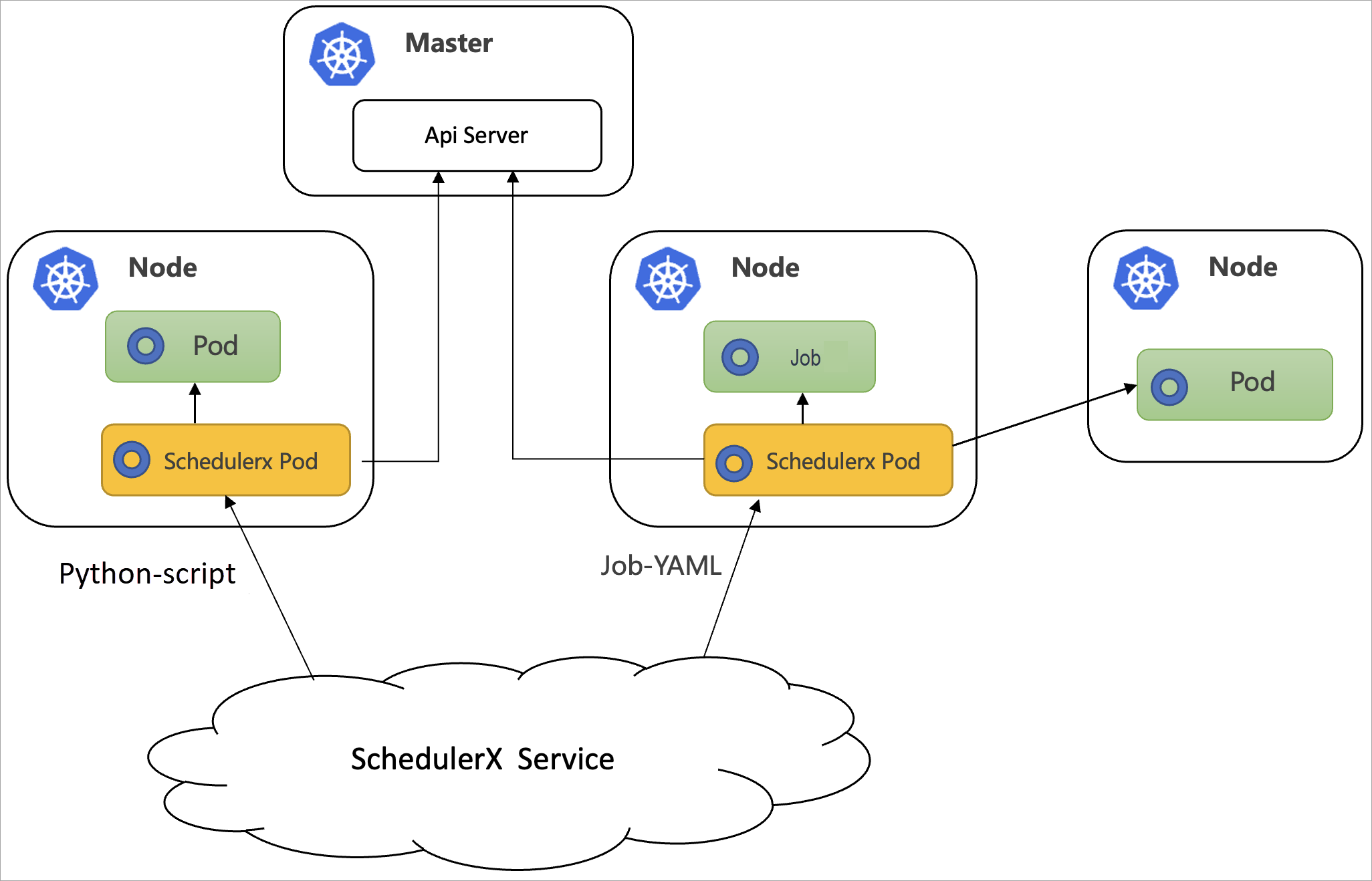
For non-Java applications, you can deploy schedulerx-agent.yaml by using a Deployment. This way, SchedulerX is deployed as a separate pod. The following figure shows how SchedulerX works in this case.
Prerequisites
An ACK cluster or a self-managed Kubernetes cluster is created. For more information, see Create an ACK managed cluster.
SchedulerX is activated.
A Kubernetes application is created in the SchedulerX console. For more information, see Create an application.
When creating an application, select Professional Edition for the version and enable Log Service. In the Instance Busy configuration, set load5 to 0, memory usage to 90%, disk usage to 95%, and enable the Trigger Busy Machine switch.
Step 1: Configure a service account
A service account provides an identity for validation and authorization when a Kubernetes job is scheduled by using SchedulerX. By default, the service account of the namespace to which the Kubernetes job belongs is used.
You need to run schedulerx-serviceaccount.yaml only once in the required namespace of the Kubernetes cluster. If you want to schedule only pods or jobs that belong to the current namespace, run the following YAML code:
If you want to schedule jobs across namespaces, you must call the ClusterRole and ClusterRoleBinding API operations.
Step 2: Install the SchedulerX agent
The following sample code shows the configurations of schedulerx-agent.yaml:
The following table describes the valid values of image.
Chip architecture | Regions and zones | Description |
X86_64 | Regions and zones in China | schedulerx-registry.cn-hangzhou.cr.aliyuncs.com/schedulerx2/agent:latest-amd64 |
Regions and zones outside China | schedulerx-registry.ap-southeast-1.cr.aliyuncs.com/schedulerx2/agent:latest-amd64 | |
ARM64 | Regions and zones in China | schedulerx-registry.cn-hangzhou.cr.aliyuncs.com/schedulerx2/agent:latest-arm64 |
Regions and zones outside China | schedulerx-registry.ap-southeast-1.cr.aliyuncs.com/schedulerx2/agent:latest-arm64 |
The following table describes the variables contained in env.
Variable | Description |
${SCHEDULERX_ENDPOINT} | ENDPOINT specifies the endpoint matched with the region where your application is deployed. Example: addr-sh-internal.edas.aliyun.com. For more information, see Endpoints. |
${SCHEDULERX_NAMESPACE} | The ID of the namespace. You can find this on the Namespace page in the SchedulerX console. In the left-side navigation pane of the Distributed Job Scheduling platform console, click Namespace. In the namespace list, find the Namespace ID column to get the ID value of the target namespace, which is used to replace |
${SCHEDULERX_GROUPID} | The application ID. You can find this on the Application Management page in the SchedulerX console. Log on to the SchedulerX console. On the Application Management page, view the Application ID of the target application in the application list — this is the parameter value. |
${SCHEDULERX_APPKEY} | The application key. You can find this on the Application Management page in the SchedulerX console. You can find this value in the Application Management page of the SchedulerX console, in the Application Key column of the application list. |
Once the Deployment is complete, verify the connection by finding the new instance on the Application Management page in the SchedulerX console.
Method 2: Deploy SchedulerX by using a Helm package
Prerequisites
An ACK cluster or a self-managed Kubernetes cluster is created. For more information, see Create an ACK managed cluster.
SchedulerX is activated.
A Kubernetes application is created in the SchedulerX console. For more information, see Create an application.
The Helm package management tool is installed.
Step 1: Download the SchedulerX Helm package
Run the following command to download the SchedulerX Helm package:
wget https://schedulerx2.oss-cn-hangzhou.aliyuncs.com/helm/schedulerxchart-2.0.0.tgzStep 2: Install the SchedulerX Helm package
Obtain the access parameters of the application in the SchedulerX console.
Log on to the SchedulerX console.
In the top navigation bar, select a region.
In the left-side navigation pane, click Application Management.
On the Application Management page, find your application and click Access Configuration in the Actions column. In the Access Configuration panel, select K8s.
Run the following installation commands:
NoteReplace the access parameters in the commands with the access parameters of the application that you want to schedule.
By default, the image address in the access configuration is the address of the image of the AMD architecture on the Internet. Specify an image address based on the region where your machine resides and the architecture of your machine.
helm install  schedulerxchart schedulerxchart-2.0.0.tgz \
--set SCHEDULERX_ENDPOINT=acm.aliyun.com\
,SCHEDULERX_NAMESPACE=f856c3f8-a15c-4a7e-9b4e-f812a9f8****\
,SCHEDULERX_GROUPID=k8s-test3\
,SCHEDULERX_APPKEY=****\
,SCHEDULERX_AGENT_IMAGE=schedulerx-registry.cn-hangzhou.cr.aliyuncs.com/schedulerx2/agent:latest-amd64
[root@tangtao-cenos-dev-2 ~]# helm install schedulerxchart schedulerxchart-2.0.0.tgz \ > --set SCHEDULERX_ENDPOINT=acm.aliyxxx \ > ,SCHEDULERX_NAMESPACE=f856c3f8-a15c-4a7e-9b4e-fxxx \ > ,SCHEDULERX_GROUPID=k8sxxx \ > ,SCHEDULERX_APPKEY=VRW7waCaeZlxxx \ > ,SCHEDULERX_AGENT_IMAGE=registry.cn-hangzhou.aliyuncs.com/schxxx NAME: schedulerxchart LAST DEPLOYED: Fri Oct 21 14:21:25 2022 NAMESPACE: default STATUS: deployed REVISION: 1 TEST SUITE: None [root@tangtao-cenos-dev-2 ~]# helm list NAME NAMESPACE REVISION UPDATED STATUS CHART APP VERSION schedulerxchart default 1 2022-10-21 14:21:25.978497197 +0800 CST deployed schedulerxchart-2.0.0 1.8.0 [root@tangtao-cenos-dev-2 ~]# kubectl get pod NAME READY STATUS RESTARTS AGE schedulerx-agent-d8cf5bd55-f4nkt 1/1 Running 0 13sThe following table describes the valid values of image.
Chip architecture
Regions and zones
Description
x86_64
Regions and zones in China
schedulerx-registry.cn-hangzhou.cr.aliyuncs.com/schedulerx2/agent:latest-amd64
Regions and zones outside China
schedulerx-registry.ap-southeast-1.cr.aliyuncs.com/schedulerx2/agent:latest-amd64
arm64
Regions and zones in China
schedulerx-registry.cn-hangzhou.cr.aliyuncs.com/schedulerx2/agent:latest-arm64
Regions and zones outside China
schedulerx-registry.ap-southeast-1.cr.aliyuncs.com/schedulerx2/agent:latest-arm64
The following table describes the variables contained in env.
Variable
Description
${SCHEDULERX_ENDPOINT}
ENDPOINT specifies the endpoint matched with the region where your application is deployed. Example: addr-sh-internal.edas.aliyun.com. For more information, see Endpoints.
${SCHEDULERX_NAMESPACE}
The ID of the namespace. You can find this on the Namespace page in the SchedulerX console. In the left-side navigation pane of the Distributed Job Scheduling platform console, click Namespace. In the namespace list, find the Namespace ID column to get the ID value of the target namespace, which is used to replace
${SCHEDULERX_NAMESPACE}in the configuration.${SCHEDULERX_GROUPID}
The application ID. You can find this on the Application Management page in the SchedulerX console. Log on to the SchedulerX console. On the Application Management page, view the Application ID of the target application in the application list — this is the parameter value.
${SCHEDULERX_APPKEY}
The application key. You can find this on the Application Management page in the SchedulerX console. You can find this value in the Application Management page of the SchedulerX console, in the Application Key column of the application list.
SCHEDULERX_AGENT_IMAGE
The image URL.
After installation, verify the deployment by viewing the instance in the SchedulerX console.
Method 3: Deploy SchedulerX by using SchedulerX SDK for Java
For Java applications, you may want to schedule both Kubernetes jobs and Java programs. In this case, you can deploy SchedulerX by using SchedulerX SDK for Java. SchedulerX and your online business share the same process. The following figure shows the workflow.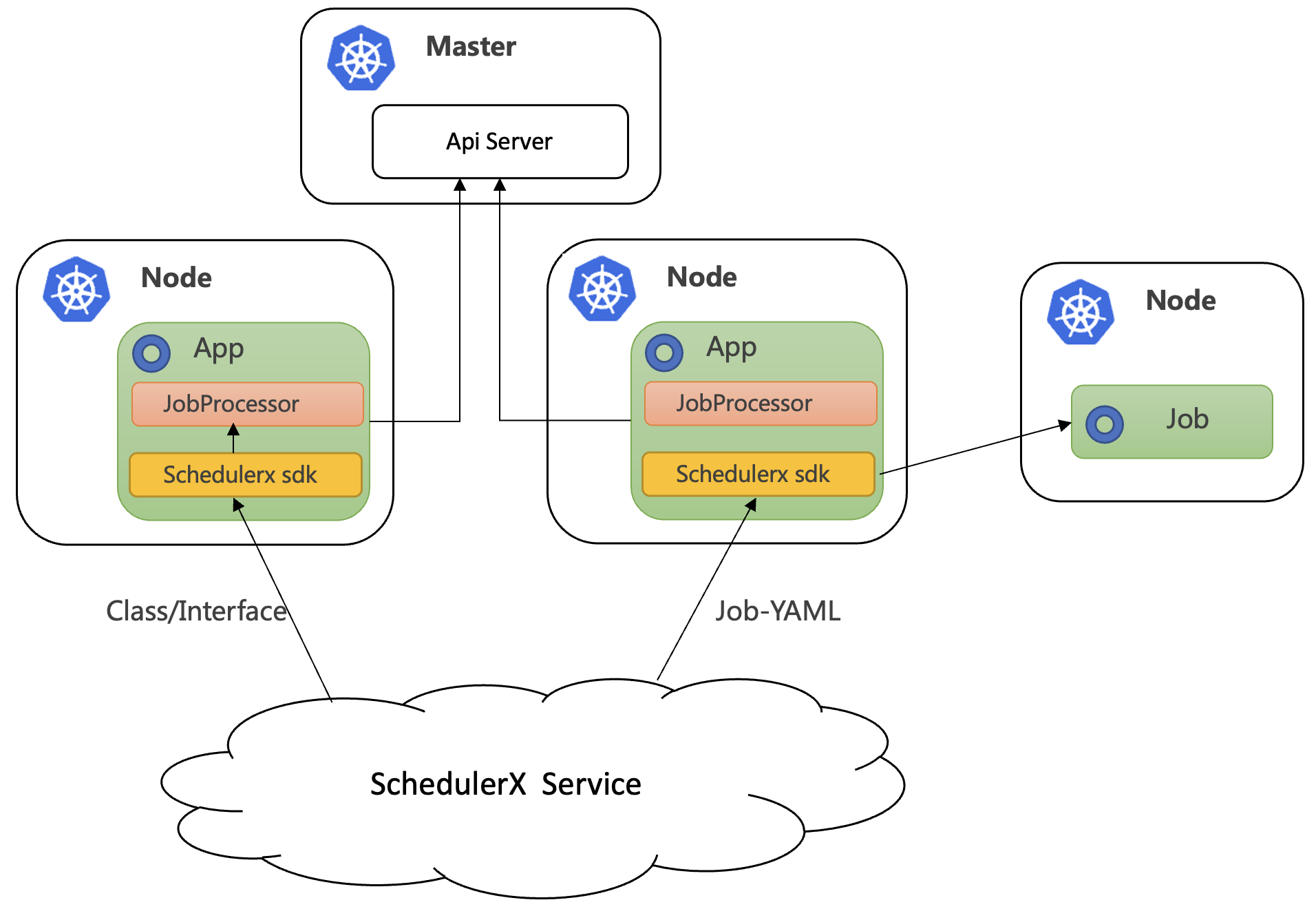
Prerequisites
An ACK cluster or a self-managed Kubernetes cluster is created. For more information, see Create an ACK managed cluster.
You have created an application of the K8s type in the SchedulerX console. For more information, see Create an application.
Connect your application to SchedulerX
Use SchedulerX SDK for Java to connect your application to SchedulerX. For more information, see Connect a Spring Boot application to SchedulerX.
Add the schedulerx-plugin-kubernetes dependency to enable the scheduling of Kubernetes jobs. Sample code:
Replace schedulerx2.version with the latest version of the SchedulerX agent. For more information, see Release notes.
<dependency>
  <groupId>com.aliyun.schedulerx</groupId>
  <artifactId>schedulerx2-spring-boot-starter</artifactId>
  <version>${schedulerx2.version}</version>
</dependency>
<dependency>
  <groupId>com.aliyun.schedulerx</groupId>
  <artifactId>schedulerx2-plugin-kubernetes</artifactId>
  <version>${schedulerx2-plugin-kubernetes.version}</version>
</dependency>
Create a Kubernetes job
Before you can run one of the following scripts, create a Kubernetes job in the Create task panel of the Task Management page. For more information, see Manage tasks.
Run a Shell script
If you want to run a Shell script in a pod, create a Kubernetes task on the Task management page. Set the resource type to Shell-Script and use the default busybox image, or replace it with your own custom image.
In the Create Task page's Basic Configuration step, configure the following parameters:
Task name: Enter
Shell-ScriptApplication ID: Select the target application
Task type: Select k8s
Resource type: Select Shell-Script
Script content: Enter
echo 'Hello, World!'Template type: Select Standard template
Image: Enter
busyboxmountPath: Enter
script/shellimagePullPolicy: Select IfNotPresent
File format: Select unix
Execution mode: Select Single-machine execution
Priority: Select Medium
After configuration, click Next, complete the scheduled and notification settings, and submit the task.
Click Run Once. A pod named schedulerx-shell-{JobId} starts in your Kubernetes cluster.
[root@schedulerx-agent-xxx /]
# kubectl get pod | grep schedulerx
schedulerx-agent-69d448d974-xzjw6    1/1     Running     0          18h
schedulerx-shell-1461                0/1     Completed   0          2m37s

[root@schedulerx-agent-xxx /]
# kubectl logs schedulerx-shell-1461
Hello, World!
hello schedulerx!

[root@schedulerx-agent-xxx /]
#
In the SchedulerX console, you can view historical execution records and the pod's operational logs on the Task management page. After the task runs successfully, the Shell-Script task shows a status of Success on the Task Instance Records page. Click the corresponding instance to view the Log panel. The log output includes hello schedulerx!, Hello, World!, and pod status change to Succeeded, indicating that the pod has successfully executed the script and exited.
Run a Python script
If you want to run a Python script in a pod, create a Kubernetes task on the Task management page. Set the resource type to Python-Script and use the default python image, or replace it with your own custom image.
In the Create Task page's Basic Configuration step, configure the following parameters:
Task name: Enter
Python-ScriptApplication ID: Select the target application
Task type: Select k8s
Resource type: Select Python-Script
In the code editor, enter the Python script, for example
import sysandprint('Hello, World!')Template type: Select Standard template
Image: Enter
pythonmountPath: Enter
script/pythonimagePullPolicy: Select IfNotPresent
File format: Select unix
Execution mode: Select Single-machine execution
Priority: Select Medium
After configuration, click Next, complete the scheduled and notification settings, and save the task.
Click Run Once. A pod named schedulerx-python-{JobId} starts in your Kubernetes cluster.
[root@schedulerx-agent-xxx /]
# kubectl get pod | grep schedulerx
schedulerx-agent-69d448d974-xzjw6    1/1     Running     0          18h
schedulerx-python-1463                0/1     Completed   0          5m37s
schedulerx-shell-1461                 0/1     Completed   0          15m

[root@schedulerx-agent-xxx /]
# kubectl logs schedulerx-python-1463
Hello, World!

[root@schedulerx-agent-xxx /]
#
In the SchedulerX console, you can view historical execution records and the pod's operational logs on the Task management page. On the Task Instance Records page, you can view the task execution status (success or failure). Click the corresponding record to open the log panel. The log output includes Hello, World! and pod status change to Succeeded, indicating that the Python script has been successfully executed in the pod.
Run a PHP script
If you want to run a PHP script in a pod, create a Kubernetes task on the Task management page. Set the resource type to PHP-Script and use the default php:7.4-cli image, or replace it with your own custom image.
In the Create Task page's Basic Configuration step, configure the following parameters:
Task name: Enter
PHP-ScriptApplication ID: Select the target application
Task type: Select k8s
Resource type: Select Php-Script
In the code editor, enter PHP code, for example
<?php echo 'Hello, World!'; ?>Template type: Select Standard template
Image: Enter
php:7.4-climountPath: Enter
script/phpimagePullPolicy: Select IfNotPresent
File format: Select unix
Execution mode: Select Single-machine execution
Priority: Select Medium
After configuration, click Next.
Click Run Once. A pod named schedulerx-php-{JobId} starts in your Kubernetes cluster.
[root@schedulerx-agent-xxx xxx]
# kubectl get pod | grep schedulerx
schedulerx-agent-xxx xxx       1/1     Running     0          19h
schedulerx-php-1464            0/1     Completed   0          54s
schedulerx-python-1463         0/1     Completed   0          28m
schedulerx-shell-1461          0/1     Completed   0          38m

[root@schedulerx-agent-xxx xxx]
# kubectl logs schedulerx-xxx
Hello, World!
[root@schedulerx-agent-xxx xxx]
#
In the SchedulerX console, you can view historical execution records and the pod's operational logs on the Task management page. After the task runs successfully, on the Task Instance Records page, you can view the task status as Success. Click the task record to open the Log panel. The log output includes Hello, World!, and the pod status changes to Succeeded.
Run a Node.js script
If you want to run a Node.js script in a pod, create a Kubernetes task on the Task management page. Set the resource type to Nodejs-Script and use the default node:16 image, or replace it with your own custom image.
Create a task in the SchedulerX console. In the Basic Configuration step, configure the following parameters:
Task name:
Nodejs-ScriptApplication ID: Select the target application
Task type: k8s
Resource type: Nodejs-Script
In the code editor, enter
console.log("Hello, World!");Template type: Standard template
Image:
node:16mountPath:
script/nodeimagePullPolicy: IfNotPresent
File format: unix
Execution mode: Single-machine execution
Priority: Medium
After configuration, click Next.
Click Run Once. A pod named schedulerx-node-{JobId} starts in your Kubernetes cluster.
[root@schedulerx-agent-xxx Z]# kubectl get pod | grep schedulerx
schedulerx-agent-6xxx       1/1     Running     0          19h
schedulerx-node-xxx         0/1     Completed   0          23s
schedulerx-php-xxx          0/1     Completed   0          4m57s
schedulerx-python-xxx       0/1     Completed   0          32m
schedulerx-shell-xxx        0/1     Completed   0          42m

[root@schedulerx-agent-6xxx Z]# kubectl logs schedulerx-node-xxx
Hello, World!
In the SchedulerX console, you can view historical execution records and the pod's operational logs on the Task management page. After the task runs, on the Task Instance Records page, the task execution status shows as Success. The Log panel outputs Hello, World! and displays pod status change to Succeeded.
Job-YAML
You can also use SchedulerX to run native Kubernetes Jobs. Create a Kubernetes task on the Task management page and set the resource type to Job-YAML.
In the Create Task page's Basic Configuration step, configure the following parameters:
Task name:
Job-YAMLApplication ID: Select the created application
Task type: k8s
Resource type: Job-YAML
Execution mode: Single-machine execution
Priority: Medium
In the code editor, enter the following Kubernetes Job YAML:
apiVersion: batch/v1
kind: Job
metadata:
  name: pi
spec:
  template:
    spec:
      containers:
      - name: pi
        image: perl
        command: ["perl", "-Mbignum=bpi", "-wle", "print bpi(100)"]
      restartPolicy: Never
  backoffLimit: 4
Click Next to proceed to the scheduled configuration.
Click Run Once. You can see that the Job and its corresponding pod have started in your Kubernetes cluster.
[root@schedulerx-agent-xxx            /]
# kubectl get job
NAME   COMPLETIONS   DURATION   AGE
pi     1/1           17s        6m5s

[root@schedulerx-agent-xxx            /]
# kubectl get pod
NAME                       READY   STATUS      RESTARTS   AGE
hello                      0/1     Completed   0          19h
pi--1-jgck5                0/1     Completed   0          6m8s
schedulerx-agent-xxx       1/1     Running     0          19h
schedulerx-node-1xxx       0/1     Completed   0          14m
schedulerx-php-14xxx       0/1     Completed   0          19m
schedulerx-python          0/1     Completed   0          46m
schedulerx-shell-xxx       0/1     Completed   0          56m

[root@schedulerx-agent-xxx            /]
# kubectl logs pi--1-jgck5
3.14159265358979323846264338327950288419716939937510582097494459230781640628620899862803482534211706

[root@schedulerx-agent-xxx            /]
#
In the SchedulerX console, you can view historical execution records and the pod's operational logs on the Task management page. On the Task Instance Records page, you can view the execution status of the Job-YAML task (success or failure). Click the task instance to open the Log panel, where the logs show that taskMaster initialized successfully and the task computation output is displayed.
CronJob-YAML
You can also use SchedulerX to run native Kubernetes CronJobs. Create a Kubernetes task on the Task management page and set the resource type to CronJob-YAML.
In the Basic Configuration page, set the Task name to CronJob-YAML and the Task type to k8s. In the YAML editor, enter the CronJob definition. In the example, configure metadata.name: hello, schedule: "0/1 * * * *", container image busybox:1.28, imagePullPolicy: IfNotPresent, and execution command /bin/sh. Set the Execution mode to Single-machine execution and click Next.
Click Run Once. You can see that the pod has started on the Task instance records page.
In the SchedulerX console, you can view historical execution records and the pod's operational logs on the Task management page.
The logs show that the pod outputs Hello from the Kubernetes cluster and the status is recorded as changed to Succeeded.
Pod-YAML
You can also use SchedulerX to run native Kubernetes pods. Create a Kubernetes task on the Task management page and set the resource type to Pod-YAML.
In the Create Task page's Basic Configuration step, configure the following parameters:
Task name:
Pod-YAMLApplication ID: Select the target application
Task type: k8s
Resource type: Pod-YAML
In the code editor, enter the Kubernetes Pod YAML definition, for example, a pod using the busybox image that runs echo "hello world". Set the Execution mode to Single-machine execution, the Priority to Medium, and then click Next.
Click Run Once. You can see that the pod has started in your Kubernetes cluster.
[root@schedulerx-agent-xxx /]
# kubectl get pod
NAME                              READY   STATUS      RESTARTS   AGE
hello                             0/1     Completed   0          2m39s
pi--1-jgck5                       0/1     Completed   0          49m
schedulerx-agent-xxx              1/1     Running     0          20h
schedulerx-node-xxx               0/1     Completed   0          58m
schedulerx-php-1xxx               0/1     Completed   0          62m
schedulerx-pythoxxx               0/1     Completed   0          90m
schedulerx-shell                  0/1     Completed   0          100m

[root@schedulerx-xxx /]
# kubectl logs hello
hello world

[root@schedulerx-agent-xxx /]
#
In the SchedulerX console, you can view historical execution records and the pod's operational logs on the Task management page. On the Task Instance Records page, you can view the execution status of the Pod-YAML type task (success or failure). Click the corresponding task to view the Log, which includes hello world and standalone taskMaster init success., indicating that the task ran successfully.
When you use SchedulerX to run Kubernetes pods, take note of the following items:
We recommend that you do not use a pod that has a long execution cycle, such as the pod of a web application. The execution of the pod never ends after the pod is started.
We recommend that you disable restart for a pod. Otherwise, the pod is repeatedly restarted.