Manual master/replica switchovers swap the roles of master and replica nodes in Tair (Redis OSS-compatible) instances, giving you control over the instance in non-fault scenarios. Use this feature for disaster recovery drills or to reduce cross-zone network latency. This differs from an automatic system failover, which is triggered only when a node becomes unavailable.
Scenarios
Common use cases:
-
Disaster recovery drills: Simulate a node failure during off-peak hours to verify your application's resilience during database switchovers.
-
Optimize access latency: If your application and the master node are in different zones, switch the master role to the node in your application's zone to reduce network latency.
Example
In this example, the application's ECS instance is in Zone B and the Tair master node is in Zone A. Cross-zone connections increase network latency and can degrade performance.
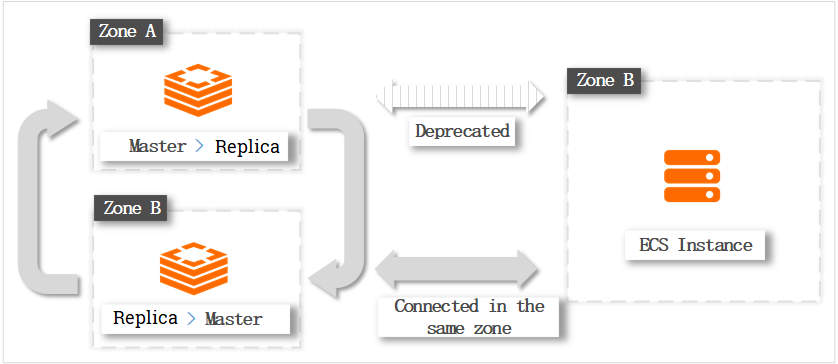
After a switchover, the Zone B node becomes the master. Only the node role changes; the zone and ID stay the same. The ECS instance and database then connect within the same zone, minimizing latency.
Switchover impacts
Before you perform a switchover, note the following impacts:
The data nodes on which the switchover is performed are disconnected for a few seconds. A switchover has potential data loss risks. For example, the data may become inconsistent between the master and replica nodes due to synchronization latency. To prevent potential data loss risks caused by the switchover and data doublewrite caused by the Domain Name System (DNS) cache, the data nodes remain read-only for up to 30 seconds.
After an instance enters the Switching state, you cannot manage this instance. For example, you cannot modify the instance configurations or migrate the instance to another zone.
About seamless switchovers
If your instance and client meet these version requirements, you can perform a seamless switchover that avoids transient disconnections and the read-only state:
-
Instance version: 7.0.2.9 or later.
-
Client version: Valkey-Java 5.3.0 or later, or Valkey-Go 1.0.67 or later.
While an instance is in the Switching state, you cannot cancel the switchover task, and you cannot overwrite it by initiating another switchover.
Procedure
Log on to the console and go to the Instances page. In the top navigation bar, select the region in which the instance that you want to manage resides. Then, find the instance and click the instance ID.
-
In the left-side navigation pane, click Service Availability.
-
In the Data Node area, select the data shard that you want to switch over and click Failover.
NoteFor cluster instances, this page shows the zones of the master and replica nodes for each data shard.
-
In the panel that appears, select when the switchover takes effect.
-
Apply Immediately: The switchover takes effect immediately.
-
Effective Within Maintenance Window: The switchover runs during your configured maintenance window. Set a maintenance window.
NoteIf you select Effective Within Maintenance Window, the system starts preparations immediately, such as requesting resources and synchronizing data. The instance status changes to Switching, but your services are not affected. The actual role switchover and its impacts (transient disconnections and read-only state) occur only when the Maintenance Window begins.
After the instance enters the Switching state, you cannot cancel the switchover task, and initiating another switchover returns a status error. To speed up the switchover, you can go to the instance's Basic Information page and change the start time of the maintenance window to the current time. The system then automatically schedules the switchover task, which is usually completed within one minute.
-
-
Click OK.
Complete secondary authentication (such as Multi-Factor Authentication (MFA)) as prompted. After you pass authentication, no re-authentication is required for 15 minutes.
Related API operations
|
API operation |
Description |
|
Performs a manual master/replica switchover for disaster recovery drills or nearest-access optimization in multi-zone deployments. |
References
Tair (Redis OSS-compatible) also supports automatic failover. The system continuously monitors the health of the nodes. If the master node becomes unavailable, the system promotes the replica to master automatically, ensuring high service availability. For more information, see High Availability Overview.