When a single TairSearch key accumulates too many documents, its memory usage can exceed the capacity of the data shard, causing an out-of-memory (OOM) error. TFT.MSEARCH solves this by letting you split a large key into smaller keys distributed across multiple data shards, then query all of them in a single request. TairProxy fans the request out to each shard in parallel, then scores, sorts, and aggregates the results before returning them to the client.
Supported instance types
We recommend that you use TFT.MSEARCH with read/write splitting instances or cluster instances in proxy mode that include TairProxy. We recommend that you do not use TFT.MSEARCH with cluster instances in direct connection mode or standard instances without TairProxy.
How it works
TairSearch provides two search commands:
| Command | Scope |
|---|---|
TFT.SEARCH | Queries a single key |
TFT.MSEARCH | Queries multiple keys with the same schema configuration |
Write path
When the client sends write requests to TairProxy, TairProxy routes each key to the appropriate data shard based on hash slots.
Figure 1. Write path: TairProxy distributing keys to data shards 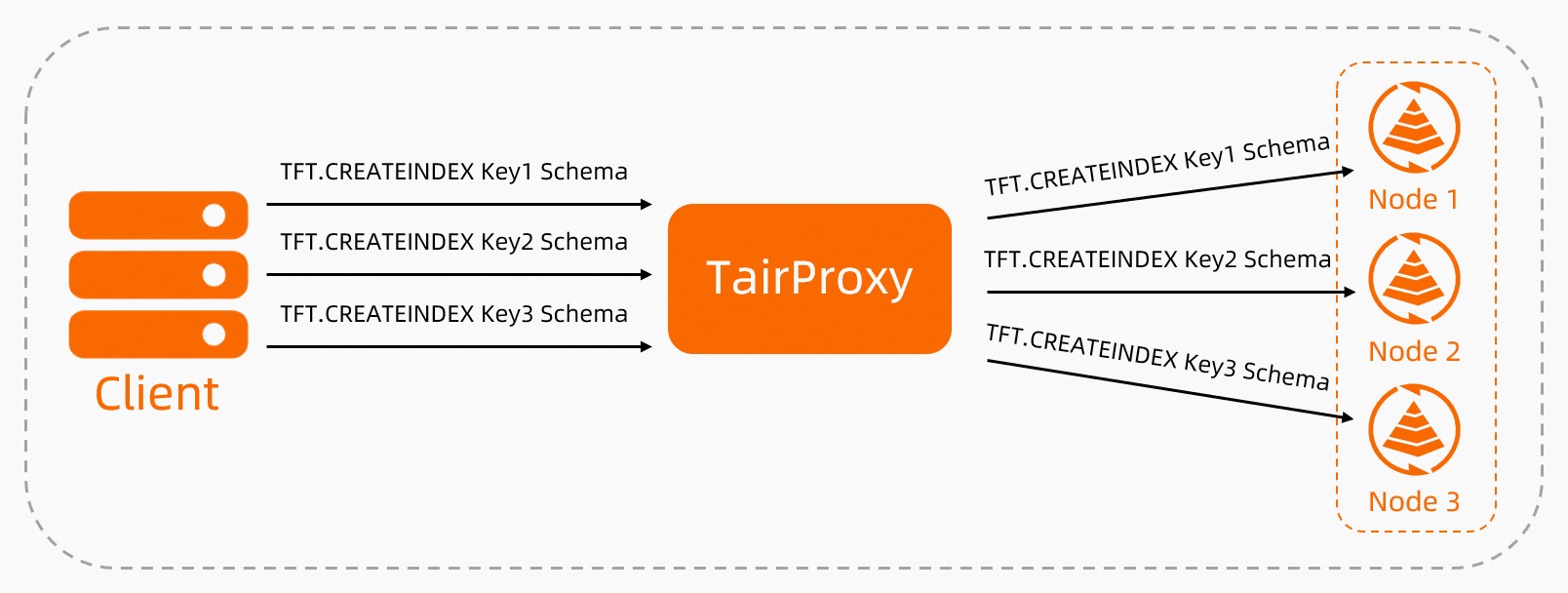
Read path
When the client sends a TFT.MSEARCH request, TairProxy:
Forwards the query to each data shard that holds the requested keys.
Each shard searches its keys and returns matching documents.
TairProxy scores, sorts, and aggregates all results.
The final result set is returned to the client.
Figure 2. Read path: TFT.MSEARCH across data shards 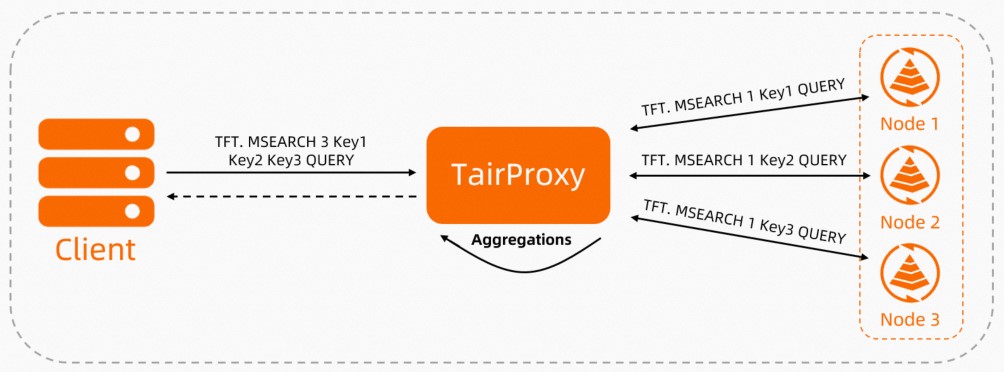
TFT.MSEARCH requires you to define your own key-splitting logic. Tair does not automatically distribute documents across keys. You control how documents are routed and how keys are named.
Prerequisites
Before you use TFT.MSEARCH:
All keys you intend to search must share the same schema configuration (identical
mappingsandsettings).You have split the large key into multiple smaller keys and distributed them across the data shards of a cluster instance. If you are on a standalone instance, first upgrade it to a cluster instance, then split the large key into small keys and distribute them to the data shards.
Search documents across data shards
Command syntax
TFT.MSEARCH <num_keys> <key1> [key2 ...] '<JSON query>'The first argument after TFT.MSEARCH is the number of keys to search. This must match the count of key names you list. The JSON query body uses the same syntax as TFT.SEARCH.
Example: search hot data across weekly keys
This example shows how to use TFT.MSEARCH to search trending content stored in time-partitioned keys.
Scenario setup:
Each key stores one week of hot data — approximately 1,000,000 documents per day (7,000,000 per key).
A new key is created at the start of each week and retained for two weeks. Expired keys are deleted.
Key names follow the format
FLOW_<start_date>_<end_date>.Each document has four fields:
datetime(long),author(text),uid(long), andcontent(text, analyzed withjieba).
Step 1: Create indexes
Create two keys with identical schema configurations. The key name encodes the date range.
TFT.CREATEINDEX FLOW_20230109_15 '{
    "mappings": {
        "properties": {
            "datetime": {
                "type": "long"
            },
            "author": {
                "type": "text"
            },
            "uid": {
                "type": "long"
            },
            "content": {
                "type": "text",
                "analyzer": "jieba"
            }
        }
    }
}'

TFT.CREATEINDEX FLOW_20230116_23 '{
    "mappings": {
        "properties": {
            "datetime": {
                "type": "long"
            },
            "author": {
                "type": "text"
            },
            "uid": {
                "type": "long"
            },
            "content": {
                "type": "text",
                "analyzer": "jieba"
            }
        }
    }
}'
Step 2: Add documents
TFT.ADDDOC FLOW_20230109_15 '{
    "datetime": 20230109001209340,
    "author": "Hot TV series",
    "uid": 7884455,
    "content": "The movie will be screened during the Spring Festival"
}'

TFT.ADDDOC FLOW_20230116_23 '{
    "datetime": 20230118011304250,
    "author": "Fashionable commodities",
    "uid": 100093,
    "content": "Launch a new line of zodiac series products for the Year of the Rabbit"
}'
Step 3: Query across both keys
Search for content related to "Chinese zodiac of the Year of the Rabbit" across both keys, sorted by time:
TFT.MSEARCH 2 FLOW_20230109_15 FLOW_20230116_23 '{
    "query": {
        "match": {
            "content": "Chinese zodiac of the Year of the Rabbit"
        }
    },
    "sort": [
        {"datetime": {"order": "desc"}}
    ],
    "size": 10,
    "reply_with_keys_cursor": true,
    "keys_cursor": {
        "FLOW_2023010916": 0,
        "FLOW_202301623": 0
    }
}'
Expected output:
{
    "hits": {
        "hits": [
            {
                "_id": "20230118011304250",
                "_index": "FLOW_20230116_23",       // (1)
                "_score": 1,
                "_source": {
                    "datetime": 20230118011304250,
                    "author": "Fashionable commodities",
                    "uid": 100093,
                    "content": "Launch a new line of zodiac series products for the Year of the Rabbit"
                }
            }
        ],
        "max_score": 1,
        "total": {
            "relation": "eq",
            "value": 1
        }
    },
    "aux_info": {
        "index_crc64": 14159192555612760957,
        "keys_cursor": {                            // (2)
            "FLOW_20230109_15": 0,
            "FLOW_20230116_23": 1
        }
    }
}
(1) _index identifies which key the document came from.
(2) aux_info.keys_cursor is the paging state for the next request. A value of 0 means no documents from that key were included in this page.
Paging with TFT.MSEARCH
TFT.SEARCH uses from + size for paging. TFT.MSEARCH uses a different mechanism because results come from multiple independent keys: size controls how many documents to return, and keys_cursor tracks the position within each key so the next query picks up where the last one left off.
Paging parameters
| Parameter | Type | Required | Description |
|---|---|---|---|
size | integer | Yes | Number of documents to return in this page |
reply_with_keys_cursor | boolean | No | Set to true to include keys_cursor in the response. Required for paging. |
keys_cursor | object | No | Start position within each key for the next query. Default: 0 for each key (start from the beginning). |
How paging works
Run TFT.MSEARCH with
sizeand"reply_with_keys_cursor": true. Tair fetchessizedocuments from each key, then scores, sorts, and aggregates them into the topsizeresults.The response includes a
keys_cursorobject that records how many documents from each key were consumed to produce this page.Pass the
keys_cursorvalue from the response as thekeys_cursorparameter in your next request. Tair resumes each key from the recorded position.
Example
With size=10 and three keys (key0, key1, key2):
Tair fetches 10 documents from each key (30 total), scores and sorts them, and returns the top 10.
Suppose the top 10 were drawn from the first 2 results in
key0, the first 5 inkey1, and the first 3 inkey2. The response includes:{"keys_cursor": {"key0": 2, "key1": 5, "key2": 3}}In the next query, pass this
keys_cursorvalue. Tair resumes from position 3 inkey0, position 6 inkey1, and position 4 inkey2.