TairVector is an in-house data structure of Tair (Enterprise Edition) that provides high-performance real-time storage and retrieval of vectors. It supports the approximate nearest neighbor (ANN) search algorithm and is designed for semantic search on unstructured data and personalized recommendations. For more information, see Vector.
This whitepaper describes the test environment, methods, and results for TairVector benchmarks using standard ANN-benchmark datasets.
QPS comparisons are meaningful only at the same recall rate. Because ANN search trades precision for speed, a higher QPS at a lower recall rate does not indicate better performance. Always compare results at the same recall level.
Test environment
Database
| Item | Value |
|---|---|
| Region and zone | Zone A in the China (Zhangjiakou) region |
| Storage type | DRAM-based instance running Redis 6.0 |
| Engine version | 6.2.8.2 |
| Instance architecture | Standard master-replica architecture with cluster mode disabled. See Standard architecture. |
| Instance type | tair.rdb.16g. The instance type has a trivial impact on test results. |
Client
An Elastic Compute Service (ECS) instance deployed in the same virtual private cloud (VPC) as the Tair instance, connected over the VPC.
Linux operating system.
Python 3.7 or later.
Test datasets
The following datasets are used in this benchmark. The Sift-128-euclidean, Gist-960-euclidean, Glove-200-angular, and Deep-image-96-angular datasets test the Hierarchical Navigable Small World (HNSW) indexing algorithm. The Random-s-100-euclidean and Mnist-784-euclidean datasets test the Flat Search indexing algorithm.
| Dataset | Description | Dimensions | Vectors | Queries | Size | Distance metric | Index |
|---|---|---|---|---|---|---|---|
| Sift-128-euclidean | Image feature vectors generated using the Texmex dataset and the scale-invariant feature transform (SIFT) algorithm. | 128 | 1,000,000 | 10,000 | 488 MB | L2 | HNSW |
| Gist-960-euclidean | Image feature vectors generated using the Texmex dataset and the gastrointestinal stromal tumor (GIST) algorithm. | 960 | 1,000,000 | 1,000 | 3.57 GB | L2 | HNSW |
| Glove-200-angular | Word vectors generated by applying the GloVe algorithm to text data from the Internet. | 200 | 1,183,514 | 10,000 | 902 MB | COSINE | HNSW |
| Deep-image-96-angular | Vectors extracted from the output layer of the GoogLeNet neural network with the ImageNet training dataset. | 96 | 9,990,000 | 10,000 | 3.57 GB | COSINE | HNSW |
| Random-s-100-euclidean | Vectors extracted from the output layer of the GoogLeNet neural network with the ImageNet training dataset. | 100 | 90,000 | 10,000 | 34 MB | L2 | Flat Search |
| Mnist-784-euclidean | A dataset from the Modified National Institute of Standards and Technology (MNIST) database of handwritten digits. | 784 | 60,000 | 10,000 | 179 MB | L2 | Flat Search |
Run the benchmark
Prerequisites
Before you begin, make sure you have:
A Tair (Redis OSS-compatible) instance with a connection endpoint, username, and password.
An ECS instance in the same VPC as your Tair instance.
Python 3.7 or later installed on the ECS instance.
Set up the test environment
Install
tairandhiredison the test server.pip install tair hiredisDownload and decompress Ann-benchmarks.
tar -zxvf ann-benchmarks.tar.gzOpen the
algos.yamlfile, search fortairvector, and configure thebase-argsparameters. Example:Parameter Description urlEndpoint, username, and password. Format: redis://user:password@host:portparallelismNumber of concurrent threads. Default: 4{"url": "redis://testaccount:Rp829dlwa@r-bp18uownec8it5****.redis.rds.aliyuncs.com:6379", "parallelism": 4}
Run tests
Run the run.py script to start the test. Each run creates an index, writes data, then queries and records results.
Run the script only once per dataset. Running it multiple times on the same dataset produces invalid results.
Examples:
# HNSW algorithm with the Sift-128-euclidean dataset (multi-threaded)
python run.py --local --runs 3 --algorithm tairvector-hnsw --dataset sift-128-euclidean --batch

# Flat Search algorithm with the Mnist-784-euclidean dataset (multi-threaded)
python run.py --local --runs 3 --algorithm tairvector-flat --dataset mnist-784-euclidean --batch
Alternatively, use the built-in web frontend:
# Install Streamlit
pip3 install streamlit

# Start the web frontend (available at http://localhost:8501)
streamlit run webrunner.py
Export results
Run the data_export.py script to export results to a CSV file.
# Multi-threaded export
python data_export.py --output out.csv --batch
Test results
All write and k-nearest neighbor (kNN) query tests use four concurrent threads. Tests cover float32 (default) and float16 data types. HNSW tests are run with the AUTO_GC feature enabled.
Three metrics are measured:
Write performance: Measured as write throughput (vectors/second). Higher is better.
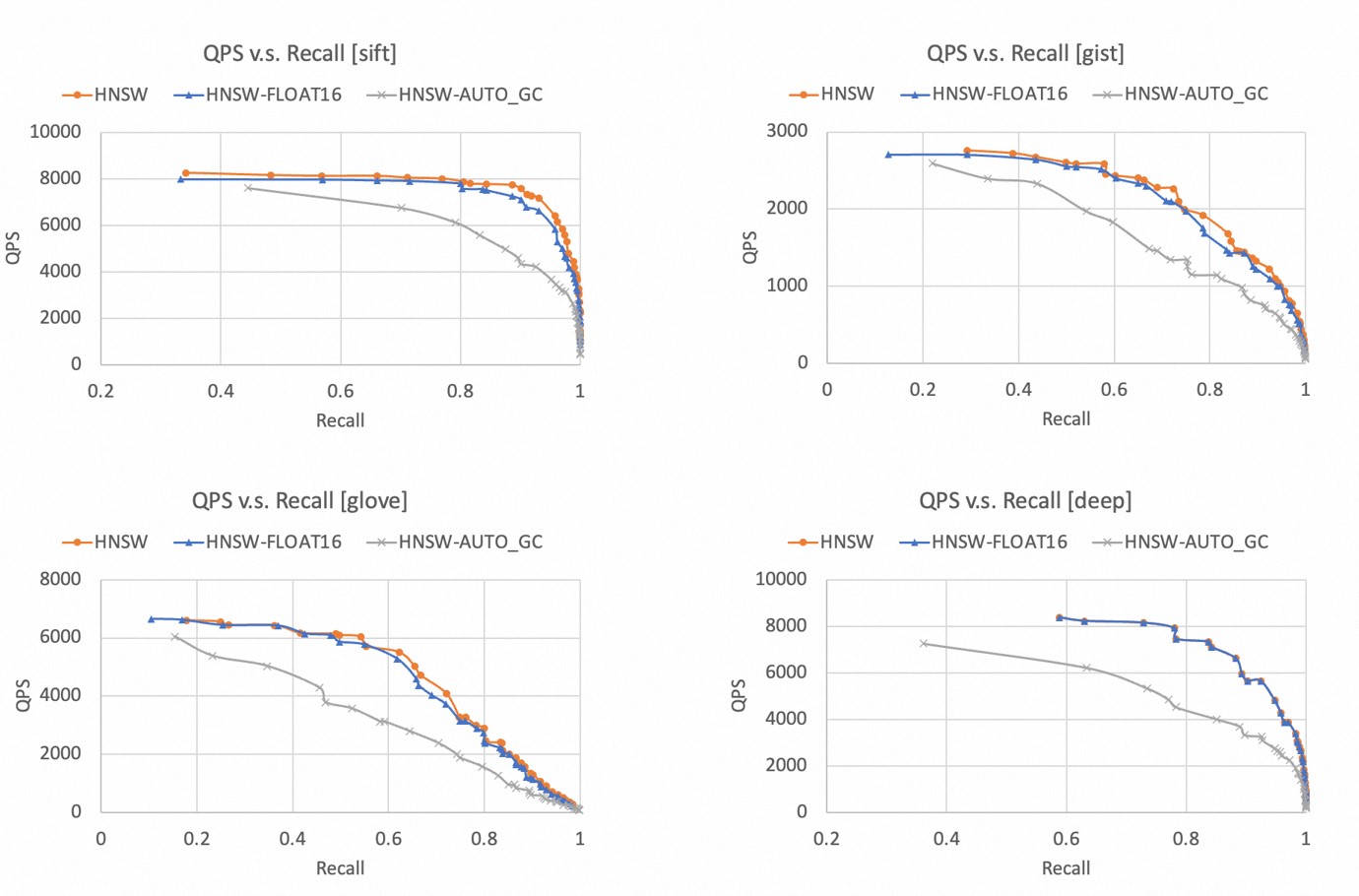
kNN query performance: Presented as a QPS vs. recall rate curve. The closer the curve is to the upper-right corner, the better. For Flat Search indexes, only QPS is shown because the recall rate is always 1.
Memory efficiency: Measured as index memory usage. Lower is better.
HNSW indexes
Write performance
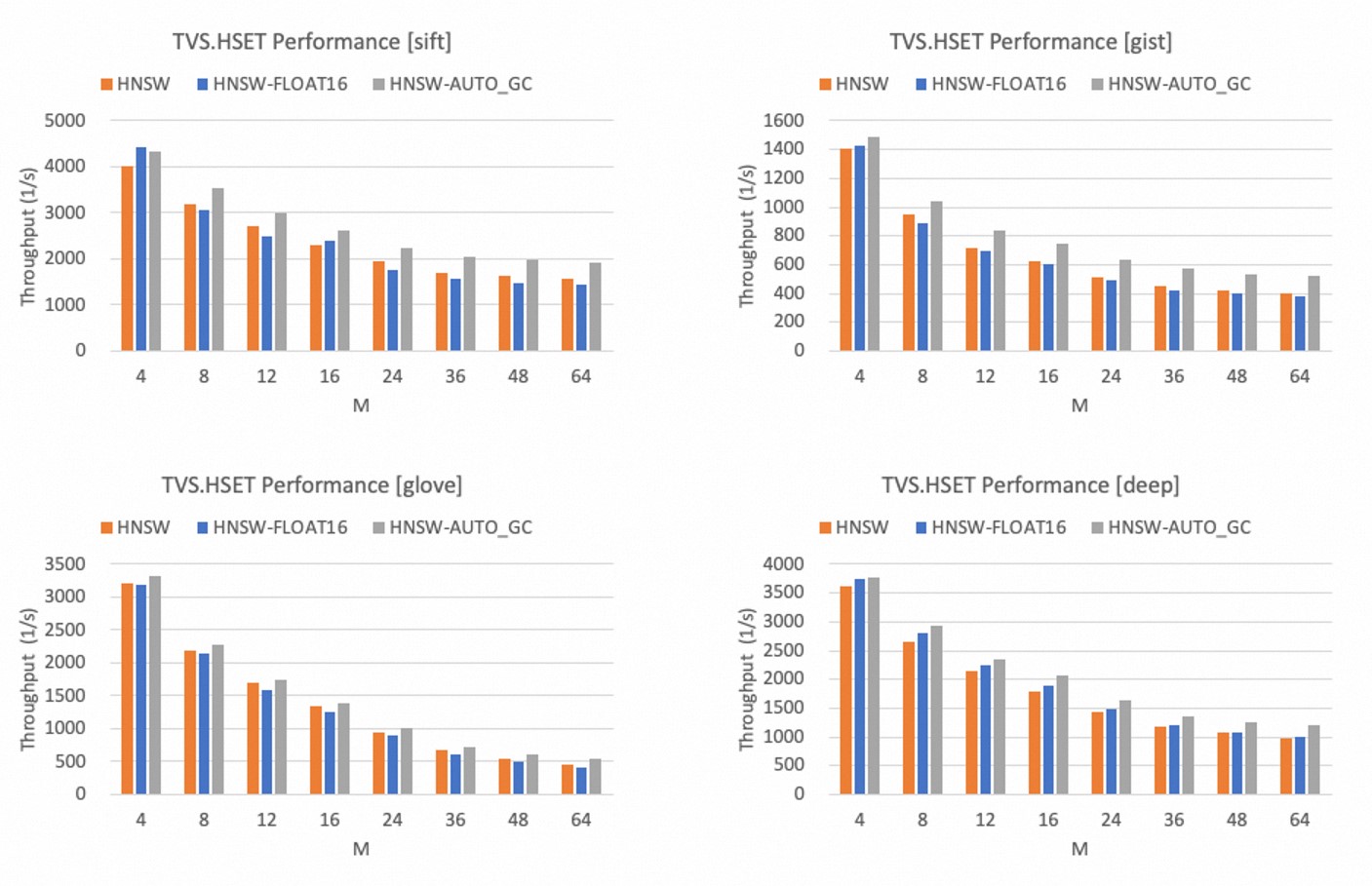
The figures below show write throughput at different values of M (maximum outgoing neighbors per layer in the graph index), with ef_construct set to 500.
Write throughput decreases as the M value increases.
Using float16 instead of float32 slightly reduces write throughput in most cases.
Enabling AUTO_GC increases write throughput by up to 30%.
kNN query performance
The figures below show QPS vs. recall rate curves for HNSW indexes across the four datasets.
All four datasets achieve a recall rate of more than 99%.
float16 and float32 perform similarly; float16 shows a slight decrease in QPS.
Enabling AUTO_GC significantly reduces kNN query performance. Enable AUTO_GC only when deleting large amounts of data.
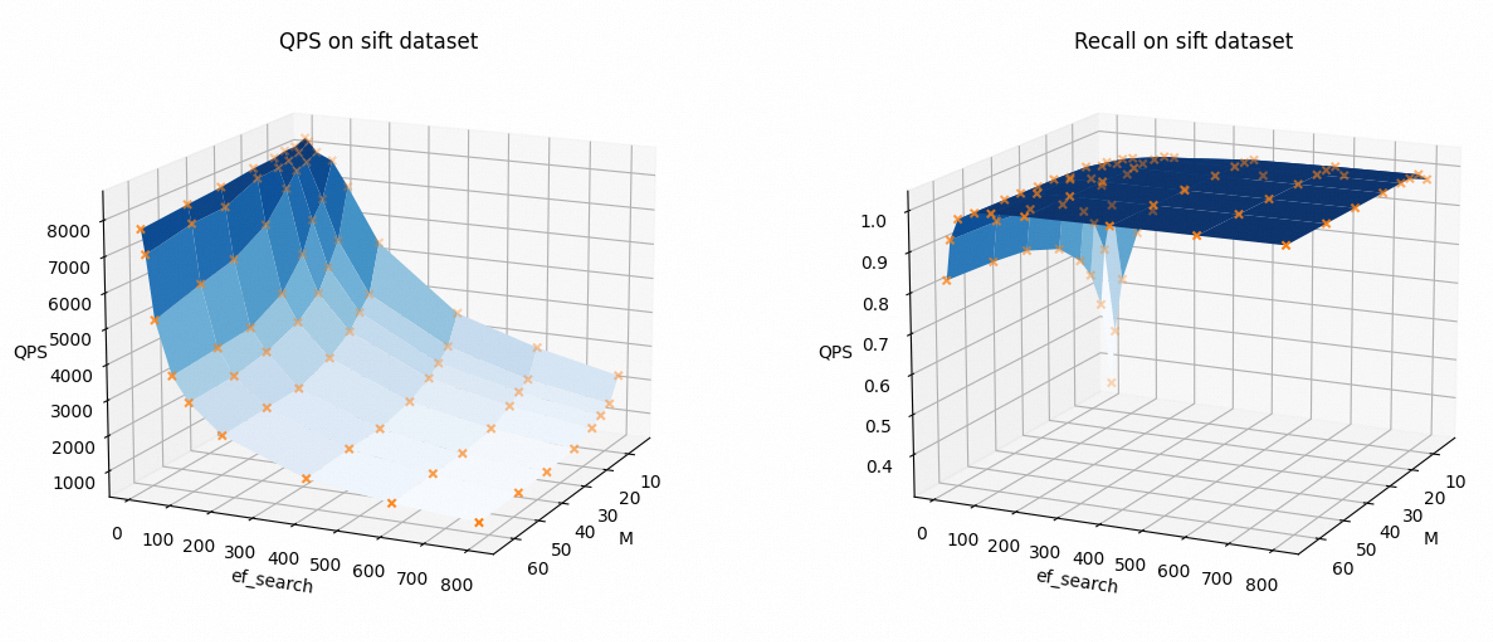
The figures below show how QPS and recall rate change as M and ef_search increase, using the Sift-128-euclidean dataset with float32 and AUTO_GC disabled.
As M and ef_search increase, QPS decreases and the recall rate increases. Tune these parameters to balance query speed against accuracy for your workload.
Memory efficiency
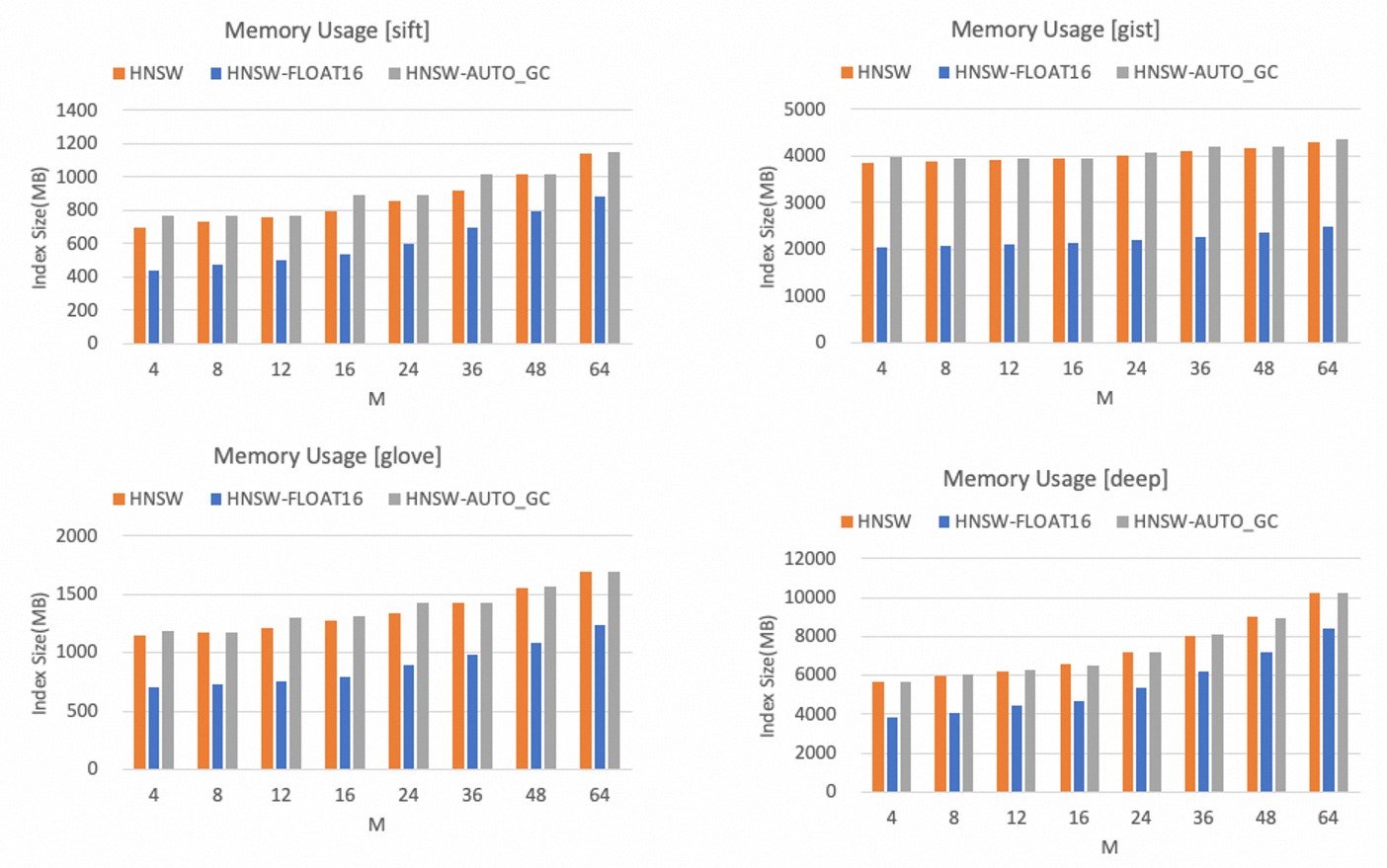
Memory usage grows in proportion to the M value.
The figures below show HNSW index memory usage across the four datasets.
float16 reduces memory usage by more than 40% compared to float32.
Enabling AUTO_GC slightly increases memory usage.
Choose M based on your vector dimension and memory budget. If you can accept a small loss of precision, use float16 to reduce memory usage by more than 40%.
Flat Search indexes
Write performance
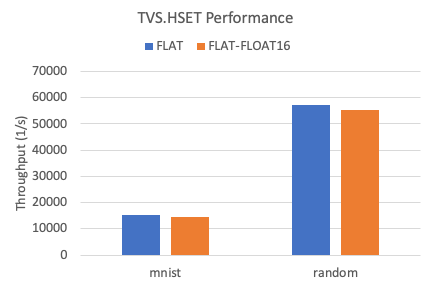
The figure below shows write throughput for Flat Search indexes across the two datasets.
Using float16 instead of float32 reduces write throughput by approximately 5%.
kNN query performance
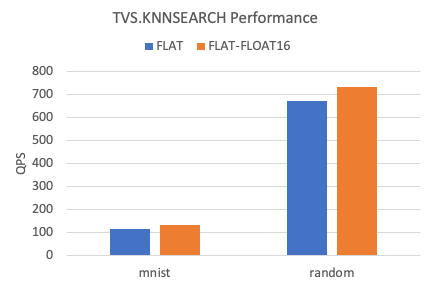
The figure below shows kNN QPS for Flat Search indexes across the two datasets.
Using float16 instead of float32 increases kNN query performance by approximately 10%.
Memory efficiency
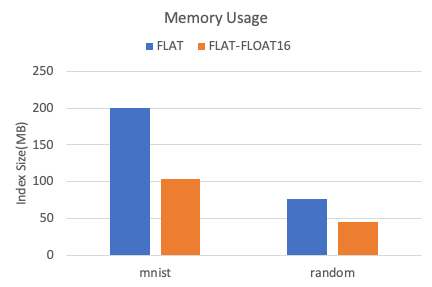
The figure below shows memory usage for Flat Search indexes across the two datasets.
Using float16 instead of float32 reduces memory usage by more than 40%.
What's next
TairVector — full API reference and parameter details.