Navicat is a third-party database management tool you can use to connect to ApsaraDB RDS instances running MySQL, SQL Server, PostgreSQL, or MariaDB.
Prerequisites
Before you begin, ensure that you have:
-
An RDS instance created. See Create an RDS for MySQL instance, Create an RDS for SQL Server instance, Create an RDS for PostgreSQL instance, or Create an RDS for MariaDB instance
-
A database created for the RDS instance. See Create a database for an RDS for MySQL instance, Create a database for an RDS for SQL Server instance, Create a database for an RDS for PostgreSQL instance, or Create a database for an RDS for MariaDB instance
-
An account created for the RDS instance. See Create an account for an RDS for MySQL instance, Create an account for an RDS for SQL Server instance, Create an account for an RDS for PostgreSQL instance, or Create an account for an RDS for MariaDB instance
-
An IP address whitelist configured for the RDS instance. See Configure an IP whitelist for an RDS for MySQL instance, Configure an IP whitelist for an RDS for SQL Server instance, Configure an IP whitelist for an RDS for PostgreSQL instance, or Configure an IP whitelist for an RDS for MariaDB instance
Find your connection information
Before configuring Navicat, locate the endpoint and port of your RDS instance in the ApsaraDB RDS console.
-
Log in to the ApsaraDB RDS console and navigate to your instance.
-
On the instance details page, find the Internal endpoint, Public endpoint, and their corresponding ports.
-
Decide which endpoint to use:
-
Internal endpoint: Use this if your client runs on an Elastic Compute Service (ECS) instance that was created under the same Alibaba Cloud account and is in the same region and virtual private cloud (VPC) as the RDS instance.
-
Public endpoint: Use this in all other situations.
-
Connect to an RDS instance
-
Start the Navicat client.
-
In the toolbar, click Connection and select the database type.
If your Navicat client is outdated, Alibaba Cloud is not displayed. Select a database type such as MySQL or PostgreSQL instead.

-
Enter the connection details for your RDS instance.
Parameter Description Example Connection Name A custom label for this connection my-rds-mysqlHost The internal or public endpoint of the RDS instance rm-bp1xxxxxxxxx.mysql.rds.aliyuncs.comPort The internal or public port of the RDS instance 3306(default for RDS for MySQL)User Name The username of the account used to connect rds_userPassword The password of the account used to connect — 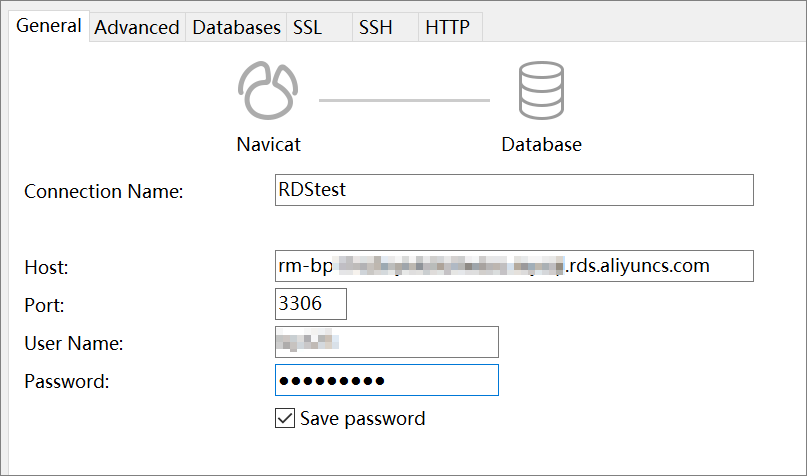
-
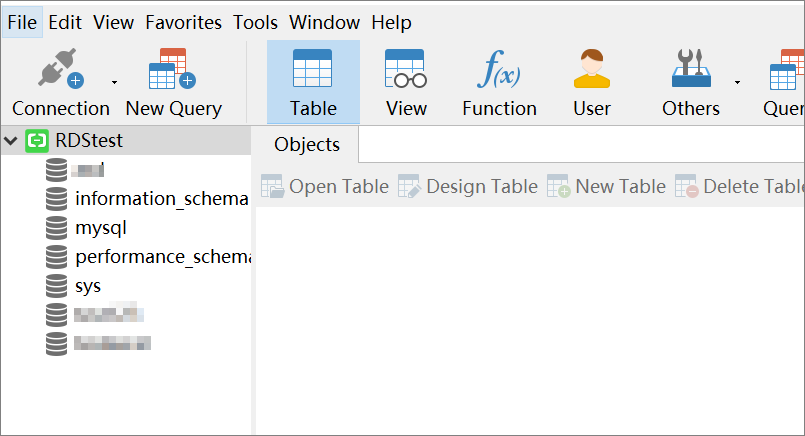
Click OK.
If enhanced whitelist mode is enabled and you are connecting over the Internet, add the public IP address of your device to the IP address whitelist of the classic network type.
What's next
To connect using Data Management (DMS) or the command-line interface (CLI), see:
FAQ
Why can't I connect to my RDS instance?
For troubleshooting steps, see What do I do if I fail to connect to an ApsaraDB RDS instance?