This topic describes how to use Navicat to connect to an RDS instance that runs MySQL, SQL Server, PostgreSQL, or MariaDB. Navicat is a third-party database management tool.
Prerequisites
Before you connect to an RDS instance, you must create an RDS instance of the required database engine, create databases and accounts for the RDS instance, and configure an IP address whitelist for the RDS instance.
An RDS instance is created. For more information, see Create an RDS for MySQL instance, Create an RDS for SQL Server instance, Create an RDS for PostgreSQL instance, or Create an RDS for MariaDB instance.
A database is created for the RDS instance. For more information, see Create an for MySQL database, Create an ApsarDB RDS for SQL Server database, Create an RDS for PostgreSQL database, or Create an RDS for MariaDB database.
An account is created for the RDS instance. For more information, see Create an account for an RDS for MySQL instance, Create an account for an RDS for SQL Server instance, Create an account for an RDS for PostgreSQL instance, or Create an account for an RDS for MariaDB instance.
An IP address whitelist is configured for the RDS instance. For more information, see Configure an IP whitelist for an RDS for MySQL instance, Configure an IP whitelist for an RDS for SQL Server instance, Configure an IP whitelist for an RDS for PostgreSQL instance, or Configure an IP whitelist for an RDS for MariaDB instance.
Procedure
Start the Navicat client.
In the toolbar, click Connection and select the type of the database to be connected.
NoteIf your Navicat client is outdated, Alibaba Cloud is not displayed. You can select a database type such as MySQL or PostgreSQL.

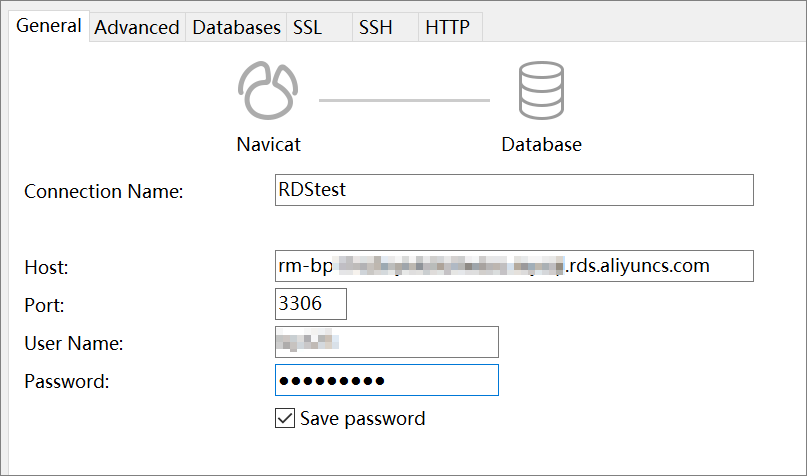
Enter information about the RDS instance to which you want to connect. The following table describes the required parameters.
Parameter
Description
Connection Name
Enter a custom name for the connection.
Host
Enter the internal or public endpoint of the RDS instance.
If your client is deployed on an Elastic Compute Service (ECS) instance and the ECS instance is created by using the same Alibaba Cloud account and resides in the same region and virtual private cloud (VPC) as the RDS instance, use the internal endpoint.
In other situations, use the public endpoint.
Port
Enter the internal or public port of the RDS instance. For example, the default port of an RDS for MySQL instance is 3306.
User Name
Enter the username of the account that is used to connect to the RDS instance.
Password
The password of the account that is used to connect to the RDS instance.
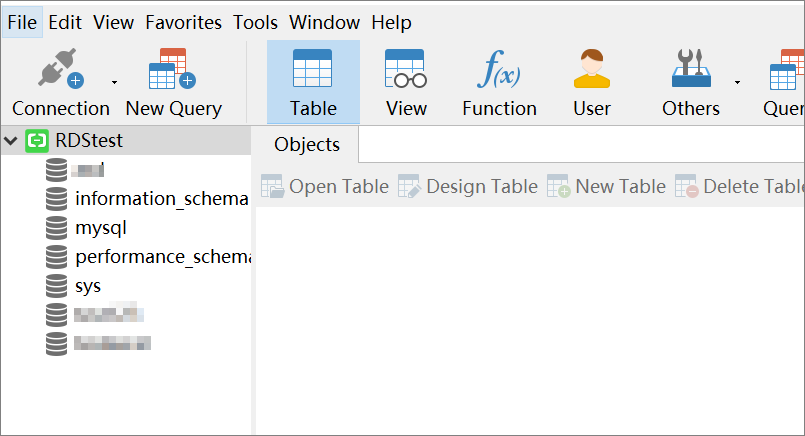
Click OK.
NoteIf the enhanced whitelist mode is enabled for your RDS instance and you want to connect your device to the instance over the Internet, you must add the public IP address of the device to the IP address whitelist of the classic network type.
References
You can also use methods such as Data Management (DMS) or the CLI to connect to an RDS instance. For more information, see the following documents:
Connect to an RDS for MySQL instance
Connect to an RDS for SQL Server instance
FAQ
For more information about how to troubleshoot the issue that you cannot connect to an RDS instance, see What do I do if I fail to connect to an ApsaraDB RDS instance?