Auto-renewal keeps your subscription RDS instance running without manual intervention at each billing cycle. When enabled, the system automatically charges the renewal fee and extends the subscription before the expiration date.
Pay-as-you-go and serverless RDS instances never expire and do not require renewal.
Auto-renewal is off by default. Enable it at purchase or any time afterward through the console.
How auto-renewal works
When auto-renewal is enabled, the system deducts the renewal fee at 08:00, three days before the instance expires. If the deduction fails, the system retries once per day for the remaining subscription duration.
Make sure you have sufficient balance in your Alibaba Cloud account to ensure that auto-renewal is successful. If all deduction attempts fail, manually renew the instance before the expiration date to prevent service interruption and potential data loss. See Overdue payments.
Renewal cycleauto-renewal cycleauto-renewal cycle: The auto-renewal cycle matches the subscription billing unit — monthly subscriptions renew monthly, yearly subscriptions renew yearly. For example, a six-month subscription with auto-renewal enabled renews one month at a time.
| Scenario | Behavior |
|---|---|
| Insufficient balance or system error during deduction | System retries once per day for the remaining subscription duration |
| Manually renewed before the automatic deduction date | No auto-deduction occurs until the next expiration cycle |
| Auto-renewal enabled with instance expiring the next day | Setting takes effect the next day — manually renew immediately to avoid interruption |
Enable auto-renewal at purchase
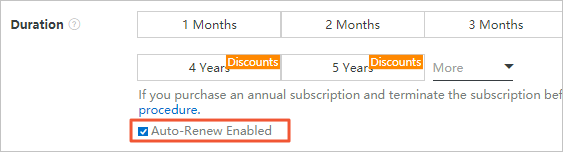
When purchasing a subscription RDS instance, select Enable Auto-renewal on the purchase page.
Enable auto-renewal after purchase
-
Log on to the ApsaraDB RDS console.
-
In the top navigation bar, choose Expenses > Renewal Management.RenewalRenewalRenewal
-
On the Auto tab, specify filter conditions to find the RDS instance for which you want to disable the auto-renewal feature and click Nonrenewal or Enable Manual Renewal in the Actions column.
-
On the ManualManual or Nonrenewal tab, find the instance.
-
Enable auto-renewal:
-
Single instance: Click auto-renewal cycleauto-renewal cycleauto-renewal cycleEnable Auto RenewalEnable Auto Renewal in the Actions column. In the dialog box, select an auto-renewal cycle and click Auto RenewAuto Renew.Enable Auto Renewal
-
Multiple instances: Select the instances, then click Enable Auto Renewal below the instance list. In the dialog box, select an auto-renewal cycle and click Auto RenewAuto Renew.
-
The auto-renewal cycle determines how long each renewal extends the subscription. For example, if set to three months, a three-month fee is charged on each automatic renewal.
Change the auto-renewal cycle
-
Log on to the ApsaraDB RDS console.
-
In the top navigation bar, choose Expenses > Renewal Management.
-
On the AutoAutoEdit Auto Renewal tab, find the instance and click Edit Auto Renewal in the Actions column.
-
In the dialog box, change the auto-renewal cycle and click OK.
Disable auto-renewal
-
Log on to the ApsaraDB RDS console.
-
In the top navigation bar, choose Expenses > Renewal Management.
-
On the Auto tab, find the instance and click Nonrenewal or Enable Manual Renewal in the Actions column.
-
In the message that appears, click OK.
API reference
| Operation | Description |
|---|---|
| CreateDBInstance | Creates an instance. You can enable auto-renewal when creating the instance. |
| RenewInstance | Renews a subscription instance. Also supports enabling auto-renewal after the instance is created. |