Connect a C#, Java, Python, or C application to an ApsaraDB RDS for PostgreSQL instance with Babelfish enabled over the Tabular Data Stream (TDS) port.
Babelfish lets your existing SQL Server client code talk to ApsaraDB RDS for PostgreSQL without rewriting the application layer. You connect on the TDS port (default 1433) with the same drivers and connection strings you use with SQL Server.
Supported drivers
The following drivers are compatible with the TDS port exposed by Babelfish:
| Language | Driver | Version |
|---|---|---|
| C# (.NET) | System.Data.SqlClient | 4.8.6 or later |
| Java | Microsoft JDBC Driver for SQL Server (mssql-jdbc) | 9.4.0.jre8 or later |
| Python | pyodbc with Microsoft ODBC Driver 17 for SQL Server | pyodbc |
| C | FreeTDS (libsybdb) | Package: freetds, freetds-devel |
Prerequisites
Before you begin, ensure that you have:
An ApsaraDB RDS for PostgreSQL instance with Babelfish enabled. See Create an ApsaraDB RDS for PostgreSQL instance for which Babelfish is enabled.
A Babelfish account. See Manage Babelfish accounts.
A whitelist configured to allow your client to reach the RDS instance. See Configure an IP address whitelist.
The endpoint and TDS port of your RDS instance. See View the endpoints and TDS port.
Set up a test database and table
Each code example in this topic runs INSERT, SELECT, and DELETE operations against a shared test table. Set up this table once before running any example.
Connect to the RDS instance using a Babelfish-compatible client. See Use clients to establish connections.
Create a test database.
NoteIn Single-DB migration mode, you can create only one database. If a database already exists, skip this step. For information about migration modes, see View the status of Babelfish.
create database sqlserverdb;Create the test table.
USE sqlserverdb
GO

CREATE TABLE dbo.tb_test(
    id int not null IDENTITY(1,1) PRIMARY KEY,
    name varchar(50))
GO
Connect with a C# application
The example runs on Windows Server with .NET 6. For other operating systems, see the .NET Hello World tutorial.
The code connects to the instance, inserts four rows using a transaction, reads them back, then cleans up — the same operations you would perform against SQL Server. No Babelfish-specific API changes are required.
Environment
.NET 6 SDK (64-bit) must be installed. Download it from dotnet.microsoft.com.
Procedure
Open Command Prompt (Win+Q, type
cmd, press Enter) and create a new console project.dotnet new console -o <project-name> -f net6.0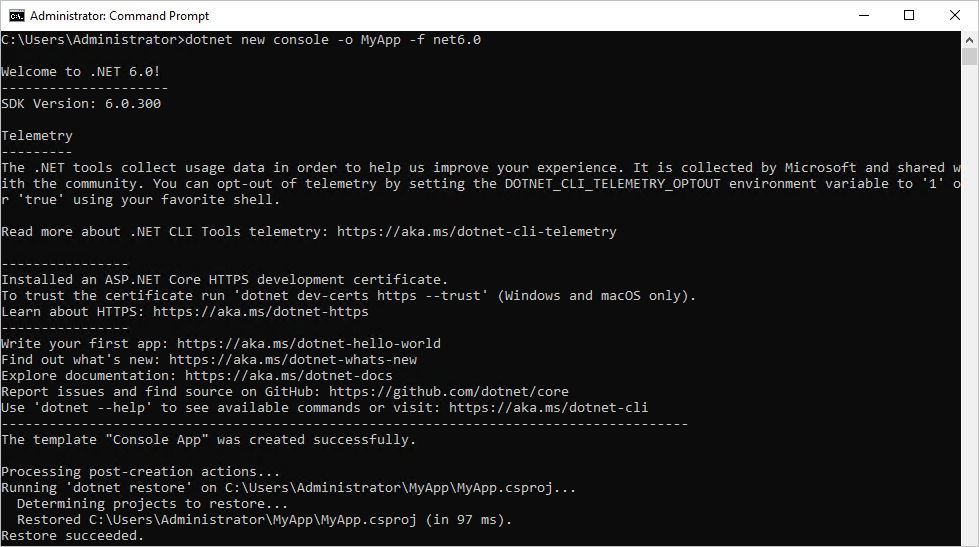
Open the project directory and edit Program.cs. The directory path is shown in the command output from step 1. In this example, the directory is
C:\Users\Administrator\MyApp\.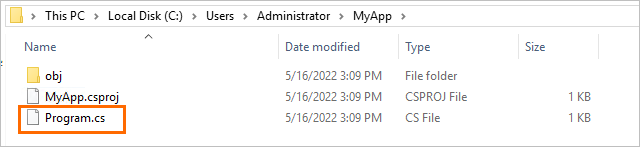
Replace the contents of Program.cs with the following code. Each connection parameter is declared as a separate variable — replace each value with your actual instance details.
using System;
using System.Collections.Generic;
using System.Linq;
using System.Text;
using System.Threading.Tasks;
using System.Data.SqlClient;

namespace sample
{
    class Program
    {
        static void Main(string[] args)
        {
            // Connection parameters — replace with your instance details.
            string server   = "pgm-****.pg.rds.aliyuncs.com,1433"; // endpoint,TDS port
            string userId   = "babelfish_user";                     // Babelfish account username
            string password = "babelfish_pwd";                      // Babelfish account password
            string database = "sqlserverdb";                        // database name

            SqlConnection con;
            string conString = $"Server={server};User id={userId};Password={password};Database={database};MultipleActiveResultSets=true;";

            con = new SqlConnection(conString);
            SqlCommand cmd = new SqlCommand();

            // Open connection.
            try
            {
                con.Open();
                Console.WriteLine("Connection established\n") ;
            }
            catch
            {
                Console.WriteLine("Can not connect to database!\nPlease check credentials!");
                Environment.Exit(1);
            }

            string sqlQuery = "";

            // Read existing rows.
            select_all(con);

            // Insert rows inside a transaction.
            cmd = con.CreateCommand();
            SqlTransaction transaction = con.BeginTransaction("SampleTransaction");

            try
            {
                sqlQuery = "insert into dbo.tb_test(name) values(@name)";
                cmd.CommandType = System.Data.CommandType.Text;
                cmd.CommandText = sqlQuery;
                cmd.Transaction = transaction;

                cmd.Parameters.AddWithValue("@name", "A");
                cmd.ExecuteNonQuery();
                cmd.Parameters.Clear();
                cmd.Parameters.AddWithValue("@name", "B");
                cmd.ExecuteNonQuery();
                cmd.Parameters.Clear();
                cmd.Parameters.AddWithValue("@name", "C");
                cmd.ExecuteNonQuery();
                cmd.Parameters.Clear();
                cmd.Parameters.AddWithValue("@name", "D");
                cmd.ExecuteNonQuery();
                transaction.Commit();

                Console.WriteLine("\nInsert successful!\n");
            }
            catch
            {
                transaction.Rollback();
                Console.WriteLine("\nInsert failed!\n");
            }

            select_all(con);

            // Delete all rows.
            sqlQuery = "delete from dbo.tb_test";
            cmd = con.CreateCommand();
            cmd.CommandText = sqlQuery;
            int row_count = cmd.ExecuteNonQuery();
            Console.WriteLine("\nDeleted rows: " + row_count + "\n");

            // Query column names from the table schema.
            sqlQuery = "SELECT COLUMN_NAME FROM INFORMATION_SCHEMA.COLUMNS WHERE TABLE_NAME = 'dbo.tb_test'";
            cmd = con.CreateCommand();
            cmd.CommandText = sqlQuery;
            SqlDataReader reader = cmd.ExecuteReader();
            string value = "";
            while (reader.Read())
            {
                value += reader.GetValue(0) + " ";
            }
            Console.WriteLine(value);
            reader.Close();

            // Close connection.
            con.Close();
            Console.WriteLine("\nConnection closed!");
        }

        private static void select_all(SqlConnection con)
        {
            string sqlQuery = "select id,name from dbo.tb_test order by id";
            SqlCommand cmd = con.CreateCommand();
            cmd.CommandText = sqlQuery;
            SqlDataReader reader = cmd.ExecuteReader();
            while (reader.Read())
            {
                string value = "";
                for (int i = 0; i != reader.FieldCount; i++)
                {
                    value += reader.GetValue(i) + " ";
                }
                Console.WriteLine(value);
            }
            reader.Close();
        }
    }
}
Add the
System.Data.SqlClientNuGet dependency to MyApp.csproj.<ItemGroup> <PackageReference Include="System.Data.SqlClient" Version="4.8.6" /> </ItemGroup>Run the application.
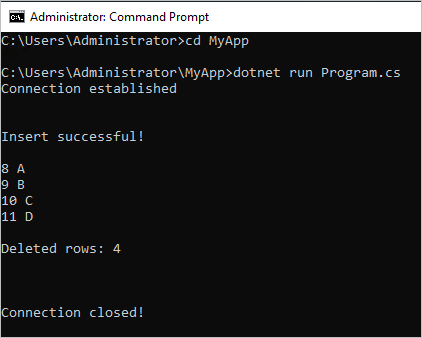
cd MyApp
dotnet run Program.cs
Expected output:
Connect with a Java application
The example uses Maven and the Microsoft JDBC Driver for SQL Server — the same driver used for SQL Server connections. No Babelfish-specific API changes are required.
Environment
Java 1.8 or later is required.
Procedure
Add the JDBC driver dependency to pom.xml.
<dependency>
  <groupId>com.microsoft.sqlserver</groupId>
  <artifactId>mssql-jdbc</artifactId>
  <version>9.4.0.jre8</version>
</dependency>
Connect to the instance using Java Database Connectivity (JDBC). Each connection parameter is declared as a separate variable — replace each value with your actual instance details.
public class BabelfishDemo {
    public static Connection getRdsPgConnection(){
        // Connection parameters — replace with your instance details.
        String rdsPgConnStr  = "pgm-****.pg.rds.aliyuncs.com"; // endpoint
        String rdsPgPort     = "1433";                          // TDS port
        String databaseName  = "sqlserverdb";                   // database name
        String userName      = "babelfish_user";                // Babelfish account username
        String password      = "babelfish_pwd";                 // Babelfish account password

        String connectionUrl = String.format(
            "jdbc:sqlserver://%s:%s;databaseName=%s;user=%s;password=%s;connectTimeout=600;socketTimeout=600",
            rdsPgConnStr, rdsPgPort, databaseName, userName, password);

        Connection connection = null;
        try{
            connection = DriverManager.getConnection(connectionUrl);
        }
        catch (Exception exception) {
            exception.printStackTrace();
        }
        return connection;
    }

    public static void insertRecord(String name, Connection dbConnObj){
        try{
            PreparedStatement stmt = dbConnObj.prepareStatement(
                "delete from dbo.tb_test;insert into dbo.tb_test(name) values(?)");
            stmt.setString(1, name);
            stmt.execute();
        } catch (Exception exception){
            exception.printStackTrace();
        }
    }

    public static void queryDataRecords(Connection dbConnObj){
        try (Statement stmt = dbConnObj.createStatement()) {
            String SQL = "select * from dbo.tb_test order by id;";
            ResultSet rs = stmt.executeQuery(SQL);
            while (rs.next()) {
                System.out.println(rs.getString("id") + " " + rs.getString("name"));
            }
        }
        catch (SQLException e) {
            e.printStackTrace();
        }
    }

    public static void main(String[] args) {
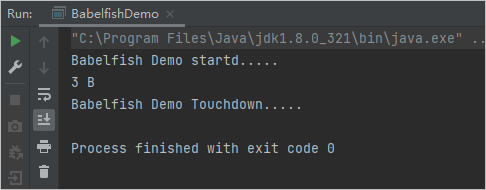
        System.out.println("Babelfish Demo started.....");
        Connection dbConnObj = getRdsPgConnection();
        insertRecord("B", dbConnObj);
        queryDataRecords(dbConnObj);
        System.out.println("Babelfish Demo Touchdown.....");
    }
}
Expected output:
Connect with a Python application
The example runs on CentOS 7.9 using pyodbc with the Microsoft ODBC Driver 17 for SQL Server.
Environment
Install the required dependencies.
sudo yum install gcc gcc-c++ -y
sudo wget https://packages.microsoft.com/config/centos/7/packages-microsoft-prod.rpm
sudo rpm -ivh packages-microsoft-prod.rpm
sudo yum install msodbcsql17.x86_64 -y
sudo yum install unixODBC-devel
sudo pip3 install pyodbc
Procedure
Create a Python file named main01.py.
vim main01.pyPress
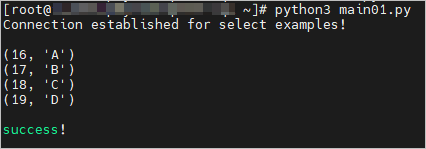
ito enter insert mode, then paste the following code.import sys import os import pyodbc # Connection parameters — replace with your instance details. server = 'pgm-*****.pg.rds.aliyuncs.com,1433' # endpoint,TDS port database = 'sqlserverdb' # database name username = 'babelfish_user' # Babelfish account username password = 'babelfish_pwd' # Babelfish account password # Connect using the Microsoft ODBC Driver 17 for SQL Server. connection, cursor = None, None try: connection = pyodbc.connect( 'DRIVER={ODBC Driver 17 for SQL Server};' 'SERVER=' + server + ';' 'DATABASE=' + database + ';' 'UID=' + username + ';' 'PWD=' + password) cursor = connection.cursor() print("Connection established!\n") except pyodbc.ProgrammingError: print("Cannot connect to the database!\nPlease check credentials!") exit(1) # Insert rows, read them back, then delete. sql = "insert into dbo.tb_test(name) values('A'),('B'),('C'),('D')" cursor.execute(sql) cursor.execute("select id,name from dbo.tb_test order by id") for row in cursor.fetchall(): print(row) sql = "delete from dbo.tb_test" cursor.execute(sql) cursor.close() connection.close() print("\nsuccess!\n")Press Esc, then type
:wqto save and exit.Run the application.
python3 main01.pyExpected output:
Connect with a C application
The example runs on CentOS 7.9 using FreeTDS (the libsybdb library), which provides a TDS-compatible DB-Library API.
One point is important when using FreeTDS with Babelfish:
The TDS port must be set via the
TDSPORTenvironment variable. Thedbopen()call does not accept a port number directly.
Environment
Install the FreeTDS library and Open Database Connectivity (ODBC) development headers.
sudo yum install freetds freetds-devel unixODBC-devel -yProcedure
Create a C source file named main01.c.
vim main01.cPress
ito enter insert mode, then paste the following code.#include <stdio.h> #include <stdlib.h> #include <unistd.h> #include <sys/param.h> #include <sybfront.h> #include <sybdb.h> #include <syberror.h> /* Connection parameters — replace with your instance details. */ #define DBNAME "sqlserverdb" /* database name */ #define UID "babelfish_user" /* Babelfish account username */ #define PWD "babelfish_pwd" /* Babelfish account password */ #define DBSERVER "pgm-*****.pg.rds.aliyuncs.com" /* endpoint */ #define TDSPORT 1433 /* TDS port */ /* Message handler: receives informational messages from the server. */ static int msg_handler(DBPROCESS* dbproc, DBINT msgno, int msgstate, int severity, char *msgtext, char *srvname, char *procname, int line) { if (severity < 11) fprintf(stderr, "Server message (severity %d): %s\n", severity, msgtext); return 0; } /* Error handler: receives error messages from the TDS library. */ static int err_handler(DBPROCESS* dbproc, int severity, int dberr, int oserr, char *dberrstr, char *oserrstr) { fprintf(stderr, "Server error %d: %s\n", dberr, dberrstr); if (oserr != 0) fprintf(stderr, "Caused by system error %d: %s\n", oserr, oserrstr); return INT_CANCEL; } int main(void) { LOGINREC *login; DBPROCESS *dbconn; char hostname[MAXHOSTNAMELEN]; int max_len = MAXHOSTNAMELEN; DBCHAR accession[10]; DBCHAR examdesc[10]; DBCHAR examcode[255]; char portstr[20]; int rc; char sql[65535]; if (dbinit() == FAIL) { fprintf(stderr, "Could not init db.\n"); return 1; } if ((login = dblogin()) == FAIL) { fprintf(stderr, "Could not initialize dblogin() structure.\n"); return 2; } /* Set login credentials. */ DBSETLUSER(login, UID); DBSETLPWD(login, PWD); if (gethostname(hostname, max_len) == 0) { DBSETLHOST(login, hostname); fprintf(stderr, "setting login hostname: %s\n", hostname); } /* FreeTDS reads the TDS port from the TDSPORT environment variable, not from dbopen(). Set it before opening the connection. */ rc = snprintf(portstr, 20, "TDSPORT=%d", TDSPORT); if (rc < 0 || rc >= 20) { fprintf(stderr, "error composing string for environment variable TDSPORT\n"); return 0; } if (putenv(portstr) != 0) { fprintf(stderr, "error setting TDSPORT environment variable\n"); return 0; } /* Register handlers so the library forwards errors and messages to our functions. */ dberrhandle(err_handler); dbmsghandle(msg_handler); /* Open the connection to the server. */ if ((dbconn = dbopen(login, DBSERVER)) == NULL) { fprintf(stderr, "Could not connect to DB Server: %s\n", DBSERVER); return 3; } /* Select the target database. */ if (dbuse(dbconn, DBNAME) == FAIL) { fprintf(stderr, "Could not use database: %s\n", DBNAME); return 4; } /* Insert rows. */ snprintf(sql, 65535, "insert into dbo.tb_test(name) values('A'),('B'),('C'),('D')"); if (dbcmd(dbconn, sql) == FAIL) { fprintf(stderr, "Could not prepare sql: %s\n", sql); return 5; } if (dbsqlexec(dbconn) == FAIL) { fprintf(stderr, "Could not execute sql: %s\n", sql); return 6; } if (dbresults(dbconn) != SUCCEED) { fprintf(stderr, "Could not execute sql: %s\n", sql); return 7; } /* Read rows back. */ snprintf(sql, 65535, "select id,name from dbo.tb_test order by id"); if (dbcmd(dbconn, sql) == FAIL) { fprintf(stderr, "Could not prepare sql: %s\n", sql); return 8; } if (dbsqlexec(dbconn) == FAIL) { fprintf(stderr, "Could not execute sql: %s\n", sql); return 9; } int retcode; char id[65535]; char name[65535]; if ((retcode = dbresults(dbconn)) != NO_MORE_RESULTS && retcode == SUCCEED) { dbbind(dbconn, 1, CHARBIND, (DBCHAR)0, (BYTE*)id); dbbind(dbconn, 2, CHARBIND, (DBCHAR)0, (BYTE*)name); while (dbnextrow(dbconn) != NO_MORE_ROWS) { printf("id: %s, name: %s\n", id, name); } } else { fprintf(stderr, "Could not fetch result for sql: %s\n", sql); return 10; } /* Delete all rows. */ snprintf(sql, 65535, "delete from dbo.tb_test"); if (dbcmd(dbconn, sql) == FAIL) { fprintf(stderr, "Could not prepare sql: %s\n", sql); return 11; } if (dbsqlexec(dbconn) == FAIL) { fprintf(stderr, "Could not execute sql: %s\n", sql); return 12; } if (dbresults(dbconn) != SUCCEED) { fprintf(stderr, "Could not execute sql: %s\n", sql); return 13; } /* Close the connection. */ dbclose(dbconn); printf("success\n"); return 0; }Press Esc, then type
:wqto save and exit.Compile and run the application.
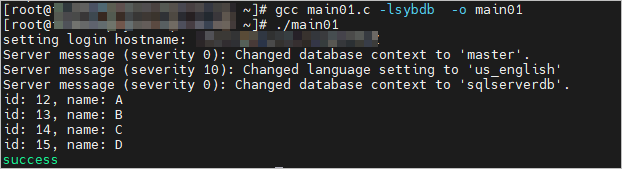
gcc main01.c -lsybdb -o main01
./main01
Expected output: