An IP address whitelist controls which IP addresses and CIDR blocks can access your ApsaraDB RDS for PostgreSQL instance. By default, only 127.0.0.1 is in the whitelist, which blocks all external access. You must add client IP addresses to the whitelist before any device can connect.
Update your IP address whitelists regularly to maintain security. Configuring IP address whitelists does not interrupt workloads on the RDS instance.
Limits
| Item | Limit |
|---|---|
| Maximum whitelists per instance | 50 |
| Maximum IP addresses and CIDR blocks per instance | 1,000 |
| default whitelist | Contains only 127.0.0.1. You can modify entries but cannot delete the whitelist itself. |
Determine which IP addresses to add
The IP addresses you add depend on how the client connects to the RDS instance.
A virtual private cloud (VPC) is an isolated network on Alibaba Cloud that provides higher security than the classic network. For more information, see What is a VPC?.
| Connection scenario | Network type | Whitelist configuration |
|---|---|---|
| Connect an Elastic Compute Service (ECS) instance to the RDS instance | The ECS instance and the RDS instance reside in the same VPC. This is the recommended connection method. | Add the private IP address of the ECS instance to an IP address whitelist of the RDS instance. |
| The ECS and RDS instances reside in different VPCs. | Instances in different VPCs cannot communicate over internal networks. To connect them: 1. Migrate the RDS instance to the VPC in which the ECS instance resides. 2. Add the private IP address of the ECS instance to an IP address whitelist of the RDS instance. Note
This operation is supported only when both instances reside in the same region. If the instances reside in different regions, use Data Transmission Service (DTS) to migrate the RDS instance to the region of the ECS instance. For more information, see Migrate data between ApsaraDB RDS for PostgreSQL instances. |
|
| The ECS and RDS instances reside in the classic network. | Add the private IP address of the ECS instance to an IP address whitelist of the RDS instance. | |
| The ECS instance resides in the classic network. The RDS instance resides in a VPC. | Instances of different network types cannot communicate over internal networks. To connect them: 1. Migrate the ECS instance from the classic network to the VPC in which the RDS instance resides. For more information, see Migrate an ECS instance from the classic network to a VPC. 2. Add the private IP address of the ECS instance to an IP address whitelist of the RDS instance. Note
This operation is supported only when both instances reside in the same region. If the instances reside in different regions, use DTS to migrate the RDS instance to the region of the ECS instance. For more information, see Migrate data between ApsaraDB RDS for PostgreSQL instances. |
|
| The ECS instance resides in a VPC. The RDS instance resides in the classic network. | Instances of different network types cannot communicate over internal networks. To connect them: 1. Migrate the RDS instance from the classic network to the VPC in which the ECS instance resides. 2. Add the private IP address of the ECS instance to an IP address whitelist of the RDS instance. Note
This operation is supported only when both instances reside in the same region. If the instances reside in different regions, use DTS to migrate the RDS instance to the region of the ECS instance. For more information, see Migrate data between ApsaraDB RDS for PostgreSQL instances. |
|
| Connect a self-managed host outside Alibaba Cloud to the RDS instance | N/A | Add the public IP address of the self-managed host to an IP address whitelist of the RDS instance. Applications on the self-managed host connect through the public endpoint of the RDS instance. For more information about how to obtain the public IP address of the self-managed host, see Why am I unable to connect to my ApsaraDB RDS for MySQL or ApsaraDB RDS for MariaDB instance from a local server over the Internet? |
Create or modify a standard IP address whitelist
In standard whitelist mode, ApsaraDB RDS does not distinguish between the classic network and VPCs. IP addresses or CIDR blocks in a standard IP address whitelist grant access over both the classic network and VPCs.
-
Go to the Instances page. In the top navigation bar, select the region of the RDS instance. Find the instance, then click the instance ID.
-
In the left-side navigation pane, click Whitelist and SecGroup.
-
Click Create Whitelist. In the dialog box, configure the Whitelist Name parameter. Alternatively, click Modify to the right of an existing whitelist.
-
Enter the IP addresses or Classless Inter-Domain Routing (CIDR) blocks that require access to the RDS instance, then click OK. > Note: > - Separate multiple IP addresses or CIDR blocks with commas (,). Do not add spaces before or after the commas. Example:
192.168.0.1,172.16.213.9. > - To add a large number of IP addresses, merge them into CIDR blocks. Example:10.10.10.0/24. -
(Optional) If a read-only instance is attached to the RDS instance, configure the Synchronize Whitelist to Read-only Instance parameter to synchronize the IP address whitelists to the read-only instance. If multiple read-only instances are attached, select the ones to synchronize.
-
(Optional) Click Add Internal IP Addresses of ECS Instances. In the dialog box, view the IP addresses of all ECS instances under your Alibaba Cloud account and add the desired ones to the whitelist.
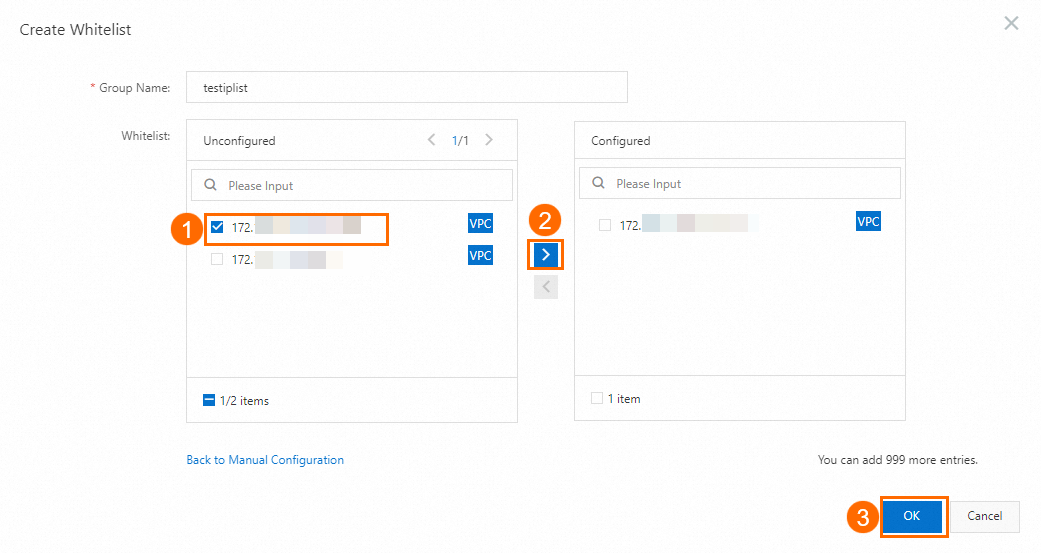
Create or modify an enhanced IP address whitelist
Local SSDs are no longer available for purchase. When you purchase an RDS instance, select the standard SSD or ESSD storage type. New RDS instances no longer support the enhanced whitelist mode. For more information, see [Announcement] Local SSDs are no longer available for purchase for ApsaraDB RDS for PostgreSQL instances from September 01, 2023.
In enhanced whitelist mode, ApsaraDB RDS distinguishes between the classic network and VPCs. Each enhanced IP address whitelist requires a specified network isolation mode. For example, if the Network Isolation Mode is set to Classic Network for a whitelist, the listed IP addresses can access the RDS instance only over the classic network.
The enhanced whitelist mode is supported only for RDS instances that use local SSDs. For more information about how to switch to enhanced whitelist mode, see Switch an ApsaraDB RDS for PostgreSQL instance to the enhanced whitelist mode.
-
Go to the Instances page. In the top navigation bar, select the region of the RDS instance. Find the instance, then click the instance ID.
-
In the left-side navigation pane, click Whitelist and SecGroup.
-
Click Create Whitelist and select a network isolation mode.
-
Configure the Whitelist Name parameter.
-
In the IP Addresses field, enter the IP addresses or CIDR blocks that require access to the RDS instance, then click OK. > Note: > - Separate multiple IP addresses or CIDR blocks with commas (,). Do not add spaces before or after the commas. Example:
192.168.0.1,172.16.213.9. > - To add a large number of IP addresses, merge them into CIDR blocks. Example:10.10.10.0/24. -
(Optional) If a read-only instance is attached to the RDS instance, configure the Synchronize Whitelist to Read-only Instance parameter to synchronize the IP address whitelists to the read-only instance. If multiple read-only instances are attached, select the ones to synchronize.
-
(Optional) Click Add Internal IP Addresses of ECS Instances. In the dialog box, view the IP addresses of all ECS instances under your Alibaba Cloud account and add the desired ones to the whitelist. > Note: If the enhanced whitelist mode is enabled for the RDS instance, select a network isolation mode.

Auto-generated whitelists for Alibaba Cloud services
Do not modify or delete IP address whitelists that are automatically generated for other Alibaba Cloud services. Deleting these whitelists prevents the corresponding service from connecting to the RDS instance. For example:
-
ali_dms_group is generated for Data Management (DMS).
-
hdm_security_ips is generated for Database Autonomy Service (DAS).
For RDS instances created after December 2020, the hdm_security_ips whitelist is hidden from users. This prevents unintentional modification or deletion.
Next steps
Create a database and an account on an ApsaraDB RDS for PostgreSQL instance
API reference
| Operation | Description |
|---|---|
| DescribeDBInstanceIPArrayList | Queries the IP address whitelists of an instance. |
| ModifySecurityIps | Modifies an IP address whitelist of an instance. |