When you create an ApsaraDB RDS for PostgreSQL instance and enable Babelfish, the management account is initialized automatically and can be used to manage Babelfish or PostgreSQL. After the RDS instance is created, you can manually create additional Babelfish management accounts. Babelfish supports two account types: management accounts (privileged accounts created in the ApsaraDB RDS console) and standard accounts (logins created over the Tabular Data Stream (TDS) port using T-SQL). Each type serves a different purpose and requires a different creation workflow.
| Account type | Created in | Used for |
|---|---|---|
| Management account | ApsaraDB RDS console | Managing Babelfish and PostgreSQL from the PostgreSQL side (psql) |
| Standard account | TDS port (sqlcmd or other SQL Server clients) | Connecting SQL Server applications to the Babelfish endpoint |
Accounts created over the TDS port cannot be viewed, created, modified, or deleted in the ApsaraDB RDS console.
Prerequisites
Before you begin, ensure that you have:
An ApsaraDB RDS for PostgreSQL instance with Babelfish enabled
The endpoint and port number of the RDS instance. For details, see View and change the internal and public endpoints and port numbers of an ApsaraDB RDS for PostgreSQL instance
(For standard accounts) An SQL Server client such as sqlcmd. For download and connection setup, see Use clients to establish connections
Create a management account
Management accounts are created in the console as privileged accounts, then granted TDS port access via psql. The following steps use babelfish_user as the example account name.
Go to the Instances page. In the top navigation bar, select the region where the RDS instance resides. Find the RDS instance and click its ID.
In the left-side navigation pane, click Accounts.
Click Create Account. In the panel that appears, set Account Type to Privileged Account.

The parameters for creating a Babelfish management account are the same as for a standard RDS account. For details, see Create an account.
Log in to the RDS instance using the new account:
psql -h <endpoint> -p 5432 -U babelfish_user -d babelfish_dbGrant the account permission to connect over the TDS port and assign the sysadmin role:
CALL sys.babel_initialize_logins('babelfish_user');
GRANT sysadmin TO babelfish_user;
The sysadmin account in PostgreSQL is used in a similar manner to the SA account in SQL Server.
Create a standard account
Standard accounts are created over the TDS port using Transact-SQL (T-SQL). The following steps use sqlcmd as the example client.
Connect to the RDS instance over the TDS port:
sqlcmd -S pgm-****.pg.rds.aliyuncs.com,1433 -U babelfish_userCreate a login and a corresponding database user:
For additional ways to create users, see CREATE USER (Transact-SQL).
-- Create the login
CREATE LOGIN test_babelfish
    WITH PASSWORD = 'Test123456!';
GO

-- Create a database user for the login
CREATE USER test_babelfish FOR LOGIN test_babelfish;
GO
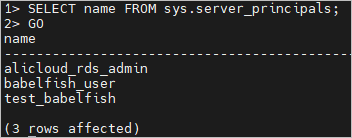
Verify the account was created by querying the server principals:
SELECT name
FROM sys.server_principals;
GO
The result lists all logins on the instance, including test_babelfish:
API reference
| Operation | Description |
|---|---|
| CreateAccount | Creates a database account |