ApsaraDB RDS for PostgreSQL Serverless instances provide real-time elastic scaling to meet your changing business needs. This allows your database resources to adapt to rapid changes in business workloads, prevent resource waste, and control database O&M costs. This document describes the features, architecture, and usage of Serverless instances to help you reduce costs and improve operational efficiency.
Introduction
ApsaraDB RDS for PostgreSQL Serverless instances provide real-time elastic scaling of CPU and memory. They are a new type of ApsaraDB RDS for PostgreSQL instance built on a cloud disk architecture. These instances provide vertical resource isolation for network resources, namespaces, and storage space. They also offer pay-as-you-go billing for compute resources. Serverless instances are cost-effective, easy to use, and flexible. You can quickly and independently scale compute resources up or down based on traffic peaks and troughs. This helps you respond quickly to business changes, optimize costs, and improve efficiency.
-
The compute resources of an ApsaraDB RDS for PostgreSQL Serverless instance are measured in RDS Capacity Units (RCUs). One RCU is equivalent to approximately 1 vCPU and 2 GB of memory. The compute resources of an instance automatically scale within the RCU range that you specify.
-
The maximum number of connections for an ApsaraDB RDS for PostgreSQL Serverless instance is fixed at 2,400. This value is fixed and does not vary with the RCU.
The following figure compares the resource usage and specifications of regular instances and Serverless instances in a scenario with fluctuating workloads.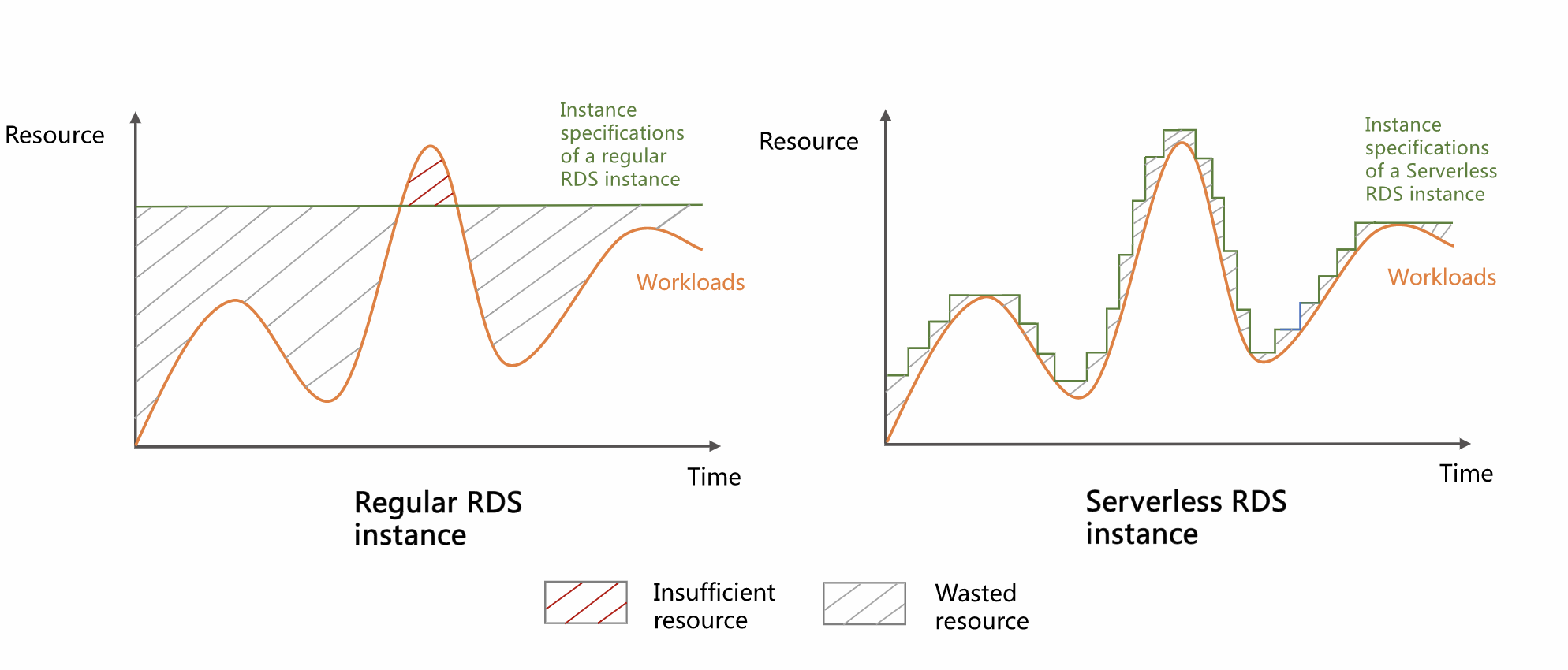
As shown in the figure, in a scenario with fluctuating workloads:
-
Regular instances: Waste resources during off-peak periods and lack sufficient resources during peak periods, which can negatively impact your business.
-
Serverless instances:
-
Compute resources are adjusted according to business demands. This reduces resource waste, improves resource utilization, and lowers costs.
-
They meet business demands even during peak periods. This ensures business continuity and improves system stability.
-
They use a pay-as-you-go billing model in which resources dynamically match the workload. This can save significant costs compared to a fixed-resource subscription model.
-
They eliminate the need for manual scaling. This improves O&M efficiency and reduces O&M costs for both operations staff and developers.
-
They support automatic start and stop. If there are no active connections, the instance automatically pauses, releasing compute resources and saving costs. When a new connection is established, the instance automatically resumes.
-
They are optimized for high-throughput write scenarios and high-concurrency services. Their elastic scaling makes them suitable for scenarios with large data volumes and typical traffic peaks and troughs.
-
Advantages
-
Lower costs: For startups, ApsaraDB RDS for PostgreSQL Serverless instances are ready to use without dependencies on other infrastructure or related services. They provide stable and efficient data access, and you pay only for the resources you use.
-
Larger storage space: The storage space can scale up to 32 TB and automatically expands based on the instance's data volume. This effectively prevents service interruptions caused by insufficient storage resources.
-
Automatic elastic scaling of compute resources: Compute resources for read and write operations can scale elastically. This greatly reduces O&M costs and system threats.
-
Fully managed: All O&M tasks, such as system deployment, scaling, and alert handling, are handled by the professional team at Alibaba Cloud. These tasks are performed transparently without affecting your business to ensure continuous service availability.
Scenarios
-
Low-frequency database usage scenarios, such as development and staging environments.
-
SaaS application scenarios, such as website building services for small and medium-sized enterprises.
-
Individual developers.
-
Education scenarios, such as school teaching and student experiments.
-
Scenarios with unpredictable workloads, such as Internet of Things (IoT) and edge computing.
-
Users who want a fully managed service.
-
Users with fluctuating or unpredictable workloads.
-
Business scenarios with intermittent scheduled tasks.
Billing description
How to use
-
Change the resource scaling range (RCU)
You can adjust the scaling range of compute resources for your Serverless instance, including the minimum and maximum RCU, to optimize the resource configuration based on your business needs.
-
Schedule the RCUs for a Serverless instance
If you have strict stability requirements for specific periods, you can use a scheduled task to configure the RCU of your Serverless instance in advance. This ensures the stability of the instance during those periods.
-
Change an instance elastic policy
For the elastic policy of a Serverless instance, you can choose the default non-enforced policy to prevent potential service interruptions. Alternatively, you can choose the enforced policy when performance requirements are more important than continuous availability.
-
Configure automatic start and stop for an instance
After you enable automatic start and stop, if there are no active connections to the instance for 10 minutes, the instance automatically pauses. In the paused state, the RCU is 0, and you are not charged for compute resources. When a new connection is made to a paused instance, it automatically resumes and begins to incur charges for compute resources.
FAQ
Q: Why do I receive Cloud Monitor alerts for CPU, memory, and other metrics for my Serverless instance?
A: This usually happens because of pre-configured global alert rules. If an alert rule for metrics such as CPU and memory already exists for all ApsaraDB RDS for PostgreSQL instances (or a specific resource group), a newly created Serverless instance automatically inherits these rules. Although a Serverless instance can scale automatically, the system still triggers and sends an alert notification if its resource usage momentarily reaches the alert threshold.
To manage these alerts, log on to the Cloud Monitor console. On the page, you can use the advanced filter feature to view and manage the alert rules that are enabled for the target Serverless instance.
Q: Why did my instance fail to scale out (increase the RCU) in a timely manner during high load, causing the service to become unresponsive?
A: An instance might fail to scale out in a timely manner during high load for one of the following two reasons:
-
The RCU limit is reached: The instance's compute resources have scaled to the specified maximum RCU value and cannot scale out further. In this case, you should evaluate your peak business requirements and increase the maximum RCU limit as needed.
-
Scaling latency cannot match instantaneous traffic: The elastic scaling mechanism of Serverless instances has a response latency. Scaling is usually triggered when CPU or memory usage exceeds 80%, and the process takes about 5 seconds. If service traffic surges dramatically in a very short period, such as less than 5 seconds, the instance might become unresponsive due to resource exhaustion before it can trigger and complete the scaling process. For business scenarios that require handling instantaneous, ultra-high concurrency, we recommend that you use regular instances with provisioned resources to ensure service stability.
Q: Why does my instance not automatically scale in (decrease the RCU) after the business load decreases?
A: A Serverless instance scales in only when both of the following conditions are met: CPU usage is below 50% and memory usage is below 50%.
A common reason that an instance does not scale in is that the database's page cache occupies a large amount of memory. Even if the business load decreases, PostgreSQL might keep data in memory to optimize subsequent queries. This prevents memory usage from dropping below 50%, so the scale-in condition is not met. To trigger a scale-in immediately, you can restart the instance to force the release of the page cache and reduce memory usage.
Q: How can I start an instance that is paused and has no connections?
A: You can disable the automatic start and stop feature for the instance in the console. The instance then automatically starts.