Data Transmission Service (DTS) migrates data from a self-managed PostgreSQL database to an ApsaraDB RDS for PostgreSQL instance with minimal downtime. DTS supports schema migration, full data migration, and incremental data migration. Combining all three types lets you switch workloads to the destination without stopping your applications.
This topic covers the following steps:
Prerequisites
Before you begin, make sure that you have:
-
An ApsaraDB RDS for PostgreSQL instance with available storage larger than the total data size in the source database. For more information, see Create an instance
-
A destination database version that is the same as or later than the source version. An earlier destination version causes compatibility issues
-
A database created in the destination instance to receive the migrated data. For more information, see Create a database
For supported source and destination database versions, see Overview of data migration scenarios.
Migration types
DTS supports three migration types that you can combine based on your downtime tolerance:
| Migration type | What it does | When to use |
|---|---|---|
| Schema migration | Copies object schemas (tables, triggers, views, sequences, functions, user-defined types, rules, domains, operations, and aggregates) to the destination | Always required as the first step |
| Full data migration | Copies all existing data to the destination | Use alone for a one-time migration with planned downtime |
| Incremental data migration | Continuously replicates changes from the source after full migration completes | Use with full migration for near-zero downtime |
One-time migration with downtime: select Schema Migration and Full Data Migration.
Migration without service interruption: select Schema Migration, Full Data Migration, and Incremental Data Migration.
SQL operations supported for incremental migration
| Operation type | SQL statements |
|---|---|
| DML | INSERT, UPDATE, DELETE |
| DDL | CREATE TABLE, DROP TABLE, ALTER TABLE (RENAME TABLE, ADD COLUMN, ADD COLUMN DEFAULT, ALTER COLUMN TYPE, DROP COLUMN, ADD CONSTRAINT, ADD CONSTRAINT CHECK, ALTER COLUMN DROP DEFAULT), TRUNCATE TABLE, CREATE INDEX ON TABLE |
-
DDL migration is available only in tasks created after October 1, 2020.
-
For tasks created before May 12, 2023, create a trigger and function in the source database to capture DDL information before configuring the task. See Use triggers and functions to implement incremental DDL migration for PostgreSQL databases.
-
TRUNCATE TABLE is supported only when the source PolarDB for PostgreSQL cluster runs PostgreSQL V11 or later.
-
The following are not supported for incremental migration: BIT data type, CREATE SEQUENCE, CASCADE or RESTRICT modifiers, DDL executed by invoking functions, DDL from sessions where
SET session_replication_role = replicais executed, and statements that mix DML and DDL in a single submission. -
To use a data migration task created before May 12, 2023 to migrate DDL operations, you must create a trigger and a function in the source database to capture DDL information before you configure the data migration task. For more information, see Use triggers and functions to implement incremental DDL migration for PostgreSQL databases.
Permissions required for database accounts
| Database type | Schema migration | Full data migration | Incremental data migration |
|---|---|---|---|
| Self-managed PostgreSQL database | USAGE permission on pg_catalog | SELECT permission on the objects to be migrated | superuser |
| ApsaraDB RDS for PostgreSQL instance | CREATE and USAGE permissions on the objects to be migrated | Permissions of the schema owner | Permissions of the schema owner |
For instructions on creating accounts and granting permissions:
-
Self-managed PostgreSQL database: CREATE USER and GRANT
-
ApsaraDB RDS for PostgreSQL instance: Create an account
Limitations
Review the following limitations before configuring your migration task. Limitations marked High impact can cause task failure or data loss if not addressed.
Source database limitations
| Limitation | Impact | Notes |
|---|---|---|
| Server must have sufficient outbound bandwidth | Reduced migration speed | No workaround; provision adequate bandwidth before starting |
| Tables must have PRIMARY KEY or UNIQUE constraints, with all fields unique. The tables to be migrated must also have the PRIMARY KEY, FOREIGN KEY, UNIQUE, or CHECK constraints | High impact: Duplicate records in the destination | Ensure all tables meet the constraint requirements before migration |
Source database name cannot contain hyphens (-). Example: dts-testdata is invalid |
Task configuration fails | Rename the database before migration |
| DTS cannot migrate temporary tables, internal triggers, or some internal C-language procedures and functions | Objects skipped silently | DTS can migrate custom parameters of COMPOSITE, ENUM, and RANGE types |
| A single task migrates data from only one database | N/A | Create a separate task for each additional database |
| If you select tables and need to rename tables or columns in the destination, a single task supports a maximum of 1,000 tables | Task fails if exceeded | For more than 1,000 tables, configure multiple tasks or migrate the entire database |
| Primary/secondary switchover on the source during an active migration task | High impact: Task fails | Avoid switchovers during migration; reconfigure the task if this occurs |
| DDL operations that change schemas or table structures during schema migration or full data migration | High impact: Task fails | Stop DDL changes before starting migration |
| A single incremental data change exceeding 256 MB | High impact: Migration instance fails and cannot be recovered | Reconfigure the task; avoid large batch changes during incremental migration |
| Major version upgrade of the source database during an active migration task | High impact: Task fails and cannot be recovered | Reconfigure the task after the upgrade |
| Long-running transactions on the source during incremental migration | WAL logs accumulate and may fill the source disk | Commit or terminate long-running transactions before starting incremental migration |
For incremental migration, also configure:
-
Set
wal_level = logicalinpostgresql.conf. -
Retain WAL logs for more than 24 hours for incremental-only migration, or at least 7 days for full + incremental migration. Insufficient retention causes DTS to fail to retrieve WAL logs, which can result in task failure or data loss.
Other limitations
-
Use the primary node as the data source. Secondary nodes may lag behind the primary due to replication latency.
-
If you select a schema as the migration object and create or rename a table within that schema during incremental migration, execute the following statement before writing data to the table:
ALTER TABLE schema.table REPLICA IDENTITY FULL;Replace
schemaandtablewith the actual schema name and table name. Do not lock the table when executing this statement to avoid deadlocks. Perform this operation during off-peak hours. -
DTS does not validate metadata such as sequences. Manually verify sequence validity.
-
Before switching workloads to the destination database, update the starting values of all sequences in the destination. After cutover, new sequences do not increment from the maximum value of sequences in the source.
-
During incremental migration, DTS creates a replication slot prefixed with
dts_sync_in the source database. By using this replication slot, DTS can obtain the incremental logs of the source database within the last 15 minutes. If the migration task is released or fails, DTS deletes the replication slot automatically. If a primary/secondary switchover occurs on the source, log on to the secondary database to delete the replication slot manually.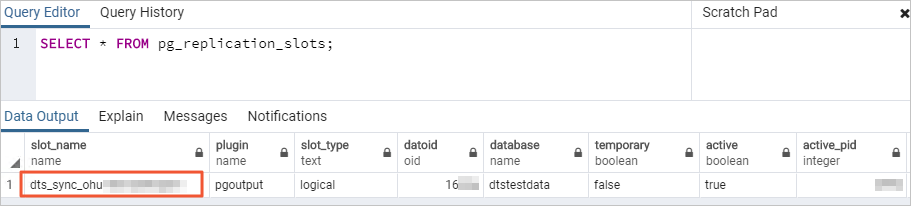
-
DTS creates the following temporary tables in the source database during migration. Do not delete these tables while the task is running. DTS deletes them automatically when the instance is released:
public.dts_pg_class,public.dts_pg_attribute,public.dts_pg_type,public.dts_pg_enum,public.dts_postgres_heartbeat,public.dts_ddl_command, andpublic.dts_args_session. -
If the source or destination tables contain foreign keys, triggers, or event triggers, and the destination account has superuser or privileged account permissions, DTS temporarily sets
session_replication_roletoreplicaat the session level during migration. If the destination account lacks these permissions, setsession_replication_role = replicamanually in the destination database. If cascade update or delete operations occur in the source during this period, data inconsistency may result. After the migration task is released, setsession_replication_roleback toorigin. -
Full data migration increases the load on both source and destination database servers. Migrate during off-peak hours. Concurrent INSERT operations during full data migration cause table fragmentation in the destination, making the destination tablespace larger than the source.
-
DTS uses the
ROUND(COLUMN, PRECISION)function to read FLOAT and DOUBLE columns. If you do not specify a precision, DTS applies 38 digits for FLOAT and 308 digits for DOUBLE. Verify that these defaults meet your business requirements. -
DTS attempts to resume failed tasks for up to 7 days. Before switching workloads to the destination, stop or release any failed tasks, or revoke DTS write permissions on the destination database. Otherwise, a resumed failed task may overwrite destination data with source data.
-
If a DTS task fails to run, DTS technical support will try to restore the task within 8 hours. During the restoration, the task may be restarted, and the parameters of the task may be modified. Only the parameters of the task may be modified — the parameters of databases are not modified. The parameters that may be modified include but are not limited to the parameters in the Modify instance parameters section of the Modify the parameters of a DTS instance topic.
Special cases
-
Self-managed PostgreSQL database: The values of
max_wal_sendersandmax_replication_slotsmust each be greater than the sum of the number of currently used replication slots and the number of DTS instances that use this database as a source. -
Google Cloud SQL for PostgreSQL: Set the Database Account parameter to an account with the
cloudsqlsuperuserpermission. Select only objects that the specified account is authorized to manage, or grant the OWNER permission on selected objects to that account. An account withcloudsqlsuperuserpermission cannot manage data owned by othercloudsqlsuperuseraccounts. -
Amazon RDS for PostgreSQL: See the Before you begin section of the "Migrate incremental data from an Amazon RDS for PostgreSQL instance to an ApsaraDB RDS for PostgreSQL instance" topic.
-
Amazon Aurora PostgreSQL: See the Preparation 1: Edit the inbound rule of the Amazon Aurora PostgreSQL instance section of the "Migrate full data from an Amazon Aurora PostgreSQL instance to an ApsaraDB RDS for PostgreSQL instance" topic.
Prepare the source database
This section applies to self-managed PostgreSQL databases running on Linux servers.
For Amazon RDS for PostgreSQL and Amazon Aurora PostgreSQL sources, see the special cases above for source-specific preparation steps.
For all self-managed PostgreSQL databases
-
Log on to the server hosting the self-managed PostgreSQL database.
-
Query the number of currently used replication slots:
select count(1) from pg_replication_slots; -
Modify the
postgresql.confconfiguration file: The following shows a sample configuration:-
Set
wal_level = logical. -
Set
max_wal_sendersandmax_replication_slotseach to a value greater than the sum of the number of used replication slots in the self-managed PostgreSQL database and the number of DTS instances whose source database is the self-managed PostgreSQL database.
Restart the PostgreSQL database after modifying
postgresql.conffor the changes to take effect.# - Settings - wal_level = logical # minimal, replica, or logical # (change requires restart) ...... # - Sending Server(s) - # Set these on the master and on any standby that will send replication data. max_wal_senders = 10 # max number of walsender processes # (change requires restart) #wal_keep_segments = 0 # in logfile segments, 16MB each; 0 disables #wal_sender_timeout = 60s # in milliseconds; 0 disables max_replication_slots = 10 # max number of replication slots # (change requires restart) -
-
Add the CIDR blocks of DTS servers to the
pg_hba.confconfiguration file. Add only the CIDR blocks for the region where the destination database resides. For the list of CIDR blocks, see Add the CIDR blocks of DTS servers. After modifyingpg_hba.conf, runSELECT pg_reload_conf();or restart PostgreSQL for the changes to take effect. Skip this step if you have already set the IP address range to0.0.0.0/0. For more information aboutpg_hba.conf, see The pg_hba.conf File.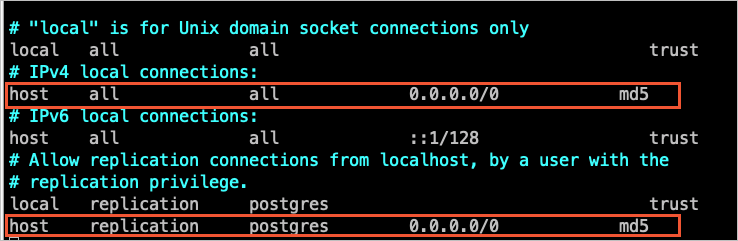
-
Create a database and schema in the destination ApsaraDB RDS for PostgreSQL instance that match the source. The schema names in the source and destination must be identical. For more information, see Create a database and Manage accounts by using schemas.
For PostgreSQL versions 9.4.8 to 10.0 (additional steps)
If the source PostgreSQL version falls in the range of 9.4.8 to 10.0, complete the following additional steps before configuring the migration task.
-
Download the PostgreSQL source code that matches your database version from the PostgreSQL official website.
-
Compile and install PostgreSQL by running the following commands in sequence:
Important- The OS version and GNU Compiler Collection (GCC) version must match. - If
sudo ./configurefails with a readline error, runsudo ./configure --without-readlineinstead. - If you install PostgreSQL using another method, compile theali_decodingplug-in in a test environment that uses the same OS and GCC version.sudo ./configure sudo make sudo make install -
Download the
ali_decodingplug-in from https://github.com/aliyun/rds_dbsync. -
Copy the
ali_decodingdirectory to thecontribdirectory of the compiled PostgreSQL installation.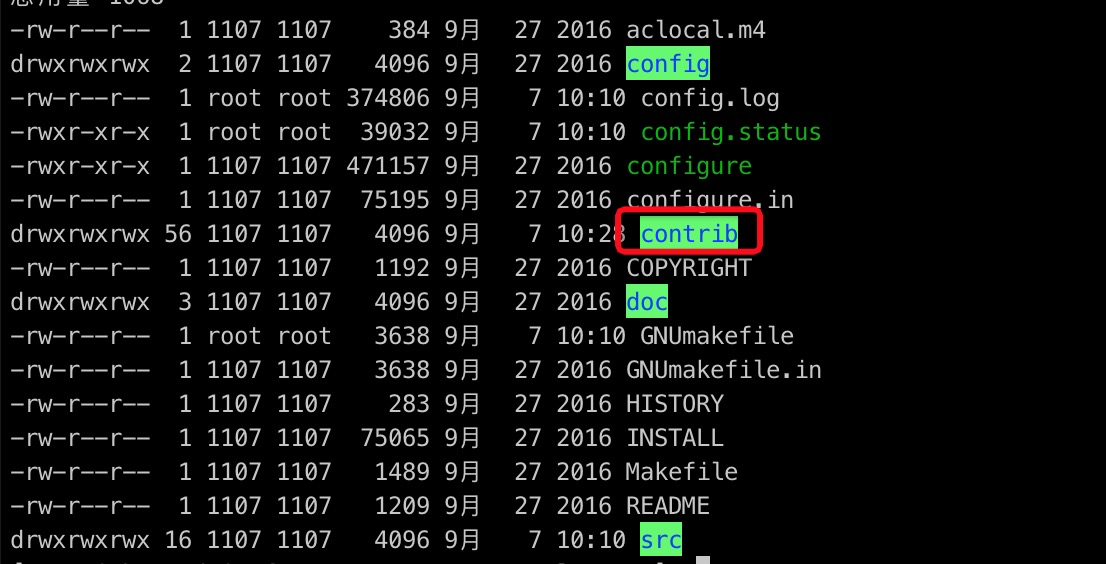
-
Go to the
ali_decodingdirectory and replace the content of theMakefilewith the following script:# contrib/ali_decoding/Makefile MODULE_big = ali_decoding MODULES = ali_decoding OBJS = ali_decoding.o DATA = ali_decoding--0.0.1.sql ali_decoding--unpackaged--0.0.1.sql EXTENSION = ali_decoding NAME = ali_decoding #subdir = contrib/ali_decoding #top_builddir = ../.. #include $(top_builddir)/src/Makefile.global #include $(top_srcdir)/contrib/contrib-global.mk #PG_CONFIG = /usr/pgsql-9.6/bin/pg_config #pgsql_lib_dir := $(shell $(PG_CONFIG) --libdir) #PGXS := $(shell $(PG_CONFIG) --pgxs) #include $(PGXS) # Run the following commands to install the ali_decoding plug-in: ifdef USE_PGXS PG_CONFIG = pg_config PGXS := $(shell $(PG_CONFIG) --pgxs) include $(PGXS) else subdir = contrib/ali_decoding top_builddir = ../.. include $(top_builddir)/src/Makefile.global include $(top_srcdir)/contrib/contrib-global.mk endif -
Compile and install the
ali_decodingplug-in:sudo make sudo make install -
Copy the output files to the specified directories.

-
Create a database and schema in the destination ApsaraDB RDS for PostgreSQL instance that match the source. The schema names must be identical. For more information, see Create a database and Manage accounts by using schemas.
Create the migration task
-
Go to the Data Migration page using one of the following methods:
DTS console
-
Log on to the DTS console.
-
In the left-side navigation pane, click Data Migration.
-
In the upper-left corner, select the region where the migration instance resides.
DMS console
The actual operation may vary based on the mode and layout of the DMS console. For more information, see Simple mode and Customize the layout and style of the DMS console.
-
Log on to the DMS console.
-
In the top navigation bar, move the pointer over .
-
From the drop-down list to the right of Data Migration Tasks, select the region where the migration instance resides.
-
-
Click Create Task. Configure the source and destination databases using the following parameters:
Section Parameter Description N/A Task Name A name for the DTS task. DTS generates a name automatically. Specify a descriptive name for easy identification. The name does not need to be unique. Source Database Select an existing DMS database instance. (Optional. If you have not registered a DMS database instance, ignore this option and configure database settings in the section below.) Select an existing registered database instance, or leave blank and configure the settings below. If you select an existing database, DTS populates the parameters automatically. Database Type Select PostgreSQL. Access Method Select based on where the source database is deployed. This example uses Cloud Enterprise Network (CEN). For self-managed databases, set up the network environment first. See Preparation overview. Instance Region The region where the self-managed PostgreSQL database resides. CEN Instance ID The ID of the CEN instance that hosts the self-managed PostgreSQL database. Connected VPC The virtual private cloud (VPC) connected to the self-managed PostgreSQL database. Domain name or IP address The IP address of the server hosting the source database. Port Number The service port of the source database. Default: 5432. Database Name The name of the source database. Database Account The source database account. For required permissions, see Permissions required for database accounts. Database Password The password for the source database account. Encryption Whether to encrypt the connection. This example uses Non-encrypted. To use SSL encryption, select SSL-encrypted, then upload the CA Certificate. Optionally upload a Client Certificate and Private Key of Client Certificate, and specify the Private Key Password of Client Certificate. Destination Database Select an existing DMS database instance. (Optional. If you have not registered a DMS database instance, ignore this option and configure database settings in the section below.) Select an existing registered database instance, or leave blank and configure the settings below. Database Type Select PostgreSQL. Access Method Select Alibaba Cloud Instance. Instance Region The region where the destination ApsaraDB RDS for PostgreSQL instance resides. Instance ID The ID of the destination ApsaraDB RDS for PostgreSQL instance. Database Name The name of the database in the destination instance that receives the migrated data. Database Account The destination database account. For required permissions, see Permissions required for database accounts. Database Password The password for the destination database account. Encryption Whether to encrypt the connection. This example uses Non-encrypted. -
Click Test Connectivity and Proceed. DTS automatically adds its server CIDR blocks to the IP address whitelist of Alibaba Cloud database instances or to security group rules of ECS-hosted databases. For self-managed databases in data centers or on third-party cloud platforms, manually add the DTS CIDR blocks to the database whitelist. For the full list of CIDR blocks, see Add the CIDR blocks of DTS servers.
WarningAdding DTS CIDR blocks to a database whitelist or ECS security group rules introduces security exposure. Before proceeding, take preventive measures such as: strengthening username and password security, limiting exposed ports, authenticating API calls, regularly auditing whitelist rules, or connecting the database to DTS through Express Connect, VPN Gateway, or Smart Access Gateway.
-
Configure the migration objects and settings:
Parameter Description Migration Types Select Schema Migration and Full Data Migration for a one-time migration. Select all three (Schema Migration, Full Data Migration, and Incremental Data Migration) for near-zero downtime migration. If you select Schema Migration, DTS migrates the schemas of the tables to be migrated from the source database to the destination database. The schemas include foreign keys. If you do not select Incremental Data Migration, we recommend that you do not write data to the source database during data migration to maintain data consistency. Processing Mode of Conflicting Tables Precheck and Report Errors: blocks the task if the destination contains tables with the same names as the source. If the source and destination databases contain tables with identical names and the tables in the destination database cannot be deleted or renamed, you can use the object name mapping feature to rename the tables that are migrated to the destination database. See Map object names. Ignore Errors and Proceed: skips the precheck. During full migration, existing destination records are retained and conflicting source records are not migrated. During incremental migration, conflicting source records overwrite destination records. If the source and destination databases have different schemas, only specific columns are migrated or the data migration task fails. Use with caution. Capitalization of Object Names in Destination Instance The capitalization policy for database, table, and column names in the destination. Default: DTS default policy. For more information, see Specify the capitalization of object names in the destination instance. Source Objects Select one or more objects from the Source Objects section. Click the  icon to move them to the Selected Objects section. Supported granularity: columns, tables, or schemas. Selecting tables or columns excludes other object types such as views, triggers, and stored procedures.
Selected Objects Right-click an object to rename it or set WHERE conditions to filter data. Click Batch Edit to rename multiple objects at once. Renaming an object may cause dependent objects to fail migration. For SQL operations that support incremental migration, see SQL operations supported for incremental migration. -
Click Next: Advanced Settings and configure the following: For data verification settings, see Configure data verification.
Parameter Description Dedicated Cluster for Task Scheduling By default, DTS uses the shared cluster. Purchase a dedicated cluster for improved task stability. See What is a DTS dedicated cluster. Set Alerts Select Yesalert notification settings to receive notifications when the task fails or migration latency exceeds the threshold. Configure alert thresholds and contacts. See Configure monitoring and alerting when you create a DTS task. Retry Time for Failed Connections The retry window for failed connections. Valid values: 10–1,440 minutes. Default: 720. Set to a value greater than 30. If different tasks share the same source or destination, the most recently specified value takes precedence. DTS charges for the instance during retries. Retry Time for Other Issues The retry window for DDL or DML operation failures. Valid values: 1–1,440 minutes. Default: 10. Set to a value greater than 10. This value must be smaller than Retry Time for Failed Connections. Enable Throttling for Full Data Migration Limits read/write load on source and destination during full migration. Configure Queries per second (QPS) to the source database, RPS of Full Data Migration, and Data migration speed for full migration (MB/s). Available only when Full Data Migration is selected. Enable Throttling for Incremental Data Migration Limits load during incremental migration. Configure RPS of Incremental Data Migration and Data migration speed for incremental migration (MB/s). Available only when Incremental Data Migration is selected. Environment Tag An optional tag to identify the DTS instance. Configure ETL Select Yes to enable the extract, transform, and load (ETL) feature and enter data processing statements. See Configure ETL in a data migration or data synchronization task. Select No to skip. -
Click Next: Save Task Settings and Precheck. DTS runs a precheck before starting the migration. The task starts only after the precheck passes.
-
If the precheck fails, click View Details next to the failed item, resolve the issue, and run the precheck again.
-
If a precheck alert can be ignored, click Confirm Alert Details, then Ignore, then OK, and then Precheck Again. Ignoring alerts may cause data inconsistency.
Click Preview OpenAPI parameters to view the API parameters for this task before proceeding.
-
-
Wait until Success Rate reaches 100%, then click Next: Purchase Instance.
-
On the Purchase Instance page, configure the instance class:
Section Parameter Description New Instance Class Resource Group The resource group for the migration instance. Default: default resource group. See What is Resource Management? Instance Class The instance class determines migration speed. Select based on your requirements. See Instance classes of data migration instances. -
Read and accept the Data Transmission Service (Pay-as-you-go) Service Terms by selecting the check box.
-
Click Buy and Start, then click OK in the confirmation dialog. Monitor task progress on the Data Migration page.
Cut over to the destination database
This section applies when incremental data migration is running. After full migration completes, incremental migration keeps the destination in sync with the source so you can cut over with minimal disruption.
-
Stop writes to the source database. Wait for all pending transactions to complete.
-
Verify that migration latency drops to zero. On the Data Migration page, monitor the migration latency metric. Proceed only when latency reaches 0.
-
Update sequence starting values. Before switching application traffic, manually update the starting values of all sequences in the destination database. After cutover, new sequences do not increment from the maximum values in the source.
-
Switch application traffic to the destination. Update your application connection strings to point to the ApsaraDB RDS for PostgreSQL instance.
-
Release or stop the migration task. After verifying that the destination is serving traffic correctly, stop or release the DTS migration instance. If you used
session_replication_role = replicain the destination during migration, set it back tooriginafter the task is released.