Before you can use the analysis dashboard and marketing activity report analysis features, a Quick Audience organization administrator must authorize embedded Quick BI reports to the target workspace so that the workspace can mount the reports.
Before you begin, enable report embedding in Quick BI. For the analysis dashboard, see Report Activation Embedding. For marketing activity report analysis, see Embed a Quick BI report.
To authorize reports as a Quick Audience organization administrator:
-
In the upper-right corner
 of the page, choose Organizations > Data Authorization.
-
Reports that have been embedded in the Quick BI are displayed in the list. Click the
 icon corresponding to the report and the authorized space is displayed in the pop-up window.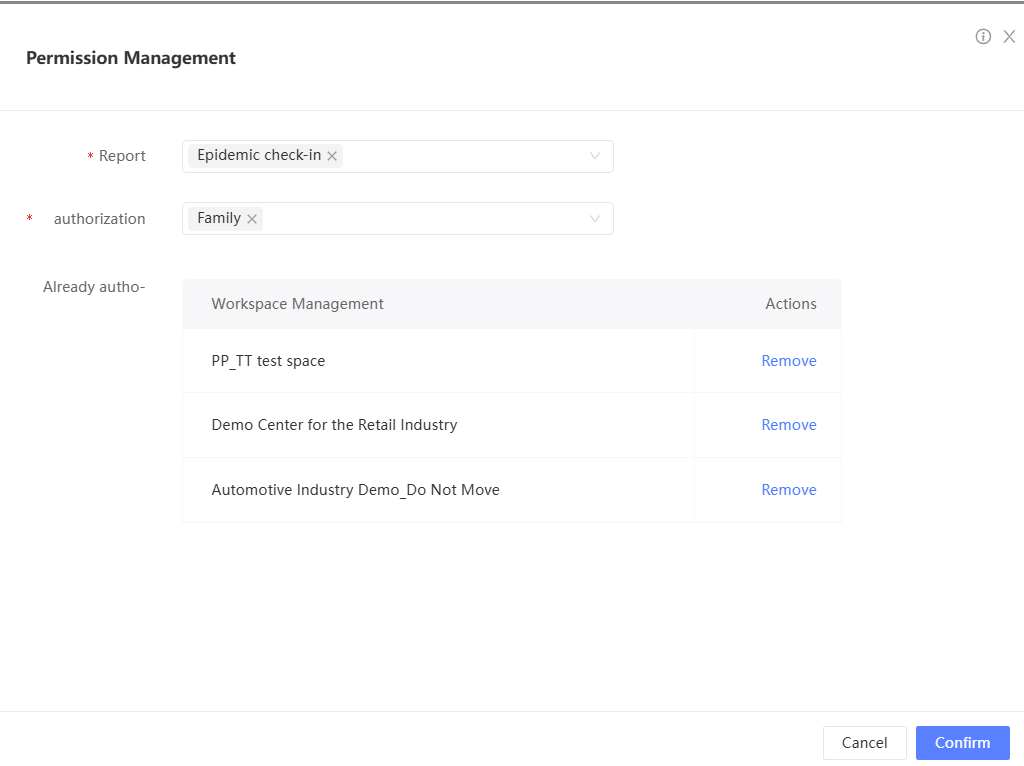
-
Release: Click Remove in the Actions column corresponding to a workspace to release the report from the workspace. The release takes effect immediately.
-
Authorization: Select the workspace to which you want to grant permissions and click OK.