Utility
This document covers the use cases, key components, and quick start for Utility.
Use cases
Overview
GanosBase Utility is a spatial-temporal extension for PostgreSQL-compatible databases such as and . It lets you import, export, and validate common 3D model file formats, such as OBJ, GLB, IFC, and OSGB, for processing in the GanosBase engine.
As part of the GanosBase spatial-temporal extension, GanosBase Utility integrates tightly with other GanosBase extensions. You can use GanosBase Utility to directly apply imported 3D model data in GanosBase spatial-temporal scenarios for further operations like modeling, rendering, and simulation. This seamless integration simplifies your workflow and improves development efficiency.
-
Import and view IFC data. In the query editor, run the SQL statement
select name,st_affine(element,1,0,0,0,0,1,0,-1,0,0,0,0) from ifc_demo_ifc_elem where family ='IfcBuildingStorey'to query the IfcBuildingStorey elements in an IFC building information modeling (BIM) model with a spatial transformation. The output returns eight rows with two columns: name (Level 1 to Level 7 and Level 7A) and st_affine (sfmesh). The 3D model viewer on the right renders a semi-transparent, perspective 3D model of the multi-story building. -
Import and view OSGB data, as shown in the following figure.

-
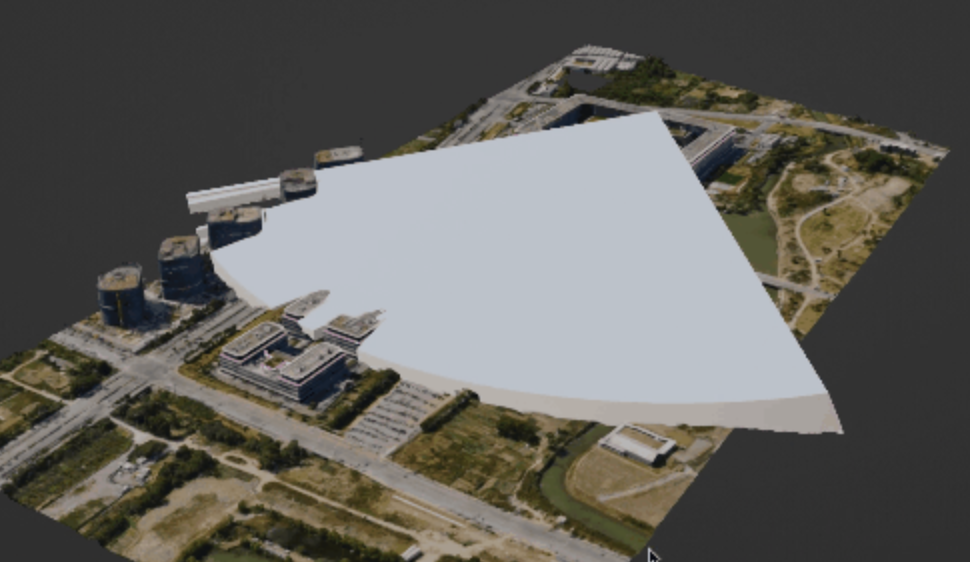
Perform field of view (FOV) analysis on OSGB data, as shown in the following figure.
Key scenarios
-
Import and export multiple file formats
GanosBase Utility can import, export, and validate various common 3D model file formats, such as OBJ, GLB, IFC, and OSGB. This lets you process and edit different types of 3D data.
-
Manage and view data
GanosBase Utility lets you manage and view 3D model data. It provides a unified toolset to quickly import data, perform edits and transformations, and export the processed data. This streamlines your workflow and improves efficiency.
-
Validate and verify data
GanosBase Utility's validation features check the format, structure, and consistency of imported 3D model data to ensure its integrity, helping you improve data quality and fix errors early.
Key components
GanosBase Utility provides a set of functions for data import, export, and validation for the sfmesh and scene modules.
Data import
-
IFC import
Industry Foundation Classes (IFC) is an open data model and file format for describing and exchanging information about building and infrastructure projects. IFC is standardized by the International Organization for Standardization (ISO) to promote collaboration and integration in building information modeling (BIM).
The IFC format is an object-based data model for representing components, attributes, and relationships in building and infrastructure projects. It can describe geometry, structure, materials, properties, and associations. Beyond geometry, IFC also includes information about functions, construction, maintenance, and operations.
-
OBJ import
Wavefront OBJ (OBJ) is a common 3D model file format for storing and exchanging the geometry and material information of static 3D models.
An OBJ dataset consists of two files: an .obj file and an .mtl file. The .obj file contains model vertices, normals, texture coordinates, and face information. It uses a set of keywords to describe geometry, such as v for vertex coordinates, vn for normals, and vt for texture coordinates. Faces are defined by vertex indices to describe polygon connectivity. The .mtl file contains material properties such as color, textures, and lighting.
-
GLB import
glTF Binary (GLB) is a binary file format for storing and exchanging 3D models. GLB is an extension of glTF (GL Transmission Format) that packages geometry, materials, textures, animations, and other related data into a single binary file for more efficient loading and transfer.
Because GLB uses binary encoding, it typically provides smaller file sizes and faster loading than text formats. This makes GLB suitable for online delivery and real-time rendering of 3D models in applications such as virtual reality (VR), augmented reality (AR), and WebGL.
-
OSGB import
OSGB is a file format for storing and loading 3D scenes. It is part of the OpenSceneGraph (OSG) framework and is used to describe and store 3D models, textures, and materials.
OSGB files are binary. Compared with other common 3D formats such as OBJ and FBX, OSGB files often have smaller file sizes and faster loading speeds, which makes them a good choice for large-scale scenes.
Data export
3D Tiles export
3D Tiles is an open standard for storing and exchanging large-scale 3D geospatial data. It is designed for efficiently rendering and visualizing large-scale 3D geospatial data on the web, including city models, terrain, and point clouds.
Tiles are organized in layers by spatial location and level of detail. This progressive loading enables high-performance browsing and interaction with massive geospatial datasets.
Data validation
OSGB validation
Although the binary nature of OSGB files makes them difficult to check directly, you can use Utility functions to verify their validity and integrity.
References
Quick start
Overview
This quick start helps you learn the basics of the GanosBase Utility engine, including how to create the extension, import and export data, and validate data.
Procedure
-
Create the extension.
CREATE EXTENSION IF NOT EXISTS ganos_utility CASCADE;Note-
We recommend that you install the extension in the public schema to prevent permission issues.
CREATE EXTENSION IF NOT EXISTS ganos_utility with schema public CASCADE; -
If the preceding statement fails with an "extension not supported" error, contact us.
-
-
Import data.
-- Import glTF data into the gltf_table table and bind it to ID 1. SELECT ST_ImportGLTF('gltf_table', 'OSS://<ak>:<ak_secret>@oss-cn-beijing-internal.aliyuncs.com/bim_wall.gltf', '1'); st_importgltf --------------- t (1 row) -- Import IFC data and generate an ifc_ifc_elem table. SELECT ST_ImportIFC('ifc', 'OSS://<ak>:<ak_secret>@oss-cn-beijing-internal.aliyuncs.com/CE1314-ACM-C3_LA-ST07_WB-AR-M3_N.ifc'::cstring); st_importifc -------------- t (1 row) -- Import OBJ data into the obj_table table. SELECT ST_ImportOBJ('obj_table', 'OSS://<ak>:<ak_secret>@oss-cn-beijing-internal.aliyuncs.com/obj/j3sn.obj', '1'); st_importobj -------------- t (1 row) -- Import an OSGB oblique photography project and save it to the osgb table. SELECT ST_ImportOSGB('osgb', 'OSS://<ak>:<ak_secret>@oss-cn-beijing-internal.aliyuncs.com/osgb'); st_importosgb --------------- t (1 row)Note-
Replace
<ak>and<ak_secret>with your actual access key and access secret.
-
-
Export data.
-- Export an IFC project to the 3D Tiles format and save it to the tile table. SELECT ST_As3DTiles(element, 'tile') from ifc_ifc_elem where family = 'IfcProject'; st_as3dtiles -------------- t (1 row) -
Validate data.
-- Validate whether an OSGB oblique photography project is valid. SELECT * FROM ST_ValidateOSGB('OSS://<ak>:<ak_secret>@oss-cn-beijing-internal.aliyuncs.com/osgb'); valid | reason -------+-------- t | (1 row) -
Drop the extension (optional).
DROP EXTENSION ganos_utility CASCADE;
Advanced usage
GanosBase Utility supports more advanced parameters that let you customize configurations.
-
IFC import
-- Import a specified project. SELECT ST_ImportIFC('Building', 'OSS://<ak>:<ak_secret>@oss-cn-beijing-internal.aliyuncs.com/mybucket/path_to_ifc'::cstring, '{"project":"building_1"}'); -- Disable parallel import. SELECT ST_ImportIFC('local', 'OSS://<ak>:<ak_secret>@oss-cn-beijing-internal.aliyuncs.com/CE1314-ACM-C3_LA-ST07_WB-AR-M3_N.ifc'::cstring, '{"disable_multi_thread":true}'); -
OBJ import
-- Disable automatic triangulation. SELECT ST_ImportObj('test_obj', 'OSS://<ak>:<ak_secret>@oss-cn-beijing-internal.aliyuncs.com/mybucket/path_to_obj.obj', '{"force_triangulate": false}'); -
GLTF/GLB import
-- Flip the Y and Z axes during import. SELECT ST_ImportGLTF('test_gltf', 'OSS://<ak>:<ak_secret>@oss-cn-beijing-internal.aliyuncs.com/mybucket/path_to_gltf.glb', 'my_glb', '{"flip_y_z": true}'); -
OSGB import
-- Specify the import parallelism. SELECT ST_ImportOSGB('test_osgb', 'OSS://<ak>:<ak_secret>@oss-cn-beijing-internal.aliyuncs.com/mybucket/path_to_oblique_project/', '{"parallel": 4}'); -- Use gateway mode. The database stores only paths, not the actual data. SELECT ST_ImportOSGB('test_osgb', 'OSS://<ak>:<ak_secret>@oss-cn-beijing-internal.aliyuncs.com/mybucket/path_to_oblique_project/', '{"gateway": true}'); -
OSGB validation
-- Validate in parallel. SELECT ST_ValidateOSGB('OSS://<ak>:<ak_secret>@oss-cn-beijing-internal.aliyuncs.com/mybucket/path_to_oblique_project/', '{"parallel": 4}'); -
3DTile export
-- Export in parallel.
SELECT ST_As3DTiles(element, 'test', '{"parallel": 4}') from ifc_ifc_elem where family = 'IfcProject';
-- Specify the tile size threshold. Geometric objects larger than this threshold are split. (Unit: KB)
SELECT ST_As3DTiles(element, 'test', '{"size_threshold": 1024}') from ifc_ifc_elem where family = 'IfcProject';
-- Specify the coordinate system for the 3DTile export.
SELECT ST_As3DTiles(element, 'test', '{"srid": 4326}') from ifc_ifc_elem where family = 'IfcProject';
-- Specify the spatial partitioning method for 3D Tiles. Valid values: 'oct' (octree), 'quad' (quadtree), and 'bsp' (BSP tree).
SELECT ST_As3DTiles(element, 'test', '{"method": "oct"}') from ifc_ifc_elem where family = 'IfcProject';