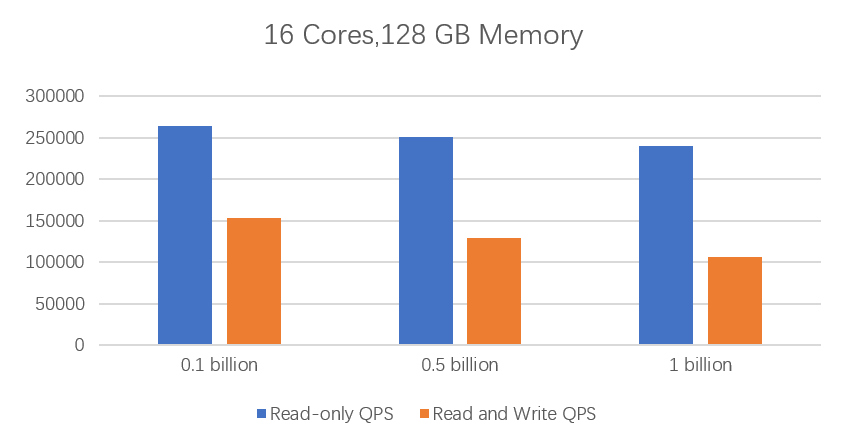
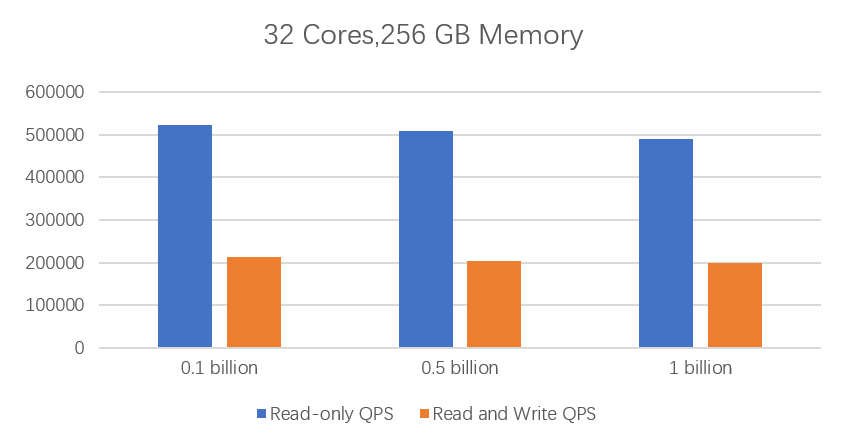
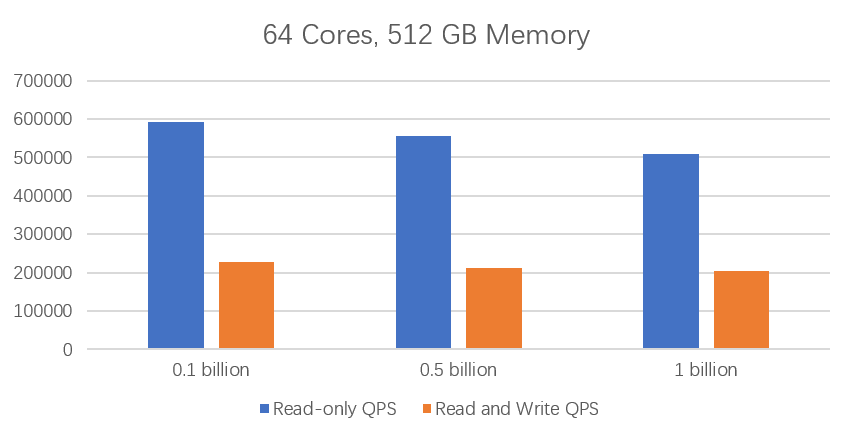
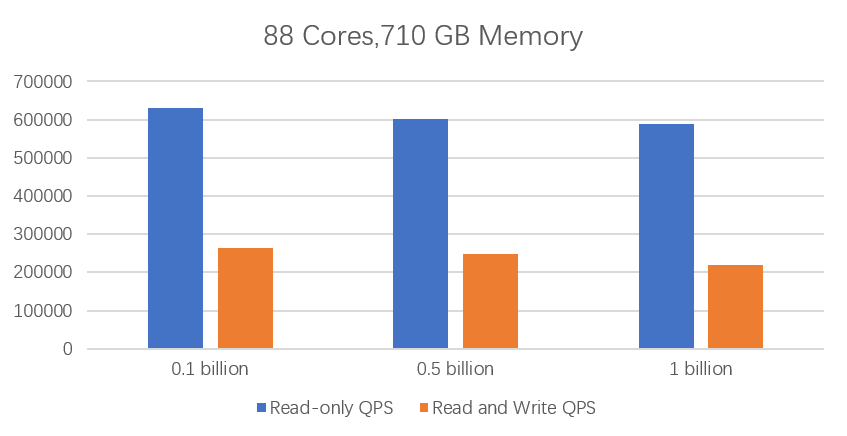
PostgreSQL includes pgbench, a lightweight stress testing tool for running benchmark tests on PolarDB for PostgreSQL (Compatible with Oracle). The tool repeatedly runs the same SQL commands in concurrent database sessions. This topic describes how to use pgbench to test the maximum performance of a PolarDB for PostgreSQL (Compatible with Oracle) cluster.
Staging environment
- All tests were performed in the China (Qingdao) region. The PolarDB cluster and the ECS instance were in the same zone.
- ECS instance type: ecs.g5.16xlarge (64-core 256 GiB).
- ECS storage specifications: 200 GiB SSD local disk.
- Network type: Virtual Private Cloud (VPC). The PolarDB cluster and the ECS instance were in the same VPC.
- Operating system: CentOS 7.6 x64.
- PolarDB cluster nodes: one primary node and one read-only node.
Test metrics
- Read-only Queries Per Second (QPS)
The number of read-only SQL statements (SELECT only) executed per second.
- Read/write QPS
The number of read/write SQL statements (INSERT, SELECT, and UPDATE) executed per second.
Preparations
- Install the testing tool Run the following commands to install PostgreSQL 11 on the ECS instance.
sudo yum install -y https://download.postgresql.org/pub/repos/yum/reporpms/EL-7-x86_64/pgdg-redhat-repo-latest.noarch.rpm sudo yum install -y postgresql11 - Modify cluster parameters PolarDB cluster must be modified as follows:
log_statement = 'none'
enable_hashjoin=off
enable_mergejoin=off
enable_bitmapscan=off
Note Currently, only the log_statement parameter can be modified in the console. For more information about how to set cluster parameters, see Set cluster parameters.After you modify the configuration parameters, restart the cluster for the changes to take effect.
Test method
- Run the following commands to configure environment variables:
export PGHOST=<Private endpoint of the PolarDB cluster>
export PGPORT=<Private port of the PolarDB cluster>
export PGDATABASE=postgres
export PGUSER=<Username for the PolarDB database>
export PGPASSWORD=<Password for the PolarDB user>
Note For more information about how to view the endpoint of a PolarDB for PostgreSQL (Compatible with Oracle) cluster, see View endpoints and ports. - Initialize the test data based on the size of the destination database. The commands are as follows:
- Initialize 1 billion data entries:
/usr/pgsql-11/bin/pgbench -i -s 10000 - Initialize 500 million data entries:
/usr/pgsql-11/bin/pgbench -i -s 5000 - Initialize 100 million data entries:
/usr/pgsql-11/bin/pgbench -i -s 1000
- Initialize 1 billion data entries:
- Create read-only and read/write test scripts.
- Create the read-only script ro.sql:
- Run the
vim ro.sqlcommand. - Press the I key to enter edit mode.
- Enter the following content:
\set aid random_gaussian(1, :range, 10.0) SELECT abalance FROM pgbench_accounts WHERE aid = :aid; - Press the Esc key to exit edit mode, then enter
:wqto save and exit.
- Run the
- Create the read/write script rw.sql:
- Run the
vim rw.sqlcommand. - Press the I key to enter edit mode.
- Enter the following content:
\set aid random_gaussian(1, :range, 10.0) \set bid random(1, 1 * :scale) \set tid random(1, 10 * :scale) \set delta random(-5000, 5000) BEGIN; UPDATE pgbench_accounts SET abalance = abalance + :delta WHERE aid = :aid; SELECT abalance FROM pgbench_accounts WHERE aid = :aid; UPDATE pgbench_tellers SET tbalance = tbalance + :delta WHERE tid = :tid; UPDATE pgbench_branches SET bbalance = bbalance + :delta WHERE bid = :bid; INSERT INTO pgbench_history (tid, bid, aid, delta, mtime) VALUES (:tid, :bid, :aid, :delta, CURRENT_TIMESTAMP); END; - Press the Esc key to exit edit mode, then enter
:wqto save and exit.
- Run the
- Create the read-only script ro.sql:
- Run the following commands to perform the tests:
- Read-only test:
88-core 710 GB (polar.o.x8.12xlarge) Total data volume: 1 billion, Hot data: 100 million /usr/pgsql-11/bin/pgbench -M prepared -v -r -P 1 -f ./ro.sql -c 256 -j 128 -T 120 -D scale=10000 -D range=100000000 Total data volume: 1 billion, Hot data: 500 million /usr/pgsql-11/bin/pgbench -M prepared -n -r -P 1 -f ./ro.sql -c 256 -j 128 -T 120 -D scale=10000 -D range=500000000 Total data volume: 1 billion, Hot data: 1 billion /usr/pgsql-11/bin/pgbench -M prepared -n -r -P 1 -f ./ro.sql -c 256 -j 128 -T 120 -D scale=10000 -D range=1000000000 64-core 512 GB (polar.o.x8.8xlarge) Total data volume: 1 billion, Hot data: 100 million /usr/pgsql-11/bin/pgbench -M prepared -v -r -P 1 -f ./ro.sql -c 256 -j 128 -T 120 -D scale=10000 -D range=100000000 Total data volume: 1 billion, Hot data: 500 million /usr/pgsql-11/bin/pgbench -M prepared -n -r -P 1 -f ./ro.sql -c 256 -j 128 -T 120 -D scale=10000 -D range=500000000 Total data volume: 1 billion, Hot data: 1 billion /usr/pgsql-11/bin/pgbench -M prepared -n -r -P 1 -f ./ro.sql -c 256 -j 128 -T 120 -D scale=10000 -D range=1000000000 32-core 256 GB (polar.o.x8.4xlarge) Total data volume: 1 billion, Hot data: 100 million /usr/pgsql-11/bin/pgbench -M prepared -v -r -P 1 -f ./ro.sql -c 128 -j 128 -T 120 -D scale=10000 -D range=100000000 Total data volume: 1 billion, Hot data: 500 million /usr/pgsql-11/bin/pgbench -M prepared -n -r -P 1 -f ./ro.sql -c 128 -j 128 -T 120 -D scale=10000 -D range=500000000 Total data volume: 1 billion, Hot data: 1 billion /usr/pgsql-11/bin/pgbench -M prepared -n -r -P 1 -f ./ro.sql -c 128 -j 128 -T 120 -D scale=10000 -D range=1000000000 16-core 128 GB (polar.o.x8.2xlarge) Total data volume: 1 billion, Hot data: 100 million /usr/pgsql-11/bin/pgbench -M prepared -v -r -P 1 -f ./ro.sql -c 64 -j 64 -T 120 -D scale=10000 -D range=100000000 Total data volume: 1 billion, Hot data: 500 million /usr/pgsql-11/bin/pgbench -M prepared -n -r -P 1 -f ./ro.sql -c 64 -j 64 -T 120 -D scale=10000 -D range=500000000 Total data volume: 1 billion, Hot data: 1 billion /usr/pgsql-11/bin/pgbench -M prepared -n -r -P 1 -f ./ro.sql -c 64 -j 64 -T 120 -D scale=10000 -D range=1000000000 8-core 64 GB (polar.o.x8.xlarge) Total data volume: 1 billion, Hot data: 100 million /usr/pgsql-11/bin/pgbench -M prepared -v -r -P 1 -f ./ro.sql -c 64 -j 32 -T 120 -D scale=10000 -D range=100000000 Total data volume: 1 billion, Hot data: 500 million /usr/pgsql-11/bin/pgbench -M prepared -n -r -P 1 -f ./ro.sql -c 64 -j 32 -T 120 -D scale=10000 -D range=500000000 Total data volume: 1 billion, Hot data: 1 billion /usr/pgsql-11/bin/pgbench -M prepared -n -r -P 1 -f ./ro.sql -c 64 -j 32 -T 120 -D scale=10000 -D range=1000000000 8-core 32 GB (polar.o.x4.xlarge) Total data volume: 1 billion, Hot data: 100 million /usr/pgsql-11/bin/pgbench -M prepared -v -r -P 1 -f ./ro.sql -c 64 -j 32 -T 120 -D scale=10000 -D range=100000000 Total data volume: 1 billion, Hot data: 500 million /usr/pgsql-11/bin/pgbench -M prepared -n -r -P 1 -f ./ro.sql -c 64 -j 32 -T 120 -D scale=10000 -D range=500000000 Total data volume: 1 billion, Hot data: 1 billion /usr/pgsql-11/bin/pgbench -M prepared -n -r -P 1 -f ./ro.sql -c 64 -j 32 -T 120 -D scale=10000 -D range=1000000000 4-core 16 GB (polar.o.x4.large) Total data volume: 500 million, Hot data: 50 million /usr/pgsql-11/bin/pgbench -M prepared -v -r -P 1 -f ./ro.sql -c 32 -j 32 -T 120 -D scale=5000 -D range=50000000 Total data volume: 500 million, Hot data: 100 million /usr/pgsql-11/bin/pgbench -M prepared -n -r -P 1 -f ./ro.sql -c 32 -j 32 -T 120 -D scale=5000 -D range=100000000 2-core 4 GB (polar.o.x4.medium) Total data volume: 100 million, Hot data: 50 million /usr/pgsql-11/bin/pgbench -M prepared -v -r -P 1 -f ./ro.sql -c 16 -j 32 -T 120 -D scale=1000 -D range=50000000 Total data volume: 100 million, Hot data: 100 million /usr/pgsql-11/bin/pgbench -M prepared -n -r -P 1 -f ./ro.sql -c 16 -j 32 -T 120 -D scale=1000 -D range=100000000 - Read/write test:
88-core 710 GB (polar.o.x8.12xlarge)
Total data volume: 1 billion, Hot data: 100 million
/usr/pgsql-11/bin/pgbench -M prepared -v -r -P 1 -f ./rw.sql -c 256 -j 256 -T 120 -D scale=10000 -D range=100000000
Total data volume: 1 billion, Hot data: 500 million
/usr/pgsql-11/bin/pgbench -M prepared -n -r -P 1 -f ./rw.sql -c 256 -j 256 -T 120 -D scale=10000 -D range=500000000
Total data volume: 1 billion, Hot data: 1 billion
/usr/pgsql-11/bin/pgbench -M prepared -n -r -P 1 -f ./rw.sql -c 256 -j 256 -T 120 -D scale=10000 -D range=1000000000

64-core 512 GB (polar.o.x8.8xlarge)
Total data volume: 1 billion, Hot data: 100 million
/usr/pgsql-11/bin/pgbench -M prepared -v -r -P 1 -f ./rw.sql -c 256 -j 256 -T 120 -D scale=10000 -D range=100000000
Total data volume: 1 billion, Hot data: 500 million
/usr/pgsql-11/bin/pgbench -M prepared -n -r -P 1 -f ./rw.sql -c 256 -j 256 -T 120 -D scale=10000 -D range=500000000
Total data volume: 1 billion, Hot data: 1 billion
/usr/pgsql-11/bin/pgbench -M prepared -n -r -P 1 -f ./rw.sql -c 256 -j 256 -T 120 -D scale=10000 -D range=1000000000

32-core 256 GB (polar.o.x8.4xlarge)
Total data volume: 1 billion, Hot data: 100 million
/usr/pgsql-11/bin/pgbench -M prepared -v -r -P 1 -f ./rw.sql -c 128 -j 128 -T 120 -D scale=10000 -D range=100000000
Total data volume: 1 billion, Hot data: 500 million
/usr/pgsql-11/bin/pgbench -M prepared -n -r -P 1 -f ./rw.sql -c 128 -j 128 -T 120 -D scale=10000 -D range=500000000
Total data volume: 1 billion, Hot data: 1 billion
/usr/pgsql-11/bin/pgbench -M prepared -n -r -P 1 -f ./rw.sql -c 128 -j 128 -T 120 -D scale=10000 -D range=1000000000

16-core 128 GB (polar.o.x8.2xlarge)
Total data volume: 1 billion, Hot data: 100 million
/usr/pgsql-11/bin/pgbench -M prepared -v -r -P 1 -f ./rw.sql -c 64 -j 64 -T 120 -D scale=10000 -D range=100000000
Total data volume: 1 billion, Hot data: 500 million
/usr/pgsql-11/bin/pgbench -M prepared -n -r -P 1 -f ./rw.sql -c 64 -j 64 -T 120 -D scale=10000 -D range=500000000
Total data volume: 1 billion, Hot data: 1 billion
/usr/pgsql-11/bin/pgbench -M prepared -n -r -P 1 -f ./rw.sql -c 64 -j 64 -T 120 -D scale=10000 -D range=1000000000

8-core 64 GB (polar.o.x8.xlarge)
Total data volume: 1 billion, Hot data: 100 million
/usr/pgsql-11/bin/pgbench -M prepared -v -r -P 1 -f ./rw.sql -c 64 -j 64 -T 120 -D scale=10000 -D range=100000000
Total data volume: 1 billion, Hot data: 500 million
/usr/pgsql-11/bin/pgbench -M prepared -n -r -P 1 -f ./rw.sql -c 64 -j 64 -T 120 -D scale=10000 -D range=500000000
Total data volume: 1 billion, Hot data: 1 billion
/usr/pgsql-11/bin/pgbench -M prepared -n -r -P 1 -f ./rw.sql -c 64 -j 64 -T 120 -D scale=10000 -D range=1000000000

8-core 32 GB (polar.o.x4.xlarge)
Total data volume: 1 billion, Hot data: 100 million
/usr/pgsql-11/bin/pgbench -M prepared -v -r -P 1 -f ./rw.sql -c 32 -j 32 -T 120 -D scale=10000 -D range=100000000
Total data volume: 1 billion, Hot data: 500 million
/usr/pgsql-11/bin/pgbench -M prepared -n -r -P 1 -f ./rw.sql -c 32 -j 32 -T 120 -D scale=10000 -D range=500000000
Total data volume: 1 billion, Hot data: 1 billion
/usr/pgsql-11/bin/pgbench -M prepared -n -r -P 1 -f ./rw.sql -c 32 -j 32 -T 120 -D scale=10000 -D range=1000000000

4-core 16 GB (polar.o.x4.large)
Total data volume: 500 million, Hot data: 50 million
/usr/pgsql-11/bin/pgbench -M prepared -v -r -P 1 -f ./rw.sql -c 16 -j 16 -T 120 -D scale=5000 -D range=50000000
Total data volume: 500 million, Hot data: 100 million
/usr/pgsql-11/bin/pgbench -M prepared -n -r -P 1 -f ./rw.sql -c 16 -j 16 -T 120 -D scale=5000 -D range=100000000

2-core 8 GB (polar.o.x4.medium)
Total data volume: 100 million, Hot data: 50 million
/usr/pgsql-11/bin/pgbench -M prepared -v -r -P 1 -f ./rw.sql -c 8 -j 8 -T 120 -D scale=1000 -D range=50000000
Total data volume: 100 million, Hot data: 100 million
/usr/pgsql-11/bin/pgbench -M prepared -n -r -P 1 -f ./rw.sql -c 8 -j 8 -T 120 -D scale=1000 -D range=100000000
Note- scale: This value is multiplied by 100,000 to represent the test data volume.
- range: The volume of active data.
- -c: The number of concurrent test connections. This value does not represent the maximum connections for the instance type. For more information about maximum connections, see Compute node specifications.
- Read-only test:
Test results
| Specifications | Test data volume | Hot (active) data volume | Read-only QPS | Read/write QPS |
polar.o.x8.12xlarge 88-core 710 GB | 1 billion | 100 million | 630650.40 | 263746.37 |
| 500 million | 601262.24 | 247352.76 | ||
| 1 billion | 589405.79 | 218788.92 | ||
polar.o.x8.8xlarge 64-core 512 GB | 1 billion | 100 million | 592064.65 | 227352.23 |
| 500 million | 554777.11 | 213343.13 | ||
| 1 billion | 508404.07 | 203331.35 | ||
polar.o.x8.4xlarge 32-core 256 GB | 1 billion | 100 million | 522182.92 | 213212.34 |
| 500 million | 509372.85 | 203322.34 | ||
| 1 billion | 489349.72 | 198531.37 | ||
polar.o.x8.2xlarge 16-core 128 GB | 1 billion | 100 million | 263893.72 | 152863.27 |
| 500 million | 250221.62 | 129238.26 | ||
| 1 billion | 239832.62 | 106212.82 | ||
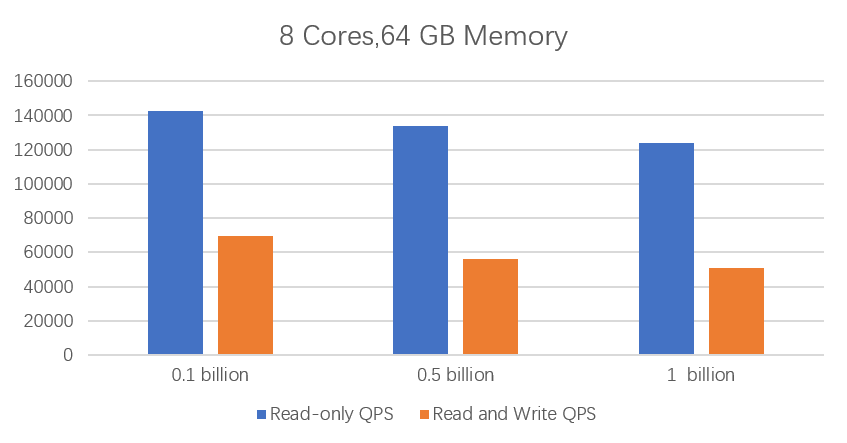
polar.o.x8.xlarge 8-core 64 GB | 1 billion | 100 million | 142836.56 | 69725.29 |
| 500 million | 133931.69 | 55927.65 | ||
| 1 billion | 124151.02 | 50786.21 | ||
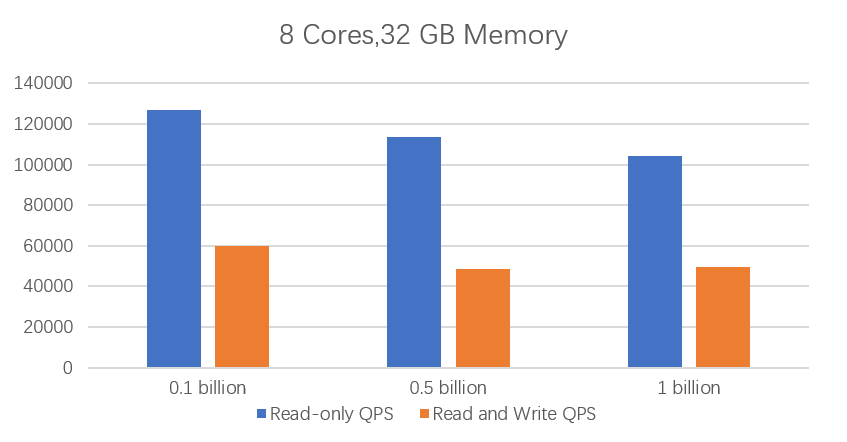
polar.o.x4.xlarge 8-core 32 GB | 1 billion | 100 million | 126748.07 | 59738.33 |
| 500 million | 113432.32 | 48372.25 | ||
| 1 billion | 104232.84 | 49763.64 | ||
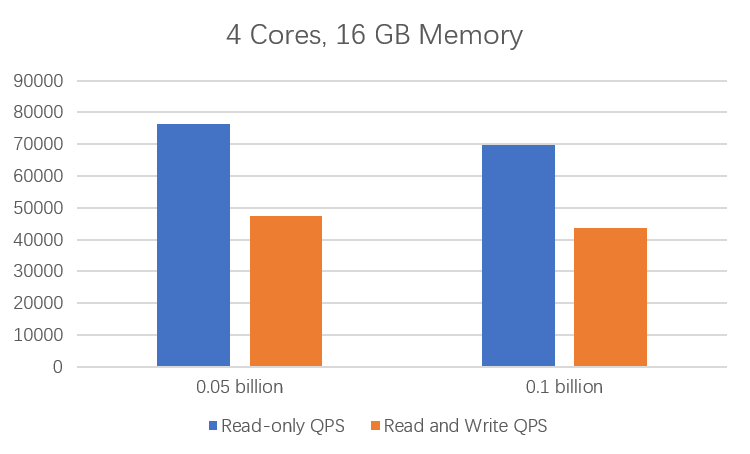
polar.o.x4.large 4-core 16 GB | 500 million | 50 million | 76238.89 | 47388.27 |
| 100 million | 69892.83 | 43638.85 | ||
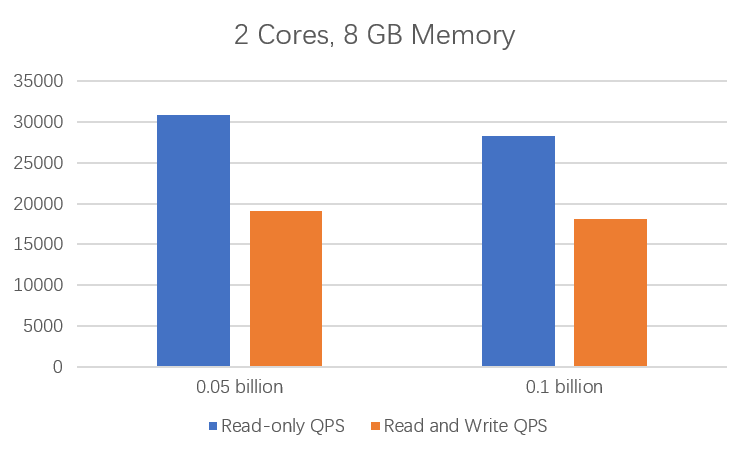
polar.o.x4.medium 2-core 8 GB | 100 million | 50 million | 28320.70 | 18152.63 |
| 100 million | 30792.19 | 19111.15 |
- Specifications: The instance type code of PolarDB for PostgreSQL (Compatible with Oracle).
- Test data volume: The number of records in this test round.
- Hot (active) data volume: The number of records used by the query and update SQL statements in this test round.
- Read-only QPS: The number of read-only queries executed per second.
- Read/write QPS: The number of read/write queries executed per second.