Use Data Transmission Service (DTS) to migrate data from a PolarDB for PostgreSQL (Compatible with Oracle) 1.0 cluster to a 2.0 cluster with minimal downtime.
Choose a migration approach
DTS supports two approaches. Pick based on whether your workload can tolerate downtime.
| Full migration only | Full + incremental migration | |
|---|---|---|
| Downtime | Required during migration | Minimal — cut over after data is in sync |
| Best for | Non-critical databases that can be taken offline | Production databases that must stay online |
| WAL log retention | Not required | At least 7 days (source cluster) |
| Billing | Free | Charged for the incremental phase |
For production workloads, use full + incremental migration. This lets you cut over at a time of your choosing after data is fully in sync.
Prerequisites
Before you begin, ensure that you have:
A source PolarDB for PostgreSQL (Compatible with Oracle) 1.0 cluster. For more information, see Create a PolarDB for PostgreSQL (Compatible with Oracle) cluster
A destination PolarDB for PostgreSQL (Compatible with Oracle) 2.0 cluster. For more information, see Create a PolarDB for PostgreSQL (Compatible with Oracle) cluster
The
wal_levelparameter set tologicalon both the source and destination clusters. For more information, see Configure cluster parametersAvailable storage on the destination cluster that exceeds the total data size of the source database
The privileged account on the source cluster and the database owner account on the destination cluster. For more information, see Create a database account
Validate compatibility before migrating
Run a migration evaluation before starting the actual migration. This checks whether objects in your 1.0 cluster are compatible with 2.0 so you can fix issues in advance.
The evaluation does not affect running workloads.
Supported regions: China (Hangzhou), China (Shanghai), China (Shenzhen), China (Beijing), China (Zhangjiakou), China (Ulanqab), China (Chengdu), China (Hong Kong), Japan (Tokyo), Singapore, Indonesia (Jakarta), US (Silicon Valley), and US (Virginia).
Create an evaluation task
Log on to the PolarDB console.
In the upper-left corner, select the region where the source cluster is deployed.
Open the evaluation dialog using one of these methods:
From the Clusters page: click Migration/Upgrade Evaluation in the upper-left corner.

From the Migration/Upgrade page: click Migration/Upgrade Evaluation in the upper-left corner.

In the Migration /Upgrade Evaluation dialog box, configure the parameters and click Next.
Parameter Value Creation Method Upgrade from PolarDB Source PolarDB Version Oracle 1.0 Source PolarDB Cluster Select the source cluster Destination Database Engine Oracle 2.0 Database Name Select the source database Review the compatibility results.
Overview — shows a summary of compatible and incompatible objects.

Details — lists specific incompatible objects.

Focus on incompatible objects in the results:
Oracle native objects can be ignored.
Objects involved in SQL statements must be adapted at the business side. If you cannot adapt them, contact Alibaba Cloud support.
Iterate until evaluation passes
After fixing incompatible objects, create a new evaluation task to confirm the issues are resolved. Repeat until all objects are compatible.
To view existing evaluation tasks, go to the Migration/Evaluation page.
Evaluation tasks are retained for seven days. Create a new task if yours has expired.
Limitations
Source database limitations
During schema synchronization, DTS synchronizes foreign keys from the source database to the destination database. During full data synchronization and incremental data synchronization, DTS temporarily disables constraint checks and cascade operations on foreign keys at the session level. If cascade updates or deletions run on the source database during this time, data inconsistency may occur.
Tables must have PRIMARY KEY or UNIQUE constraints with all fields unique. Otherwise, the destination database may contain duplicate records.
When migrating selected tables with object renaming (such as renaming tables or columns), a single migration task supports up to 1,000 tables. To migrate more than 1,000 tables, create multiple tasks or migrate the entire database instead.
For incremental data migration:
Write-ahead logging (WAL) must be enabled on the source cluster.
WAL log retention must be more than 24 hours for incremental-only migration, or at least 7 days for full + incremental migration. If WAL logs are unavailable, the task may fail or data loss may occur. After full migration completes, you can reduce the retention to more than 24 hours.
If you need to perform a primary/secondary switchover on the source cluster during migration, enable the Logical Replication Slot Failover feature first. For more information, see Logical replication slot failover.
During schema migration and full data migration, do not execute DDL statements. Doing so will fail the migration task.
For full-only migration, do not write to the source database during migration. Data written after migration starts will not appear in the destination. To avoid this, use full + incremental migration instead.
If the source database has long-running transactions with an incremental migration task active, uncommitted WAL data may accumulate and cause disk space issues.
Other limitations
Each migration task covers a single source database. Create separate tasks for multiple databases.
For incremental migration with schema-level objects: after creating a new table or renaming a table in a schema, run the following statement before writing data to that table:
ALTER TABLE schema.table REPLICA IDENTITY FULL;Replace
schemaandtablewith your schema name and table name.DTS creates a table named
dts_postgres_heartbeatin the source database to track latency. The following figure shows the table structure.
DTS creates a replication slot prefixed with
dts_sync_on the source database to capture incremental logs from the last 15 minutes.- After the DTS instance is released, the replication slot is deleted automatically. If you change the source database password or remove DTS from the IP address whitelist, the replication slot cannot be deleted automatically — you must delete it manually to prevent accumulation and cluster unavailability. - If the migration task is released or fails, DTS clears the replication slot automatically. If a primary/secondary switchover occurs on the source cluster, log on to the secondary instance and clear the replication slot manually.
Migrate data during off-peak hours. Full data migration reads from the source and writes to the destination concurrently, which increases load on both databases.
After full data migration, the destination tablespace is larger than the source due to fragmentation from concurrent INSERT operations.
DTS uses
ROUND(COLUMN, PRECISION)to retrieve values from FLOAT and DOUBLE columns. Default precision: FLOAT = 38 digits, DOUBLE = 308 digits. Verify these settings meet your requirements.DTS retries failed tasks for up to 7 days. Before switching workloads to the destination, stop or release any failed tasks — or revoke DTS write permissions using
REVOKE— to prevent stale source data from overwriting the destination after a retry.DTS does not validate sequence metadata. Check sequence validity manually.
After cutover, sequences do not automatically continue from the maximum value in the source database. Query and reset them before switching workloads. See Reset sequences after cutover.
Billing
| Migration type | Cost |
|---|---|
| Schema migration + full data migration | Free |
| Incremental data migration | Charged. For more information, see Billing overview. |
Migration types and supported SQL
Migration types
| Type | What it does |
|---|---|
| Schema migration | Migrates object schemas to the destination: tables, views, synonyms, triggers, stored procedures, stored functions, packages, and user-defined types. Triggers are not supported in this scenario — delete source triggers before migrating to avoid data inconsistency. For more information, see Configure a data synchronization or migration task for a source database that contains a trigger. |
| Full data migration | Copies all historical data from the source to the destination. Do not perform DDL operations on objects during this phase. |
| Incremental data migration | Reads WAL log files from the source and continuously applies changes to the destination. Enables minimal-downtime migration. |
SQL statements supported in incremental migration
DML: INSERT, UPDATE, DELETE
DDL (requires a privileged account on the source):
CREATE TABLE, DROP TABLE
ALTER TABLE: RENAME TABLE, ADD COLUMN, ADD COLUMN DEFAULT, ALTER COLUMN TYPE, DROP COLUMN, ADD CONSTRAINT, ADD CONSTRAINT CHECK, ALTER COLUMN DROP DEFAULT
TRUNCATE TABLE (source cluster version 1.0 or later)
CREATE INDEX ON TABLE
DDL not supported:
CASCADE and RESTRICT modifiers on DDL statements are not synchronized.
DDL statements from sessions that run
SET session_replication_role = replicaare not synchronized.If a commit contains both DML and DDL statements, the DDL is not synchronized.
If multiple statements committed at the same time include DDL for objects outside the synchronized scope, those DDL statements are not synchronized.
Data of the BIT type cannot be synchronized in incremental mode.
For tasks created before September 9, 2022, create a trigger and function in the source database to capture DDL before configuring the task. For more information, see Use triggers and functions to implement incremental DDL migration for PostgreSQL databases.
Create a migration task
Step 1: Open the Data Migration page
Use one of the following methods:
From the DTS console:
Log on to the DTS console.
In the left-side navigation pane, click Data Migration.
In the upper-left corner, select the region where the migration instance resides.
From the DMS console:
The actual steps may vary based on the DMS console mode and layout. For more information, see Simple mode and Customize the layout and style of the DMS console.
Log on to the DMS console.
In the top navigation bar, go to Data + AI > DTS (DTS) > Data Migration.
From the drop-down list next to Data Migration Tasks, select the region where the migration instance resides.
Step 2: Configure source and destination databases
Click Create Task, then configure the source and destination.
Set Database Type to PolarDB for PostgreSQL (Compatible with Oracle) for both source and destination.
Adding DTS CIDR blocks to your database IP address whitelist or ECS security group rules introduces security risks. Before proceeding, take preventive measures including: strengthening username and password security, limiting exposed ports, authenticating API calls, and regularly auditing whitelist rules. Alternatively, connect the database to DTS using Express Connect, VPN Gateway, or Smart Access Gateway.
Task settings:
| Parameter | Description |
|---|---|
| Task Name | Assign a descriptive name. Names do not need to be unique. |
Source database (PolarDB for PostgreSQL (Compatible with Oracle) 1.0):
| Parameter | Description |
|---|---|
| Select Existing Connection | Select an existing connection to auto-populate parameters, or configure manually. |
| Database Type | PolarDB for PostgreSQL (Compatible with Oracle) |
| Access Method | Alibaba Cloud Instance |
| Instance Region | Region of the source cluster |
| Replicate Data Across Alibaba Cloud Accounts | Select No for same-account migration |
| Instance ID | ID of the source cluster |
| Database Name | Name of the source database |
| Database Account | Privileged account of the source cluster |
| Database Password | Password for the database account |
Destination database (PolarDB for PostgreSQL (Compatible with Oracle) 2.0):
| Parameter | Description |
|---|---|
| Select Existing Connection | Select an existing connection to auto-populate parameters, or configure manually. |
| Database Type | PolarDB for PostgreSQL (Compatible with Oracle) |
| Access Method | Alibaba Cloud Instance |
| Instance Region | Region of the destination cluster |
| Instance ID | ID of the destination cluster |
| Database Name | Name of the destination database |
| Database Account | Database owner account of the destination cluster. For more information, see Create a database account. |
| Database Password | Password for the database account |
Click Test Connectivity and Proceed. DTS adds its CIDR blocks to the destination cluster's whitelist.
Step 3: Select objects and configure synchronization settings
All namespaces in the source database are listed. Select the namespaces you want to migrate.
| Parameter | Description |
|---|---|
| Synchronization Type | Select Schema Synchronization, Full Data Synchronization, and Incremental Data Synchronization. All three are required. |
| Synchronization Topology | One-way synchronization: data flows from source to destination only. Two-way synchronization: data also flows from destination to source (incremental only, DDL not supported in reverse). |
| Processing Mode in Existed Target Table | Precheck and Report Errors: fails precheck if destination has tables with identical names. Use object name mapping to resolve conflicts. For more information, see Map object names. Ignore Errors and Proceed: skips the check. During full sync, existing destination records are kept; during incremental sync, source records overwrite destination records. Schema mismatches may cause partial sync or task failure. |
| Capitalization of Object Names in Destination Instance | Controls capitalization of database, table, and column names. Default: DTS default policy. For more information, see Specify the capitalization of object names in the destination instance. |
| Source Objects | Select objects and click  to add them to Selected Objects. Select columns, tables, or databases. If you select tables or columns, views, triggers, and stored procedures are not migrated. to add them to Selected Objects. Select columns, tables, or databases. If you select tables or columns, views, triggers, and stored procedures are not migrated. |
| Selected Objects | Right-click an object to rename it or filter rows with a WHERE condition. Click Batch Edit to rename multiple objects at once. For more information, see Map object names and Use SQL conditions to filter data. |
Step 4: Configure advanced settings
Click Next: Advanced Settings.
| Parameter | Description |
|---|---|
| Dedicated Cluster for Task Scheduling | Run the task on a DTS dedicated cluster for exclusive resources and better stability. For more information, see What is a DTS dedicated cluster. |
| Specify the retry time range for failed connections | How long DTS retries after a connection failure. Range: 10–1,440 minutes. Default: 720 minutes. Set to more than 30 minutes. When multiple tasks share the same source or destination, the shortest retry time takes precedence. DTS instance charges apply while retrying. |
| Retry Time for Other Issues | How long DTS retries after DDL or DML failures. Range: 1–1,440 minutes. Default: 10 minutes. Set to more than 10 minutes. Must be smaller than the connection retry time. |
| Enable Throttling for Full Data Migration | Limits concurrent reads and writes during full migration to reduce load on source and destination databases. |
| Enable Throttling for Incremental Data Migration | Limits migration rate during incremental migration to reduce write pressure. |
| Environment Tag | Labels the task by environment (production, staging, etc.). Does not affect task behavior. |
| Configure ETL | Applies extract, transform, and load (ETL) processing to migrated data. For more information, see What is ETL and Configure ETL in a data migration or data synchronization task. |
| Monitoring and Alerting | Sends alerts if the task fails or latency exceeds a threshold. Select Yes to configure alert contacts and thresholds. For more information, see Configure monitoring and alerting. |
Step 5: Configure data verification
Click Next Step: Data Verification.
| Parameter | Description |
|---|---|
| Data Verification Mode | Full Data Verification: compares all data between source and destination. Requires configuring verification objects. For more information, see Configure the data verification feature for a data synchronization or migration task in DTS. Incremental Data Verification: verifies incrementally migrated data (selected by default). Schema Verification: verifies schemas of selected objects. |
Step 6: Run the precheck
Click Next: Save Task Settings and Precheck.
To preview the corresponding API parameters, hover over the button and click Preview OpenAPI parameters.
DTS runs a precheck before starting migration.
If an item fails, click View Details to see the cause, fix the issue, and click Precheck Again.
If an alert is generated for an item you can safely ignore, click Confirm Alert Details, then click Ignore in the dialog box, then click Precheck Again.
Ignoring alert items may cause data inconsistency or expose your business to risks.
Step 7: Purchase the DTS instance
After the precheck reaches 100%, click Next: Purchase Instance.
| Parameter | Description |
|---|---|
| Billing Method | Subscription: pay upfront for 1–9 months, 1 year, 2 years, 3 years, or 5 years. More cost-effective for long-term use. Pay-as-you-go: charged hourly. Suitable for short-term use. |
| Resource Group | The resource group for the instance. Default: default resource group. For more information, see What is Resource Management?. |
| Instance Class | Determines migration performance. Select based on your data volume and latency requirements. For more information, see Specifications of data synchronization instances. |
| Duration | Subscription duration (displayed only for the subscription billing method). |
Read and accept the Data Transmission Service (Pay-as-you-go) Service Terms, then click Buy and Start.
Track task progress in the task list.
How the migration runs
After the task starts, DTS automatically runs these phases in sequence. Monitor them on the Data Synchronization page of the DTS console.
Precheck — Verifies network connectivity, permissions, and data format requirements.
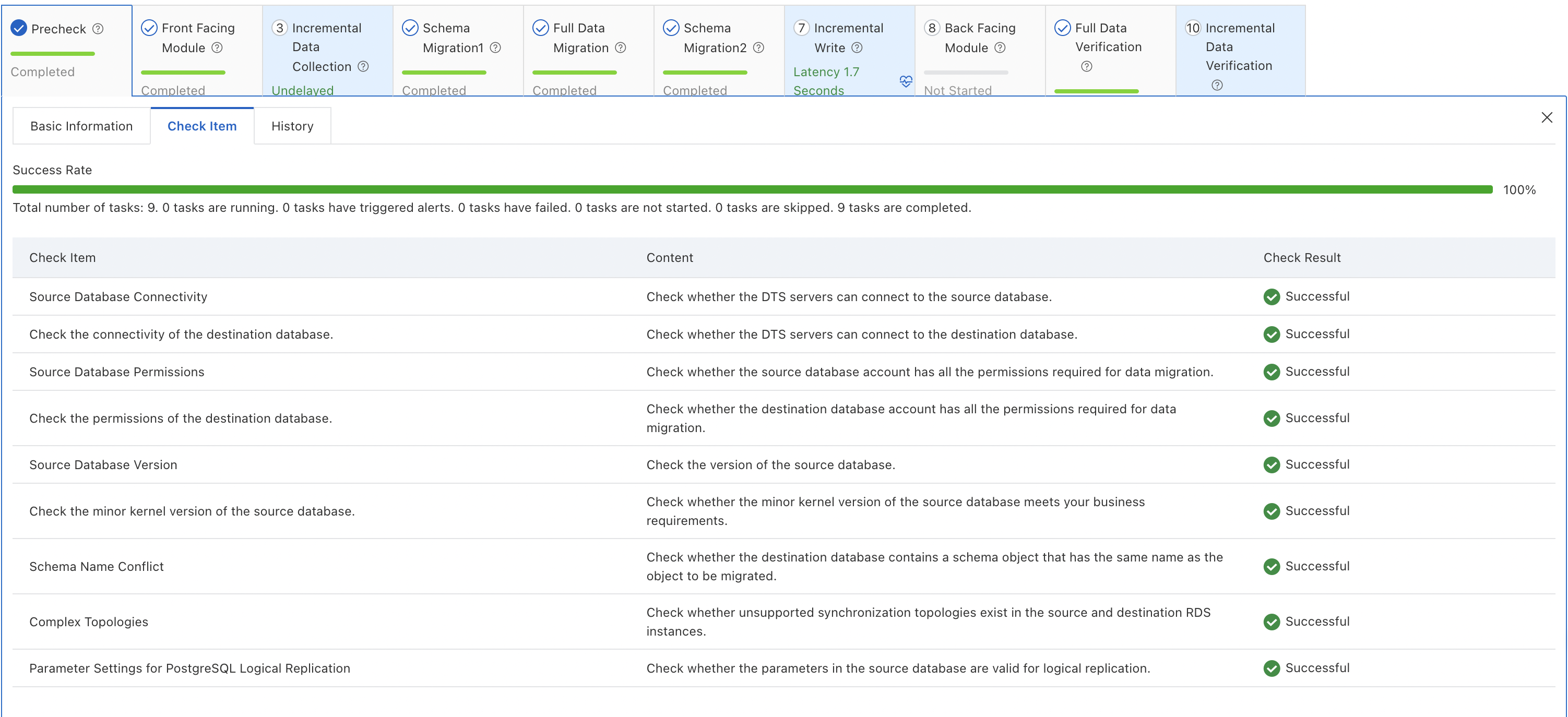
Pre-processing — Creates triggers needed for subsequent data capture.

Incremental data collection — Starts capturing changes from the source before full migration begins, so no changes are missed.

Schema migration — Migrates schemas, sequences, functions, stored procedures, views, and indexes. If a schema migration step fails, use the schema revision feature to manually correct the SQL.

Full data migration — Copies all data for selected objects. Monitor data traffic and transfer speed on the Data Synchronization page.

Foreign key migration — Adds foreign key constraints to migrated tables to maintain referential integrity.

Incremental write — Applies changes captured since step 3 to the destination, then continuously syncs new changes.

Post-processing — Clears intermediate data and creates final indexes.

Full data verification — Compares all rows between source and destination. For example, 835,266 rows in the
t1table are compared and confirmed consistent.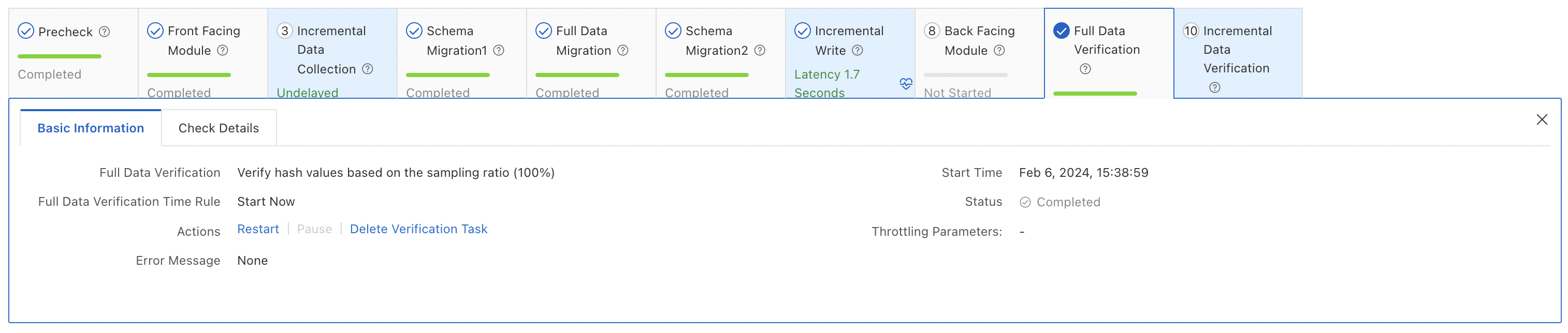
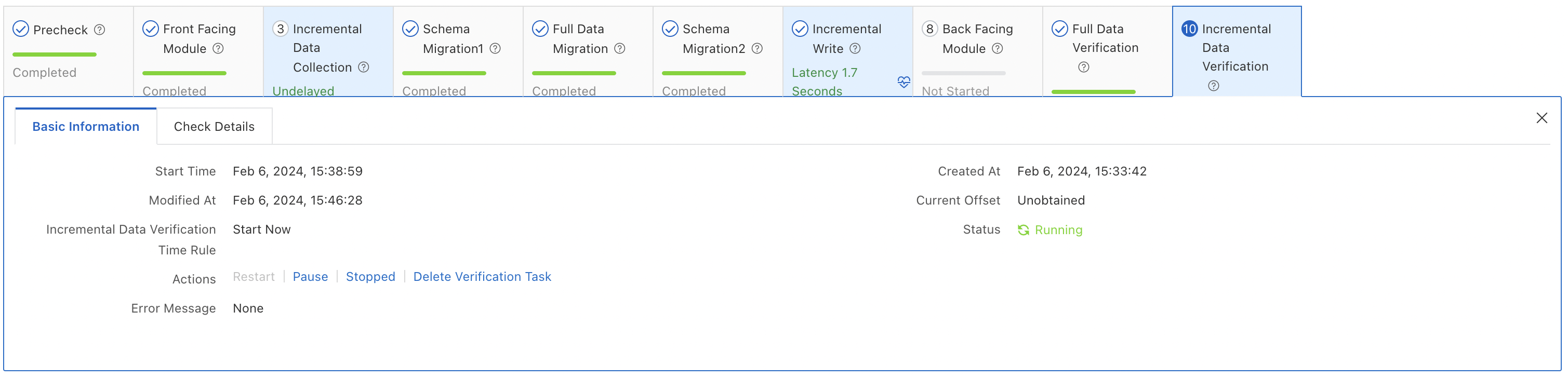
Incremental data verification — Continuously compares incremental changes between source and destination.
Cut over to the destination cluster
Test before cutting over
After migration reaches the incremental phase, add the destination cluster to a test environment and run comprehensive tests. Test for at least one week to confirm the destination cluster is stable before proceeding with cutover.
Reset sequences after cutover
After cutover, sequences do not automatically continue from the maximum value in the source database. Before switching workloads, query the maximum sequence values from the source and set them as the initial values in the destination.
Run the following statement on the source database to get the setval commands:
do language plpgsql $$
DECLARE
 nsp name;
 rel name;
 val int8;
BEGIN
 for nsp,rel in select nspname,relname from pg_class t2 , pg_namespace t3 where t2.relnamespace=t3.oid and t2.relkind='S' and relowner != 10
 loop
 execute format($_$select last_value from %I.%I$_$, nsp, rel) into val;
 raise notice '%',
 format($_$select setval('%I.%I'::regclass, %s);$_$, nsp, rel, val+1);
 end loop;
END;
$$;
The output lists setval() statements for each sequence. Run those statements on the destination database.
Perform the cutover
Plan a cutover window (for example, 10 hours). During this window:
Stop all write workloads on the source database.
Wait until the incremental migration latency reaches zero on the DTS console, which indicates that data replay on the destination database is complete.
Update the database connection string in your application to point to the destination cluster.
Restart the application and run basic functional tests.
If tests pass, the destination cluster is live.
Keep the source database running until you confirm the destination cluster is completely stable. Release the source after you have verified all workloads are behaving as expected.
What's next
PolarDB for PostgreSQL (Compatible with Oracle) 2.0 available for commercial use