PolarDB for MySQL clusters provide a built-in read/write splitting feature. Your application only needs to connect to a single cluster endpoint in Read/Write (Automatic Read/Write Splitting). Write requests are automatically forwarded to the primary node. Read requests are automatically forwarded to the primary node or a read-only node based on the load (the number of current unfinished requests) on each node.
Benefits
-
Read Consistency
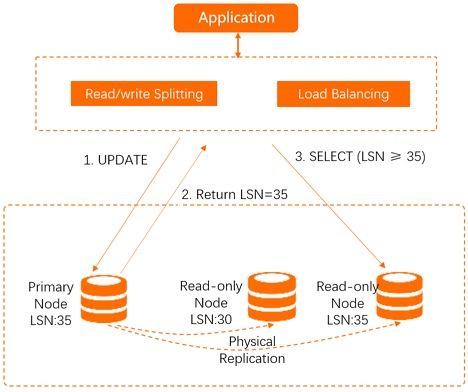
After a client connects to the backend through a cluster endpoint, the read/write splitting middleware automatically establishes connections to the primary node and each read-only node. Within a single connection (session), the middleware selects the most appropriate node by checking the data synchronization status of each database node. This method ensures correct results (reads after writes return the expected data) and provides load balancing for read and write requests.
-
Native read/write splitting for better performance
If you build your own proxy layer on the cloud to implement read/write splitting, requests must go through multiple components for SQL parsing and forwarding before they reach the database, which increases latency. By contrast, PolarDB read/write splitting is built directly into the existing high-security link. It adds no extra components or overhead, reducing latency and improving throughput.
-
Simplified maintenance
In a traditional model, you must configure the connection endpoints for the primary node and every read-only node in your application. You also need to split your business logic to ensure that write requests are sent to the primary node and read requests are sent to all nodes.
PolarDB provides a single cluster endpoint. After your application connects to this endpoint, it can perform read and write operations on the primary and read-only nodes. Requests are forwarded automatically, and the routing logic is fully transparent, reducing maintenance costs.
You can also increase processing capacity by adding more read-only nodes without making any changes to your application.
-
Node health checks for high availability
The read/write splitting module automatically performs a node health check on all nodes in the cluster. If a node fails or its latency exceeds a specified threshold, PolarDB stops routing read requests to that node. Requests are then distributed among the remaining healthy nodes. This ensures a single read-only node failure does not affect your application. After the node recovers, PolarDB automatically adds it back to the routing pool.
-
Free to use, reducing resource and maintenance costs
The read/write splitting feature is provided at no extra cost.
Request routing logic
In Read/Write mode, requests are routed as follows:
-
Forwarded only to the primary node:
-
All DML operations (INSERT, UPDATE, DELETE, and SELECT FOR UPDATE)
-
All DDL operations (such as creating or dropping databases and tables, altering table schemas, and managing permissions)
-
All requests within a transaction when transaction splitting is disabled
NoteFor routing details when transaction splitting is enabled, see transaction splitting.
-
User-defined functions
-
stored procedures
-
LOCK/UNLOCK TABLES statements
-
Multi-statement queries
-
Requests that use temporary tables
-
SELECT last_insert_id() -
All queries and modifications of user variables
-
binlog dump requests
-
-
Forwarded to read-only nodes or the primary node:
NoteRequests are forwarded to the primary node only when Primary Node Accepts Read Requests is set to Yes.
-
Read requests outside of a transaction
-
Read-only transactions (START TRANSACTION READ ONLY)
-
-
Always forwarded to all nodes:
-
All changes to system variables
-
The USE command
-
The PREPARE and DEALLOCATE PREPARE commands
-
Commands such as COM_CHANGE_USER, COM_RESET_CONNECTION, COM_QUIT, and COM_SET_OPTION
-
SHOW PROCESSLISTNoteWhen you run the
SHOW PROCESSLISTcommand, PolarDB returns the process list information from all nodes. -
KILL (the KILL statement in SQL, not the command-line KILL command)
-
In Read Only, requests are routed as follows:
-
DDL and DML operations are not allowed.
-
All read requests are forwarded to read-only nodes using load balancing.
-
Read requests are never forwarded to the primary node, even if the primary node has been added to the service nodes.
-
PolarDB pins a binlog dump to a specific read-only node.
Features
PolarDB read/write splitting includes the following features: