O&M activities—such as specification upgrades, switchovers, and minor version upgrades—and unplanned events like primary node failures can disconnect your application from PolarDB. Without persistent connections, your application must detect the disconnection and reconnect, which interrupts service or requires reconnection logic in your code. With persistent connections enabled, PolarProxy keeps the frontend connection alive across these events and restores the session state transparently, so your application sees no interruption.
Supported configurations
Persistent connections require the following:
PolarProxy version 2.4.7 or later. To check your version and upgrade, see Minor version upgrade.
PolarDB for MySQL 5.6, 5.7, or 8.0 (Cluster Edition).
A supported endpoint type (see the table below).
Supported endpoint types:
| Endpoint type | Load balancing policy | Persistent connections supported |
|---|---|---|
| Default cluster endpoint | Any | Yes |
| Custom endpoint | Active requests-based load balancing | Yes |
| Custom endpoint | Connections-based load balancing | No — removing a node disconnects all connections on that node |
| Direct connection to a read-only node | N/A | No — always disconnected on node removal |
How it works
Primary node switchover
Each database session has two layers:
A frontend connection between your application and PolarProxy
A backend connection between PolarProxy and the primary or read-only node
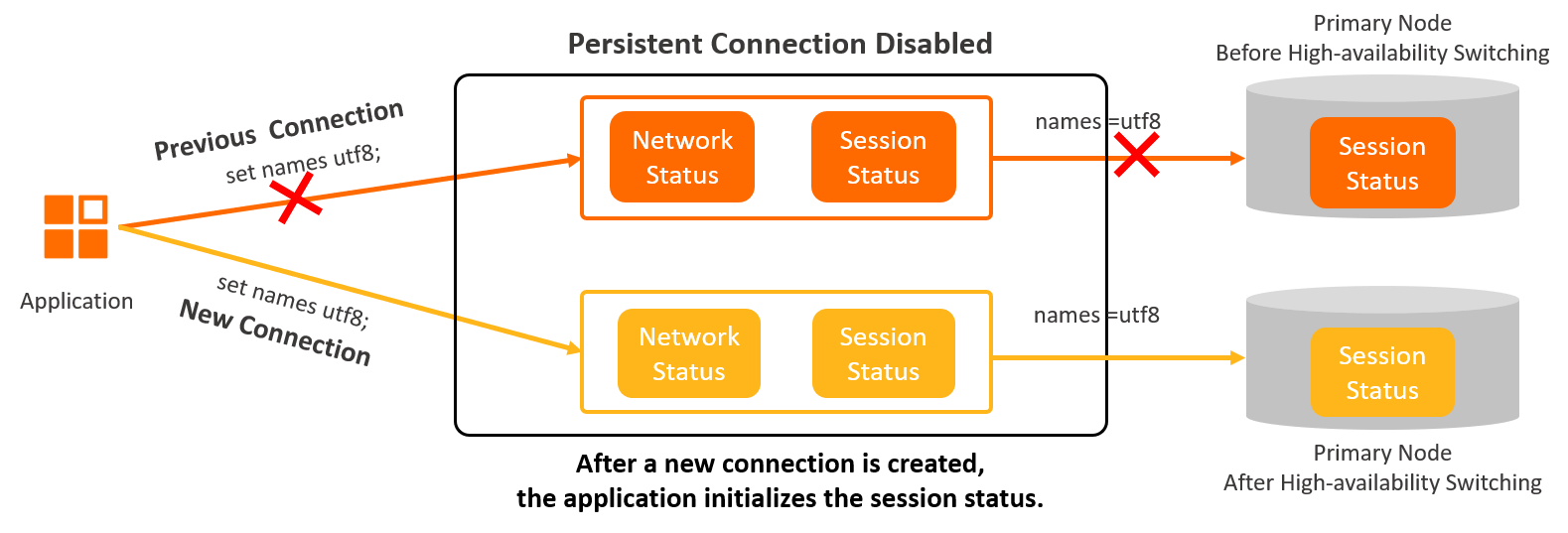
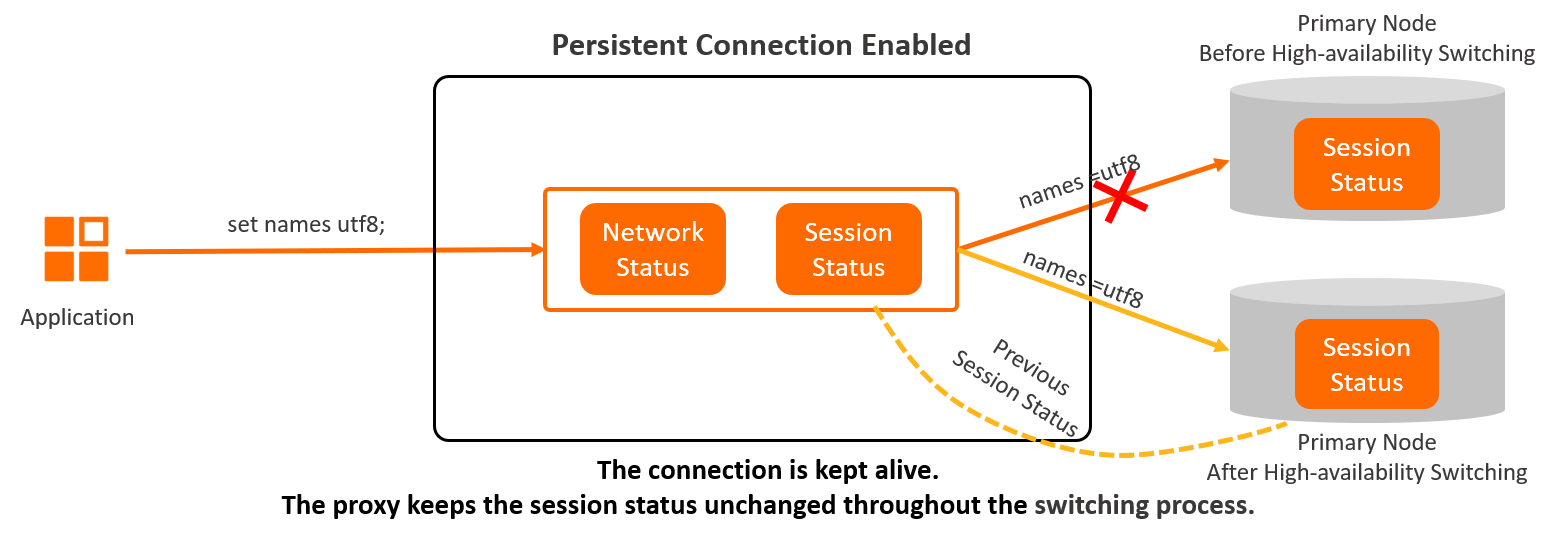
Without persistent connections, a primary node switchover breaks both layers and your application must reconnect. With persistent connections enabled, PolarProxy keeps the frontend connection alive while it disconnects from the old primary node, connects to the new primary node, and restores the session state. The switchover is transparent to your application.
Session state restoration
A MySQL session carries state that must survive the switchover: system variables, user variables, temporary tables, character set encoding, transaction status, and prepared statement status. When PolarProxy connects to the new primary node, it replays this state so your application's session settings remain unchanged.
For example, after set names utf8; is executed, the session is in a names=utf8 state. PolarProxy restores this encoding on the new primary node, so no character set errors occur.
Timing during a switchover
When the new primary node takes over, both the original and new databases are temporarily inaccessible. The duration depends on database load.
If the new primary node recovers within 60 seconds, PolarProxy routes requests to it and the session continues.
If the new primary node does not recover within 60 seconds, PolarProxy drops the connection. Your application must reconnect. This behavior occurs regardless of whether persistent connections are enabled.
Read-only node removal
After PolarProxy receives a removal request for a read-only node, all new connections and idle requests are immediately redirected away from that node.
If a request is already running on the node being removed, PolarProxy waits up to 60 seconds for it to finish. If the request completes within that window, the connection is kept alive. If the request is still running after 60 seconds, the connection is dropped.
Removing a read-only node from an endpoint that uses the Connections-based load balancing policy disconnects all connections on that node, including direct connections to the node.
Limitations
Persistent connections cannot keep a session alive in the following situations:
| Situation | Description |
|---|---|
| Active temporary tables | The session has temporary tables when the switchover starts. |
| Partial result delivery | A query result is only partially delivered to PolarProxy at the time of switchover. For example, a SELECT statement returns 100 MB, but only 10 MB has been received when the switchover triggers. |
| In-progress transactions | An active transaction exists when the switchover starts—for example, begin; insert into .... |
Cursor or stmt_send_long_data in use | The cursor or stmt_send_long_data method is in use and the request has not finished when the switchover starts. |
When a switchover or node removal starts, PolarProxy waits up to 60 seconds for active connections to become idle—that is, all requests have returned responses or the transaction has ended. Connections that become idle within this window are kept alive.
Performance benchmarking
The following results show the percentage of connections kept alive under different O&M scenarios.
Test environment:
| Parameter | Value |
|---|---|
| Cluster | PolarDB for MySQL 8.0, one primary node and two read-only nodes |
| Node specification | 4-core 16 GB (polar.mysql.x4.large) |
| Test tool | Sysbench |
| Test data | 20 tables, 10,000 rows per table, parallelism degree of 20 |
Procedure: Measure the keep-alive rate before and after each O&M activity.
Results:
| Scenario | Keep-alive rate | Conditions |
|---|---|---|
| Switch to a new primary node | 100% | |
| Upgrade the minor version of the database kernel engine | 100% | Does not cover database proxy minor version upgrades; those upgrades may cause network interruptions. |
| Upgrade cluster specifications | 100% | Applies only to tier-by-tier upgrades (for example, 4 cores to 8 cores). Skipping tiers—such as upgrading from 4 cores to 16 cores or higher—may cause a service interruption. |
| Add or remove nodes | 100% | If the database proxy node is downgraded during a read-only node removal, some connections may be closed. |