Data is a core asset for enterprises. As the business of enterprises grows, data increases exponentially. This requires business applications to be able to process data online and in real time. Database O&M personnel face great challenges in protecting the core data of enterprises because issues, such as accidental data deletion, system vulnerabilities and ransomware, hardware failures, and natural disasters, can cause data loss. Therefore, backup and restoration are important features of databases.
PolarDB supports data backups and redo log backups:
-
Data backup: Creates a backup set (snapshot) of a cluster's complete data at a specific point in time. This is a full backup.
-
Redo log backup: Records the incremental data generated after a backup set is created. This is an incremental backup.
-
A PolarDB cluster recovery restores data to the current cluster by using a backup set (snapshot).
-
A PolarDB database or table recovery creates a new database or table in the current cluster to restore the data.
A full data backup combined with subsequent redo log backups enables point-in-time restoration of an entire PolarDB cluster or specific databases and tables.
Billing rules
-
You can use the backup and restoration feature free of charge. However, backup files consume storage space. For more information about billing rules, see Backup storage (beyond free quota).
-
For more information about how to view your bills, see Bills.
If you select to retain backup sets for a long time when you manually unsubscribe or release your cluster, the backup sets are automatically moved to the cluster recycle bin. In this case, level-1 backup files automatically become level-2 backup files and you are charged. For more information, see Cluster recycle bin.
Data backup
PSL4/PSL5
Level-1 backup
Level-1 backups use redirect-on-write (ROW) snapshots and are stored directly in the PolarDB distributed storage system. No data is copied during backup. When a block is modified, the system retains the original version for the snapshot and redirects to a new block, enabling backups to complete in seconds regardless of database size.
PolarDB restores a cluster from a snapshot in about 10 minutes using multi-threaded parallel processing. Recovery time doubles with a hot standby cluster and varies with database size.
Level-1 backup size
In the PolarDB console, go to to view level-1 backup sizes.:

-
PolarDB cluster Physical Size of Level-1 Backups (shown as ① in the figure above): This is the total physical space exclusively occupied by all level-1 backups. This value is used as the baseline to calculate the actual storage usage of level-1 backups.
-
PolarDB cluster Logical Size of Backups (indicated by ② in the preceding figure): The logical size of a single backup set. This size is not used for billing.
-
The data of a PolarDB cluster and its multiple level-1 backups (snapshots) share the same physical data blocks. These shared blocks are billed only once.
Backup FAQ.
-
Level-1 backup is enabled by default and cannot be disabled.
-
The retention period for level-1 backups is 3 to 14 days.
Level-2 backup
-
A level-2 backup is a compressed copy of a level-1 backup on offline storage. It costs less but restores slower.
-
If you enable level-2 backup, level-1 backups are automatically converted to level-2 backups after their specified retention period expires.
-
Level-2 backups support Single-region and cross-region backups.
Level-2 backup size
In the PolarDB console, go to to view total level-2 backup size (sum of all backup files):
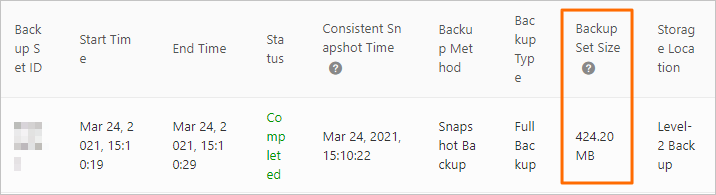
-
If level-1 to level-2 conversion takes too long, the next expiring level-1 backup is deleted instead of converted. Example: your PolarDB cluster backs up daily at 01:00 with 24-hour retention. PolarDB creates Backup A on January 1 at 01:00. Backup A expires on January 2 and starts converting. If conversion is still running on January 3 at 01:00, Backup B (January 2) is deleted without conversion.
-
Level-2 backup is disabled by default.
-
The retention period for level-2 backups is 30 to 7,300 days.
ESSD
Level-1 backups are local snapshots on the distributed storage cluster, providing the fastest backup and recovery at higher cost. Long-term storage may slightly affect write performance; keep retention under two weeks. A free storage quota is provided; excess usage is billed. Adjust the backup cycle to control capacity.
-
Level-1 backup is enabled by default and cannot be disabled.
-
The retention period for level-1 backups is 3 to 14 days.
Level-1 backup size
In the PolarDB console, go to to view level-1 backup sizes.:
-
PolarDB cluster Physical Size of Level-1 Backups (indicated by ① in the figure above): This is the total physical space exclusively occupied by all level-1 backups. This value is used as the baseline to calculate the actual usage of level-1 backup storage.
-
PolarDB cluster Logical Size of Backups (indicated by ② in the figure above): The logical size of a single backup set, which is not used for billing.
-
The data of a PolarDB cluster and its multiple level-1 backups (snapshots) share the same physical data blocks. These shared blocks are billed only once.
Backup FAQ.
Redo log backup
PolarDB creates log backups by uploading redo logs to Object Storage Service (OSS) in parallel and in real time. Log backups support single-region backup and cross-region backup, with a retention period from 3 to 7,300 days. You can also enable the Long-term Retain Backups before Cluster Deletion feature for long-term storage.
-
Currently, only the Enterprise Edition supports the Long-term Retain Backups before Cluster Deletion option.
-
Single-region backup for logs is enabled by default and cannot be disabled.
Log backups enable point-in-time recovery (PITR). A full snapshot combined with subsequent log backups restores a PolarDB cluster to any point in time, protecting against accidental data loss. Redo log replay speed: 20–70 seconds per GB. Total recovery time = snapshot restoration + log replay.
Backup size
The total size of log backups is the sum of the sizes of all individual log backup files.:

Risk assessment
If the redo log generation rate of a PolarDB for MySQL cluster reaches 35 MB/s to 50 MB/s, redo logs may accumulate. This can increase your backup storage costs.
Backup data protection
-
Tamper-proofing:
-
In PolarDB for MySQL, level-1 backups are stored as snapshots in the distributed storage system, while level-2 and log backups are stored in OSS. Both provide Write Once, Read Many (WORM) immutability.
NoteStandard Edition clusters support only level-1 backups (data backups) and do not support level-2 backups.
-
-
Protection against malicious or accidental deletion:
-
Manual deletion: You can only delete data from manual backups. You cannot delete data from automatic backups.
-
Automatic backups are deleted after their retention period expires, but the feature cannot be disabled. Per the backup policy settings, minimum retention is 3 days (default: 7) with at least two backups per week, so automatic backup data is never fully deleted.
-
Single-region and cross-region backups
-
Backup description
Backup type
Description
Enabled by default
Use cases
Benefits
Single-region backup
Backups are stored in a different availability zone within the same region.
Yes.
NoteWhen you enable level-2 backup, single-region backup is enabled by default.
Long-term archiving.
Reduces costs by allowing less frequent backup transfers.
Cross-region backup
Backups are stored in a region other than the source region.
ImportantThis feature is available only for PolarDB for MySQL Enterprise Edition.
No. You must enable it manually.
Geo-redundant backup and MLPS Level 3 compliance.
Low RPO, ideal for secure non-public environments. Lower transfer frequency reduces costs.
NoteLow-frequency level-2 backup: The backup cycle for level-2 backups is set to a lower frequency than that of level-1 backups.
-
Supported regions for cross-region backup
Source region
Destination region
the Chinese mainland
the Chinese mainland
US (Silicon Valley), US (Virginia)
China (Hong Kong)
Singapore, Indonesia (Jakarta), Japan (Tokyo), Malaysia (Kuala Lumpur)
Germany (Frankfurt)
China (Hong Kong)
the Chinese mainland
US (Silicon Valley), US (Virginia)
Japan (Tokyo), Singapore, Malaysia (Kuala Lumpur), Indonesia (Jakarta)
Germany (Frankfurt)
Japan (Tokyo)
the Chinese mainland
US (Silicon Valley), US (Virginia)
China (Hong Kong)
Singapore, Malaysia (Kuala Lumpur), Indonesia (Jakarta)
Germany (Frankfurt)
US (Silicon Valley)
the Chinese mainland
US (Virginia)
China (Hong Kong)
Singapore, Malaysia (Kuala Lumpur), Indonesia (Jakarta)
Germany (Frankfurt)
US (Virginia)
the Chinese mainland
US (Silicon Valley)
China (Hong Kong)
Singapore, Malaysia (Kuala Lumpur), Indonesia (Jakarta)
Germany (Frankfurt)
Singapore
the Chinese mainland
US (Silicon Valley), US (Virginia)
China (Hong Kong)
Malaysia (Kuala Lumpur), Indonesia (Jakarta)
Germany (Frankfurt)
Malaysia (Kuala Lumpur)
the Chinese mainland
US (Silicon Valley), US (Virginia)
China (Hong Kong)
Singapore, Indonesia (Jakarta), Japan (Tokyo)
Germany (Frankfurt)
Indonesia (Jakarta)
the Chinese mainland
US (Silicon Valley), US (Virginia)
China (Hong Kong)
Singapore, Japan (Tokyo), Malaysia (Kuala Lumpur)
Germany (Frankfurt)
Germany (Frankfurt)
the Chinese mainland
US (Silicon Valley), US (Virginia)
China (Hong Kong)
Singapore, Indonesia (Jakarta), Japan (Tokyo), Malaysia (Kuala Lumpur)
China (Hangzhou) Finance Cloud
China (Shanghai) Finance Cloud, China (Shenzhen) Finance Cloud
China (Shanghai) Finance Cloud
China (Hangzhou) Finance Cloud, China (Shenzhen) Finance Cloud
China (Shenzhen) Finance Cloud
China (Hangzhou) Finance Cloud, China (Shanghai) Finance Cloud
FAQ
Backup and recovery FAQ.