Deploy and call an encrypted large language model (LLM) in the PAI-EAS secure encrypted inference environment on Platform for AI (PAI). The model is encrypted and uploaded for use inside a trusted environment. At deployment, the remote attestation service (Trustee) verifies that the runtime environment is trustworthy and then releases the decryption key, which decrypts and mounts the model. Trusted Network Gateway (TNG) can transparently encrypt inference traffic. These layers of protection keep your data and your model secure throughout their lifecycle. This solution suits workloads that handle sensitive data under strict security requirements, such as financial services, government, and enterprise applications.
How it works
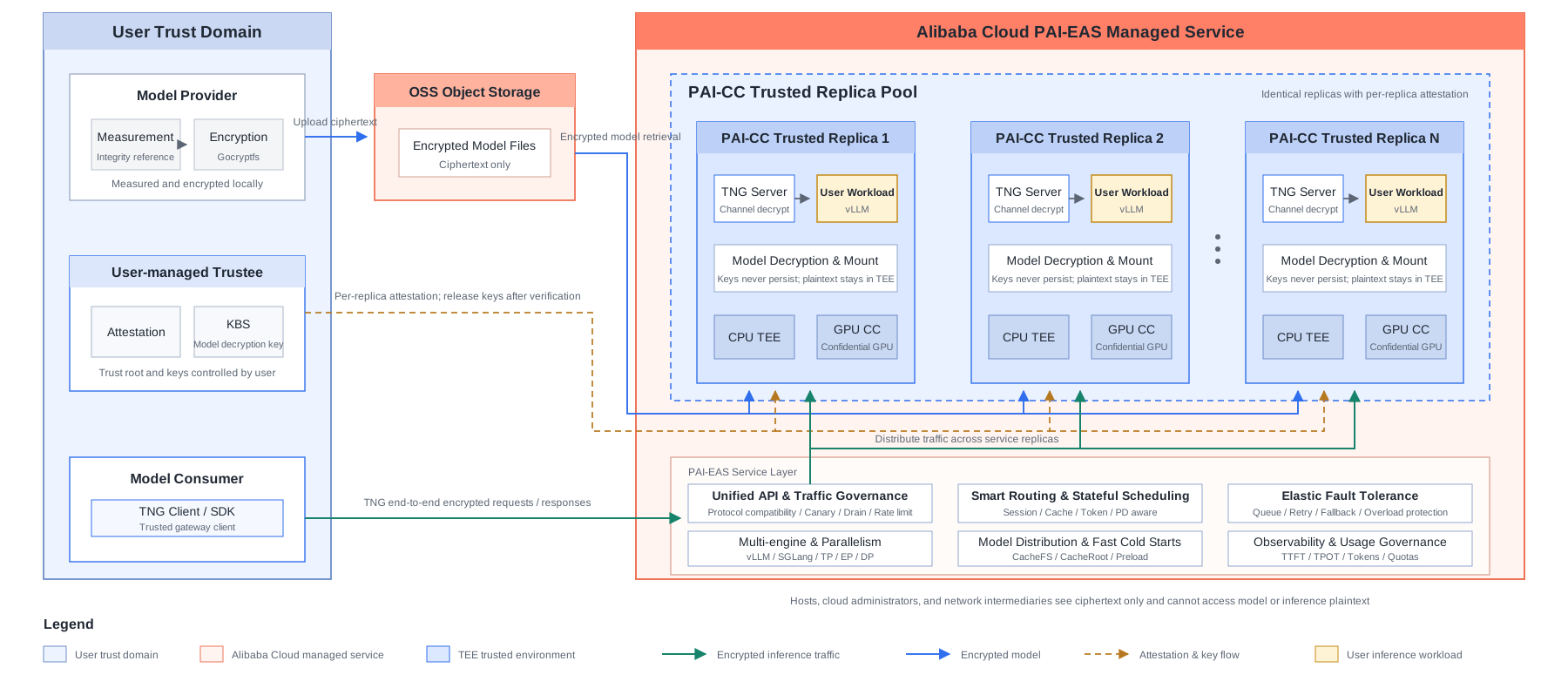
PAI-CC (PAI Confidential Computing) is the PAI-EAS inference service for confidential computing workloads. It builds on a standard Elastic Algorithm Service (EAS) inference service and protects model inference end to end with the following capabilities:
CPU TEE (Intel TDX trusted execution environment): The inference process runs in a trust domain isolated by Intel TDX hardware. Model loading, tokenization, scheduling logic, and the KV cache all take place inside the enclave on the CPU, so neither the host nor the cloud platform can read the plaintext.
GPU TEE (confidential GPU): The GPU is part of the trusted execution environment (TEE). The TEE protects the transfer of model weights from the CPU to the GPU, as well as the attention computation, matrix multiplication, and KV cache inside the GPU. The CPU-GPU interconnect is encrypted.
Encrypted model storage: The model is encrypted with gocryptfs (AES256-GCM), stored in Object Storage Service (OSS), and transferred to the instance as ciphertext. The decryption key is injected into the TEE only after remote attestation succeeds, and the model is then decrypted and mounted. The key is never written to disk and never leaves the TEE.
Remote attestation: Before deployment and before inference starts, Trustee verifies the TEE hardware signature, the firmware measurement, and the runtime configuration of the instance. The model decryption key is released only after this verification succeeds.
Model integrity measurement (verity): Optional. This capability generates a Merkle tree root hash for the model files and checks it at deployment, which prevents the model from being tampered with or replaced at runtime.
Encrypted inference traffic (TNG gateway protection): Optional. TNG transparently encrypts the requests and responses between the client and the inference service, which protects inference data end to end. Keys are negotiated during the remote attestation handshake, and each inference request uses a unique key to prevent eavesdropping and tampering on the network path.
Install the pai-cc-tools client
pai-cc-tools wraps the commands for model measurement, encryption, upload, and confidential inference. Install the client before you begin:
curl -fsSL https://conf-ai.oss-cn-beijing.aliyuncs.com/pai-cc/pai-cc-tools-20260924-3599a46.tar.gz | tar -xz -C /opt && ln -sf /opt/pai-cc-tools/pai-cc /usr/local/bin/pai-ccThe pai-cc command is then available.
Step 1: Prepare an encrypted model
This step has three parts: measure the model (optional), encrypt the model, and upload the model. Model files are large, so this process can take a long time.
To try this solution quickly, use the encrypted model file provided in the following table. Skip the measurement, encryption, and upload parts of this step and go directly to Step 2: Set up the Trustee remote attestation service.
Add the reference value from the preceding table to the remote attestation policy in Step 2 to verify the model that your service loads at deployment. To use your own model, complete the following parts. This topic uses the Qwen3.8-27B model as an example.
1. Measure the model (optional)
Model measurement generates a reference value for the model directory. At deployment, the service uses this value to check that the loaded model and the runtime checkpoint haven't been tampered with. Run this part if you need to verify a model that you load from a remote source and to protect the runtime checkpoint from tampering. Measure the model before you encrypt it.
# Pull online from ModelScope or use a local directory
DIR=$(pai-cc model measure --modelscope Qwen/Qwen3.8-27B --hash-output /tmp/qwen-root.hash)
echo "Path of the measured model: ${DIR}"
The reference value is written to the file specified by
--hash-output. Record this value. You can use it later as a reference value for remote attestation.
2. Encrypt the model
PAI-EAS encrypted inference uses Gocryptfs, an AES256-GCM-based encryption method that complies with the open-source gocryptfs standard.
pai-cc model encrypt performs the encryption. This solution uses the key 0Bn4Q1wwY9fN3P throughout. You provide this key.
-
(Optional) To encrypt the measured model:
CIPHER=$(pai-cc model encrypt --model "$DIR" --method gocryptfs --key 0Bn4Q1wwY9fN3P) echo "Path of the measured and encrypted model: ${CIPHER}" -
To encrypt the model without measuring it first:
CIPHER=$(pai-cc model encrypt --modelscope Qwen/Qwen3.8-27B --method gocryptfs --key 0Bn4Q1wwY9fN3P)
echo "Path of the encrypted model: ${CIPHER}"
3. Upload the model
Upload the ciphertext directory to an OSS bucket in the same region as the deployment instance. pai-cc model upload wraps ossutil, performs a flat upload of the ciphertext and verifies the file count.
URI=$(pai-cc model upload --cipher "$CIPHER" --bucket <your-bucket> --prefix qwen3.8-27b-gocryptfs)The command writes the
oss://<your-bucket>/qwen3.8-27b-gocryptfs/URI to stdout. Use this path for the Storage Mount configuration in Step 3.
Step 2: Set up the Trustee remote attestation service
You manage the remote attestation service, which verifies the runtime environment of the model and the inference service. The model decryption key is injected only after the deployment environment meets your trust requirements. The key then decrypts and mounts the model. This solution deploys Trustee on Elastic Compute Service (ECS).
-
Prepare a standard ECS instance with a public IP address, and select Alibaba Cloud Linux 3.2104 LTS 64-bit as the OS. Run all the following commands on this instance.
For the strictest security requirements, you can also deploy Trustee in an on-premises data center or on a local server. Connect it to the VPC on the cloud over an Express Connect circuit or a VPN. This keeps the root of trust fully under your control.
-
Log on to the instance, and then install and start Trustee from the yum repository:
yum install -y trustee-1.10.0Trustee starts automatically and listens on port 8081 by default. Its endpoint is
http://<trustee-ip>:8081/api. Configure HTTPS for Trustee in production environments. -
Import the model decryption key into Trustee. This solution uses the key
0Bn4Q1wwY9fN3P. You provide this key. When you write the key, useecho -nto omit the trailing newline so that the value matches the encryption key byte for byte:sudo mkdir -p /opt/trustee/kbs/repository/default/aliyun/ sudo sh -c 'echo -n "0Bn4Q1wwY9fN3P" > /opt/trustee/kbs/repository/default/aliyun/model-decryption-key'After this step, the key ID in Trustee is
kbs:///default/aliyun/model-decryption-key, which is the value ofdecryption_keyin the Step 3 configuration. -
Configure the remote attestation policy. The policy file is
/opt/trustee/attestation-service/policies/opa/default.rego. Trustee checks each replica of the PAI-CC instance and decides whether to release the key. -
Restart Trustee:
sudo systemctl restart trustee
Step 3: Create a PAI-CC service
Create a Lingjun resource group and purchase nodes. Follow the instructions in Create a resource group and purchase Lingjun resources to create the resource group in the China (Beijing) region and purchase instances of the
ml.gu8tef.8.46xlarge.ccinstance type. This instance type is in invitational preview. Contact your Alibaba Cloud account manager to request access.Create a virtual private cloud (VPC) in the China (Beijing) region, create a vSwitch in the beijing-i zone, and then create a security group in the VPC. This VPC hosts the confidential containers that run inference for the PAI-CC instance you create later. Configure the SNAT feature of an Internet NAT gateway for the VPC and associate an Elastic IP Address (EIP). The instances then have public network access to pull the model ciphertext and reach Trustee. For more information, see Internet NAT gateway.
Configure the network of the instance that runs Trustee so that the PAI-CC instance can reach Trustee over the public network. Add an inbound rule to the security group of the Trustee ECS instance to allow traffic on port 8081 (custom TCP). Set the source to the SNAT egress IP address that you configured for the VPC.
Create a resource quota. Follow the instructions in Create a resource quota: for Source Type, select Lingjun resource group, and then select the Lingjun resource group that you created, along with its nodes or instance types. For VPC, select the VPC that you created. For Associate Workspace, select a PAI workspace. The resource quota is allocated to that workspace. If you haven't created a workspace, follow the instructions in Create and manage workspaces to create one.
Log on to the PAI console. At the top of the page, select the region. On the right, select the workspace. Then click Elastic Algorithm Service (EAS). On the Inference Service tab, click Deploy Service. In the Custom Model Deployment section, click Custom Deployment.
-
Configure the following key parameters. For more information about the other parameters, see Custom deployment.
Parameter
Description
Resource Information
Resource Type
Select Resource Quota, and then select the Lingjun resource quota that you created.
Deployment
For GPU (Number of GPUs), specify
1. For CPU (Number of Cores), specify20. For Memory (GB), specify200. Adjust these values based on your model and how you deploy the service.Replicas
Specify
8. Adjust this value based on your Deployment settings.Environment Information
Deployment Method
Select Image-based Deployment.
Image Configuration
Select a runtime image. In this example, select Alibaba Cloud Image > vllm 0.25.0-gpu.
Storage Mount
Select OSS. Set Uri to
oss://conf-ai/qwen3.8-27b-gocryptfs/(the ciphertext path that you uploaded in Step 1), and set Mount Path to/mnt/model/. Use a read-only mount.Command to Run
vllm serve /mnt/model/ --host 0.0.0.0 --port 8000 --served-model-name "Qwen3.8-27B". The model path/mnt/model/must match the OSS Mount Path that you specified.Port Number
8000.
Network Information
VPC
Select the VPC and the vSwitch that you created.
Security Group Name
Select the security group that you created.
Features
GPU Driver Version
Use
570.148.08-open. If you can't select this field, edit the JSON configuration directly.The key difference between PAI-CC and a standard EAS service is confidential computing. When you create a PAI-CC service, also enable Configure Secure Encryption Environment and configure the following options. After you enable this option, the inference service runs in a confidential computing environment protected by both the CPU TEE and the GPU TEE. During inference, the model weights, the KV cache, and all intermediate computations stay inside the TEE, and no plaintext is exposed to the host. At deployment, the model is decrypted and mounted only after remote attestation succeeds. TNG then encrypts the inference traffic.
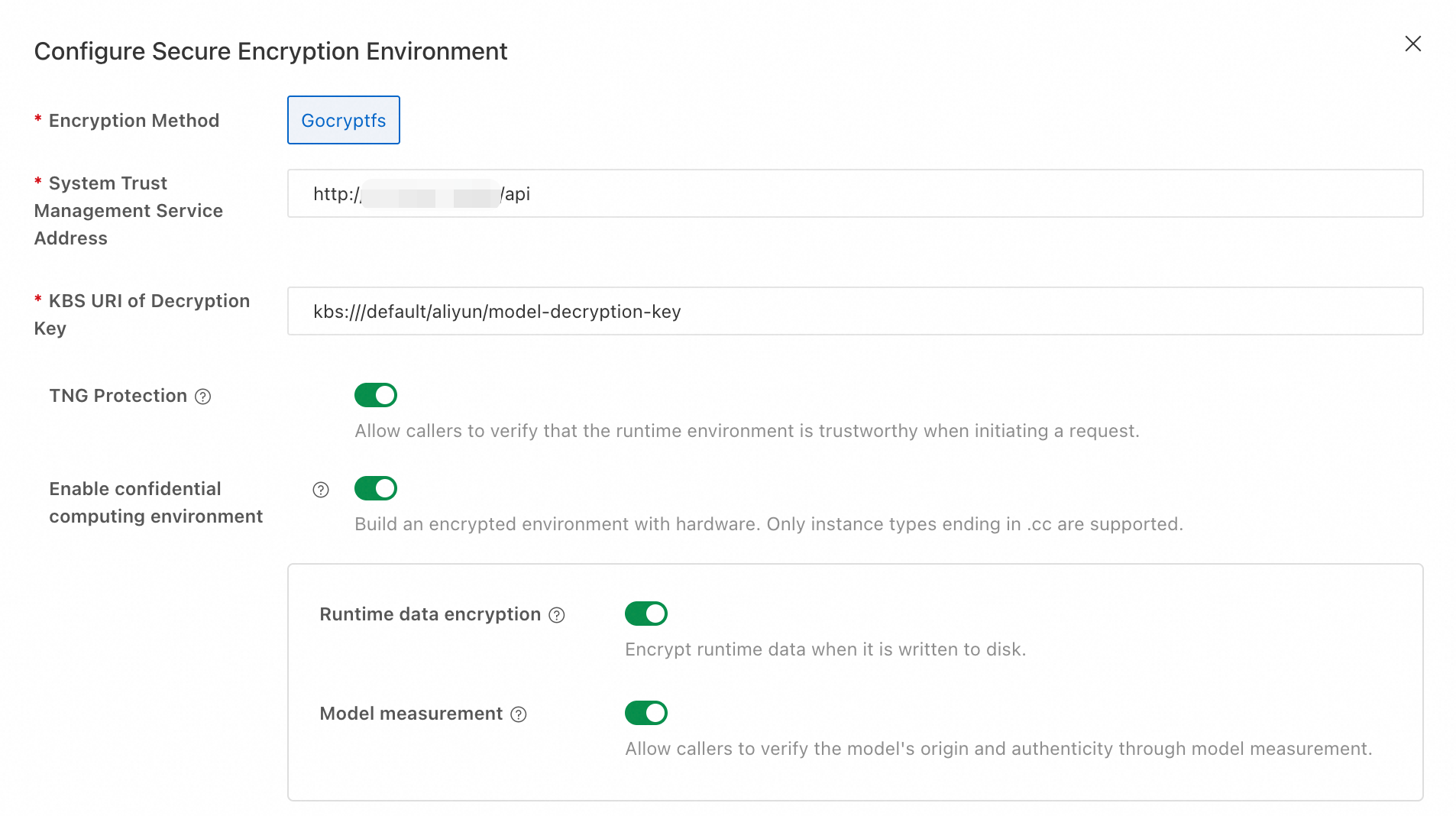
Configuration item
Value
Encryption Method
Gocryptfs (the same as
--methodin Step 1)Configure Secure Encryption Environment
Enabled
Runtime data encryption
Enabled
TNG gateway protection
Enabled (TNG encrypts the inference traffic)
Model measurement
Enabled (if you measured the model in Step 1)
System Trust Management Service Address
http://<trustee-ip>:8081/api(the endpoint of the Trustee service that you deployed)KBS URI of Decryption Key
kbs:///default/aliyun/model-decryption-keyThe following example shows the resulting JSON configuration:
After you configure the parameters, click Deploy. When service status shows Running, the service is deployed.
Step 4: Run confidential inference
TNG encrypts the traffic between the client and the inference service. Inference runs in the confidential computing environment provided by Intel TDX and the GPU TEE. Your requests and responses, including streaming responses, are encrypted in transit.
Your client sends inference requests through the TNG client. The following access methods are available. Choose the one that fits your use case.
|
Access method |
How to obtain |
|
Proxy gateway (HTTP proxy / SOCKS5 proxy / transparent proxy) |
Download the binaries or containers from the GitHub repository. See Documentation and examples |
|
Python SDK |
|
|
Go SDK |
|
|
JS SDK |
|
To simplify these examples, pai-cc-tools wraps the TNG calls in the preceding table.
1. View the service endpoint
On the Inference Service tab, click the name of your service to open the Overview page. In the Basic Information section, click View Endpoint Information.
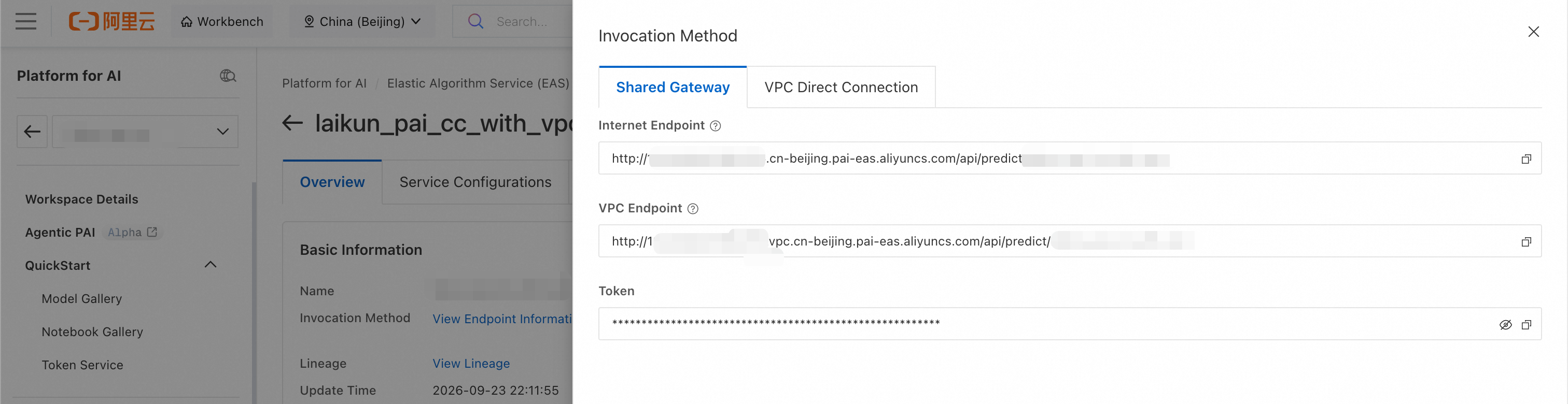
Record the service endpoint and the token for the pai-cc secure commands that follow.
2. Run a single confidential inference
pai-cc secure run automatically downloads and configures the required TNG components. The gateway transparently encrypts every inference request that the curl command sends:
pai-cc secure run -- \
    curl -sS -X POST http://<service-url>/v1/chat/completions \
        -H "Authorization: <your-token>" -H "Content-Type: application/json" \
        -d '{"model":"Qwen3.8-27B","messages":[{"role":"user","content":"Hello"}],"max_tokens":100,"stream":false}'
Everything after -- is the full original command, including the URL and the Authorization header. Actual output:
{"id":"chatcmpl-b1df6ef135765608","object":"chat.completion","created":1790173748,"model":"Qwen3.8-27B","choices":[{"index":0,"message":{"role":"assistant","content":"The user said \"Hello\" - a simple greeting. I should respond warmly and concisely, offering to help.\n```\n\n\nHello! How can I help you today?","refusal":null,"annotations":null,"audio":null,"function_call":null,"reasoning":null},"logprobs":null,"finish_reason":"stop","stop_reason":null,"token_ids":null,"routed_experts":null}],"service_tier":null,"system_fingerprint":"vllm-0.25.0-fb7f4d0a","usage":{"prompt_tokens":53,"total_tokens":90,"completion_tokens":37,"prompt_tokens_details":null},"prompt_logprobs":null,"prompt_token_ids":null,"prompt_text":null,"kv_transfer_params":null,"metrics":null}
3. Verify SDK compatibility
Run the following command to verify that all the TNG client SDKs can make confidential calls to this inference service. The command covers proxy mode, process injection, the Python SDK, the Go SDK, and the JS SDK.
pai-cc secure test \
  --endpoint http://<service-url>/v1/chat/completions \
  --token <your-token> --builtin-as -m all
── tng-launch ──────────────────────────────────
PASS	tng-launch
── tng-exec ──────────────────────────────────
PASS	tng-exec
── python-sdk ──────────────────────────────────
PASS	python-sdk
── go-sdk ──────────────────────────────────
PASS	go-sdk
── js-sdk ──────────────────────────────────
PASS	js-sdk
summary: 5 passed, 0 failed, 0 skipped