If your recommendation system already handles recall, filtering, fine-grained sorting, and re-sorting, you can replace only the fine-grained sorting and re-sorting stages with PAI-Rec while keeping your existing recall results. After the PAI-Rec fine-grained sorting model proves effective in experiments, you can gradually migrate your recall policies to the PAI-Rec engine.
Prerequisites
Before you begin, make sure you have:
-
PAI-FeatureStore configured with user and item features
-
A fine-grained sorting model deployed via EasyRec Processor (TensorFlow) or TorchEasyRec Processor (PyTorch)
-
Feature engineering and model deployment code generated and deployed to DataWorks
Architecture overview
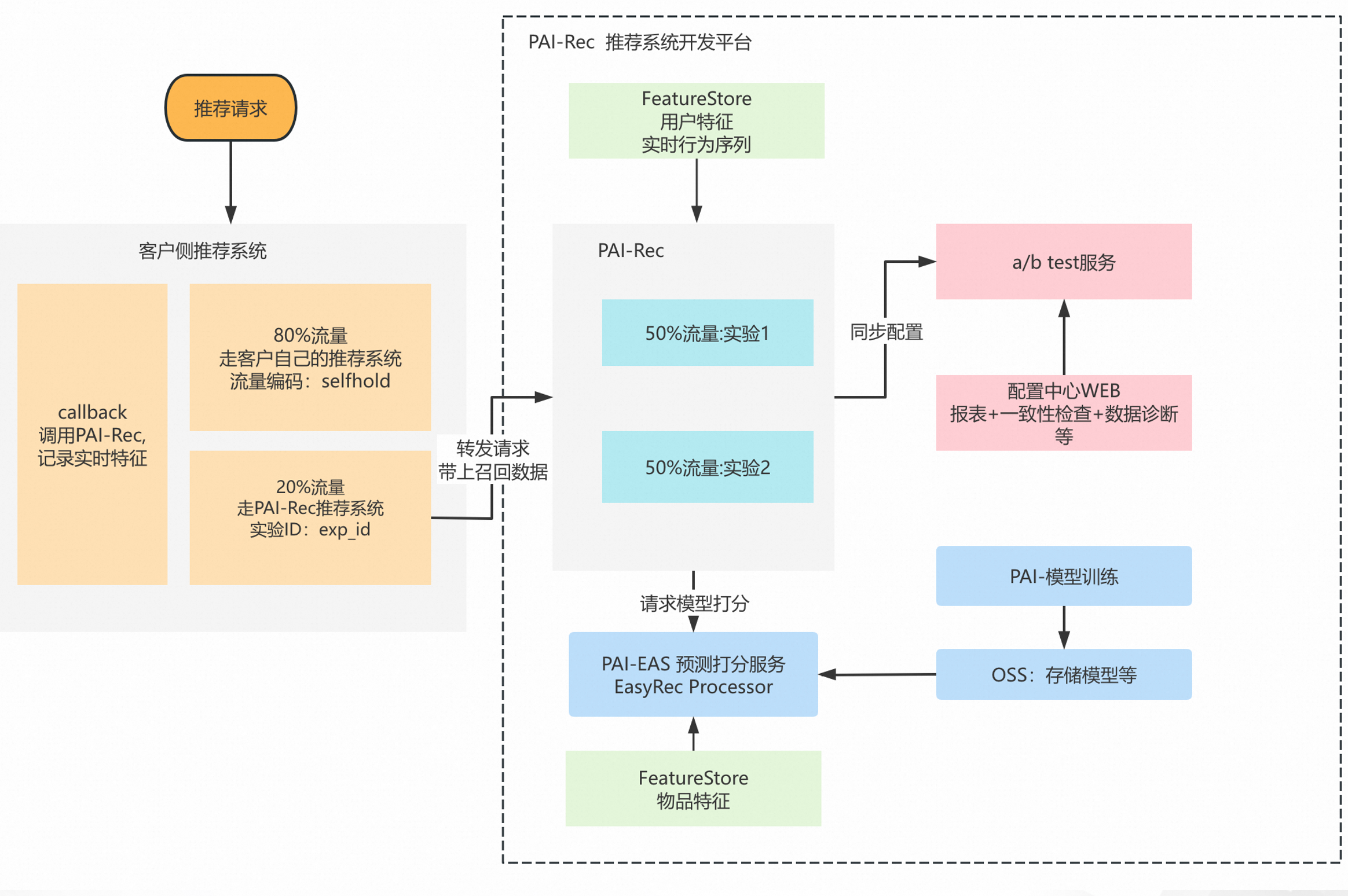
Your system handles recall and filtering, then passes the candidate list to PAI-Rec for fine-grained sorting. PAI-Rec returns the ranked list to your system.
-
Recall and filtering: Your existing system runs recall and filtering, producing a candidate item list.
-
Traffic splitting and API calls: Split a portion of traffic by user ID or another method, then call the PAI-Rec recommendation engine API. Pass the candidate item list in the
item_listparameter. -
PAI-Rec fine-grained sorting: PAI-Rec uses
item_listas its recall source. The engine retrieves user and item features, scores and sorts the items using the deployed fine-grained sorting model, and can apply re-sorting afterward. -
Result return and logging: PAI-Rec returns the sorted item list along with the experiment ID (
exp_id) and request ID (request_id). Record both values in your client:-
exp_id: identifies which experiment the result belongs to — required for experiment attribution and performance analysis -
request_id: uniquely identifies the request — required for data diagnostics and troubleshooting
-
PAI-Rec configuration
Configure the following components in your PAI-Rec solution. PAI-FeatureStore manages the features.
Model scoring service
Choose the processor that matches your model framework:
| Framework | Processor | Reference |
|---|---|---|
| TensorFlow | EasyRec Processor | EasyRec Processor |
| PyTorch | TorchEasyRec Processor | TorchEasyRec Processor |
PAI-Rec engine settings
Configure the following in the PAI-Rec engine:
-
User features: Retrieve user features from FeatureStore. See PAI-FeatureStore feature configuration.
-
ContextItemRecall: Configure Context Item Recall (ContextItemRecall) in the engine configuration. The engine then uses the
item_listpassed through the API as its recall source.{ "SceneConfs": { "${scene_name}": { "default": { "RecallNames": [ "ContextItemRecall" ] } } } } -
Fine-grained sorting model: Configure the fine-grained sorting model in the engine configuration file. See Fine-grained sorting configuration.
-
A/B testing: Use the A/B Test service to manage internal A/B experiments. Set up multiple sorting models using bucketing by user ID.
User-side changes
Your system retains all recall, filtering, and exposure operations. Make the following two changes to integrate with PAI-Rec:
1. Call the PAI-Rec engine API
Modify your recommendation request logic to call the PAI-Rec engine API. In the request, pass:
-
item_list: item IDs from your recall and filtering stages -
User ID and user features
-
Filtering rules
2. Record log fields
In your exposure and behavior logs, record the following fields from each PAI-Rec API response:
| Field | Purpose | Impact if missing |
|---|---|---|
exp_id |
Identifies the experiment — used for experiment attribution and performance analysis | Cannot attribute traffic or evaluate experiment results |
request_id |
Uniquely identifies the request — used for data diagnostics and troubleshooting | Cannot trace or diagnose data issues after the fact |