Qwen3 is the latest large language model series from the Qwen team at Alibaba Cloud. It includes two MoE models and six dense models, with improvements in reasoning, instruction following, agent, and multilingual capabilities. PAI-Model Gallery provides all 22 models, including the Base and FP8 versions. This topic uses Qwen3-235B-A22B as an example to show how to deploy, invoke, fine-tune, and evaluate models in this series in Model Gallery.
Deploy and invoke a model
Deploy a model
This example deploys the Qwen3-235B-A22B model with SGLang.
Go to the Model Gallery page.
Log in to the PAI console and select a region in the upper-left corner. Switch regions to find available compute resources.
In the left-side navigation pane, choose Workspaces and click the name of your target workspace to open it.
In the left-side navigation pane, choose QuickStart > Model Gallery.
In the model list on the right side of the Model Gallery page, click the Qwen3-235B-A22B model card to open the model details page.
In the upper-right corner, click Deploy. Configure the following parameters and keep the defaults for the others to deploy the model to the EAS inference service platform.
Deployment Method: Set Inference Engine to SGLang and Deployment Template to Single-Node.
Resource Information: For Resource Type, select public resources. The system recommends a suitable instance type. For the minimum configuration of each model, see Appendix: Computing resources and token limits.
ImportantIf no instance specifications are available, public resources in that region are out of stock. Consider the following options:
Switch regions. China (Ulanqab) provides more Lingjun preemptible resources (ml.gu7ef.8xlarge-gu100, ml.gu7xf.8xlarge-gu108, ml.gu8xf.8xlarge-gu108, ml.gu8tf.8.40xlarge). Preemptible resources can be reclaimed, so set your bid carefully.
Use an EAS resource group. Go to the EAS dedicated resources subscription page to purchase EAS dedicated resources.
Debug online
At the bottom of the Service details page, click online debugging. The following figure shows an example.

Invoke the API
Obtain the service endpoint and token.
In Model Gallery > Job Management > Deployment Jobs, click the service name of the deployed service to open the service details page.
Click View Call Information to obtain the Internet Endpoint and token.

Example call to the
/v1/chat/completionschat API for a service deployed with SGLang.curl -X POST \ -H "Content-Type: application/json" \ -H "Authorization: <EAS_TOKEN>" \ -d '{ "model": "<model_name, obtained from the /v1/models API>", "messages": [ { "role": "system", "content": "You are a helpful assistant." }, { "role": "user", "content": "hello!" } ] }' \ <EAS_ENDPOINT>/v1/chat/completionsfrom openai import OpenAI ##### API configuration ##### # Replace <EAS_ENDPOINT> with the service endpoint and <EAS_TOKEN> with the service token. openai_api_key = "<EAS_TOKEN>" openai_api_base = "<EAS_ENDPOINT>/v1" client = OpenAI( api_key=openai_api_key, base_url=openai_api_base, ) models = client.models.list() model = models.data[0].id print(model) stream = True chat_completion = client.chat.completions.create( messages=[ {"role": "user", "content": "Hello, could you please introduce yourself"} ], model=model, max_completion_tokens=2048, stream=stream, ) if stream: for chunk in chat_completion: print(chunk.choices[0].delta.content, end="") else: result = chat_completion.choices[0].message.content print(result)Replace <EAS_ENDPOINT> with the service endpoint and <EAS_TOKEN> with the service token.
Invocation methods vary by deployment method. For more invocation methods, see Invoke an API for a deployed LLM service.
Third-party integration
To connect to Chatbox, Dify, or Cherry Studio, see Integrate with third-party clients.
Advanced configuration
Edit the JSON configuration of the service to enable advanced features, such as adjusting the token limit and enabling tool calling (Function Calling).
Procedure: On the deployment page, edit the JSON in the Service Configuration section. If the service is already deployed, update it to access the deployment page.

Modify token limit
Qwen3 models natively support 32,768 tokens. RoPE scaling extends this to 131,072, though performance may degrade slightly. Modify the containers.script field in the service configuration JSON:
vLLM:
vllm serve ... --rope-scaling '{"rope_type":"yarn","factor":4.0,"original_max_position_embeddings":32768}' --max-model-len 131072SGLang:
python -m sglang.launch_server ... --json-model-override-args '{"rope_scaling":{"rope_type":"yarn","factor":4.0,"original_max_position_embeddings":32768}}'
Parse tool calls
vLLM and SGLang can parse the tool calling content generated by the model into structured messages. Modify the containers.script field in the service configuration JSON:
vLLM:
vllm serve ... --enable-auto-tool-choice --tool-call-parser hermesSGLang:
python -m sglang.launch_server ... --tool-call-parser qwen25
Control thinking mode
Qwen3 uses thinking mode by default. A hard switch disables thinking entirely; a soft switch lets the model follow your instructions about whether to think.
Use the soft switch/no_think
The following example shows the request body:
{
  "model": "<MODEL_NAME>",
  "messages": [
    {
      "role": "user",
      "content": "/no_think Hello!"
    }
  ],
  "max_tokens": 1024
}
Hard switch
Control by using API parameters (vLLM and SGLang): Add the
chat_template_kwargsparameter to the API call. Example:curl -X POST \ -H "Content-Type: application/json" \ -H "Authorization: <EAS_TOKEN>" \ -d '{ "model": "<MODEL_NAME>", "messages": [ { "role": "user", "content": "Give me a short introduction to large language models." } ], "temperature": 0.7, "top_p": 0.8, "max_tokens": 8192, "presence_penalty": 1.5, "chat_template_kwargs": {"enable_thinking": false} }' \ <EAS_ENDPOINT>/v1/chat/completionsfrom openai import OpenAI # # Replace <EAS_ENDPOINT> with the service endpoint and <EAS_TOKEN> with the service token. openai_api_key = "<<EAS_TOKEN>" openai_api_base = "<EAS_ENDPOINT>/v1" client = OpenAI( api_key=openai_api_key, base_url=openai_api_base, ) chat_response = client.chat.completions.create( model="<MODEL_NAME>", messages=[ {"role": "user", "content": "Give me a short introduction to large language models."}, ], temperature=0.7, top_p=0.8, presence_penalty=1.5, extra_body={"chat_template_kwargs": {"enable_thinking": False}}, ) print("Chat response:", chat_response)Replace <EAS_ENDPOINT> with the service endpoint, <EAS_TOKEN> with the token, and <MODEL_NAME> with the model name from the
/v1/modelsAPI.Disable by modifying the service configuration (BladeLLM): Use a chat template that prevents the model from generating thinking content at startup.
On the model's page in Model Gallery, check whether a method is provided to disable thinking mode for BladeLLM. For example, with Qwen3-8B, modify the
containers.scriptfield in the service configuration JSON to disable thinking mode:blade_llm_server ... --chat_template /model_dir/no_thinking.jinjaWrite your own chat template, such as
no_thinking.jinja, mount it from OSS, and update thecontainers.scriptfield in the service configuration JSON.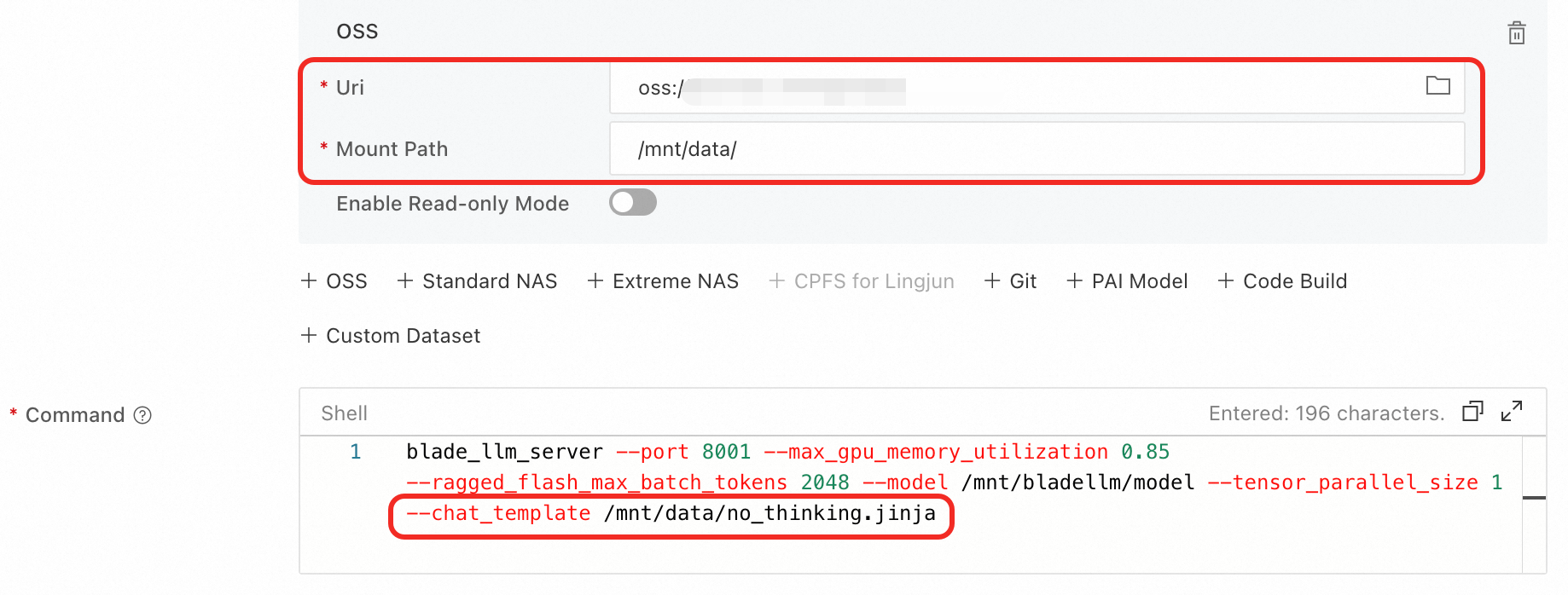
Parse thinking content
To output the think content separately, modify the containers.script field in the service configuration JSON:
vLLM:
vllm serve ... --enable-reasoning --reasoning-parser qwen3SGLang:
python -m sglang.launch_server ... --reasoning-parser deepseek-r1
Fine-tune a model
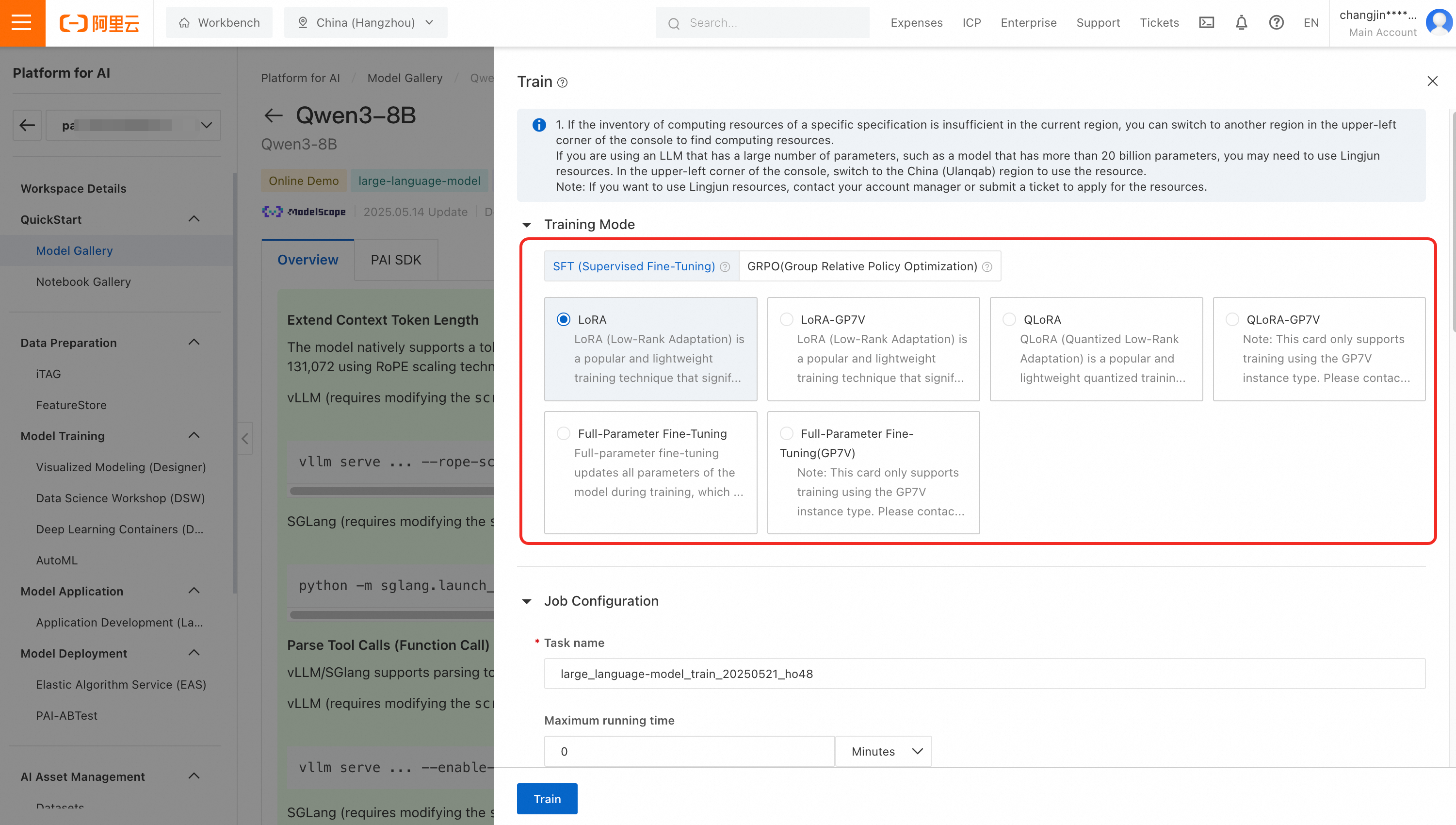
Qwen3-32B, 14B, 8B, 4B, 1.7B, and 0.6B support SFT (full-parameter, LoRA, and QLoRA fine-tuning) and GRPO training.
Use one-click training task submission to train a dedicated model for your enterprise business scenarios.

Evaluate a model
For detailed instructions on model evaluation, see Model evaluation and Best practices for LLM evaluation.
Appendix: Computing resources and token limits
The following table lists the minimum deployment configuration of each Qwen3 model, and the maximum number of tokens that each instance type supports under different inference frameworks.
Among the FP8 models, only Qwen3-235B-A22B requires less computing power than its original model. The other FP8 models require the same computing power as their non-FP8 versions, so they are not listed in the table. For example, for the computing power required by Qwen3-30B-A3B-FP8, see Qwen3-30B-A3B.
Model | Max tokens (input + output) | Minimum configuration | |
SGLang accelerated deployment | vLLM accelerated deployment | ||
Qwen3-235B-A22B | 32,768 (with RoPE scaling: 131,072) | 32,768 (with RoPE scaling: 131,072) | 8 × GPU H / GU120 (8 × 96 GB VARM) |
Qwen3-235B-A22B-FP8 | 32,768 (with RoPE scaling: 131,072) | 32,768 (with RoPE scaling: 131,072) | 4 × GPU H / GU120 (4 × 96 GB VARM) |
Qwen3-30B-A3B Qwen3-30B-A3B-Base Qwen3-32B | 32,768 (with RoPE scaling: 131,072) | 32,768 (with RoPE scaling: 131,072) | 1 × GPU H / GU120 (96 GB VARM) |
Qwen3-14B Qwen3-14B-Base | 32,768 (with RoPE scaling: 131,072) | 32,768 (with RoPE scaling: 131,072) | 1 × GPU L / GU60 (48 GB VARM) |
Qwen3-8B Qwen3-4B Qwen3-1.7B Qwen3-0.6B Qwen3-8B-Base Qwen3-4B-Base Qwen3-1.7B-Base Qwen3-0.6B-Base | 32,768 (with RoPE scaling: 131,072) | 32,768 (with RoPE scaling: 131,072) | 1 × A10 / GU30 (24 GB VARM) Important An 8B model with RoPE scaling requires 48 GB of VARM. |
FAQ
Q: Do model services deployed on PAI support sessions that retain context across multiple requests?
No. The model service APIs deployed on PAI are stateless. Each call is fully independent, and the server retains no context or session state between requests.
To implement multi-turn conversations, the client must store the conversation history and attach it to each request. For a request example, see How do I implement a multi-turn conversation?