EAS (Elastic Algorithm Service) allows you to deploy trained models as an online inference service or an AI web application. EAS supports heterogeneous resources and combines features like auto scaling, one-click stress testing, canary release, and real-time monitoring to ensure service stability in high-concurrency scenarios at a lower cost.
Product architecture
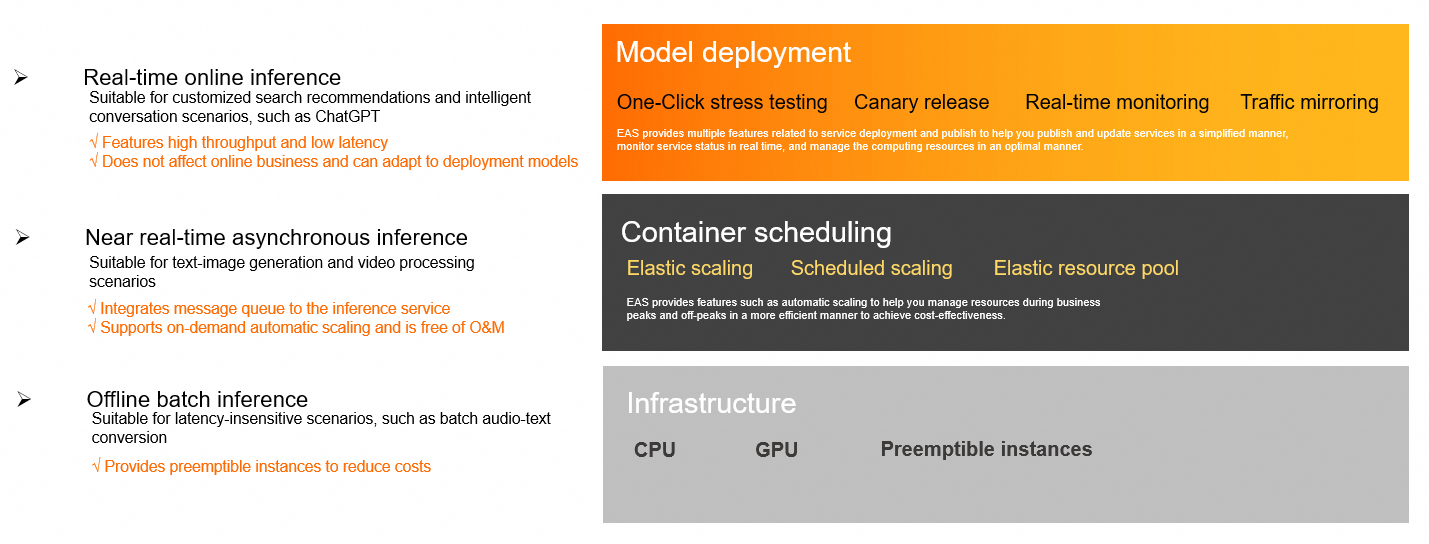
Core capabilities
EAS covers the entire workflow, from resource management and model deployment to service O&M.
Flexible resource and cost management
EAS is a fully managed model deployment and inference service, not a traditional server that you provision and maintain yourself. It runs on Alibaba Cloud elastic compute resources, such as ECS instances and GPU instances, so you do not need to purchase or manage the underlying servers.
Heterogeneous hardware support: Supports CPUs, GPUs, and specialized AI accelerator instances such as GU and PPU to meet the performance needs of different models. When you deploy a service, you can select the specific resource specification based on your model's requirements.
Cost optimization: Supports preemptible instances to significantly reduce compute costs. With scheduled scaling, you can define policies based on business cycles to precisely control resource allocation.
Elastic resource pool: When a dedicated resource group is fully utilized, EAS automatically schedules new instances to the public resource group, balancing cost control and service stability.
Stability and high availability
Elastic scaling: Automatically adjusts the number of service replicas based on real-time workload to handle unpredictable traffic spikes, preventing resource underutilization or service overload.
High-availability mechanism: Automatic fault recovery ensures service continuity. Dedicated resources are physically isolated, eliminating the risk of resource preemption.
Safe releases: Supports canary release, allowing you to direct a percentage of traffic to a new version for validation. It also supports traffic mirroring, which copies production traffic to a test service to verify reliability without affecting real user requests.
Efficient deployment and O&M
One-click stress testing: Dynamically increases the load to probe the service's performance limits. You can view second-level monitoring data and stress test reports in real time to quickly assess your service's capabilities.
Real-time monitoring: Provides real-time monitoring of key metrics such as QPS, response time, and CPU utilization. You can also enable service monitoring alerts to stay informed about your service's health.
Multiple deployment methods: Supports deploying services by using a runtime image (recommended) or a processor deployment to suit different technology stacks.
Diverse inference modes
Real-time synchronous inference: Features high throughput and low latency, making it suitable for latency-sensitive scenarios like search recommendations and conversational bots. For large language models (LLMs) and other generative models, waiting for the entire response to finish generating before returning it can create a strong sense of latency. We recommend that you enable streaming output, which returns tokens to the client in real time as they are generated and significantly improves perceived responsiveness. If performance still does not meet your expectations after you enable streaming output, you can test a public resource group instance with a higher specification for comparison.
Near real-time asynchronous inference: Includes a built-in message queue, ideal for long-running tasks such as text-to-image generation and video processing. It supports auto scaling based on the queue backlog to prevent request pile-ups.
Offline batch inference: Suitable for batch processing scenarios that are not sensitive to response times, such as batch conversion of voice data. It also supports preemptible instances to reduce costs.
Procedure
Step 1: Prepare resources and files
Prepare inference resources: Select a suitable EAS resource type based on your model size, concurrency needs, and budget. For guidance on resource selection and purchasing, see Overview of EAS deployment resources.
NoteYou can use public resources directly without purchasing them in advance. Other resource types, such as EAS resource groups and resource quotas, must be purchased before use.
Prepare files: Upload your trained model, processing code, and dependencies to a cloud storage service like Object Storage Service (OSS). You can then access these files from your service by using storage mounting. Model files stored in OSS are not tied to a specific operating system—you can download them on both Windows and Linux. However, whether your service can load and run the model also depends on the operating system support of the inference framework you use, such as vLLM or Triton Server. Most mainstream inference frameworks give priority to Linux support, so if you plan to use Windows, check the official documentation of your inference framework beforehand to confirm its operating system requirements.
Step 2: Deploy the service
You can deploy and manage services using the console, the EASCMD command-line tool, or an SDK. For more information, see Service deployment.
Console: Offers easy-to-use Custom Deployment and scenario-based deployment options ideal for beginners. For models without a predefined deployment solution in EAS, such as third-party models like MinerU, you can create a service using the Custom Deployment feature. To do this, you must prepare the model and configuration files and upload them to a cloud storage service like OSS.
EASCMD command-line tool: Supports operations such as creating, updating, and viewing services. It is suitable for algorithm developers who are familiar with EAS.
SDK: Ideal for large-scale, unified scheduling and O&M.
Step 3: Invoke and stress test service
Web application: If you deploy your service as an AI web application, you can open the interactive page directly in a browser to test it.
API service: You can use the online debugging feature to verify service functionality, or call the API synchronously or asynchronously. For more information, see Service invocation.
Service stress testing: You can use the built-in one-click stress testing tool to test the performance of your service under pressure. For more information, see Service stress testing.
Step 4: Monitor and manage service
Monitoring and alerts: In the Inference Services list, you can view the running status, service ID, and resource group information for your services, and filter them by resource group. This list is also the primary place to look up a service's instance identity information. We recommend that you enable service monitoring alerts to stay informed about service health in real time.
Elastic scaling: Configure elastic scaling or scheduled scaling policies based on your business requirements to dynamically manage compute resources. You can check a service's current deployment mode on its details page in the PAI console to see whether it uses always-on instances or elastic scaling. A service that uses always-on instances runs with a fixed number of replicas, while a service that uses elastic scaling dynamically adjusts the number of replicas based on the configured policy.
Service updates: In the Actions column, click Update to deploy a new version. After the update is complete, you can view the version information or switch between versions.
WarningService updates cause a temporary service interruption, which may cause dependent requests to fail. Proceed with caution.
Service migration: To migrate an EAS service configuration across regions, use the EASCMD command-line tool to export the service configuration from the source region. You can then use the exported configuration to create a new service in the destination region.
Important notes
If an EAS service remains in a non-Running state for 180 consecutive days, the system automatically deletes it.
EAS supports the regions listed in Regions and availability zones.
Billing
For more information, see Billing of Elastic Algorithm Service (EAS).
Quick start
Use cases
LLM: Deploy a large language model (LLM) | Deploy a Mixture-of-Experts (MoE) model by using expert parallelism and pipeline-data parallelism separation
AIGC: AI video generation - Deploy ComfyUI | AI art generation - Deploy SD-WebUI
Other: Access a fully-managed dedicated gateway across VPCs | Best practices for PAI-EAS Spot
FAQ
Q: Dedicated resources vs. public resources?
Public resources: Suitable for cost-sensitive development, testing, or small-scale applications that can tolerate performance fluctuations. They are low-cost but may experience resource contention during peak hours.
Dedicated resources: Ideal for production environments that require high stability and performance. They are physically isolated, eliminating the risk of resource preemption. The elastic resource pool feature allows workloads to overflow to public resources when dedicated capacity is exhausted, balancing cost and stability during peak hours. To reserve instance types with limited inventory, you must purchase them as dedicated resources.
Q: EAS vs. self-managed services
EAS provides managed O&M. It automatically handles resource scheduling, fault recovery, and monitoring, and includes built-in features like elastic scaling and canary release. This frees developers to focus on model development, reducing operational overhead and accelerating time-to-market.
Q: How do I check the instance ID or cluster ID of an EAS service?
EAS (Elastic Algorithm Service) is an online model inference service, not an ACK container cluster, so it does not have a traditional "cluster ID". To identify a service, use its service name or service ID instead. To view these values, log on to the PAI console, go to Model Deployment (EAS), and open the Inference Services list, where you can view the service name and service ID of each service.
Q: Is there a limit on the size of the model that I can deploy on PAI-EAS?
EAS does not impose a fixed limit on model file size. The maximum model size that you can deploy depends on the memory or GPU memory (VARM) capacity of the resource specification you select, and the available storage mount capacity. We recommend that you select a GPU or CPU instance type that matches your model's parameter count and precision, and use OSS storage mounting to load large model files. If a model fails to load because it is too large, you can upgrade to a higher resource specification, or use optimization techniques such as model quantization or sharded loading.
References
API documentation: API overview
FAQ: FAQ about EAS