OSS Accelerator monitoring provides Cache heat map, as well as monitoring data such as Used bandwidth, Used QPS, Hit rate, and Latency, for viewing the access distribution of cached data and the operational status of the accelerator.
Cache heat monitoring is currently in invitation-only testing. To use it, Submit a ticket contact OSS to apply for activation.
How to increase the cache hit rate of an OSS accelerator
When the cache hit rate is low, you can use the cache heat map to determine whether access is concentrated within recently accessed data, and then evaluate whether to adjust the acceleration path or cache capacity. For details, see Optimize OSS accelerator capacity by using cache heatmaps.
Prerequisites
An OSS accelerator is created. For more information, see Create, modify, and delete an OSS accelerator.
Monitoring items
Bandwidth Usage: the average outbound traffic in a specific period of time. This monitoring item indicates the overall data transfer rate.
QPS Usage: the average number of times that the accelerator is accessed in a specific period of time. This monitoring item indicates the frequency at which the accelerator is accessed.
Hit Rate: the percentage of the amount of data downloaded from the OSS accelerator cache in a specific period of time to the total amount of hit data downloaded in the same period of time. A higher value indicates more efficient cache utilization.
Latency: the value that is obtained by dividing the total amount of time consumed to transfer data that hits the OSS accelerator cache by the total number of hits in a specific period of time.
View the monitoring information
Go to the Buckets page and select the bucket that you want to manage.
In the left-side navigation pane of the Bucket page, click . In the Actions column of the accelerator list, click Details to go to the accelerator details page, and then click Accelerator monitoring.
Query monitoring data as needed:
View cache heat map: Set the start time and end time above the cache heat monitoring section, and then click Search. The interval between the start and end times must be no less than 1 hour.
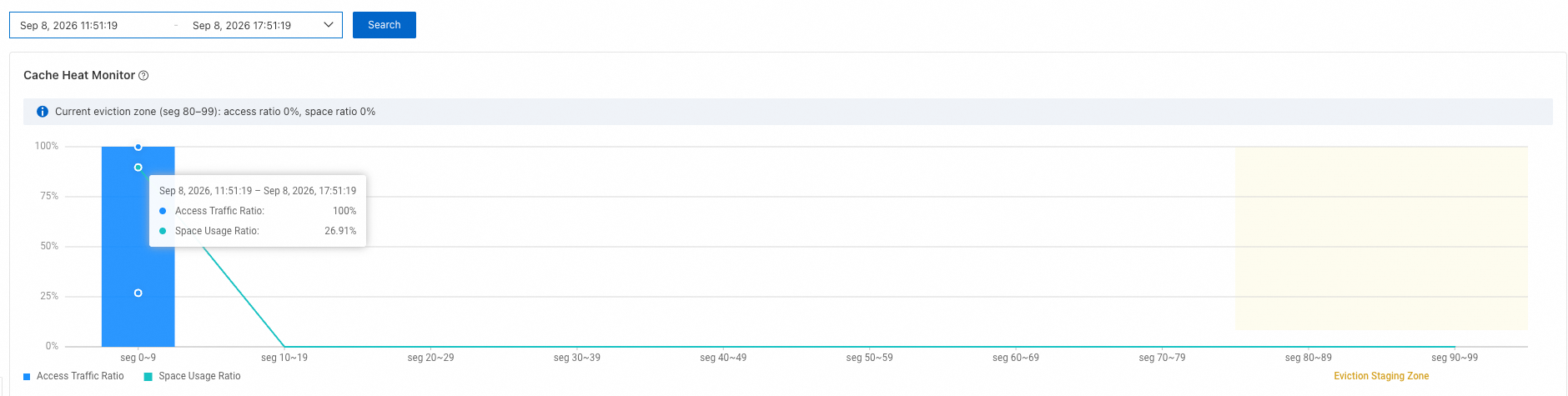
View used bandwidth, used QPS, hit rate, and latency: Below the cache heat monitoring section, select 15 minutes, 30 minutes, or a custom time range, and then click Search.

The following lists the monitoring metrics corresponding to used bandwidth, used QPS, hit rate, and latency.
Monitoring metric
Description
Unit
Outbound Bandwidth from OSS Accelerator
The average rate of outbound traffic of the OSS accelerator.
Kbps
Outbound Bandwidth from Origin
The average rate of outbound traffic of a standard OSS bucket.
Kbps
Read Request
The number of queries per second.
Requests/s
Hit Rate
The hit rate for downloading accelerated cache data.
%
Cache Access
The average time consumed to download accelerated cache data.
ms
View monitoring data in CloudMonitor
OSS accelerators report monitoring data to CloudMonitor. In addition to viewing the data on the accelerator monitoring page in the OSS console, you can view all monitoring metrics of OSS accelerators in the CloudMonitor console, and build custom dashboards and configure alerts based on these metrics. Procedure:
Log on to the OSS accelerator monitoring metrics page (the product category is Object Storage Service (OSS) Monitoring_Cache (oss_cache)), and view the metric name, dimensions (
userId,instanceId,BucketName, and so on), statistical period (60 seconds and 3,600 seconds), Statistics (Value), and unit of each required metric. The main monitoring metrics of accelerators are described in the following table:Metric name (MetricName)
Description
Unit
CacheOriginRecvBack-to-origin inbound traffic of the accelerator
Bytes
CacheOriginRecvBandwidthBack-to-origin inbound bandwidth of the accelerator
bit/s
CacheOriginSendBack-to-origin outbound traffic of the accelerator
Bytes
CacheOriginSendBandwidthBack-to-origin outbound bandwidth of the accelerator
bit/s
CacheRecvInbound traffic of the accelerator
Bytes
CacheRecvBandwidthInbound bandwidth of the accelerator
bit/s
CacheSendOutbound traffic of the accelerator
Bytes
CacheSendBandwidthOutbound bandwidth of the accelerator
bit/s
(Optional) Create an alert rule the metrics you care about to receive timely notifications when metric anomalies occur.