AI Search Open Platform provides a complete RAG development pipeline—covering data preprocessing, retrieval, and answer generation—with composable algorithm services exposed through APIs. Download the provided code, replace the API key, endpoint, and knowledge base information as described in this topic, and you can quickly build a conversational search application over your own knowledge base.
How it works
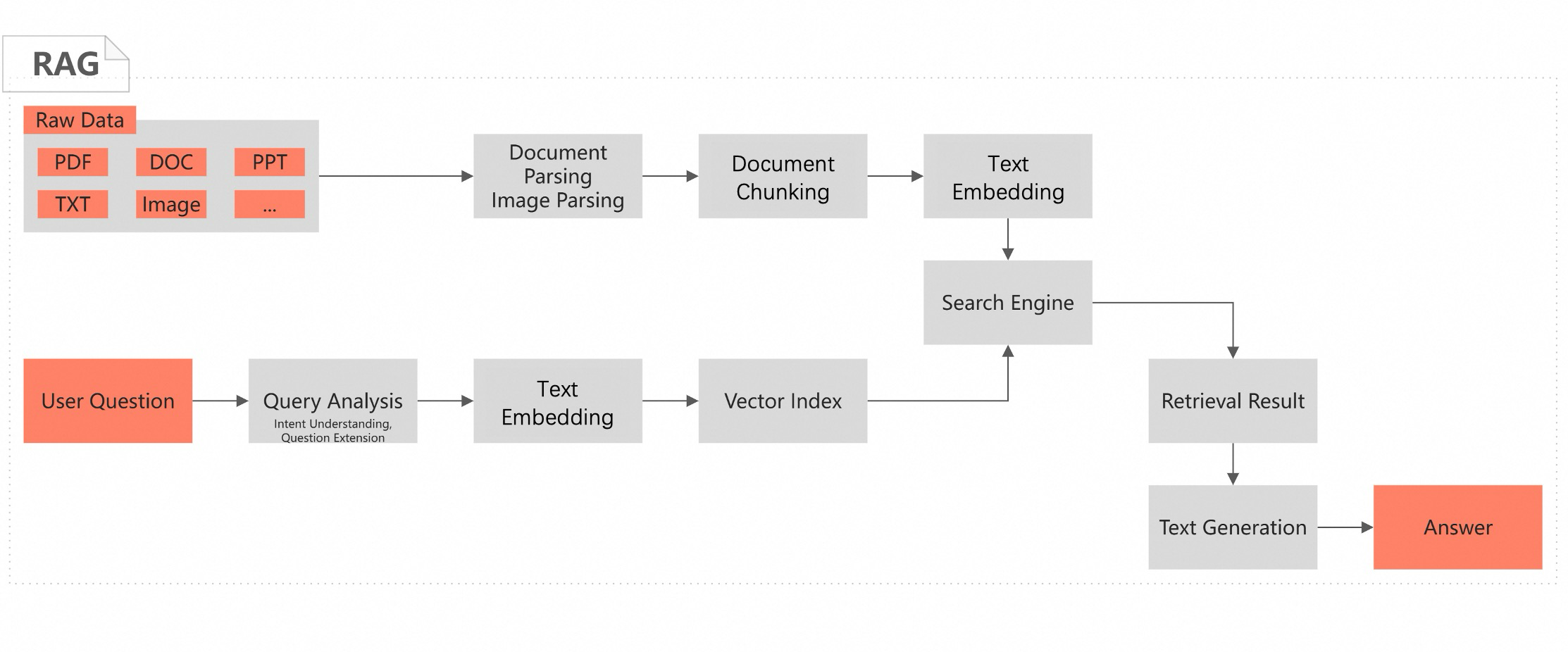
Retrieval-Augmented Generation (RAG) combines information retrieval with large language models (LLMs) to improve the accuracy and relevance of generated content. A RAG system retrieves the most relevant information from an external knowledge base and provides it as context to the LLM, enabling the model to generate precise answers grounded in up-to-date or domain-specific data rather than relying solely on its training data.
Use cases
Conversational search over a knowledge base suits use cases such as enterprise knowledge retrieval and domain-specific Q&A. By applying RAG and LLMs to your knowledge base documents, the system can understand complex natural language queries and help users quickly find information across document formats including PDF, Word, tables, and images.
In the conversational search interface, a user submits a question in natural language. The system returns a structured answer and suggests follow-up questions for further exploration.
Prerequisites
-
The AI Search Open Platform service is activated. For more information, see Activate the service.
-
Obtain a service endpoint and authentication credentials. For more information, see Obtain a service endpoint and Manage API keys.
AI Search Open Platform supports both public and VPC endpoints. Cross-region calls are supported through VPC endpoints. Currently, VPC access is available in the China (Shanghai), China (Hangzhou), China (Shenzhen), China (Beijing), China (Zhangjiakou), and China (Qingdao) regions.
On the API Keys page, a message at the top reads, "API keys are used for service call permissions. Please keep them secure. If an API key is compromised, disable it immediately. You can have up to 10 API keys enabled at a time." The Access Domain section displays the Public API Domain and Private API Domain, both of which support HTTPS access.
-
Create an Alibaba Cloud Elasticsearch cluster of version 8.5 or later. For more information, see Create an Alibaba Cloud Elasticsearch cluster. When accessing the cluster over the public network or a VPC, you must add the IP address of your device to the cluster's IP address whitelist. For more information, see Configure a public or private IP address whitelist for an Elasticsearch cluster.
-
You have a Python 3.7 or later environment with the
aiohttp 3.8.6andelasticsearch 8.14packages installed.
Build the RAG development pipeline
AI Search Open Platform provides four development frameworks:
-
Java SDK
-
Python SDK
-
LangChain: Select this if your business already uses the LangChain framework.
-
LlamaIndex: Select this if your business already uses the LlamaIndex framework.
Step 1: Select services and download code
Based on your knowledge base and business requirements, select the algorithm services and development framework for your RAG pipeline. This topic uses the Python SDK as an example.
-
Log on to the AI Search Open Platform console.
-
Select the China (Shanghai) region, switch to AI Search Open Platform, and then select your target workspace.
Note-
AI Search Open Platform is available only in the China (Shanghai) and Germany (Frankfurt) regions.
-
Users in the China (Hangzhou), China (Shenzhen), China (Beijing), China (Zhangjiakou), and China (Qingdao) regions can use a VPC endpoint to call AI Search Open Platform services across regions.
-
-
In the left-side navigation pane, click Scene Center. On the RAG Scene-Knowledge Base Online Q & A. card, click Enter.
-
From the drop-down lists, select the services you need based on your business requirements. You can view detailed information for each service on the Service Details tab.
Note-
When calling an algorithm service in the RAG pipeline via an API, you must provide the service ID (
service_id). For example, the ID for the document content parsing service isops-document-analyze-001. -
When you switch services in the list, the
service_idin the generated code updates automatically. After you download the code, you can still change theservice_idto call a different service.
Stage
Service description
Document content parsing
Document content parsing service (ops-document-analyze-001): A general-purpose service that extracts logical structures like titles and paragraphs from unstructured documents (text, tables, and images) and outputs them in a structured format.
Image content parsing
-
Image content understanding service (ops-image-analyze-vlm-001): Uses a multimodal large model to parse, understand, and recognize text from images. The extracted text can be used for image retrieval and Q&A scenarios.
-
Image text recognition service (ops-image-analyze-ocr-001): Uses OCR to recognize text in images. The parsed text can be used for image retrieval and Q&A scenarios.
Document chunking
Document chunking service (ops-document-split-001): A general-purpose text chunking service that splits structured data in HTML, Markdown, and TXT formats based on document paragraphs, text semantics, or specified rules. It also supports extracting code, images, and tables as rich text from documents.
Text embedding
-
OpenSearch text embedding service-001 (ops-text-embedding-001): Provides multilingual (40+) text embedding. Maximum input length is 300 tokens, and the output vector dimension is 1536.
-
OpenSearch general text embedding service-002 (ops-text-embedding-002): Provides multilingual (100+) text embedding. Maximum input length is 8,192 tokens, and the output vector dimension is 1024.
-
OpenSearch text embedding service-Chinese-001 (ops-text-embedding-zh-001): Provides Chinese text embedding. Maximum input length is 1,024 tokens, and the output vector dimension is 768.
-
OpenSearch text embedding service-English-001 (ops-text-embedding-en-001): Provides English text embedding. Maximum input length is 512 tokens, and the output vector dimension is 768.
Sparse text embedding
Converts text into a sparse vector representation. Sparse vectors use less storage and typically represent keywords and term frequencies. Combine them with dense vectors for hybrid search to improve retrieval performance.
OpenSearch sparse text embedding service (ops-text-sparse-embedding-001): Provides multilingual (100+) sparse text embedding. Maximum input length is 8,192 tokens.
Query analysis
Query analysis service 001 (ops-query-analyze-001): Uses a large language model to understand user query intent and expand it with similar questions.
Search engine
-
Alibaba Cloud Elasticsearch: A fully managed cloud service built on open-source Elasticsearch, 100% compatible with open-source features, with an out-of-the-box, pay-as-you-go experience.
NoteIf you choose Alibaba Cloud Elasticsearch as the search engine, the sparse text embedding service is unavailable due to compatibility issues. We recommend using text embedding services instead.
-
OpenSearch Vector Search Edition: A large-scale distributed vector search engine developed by Alibaba that supports various vector search algorithms with high precision and cost-effective indexing at scale. Indexes support horizontal scaling, streaming builds, real-time queries, and dynamic data updates.
NoteIf you need to use OpenSearch Vector Search Edition, you can replace the engine configuration and code in the RAG pipeline.
Reranking service
BGE reranker model (ops-bge-reranker-larger): Scores and sorts documents by relevance to the query, ranking them from highest to lowest, and outputs the scoring results.
Large language model
-
OpenSearch-Qwen-Turbo (ops-qwen-turbo): Built on the Qwen-Turbo large language model, this service is fine-tuned with supervised learning to enhance retrieval augmentation and reduce harmful responses.
-
Qwen-Turbo (qwen-turbo): A large-scale language model from the Qwen series that supports various languages, including Chinese and English. For more information, see Introduction to Qwen series LLMs.
-
Qwen-Plus (qwen-plus): An enhanced version of the Qwen-Turbo large language model that supports various languages, including Chinese and English. For more information, see Introduction to Qwen series LLMs.
-
Qwen-Max (qwen-max): A trillion-parameter, ultra-large-scale language model from the Qwen series that supports various languages, including Chinese and English. For more information, see Introduction to Qwen series LLMs.
-
-
After selecting your services, click After the configuration is completed, enter the code query to view and download the code.
The code is structured into two parts that reflect the RAG pipeline's runtime flow: offline document processing and online conversational search.
Process
Function
Description
Offline document processing
Processes documents, which includes parsing, image extraction, chunking, embedding, and writing the results to an Elasticsearch index.
The
document_pipeline_executemain function completes the following workflow. You can input documents via a URL or Base64 encoding.-
Document parsing. For API details, see Document Parsing API.
-
Call the asynchronous document parsing API to extract content from a document URL or decode content from a Base64-encoded file.
-
Use the
create_async_extraction_taskfunction to create a parsing task and thepoll_task_resultfunction to poll for the task's completion status.
-
-
Image extraction. For API details, see Image Content Extraction API.
-
Call the asynchronous image parsing API to extract content from an image URL or decode it from a Base64-encoded file.
-
Use the
create_image_analyze_taskfunction to create an image parsing task and theget_image_analyze_task_statusfunction to get its status.
-
-
Document chunking. For API details, see Document Chunking API.
-
Call the document chunking API to split the parsed document according to a specified strategy.
-
Use the
document_splitfunction for both document chunking and rich text content parsing.
-
-
Text embedding. For API details, see Text Embedding API.
-
Call the text embedding API to create vector representations of the chunked text.
-
Use the
text_embeddingfunction to calculate the embedding vector for each chunk.
-
-
Write to Elasticsearch. For service details, see Use the k-nearest neighbor (kNN) search feature of Elasticsearch.
-
Create an Elasticsearch index configuration that specifies the vector field
embeddingand the document content fieldcontent.ImportantWhen you create an Elasticsearch index, any existing index with the same name is deleted. To avoid accidental data loss, change the index name in the code.
-
Use the
helpers.async_bulkfunction to bulk-write the vectorized results to the Elasticsearch index.
-
Online conversational search
Processes online user queries, which includes generating query vectors, performing query analysis, retrieving relevant document chunks, reranking search results, and generating a final answer.
The
query_pipeline_executemain function completes the following workflow to process a user query and return an answer.-
Vectorize the query. For API details, see Text Embedding API.
-
Call the text embedding API to convert the user query into a vector.
-
Use the
text_embeddingfunction to generate the query vector.
-
-
Call the query analysis service. For details, see Query Analysis API.
This service identifies user intent and generates similar questions by analyzing the conversation history.
-
Search for embedding chunks. For service details, see Use the k-nearest neighbor (kNN) search feature of Elasticsearch.
-
Use Elasticsearch to retrieve document chunks from the index that are similar to the query vector.
-
Use the
searchAPI ofAsyncElasticsearchcombined with a kNN query to perform similarity search.
-
-
Call the reranking service. For details, see Reranking API.
-
Call the reranking service API to score and sort the retrieved chunks.
-
Use the
documents_rankingfunction to score and sort documents based on the user query.
-
-
Generate an answer with the large language model. For API details, see Answer Generation API.
Call the LLM service, using the
llm_callfunction with the retrieval results and user query to generate the final answer.
Under Code Query, select Document processing flow and Online Q & A Process, and then click Copy Code or Download File to save the code locally.
-
Step 2: Configure and test the pipeline
After downloading the code into two local files, such as offline.py and online.py, configure the following key parameters.
|
Category |
Parameter |
Description |
|
AI Search Open Platform |
|
The API key for authentication. For more information, see Manage API keys. |
|
|
The service endpoint for API calls. For more information, see Obtain a service endpoint. Note
Remove the "http://" prefix from the endpoint URL. API calls are supported via both public and VPC endpoints. |
|
|
|
The name of your workspace on AI Search Open Platform. |
|
|
|
The service ID. For convenience, you can configure the service IDs for different services in both the |
|
|
Elasticsearch search engine |
|
The endpoint of the Elasticsearch cluster. When accessing the cluster over the public network or a VPC, you must add the IP address of your device to the cluster's IP address whitelist. For more information, see Configure a public or private IP address whitelist for an Elasticsearch cluster. |
|
|
The username and password for accessing the Elasticsearch cluster. The username is |
|
|
Other parameters |
No modifications are needed if you use the sample data. |
|
After configuring the parameters, run the offline.py script first, followed by the online.py script, in a Python 3.7 or later environment to test the results.
If the knowledge base document is Introduction to AI Search Open Platform, ask the following question: What can AI Search Open Platform do?
You should see the following output:
-
Offline document processing result
image analyze :https://img.alicdn.com/imgextra/i2/O1CN01bYc1m81RrcSAyOjMu_!!6000000002165-54-tps-60-60.apng https://img.alicdn.com/imgextra/i2/O1CN01bYc1m81RrcSAyOjMu_!!6000000002165-54-tps-60-60.apng is not analyzable. image analyze :https://help-static-aliyun-doc.aliyuncs.com/assets/img/zh-CN/3873436171/p802381.png image analyze :https://help-static-aliyun-doc.aliyuncs.com/assets/img/zh-CN/0650850271/p819277.png image analyze :https://help-static-aliyun-doc.aliyuncs.com/assets/img/zh-CN/0650850271/p819277.png image analyze ://gw.alicdn.com/tfs/TB1GxwdSXXXXXa.aXXXXXXXXXXX-65-70.gif https://gw.alicdn.com/tfs/TB1GxwdSXXXXXa.aXXXXXXXXXXX-65-70.gif is not analyzable. image analyze ://img.alicdn.com/tfs/TB1..50QpXXXX7XpXXXXXXXXXX-40-40.png image analyze :https://img.alicdn.com/tfs/TB1A0dINW6qK1RjSZFmXXX0PFXa-258-258.jpg image analyze ://gw.alicdn.com/tfs/TB1GxwdSXXXXXa.aXXXXXXXXXXX-65-70.gif https://gw.alicdn.com/tfs/TB1GxwdSXXXXXa.aXXXXXXXXXXX-65-70.gif is not analyzable. image analyze ://img.alicdn.com/tfs/TB1..50QpXXXX7XpXXXXXXXXXX-40-40.png image analyze ://gw.alicdn.com/tfs/TB1GxwdSXXXXXa.aXXXXXXXXXXX-65-70.gif https://gw.alicdn.com/tfs/TB1GxwdSXXXXXa.aXXXXXXXXXXX-65-70.gif is not analyzable. image analyze ://img.alicdn.com/tfs/TB1..50QpXXXX7XpXXXXXXXXXX-40-40.png text-embedding done OS write response: {"status":"OK","code":200} -
Online conversational search result
/opt/miniconda3/envs/QA-pytest-base-lib1/bin/python /Users/liu/codeRepos/QA-pytest-base-lib/rag/case/SDK/python_sdk_es_zx.py query analysis rewrite result:What can the OpenSearch AI Search Open Platform do? Final answer from the large model: AI Search Open Platform provides intelligent search services that power the core search functions for Alibaba's businesses, including Taobao and Tmall, and offers intelligent search solutions to external clients across various industries. It features industry-specific query semantic understanding and machine learning ranking algorithms to help developers build high-quality intelligent search services. The platform is suitable for a wide range of scenarios, including but not limited to: - E-commerce and retail intelligent search - Content and news search - Gaming industry search - Healthcare industry search - Financial industry search AI Search Open Platform focuses on intelligent search and Retrieval-Augmented Generation (RAG) scenarios, providing component-based services and flexible calling mechanisms. It has built-in services for document parsing, document chunking, text embedding, retrieval, reranking, and large language models, enabling a one-stop, flexible development experience for AI search applications. Process finished with exit code 0 -
Source code files
FAQ
During code execution, you might see an "Unclosed connector" message due to resources not being released in time. You can safely ignore this message.