When you use resource groups to organize and manage resources, you can use RAM to isolate resources and enforce fine-grained permissions within a single Alibaba Cloud account. This topic explains how Operation Orchestration Service supports resource groups and how to grant permissions at the resource group level.
-
Resource group-level authorization applies only to resource types that support resource groups and to operations that support resource group-level authorization.
-
For resource types that do not support resource groups, resource group-level permissions have no effect. For these resources, you must grant permissions at the account level. For more information, see Operations that do not support resource group-level authorization.
Resource group authorization
You can use a Resource Group to organize and manage resources in your Alibaba Cloud account. For example, you can create a dedicated Resource Group for each of your projects and add the project's resources to it. This helps you manage all resources for a project in one place. For more information, see What is a Resource Group?.
After you organize your resources into groups, you can grant permissions to a RAM principal, such as a RAM user, RAM user group, or RAM role, for a specific Resource Group. This restricts the RAM principal to managing only the resources within that Resource Group. For more information, see Resource grouping and authorization.
This authorization method offers the following benefits:
-
Fine-grained permissions: You can grant each RAM identity precise permissions to resources. This practice keeps the management of resources for different projects separate within a single account.
-
Scalability: When new resources are added to a Resource Group, the associated RAM identity automatically gains the necessary permissions for them. This eliminates the need for re-authorization.
Grant a RAM user resource group permissions
This topic describes how to grant permissions to a RAM user to manage Operation Orchestration Service resources within a specific resource group.
1. Prerequisites
-
Create a RAM user. For more information, see Create a RAM user.
-
Create a resource group and move existing resources to the target resource group. For more information, see Create a resource group, Automatically transfer resources to a resource group, and Manually transfer resources to a resource group.
2. Grant resource group-level permissions
You can use either of the following methods to grant resource group-level permissions.
Method 1: Resource Management console
Use the permission management feature of a resource group to grant permissions to a specific RAM user. For more information, see Grant resource group-scoped permissions to a RAM principal.
-
Log on to the Resource Management console.
-
On the Resource Groups page, click Permission Management in the Actions column of the target resource group.
-
On the Permission Management tab, click Add Permission.
-
In the Add Permission panel, configure the principal and policy.
-
Principal: Select an existing RAM user.
-
Policy: Select a system policy or an existing custom policy. For more information, see Create a custom policy.
-
-
Click Confirm.
Method 2: RAM console
Use the RAM console to grant resource group-level permissions to a specific RAM user. For more information, see Manage permissions for a RAM user.
-
Log on to the RAM console as an Alibaba Cloud account (root account) or a RAM administrator.
-
In the left-side navigation pane, choose . On the Users page, click Add Permissions in the Actions column of the target RAM user.
-
In the Add Permissions panel, configure the following parameters.
-
Resource scope: Select Resource group level.
-
Principal: Select an existing RAM user.
-
Policy: Select a system policy or an existing custom policy. For more information, see Create a custom policy.
-
-
Click Confirm.
Resource types that support resource groups
The following table lists the resource types in Operation Orchestration Service that support resource groups.
|
Cloud service |
Cloud service code |
Resource type |
|
Operation Orchestration Service |
oos |
execution |
|
Operation Orchestration Service |
oos |
parameter |
|
Operation Orchestration Service |
oos |
patch baseline |
|
Operation Orchestration Service |
oos |
secret parameter |
|
Operation Orchestration Service |
oos |
state configuration |
|
Operation Orchestration Service |
oos |
template |
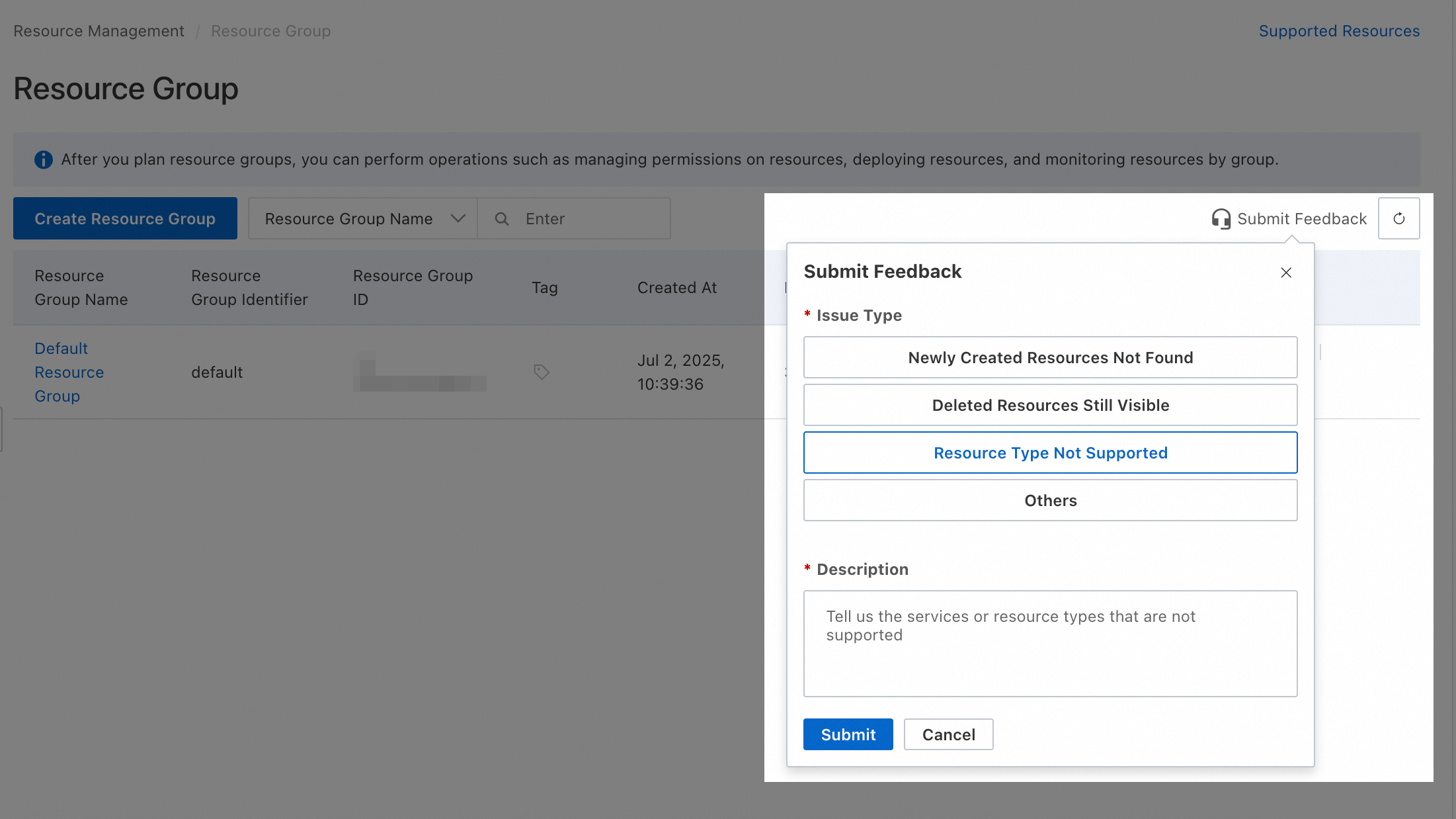
For resource types that do not yet support resource groups, you can submit feedback in the Resource Group Console.
Operations without resource group-level authorization
For system O&M management, the following actions do not support resource group-level authorization:
|
Actions |
Description |
|
oos:AnalyzeGitRepository |
- |
|
oos:BindGitAccount |
- |
|
oos:CancelExecutions |
- |
|
oos:CancelPublicTemplateRegistration |
- |
|
oos:Chat |
- |
|
oos:CheckGitRepoFileExists |
- |
|
oos:CheckGitRepositoryExists |
- |
|
oos:ContinueDeployApplicationGroup |
Resumes a failed deployment of an application group. Application management is available only in the China (Hangzhou) region. Use the endpoint for China (Hangzhou). |
|
oos:CreateAITask |
- |
|
oos:CreateChatConfiguration |
- |
|
oos:CreateDeployRevision |
- |
|
oos:CreateGitRepository |
- |
|
oos:CreateLingoConnection |
- |
|
oos:CreateOpsItemConfiguration |
- |
|
oos:DeleteApplicationGroup |
Deletes an application group. Application management is available only in the China (Hangzhou) region. Use the endpoint for China (Hangzhou). |
|
oos:DeleteChatConfiguration |
- |
|
oos:DeleteDeployRevision |
- |
|
oos:DeleteOpsItemConfigurations |
- |
|
oos:DeployApplicationGroup |
Deploys an application group. Application management is available only in the China (Hangzhou) region. Use the endpoint for China (Hangzhou). |
|
oos:DeployLingoApplication |
- |
|
oos:DescribeApplicationGroupBill |
Queries the resource cost for an application group. |
|
oos:DescribeRegions |
Queries the supported regions. |
|
oos:ForkGitRepository |
- |
|
oos:GenerateApplicationTemplate |
- |
|
oos:GenerateOpsItem |
Creates an OpsItem. |
|
oos:GetAITask |
- |
|
oos:GetApplicationGroup |
Gets the details of an application group. Application management is available only in the China (Hangzhou) region. Use the endpoint for China (Hangzhou). |
|
oos:GetChatConfiguration |
- |
|
oos:GetDeployRevision |
- |
|
oos:GetGitBranch |
- |
|
oos:GetGitRepository |
- |
|
oos:GetInventorySchema |
Gets the schema of an inventory. |
|
oos:GetLingoSettings |
- |
|
oos:GetLingoTokenUsedDetails |
- |
|
oos:GetModelGenerationResult |
- |
|
oos:GetOpsItemConfiguration |
- |
|
oos:GetParametersByPath |
Gets parameters by path. |
|
oos:GetSecretParametersByPath |
Gets secret parameters by path. Before calling this operation, ensure you have permissions to call the |
|
oos:GetServiceSettings |
Gets the service settings, including delivery settings for execution records and the associated Alibaba Cloud DevOps enterprise. |
|
oos:InitializeApplicationManager |
- |
|
oos:LingoChat |
- |
|
oos:ListAITaskLogs |
- |
|
oos:ListAITasks |
- |
|
oos:ListActions |
- |
|
oos:ListApplicationGroupResources |
- |
|
oos:ListApplicationGroups |
Lists application groups. Application management is available only in the China (Hangzhou) region. Use the endpoint for China (Hangzhou). |
|
oos:ListChatConfiguration |
- |
|
oos:ListChatConfigurations |
- |
|
oos:ListChatConversations |
- |
|
oos:ListDeployRevisions |
- |
|
oos:ListExecutionRiskyTasks |
Lists the high-risk tasks in a template. |
|
oos:ListExecutionTasks |
- |
|
oos:ListGitAccounts |
- |
|
oos:ListGitBranches |
- |
|
oos:ListGitOrganizations |
- |
|
oos:ListGitRepositories |
- |
|
oos:ListGitRepositoryContents |
- |
|
oos:ListInstancePackageStates |
Lists the package states for an instance. |
|
oos:ListInstancePatchStates |
Lists the patch states for an instance. |
|
oos:ListInstancePatches |
Lists the patches for an instance. |
|
oos:ListInstanceStateReports |
- |
|
oos:ListInventoryEntries |
Lists the inventory entries for an instance. |
|
oos:ListLingoAppEnvVars |
- |
|
oos:ListLingoApps |
- |
|
oos:ListLingoConnectionSchemas |
- |
|
oos:ListLingoConnections |
- |
|
oos:ListLingoSkills |
- |
|
oos:ListPublicTemplateRegistrations |
- |
|
oos:ListQuickSetupConfigurations |
- |
|
oos:ListTagKeys |
Lists existing tag keys. |
|
oos:ListTagValues |
Lists existing tag values. |
|
oos:ListTaskExecutionInvocations |
- |
|
oos:ListTemplateTaskOutputs |
- |
|
oos:ListTriggerTimes |
- |
|
oos:PublishTemplateVersion |
- |
|
oos:SearchInventory |
Queries detailed or aggregated inventory information. |
|
oos:SetLingoSettings |
- |
|
oos:SetServiceSettings |
Enables or disables delivery for template execution records, specifies a delivery destination, and associates an Alibaba Cloud DevOps enterprise ID. |
|
oos:StartDebugExecution |
- |
|
oos:TagResources |
Adds user tags to one or more resources. |
|
oos:UnbindGitAccount |
- |
|
oos:UntagResources |
Removes user tags from one or more resources. |
|
oos:UpdateApplicationGroup |
Updates an application group. Application management is available only in the China (Hangzhou) region. Use the endpoint for China (Hangzhou). |
|
oos:UpdateChatConfiguration |
- |
|
oos:UpdateLingoApp |
- |
|
oos:UpdateOpsItemConfiguration |
- |
|
oos:ValidateTemplateContent |
Validates a template. |
For operations that do not support resource group-level authorization, selecting resource group level as the resource scope will have no effect. To grant a RAM User these permissions, create a custom policy and select account level as the resource scope.
 Below are two custom permission policy examples that you can modify.
-
Allows all read-only operations that do not support resource group-level authorization: The
Actionelement lists all of these operations.{ "Version": "1", "Statement": [ { "Effect": "Allow", "Action": [ "oos:GetAITask", "oos:GetApplicationGroup", "oos:GetChatConfiguration", "oos:GetDeployRevision", "oos:GetGitBranch", "oos:GetGitRepository", "oos:GetInventorySchema", "oos:GetLingoSettings", "oos:GetLingoTokenUsedDetails", "oos:GetModelGenerationResult", "oos:GetOpsItemConfiguration", "oos:GetParametersByPath", "oos:GetSecretParametersByPath", "oos:GetServiceSettings", "oos:ListAITaskLogs", "oos:ListAITasks", "oos:ListActions", "oos:ListApplicationGroupResources", "oos:ListApplicationGroups", "oos:ListChatConfiguration", "oos:ListChatConfigurations", "oos:ListChatConversations", "oos:ListDeployRevisions", "oos:ListExecutionRiskyTasks", "oos:ListExecutionTasks", "oos:ListGitAccounts", "oos:ListGitBranches", "oos:ListGitOrganizations", "oos:ListGitRepositories", "oos:ListGitRepositoryContents", "oos:ListInstancePackageStates", "oos:ListInstancePatchStates", "oos:ListInstancePatches", "oos:ListInstanceStateReports", "oos:ListInventoryEntries", "oos:ListLingoAppEnvVars", "oos:ListLingoApps", "oos:ListLingoConnectionSchemas", "oos:ListLingoConnections", "oos:ListLingoSkills", "oos:ListPublicTemplateRegistrations", "oos:ListQuickSetupConfigurations", "oos:ListTagKeys", "oos:ListTagValues", "oos:ListTaskExecutionInvocations", "oos:ListTemplateTaskOutputs", "oos:ListTriggerTimes" ], "Resource": "*" } ] } -
Allows all operations that do not support resource group-level authorization: All operations that do not support resource group-level authorization are listed in the
Actionelement.{ "Version": "1", "Statement": [ { "Effect": "Allow", "Action": [ "oos:AnalyzeGitRepository", "oos:BindGitAccount", "oos:CancelExecutions", "oos:CancelPublicTemplateRegistration", "oos:Chat", "oos:CheckGitRepoFileExists", "oos:CheckGitRepositoryExists", "oos:ContinueDeployApplicationGroup", "oos:CreateAITask", "oos:CreateChatConfiguration", "oos:CreateDeployRevision", "oos:CreateGitRepository", "oos:CreateLingoConnection", "oos:CreateOpsItemConfiguration", "oos:DeleteApplicationGroup", "oos:DeleteChatConfiguration", "oos:DeleteDeployRevision", "oos:DeleteOpsItemConfigurations", "oos:DeployApplicationGroup", "oos:DeployLingoApplication", "oos:DescribeApplicationGroupBill", "oos:DescribeRegions", "oos:ForkGitRepository", "oos:GenerateApplicationTemplate", "oos:GenerateOpsItem", "oos:GetAITask", "oos:GetApplicationGroup", "oos:GetChatConfiguration", "oos:GetDeployRevision", "oos:GetGitBranch", "oos:GetGitRepository", "oos:GetInventorySchema", "oos:GetLingoSettings", "oos:GetLingoTokenUsedDetails", "oos:GetModelGenerationResult", "oos:GetOpsItemConfiguration", "oos:GetParametersByPath", "oos:GetSecretParametersByPath", "oos:GetServiceSettings", "oos:InitializeApplicationManager", "oos:LingoChat", "oos:ListAITaskLogs", "oos:ListAITasks", "oos:ListActions", "oos:ListApplicationGroupResources", "oos:ListApplicationGroups", "oos:ListChatConfiguration", "oos:ListChatConfigurations", "oos:ListChatConversations", "oos:ListDeployRevisions", "oos:ListExecutionRiskyTasks", "oos:ListExecutionTasks", "oos:ListGitAccounts", "oos:ListGitBranches", "oos:ListGitOrganizations", "oos:ListGitRepositories", "oos:ListGitRepositoryContents", "oos:ListInstancePackageStates", "oos:ListInstancePatchStates", "oos:ListInstancePatches", "oos:ListInstanceStateReports", "oos:ListInventoryEntries", "oos:ListLingoAppEnvVars", "oos:ListLingoApps", "oos:ListLingoConnectionSchemas", "oos:ListLingoConnections", "oos:ListLingoSkills", "oos:ListPublicTemplateRegistrations", "oos:ListQuickSetupConfigurations", "oos:ListTagKeys", "oos:ListTagValues", "oos:ListTaskExecutionInvocations", "oos:ListTemplateTaskOutputs", "oos:ListTriggerTimes", "oos:PublishTemplateVersion", "oos:SearchInventory", "oos:SetLingoSettings", "oos:SetServiceSettings", "oos:StartDebugExecution", "oos:TagResources", "oos:UnbindGitAccount", "oos:UntagResources", "oos:UpdateApplicationGroup", "oos:UpdateChatConfiguration", "oos:UpdateLingoApp", "oos:UpdateOpsItemConfiguration", "oos:ValidateTemplateContent" ], "Resource": "*" } ] }
A RAM user or RAM role with account-level permissions can manage all resources within your account. Ensure the granted permissions match your intent, and follow the principle of least privilege.
FAQ
Find a resource's resource group
-
Method 1: Click the resource name to open its details page. The page displays the resource group.
-
Method 2: Log on to the Resource Management console and click . On the left, select the owner account (the current account is selected by default). Filter for the target resource to view its resource group.
View product resources in a resource group
-
Method 1: Log on to the Resource Management console and click . On the left, under the owner account (the current account is selected by default), click the target resource group. Then, on the right, select the target product from the Select Resource Type list to view all its resources in that resource group.
-
Method 2: Log on to the Resource Management console and navigate to . Find the target resource group and click Resource Management in the Actions column. On the Resource Management page, select the target product from the Product dropdown list to view all its resources in that resource group.
Move resources between resource groups
Log on to the Resource Management console and navigate to . In the target resource group's row, click Resource Management in the Actions column. Use the filter conditions to locate the target resources. For each resource, select the checkbox in the first column, and then click Transfer Resource Group at the bottom of the list. Follow the on-screen instructions to complete the transfer.