Quick setup lets you configure common O&M features across multiple regions in batch, following recommended best practices. For example, install the CloudMonitor agent, collect instance metadata, scan for patch compliance and vulnerability fixing, and manage extensions — all across regions at once.
Benefits
-
Simplified service and feature configuration
Applies best practices and automation to simplify service configuration.
-
Automatic configuration deployment across multiple regions
Deploy configurations to multiple regions at once, ensuring cross-region consistency.
-
Configuration drift check
Quick setup periodically detects configuration drifts — discrepancies between expected and actual configurations caused by out-of-band changes.
-
Automatic configuration deployment across multiple accounts
Use Resource Management to deploy configurations across one or multiple Alibaba Cloud accounts, ensuring cross-account consistency.
Scenarios
Use quick setup when you already know which services to configure and want to streamline the process. Before using quick setup for ECS instances, review the following topics:
If you are new to ECS, we recommend that you do not use OOS to manage ECS instances.
Billing
Quick setup is free. However, you may be charged for the underlying services based on their pricing and usage limits.
Supported configurations
Quick setup supports the following configuration types.
Quick setup deploys configurations through ROS stacks. You must have the required permissions on both ROS and OOS.
|
Configuration |
Description |
|
Securely manages your ECS instances. |
|
|
Scans for missing patches or installs all patches on your ECS instances. |
|
|
Collects ECS instance metadata, such as applications, network configurations, files, and services. |
|
|
Starts or stops your ECS instances at a specified time. |
|
|
Upgrades ECS instance bandwidth for a specified period. |
|
|
Automates batch O&M operations on cloud resources. |
View configurations
After setup, view details on the Configurations tab.
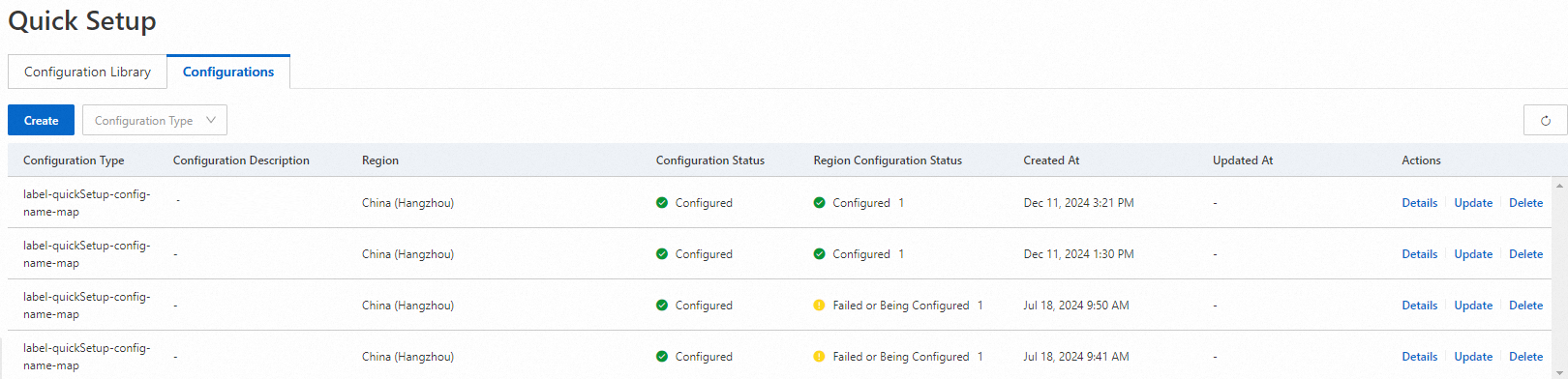
Each column is described below.
|
Parameter |
Description |
|
Configuration Type |
The configuration type, such as Host Management. |
|
Configuration Description |
A summary of the configuration. |
|
Configuration Status |
Whether the configuration is deployed by ROS. |
|
Region Configuration Status |
Configuration status per region. Each region shows Configured or Failed or Being Configured. |
|
Created At |
When the configuration was created. |
|
Updated At |
The last update time, or a hyphen (-) if never updated. |
|
Actions |
Click Update, Delete, or Details to manage a configuration. |
Manage configurations
On the Configurations tab of the Quick Setup page, manage your configurations:
-
Click Update in the Actions column to modify a configuration.
-
Click Delete in the Actions column, or click Details in the Actions column and then click Delete Configuration in the upper-right corner.
NoteDeletion may take some time.