Use resource groups with Resource Access Management (RAM) to isolate resources and manage fine-grained permissions within a single Alibaba Cloud account. This topic describes how NAS supports resource groups and how to grant permissions at the resource group level.
-
Resource group-level authorization applies only to resource types that support resource groups and operations that support resource group-level authorization.
-
For resource types that do not support resource groups, permissions granted at the resource group scope have no effect. You must grant permissions at the account level. For details, see Operations that do not support resource group-level authorization.
Resource group authorization
You can use resource groups to organize resources in your Alibaba Cloud account. For example, you can create a resource group for each project and add its resources to the group for centralized management. For more information, see What is a resource group.
After grouping resources, you can grant permissions scoped to a specific resource group to different RAM identities, such as RAM users, RAM user groups, or RAM roles. This ensures an identity can manage only the resources within that resource group. For more information, see Resource grouping and authorization.
This authorization method provides the following benefits:
-
Fine-grained permissions: You can grant each identity only the precise permissions it requires. This helps you isolate resource management by project and prevents resources for different projects from being managed together.
-
Scalability: When you add new resources, you only need to assign them to the resource group. The associated RAM identities automatically gain permissions for the new resources, eliminating the need for further authorization.
Grant resource group-level permissions
This topic describes how to grant a RAM user permissions on NAS resources in a specific resource group.
1. Prerequisites
-
Create a RAM user. For more information, see Create a RAM user.
-
Create a resource group and assign existing resources to it. For more information, see Create a resource group, Automatically transfer resources to a resource group, and Manually transfer a resource to another resource group.
2. Grant permissions at the resource group level
You can grant resource group-level permissions using one of the following methods.
Resource management console
Grant permissions to a RAM user using the resource group's Permission Management feature. For more information, see Grant permissions on a resource group to a RAM identity.
-
Log on to the Resource Management console.
-
On the Resource Groups page, find the target resource group and then click Permission Management in the Actions column.
-
On the Permission Management tab, click Grant Permission.
-
In the Grant Permission panel, configure the principal and policy.
-
Principal: Select an existing RAM user.
-
Policy: Select a system policy or a custom policy. For more information, see Create a custom policy.
-
-
Click OK.
RAM console
Grant resource group-level permissions to a RAM user in the RAM console. For more information, see Grant permissions to a RAM user.
-
Log on to the RAM console as an Alibaba Cloud account or a RAM administrator.
-
In the left-side navigation pane, choose . On the Users page, find the target RAM user and then click Add Permissions in the Actions column.
-
In the Add Permissions panel, configure the scope, principal, and policy.
-
Scope: Select Resource Group Level.
-
Principal: Select the RAM user that you created or an existing RAM user.
-
Policy: Select a system policy or a custom policy. For more information, see Create a custom policy.
-
-
Click OK.
Supported resource types
This table lists the Apsara File Storage NAS resource types that can be added to a resource group.
|
Cloud service |
Cloud service code |
Resource type |
|
Apsara File Storage NAS |
nas |
filesystem: file system |
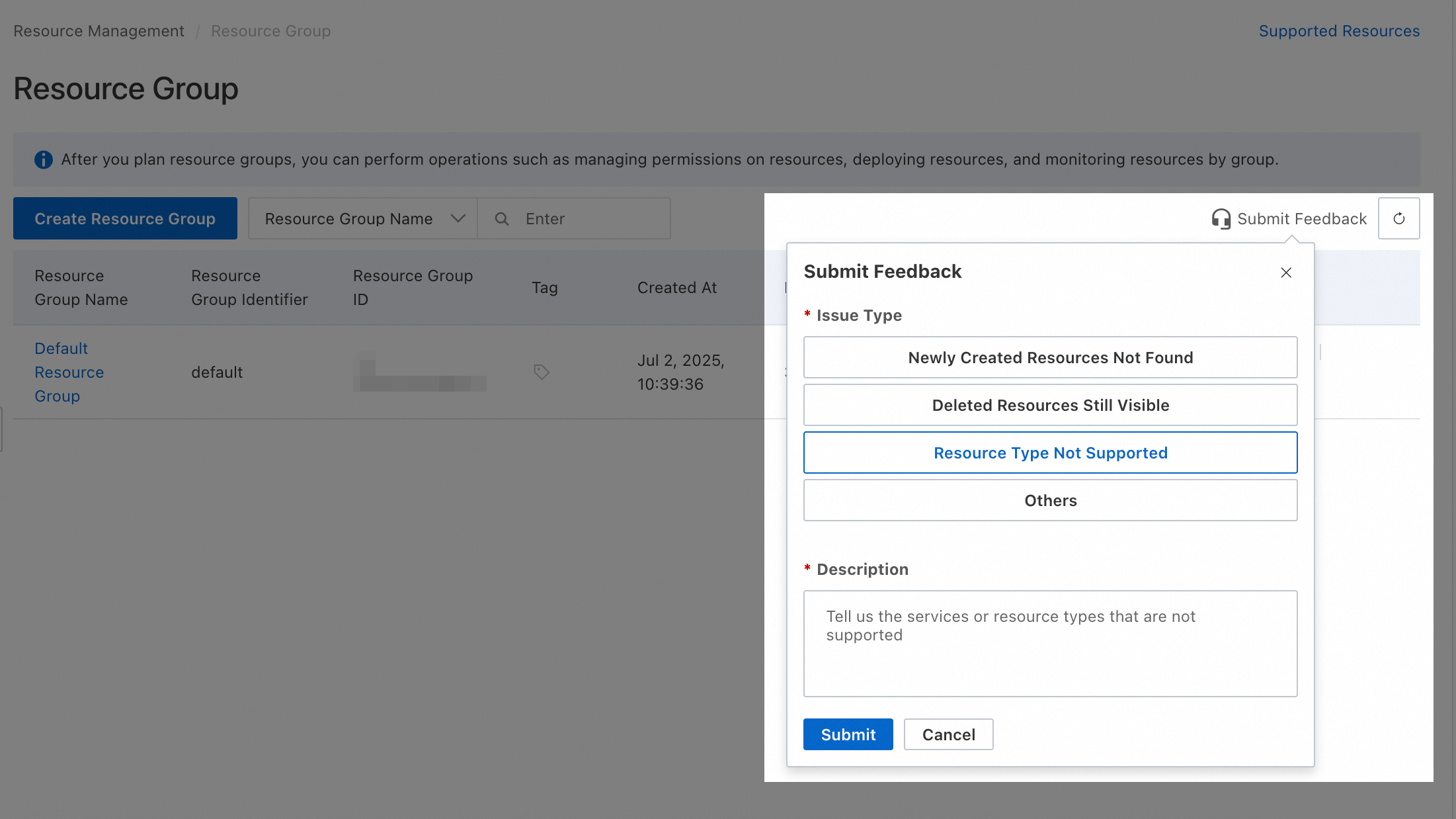
To request support for a resource type that is not yet supported, submit your feedback in the resource group console.
Actions without resource group authorization
The following Apsara File Storage NAS actions do not support resource group-level authorization:
|
Actions |
Description |
|
nas:AddClientToBlackList |
Adds a client to the blacklist for a CPFS service, which rejects the client's write requests. This action serves as an I/O fence. |
|
nas:AddTags |
- |
|
nas:ApplyAutoSnapshotPolicy |
Applies an auto snapshot policy to one or more file systems. |
|
nas:AttachVscMountPoint |
- |
|
nas:AttachVscToFilesystems |
Associates a VSC device with a file system. |
|
nas:BindStoragePackage |
- |
|
nas:CancelAutoSnapshotPolicy |
Cancels the auto snapshot policy for one or more file systems. |
|
nas:CancelLifecycleRetrieveJob |
Cancels an active data retrieval job. |
|
nas:CancelRecycleBinJob |
Cancels a running job in the recycle bin. |
|
nas:ClientMount |
- |
|
nas:ClientRootAccess |
- |
|
nas:ClientWrite |
- |
|
nas:CreateAccessGroup |
Creates an access group. |
|
nas:CreateAccessRule |
Creates an access rule. |
|
nas:CreateAutoSnapshotPolicy |
Creates an auto snapshot policy. |
|
nas:CreateFile |
Creates a directory or file. |
|
nas:CreateLDAPConfig |
Adds an LDAP configuration. |
|
nas:CreateLogAnalysis |
Dumps the logs of a General-purpose NAS file system to Log Service. |
|
nas:CreateMountTargetInternal |
- |
|
nas:CreateProtocolMountTarget |
Creates an export directory for a protocol service. |
|
nas:CreateProtocolService |
Creates a protocol service for a CPFS file system. The process takes 5 to 10 minutes. |
|
nas:CreateServicePolicy |
- |
|
nas:CreateSnapshot |
Creates a snapshot. |
|
nas:CreateVscMountPoint |
- |
|
nas:DeleteAccessGroup |
Deletes an access group. |
|
nas:DeleteAccessRule |
Deletes an access rule. |
|
nas:DeleteAutoSnapshotPolicy |
Deletes an auto snapshot policy. |
|
nas:DeleteLDAPConfig |
Deletes an LDAP configuration. |
|
nas:DeleteLogAnalysis |
Stops dumping logs for a General-purpose NAS file system. |
|
nas:DeleteMountTargetSpecial |
- |
|
nas:DeleteProtocolMountTarget |
Deletes an export directory for a protocol service. |
|
nas:DeleteProtocolService |
Deletes a protocol service for a CPFS file system. |
|
nas:DeleteSnapshot |
Deletes a snapshot or cancels a snapshot creation task. |
|
nas:DeleteVscMountPoint |
- |
|
nas:DemoCloneTest |
- |
|
nas:DescribeAccessGroups |
Lists access groups. |
|
nas:DescribeAccessRules |
Lists access rules. |
|
nas:DescribeAutoSnapshotPolicies |
Lists auto snapshot policies. |
|
nas:DescribeAutoSnapshotTasks |
Lists auto snapshot tasks. |
|
nas:DescribeBlackListClients |
Queries the status of clients in the blacklist for a CPFS service. |
|
nas:DescribeFileSystemBriefInfos |
- |
|
nas:DescribeFileSystemFlowControlSetting |
- |
|
nas:DescribeFileSystemStatistics |
Queries the statistics of file systems under the current account. |
|
nas:DescribeFilesystemsAssociatedHpnZones |
- |
|
nas:DescribeFilesystemsVscAttachInfo |
Queries the virtual storage channel information associated with a file system. |
|
nas:DescribeLogAnalysis |
Queries the log dump information configured in Log Analysis. |
|
nas:DescribeMountedClients |
Lists mounted clients. |
|
nas:DescribeProtocolMountTarget |
Lists the export directories for a protocol service. |
|
nas:DescribeProtocolMountTarget007 |
- |
|
nas:DescribeProtocolService |
Lists protocol services. |
|
nas:DescribeRegions |
Lists available Alibaba Cloud regions. |
|
nas:DescribeResourceStatistics |
- |
|
nas:DescribeSnapshots |
Lists snapshots for a specified file system. |
|
nas:DescribeStoragePackages |
Lists storage packages. |
|
nas:DescribeVscMountPointAttachInfo |
- |
|
nas:DescribeVscMountPoints |
- |
|
nas:DescribeZones |
Queries all zones in a region and the file system types supported in each zone. |
|
nas:DetachVscFromFilesystems |
Disassociates a VSC device from a file system. |
|
nas:DetachVscMountPoint |
- |
|
nas:GetLifecycleRuleTimeRange |
- |
|
nas:GetViperGrayConfig |
- |
|
nas:ModifyAccessGroup |
Modifies an access group. |
|
nas:ModifyAccessRule |
Modifies an access rule. |
|
nas:ModifyAutoSnapshotPolicy |
Modifies an auto snapshot policy. The changes take effect immediately for all associated file systems. |
|
nas:ModifyDataFlowTasks |
- |
|
nas:ModifyLDAPConfig |
Modifies an LDAP configuration. |
|
nas:ModifyProtocolMountTarget |
Modifies the access group or description for an export directory of a protocol service. To change the VPC or vSwitch, you must recreate the export directory. |
|
nas:ModifyProtocolService |
Modifies the description of a protocol service. |
|
nas:OpenNasService |
- |
|
nas:RemoveClientFromBlackList |
Removes a client from the blacklist for a CPFS service to resume its write requests. |
|
nas:ResetFileSystem |
Rolls back a file system to a previous snapshot. |
|
nas:RetryLifecycleRetrieveJob |
Retries a failed data retrieval job. |
|
nas:SetFileSystemFlowControl |
- |
|
nas:TagResources |
Creates and applies tags to resources, such as file systems and access points. |
|
nas:TestDemoDescribeProtocolMountTarget |
- |
|
nas:TestDemoDescribeProtocolMountTarget03 |
- |
|
nas:TestDescribeProtocolMountTarget |
- |
|
nas:TestDescribeProtocolMountTarget02 |
- |
|
nas:UntagResources |
Removes tags from resources. |
For actions that do not support resource group-level authorization, granting permissions at the resource group level is ineffective. To grant a RAM user permissions for these actions, you must create a custom policy and authorize the user at the account level.
 The following examples show custom policies. You can adapt them for your specific requirements.
-
The following policy allows all read-only actions that do not support resource group-level authorization by listing them in the
Actionelement.{ "Version": "1", "Statement": [ { "Effect": "Allow", "Action": [ "nas:DescribeAccessGroups", "nas:DescribeAccessRules", "nas:DescribeAutoSnapshotPolicies", "nas:DescribeAutoSnapshotTasks", "nas:DescribeBlackListClients", "nas:DescribeFileSystemBriefInfos", "nas:DescribeFileSystemFlowControlSetting", "nas:DescribeFileSystemStatistics", "nas:DescribeFilesystemsAssociatedHpnZones", "nas:DescribeFilesystemsVscAttachInfo", "nas:DescribeLogAnalysis", "nas:DescribeMountedClients", "nas:DescribeProtocolMountTarget", "nas:DescribeProtocolMountTarget007", "nas:DescribeProtocolService", "nas:DescribeRegions", "nas:DescribeResourceStatistics", "nas:DescribeSnapshots", "nas:DescribeStoragePackages", "nas:DescribeVscMountPointAttachInfo", "nas:DescribeVscMountPoints", "nas:DescribeZones", "nas:GetLifecycleRuleTimeRange", "nas:GetViperGrayConfig" ], "Resource": "*" } ] } -
The following policy allows all actions that do not support resource group-level authorization by listing them in the
Actionelement.{ "Version": "1", "Statement": [ { "Effect": "Allow", "Action": [ "nas:AddClientToBlackList", "nas:AddTags", "nas:ApplyAutoSnapshotPolicy", "nas:AttachVscMountPoint", "nas:AttachVscToFilesystems", "nas:BindStoragePackage", "nas:CancelAutoSnapshotPolicy", "nas:CancelLifecycleRetrieveJob", "nas:CancelRecycleBinJob", "nas:ClientMount", "nas:ClientRootAccess", "nas:ClientWrite", "nas:CreateAccessGroup", "nas:CreateAccessRule", "nas:CreateAutoSnapshotPolicy", "nas:CreateFile", "nas:CreateLDAPConfig", "nas:CreateLogAnalysis", "nas:CreateMountTargetInternal", "nas:CreateProtocolMountTarget", "nas:CreateProtocolService", "nas:CreateServicePolicy", "nas:CreateSnapshot", "nas:CreateVscMountPoint", "nas:DeleteAccessGroup", "nas:DeleteAccessRule", "nas:DeleteAutoSnapshotPolicy", "nas:DeleteLDAPConfig", "nas:DeleteLogAnalysis", "nas:DeleteMountTargetSpecial", "nas:DeleteProtocolMountTarget", "nas:DeleteProtocolService", "nas:DeleteSnapshot", "nas:DeleteVscMountPoint", "nas:DemoCloneTest", "nas:DescribeAccessGroups", "nas:DescribeAccessRules", "nas:DescribeAutoSnapshotPolicies", "nas:DescribeAutoSnapshotTasks", "nas:DescribeBlackListClients", "nas:DescribeFileSystemBriefInfos", "nas:DescribeFileSystemFlowControlSetting", "nas:DescribeFileSystemStatistics", "nas:DescribeFilesystemsAssociatedHpnZones", "nas:DescribeFilesystemsVscAttachInfo", "nas:DescribeLogAnalysis", "nas:DescribeMountedClients", "nas:DescribeProtocolMountTarget", "nas:DescribeProtocolMountTarget007", "nas:DescribeProtocolService", "nas:DescribeRegions", "nas:DescribeResourceStatistics", "nas:DescribeSnapshots", "nas:DescribeStoragePackages", "nas:DescribeVscMountPointAttachInfo", "nas:DescribeVscMountPoints", "nas:DescribeZones", "nas:DetachVscFromFilesystems", "nas:DetachVscMountPoint", "nas:GetLifecycleRuleTimeRange", "nas:GetViperGrayConfig", "nas:ModifyAccessGroup", "nas:ModifyAccessRule", "nas:ModifyAutoSnapshotPolicy", "nas:ModifyDataFlowTasks", "nas:ModifyLDAPConfig", "nas:ModifyProtocolMountTarget", "nas:ModifyProtocolService", "nas:OpenNasService", "nas:RemoveClientFromBlackList", "nas:ResetFileSystem", "nas:RetryLifecycleRetrieveJob", "nas:SetFileSystemFlowControl", "nas:TagResources", "nas:TestDemoDescribeProtocolMountTarget", "nas:TestDemoDescribeProtocolMountTarget03", "nas:TestDescribeProtocolMountTarget", "nas:TestDescribeProtocolMountTarget02", "nas:UntagResources" ], "Resource": "*" } ] }
A RAM user or RAM role with account-level permissions can operate on all relevant resources within the account. Always follow the principle of least privilege: grant these permissions with caution and ensure they align with your requirements.
FAQ
Find the resource group for a resource
-
Method 1: Click the resource name to open its details page. The resource's resource group is displayed on this page.
-
Method 2: Log on to the Resource Management console and choose . In the left pane, select the account that contains the resource (defaults to current account). Use the filters to locate the resource and view its resource group.
View product resources in a resource group
-
Method 1: Log on to the Resource Management console and choose . In the left pane, under the account that contains the resources (defaults to current account), click the name of the target resource group. Then, in the Select Resource Type section on the right, select the desired product to view all its resources in that group.
-
Method 2: Log on to the Resource Management console and choose . Find the target resource group and click Resource Management in the Actions column. On the resource management page, select the desired product from the Product drop-down list to view all resources of that product in the resource group.
Change the resource group for multiple resources
Log on to the Resource Management console and choose . In the row for the target resource group, click Resource Management in the Actions column to open the resource management page. Use the filters to locate the desired resources, select their checkboxes in the first column, and click Transfer Resource Group at the bottom of the page. Follow the on-screen instructions to complete the transfer.