In MSE Microservices Governance, the Application Overview page displays the QPS data, top lists, and other information about your application.
Procedure
Log on to the MSE console, and select a region in the top navigation bar.
-
In the left-side navigation pane, choose Microservices Governance > Application Governance.
-
On the Application list page, click the resource card of the desired application.
In the left-side navigation pane, click Application Overview.
Features
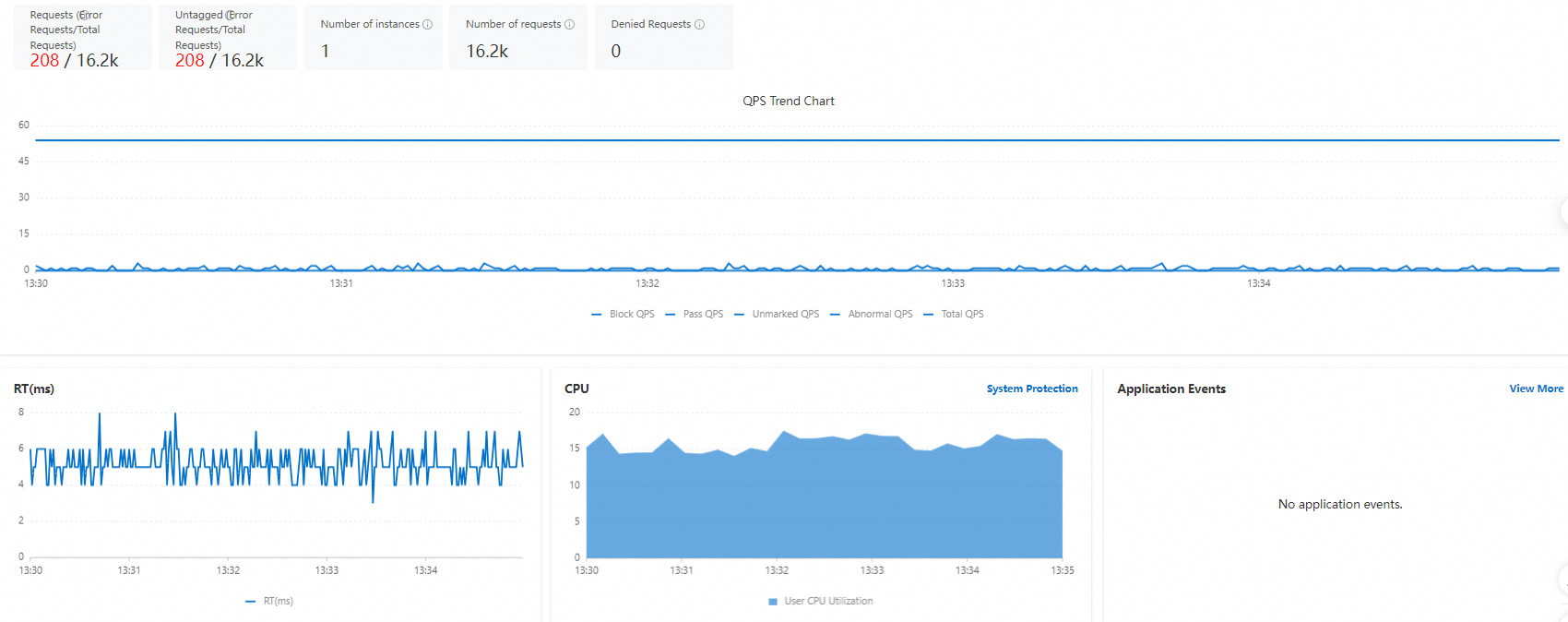
The Application Overview page refreshes dynamically and displays information about the application, such as Request Data, RT(ms), CPU, and Application Events.
Performance metrics: the QPS, RT(ms), CPU, and other statistics of the application, including the following items:
Request Data: displays the trend charts of the number of instances, passed requests, and blocked requests over the last 5 minutes. Click a legend item to hide or show the trend chart of the corresponding metric.
RT(ms): the response time, in ms. Displays the trend chart of the response time over the last 5 minutes.
CPU: the user CPU utilization. Displays the CPU utilization over the last 5 minutes.
Application Events: displays the application events that the application generated recently.
The QPS and response time metrics on the Application Overview page are collected from the entry-point interfaces of the application. They do not include statistics for method calls inside the application.
The following figure shows the performance metrics on the Application Overview page.
Top lists and system resource metrics: include the Through QPS Top, Top Block QPS for Protection, and Average RT TOP interface lists.
The top interface lists refresh dynamically. On the Through QPS Top tab, interfaces are sorted by passed QPS. On each of the other tabs, interfaces are sorted by the metric in the tab name.
Click an interface name, or click View All in the upper-right corner of the section, to go to the WEB service tab and view the QPS Data (Seconds), RT (ms), Maximum Concurrency (in Seconds), and Event details of all interfaces.
In the Actions column of the interface that you want to manage, click Flow Control or Isolation to configure the corresponding rule for the resource.