HTTP jobs
SchedulerX 2.0 schedules HTTP jobs that call your HTTP endpoints on a defined schedule and validate the responses automatically. You run HTTP jobs in one of two execution modes -- serverless or agent -- depending on whether your endpoints are publicly accessible and whether you need second-level scheduling.
Choose an execution mode
| Serverless mode | Agent mode | |
|---|---|---|
| Best for | Internet-facing API calls and lightweight jobs | Internal service calls and complex processing scenarios |
| Client setup | Not required. SchedulerX initiates the requests. | Required. Deploy the SchedulerX agent first. |
| Request methods | GET, POST | GET, POST |
| Second-level scheduling | Not supported. Minimum interval is one minute. | Supported |
| Internal URLs | Not supported. URLs must be publicly accessible. If the address uses IP:Port format, the machine must have Internet access. | Supported |
| Execution timeout | Basic Edition: 30 seconds. Professional Edition: 120 seconds. | No limit |
Every HTTP response must be in JSON format. SchedulerX validates each response by checking whether the parsed value of a specified key matches the value you configured.
Prerequisites
Before you begin, make sure that you have:
A deployed HTTP service with a URL accessible from the Internet (serverless mode) or from the agent host (agent mode)
(Agent mode only) A deployed SchedulerX agent (version later than 1.8.2). See Deploy the SchedulerX agent.
Create an HTTP job
Creating an HTTP job involves three steps: configure basic settings, set up scheduling, and configure notifications.
Prepare an HTTP service
If you already have an HTTP service, skip to Create the job in the console. Have the following ready:
The full URL of the HTTP service
The request method (GET or POST)
Any headers, cookies, or POST parameters
If you need to build an HTTP service, use the following Java examples as a starting point.
GET endpoint example:
@GET
@Path("hi")
@Produces(MediaType.APPLICATION_JSON)
public RestResult hi(@QueryParam("user") String user) {
    TestVo vo = new TestVo();
    vo.setName(user);
    RestResult result = new RestResult();
    result.setCode(200);
    result.setData(vo);
    return result;
}
POST endpoint example:
import com.alibaba.schedulerx.common.constants.CommonConstants;

@POST
@Path("createUser")
@Produces(MediaType.APPLICATION_JSON)
public RestResult createUser(@FormParam("userId") String userId,
        @FormParam("userName") String userName) {
    TestVo vo = new TestVo();
    System.out.println("userId=" + userId + ", userName=" + userName);
    vo.setName(userName);
    RestResult result = new RestResult();
    result.setCode(200);
    result.setData(vo);
    return result;
}
Create the job in the console
Log on to the MSE console.
Create an HTTP job. For general job creation steps, see Create a job.
In the Basic Configuration step, configure the following parameters.
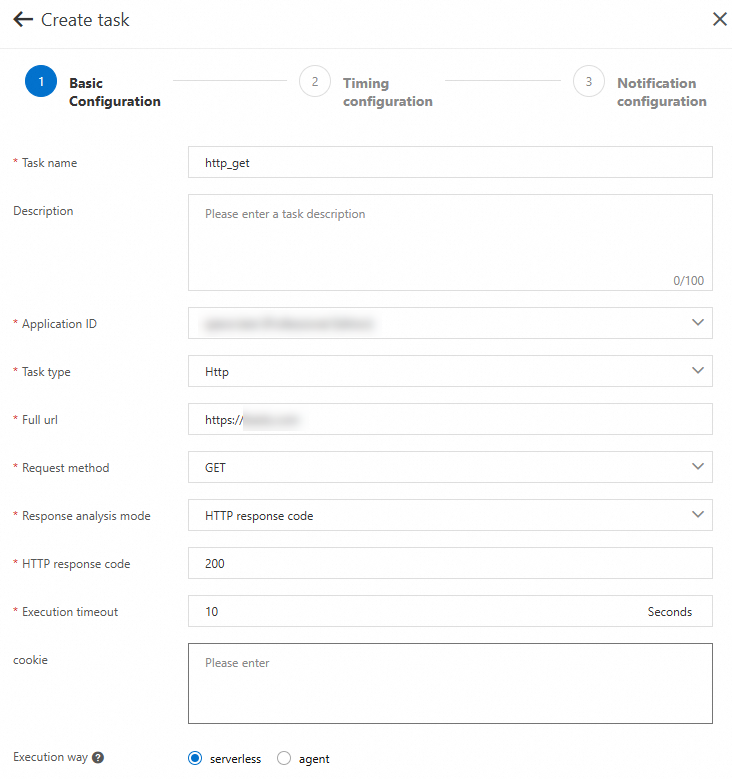
The following figures show the basic configuration for a GET request and a POST request:
GET request configuration:
POST request configuration:
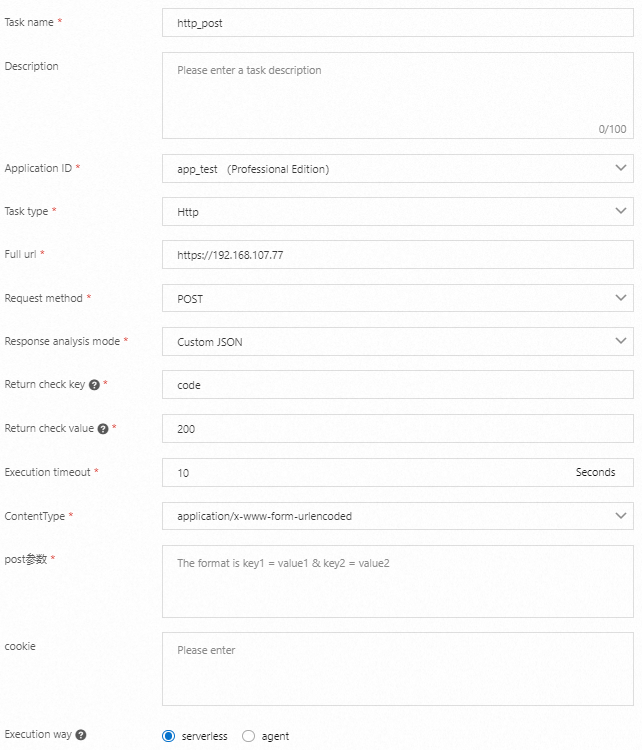
The basic configuration parameters are the same for both serverless and agent mode.
Basic configuration parameters
| Parameter | Description |
|---|---|
| Task name | A custom name for the job. |
| Description | A brief description for easy identification. |
| Application ID | The application group to which the job belongs. Select from the drop-down list. |
| Task type | Select Http from the drop-down list. |
| Full url | The complete URL, starting with http or https. |
| Request method | GET or POST. |
| Response analysis mode | The method SchedulerX uses to validate the HTTP response. Options: HTTP response code (validates by status code), Custom JSON (validates by a JSON key-value pair), Custom string (validates by string matching). |
| HTTP response code | The expected HTTP status code. Default: 200. Available when Response analysis mode is set to HTTP response code. |
| Return check key | The JSON key to check. Available when Response analysis mode is set to Custom JSON. |
| Return check value | The expected JSON value. Available when Response analysis mode is set to Custom JSON. |
| Custom string | The expected string to match against the response body. Available when Response analysis mode is set to Custom string. |
| Execution timeout | The maximum execution time. Serverless mode: 30 seconds (Basic Edition), 120 seconds (Professional Edition). Agent mode: no limit. |
| ContentType | The request body format for POST requests. Options: application/x-www-form-urlencoded, application/json. |
| POST parameters | The request body for POST requests. Format depends on ContentType: key1=value&key2=value2 for form-urlencoded, {"key1":"val1","key2":"val2"} for JSON. |
| cookie | Cookie values in the format key1=val1;key2=val2. Multiple values are separated by semicolons (;). Maximum length: 300 bytes. |
| Execution way | The execution mode: serverless (requests initiated by the server; URLs must be Internet-accessible) or agent (requests initiated by the client; supports internal URLs). Agent mode requires deploying the SchedulerX agent beforehand. See Deploy the SchedulerX agent for script or HTTP jobs. |
Custom JSON validation example:
The following sample response shows how key-value validation works:
{
  "code": 200,
  "data": "true",
  "message": "",
  "requestId": "446655068791923614103381232971",
  "success": true
}
To validate this response, set Return check key to success and Return check value to true, or set the key to code and the value to 200.
Advanced configuration parameters
| Parameter | Description |
|---|---|
| Task failure retry count | The number of retries after a failure. Default: 0. |
| Task failure retry interval | The interval between retries, in seconds. Default: 30. |
| Task concurrency | The maximum number of concurrent instances for this job. A value of 1 prevents overlapping runs. If the concurrency limit is reached, the current trigger is skipped. |
| Cleaning strategy | The policy for clearing job history records. Default: Keep last N entries. Options: Keep last N entries, Keep the last N entries by status. |
| Retained Number | The number of history records to retain. Default: 300. |
Set up scheduling
In the Timing configuration step, set the scheduling parameters and click Next Step.

Scheduling parameters
| Parameter | Description |
|---|---|
| Time type | The scheduling method. Options: none (no scheduling; typically used with workflows), cron (cron expression), api (API-triggered), fixed_rate (fixed interval), second_delay (second-level delay), one_time (single execution). |
| cron expression | A cron expression defining the schedule. Available when Time type is cron. Use the built-in tool to generate a valid expression. |
| Fixed frequency | The interval in seconds between runs. Must be greater than 60. Available when Time type is fixed_rate. |
| Fixed delay | The delay in seconds between runs. Valid values: 1 to 60. Available when Time type is second_delay. |
| Scheduling time | The date and time for a one-time execution. Available when Time type is one_time. |
Advanced scheduling parameters
| Parameter | Description |
|---|---|
| Time offset | The offset between the data processing time and the job scheduling time. Retrieve this value from the scheduling context at runtime. |
| Time zone | The time zone for scheduling. Select a country/region time zone or a GMT offset. |
| Calendar | The calendar that determines when the job runs. Options: Daily scheduling, Specify calendar (choose Financial day or Workday). |
| Effective time | When the schedule takes effect. Options: Effective immediately, Start Time (select a specific date and time). |
Configure notifications
HTTP jobs support error alerts for issues such as timeouts or unexpected return values.
In the Notification configuration step, configure alert conditions and contacts, then click Complete.

To trigger a manual test run, click Run Once in the Operation column of the job.
Retrieve job metadata from HTTP headers
SchedulerX passes job metadata in HTTP request headers. To read this metadata in your HTTP service, add the following Maven dependency:
<dependency>
    <groupId>com.aliyun.schedulerx</groupId>
    <artifactId>schedulerx2-common</artifactId>
    <version>1.6.0</version>
</dependency>
The following GET endpoint example reads the job ID and job name from the request headers:
import com.alibaba.schedulerx.common.constants.CommonConstants;

@GET
@Path("hi")
@Produces(MediaType.APPLICATION_JSON)
public RestResult hi(@QueryParam("user") String user,
        @HeaderParam(CommonConstants.JOB_ID_HEADER) String jobId,
        @HeaderParam(CommonConstants.JOB_NAME_HEADER) String jobName) {
    TestVo vo = new TestVo();
    vo.setName("armon");
    // Decode URL-encoded job name (required for non-ASCII characters)
    String decodedJobName = URLDecoder.decode(jobName, "utf-8");
    System.out.println("user=" + user + ", jobId=" + jobId + ", jobName=" + decodedJobName);
    RestResult result = new RestResult();
    result.setCode(200);
    result.setData(vo);
    return result;
}
Available header constants
All constants are defined in CommonConstants:
| Constant | Header key | Description |
|---|---|---|
JOB_ID_HEADER | schedulerx-jobId | The job ID |
JOB_NAME_HEADER | schedulerx-jobName | The job name (English names supported) |
SCHEDULE_TIMESTAMP_HEADER | schedulerx-scheduleTimestamp | The scheduling timestamp |
DATA_TIMESTAMP_HEADER | schedulerx-dataTimestamp | The data processing timestamp |
GROUP_ID_HEADER | schedulerx-groupId | The application group ID |
USER_HEADER | schedulerx-user | The username |
MAX_ATTEMPT_HEADER | schedulerx-maxAttempt | The maximum retry count for the instance |
ATTEMPT_HEADER | schedulerx-attempt | The current retry count for the instance |
JOB_PARAMETERS_HEADER | schedulerx-jobParameters | The job parameters |
INSTANCE_PARAMETERS_HEADER | schedulerx-instanceParameters | The instance parameters (set through API calls) |
Verify the result
After a job runs, check the execution list for the result.
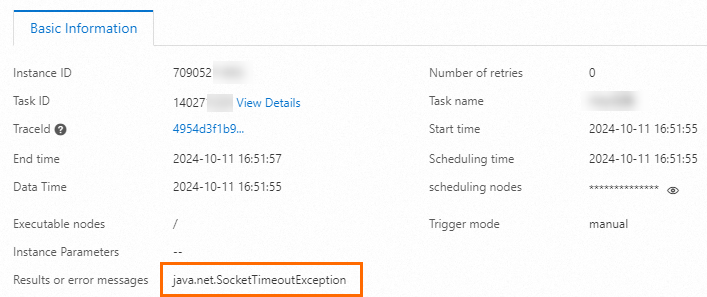
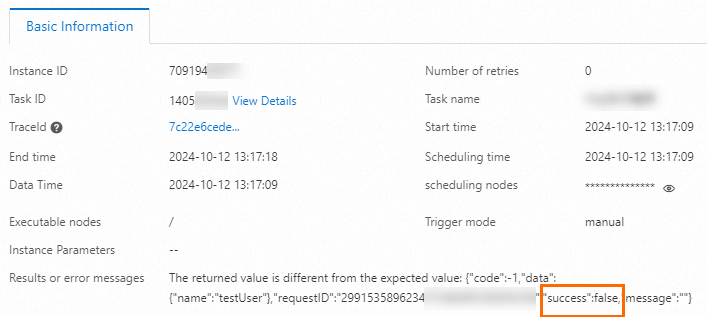
If a job fails, click Details to view the failure reason. Common failure scenarios include:
Return value mismatch: The actual response does not match the expected value configured in the response analysis mode.
Execution timeout: The job exceeded the configured timeout period.