A lightweight text-to-image model for fast generation, with Chinese and English text rendering, and flexible resolutions.
Try it online: (Singapore | Beijing) | Technical blog
Examples
Input prompt | Output image |
|---|
Photo of a stylish young woman with short black hair standing confidently in front of a vibrant cartoon-style mural wall. She wears an all-black outfit: a puffed bomber jacket with a ruffled collar, cargo shorts, fishnet tights, and chunky black Doc Martens, with a gold chain dangling from her waist. The background features four colorful comic-style panels: one reads “GRAND STAGE” and includes sneakers and a Gatorade bottle; another displays green Nike sneakers and a slice of pizza; the third reads “HARAJUKU st” with floating shoes; and the fourth shows a blue mouse riding a skateboard with the text “Takeshita WELCOME.” Dominant bright colors include yellow, teal, orange, pink, and green. Speech bubbles, halftone patterns, and playful characters enhance the urban street-art aesthetic. Daylight evenly illuminates the scene, and the ground beneath her feet is white tiled pavement. Full-body portrait, centered composition, slightly tilted stance, direct eye contact with the camera. High detail, sharp focus, dynamic framing. | 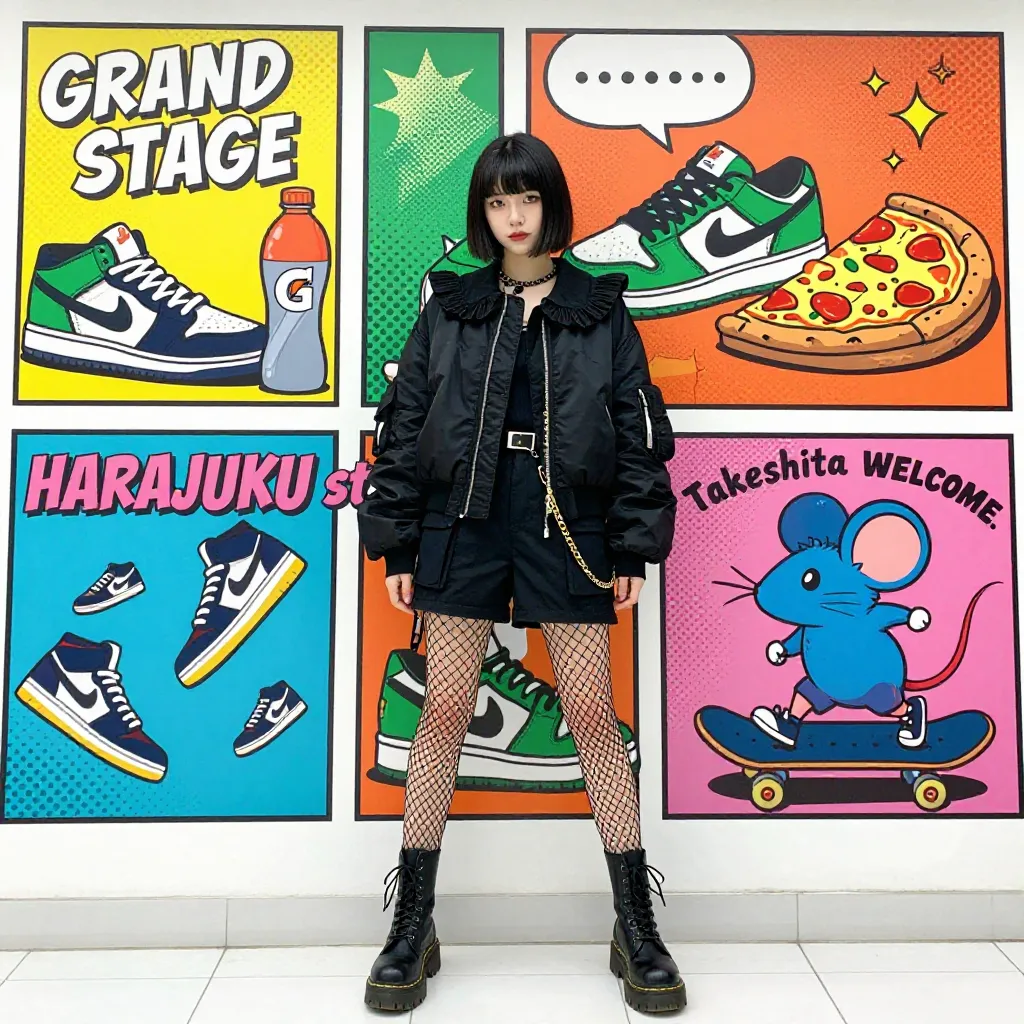
|
Model overview
Model Name | Description | Output image specifications |
|---|
z-image-turbo | A fast lightweight image generation model | Image resolution: 512×512 to 2048×2048 pixels. See recommended resolutions in size parameter settings. Image format: png Number of images: Fixed at 1. |
NoteCheck Model List for region support before calling.
Prerequisites
Create an API key and set the API key as an environment variable.
ImportantAlibaba Cloud Model Studio has released workspace-specific domains for the China (Beijing) and Singapore regions. The new dedicated domains deliver superior performance and higher stability for inference requests. We recommend migrating to the new domains:
- China (Beijing): from
https://dashscope.aliyuncs.com to https://{WorkspaceId}.cn-beijing.maas.aliyuncs.com
- Singapore: from
https://dashscope-intl.aliyuncs.com to https://{WorkspaceId}.ap-southeast-1.maas.aliyuncs.com
{WorkspaceId} is your workspace ID, which can be found on the Workspace Details page in the Alibaba Cloud Model Studio console. The existing domain remains fully functional.
Synchronous HTTP call
Singapore:POST https://{WorkspaceId}.ap-southeast-1.maas.aliyuncs.com/api/v1/services/aigc/multimodal-generation/generation
Beijing:POST https://{WorkspaceId}.ap-southeast-1.maas.aliyuncs.com/api/v1/services/aigc/multimodal-generation/generation
Replace {WorkspaceId} with your actual workspace ID.
Request parameters Request headers Content-Type string (Required) The content type of the request. Must be application/json. Authorization string (Required) Authenticates the request with a Model Studio API key. Example: Bearer sk-xxxx. Request body model string (Required) Model name: z-image-turbo. input object (Required) Input content. Properties messages array (Required) Request content array. Single-turn only — pass one role and content set. Multi-turn not supported. Properties rolestring (Required) Message role: user. contentarray (Required) Message content array. Must contain one text object. Properties textstring(Required) Positive prompt describing desired content, style, and composition. Supports Chinese and English. Max 800 characters (each character, letter, number, or symbol counts as one). Extra characters truncated. Example: A sitting orange cat with a happy expression, lively and cute, realistic and accurate. Note: Only one text object supported. Passing zero or multiple text objects returns an error. parameters object (Optional) Image generation parameters. Properties size string (Optional) Output image resolution in width×height format.
- Default:
1024*1536
- Range: 512×512 to 2048×2048
- Recommended: 1024×1024 to 1536×1536
Example: 1024*1536. Recommended resolutions for a total of 1024*1024 pixels:
- 1:1: 1024*1024
- 2:3: 832*1248
- 3:2: 1248*832
- 3:4: 864*1152
- 4:3: 1152*864
- 7:9: 896*1152
- 9:7: 1152*896
- 9:16: 720*1280
- 9:21: 576*1344
- 16:9: 1280*720
- 21:9: 1344*576
Recommended resolutions for a total of 1280*1280 pixels:
- 1:1: 1280*1280
- 2:3: 1024*1536
- 3:2: 1536*1024
- 3:4: 1104*1472
- 4:3: 1472*1104
- 7:9: 1120*1440
- 9:7: 1440*1120
- 9:16: 864*1536
- 9:21: 720*1680
- 16:9: 1536*864
- 21:9: 1680*720
Recommended resolutions for a total of 1536*1536 pixels:
- 1:1: 1536*1536
- 2:3: 1248*1872
- 3:2: 1872*1248
- 3:4: 1296*1728
- 4:3: 1728*1296
- 7:9: 1344*1728
- 9:7: 1728*1344
- 9:16: 1152*2048
- 9:21: 864*2016
- 16:9: 2048*1152
- 21:9: 2016*864
prompt_extend bool (Optional) ImportantEnabling prompt_extend increases cost. See Model pricing for details. Enable intelligent prompt rewriting via LLM optimization and reasoning output.
- false (default): Returns image and original prompt
- true: Returns image, optimized prompt, and reasoning
seed integer (optional) Random number seed. Valid range: [0,2147483647]. Using the same seed yields similar outputs. If omitted, the algorithm uses a random seed. Note: Image generation is probabilistic. Even with the same seed, results may vary. | Text-to-imageThis example returns an image directly for a faster response. To enable intelligent rewriting, set prompt_extend=true — the system returns the optimized prompt, reasoning, and image (increases response time). curl --location 'https://{WorkspaceId}.ap-southeast-1.maas.aliyuncs.com/api/v1/services/aigc/multimodal-generation/generation' \
--header 'Content-Type: application/json' \
--header "Authorization: Bearer $DASHSCOPE_API_KEY" \
--data '{
"model": "z-image-turbo",
"input": {
"messages": [
{
"role": "user",
"content": [
{
"text": "Photo of a stylish young woman with short black hair standing confidently in front of a vibrant cartoon-style mural wall. She wears an all-black outfit: a puffed bomber jacket with a ruffled collar, cargo shorts, fishnet tights, and chunky black Doc Martens, with a gold chain dangling from her waist. The background features four colorful comic-style panels: one reads “GRAND STAGE” and includes sneakers and a Gatorade bottle; another displays green Nike sneakers and a slice of pizza; the third reads “HARAJUKU st” with floating shoes; and the fourth shows a blue mouse riding a skateboard with the text “Takeshita WELCOME.” Dominant bright colors include yellow, teal, orange, pink, and green. Speech bubbles, halftone patterns, and playful characters enhance the urban street-art aesthetic. Daylight evenly illuminates the scene, and the ground beneath her feet is white tiled pavement. Full-body portrait, centered composition, slightly tilted stance, direct eye contact with the camera. High detail, sharp focus, dynamic framing."
}
]
}
]
},
"parameters": {
"prompt_extend": false,
"size": "1024*1024"
}
}'
|
Response parameters output object Model output. Properties choices array Model output content. Array contains one element. Properties finish_reason string Reason for completion. Value stop indicates success. message object Model response message. Properties rolestring Message role. Value is assistant. contentarray Properties image string Generated image URL (PNG). Valid 24 hours — download promptly. text string This returns the input prompt (prompt_extend=false) or the rewritten prompt (prompt_extend=true). reasoning_content string Model reasoning process. Only returned when prompt_extend=true. usage object This includes usage statistics for successful generations only. Properties width integer Generated image width (pixels). height integer Generated image height (pixels). image_count integer Number of generated images: 1. input_tokens integer Input tokens (0 when prompt_extend=false). output_tokens integer Output tokens (0 when prompt_extend=false). output_tokens_detailsobject Output token details (only when prompt_extend=true). Properties reasoning_tokensinteger Tokens used for reasoning. total_tokensinteger Total tokens (0 when prompt_extend=false). request_id string Unique request identifier for tracing and troubleshooting. code string Error code. Returned only for failed requests. See Error codes. message string Detailed error message. Returned only for failed requests. See Error codes. | Successful task executionTask data (task status and image URLs) is retained for only 24 hours and then automatically purged. Save generated images promptly. {
"output": {
"choices": [
{
"finish_reason": "stop",
"message": {
"content": [
{
"image": "https://dashscope-result-bj.oss-cn-beijing.aliyuncs.com/xxx.png?Expires=xxx"
},
{
"text": "Photo of a stylish young woman with short black hair standing confidently in front of a vibrant cartoon-style mural wall. She wears an all-black outfit: a puffed bomber jacket with a ruffled collar, cargo shorts, fishnet tights, and chunky black Doc Martens, with a gold chain dangling from her waist. The background features four colorful comic-style panels: one reads “GRAND STAGE” and includes sneakers and a Gatorade bottle; another displays green Nike sneakers and a slice of pizza; the third reads “HARAJUKU st” with floating shoes; and the fourth shows a blue mouse riding a skateboard with the text “Takeshita WELCOME.” Dominant bright colors include yellow, teal, orange, pink, and green. Speech bubbles, halftone patterns, and playful characters enhance the urban street-art aesthetic. Daylight evenly illuminates the scene, and the ground beneath her feet is white tiled pavement. Full-body portrait, centered composition, slightly tilted stance, direct eye contact with the camera. High detail, sharp focus, dynamic framing."
}
],
"reasoning_content": "",
"role": "assistant"
}
}
]
},
"usage": {
"height": 1024,
"image_count": 1,
"input_tokens": 0,
"output_tokens": 0,
"total_tokens": 0,
"width": 1024
},
"request_id": "abf1645b-b630-433a-92f6-xxxxxx"
}
Abnormal task executionOn failure, the system returns error details in code and message fields. See Error codes for troubleshooting. {
"request_id": "a4d78a5f-655f-9639-8437-xxxxxx",
"code": "InvalidParameter",
"message": "num_images_per_prompt must be 1"
}
|
Limits
- Image URLs are valid for 24 hours. Download promptly.
- Content moderation: Both the input
prompt and output image undergo content moderation. Non-compliant content returns an IPInfringementSuspect or DataInspectionFailed error. See Error codes.
Billing and rate limiting
- For pricing and free quota, see Model pricing.
- For rate limits, see Z-Image.
- Billing is based on successful image count and prompt_extend status. Failed calls do not incur fees or consume free quota.
Error codes
See Error codes for troubleshooting failed calls.
FAQ
Q: How do I view model invocation metrics?
A: One hour after a model invocation completes, go to the Monitoring (Singapore) or Monitoring (China (Beijing)) page to view metrics such as invocation count and success rate. For more information, see Billing and cost management.
Q: How do I get the domain name whitelist for image storage?
A: Images generated by models are stored in OSS. The API returns a temporary public URL. To configure a firewall whitelist for this download URL, note the following: The underlying storage may change dynamically. This topic does not provide a fixed OSS domain name whitelist to prevent access issues caused by outdated information. If you have security control requirements, contact your account manager to obtain the latest OSS domain name list.