This topic describes the input and output parameters for the Wan - general image editing model.
ImportantThis document is for the China (Beijing) region only. To use the model, use an API key from the China(Beijing) region.
This model uses simple instructions to perform various image editing tasks (image expansion, watermark removal, style transfer, image inpainting, and image enhancement). The following features are currently supported:
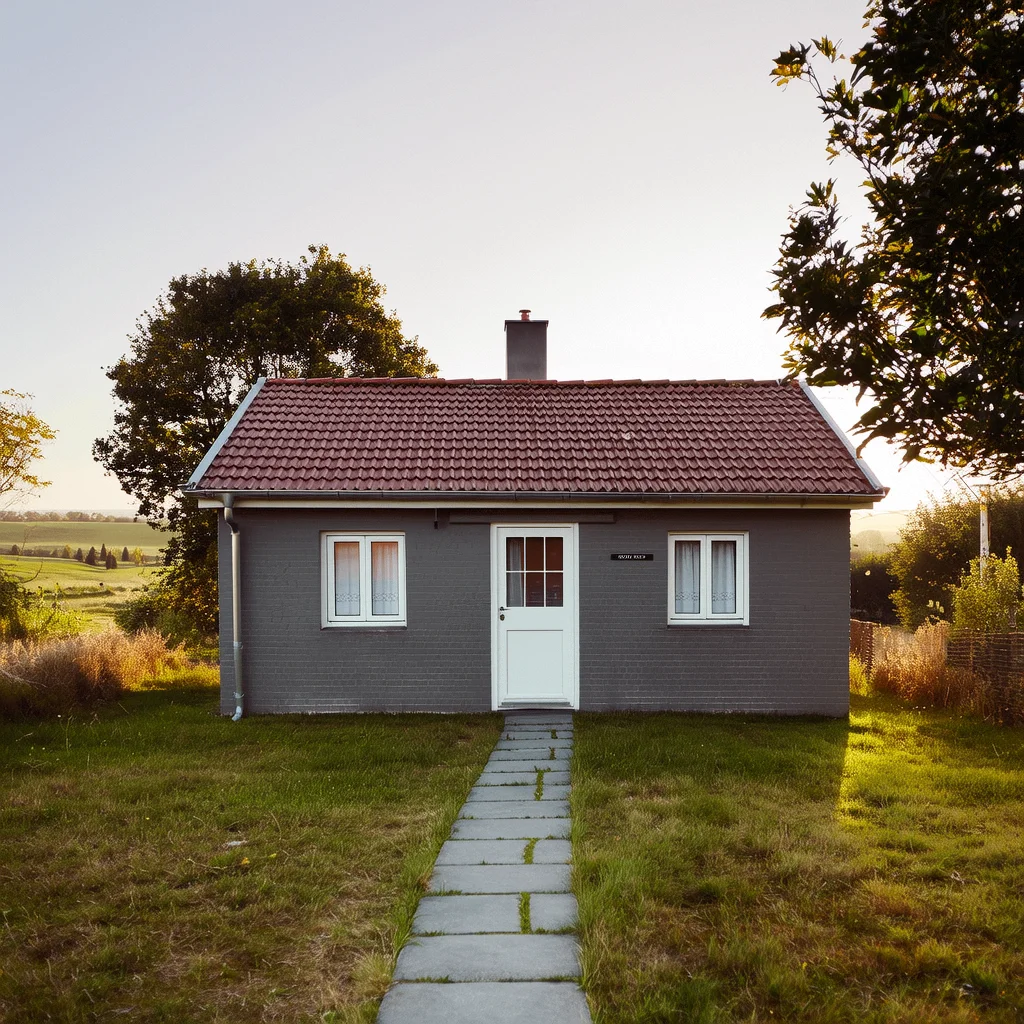
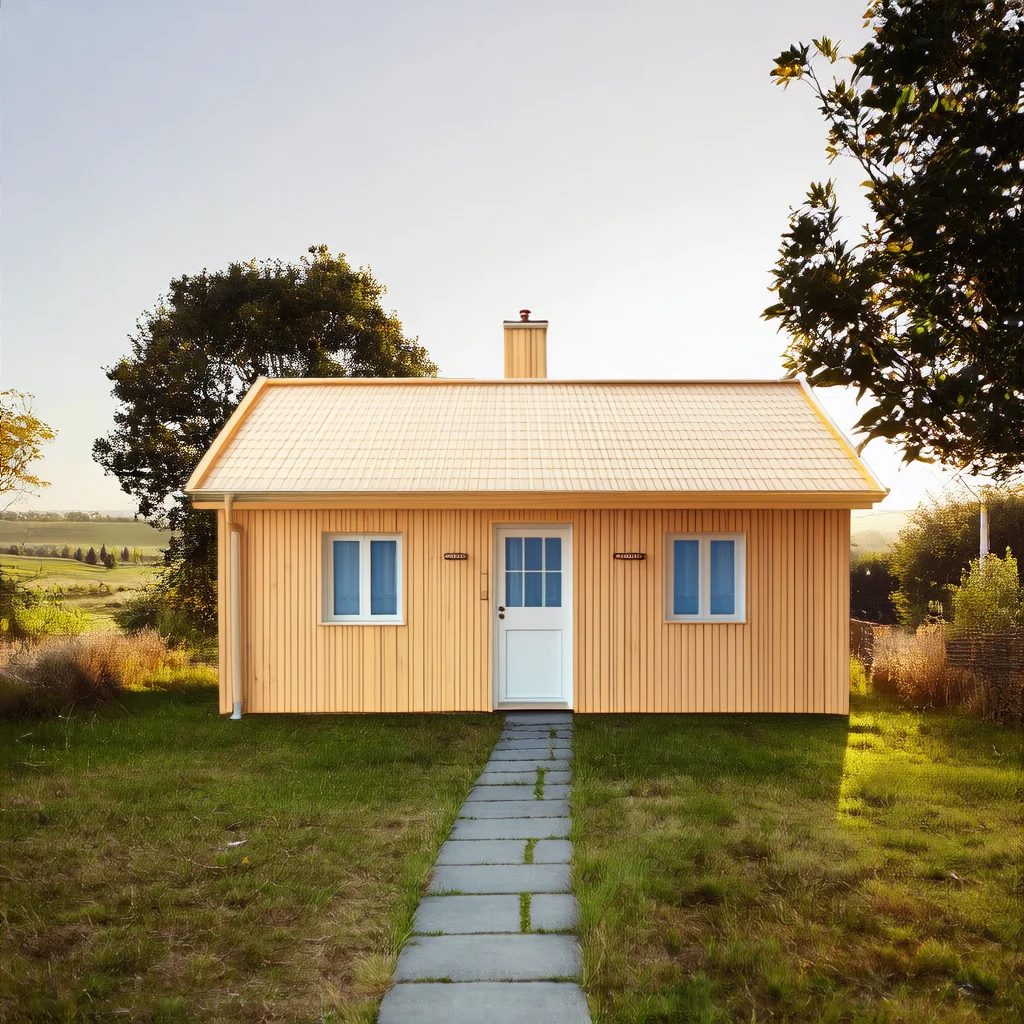
- Image stylization: Global and local stylization.
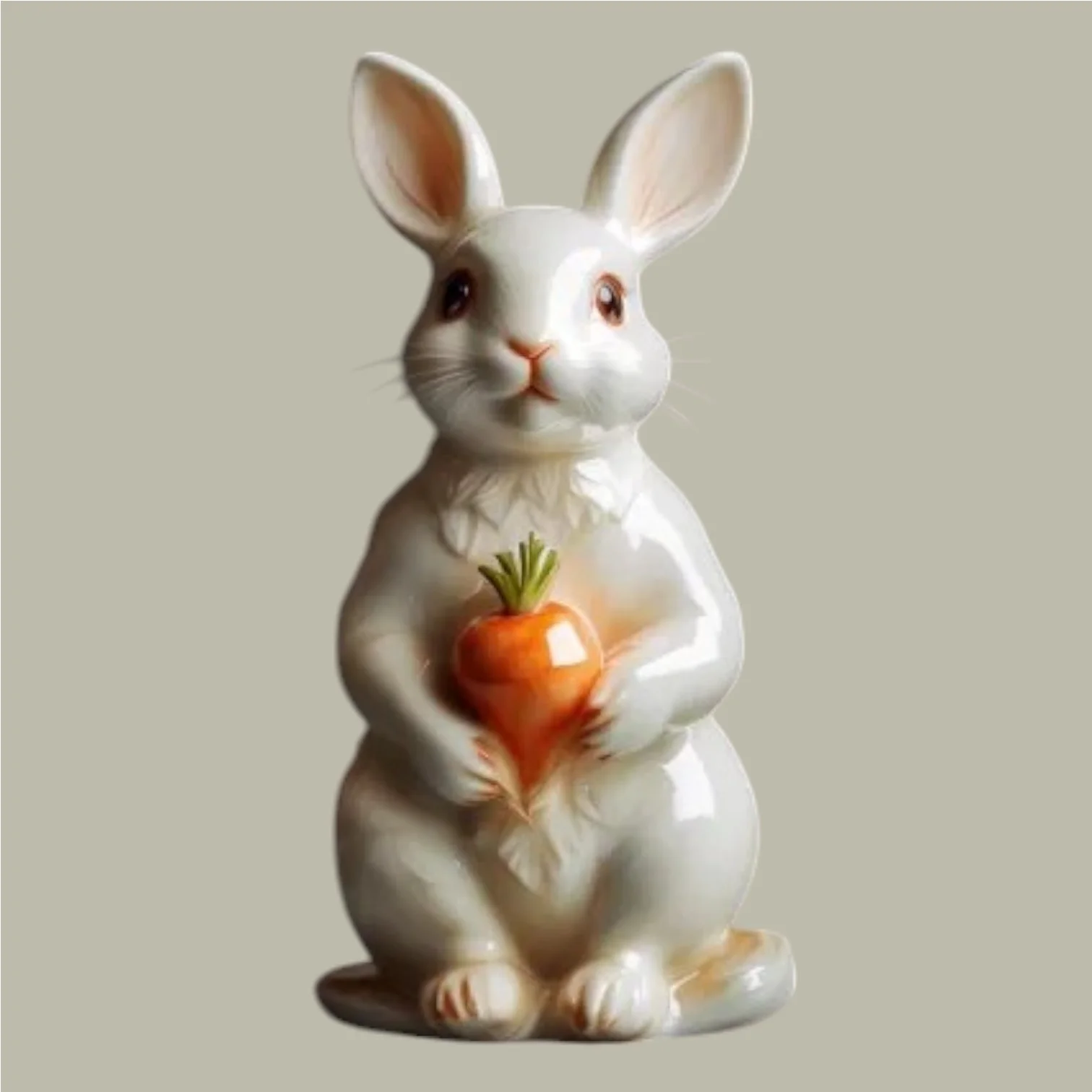
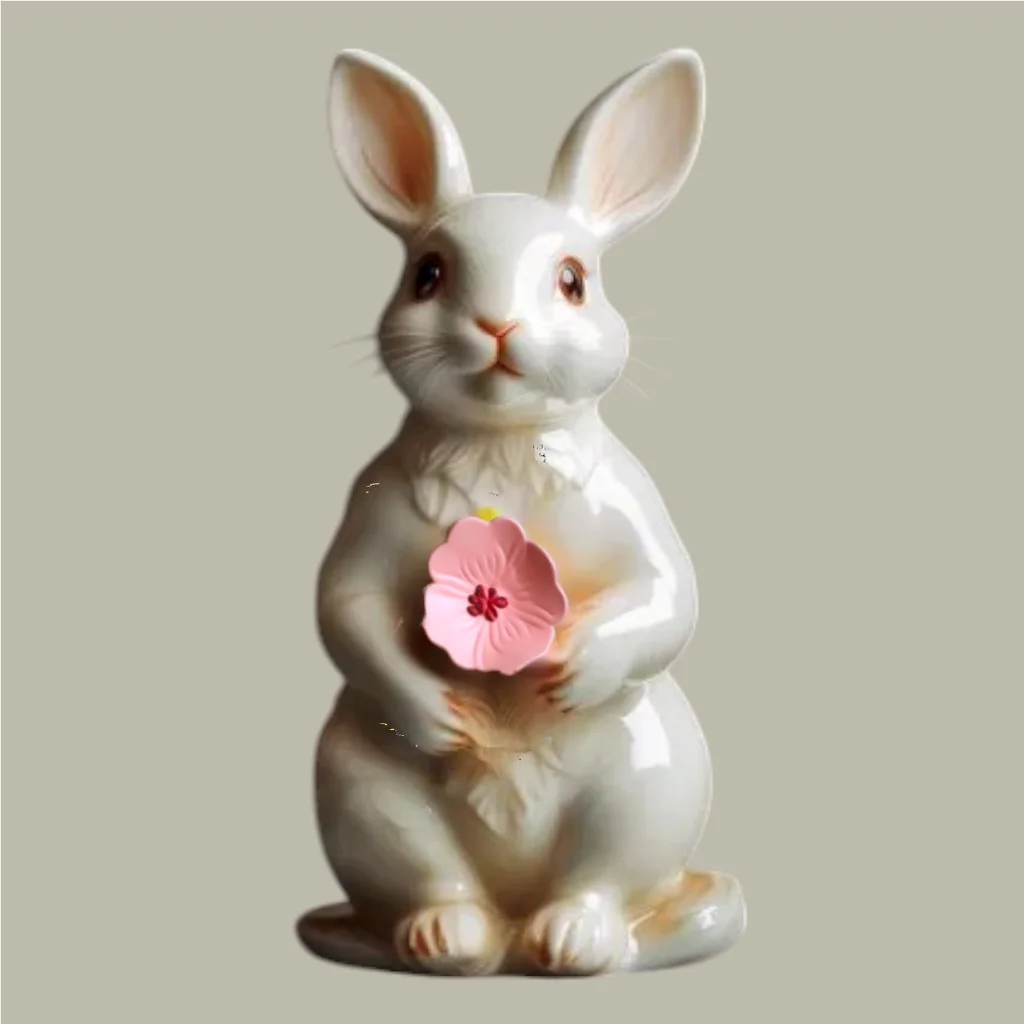
- Image content editing: Instruction-based editing (add or modify image content using instructions without specifying a region), inpainting (add, delete, or modify content in a specified area), and text watermark removal (Chinese and English).
- Image size and resolution optimization: Image expansion (expand by ratio) and super resolution (enhance to high definition).
- Image color processing: Colorization (convert black-and-white or grayscale images to color).
- Generation based on a reference image: Sketch-to-image generation (extract a sketch from the input image and then generate an image based on the sketch) and cartoon character reference generation.
Related guide: Image editing - Wan2.1
Model overview
Model | Price | Rate limit (shared by root accounts and RAM users) | |
|---|---|---|---|
Task submission RPS | Concurrent tasks | ||
wanx2.1-imageedit | $0.020070/image | 2 | 2 |
Model effects
Feature | Input image | Input prompt | Output image |
|---|---|---|---|
Global stylization |
| Convert to French picture book style |
|
Local stylization |
| Change the house to a wooden style. |
|
Instruction-based editing |
| Change her hair to red. |
|
Inpainting | Input image
Input mask image (white is the masked area)
| A ceramic rabbit holding a ceramic flower. | Output image
|
Text watermark removal |
| Remove the text from the image. |
|
Image expansion |
| A green fairy. |
|
Super resolution | Blurry image
| Super resolution. | Clear image
|
Colorization |
| Blue background, yellow leaves. |
|
Sketch-to-image generation | Input image
| A living room in a minimalist Nordic style. | Extract the sketch from the original image and generate a new image
|
Cartoon character reference generation | Input reference image (cartoon character)
| The cartoon character cautiously peeks out, looking at a sparkling blue gem in the room. | Output image
|

















Prerequisites
Call the Wan - general image editing API using HTTP or the DashScope SDK.
Before making a call, get an API key and export the API key as an environment variable.
To call the API using the SDK, install the DashScope SDK. The SDK is available for Python and Java.
HTTP
Image models take a long time to process. To prevent timeouts, HTTP calls support only asynchronous result retrieval. Two requests are required:
- Create a task to get a task ID: Send a request to create a task. The response returns a task ID (
task_id). - Query the result using the task ID: Use the task ID from the previous step to query the task status and result. If the task is successful, the response returns an image URL that is valid for 24 hours.
NoteAfter creation, the task enters a queue for scheduling. Call the query API to retrieve the task status and result.
The general image editing model takes about 5 to 15 seconds to process a request. The actual time depends on the number of tasks in the queue and the network conditions. Please wait patiently for the result.
Step 1: Create a task to get task ID
POST https://{WorkspaceId}.cn-beijing.maas.aliyuncs.com/api/v1/services/aigc/image2image/image-synthesis
Replace {WorkspaceId} with your actual workspace ID.
Request parametersRequest headersContent-Type The content type of the request. Must be Authorization Authenticates the request with a Model Studio API key. Example: Bearer sk-xxxx. X-DashScope-Async Enables asynchronous processing. HTTP requests support only asynchronous calls. Must be ImportantIf this request header is missing, the error "current user api does not support synchronous calls" is returned. Request bodymodel The model name, for example, wanx2.1-imageedit. input The basic input information (prompt). parameters The image processing parameters. | Global stylizationPass a local file (Base64)The following example shows how to pass a Base64-encoded parameter for global stylization. Because the Base64-encoded string is long, download image_base64 and copy its entire content to the For more information about the data format, see Supported formats. Local stylizationInstruction-based editingFeature description: Add or modify image content using only instructions, without specifying a region. InpaintingFeature description: Add, delete, or modify content in a specified area. Text watermark removalFeature description: Supports removing Chinese and English text watermarks. Image expansionFeature description: Supports expanding the image proportionally up, down, left, and right. Super resolutionFeature description: Supports upscaling a blurry image to high definition. ColorizationFeature description: Converts a black and white or grayscale image to a color image. Sketch-to-image generationFeature description: Extracts a sketch from the input image and then generates an image based on the sketch. Cartoon character reference generationFeature description: Supports generating an image based on a reference cartoon character. |
Response parametersoutput The task output information. request_id Unique request identifier for tracing and troubleshooting. code Error code. Returned only for failed requests. See Error codes. message Detailed error message. Returned only for failed requests. See Error codes. | Successful responseSave the Error responseTask creation failed. See Error codes. |
Step 2: Query result by task ID
GET https://{WorkspaceId}.cn-beijing.maas.aliyuncs.com/api/v1/tasks/{task_id}
Replace {WorkspaceId} with your actual workspace ID.
Request parametersRequest headersAuthorization Authenticates the request with a Model Studio API key. Example: Bearer sk-xxxx. Path parameterstask_id The ID of the task. | Query task resultReplace |
Response parametersoutput The task output information. usage The output information statistics. Only successful results are counted. request_id Unique request identifier for tracing and troubleshooting. | Task successfulTask data (task status and image URLs) is retained for only 24 hours and then automatically purged. Save generated images promptly. Task failedWhen a task fails, Task partially failedThe model can generate multiple images per task. If at least one succeeds, the task status is |
DashScope SDK
First, ensure you have installed the latest version of the DashScope SDK. Otherwise, a runtime error may occur.
The DashScope SDK currently supports Python and Java.
The parameter names in the SDK are mostly consistent with those in the HTTP API. The parameter structure depends on the SDK encapsulation for different languages. For parameter descriptions, see HTTP call.
Video model processing takes a long time, so the service uses an asynchronous approach. The SDK provides a wrapper supporting both synchronous and asynchronous calls.
The general image editing model takes about 5 to 15 seconds to process a request. The actual time depends on the number of tasks in the queue and the network conditions. Please wait patiently for the result.
Python SDK
When using the Python SDK to process image files, input an image using one of the following three methods. Choose the method that best fits your scenario.
- Public URL: A publicly accessible image URL that uses the HTTP or HTTPS protocol.
- Base64-encoded: Pass the Base64-encoded file string in the
data:{MIME_type};base64,{base64_data}format. - Local file path: Supports both absolute and relative paths. See the following table for valid file path formats.
System | File path to pass | Example (absolute path) | Example (relative path) |
|---|---|---|---|
Linux or macOS | file://{absolute or relative path of the file} | file:///home/images/test.png | file://./images/test.png |
Windows | file://D:/images/test.png | file://./images/test.png |
Sample code
NoteBefore calling the code, install or upgrade the DashScope Python SDK to the latest version: pip install -U dashscope. See Install the SDK.
Synchronous call
This example shows a synchronous call and supports three image input methods: public URL, Base64 encoding, and local file path.
Request example
import base64
import os
from http import HTTPStatus
from dashscope import ImageSynthesis
import dashscope
import mimetypes

"""
Environment requirements:
    dashscope python SDK >= 1.23.8
Install/Upgrade SDK:
    pip install -U dashscope
"""

dashscope.base_http_api_url = "https://{WorkspaceId}.cn-beijing.maas.aliyuncs.com/api/v1"

# If the environment variable is not configured, replace the following line with: api_key="sk-xxx"
api_key = os.getenv("DASHSCOPE_API_KEY")

# --- Helper function: for Base64 encoding ---
# Format is data:{MIME_type};base64,{base64_data}
def encode_file(file_path):
    mime_type, _ = mimetypes.guess_type(file_path)
    if not mime_type or not mime_type.startswith("image/"):
        raise ValueError("Unsupported or unrecognized image format")
    with open(file_path, "rb") as image_file:
        encoded_string = base64.b64encode(image_file.read()).decode('utf-8')
    return f"data:{mime_type};base64,{encoded_string}"

"""
Image input methods:
Choose one of the following three methods.

1. Use a public URL - suitable for publicly accessible images.
2. Use a local file - suitable for local development and testing.
3. Use Base64 encoding - suitable for private images or scenarios requiring encrypted transmission.
"""

# [Method 1] Use a public image URL
mask_image_url = "http://wanx.alicdn.com/material/20250318/description_edit_with_mask_3_mask.png"
base_image_url = "http://wanx.alicdn.com/material/20250318/description_edit_with_mask_3.jpeg"

# [Method 2] Use a local file (supports absolute and relative paths)
# Format requirement: file:// + file path
# Example (absolute path):
# mask_image_url = "file://" + "/path/to/your/mask_image.png"     # Linux/macOS
# base_image_url = "file://" + "C:/path/to/your/base_image.jpeg"  # Windows
# Example (relative path):
# mask_image_url = "file://" + "./mask_image.png"                 # Based on the actual path
# base_image_url = "file://" + "./base_image.jpeg"                # Based on the actual path

# [Method 3] Use a Base64-encoded image
# mask_image_url = encode_file("./mask_image.png")               # Based on the actual path
# base_image_url = encode_file("./base_image.jpeg")              # Based on the actual path

def sample_sync_call_imageedit():
    print('please wait...')
    rsp = ImageSynthesis.call(api_key=api_key,
                              model="wanx2.1-imageedit",
                              function="description_edit_with_mask",
                              prompt="A ceramic rabbit holding a ceramic flower",
                              mask_image_url=mask_image_url,
                              base_image_url=base_image_url,
                              n=1)
    assert rsp.status_code == HTTPStatus.OK

    print('response: %s' % rsp)
    if rsp.status_code == HTTPStatus.OK:
        for result in rsp.output.results:
            print("---------------------------")
            print(result.url)
    else:
        print('sync_call Failed, status_code: %s, code: %s, message: %s' %
              (rsp.status_code, rsp.code, rsp.message))

if __name__ == '__main__':
    sample_sync_call_imageedit()
Response example
The URL is valid for 24 hours. Download the image promptly.
{
    "status_code": 200,
    "request_id": "dc41682c-4e4a-9010-bc6f-xxxxxx",
    "code": null,
    "message": "",
    "output": {
        "task_id": "6e319d88-a07a-420c-9493-xxxxxx",
        "task_status": "SUCCEEDED",
        "results": [
            {
                "url": "https://dashscope-result-wlcb-acdr-1.oss-cn-wulanchabu-acdr-1.aliyuncs.com/xxx.png?xxxxxx"
            }
        ],
        "submit_time": "2025-05-26 14:58:27.320",
        "scheduled_time": "2025-05-26 14:58:27.339",
        "end_time": "2025-05-26 14:58:39.170",
        "task_metrics": {
            "TOTAL": 1,
            "SUCCEEDED": 1,
            "FAILED": 0
        }
    },
    "usage": {
        "image_count": 1
    }
}
Asynchronous call
This example shows only the asynchronous call method.
Request example
import os
from http import HTTPStatus
from dashscope import ImageSynthesis
import dashscope

"""
Environment requirements:
    dashscope python SDK >= 1.23.4
Install/Upgrade SDK:
    pip install -U dashscope
"""

dashscope.base_http_api_url = "https://{WorkspaceId}.cn-beijing.maas.aliyuncs.com/api/v1"

# If the environment variable is not configured, replace the following line with: api_key="sk-xxx"
api_key = os.getenv("DASHSCOPE_API_KEY")

# Use a public image URL
mask_image_url = "http://wanx.alicdn.com/material/20250318/description_edit_with_mask_3_mask.png"
base_image_url = "http://wanx.alicdn.com/material/20250318/description_edit_with_mask_3.jpeg"

def sample_async_call_imageedit():
    # Asynchronous call, returns a task_id
    rsp = ImageSynthesis.async_call(api_key=api_key,
                                    model="wanx2.1-imageedit",
                                    function="description_edit_with_mask",
                                    prompt="A ceramic rabbit holding a ceramic flower",
                                    mask_image_url=mask_image_url,
                                    base_image_url=base_image_url,
                                    n=1)
    print(rsp)
    if rsp.status_code == HTTPStatus.OK:
        print("task_id: %s" % rsp.output.task_id)
    else:
        print('Failed, status_code: %s, code: %s, message: %s' %
              (rsp.status_code, rsp.code, rsp.message))

    # Get asynchronous task information
    status = ImageSynthesis.fetch(task=rsp, api_key=api_key)
    if status.status_code == HTTPStatus.OK:
        print(status.output.task_status)  # check the task status
    else:
        print('Failed, status_code: %s, code: %s, message: %s' %
              (status.status_code, status.code, status.message))

    # Wait for the asynchronous task to finish
    rsp = ImageSynthesis.wait(rsp)
    print(rsp)
    if rsp.status_code == HTTPStatus.OK:
        print(rsp.output)
        for result in rsp.output.results:
            print("---------------------------")
            print(result.url)
    else:
        print('Failed, status_code: %s, code: %s, message: %s' %
              (rsp.status_code, rsp.code, rsp.message))

if __name__ == '__main__':
    sample_async_call_imageedit()
Response example
- Response example for creating a task
{
	"status_code": 200,
	"request_id": "6dc3bf6c-be18-9268-9c27-xxxxxx",
	"code": "",
	"message": "",
	"output": {
		"task_id": "686391d9-7ecf-4290-a8e9-xxxxxx",
		"task_status": "PENDING",
		"video_url": ""
	},
	"usage": null
}
- Response example for querying a task result
The URL is valid for 24 hours. Download the image promptly.
{
    "status_code": 200,
    "request_id": "dc41682c-4e4a-9010-bc6f-xxxxxx",
    "code": null,
    "message": "",
    "output": {
        "task_id": "6e319d88-a07a-420c-9493-xxxxxx",
        "task_status": "SUCCEEDED",
        "results": [
            {
                "url": "https://dashscope-result-wlcb-acdr-1.oss-cn-wulanchabu-acdr-1.aliyuncs.com/xxx.png?Expires=17xxxxxx"
            }
        ],
        "submit_time": "2025-05-26 14:58:27.320",
        "scheduled_time": "2025-05-26 14:58:27.339",
        "end_time": "2025-05-26 14:58:39.170",
        "task_metrics": {
            "TOTAL": 1,
            "SUCCEEDED": 1,
            "FAILED": 0
        }
    },
    "usage": {
        "image_count": 1
    }
}
Java SDK
When using the Java SDK to process image files, input an image using one of the following three methods. Choose the method that best fits your scenario.
- Public URL: A publicly accessible image URL that uses the HTTP or HTTPS protocol.
- Base64-encoded: Pass the Base64-encoded file string in the
data:{MIME_type};base64,{base64_data}format. - Local file path: Only absolute paths are supported. See the following table for valid file path formats.
System | File path to pass | Example |
|---|---|---|
Linux or macOS | file://{absolute path of the file} | file:///home/images/test.png |
Windows | file:///{absolute path of the file} | file:///D:/images/test.png |
Sample code
NoteBefore calling the code, install or upgrade the DashScope Java SDK to the latest version. See Install the SDK.
Synchronous call
This example shows a synchronous call and supports three image input methods: public URL, Base64 encoding, and local file path.
Request example
// Copyright (c) Alibaba, Inc. and its affiliates.

import com.alibaba.dashscope.aigc.imagesynthesis.ImageSynthesis;
import com.alibaba.dashscope.aigc.imagesynthesis.ImageSynthesisParam;
import com.alibaba.dashscope.aigc.imagesynthesis.ImageSynthesisResult;
import com.alibaba.dashscope.exception.ApiException;
import com.alibaba.dashscope.exception.NoApiKeyException;
import com.alibaba.dashscope.utils.Constants;
import com.alibaba.dashscope.utils.JsonUtils;

import java.io.IOException;
import java.nio.file.Files;
import java.nio.file.Path;
import java.nio.file.Paths;
import java.util.Base64;
import java.util.HashMap;
import java.util.Map;

/**
 * Environment requirements
 *      dashscope java SDK >=2.20.9
 * Update Maven dependency:
 *      https://mvnrepository.com/artifact/com.alibaba/dashscope-sdk-java
 */

public class ImageEditSync {
    static {Constants.baseHttpApiUrl="https://{WorkspaceId}.cn-beijing.maas.aliyuncs.com/api/v1";}

    // If the environment variable is not configured, replace the following line with: apiKey="sk-xxx"
    static String apiKey = System.getenv("DASHSCOPE_API_KEY");

    /**
     * Image input methods: Choose one of the following three.
     *
     * 1. Use a public URL - suitable for publicly accessible images.
     * 2. Use a local file - suitable for local development and testing.
     * 3. Use Base64 encoding - suitable for private images or scenarios requiring encrypted transmission.
     */

    //[Method 1] Public URL
    static String maskImageUrl = "http://wanx.alicdn.com/material/20250318/description_edit_with_mask_3_mask.png";
    static String baseImageUrl = "http://wanx.alicdn.com/material/20250318/description_edit_with_mask_3.jpeg";

    //[Method 2] Local file path (file://+absolute path or file:///+absolute path)
    // static String maskImageUrl = "file://" + "/your/path/to/mask_image.png";    // Linux/macOS
    // static String baseImageUrl = "file:///" + "C:/your/path/to/base_image.png";  // Windows

    //[Method 3] Base64 encoding
    // static String maskImageUrl = encodeFile("/your/path/to/mask_image.png");
    // static String baseImageUrl = encodeFile("/your/path/to/base_image.png");

    public static void syncCall() {
        // Set the parameters parameter
        Map<String, Object> parameters = new HashMap<>();
        parameters.put("prompt_extend", true);

        ImageSynthesisParam param =
                ImageSynthesisParam.builder()
                        .apiKey(apiKey)
                        .model("wanx2.1-imageedit")
                        .function(ImageSynthesis.ImageEditFunction.DESCRIPTION_EDIT_WITH_MASK)
                        .prompt("A ceramic rabbit holding a ceramic flower")
                        .maskImageUrl(maskImageUrl)
                        .baseImageUrl(baseImageUrl)
                        .n(1)
                        .size("1024*1024")
                        .parameters(parameters)
                        .build();

        ImageSynthesis imageSynthesis = new ImageSynthesis();
        ImageSynthesisResult result = null;
        try {
            System.out.println("---sync call, please wait a moment----");
            result = imageSynthesis.call(param);
        } catch (ApiException | NoApiKeyException e){
            throw new RuntimeException(e.getMessage());
        }
        System.out.println(JsonUtils.toJson(result));
    }

    /**
     * Encodes a file into a Base64 string
     * @param filePath The file path
     * @return A Base64 string in the format data:{MIME_type};base64,{base64_data}
     */
    public static String encodeFile(String filePath) {
        Path path = Paths.get(filePath);
        if (!Files.exists(path)) {
            throw new IllegalArgumentException("File does not exist: " + filePath);
        }
        // Detect the MIME type
        String mimeType = null;
        try {
            mimeType = Files.probeContentType(path);
        } catch (IOException e) {
            throw new IllegalArgumentException("Cannot detect file type: " + filePath);
        }
        if (mimeType == null || !mimeType.startsWith("image/")) {
            throw new IllegalArgumentException("Unsupported or unrecognized image format");
        }
        // Read the file content and encode it
        byte[] fileBytes = null;
        try{
            fileBytes = Files.readAllBytes(path);
        } catch (IOException e) {
            throw new IllegalArgumentException("Cannot read file content: " + filePath);
        }

        String encodedString = Base64.getEncoder().encodeToString(fileBytes);
        return "data:" + mimeType + ";base64," + encodedString;
    }

    public static void main(String[] args) {
        syncCall();
    }
}
Response example
The URL is valid for 24 hours. Download the image promptly.
{
    "request_id": "bf6c6361-f0fc-949c-9d60-xxxxxx",
    "output": {
        "task_id": "958db858-153b-4c81-b243-xxxxxx",
        "task_status": "SUCCEEDED",
        "results": [
            {
                "url": "https://dashscope-result-wlcb-acdr-1.oss-cn-wulanchabu-acdr-1.aliyuncs.com/xxx.png?xxxxxx"
            }
        ],
        "task_metrics": {
            "TOTAL": 1,
            "SUCCEEDED": 1,
            "FAILED": 0
        }
    },
    "usage": {
        "image_count": 1
    }
}
Asynchronous call
This example shows only the asynchronous call method.
Request example
// Copyright (c) Alibaba, Inc. and its affiliates.

import com.alibaba.dashscope.aigc.imagesynthesis.ImageSynthesis;
import com.alibaba.dashscope.aigc.imagesynthesis.ImageSynthesisListResult;
import com.alibaba.dashscope.aigc.imagesynthesis.ImageSynthesisParam;
import com.alibaba.dashscope.aigc.imagesynthesis.ImageSynthesisResult;
import com.alibaba.dashscope.exception.ApiException;
import com.alibaba.dashscope.exception.NoApiKeyException;
import com.alibaba.dashscope.task.AsyncTaskListParam;
import com.alibaba.dashscope.utils.Constants;
import com.alibaba.dashscope.utils.JsonUtils;

import java.util.HashMap;
import java.util.Map;

/**
 * Environment requirements
 *      dashscope java SDK >= 2.20.1
 * Update Maven dependency:
 *      https://mvnrepository.com/artifact/com.alibaba/dashscope-sdk-java
 */

public class ImageEditAsync {
    static {Constants.baseHttpApiUrl="https://{WorkspaceId}.cn-beijing.maas.aliyuncs.com/api/v1";}

    // If the environment variable is not configured, replace the following line with: apiKey="sk-xxx"
    static String apiKey = System.getenv("DASHSCOPE_API_KEY");

    //[Method 1] Public URL
    static String maskImageUrl = "http://wanx.alicdn.com/material/20250318/description_edit_with_mask_3_mask.png";
    static String baseImageUrl = "http://wanx.alicdn.com/material/20250318/description_edit_with_mask_3.jpeg";

    public static void asyncCall() {
        // Set the parameters parameter
        Map<String, Object> parameters = new HashMap<>();
        parameters.put("prompt_extend", true);

        ImageSynthesisParam param =
                ImageSynthesisParam.builder()
                        .apiKey(apiKey)
                        .model("wanx2.1-imageedit")
                        .function(ImageSynthesis.ImageEditFunction.DESCRIPTION_EDIT_WITH_MASK)
                        .prompt("A ceramic rabbit holding a ceramic flower")
                        .maskImageUrl(maskImageUrl)
                        .baseImageUrl(baseImageUrl)
                        .n(1)
                        .size("1024*1024")
                        .parameters(parameters)
                        .build();
        ImageSynthesis imageSynthesis = new ImageSynthesis();
        ImageSynthesisResult result = null;
        try {
            System.out.println("---async call, please wait a moment----");
            result = imageSynthesis.asyncCall(param);
        } catch (ApiException | NoApiKeyException e){
            throw new RuntimeException(e.getMessage());
        }

        System.out.println(JsonUtils.toJson(result));

        String taskId = result.getOutput().getTaskId();

        System.out.println("taskId=" + taskId);

        try {
            result = imageSynthesis.wait(taskId, apiKey);
        } catch (ApiException | NoApiKeyException e){
            throw new RuntimeException(e.getMessage());
        }
        System.out.println(JsonUtils.toJson(result));
        System.out.println(JsonUtils.toJson(result.getOutput()));
    }

    public static void listTask() throws ApiException, NoApiKeyException {
        ImageSynthesis is = new ImageSynthesis();
        AsyncTaskListParam param = AsyncTaskListParam.builder().build();
        param.setApiKey(apiKey);
        ImageSynthesisListResult result = is.list(param);
        System.out.println(result);
    }

    public void fetchTask(String taskId) throws ApiException, NoApiKeyException {
        ImageSynthesis is = new ImageSynthesis();
        // If DASHSCOPE_API_KEY is set as an environment variable, apiKey can be empty.
        ImageSynthesisResult result = is.fetch(taskId, apiKey);
        System.out.println(result.getOutput());
        System.out.println(result.getUsage());
    }

    public static void main(String[] args) {
        asyncCall();
    }
}
Response example
- Response example for creating a task
{
	"request_id": "5dbf9dc5-4f4c-9605-85ea-xxxxxxxx",
	"output": {
		"task_id": "7277e20e-aa01-4709-xxxxxxxx",
		"task_status": "PENDING"
	}
}
- Response example for querying a task result
The URL is valid for 24 hours. Download the image promptly.
{
	"request_id": "3d740fc4-a968-9c36-b0e7-xxxxxxxx",
	"output": {
		"task_id": "34dcf4b0-ed84-441e-91cb-xxxxxxxx",
		"task_status": "SUCCEEDED",
		"results": [
			{
				"url": "https://dashscope-result-hz.oss-cn-hangzhou.aliyuncs.com/xxx.png"
			}
		],
		"submit_time": "2025-02-21 17:56:31.786",
		"scheduled_time": "2025-02-21 17:56:31.821",
		"end_time": "2025-02-21 17:56:42.530",
		"task_metrics": {
			"TOTAL": 1,
			"SUCCEEDED": 1,
			"FAILED": 0
		}
	},
	"usage": {
		"image_count": 1
	}
}
Error codes
If the model call fails and returns an error message, see Error codes for resolution.
This API also has specific status codes, as shown in the following table.
HTTP status code | API error code (code) | API error message (message) | Description |
|---|---|---|---|
400 | InvalidParameter | InvalidParameter | The request parameters are invalid. |
400 | IPInfringementSuspect | Input data is suspected of being involved in IP infringement. | The input data (such as the prompt or image) is suspected of intellectual property infringement. Check the input to ensure it does not contain content that poses an infringement risk. |
400 | DataInspectionFailed | Input data may contain inappropriate content. | The input data (such as the prompt or image) may contain inappropriate content. Modify the input and try again. |
500 | InternalError | InternalError | The service is abnormal. Try again to rule out an occasional issue. |
Input image formats
Supported formats
Input images support multiple string formats, as shown in the following table.
Invocation method | HTTP | Python SDK | Java SDK |
|---|---|---|---|
Supported input image methods |
|
|
|
- Provide a publicly accessible image address. HTTP or HTTPS protocols are supported.
- Example:
https://xxxx/img.png
Convert a local image file to a Base64 string and concatenate it into the format data:{MIME_type};base64,{base64_data}.
-
For the conversion code, see Sample code
-
{MIME_type}: The media type of the image, which must match the file format
-
{base64_data}: The Base64-encoded string of the image file
-
MIME type reference:
Image format
MIME Type
JPEG
image/jpeg
JPG
image/jpeg
PNG
image/png
BMP
image/bmp
TIFF
image/tiff
WEBP
image/webp
-
Example:
data:image/png;base64,iVBORw0KGgoAAAANSUhEUgAABDg......Note: The Base64 string above is truncated for demonstration. In actual use, pass the complete encoded string.
- HTTP does not support local file paths. Only the Python SDK and Java SDK support this method.
- For local file path rules, see Python SDK and Java SDK.
FAQ
For common questions about image models (model billing, rate limiting rules, and frequent API errors), see Image API FAQ.