The wan3.0 series is an All-in-One video generation model with comprehensive upgrades in audio-video generation, multi-modal reference, and video editing capabilities. It supports up to 30 seconds per generation, 30fps output frame rate, natively outputs dialogue, BGM, and sound effects, supports up to 20 multi-modal reference materials (images, videos, audio, documents, web pages) per request, and supports first frame/first-last frame control, video editing and extension.
For prompt writing, see the wan3.0 Video Generation Prompt Guide.
Scope
- Supported models vary by region, and resources are independent across regions. For models available in each region, see the Model Studio console.
- Before making calls, first obtain and configure an API Key, then configure the API Key as an environment variable. When making calls, replace
{WorkspaceId}with your actual workspace ID. - When making calls, ensure that the model, Endpoint URL, and API Key all belong to the same region. Cross-region calls will fail.
NoteThe sample code is applicable to the Singapore region.
Model capabilities
wan3.0-video / wan3.0-video-prime is an All-in-One model that covers all the following task types without switching model names. The model automatically routes based on the type field in input.media and the prompt intent.
NoteEach task type only supports the type values listed in the table below. The type values of different task types cannot be mixed. For example, the first-last frame mode only supports first_frame and last_frame, and cannot accept reference_audio or other types at the same time. For detailed combination rules, see Material combinations.
Task type | Trigger method | Usage notes | |
|---|---|---|---|
Text-to-video | Only pass | Supports free setting of resolution, aspect ratio, and duration | |
Image-to-video | First frame to video |
|
|
First and last frame to video |
|
| |
Multi-modal reference | Image reference |
| Up to 10 images, each ≤20MB |
Video reference |
| Up to 5 clips, total duration ≤15 seconds, each file ≤100MB | |
Audio reference |
| Up to 5 clips, total duration ≤15 seconds, each file ≤15MB | |
Combined reference |
| Reference images/videos/audio, supports any combination of the three reference material types
| |
File/Web page to video reference |
| Parse document/web page content to generate video Documents and web links only support publicly accessible pages that do not require login | |
Video editing |
| Add/remove/modify elements, style conversion, lighting editing, dialogue editing. | |
Video extension |
| Extend forward/backward/both directions. | |
Prompt tips
The platform provides a Wan 3.0 prompt optimization Skill to help you refine prompts.
Download Skill: wan3-pe.zip (unzip after download)
Usage: In the AI chat box, enter /wan3-pe followed by your prompt to start refining. Example:
/wan3-pe Refine the prompt based on the Skill. Prompt: A cat running on the grass.
Key features
Text-to-video
Generate videos using only a prompt, without any media input. Natively supports up to 30-second multi-shot narratives with auto-generated synchronized dialogue, BGM, and sound effects.
- Supports single-shot and multi-shot storyboard format (4~6 seconds per shot, with timestamp annotations).
- Audio-video: Natively generates voice dialogue, ambient sound effects, and background music without post-production dubbing.
- Smart duration: When
durationis set to-1, the model automatically recommends an appropriate duration.
Parameter configuration: resolution=480P/720P/1080P (default), ratio=21:9/16:9/4:3/1:1/3:4/9:16, duration=2~30 seconds or -1 (smart duration).
Sample prompt 2
Story Synopsis
This is a "refueling" incident full of dry humor and absurdity, set on a brightly colored future wasteland. At a forgotten gas station resembling Route 66, a bored attendant receives a peculiar guest — a cool cowgirl riding a real horse. Just as the attendant assumes she's just a passing lunatic, the cowgirl walks straight to the gas pump, picks up the nozzle, and "fills up" her horse with fresh grass. This surreal scene sends the seasoned attendant into a complete state of cognitive dissonance.
Scene Description and Lighting Aesthetics
Visual style: Realistic style with high-saturation, high-brightness cinematic color grading, creating a "sunny" feel that makes the absurd story unfold in an incredibly normal, even pleasant environment.
Color aesthetics: Strictly follows a bright "teal-orange" color scheme.
Teal: The cloudless sky is bright, clear azure blue (with a teal tint). The gas station's main building features a vintage yellow-orange-blue color scheme, slightly faded. The gas pump is a faded vintage red.
Orange: The ground is cracked, dry orange earth. Distant mountains show warm terracotta tones. The cowgirl's scarf or jacket is orange.
Characters and Scene:
Cowgirl: Cool and taciturn. Wearing a wide-brimmed cowboy hat. Dressed in durable work boots and jeans, with dust from a long journey on her clothes.
Horse: A real horse with a calm demeanor and ordinary coat color, as if long accustomed to all of this.
Gas station attendant: Wearing greasy blue overalls, a pair of huge black sunglasses, leaning lazily in his chair with a toothpick in his mouth. He serves as the core "reaction shot" character in this film.
Gas station: Classic Route 66 style, with a small convenience store next to it, a faded Coke vending machine at the entrance, full of American retro charm.
- Camera Movement Style Description
The camera style is "Calm Observation & Absurd Close-up":
Extensive use of fixed medium shots and slow lateral tracking, recording events from a very calm, objective perspective without any emotional guidance.
At key moments of absurd behavior, the camera suddenly cuts to an extreme close-up — such as the instant grass shoots from the nozzle, or the attendant's stunned facial expression — creating humor through this abrupt magnification.
- Shot-by-shot Description
0s - 8s: Prologue — A Boring Afternoon
Wide establishing shot (fixed). Blue sky, wind and dust. A vintage, slightly faded yellow-orange-blue gas station stands alone beside the highway. At the station entrance, the attendant wearing sunglasses dozes lazily in his chair. Everything is so quiet only the wind can be heard.
Long shot. On the horizon, a cowgirl riding a horse slowly appears, breaking the silence.
Medium shot. The attendant is awakened by the hoofbeats, adjusts his sunglasses, and sits up impatiently, watching this strange combination. The toothpick in his mouth twitches, his face saying "another one asking for directions."
8s - 16s: Development — Dead Serious Nonsense
The cowgirl says nothing. She dismounts swiftly, leads the horse, and walks straight to an old gas pump. The horse expertly extends its head toward the pump.
Attendant's POV (slight fish-eye): The camera mimics his view from behind his sunglasses — the woman and horse combo looks even more bizarre. He sees the cowgirl actually pick up the fuel nozzle.
Close-up. The attendant's brow furrows; he thinks this woman is messing with him. He removes his sunglasses, about to yell.
Slow-motion close-up: The moment he removes his sunglasses, he sees the cowgirl aim the nozzle at the horse's mouth and pull the trigger.
16s - 24s: Climax — The Moment of Cognitive Collapse
[Ultimate Contrast]:
Close-up: The fuel nozzle. Instead of gasoline, streams of fresh, dewy green grass shoot out!
Extreme close-up: Quick cut to the attendant's dumbfounded face. His eyes are wide as saucers, mouth slightly open, the toothpick frozen still. His expression is frozen, as if his entire worldview has been shattered in this single second.
Medium shot. The horse munches happily, contentedly squinting its eyes, then gives a satisfied, powerful flick of its tail. The dust kicked up by the tail lands right on the face of the still-stunned attendant beside it.
24s - 30s: Resolution — Dust in the Wind, Leaving Only Stupor
"Full tank" of grass. The cowgirl hangs the nozzle back in place. She pulls a few coins from her pocket, walks to the convenience store entrance, and drops them clinking into a tin can on the counter.
She glances back at the still-petrified attendant, and the corner of her mouth under the hat brim seems to curl up slightly.
[Ultimate Freeze Frame]: She mounts the horse and rides off into the distance.
The camera slowly pushes in on the attendant. He still holds that dumbfounded pose, face covered in dust, still clutching the sunglasses he just removed, until the toothpick finally drops from his mouth with a click.
Freeze on his face of existential crisis. The film ends in absurd silence, with only the sound of the toothpick rolling on the ground in the wind.
Sample prompt 3
3D animated short film, 30 seconds, dark fantasy theme, single shot, dimly lit stone-brick interior scene. A cold and strikingly handsome man with violet eyes, ink-blue hair with silver-streaked highlights in disarray, dark crystalline horns, pale cold skin, and dark purple astral magic runes covering his forehead and temples. He wears a polar-night blue brocade stand-collar trench coat over a black silk shirt, with a dark silver amethyst ear cuff on his left ear.
Scene: Nighttime cold white moonlight as the dominant hard key light, high-contrast low-key lighting, front-side lighting effect. In the background, two blurry figures and warm yellow firelight flicker, with ethereal blue dust particles floating in the air.
Camera: Medium close-up with a slight high-angle, shallow depth of field locked on the figure on the left, slowly tilting up to eye level during the monologue.
Action: The man stands at an angle, head lowered with a contemptuous smile, glances at his palm then turns toward the camera, raises his head and speaks in a cold, magnetic voice: "Ripe enough for the void." His left hand opens with five fingers spread, a dark shadow nebula vortex coalesces in his palm, and he says: "Your soul, a mere spark for me to extinguish." He suddenly clenches his fist, the nebula explodes and dissipates into dark purple mist and ethereal blue star fragments, finally revealing a cruel smile as his dark-purple gradient fingernails subtly extend.
Accompanied by void resonance sound effects and energy burst sounds, with a young English-speaking villain voice throughout.
Python SDK
ImportantPlease update the DashScope Python SDK to 1.26.2.1 or later before running the following code. For update instructions, see Install SDK.
import os
from http import HTTPStatus
from dashscope import VideoSynthesis
import dashscope

dashscope.base_http_api_url = 'https://{WorkspaceId}.ap-southeast-1.maas.aliyuncs.com/api/v1'
api_key = os.getenv("DASHSCOPE_API_KEY", "YOUR_API_KEY")

print('please wait...')
rsp = VideoSynthesis.call(
    api_key=api_key,
    model='wan3.0-video',
    prompt='A 20-second ultra-widescreen plush universe adventure clip, featuring ultra-fine plush textures throughout, cinematic space scale, a contrast between cute appearances and intense action, exaggerated FPV camera movements, and realistic soft-body physics. A spaceship made of plush fabric, buttons, zippers, and stuffing cotton carries three small plush animals — a rabbit, a fox, and a crow — fleeing at high speed through a universe composed of giant yarn planets, fluffy nebulae, and puppet giant beasts. A massive interstellar whale beast covered in deep blue long fur with eyes like two glass buttons chases the ship from within the nebula. The dynamics include the zipper ship launching via catapult, high-speed orbiting around a yarn planet, the giant whale bursting out from behind, navigating through a button asteroid belt, being swallowed by the whale beast, escaping through a golden zipper on its back, the whale slowly deflating as if losing its stuffing cotton, and finally flying through a pink-purple fluffy nebula toward a colorful button sun.',
    resolution="480P",
    ratio="adaptive",
    duration=20,
    prompt_extend=True)
print(rsp)
if rsp.status_code == HTTPStatus.OK:
    print("video_url:", rsp.output.video_url)
else:
    print('Failed, status_code: %s, code: %s, message: %s' % (rsp.status_code, rsp.code, rsp.message))
Java SDK
ImportantPlease update DashScope Java SDK to 2.22.31 or later before running the following code. For update instructions, see Install SDK.
// Copyright (c) Alibaba, Inc. and its affiliates.

import com.alibaba.dashscope.aigc.videosynthesis.VideoSynthesis;
import com.alibaba.dashscope.aigc.videosynthesis.VideoSynthesisParam;
import com.alibaba.dashscope.aigc.videosynthesis.VideoSynthesisResult;
import com.alibaba.dashscope.exception.ApiException;
import com.alibaba.dashscope.exception.InputRequiredException;
import com.alibaba.dashscope.exception.NoApiKeyException;
import com.alibaba.dashscope.utils.Constants;
import com.alibaba.dashscope.utils.JsonUtils;

public class Text2Video {

    static {
        Constants.baseHttpApiUrl = "https://{WorkspaceId}.ap-southeast-1.maas.aliyuncs.com/api/v1";
    }

    static String apiKey = System.getenv("DASHSCOPE_API_KEY");

    public static void syncCall() {
        VideoSynthesis videoSynthesis = new VideoSynthesis();
        VideoSynthesisParam param =
                VideoSynthesisParam.builder()
                        .apiKey(apiKey)
                        .model("wan3.0-video")
                        .prompt("20秒超宽银幕毛绒宇宙冒险片段,整体采用超精细毛绒材质、电影级太空尺度、可爱外形与强烈动作反差、夸张FPV运镜和真实软体物理。一艘由毛绒布、纽扣、拉链与填充棉制成的宇宙飞船,载着兔子、狐狸和乌鸦三只小型毛绒动物,在由巨大毛线行星、绒毛星云和布偶巨兽组成的宇宙中高速逃亡。")
                        .resolution("480P")
                        .ratio("adaptive")
                        .duration(20)
                        .promptExtend(true)
                        .build();
        VideoSynthesisResult result = null;
        try {
            System.out.println("---sync call, please wait a moment----");
            result = videoSynthesis.call(param);
        } catch (ApiException | NoApiKeyException e) {
            throw new RuntimeException(e.getMessage());
        } catch (InputRequiredException e) {
            throw new RuntimeException(e);
        }
        System.out.println(JsonUtils.toJson(result));
    }

    public static void main(String[] args) {
        syncCall();
    }
}
curl
Step 1: Create a task and get the task IDcurl --location 'https://{WorkspaceId}.ap-southeast-1.maas.aliyuncs.com/api/v1/services/aigc/video-generation/video-synthesis' \
-H 'X-DashScope-Async: enable' \
-H "Authorization: Bearer $DASHSCOPE_API_KEY" \
-H 'Content-Type: application/json' \
-d '{
"model": "wan3.0-video",
"input": {
"prompt": "A 20-second ultra-widescreen plush universe adventure clip, featuring ultra-fine plush textures throughout, cinematic space scale, a contrast between cute appearances and intense action, exaggerated FPV camera movements, and realistic soft-body physics. A spaceship made of plush fabric, buttons, zippers, and stuffing cotton carries three small plush animals — a rabbit, a fox, and a crow — fleeing at high speed through a universe composed of giant yarn planets, fluffy nebulae, and puppet giant beasts. A massive interstellar whale beast covered in deep blue long fur with eyes like two glass buttons chases the ship from within the nebula. The dynamics include the zipper ship launching via catapult, high-speed orbiting around a yarn planet, the giant whale bursting out from behind, navigating through a button asteroid belt, being swallowed by the whale beast, escaping through a golden zipper on its back, the whale slowly deflating as if losing its stuffing cotton, and finally flying through a pink-purple fluffy nebula toward a colorful button sun."
},
"parameters": {
"resolution": "480P",
"ratio": "adaptive",
"duration": 20,
"prompt_extend": true
}
}'
curl -X GET 'https://{WorkspaceId}.ap-southeast-1.maas.aliyuncs.com/api/v1/tasks/{task_id}' \
    -H "Authorization: Bearer $DASHSCOPE_API_KEY"
Image-to-video (first frame / first-last frame)
Strictly specify the first or last frame image of the video using first_frame/last_frame, achieving pixel-level reproduction of the reference image. Suitable for scenarios requiring precise control over start and end frames.
- First frame to video: Provide an image as the first frame of the video, and the model generates subsequent motion.
- First and last frame to video: Specify both the first and last frames simultaneously, and the model automatically generates the transitional motion in between.
- Supports audio-video output; dialogue and sound effects can be specified in the prompt.
Parameter configuration: ratio recommended as adaptive (auto-matches the input image aspect ratio), duration=2~30 seconds or -1.
| Capability | Input prompt | Input first or last frame | Output video |
First frame to video | (0:00 - 0:03) Camera: Medium shot. Scene: A ink-wash bamboo forest scene from Image 1. A swordsman wearing a bamboo hat and dressed in a dark robe, his silhouette standing in the center surrounded by thick fog and swaying bamboo shadows. Action: The swordsman's left hand lightly rests on the sword hilt, bamboo leaves fall with the wind. Atmosphere: Silent, oppressive, with clearly visible ink-wash grain texture.
| 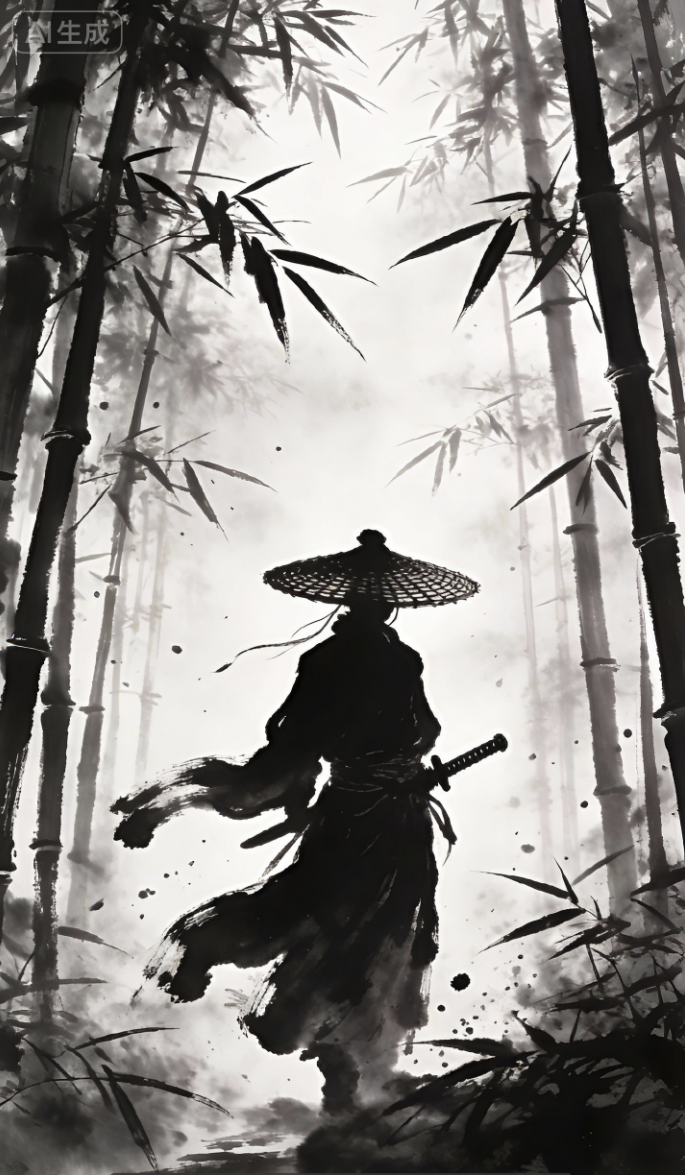 | |
First and last frame to video | [One continuous take, slow aesthetic camera movement, no cuts, 15-second long shot, rock-color mineral pigment texture colliding with 3D rendering, cyan-blue × gilt gold contrasting colors]
| First frame  Last frame  |
Prompt: First frame to video
(0:00 - 0:03) Camera: Medium shot. Scene: A ink-wash bamboo forest scene from Image 1. A swordsman wearing a bamboo hat and dressed in a dark robe, his silhouette standing in the center surrounded by thick fog and swaying bamboo shadows. Action: The swordsman's left hand lightly rests on the sword hilt, bamboo leaves fall with the wind. Atmosphere: Silent, oppressive, with clearly visible ink-wash grain texture.
(0:03 - 0:08) Plot introduction. Camera: Close-up. Plot: The swordsman senses killing intent. Scene: The camera rapidly pushes in to a close-up beneath the swordsman's bamboo hat. Detail: Beneath the hat brim, a pair of sharp, resolute eyes appear, gaze like a blade. Ink-wash "sweat drops" slide down from the forehead. Action: The swordsman's right hand slowly grips the sword hilt, knuckles turning white. The bamboo leaves fall faster.
(0:08 - 0:13) Camera: Fast orbit. Scene: The camera rapidly orbits around the swordsman. Plot: Two assassins, also ink-wash silhouettes, burst out from deep in the bamboo forest, wielding twin hooks and short blades. Detail: The assassins' movements are also composed of ink-wash brushstrokes, flowing like ink traces. The camera sweeps past the assassins' figures rapidly, emphasizing speed.
(0:13 - 0:18) Camera: Handheld feel, high-speed capture. Combat: The swordsman draws his blade sharply — the blade light is a pure white ink-wash crack. The assassin attacks with twin hooks. Detail: Strike one — the swordsman spins and slashes, blade colliding with the assassin's twin hooks, sending sparks of black and white with calligraphic flair and ink drops flying. Strike two — the swordsman feints, uses a bamboo pole to catapult himself, and strikes down from above. The assassin rolls to dodge. The bamboo pole shatters into scattered ink traces. Strike three — the swordsman's blade tip points at the other assassin's throat; the assassin blocks with a short blade, and the camera captures the fine detail of ink traces cracking where the blades grind.
(0:18 - 0:20) Camera: Slow motion to freeze frame. * Scene: The swordsman's blade stops at the assassin's neck, the assassin frozen. * Detail: The swordsman's bamboo hat is slightly tilted from the fight. The bamboo forest returns to calm, more bamboo leaves dancing. * Atmosphere: The camera slowly pulls back to medium shot, freezing on the swordsman sheathing his blade and the assassin falling. * Text (optional): Ink-wash style text appears at the bottom: "The world of martial arts — settled with a single stroke." Style note: Throughout, maintain the highly black-and-white, ink-wash painting style of Image 1. Actions must have a calligraphic brush feel, speed must be fast, details must be rich (ink drops, sparks, ink crack marks).
Prompt: First and last frame to video
[One continuous take, slow aesthetic camera movement, no cuts, 15-second long shot, rock-color mineral pigment texture colliding with 3D rendering, cyan-blue × gilt gold contrasting colors]
Global setting: Chinese-style rock-color painting texture, mineral pigment granular texture, gold foil texture, strong cyan-blue and gilt gold contrasting colors. The scene is West Lake at dawn in thin mist: the lake surface shows matte cyan-blue ink wash, golden morning light pierces through clouds forming Tyndall light columns, the three stone pagodas of Three Pools Mirroring the Moon and Leifeng Pagoda are faintly visible in the mist, with lotus leaves and lotus flowers in the foreground. The main subject is the West Lake water goddess "Xizi": rock-color painting texture, oval face, willow-leaf eyebrows, phoenix eyes, a cinnabar floral ornament between her brows, skin like warm jade emitting a soft glow, a pale golden halo floating behind her head; hair swept up high with a gilt lotus hairpin, her skirt and shawl composed of flowing lake water, cyan-blue gradient, with shimmering water reflections on the surface.
Audio and sound effects: Background features gentle guzheng and bamboo flute, with ambient sounds of subtle water ripples and morning birdsong. Starting at second 8, an ethereal, gentle female voice slowly recites: "If West Lake were compared to the beauty Xizi—"; during the turn-back segment, she continues: "Whether lightly or heavily adorned, she is always beautiful." The pace is slow, with slight reverberation and lingering resonance.
[0-3s: A water drop] Extreme macro close-up, at the edge of a lotus leaf at dawn, a water droplet gathers to fullness, reflecting golden morning light, slowly falling. The camera follows the droplet with a tilt down, the droplet falls into the lake, creating rings of gold-blue ripples that spread outward layer by layer.
[3-7s: Water coalesces into form] At the center of the ripples, lake water slowly rises and coalesces into the form of the goddess "Xizi": the lake water transforms into her cyan-blue skirt and semi-transparent shawl, with fine water streams circling around her. She slowly rises from the lake center, eyes gently closed then slowly opening, the gilt lotus hairpin glowing faintly. The camera slowly orbits her half-lowered gaze and the skirt woven from flowing water.
[7-11s: A lotus with every step] She walks barefoot on the lake surface, each step creating rings of golden ripples, with lotus flowers blooming one after another within the ripples. The camera pulls back to a medium-wide shot: the mist disperses, revealing the three stone pagodas of Three Pools Mirroring the Moon glowing with warm light in the distance, Leifeng Pagoda appearing in the morning light, and weeping willows brushing the water along the shore. At second 8, the female voiceover begins: "If West Lake were compared to the beauty Xizi—" Her shawl trails a long gold-blue water-light behind her.
[11-15s: The turn — always beautiful] She stops, turns to look at the camera, the camera slowly pushes in to a medium close-up: morning light falls on her face, the lake-water shawl gently drifts at her side, a few glowing water droplets fall from her hair tips, transforming into fine light particles in the air. The voiceover continues: "Whether lightly or heavily adorned, she is always beautiful." She gives a gentle smile, with Leifeng Pagoda and the hazy Three Pools Mirroring the Moon behind her. In the final second, the frame completely freezes on her turning gaze, composed as a perfect cinematic poster.
Python SDK
ImportantPlease update the DashScope Python SDK to 1.26.2.1 or later before running the following code. For update instructions, see Install SDK.
import os
from http import HTTPStatus
from dashscope import VideoSynthesis
import dashscope

dashscope.base_http_api_url = 'https://{WorkspaceId}.ap-southeast-1.maas.aliyuncs.com/api/v1'
api_key = os.getenv("DASHSCOPE_API_KEY", "YOUR_API_KEY")

print('please wait...')
rsp = VideoSynthesis.call(
    api_key=api_key,
    model='wan3.0-video',
    prompt='A cat running on the grass',
    media=[{"type": "first_frame", "url": "https://cdn.translate.alibaba.com/r/wanx-demo-1.png"}],
    resolution="720P",
    ratio="adaptive",
    duration=5,
    prompt_extend=True)
print(rsp)
if rsp.status_code == HTTPStatus.OK:
    print("video_url:", rsp.output.video_url)
else:
    print('Failed, status_code: %s, code: %s, message: %s' % (rsp.status_code, rsp.code, rsp.message))
Java SDK
ImportantPlease update DashScope Java SDK to 2.22.31 or later before running the following code. For update instructions, see Install SDK.
// Copyright (c) Alibaba, Inc. and its affiliates.

import com.alibaba.dashscope.aigc.videosynthesis.VideoSynthesis;
import com.alibaba.dashscope.aigc.videosynthesis.VideoSynthesisParam;
import com.alibaba.dashscope.aigc.videosynthesis.VideoSynthesisResult;
import com.alibaba.dashscope.exception.ApiException;
import com.alibaba.dashscope.exception.InputRequiredException;
import com.alibaba.dashscope.exception.NoApiKeyException;
import com.alibaba.dashscope.utils.Constants;
import com.alibaba.dashscope.utils.JsonUtils;

import java.util.ArrayList;
import java.util.List;

public class FirstFrame2Video {

    static {
        Constants.baseHttpApiUrl = "https://{WorkspaceId}.ap-southeast-1.maas.aliyuncs.com/api/v1";
    }

    static String apiKey = System.getenv("DASHSCOPE_API_KEY");

    public static void syncCall() {
        VideoSynthesis videoSynthesis = new VideoSynthesis();
        List<VideoSynthesisParam.Media> media = new ArrayList<>();
        media.add(VideoSynthesisParam.Media.builder()
                    .url("https://cdn.translate.alibaba.com/r/wanx-demo-1.png")
                    .type("first_frame")
                    .build());

        VideoSynthesisParam param =
                VideoSynthesisParam.builder()
                        .apiKey(apiKey)
                        .model("wan3.0-video")
                        .prompt("一只猫在草地上奔跑")
                        .media(media)
                        .resolution("720P")
                        .ratio("adaptive")
                        .duration(5)
                        .promptExtend(true)
                        .build();
        VideoSynthesisResult result = null;
        try {
            System.out.println("---sync call, please wait a moment----");
            result = videoSynthesis.call(param);
        } catch (ApiException | NoApiKeyException e) {
            throw new RuntimeException(e.getMessage());
        } catch (InputRequiredException e) {
            throw new RuntimeException(e);
        }
        System.out.println(JsonUtils.toJson(result));
    }

    public static void main(String[] args) {
        syncCall();
    }
}
curl
Step 1: Create a task and get the task IDcurl --location 'https://{WorkspaceId}.ap-southeast-1.maas.aliyuncs.com/api/v1/services/aigc/video-generation/video-synthesis' \
-H 'X-DashScope-Async: enable' \
-H "Authorization: Bearer $DASHSCOPE_API_KEY" \
-H 'Content-Type: application/json' \
-d '{
"model": "wan3.0-video",
"input": {
"prompt": "A cat running on the grass",
"media": [
{
"type": "first_frame",
"url": "https://cdn.translate.alibaba.com/r/wanx-demo-1.png"
}
]
},
"parameters": {
"resolution": "720P",
"ratio": "adaptive",
"duration": 5,
"prompt_extend": true
}
}'
curl -X GET 'https://{WorkspaceId}.ap-southeast-1.maas.aliyuncs.com/api/v1/tasks/{task_id}' \
    -H "Authorization: Bearer $DASHSCOPE_API_KEY"
Multi-modal reference video generation
Provide up to 20 reference materials (images, videos, audio, documents, web pages), and the model automatically understands the reference intent to generate video. In the prompt, use "Image 1" or "Img 1", "Video 1", "Audio 1", etc. to refer to the corresponding materials in the input.media array by their order.
NoteMaterial designation rules: Images, videos, and audio are counted separately. The first reference_image in the input.media array corresponds to "Img 1" or "Image 1" in the prompt, the second corresponds to "Img 2" or "Image 2"; the first reference_video corresponds to "Video 1", the second to "Video 2"; the first reference_audio corresponds to "Audio 1", the second to "Audio 2", and so on. The three types do not conflict and can coexist as "Image 1", "Video 1", and "Audio 1" simultaneously.
- Character/object reference: Provide character or object images to generate video with consistent appearance.
- Camera movement/action reference: Provide a reference video to replicate its camera movements or action choreography.
- Style reference: Provide a style reference image to apply its aesthetic style to the generated video.
- Audio reference: Provide music or voice to generate dance or lip-sync animation synchronized with the beat/tone.
- Document/web page to video: Provide a document or public web link to automatically parse content and generate video.
Parameter configuration: ratio recommended as adaptive (adapts to reference materials), duration=2~30 seconds or -1.
1. Reference images/videos/audio
| Capability | Input prompt | Input reference materials | Output video |
Reference image | Using the lip gloss product in Image 1, generate a model swatch video, 15 seconds, vertical screen, highlighting the lip color effect | 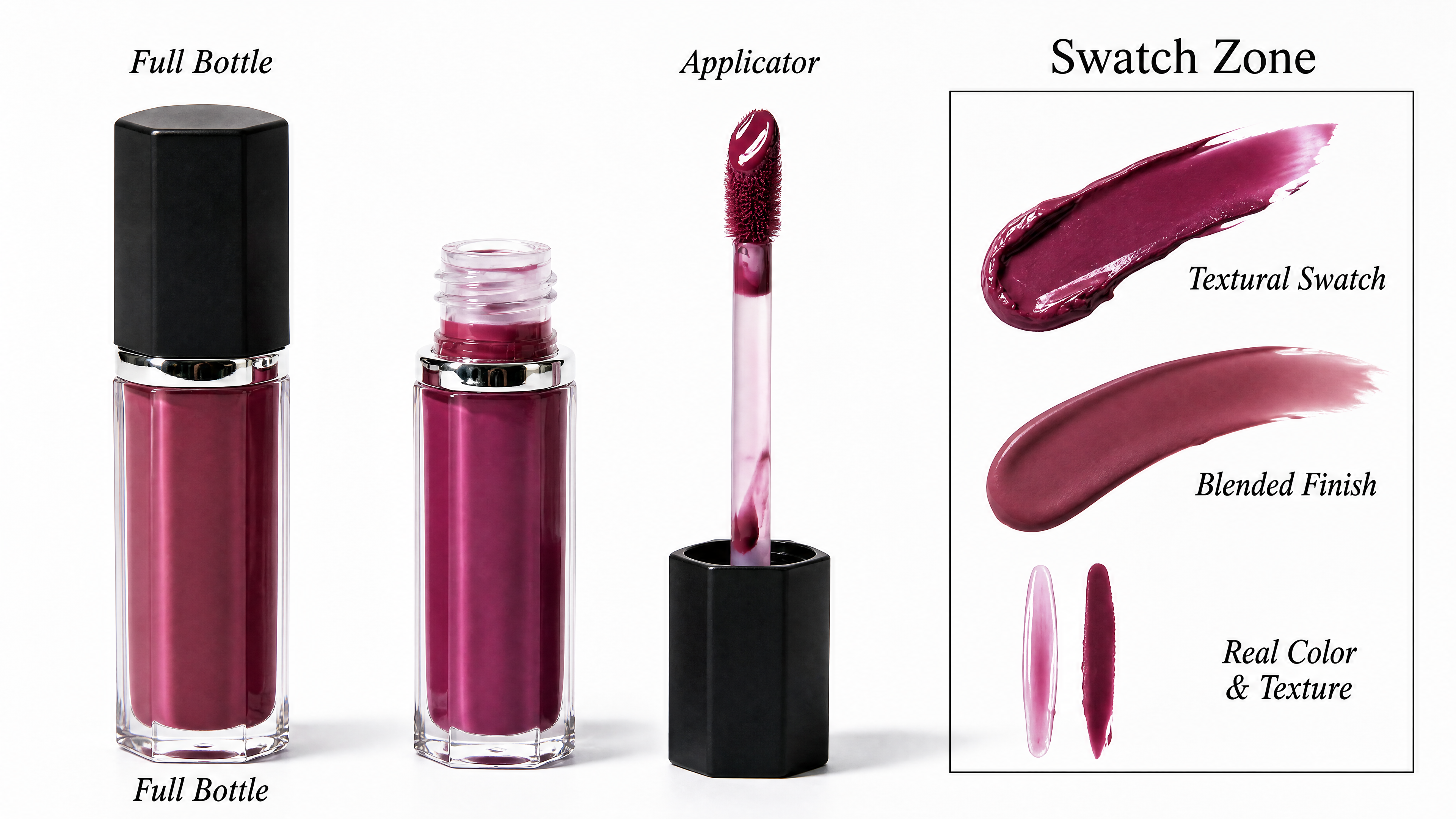 | |
Reference image+video+audio | Seamlessly replace the male character from Image 1 into Video 1's female role. The character sits by the window, holding a phone to the ear. [Voice and dialogue] Extract the voice characteristics from Audio 1, and have the character say the following lines: "Really? That sounds great! When are you coming back? I miss you so much." [Lip-sync and expressions] The generated voice must precisely drive the character's lip movements with natural opening and closing. While speaking, include natural blinking, slight head nodding, and a sense of breathing. Facial micro-expressions must perfectly match the caring and nostalgic emotions in the dialogue. [Lighting and scene] The character's face must naturally receive mixed lighting from warm indoor light and cool neon light from outside the window. Raindrops continuously slide slowly down the window in the background, with slight steam rising from the coffee on the table. The character blends naturally with the scene edges, with no cutout artifacts. [Camera and quality] 15-second long take, camera pushes forward extremely slowly, extremely stable frame, cinematic lighting, 8K resolution, photorealistic quality. | Reference image  Reference video Reference audio |
Python SDK
ImportantPlease update the DashScope Python SDK to 1.26.2.1 or later before running the following code. For update instructions, see Install SDK.
import os
from http import HTTPStatus
from dashscope import VideoSynthesis
import dashscope

dashscope.base_http_api_url = 'https://{WorkspaceId}.ap-southeast-1.maas.aliyuncs.com/api/v1'
api_key = os.getenv("DASHSCOPE_API_KEY", "YOUR_API_KEY")

print('please wait...')
rsp = VideoSynthesis.call(
    api_key=api_key,
    model='wan3.0-video',
    prompt='Video 1 holds Image 3, sitting on the chair in Image 4, playing a soothing country folk song, and says: "The sunshine is so nice today." Image 1 holds Image 2 in hand, walks past Video 1, places Image 2 on the table next to Video 1, and says: "That sounds great, can you sing it again?"',
    media=[
        {"type": "reference_image", "url": "https://help-static-aliyun-doc.aliyuncs.com/file-manage-files/zh-CN/20260408/sjuytr/wan-r2v-object-girl.jpg"},
        {"type": "reference_video", "url": "https://help-static-aliyun-doc.aliyuncs.com/file-manage-files/zh-CN/20260129/qigswt/wan-r2v-role2.mp4"},
        {"type": "reference_image", "url": "https://help-static-aliyun-doc.aliyuncs.com/file-manage-files/zh-CN/20260129/rtjeqf/wan-r2v-object3.png"},
        {"type": "reference_image", "url": "https://help-static-aliyun-doc.aliyuncs.com/file-manage-files/zh-CN/20260129/qpzxps/wan-r2v-object4.png"},
        {"type": "reference_image", "url": "https://help-static-aliyun-doc.aliyuncs.com/file-manage-files/zh-CN/20260129/wfjikw/wan-r2v-backgroud5.png"}
    ],
    resolution="720P",
    ratio="adaptive",
    duration=5,
    prompt_extend=True)
print(rsp)
if rsp.status_code == HTTPStatus.OK:
    print("video_url:", rsp.output.video_url)
else:
    print('Failed, status_code: %s, code: %s, message: %s' % (rsp.status_code, rsp.code, rsp.message))
Java SDK
ImportantPlease update DashScope Java SDK to 2.22.31 or later before running the following code. For update instructions, see Install SDK.
// Copyright (c) Alibaba, Inc. and its affiliates.

import com.alibaba.dashscope.aigc.videosynthesis.VideoSynthesis;
import com.alibaba.dashscope.aigc.videosynthesis.VideoSynthesisParam;
import com.alibaba.dashscope.aigc.videosynthesis.VideoSynthesisResult;
import com.alibaba.dashscope.exception.ApiException;
import com.alibaba.dashscope.exception.InputRequiredException;
import com.alibaba.dashscope.exception.NoApiKeyException;
import com.alibaba.dashscope.utils.Constants;
import com.alibaba.dashscope.utils.JsonUtils;

import java.util.ArrayList;
import java.util.List;

public class Reference2Video {

    static {
        Constants.baseHttpApiUrl = "https://{WorkspaceId}.ap-southeast-1.maas.aliyuncs.com/api/v1";
    }

    static String apiKey = System.getenv("DASHSCOPE_API_KEY");

    public static void syncCall() {
        VideoSynthesis videoSynthesis = new VideoSynthesis();
        List<VideoSynthesisParam.Media> media = new ArrayList<>();
        media.add(VideoSynthesisParam.Media.builder()
                    .url("https://help-static-aliyun-doc.aliyuncs.com/file-manage-files/zh-CN/20260408/sjuytr/wan-r2v-object-girl.jpg")
                    .type("reference_image")
                    .build());
        media.add(VideoSynthesisParam.Media.builder()
                    .url("https://help-static-aliyun-doc.aliyuncs.com/file-manage-files/zh-CN/20260129/qigswt/wan-r2v-role2.mp4")
                    .type("reference_video")
                    .build());
        media.add(VideoSynthesisParam.Media.builder()
                    .url("https://help-static-aliyun-doc.aliyuncs.com/file-manage-files/zh-CN/20260129/rtjeqf/wan-r2v-object3.png")
                    .type("reference_image")
                    .build());
        media.add(VideoSynthesisParam.Media.builder()
                    .url("https://help-static-aliyun-doc.aliyuncs.com/file-manage-files/zh-CN/20260129/qpzxps/wan-r2v-object4.png")
                    .type("reference_image")
                    .build());
        media.add(VideoSynthesisParam.Media.builder()
                    .url("https://help-static-aliyun-doc.aliyuncs.com/file-manage-files/zh-CN/20260129/wfjikw/wan-r2v-backgroud5.png")
                    .type("reference_image")
                    .build());

        VideoSynthesisParam param =
                VideoSynthesisParam.builder()
                        .apiKey(apiKey)
                        .model("wan3.0-video")
                        .prompt("视频1抱着图3,在图4的椅子上弹奏一支舒缓的乡村民谣,并说道:\"今天的阳光真好。\"图1手中拿着图2,路过视频1,把手中的图2放到视频1旁边的桌子上,并说道:\"真好听,能不能再唱一遍\"。")
                        .media(media)
                        .resolution("720P")
                        .ratio("adaptive")
                        .duration(5)
                        .promptExtend(true)
                        .build();
        VideoSynthesisResult result = null;
        try {
            System.out.println("---sync call, please wait a moment----");
            result = videoSynthesis.call(param);
        } catch (ApiException | NoApiKeyException e) {
            throw new RuntimeException(e.getMessage());
        } catch (InputRequiredException e) {
            throw new RuntimeException(e);
        }
        System.out.println(JsonUtils.toJson(result));
    }

    public static void main(String[] args) {
        syncCall();
    }
}
curl
Step 1: Create a task and get the task IDcurl --location 'https://{WorkspaceId}.ap-southeast-1.maas.aliyuncs.com/api/v1/services/aigc/video-generation/video-synthesis' \
-H 'X-DashScope-Async: enable' \
-H "Authorization: Bearer $DASHSCOPE_API_KEY" \
-H 'Content-Type: application/json' \
-d '{
"model": "wan3.0-video",
"input": {
"prompt": "Video 1 holds Image 3, sitting on the chair in Image 4, playing a soothing country folk song, and says: \"The sunshine is so nice today.\" Image 1 holds Image 2 in hand, walks past Video 1, places Image 2 on the table next to Video 1, and says: \"That sounds great, can you sing it again?\"",
"media": [
{"type": "reference_image", "url": "https://help-static-aliyun-doc.aliyuncs.com/file-manage-files/zh-CN/20260408/sjuytr/wan-r2v-object-girl.jpg"},
{"type": "reference_video", "url": "https://help-static-aliyun-doc.aliyuncs.com/file-manage-files/zh-CN/20260129/qigswt/wan-r2v-role2.mp4"},
{"type": "reference_image", "url": "https://help-static-aliyun-doc.aliyuncs.com/file-manage-files/zh-CN/20260129/rtjeqf/wan-r2v-object3.png"},
{"type": "reference_image", "url": "https://help-static-aliyun-doc.aliyuncs.com/file-manage-files/zh-CN/20260129/qpzxps/wan-r2v-object4.png"},
{"type": "reference_image", "url": "https://help-static-aliyun-doc.aliyuncs.com/file-manage-files/zh-CN/20260129/wfjikw/wan-r2v-backgroud5.png"}
]
},
"parameters": {
"resolution": "720P",
"ratio": "adaptive",
"duration": 5,
"prompt_extend": true
}
}'
curl -X GET 'https://{WorkspaceId}.ap-southeast-1.maas.aliyuncs.com/api/v1/tasks/{task_id}' \
    -H "Authorization: Bearer $DASHSCOPE_API_KEY"
2. Reference files or web pages
| Capability | Input prompt | Input materials | Output video |
Reference file - PPT to video | A high-end smart glasses product advertisement, with an overall minimalist, futuristic, fashion-forward style, restrained lighting, a palette of black, silver-gray, and ice-blue as main tones, with localized soft white light accents and parameter UI graphics.
| ||
Reference file - Excel to video | Total duration 22 seconds, 4 segments joined in sequence. Pure white background throughout, soft color blocks and clean line charts, Apple Keynote-style minimalist business aesthetic, sans-serif dark gray font.
|
Prompt: Reference file - PPT to video
A high-end smart glasses product advertisement, with an overall minimalist, futuristic, fashion-forward style, restrained lighting, a palette of black, silver-gray, and ice-blue as main tones, with localized soft white light accents and parameter UI graphics. Opening on a pure black background, a pair of smart glasses slowly emerges from the darkness, with refined highlights gliding along the temple edges, the frame silhouette outlined under cold edge lighting. The camera passes in extreme close-up over the lenses, nose pads, hinges, temples, and material details, showcasing the delicate texture of metal and high-performance composite materials, with a refined and restrained surface treatment and slim, flowing lines. The product then slowly rotates in midair, with minimalist motion graphics displaying core parameter information in sync. The camera then quickly converges, all components precisely returning to assemble into the complete product. It transitions to a young model wearing the glasses — the model has defined features, confident demeanor, dressed in sleek, upscale urban fashion, naturally turning their head, raising their hand, walking, and smiling in a minimalist space and urban lighting environment. The camera shows the glasses from front, side, and rear-oblique angles, highlighting the slim fit, fashionable silhouette, and everyday versatility. The ending features the product floating and frozen against a solid-color background, with the camera slowly pushing in toward the brand logo and core slogan. The overall music is minimalist electronic ambiance with precise beats, clean and powerful rhythm. The visual quality is refined, restrained, and pure, with a strong brand signature and international tech aesthetic.
Prompt: Reference file - Excel to video
Total duration 22 seconds, 4 segments joined in sequence. Pure white background throughout, soft color blocks and clean line charts, Apple Keynote-style minimalist business aesthetic, sans-serif dark gray font. BGM (required, throughout the entire film, clearly audible volume): A light, upbeat business background music track with a steady rhythm and simple melody, starting from the very first second, continuous throughout without interruption. When voiceover appears, the music does not disappear — volume just slightly lower than the voice. Sound effects layer: A "whoosh" sound when color blocks slide in, light keyboard "click" sounds when numbers jump, and a crisp "ding" bell sound when key data pops up. Voiceover: English male or female voice, bright and confident, speaking at approximately 2.5 words/second, like giving a presentation at a quarterly meeting — professional but not cold, rhythmic, with slight emphasis on key figures.
H1-2026跨境电商月度GMV.xlsx
Segment 1: Wide shot, center composition, pure white background, soft light, minimalist business style, visual reference — clean white background + soft color blocks from reference image 1. Pure white screen opens from the center, countless golden light particles converge from all edges toward the center, particles collide and flash then solidify into the title text "H1 2026 · Wan", with flowing data light effects on the text surface and fine particles continuously orbiting the edges, overall dazzling yet refined. After a brief pause, the title dissolves into particle streams, while two sets of large dark gray numbers slide in below — left side shows the B7 cell value $1,580 (January GMV), right side shows the G7 cell value $3,460 (June GMV), connected by a light gray arrow in the middle with light gray small text "Monthly GMV Growth" below it. A coral-colored rounded tag pops up at the bottom, displaying the H8 cell value +45.7% (H1 overall growth), accompanied by a crisp "ding" sound on pop-up. Voiceover says brightly and confidently: "In the first half of 2026, monthly GMV grew from 15.8 to 34.6 million dollars." BGM starts clearly from the first second of the frame, with a light rhythm throughout. A slight "whoosh" sound accompanies the sliding color blocks. At the end of the segment, color blocks smoothly slide to both sides, revealing the next segment.
Segment 2: Wide shot, left Y-axis + bottom X-axis composition, pure white background + light gray dotted grid, soft light, minimalist business style, visual reference — trend line chart style from reference image 2. The bottom X-axis clearly labels six month markers from left to right: Jan, Feb, Mar, Apr, May, Jun, evenly spaced, in light gray sans-serif font. The left Y-axis labels value scales. Three trend lines draw simultaneously from left to right — coral for Southeast Asia (data from row 4: B4=$580, C4=$640, D4=$750, E4=$880, F4=$1,050, G4=$1,280), teal-blue for North America (row 5: B5=$420, C5=$480, D5=$560, E5=$680, F5=$860, G5=$1,260), amber for Europe (row 6: B6=$580, C6=$610, D6=$680, E6=$750, F6=$830, G6=$920). All three lines start from the same Jan position and extend upward-right to Jun with the rhythm. Each line has a 30% transparency gradient fill beneath it. When each monthly node is reached, the data point bounces slightly, with the precise value label floating directly above — labels show only dollar values, no percentages, no other text, values must exactly match the cells above. A legend slides out in the upper right: three color blocks with English market names. After all six points are reached, the frame holds briefly. Voiceover says steadily: "All three markets — Southeast Asia, North America, and Europe — showed consistent month-over-month growth, with no single dip." BGM remains audible throughout, with fine "click" keyboard sounds accompanying data pop-ups. The June endpoint label enlarges to fill the frame, then shrinks and reorganizes, transitioning to the next segment.
Segment 3: Wide shot, left 60% bar chart + right 40% data column composition, pure white background, soft light, minimalist business style, visual reference — bar chart style from reference image 1. On a white background, 6 teal-blue rounded bars rise sequentially from left to right, corresponding to January through June — all 6 bars must be fully displayed. Bar heights strictly correspond to row 5 North America monthly values: B5=$420, C5=$480, D5=$560, E5=$680, F5=$860, G5=$1,260, arranged from low to high in ascending order, showing a clear month-over-month growth trend. Each bar rises with a slight "whoosh" spring sound effect, with the precise dollar value label floating above the bar top. After all bars are in place, 5 North America month-over-month growth rates slide in vertically on the right side, calculated from adjacent months: Feb +14.3% (C5 vs B5), Mar +16.7% (D5 vs C5), Apr +21.4% (E5 vs D5), May +26.5% (F5 vs E5), Jun +46.5% (G5 vs F5). Each growth rate displays as: a green upward arrow icon + percentage value (e.g., ↑+14.3%), arranged in a staircase pattern from top to bottom, with green arrows emphasizing growth momentum, slightly larger font for clear readability. Each number slides in with a fine "click" sound. Finally, the North America overall growth pops up in large coral-colored text from the center: +200% (calculated from G5=$1,260 vs B5=$420), accompanied by a crisp "ding" bell sound, holding briefly with a slight glow halo around the number. Voiceover slightly emphasizes key data: "North America was our growth engine — up two hundred percent in just six months, accelerating every single month." BGM remains clearly audible, rhythm building toward a peak. The overall growth number centers and enlarges while surrounding elements softly fade out, transitioning to the final segment.
Segment 4: Wide shot, center composition slightly above, pure white background, soft light, minimalist business style, visual reference — ring chart style from reference image 3. A simple ring chart (donut chart) appears at the center of the white background, with only three arc segments, rendered in coral, teal-blue, and amber for the three markets' H1 share — Southeast Asia share calculated from H4=5180, North America from H5=4260, Europe from H6=4370, total H7=13810. The three arc segments are separated by white gaps, the ring chart overall clean and simple, with no percentage symbols, no numbers, no scattered labels on the chart — only pure three-color arcs. The ring chart slowly rotates at approximately 10°/s. At the center of the ring chart, a large dark gray number rapidly counts up from 0 to the H7 cell value $138.1M (i.e., 138.1 million dollars), with continuous fine "click" sounds during counting, and a crisp "ding" when the final number settles. A light gray subtitle fades in below: "Three Markets · All Growing · Zero Downturn." Voiceover concludes steadily, leaving 1 second of silence after speaking: "138 million in total — all markets growing, zero downturns." BGM remains audible throughout, gradually fading. 1 second of silence before the film ends.
Python SDK
ImportantPlease update the DashScope Python SDK to 1.26.2.1 or later before running the following code. For update instructions, see Install SDK.
import os
from http import HTTPStatus
from dashscope import VideoSynthesis
import dashscope

dashscope.base_http_api_url = 'https://{WorkspaceId}.ap-southeast-1.maas.aliyuncs.com/api/v1'
api_key = os.getenv("DASHSCOPE_API_KEY", "YOUR_API_KEY")

print('please wait...')
rsp = VideoSynthesis.call(
    api_key=api_key,
    model='wan3.0-video',
    prompt='A high-end smart glasses product advertisement, with an overall minimalist, futuristic, fashion-forward style, restrained lighting, a palette of black, silver-gray, and ice-blue as main tones, with localized soft white light accents and parameter UI graphics. Opening on a pure black background, a pair of smart glasses slowly emerges from the darkness, with refined highlights gliding along the temple edges, the frame silhouette outlined under cold edge lighting. The camera passes in extreme close-up over the lenses, nose pads, hinges, temples, and material details, showcasing the delicate texture of metal and high-performance composite materials, with a refined and restrained surface treatment and slim, flowing lines. The product then slowly rotates in midair, with minimalist motion graphics displaying core parameter information in sync. The camera then quickly converges, all components precisely returning to assemble into the complete product. It transitions to a young model wearing the glasses — the model has defined features, confident demeanor, dressed in sleek, upscale urban fashion, naturally turning their head, raising their hand, walking, and smiling in a minimalist space and urban lighting environment. The camera shows the glasses from front, side, and rear-oblique angles, highlighting the slim fit, fashionable silhouette, and everyday versatility. The ending features the product floating and frozen against a solid-color background, with the camera slowly pushing in toward the brand logo and core slogan. The overall music is minimalist electronic ambiance with precise beats, clean and powerful rhythm. The visual quality is refined, restrained, and pure, with a strong brand signature and international tech aesthetic.',
    media=[
        {"type": "file", "url": "https://help-static-aliyun-doc.aliyuncs.com/file-manage-files/zh-CN/20260806/ebapmr/glass.pptx"}
    ],
    resolution="480P",
    ratio="adaptive",
    duration=10,
    prompt_extend=True)
print(rsp)
if rsp.status_code == HTTPStatus.OK:
    print("video_url:", rsp.output.video_url)
else:
    print('Failed, status_code: %s, code: %s, message: %s' % (rsp.status_code, rsp.code, rsp.message))
Java SDK
ImportantPlease update DashScope Java SDK to 2.22.31 or later before running the following code. For update instructions, see Install SDK.
// Copyright (c) Alibaba, Inc. and its affiliates.

import com.alibaba.dashscope.aigc.videosynthesis.VideoSynthesis;
import com.alibaba.dashscope.aigc.videosynthesis.VideoSynthesisParam;
import com.alibaba.dashscope.aigc.videosynthesis.VideoSynthesisResult;
import com.alibaba.dashscope.exception.ApiException;
import com.alibaba.dashscope.exception.InputRequiredException;
import com.alibaba.dashscope.exception.NoApiKeyException;
import com.alibaba.dashscope.utils.Constants;
import com.alibaba.dashscope.utils.JsonUtils;

import java.util.ArrayList;
import java.util.List;

public class File2Video {

    static {
        Constants.baseHttpApiUrl = "https://{WorkspaceId}.ap-southeast-1.maas.aliyuncs.com/api/v1";
    }

    static String apiKey = System.getenv("DASHSCOPE_API_KEY");

    public static void syncCall() {
        VideoSynthesis videoSynthesis = new VideoSynthesis();
        List<VideoSynthesisParam.Media> media = new ArrayList<>();
        media.add(VideoSynthesisParam.Media.builder()
                    .url("https://help-static-aliyun-doc.aliyuncs.com/file-manage-files/zh-CN/20260806/ebapmr/glass.pptx")
                    .type("file")
                    .build());

        VideoSynthesisParam param =
                VideoSynthesisParam.builder()
                        .apiKey(apiKey)
                        .model("wan3.0-video")
                        .prompt("一支高端智能眼镜产品广告,整体风格极简、未来感、时尚高级,光影克制,画面以黑色、银灰色、冰蓝色为主色调。")
                        .media(media)
                        .resolution("480P")
                        .ratio("adaptive")
                        .duration(10)
                        .promptExtend(true)
                        .build();
        VideoSynthesisResult result = null;
        try {
            System.out.println("---sync call, please wait a moment----");
            result = videoSynthesis.call(param);
        } catch (ApiException | NoApiKeyException e) {
            throw new RuntimeException(e.getMessage());
        } catch (InputRequiredException e) {
            throw new RuntimeException(e);
        }
        System.out.println(JsonUtils.toJson(result));
    }

    public static void main(String[] args) {
        syncCall();
    }
}
curl
Step 1: Create a task and get the task IDcurl --location 'https://{WorkspaceId}.ap-southeast-1.maas.aliyuncs.com/api/v1/services/aigc/video-generation/video-synthesis' \
-H 'X-DashScope-Async: enable' \
-H "Authorization: Bearer $DASHSCOPE_API_KEY" \
-H 'Content-Type: application/json' \
-d '{
"model": "wan3.0-video",
"input": {
"prompt": "A high-end smart glasses product advertisement, with an overall minimalist, futuristic, fashion-forward style, restrained lighting, a palette of black, silver-gray, and ice-blue as main tones, with localized soft white light accents and parameter UI graphics. Opening on a pure black background, a pair of smart glasses slowly emerges from the darkness, with refined highlights gliding along the temple edges, the frame silhouette outlined under cold edge lighting. The camera passes in extreme close-up over the lenses, nose pads, hinges, temples, and material details, showcasing the delicate texture of metal and high-performance composite materials, with a refined and restrained surface treatment and slim, flowing lines. The product then slowly rotates in midair, with minimalist motion graphics displaying core parameter information in sync. The camera then quickly converges, all components precisely returning to assemble into the complete product. It transitions to a young model wearing the glasses — the model has defined features, confident demeanor, dressed in sleek, upscale urban fashion, naturally turning their head, raising their hand, walking, and smiling in a minimalist space and urban lighting environment. The camera shows the glasses from front, side, and rear-oblique angles, highlighting the slim fit, fashionable silhouette, and everyday versatility. The ending features the product floating and frozen against a solid-color background, with the camera slowly pushing in toward the brand logo and core slogan. The overall music is minimalist electronic ambiance with precise beats, clean and powerful rhythm. The visual quality is refined, restrained, and pure, with a strong brand signature and international tech aesthetic.",
"media": [
{
"type": "file",
"url": "https://help-static-aliyun-doc.aliyuncs.com/file-manage-files/zh-CN/20260806/ebapmr/glass.pptx"
}
]
},
"parameters": {
"resolution": "480P",
"ratio": "adaptive",
"duration": 10,
"prompt_extend": true
}
}'
curl -X GET 'https://{WorkspaceId}.ap-southeast-1.maas.aliyuncs.com/api/v1/tasks/{task_id}' \
    -H "Authorization: Bearer $DASHSCOPE_API_KEY"
Video editing
Provide a reference video and use natural language instructions to precisely edit it. Parts not specified for modification remain unchanged.
- Add elements: Add new objects or characters at specified positions in the video.
- Remove elements: Remove objects or characters from the video with automatic background fill.
- Modify elements: Replace character appearance, clothing, age, and other attributes.
- Style/lighting editing: Convert the overall visual style (e.g., clay, ink-wash) or adjust lighting.
- Dialogue editing: Modify the dialogue content of characters in the video.
- Reference editing: Provide reference images and add their elements into the video.
Parameter configuration: ratio recommended as adaptive, duration recommended as -1 (auto-preserves original video aspect ratio and duration). The prompt must include editing intent keywords (e.g., "edit video", "remove", "replace", "change to").
| Capability | Input prompt | Input reference video | Output video |
Style conversion | Convert the entire scene to clay style | ||
Dialogue editing | Edit the video, change the man's dialogue to: "The deal is done. Now... we disappear." | ||
Reference editing | Edit the video: the woman in Video 1 puts on the hat from Image 1, naturally fitting her head shape. The man in Video 1 puts on the hat from Image 2, naturally fitting his head shape. The man's russet-brown shirt is replaced with the blue washed loose denim shirt from Image 3, with the collar open and sleeves rolled up to the forearms. The movements, other clothing, and the rest of the scene remain unchanged. | Reference video Reference images (3)  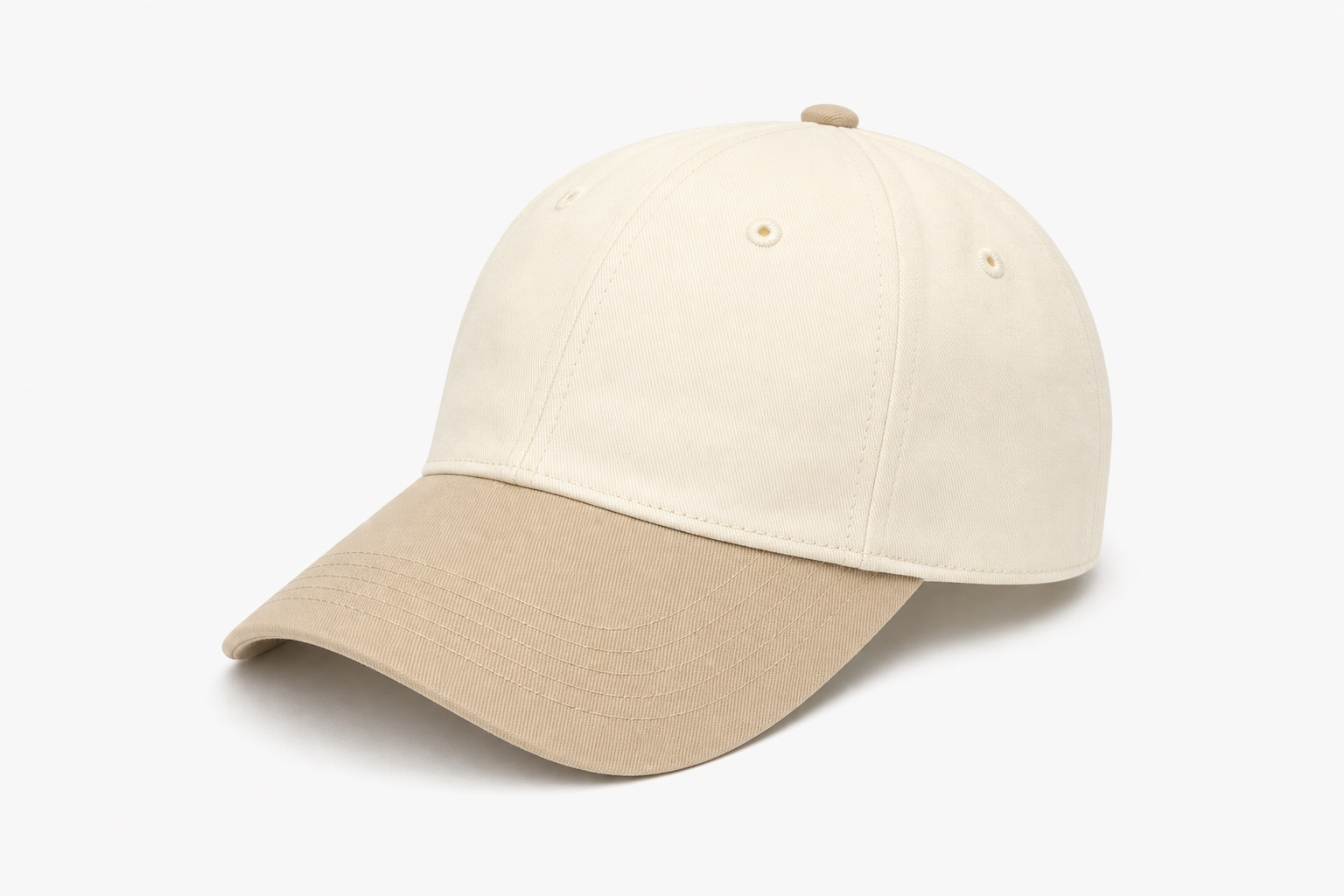 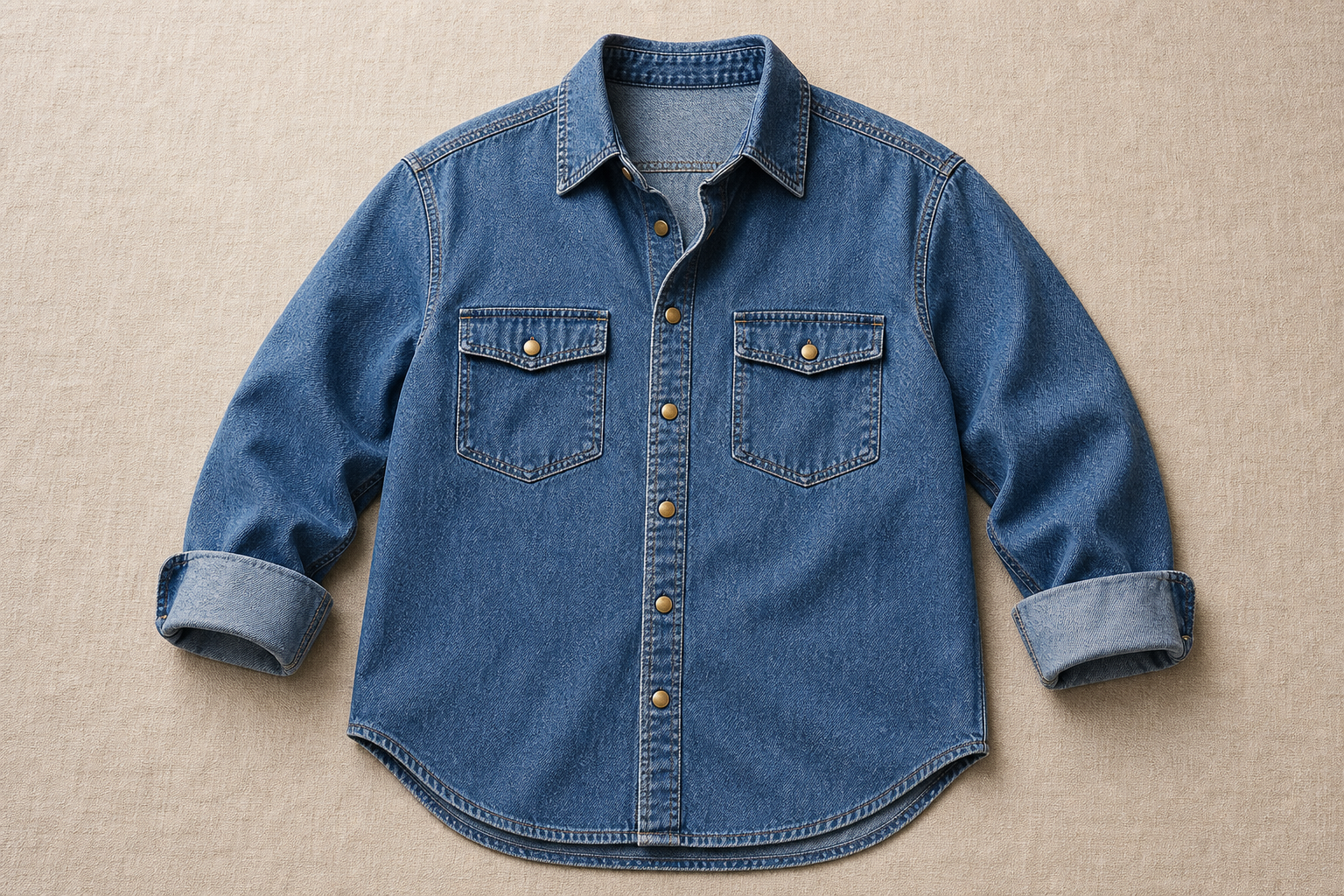 |
Python SDK
ImportantPlease update the DashScope Python SDK to 1.26.2.1 or later before running the following code. For update instructions, see Install SDK.
import os
from http import HTTPStatus
from dashscope import VideoSynthesis
import dashscope

dashscope.base_http_api_url = 'https://{WorkspaceId}.ap-southeast-1.maas.aliyuncs.com/api/v1'
api_key = os.getenv("DASHSCOPE_API_KEY", "YOUR_API_KEY")

print('please wait...')
rsp = VideoSynthesis.call(
    api_key=api_key,
    model='wan3.0-video',
    prompt='Convert the entire scene to clay style',
    media=[
        {"type": "reference_video", "url": "https://help-static-aliyun-doc.aliyuncs.com/file-manage-files/zh-CN/20260402/ldnfdf/wan2.7-videoedit-style-change.mp4"}
    ],
    resolution="720P",
    duration=-1,
    prompt_extend=True)
print(rsp)
if rsp.status_code == HTTPStatus.OK:
    print("video_url:", rsp.output.video_url)
else:
    print('Failed, status_code: %s, code: %s, message: %s' % (rsp.status_code, rsp.code, rsp.message))
Java SDK
ImportantPlease update DashScope Java SDK to 2.22.31 or later before running the following code. For update instructions, see Install SDK.
// Copyright (c) Alibaba, Inc. and its affiliates.

import com.alibaba.dashscope.aigc.videosynthesis.VideoSynthesis;
import com.alibaba.dashscope.aigc.videosynthesis.VideoSynthesisParam;
import com.alibaba.dashscope.aigc.videosynthesis.VideoSynthesisResult;
import com.alibaba.dashscope.exception.ApiException;
import com.alibaba.dashscope.exception.InputRequiredException;
import com.alibaba.dashscope.exception.NoApiKeyException;
import com.alibaba.dashscope.utils.Constants;
import com.alibaba.dashscope.utils.JsonUtils;

import java.util.ArrayList;
import java.util.List;

public class VideoEdit {

    static {
        Constants.baseHttpApiUrl = "https://{WorkspaceId}.ap-southeast-1.maas.aliyuncs.com/api/v1";
    }

    static String apiKey = System.getenv("DASHSCOPE_API_KEY");

    public static void syncCall() {
        VideoSynthesis videoSynthesis = new VideoSynthesis();
        List<VideoSynthesisParam.Media> media = new ArrayList<>();
        media.add(VideoSynthesisParam.Media.builder()
                    .url("https://help-static-aliyun-doc.aliyuncs.com/file-manage-files/zh-CN/20260402/ldnfdf/wan2.7-videoedit-style-change.mp4")
                    .type("reference_video")
                    .build());

        VideoSynthesisParam param =
                VideoSynthesisParam.builder()
                        .apiKey(apiKey)
                        .model("wan3.0-video")
                        .prompt("将整个画面转换为黏土风格")
                        .media(media)
                        .resolution("720P")
                        .duration(-1)
                        .promptExtend(true)
                        .build();
        VideoSynthesisResult result = null;
        try {
            System.out.println("---sync call, please wait a moment----");
            result = videoSynthesis.call(param);
        } catch (ApiException | NoApiKeyException e) {
            throw new RuntimeException(e.getMessage());
        } catch (InputRequiredException e) {
            throw new RuntimeException(e);
        }
        System.out.println(JsonUtils.toJson(result));
    }

    public static void main(String[] args) {
        syncCall();
    }
}
curl
Step 1: Create a task and get the task IDcurl --location 'https://{WorkspaceId}.ap-southeast-1.maas.aliyuncs.com/api/v1/services/aigc/video-generation/video-synthesis' \
-H 'X-DashScope-Async: enable' \
-H "Authorization: Bearer $DASHSCOPE_API_KEY" \
-H 'Content-Type: application/json' \
-d '{
"model": "wan3.0-video",
"input": {
"prompt": "Convert the entire scene to clay style",
"media": [
{
"type": "reference_video",
"url": "https://help-static-aliyun-doc.aliyuncs.com/file-manage-files/zh-CN/20260402/ldnfdf/wan2.7-videoedit-style-change.mp4"
}
]
},
"parameters": {
"resolution": "720P",
"duration": -1,
"prompt_extend": true
}
}'
curl -X GET 'https://{WorkspaceId}.ap-southeast-1.maas.aliyuncs.com/api/v1/tasks/{task_id}' \
    -H "Authorization: Bearer $DASHSCOPE_API_KEY"
Video extension
Extend the duration of an existing video, supporting forward, backward, or bidirectional extension. Visual style and characters remain consistent, and the prompt describes the dynamic changes for the extended portion.
- Backward extension: Uses the last frame of the video as the starting point to generate subsequent content.
- Forward extension: Uses the first frame of the video as the endpoint to generate preceding content.
- Bidirectional extension: Uses the video as the middle segment and extends both forward and backward simultaneously.
Parameter configuration: ratio recommended as adaptive (preserves original video aspect ratio). The prompt must include extension intent keywords (e.g., "extend", "continue", "extend forward/backward").
durationrecommended as-1(the model automatically recommends a suitable duration based on the input), or set it to the target output duration, i.e. the input video duration + the expected extension duration. For example, for a 5-second source video extended backward by 2 seconds,durationcan be set to-1or7.- Note that the input duration + output duration must total ≤30 seconds.
| Capability | Input prompt | Input reference video | Output video |
Backward extension | The baker brings up the brushed bread, puts the brush aside, the camera follows the baker to the oven behind for baking. The baker closes the oven door, stands beside the oven, watches the bread baking inside, takes a sniff of the bread aroma, and says: "so good". | ||
Forward extension | Extend Video 1 forward by 15s. Character A is a male with short dark brown hair wearing a black tailcoat, white shirt, black bow tie, and beige vest. Character B is a female with brown upswept hair wearing a beige puff-sleeve vintage long dress with black lace trim on the skirt, and dark teardrop earrings.
| ||
Bidirectional extension | Using the video as the middle segment, extend forward by two seconds: the camera smoothly follows as the girl slowly walks toward the camera, stops, gently lifts her head, takes a deep breath in the cold air with lips slightly parted; using the video as the middle segment, extend backward by three seconds: the girl finishes rubbing her hands, looks directly at the camera, and breaks into a warm, radiant smile. She slowly raises a gloved hand to catch a gently falling snowflake. The camera slowly pulls back to a medium-long shot, revealing a sunny snowy forest path, golden hour backlighting, lens flare, shallow depth of field, warm and healing atmosphere. |
Prompt: Forward extension
Extend Video 1 forward by 15s. Character A is a male with short dark brown hair wearing a black tailcoat, white shirt, black bow tie, and beige vest. Character B is a female with brown upswept hair wearing a beige puff-sleeve vintage long dress with black lace trim on the skirt, and dark teardrop earrings. Inside the ballroom, crystal chandelier light reflects off the marble floor. Guests chat in small groups, holding glasses and speaking in low voices. A graceful waltz string prelude slowly begins, and the guests' conversations gradually quiet. Character B walks slowly from one side of the ballroom, her skirt hem lightly brushing the marble floor, her gaze surveying the room. Character A emerges from the crowd, walks past the guests directly to Character B, gives a slight bow and extends his right hand, his gaze warm and attentive. Character B lowers her eyes with a gentle smile, lightly placing her right hand on Character A's palm. The two exchange a smile, and Character A leads Character B to the center of the dance floor. The surrounding guests naturally step back to make room, all eyes focused on the pair. Character A's left hand holds Character B's right hand raised, his right hand gently resting on her lower back. The two assume the waltz pose, stepping out on the downbeat of the strings, beginning to spin. The elegant atmosphere of a 19th-century court ball, warm golden tones.
Python SDK
ImportantPlease update the DashScope Python SDK to 1.26.2.1 or later before running the following code. For update instructions, see Install SDK.
import os
from http import HTTPStatus
from dashscope import VideoSynthesis
import dashscope

dashscope.base_http_api_url = 'https://{WorkspaceId}.ap-southeast-1.maas.aliyuncs.com/api/v1'
api_key = os.getenv("DASHSCOPE_API_KEY", "YOUR_API_KEY")

print('please wait...')
rsp = VideoSynthesis.call(
    api_key=api_key,
    model='wan3.0-video',
    prompt='Extend Video 1 backward, the baker brings up the brushed bread, puts the brush aside, the camera follows the baker to the oven behind for baking',
    media=[
        {"type": "reference_video", "url": "https://help-static-aliyun-doc.aliyuncs.com/file-manage-files/zh-CN/20260414/rptnhd/wan2.7-i2v-video-continuation-2.mp4"}
    ],
    resolution="720P",
    ratio="adaptive",
    duration=5,
    prompt_extend=True)
print(rsp)
if rsp.status_code == HTTPStatus.OK:
    print("video_url:", rsp.output.video_url)
else:
    print('Failed, status_code: %s, code: %s, message: %s' % (rsp.status_code, rsp.code, rsp.message))
Java SDK
ImportantPlease update DashScope Java SDK to 2.22.31 or later before running the following code. For update instructions, see Install SDK.
// Copyright (c) Alibaba, Inc. and its affiliates.

import com.alibaba.dashscope.aigc.videosynthesis.VideoSynthesis;
import com.alibaba.dashscope.aigc.videosynthesis.VideoSynthesisParam;
import com.alibaba.dashscope.aigc.videosynthesis.VideoSynthesisResult;
import com.alibaba.dashscope.exception.ApiException;
import com.alibaba.dashscope.exception.InputRequiredException;
import com.alibaba.dashscope.exception.NoApiKeyException;
import com.alibaba.dashscope.utils.Constants;
import com.alibaba.dashscope.utils.JsonUtils;

import java.util.ArrayList;
import java.util.List;

public class VideoExtend {

    static {
        Constants.baseHttpApiUrl = "https://{WorkspaceId}.ap-southeast-1.maas.aliyuncs.com/api/v1";
    }

    static String apiKey = System.getenv("DASHSCOPE_API_KEY");

    public static void syncCall() {
        VideoSynthesis videoSynthesis = new VideoSynthesis();
        List<VideoSynthesisParam.Media> media = new ArrayList<>();
        media.add(VideoSynthesisParam.Media.builder()
                    .url("https://help-static-aliyun-doc.aliyuncs.com/file-manage-files/zh-CN/20260414/rptnhd/wan2.7-i2v-video-continuation-2.mp4")
                    .type("reference_video")
                    .build());

        VideoSynthesisParam param =
                VideoSynthesisParam.builder()
                        .apiKey(apiKey)
                        .model("wan3.0-video")
                        .prompt("将视频1向后延长,面包师端上刷好的面包,将刷子放到一旁,镜头跟随面包师,去斜后方的烤炉进行烤制")
                        .media(media)
                        .resolution("720P")
                        .ratio("adaptive")
                        .duration(5)
                        .promptExtend(true)
                        .build();
        VideoSynthesisResult result = null;
        try {
            System.out.println("---sync call, please wait a moment----");
            result = videoSynthesis.call(param);
        } catch (ApiException | NoApiKeyException e) {
            throw new RuntimeException(e.getMessage());
        } catch (InputRequiredException e) {
            throw new RuntimeException(e);
        }
        System.out.println(JsonUtils.toJson(result));
    }

    public static void main(String[] args) {
        syncCall();
    }
}
curl
Step 1: Create a task and get the task IDcurl --location 'https://{WorkspaceId}.ap-southeast-1.maas.aliyuncs.com/api/v1/services/aigc/video-generation/video-synthesis' \
-H 'X-DashScope-Async: enable' \
-H "Authorization: Bearer $DASHSCOPE_API_KEY" \
-H 'Content-Type: application/json' \
-d '{
"model": "wan3.0-video",
"input": {
"prompt": "Extend Video 1 backward, the baker brings up the brushed bread, puts the brush aside, the camera follows the baker to the oven behind for baking",
"media": [
{
"type": "reference_video",
"url": "https://help-static-aliyun-doc.aliyuncs.com/file-manage-files/zh-CN/20260414/rptnhd/wan2.7-i2v-video-continuation-2.mp4"
}
]
},
"parameters": {
"resolution": "720P",
"ratio": "adaptive",
"duration": 5,
"prompt_extend": true
}
}'
curl -X GET 'https://{WorkspaceId}.ap-southeast-1.maas.aliyuncs.com/api/v1/tasks/{task_id}' \
    -H "Authorization: Bearer $DASHSCOPE_API_KEY"
Input media
Each element in the input.media array contains type and url fields. Supported types and constraints are as follows:
type | Description | Constraints |
| First frame image, strictly used as the first frame of the video | Maximum 1 |
| Last frame image, strictly used as the last frame of the video | Maximum 1 |
| Reference image | Maximum 10 |
| Reference video | Maximum 5, total duration no more than 15 seconds |
| Reference audio | Maximum 5, total duration no more than 15 seconds |
| File (docx, doc, xlsx, xls, pptx, ppt, pdf, txt, md) | Maximum 1, cannot be used with link simultaneously |
| Web link (public web pages) | Maximum 1, cannot be used with file simultaneously |
Importantreference_xx/file/link types and first_frame/last_frame types are mutually exclusive and cannot be used in the same request.
Output video
- Resolution: 480P, 720P, 1080P (default).
- Aspect ratio: 16:9, 4:3, 1:1, 3:4, 9:16, adaptive (default, adapts to input materials).
- Duration: 2~30 seconds; -1 (smart duration, defaults to 5 seconds). When video input is provided, input + output total duration ≤30 seconds.
- Format: MP4, 30fps frame rate.
- Audio-video: Enabled by default; can be disabled with
audio=false. - Video URL is valid for 24 hours. Please save promptly.
Billing and rate limits
- For billing details, see Model pricing.
- For rate limit details, see Rate limits.