The Wan 2.7 image-to-video model uses multimodal input (text, image, audio, and video) to perform three main tasks: first-frame video generation, first-and-last-frame video generation, and video continuation (continuing from an initial video segment, with or without a final frame) .
- Basic settings: Supports video durations from 2 to 15 seconds, configurable video resolution (720p or 1080p), intelligent prompt rewriting, and watermarking.
- Audio capabilities: Supports automatic dubbing or custom audio upload, ensuring audio-visual synchronization.
- Multi-shot narrative: Lets you generate videos with multiple shots, maintaining subject consistency between shots.
Quick links: try it online (Singapore | Virginia | China (Beijing))|API reference
Quick start
| Input prompt | Input first video clip (2 s) | Input last frame image | Output video (12 s, 10 s continuation) |
A man looks down at a wooden box on the ground. He bends over and carefully opens the lid. He stares at the contents of the box, his lips trembling and slightly parted. His brow is furrowed and his eyes are wide with a look of horror. |  |
Before you make a call, get an API key and configure it as an environment variable. To use an SDK, install the DashScope SDK.
Python SDK
ImportantEnsure your DashScope Python SDK is version 1.25.16 or later before running the following code.
If you use an earlier version, an error such as "url error, please check url!" may occur. See Install the SDK to update your version.
# -*- coding: utf-8 -*-
from http import HTTPStatus
from dashscope import VideoSynthesis
import dashscope
import os

# This URL is for the Singapore region. URLs vary by region. For more information, see https://www.alibabacloud.com/help/model-studio/image-to-video-general-api-reference
dashscope.base_http_api_url = 'https://{WorkspaceId}.ap-southeast-1.maas.aliyuncs.com/api/v1'

# If you have not configured an environment variable, replace the following line with your Model Studio API key: api_key="sk-xxx"
# API keys vary by region. To get an API key, see https://www.alibabacloud.com/help/model-studio/get-api-key
api_key = os.getenv("DASHSCOPE_API_KEY")

media = [
    {
        "type": "first_clip",
        "url": "https://help-static-aliyun-doc.aliyuncs.com/file-manage-files/zh-CN/20260414/cqcbkw/wan2.7-i2v-video-continuation.mp4"
    },
    {
        "type": "last_frame",
        "url": "https://help-static-aliyun-doc.aliyuncs.com/file-manage-files/zh-CN/20260414/mrwahg/wan2.7-i2v-video-continuation.webp"
    }
]

def sample_sync_call():
    print('----sync call, please wait a moment----')
    rsp = VideoSynthesis.call(
        api_key=api_key,
        model="wan2.7-i2v-2026-04-25",
        media=media,
        resolution="720P",
        duration=12,
        watermark=True,
        prompt="A man looks down at a wooden box on the ground. He bends over and carefully opens the lid. He stares at the contents of the box, his lips trembling and slightly parted. His brow is furrowed and his eyes are wide with a look of horror.",
    )
    if rsp.status_code == HTTPStatus.OK:
        print(rsp.output.video_url)
    else:
        print('Failed, status_code: %s, code: %s, message: %s' %
              (rsp.status_code, rsp.code, rsp.message))

if __name__ == '__main__':
    sample_sync_call()
Java SDK
ImportantEnsure your DashScope Java SDK is version 2.22.14 or later before running the following code.
If you use an earlier version, an error such as "url error, please check url!" may occur. See Install the SDK to update your version.
// Copyright (c) Alibaba, Inc. and its affiliates.

import com.alibaba.dashscope.aigc.videosynthesis.VideoSynthesis;
import com.alibaba.dashscope.aigc.videosynthesis.VideoSynthesisParam;
import com.alibaba.dashscope.aigc.videosynthesis.VideoSynthesisResult;
import com.alibaba.dashscope.exception.ApiException;
import com.alibaba.dashscope.exception.InputRequiredException;
import com.alibaba.dashscope.exception.NoApiKeyException;
import com.alibaba.dashscope.utils.Constants;
import com.alibaba.dashscope.utils.JsonUtils;

import java.util.ArrayList;
import java.util.List;

public class Image2Video {

    static {
        // Singapore region URL. Replace {WorkspaceId} with your actual workspace ID. The URL varies by region.
        Constants.baseHttpApiUrl = "https://{WorkspaceId}.ap-southeast-1.maas.aliyuncs.com/api/v1";
    }

    // If you have not configured an environment variable, replace the following line with your Model Studio API key: apiKey="sk-xxx"
    // API keys vary by region. To get an API key, see https://www.alibabacloud.com/help/model-studio/get-api-key
    static String apiKey = System.getenv("DASHSCOPE_API_KEY");

    public static void syncCall() {
        VideoSynthesis videoSynthesis = new VideoSynthesis();
        final String prompt = "A man looks down at a wooden box on the ground. He bends over and carefully opens the lid. He stares at the contents of the box, his lips trembling and slightly parted. His brow is furrowed and his eyes are wide with a look of horror.";
        List<VideoSynthesisParam.Media> media = new ArrayList<VideoSynthesisParam.Media>(){{
            add(VideoSynthesisParam.Media.builder()
                    .url("https://help-static-aliyun-doc.aliyuncs.com/file-manage-files/zh-CN/20260414/cqcbkw/wan2.7-i2v-video-continuation.mp4")
                    .type("first_clip")
                    .build());
            add(VideoSynthesisParam.Media.builder()
                    .url("https://help-static-aliyun-doc.aliyuncs.com/file-manage-files/zh-CN/20260414/mrwahg/wan2.7-i2v-video-continuation.webp")
                    .type("last_frame")
                    .build());
        }};
        VideoSynthesisParam param =
                VideoSynthesisParam.builder()
                        .apiKey(apiKey)
                        .model("wan2.7-i2v-2026-04-25")
                        .prompt(prompt)
                        .media(media)
                        .watermark(true)
                        .duration(12)
                        .resolution("720P")
                        .build();
        VideoSynthesisResult result = null;
        try {
            System.out.println("---sync call, please wait a moment----");
            result = videoSynthesis.call(param);
        } catch (ApiException | NoApiKeyException e){
            throw new RuntimeException(e.getMessage());
        } catch (InputRequiredException e) {
            throw new RuntimeException(e);
        }
        System.out.println(JsonUtils.toJson(result));
    }

    public static void main(String[] args) {
        syncCall();
    }
}
Curl
Step 1: Create a task and get the task IDcurl --location 'https://{WorkspaceId}.ap-southeast-1.maas.aliyuncs.com/api/v1/services/aigc/video-generation/video-synthesis' \
-H 'X-DashScope-Async: enable' \
-H "Authorization: Bearer $DASHSCOPE_API_KEY" \
-H 'Content-Type: application/json' \
-d '{
"model": "wan2.7-i2v-2026-04-25",
"input": {
"prompt": "A man looks down at a wooden box on the ground. He bends over and carefully opens the lid. He stares at the contents of the box, his lips trembling and slightly parted. His brow is furrowed and his eyes are wide with a look of horror.",
"media": [
{
"type": "first_clip",
"url": "https://help-static-aliyun-doc.aliyuncs.com/file-manage-files/zh-CN/20260414/cqcbkw/wan2.7-i2v-video-continuation.mp4"
},
{
"type": "last_frame",
"url": "https://help-static-aliyun-doc.aliyuncs.com/file-manage-files/zh-CN/20260414/mrwahg/wan2.7-i2v-video-continuation.webp"
}
]
},
"parameters": {
"resolution": "720P",
"duration": 12,
"prompt_extend": true,
"watermark": true
}
}'
Replace {task_id} with the task_id value returned by the previous API call. The task_id is valid for queries for 24 hours, Replace {WorkspaceId} with your actual workspace ID.
curl -X GET https://{WorkspaceId}.ap-southeast-1.maas.aliyuncs.com/api/v1/tasks/{task_id} \
--header "Authorization: Bearer $DASHSCOPE_API_KEY"
The
video_urlis valid for 24 hours. Download the video promptly.
{
    "request_id": "c1209113-8437-424f-a386-xxxxxx",
    "output": {
        "task_id": "966cebcd-dedc-4962-af88-xxxxxx",
        "task_status": "SUCCEEDED",
        "video_url": "https://dashscope-result-sh.oss-accelerate.aliyuncs.com/xxx.mp4?Expires=xxx",
         ...
    },
    ...
}
Usage notes
- Supported models vary by region. Resources are isolated between regions. For supported models in each region, see the Model Studio console.
- When making a call, make sure your model, endpoint URL, and API key all belong to the same region. Cross-region calls fail.
NoteThe sample code in this topic is for the Singapore region.
Core capabilities
First-frame video generation
Supported models: wan2.7 series models.
Parameter settings: The type field in the media array supports the following two combinations. See Input assets for details on media asset combinations.
- First frame: Set
typetofirst_frame. The model automatically adds audio to the video. - First frame + audio: Set
typetofirst_frameanddriving_audio. The model uses the audio to drive video generation for features like lip-syncing and action timing.
| Prompt | First frame image | Output video |
An urban fantasy art scene. A dynamic graffiti art character. A boy made of spray paint comes to life from a concrete wall. He raps an English song at high speed while striking a classic, energetic rapper pose. The scene is set at night under an urban railway bridge. The light comes from a single street lamp, creating a cinematic atmosphere full of high energy and amazing detail. The audio of the video consists entirely of the rap, with no other dialogue or noise. | 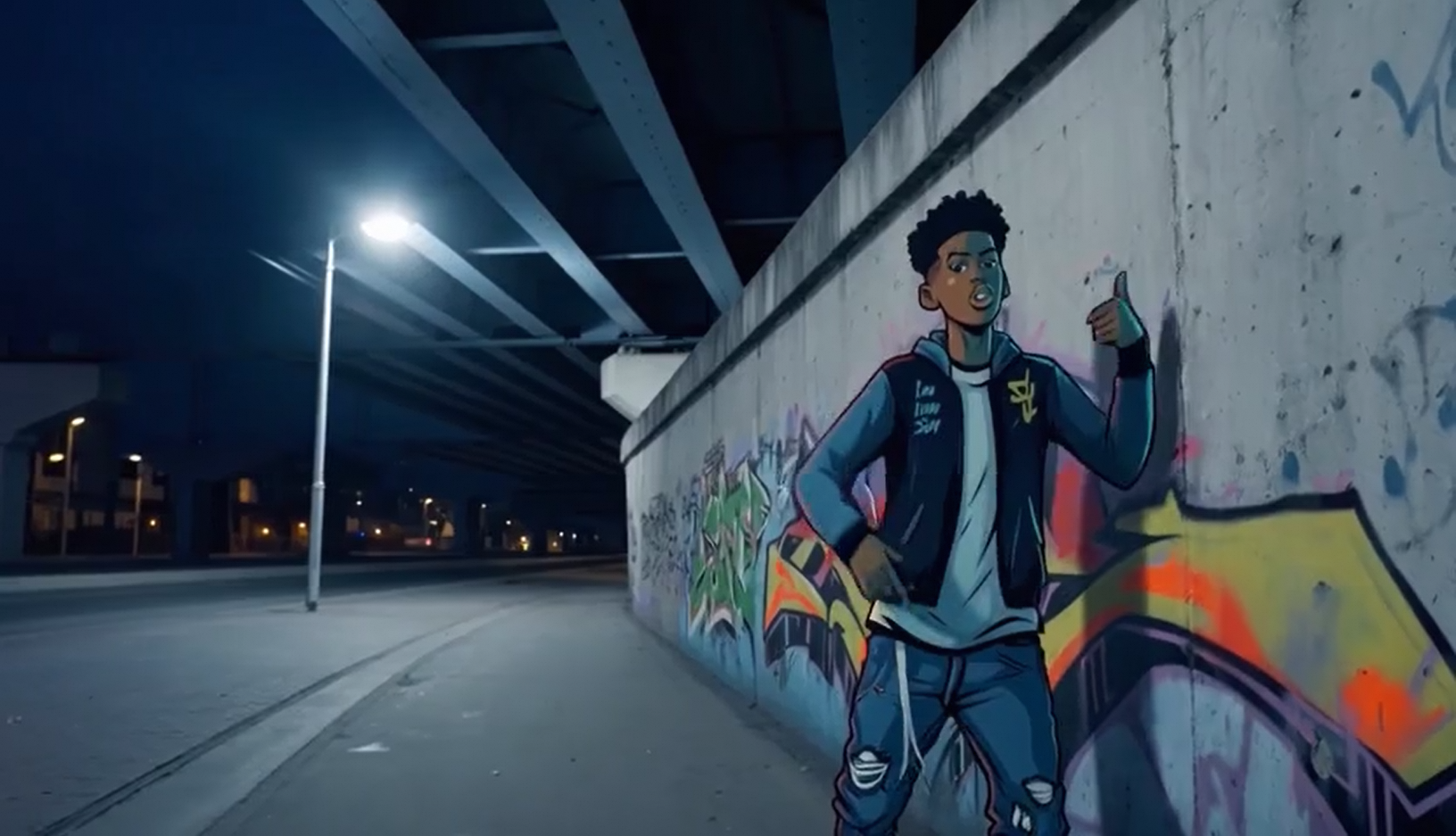 Input audio: |
Python SDK
Ensure that your DashScope Python SDK version is
1.25.16or later. To update, refer to Install the SDK.
# -*- coding: utf-8 -*-
from http import HTTPStatus
from dashscope import VideoSynthesis
import dashscope
import os

# This is the URL for the Singapore region. URLs vary by region. For a list of URLs, see https://www.alibabacloud.com/help/model-studio/image-to-video-general-api-reference.
dashscope.base_http_api_url = 'https://{WorkspaceId}.ap-southeast-1.maas.aliyuncs.com/api/v1'

# If you have not configured an environment variable, replace the following line with your Model Studio API key: api_key="sk-xxx"
# API keys vary by region. To obtain an API key, see https://www.alibabacloud.com/help/model-studio/get-api-key.
api_key = os.getenv("DASHSCOPE_API_KEY")

media = [
    {
        "type": "first_frame",
        "url": "https://help-static-aliyun-doc.aliyuncs.com/file-manage-files/zh-CN/20250925/wpimhv/rap.png"
    },
    {
        "type": "driving_audio",
        "url": "https://help-static-aliyun-doc.aliyuncs.com/file-manage-files/zh-CN/20250925/ozwpvi/rap.mp3"
    }
]

def sample_sync_call():
    print('----sync call, please wait a moment----')
    rsp = VideoSynthesis.call(
        api_key=api_key,
        model="wan2.7-i2v-2026-04-25",
        media=media,
        resolution="720P",
        duration=10,
        watermark=True,
        prompt="An urban fantasy art scene. A dynamic graffiti art character. A boy made of spray paint comes to life from a concrete wall. He raps an English song at high speed while striking a classic, energetic rapper pose. The scene is set at night under an urban railway bridge. The light comes from a single street lamp, creating a cinematic atmosphere full of high energy and amazing detail. The audio of the video consists entirely of the rap, with no other dialogue or noise.",
    )
    if rsp.status_code == HTTPStatus.OK:
        print(rsp.output.video_url)
    else:
        print('Failed, status_code: %s, code: %s, message: %s' %
              (rsp.status_code, rsp.code, rsp.message))

if __name__ == '__main__':
    sample_sync_call()
Java SDK
Ensure that your DashScope Java SDK version is
2.22.14or later. To update, refer to Install the SDK.
// Copyright (c) Alibaba, Inc. and its affiliates.

import com.alibaba.dashscope.aigc.videosynthesis.VideoSynthesis;
import com.alibaba.dashscope.aigc.videosynthesis.VideoSynthesisParam;
import com.alibaba.dashscope.aigc.videosynthesis.VideoSynthesisResult;
import com.alibaba.dashscope.exception.ApiException;
import com.alibaba.dashscope.exception.InputRequiredException;
import com.alibaba.dashscope.exception.NoApiKeyException;
import com.alibaba.dashscope.utils.Constants;
import com.alibaba.dashscope.utils.JsonUtils;

import java.util.ArrayList;
import java.util.List;

public class Image2Video {

    static {
        // This is the endpoint for the Singapore region. For the China (Beijing) region, use https://{WorkspaceId}.cn-beijing.maas.aliyuncs.com/api/v1
        Constants.baseHttpApiUrl = "https://{WorkspaceId}.ap-southeast-1.maas.aliyuncs.com/api/v1";
    }

    // If you have not configured an environment variable, replace the following line with your Model Studio API key: apiKey="sk-xxx"
    // API keys vary by region. To obtain an API key, see https://www.alibabacloud.com/help/model-studio/get-api-key.
    static String apiKey = System.getenv("DASHSCOPE_API_KEY");

    public static void syncCall() {
        VideoSynthesis videoSynthesis = new VideoSynthesis();
        final String prompt = "An urban fantasy art scene. A dynamic graffiti art character. A boy made of spray paint comes to life from a concrete wall. He raps an English song at high speed while striking a classic, energetic rapper pose. The scene is set at night under an urban railway bridge. The light comes from a single street lamp, creating a cinematic atmosphere full of high energy and amazing detail. The audio of the video consists entirely of the rap, with no other dialogue or noise.";
        List<VideoSynthesisParam.Media> media = new ArrayList<VideoSynthesisParam.Media>(){{
            add(VideoSynthesisParam.Media.builder()
                    .url("https://help-static-aliyun-doc.aliyuncs.com/file-manage-files/zh-CN/20250925/wpimhv/rap.png")
                    .type("first_frame")
                    .build());
            add(VideoSynthesisParam.Media.builder()
                    .url("https://help-static-aliyun-doc.aliyuncs.com/file-manage-files/zh-CN/20250925/ozwpvi/rap.mp3")
                    .type("driving_audio")
                    .build());
        }};
        VideoSynthesisParam param =
                VideoSynthesisParam.builder()
                        .apiKey(apiKey)
                        .model("wan2.7-i2v-2026-04-25")
                        .prompt(prompt)
                        .media(media)
                        .watermark(true)
                        .duration(10)
                        .resolution("720P")
                        .build();
        VideoSynthesisResult result = null;
        try {
            System.out.println("---sync call, please wait a moment----");
            result = videoSynthesis.call(param);
        } catch (ApiException | NoApiKeyException e){
            throw new RuntimeException(e.getMessage());
        } catch (InputRequiredException e) {
            throw new RuntimeException(e);
        }
        System.out.println(JsonUtils.toJson(result));
    }

    public static void main(String[] args) {
        syncCall();
    }
}
Curl
Step 1: Create a task and get the task IDcurl --location 'https://{WorkspaceId}.ap-southeast-1.maas.aliyuncs.com/api/v1/services/aigc/video-generation/video-synthesis' \
-H 'X-DashScope-Async: enable' \
-H "Authorization: Bearer $DASHSCOPE_API_KEY" \
-H 'Content-Type: application/json' \
-d '{
"model": "wan2.7-i2v-2026-04-25",
"input": {
"prompt": "An urban fantasy art scene. A dynamic graffiti art character. A boy made of spray paint comes to life from a concrete wall. He raps an English song at high speed while striking a classic, energetic rapper pose. The scene is set at night under an urban railway bridge. The light comes from a single street lamp, creating a cinematic atmosphere full of high energy and amazing detail. The audio of the video consists entirely of the rap, with no other dialogue or noise.",
"media": [
{
"type": "first_frame",
"url": "https://help-static-aliyun-doc.aliyuncs.com/file-manage-files/zh-CN/20250925/wpimhv/rap.png"
},
{
"type": "driving_audio",
"url": "https://help-static-aliyun-doc.aliyuncs.com/file-manage-files/zh-CN/20250925/ozwpvi/rap.mp3"
}
]
},
"parameters": {
"resolution": "720P",
"duration": 10,
"prompt_extend": true,
"watermark": true
}
}'
Replace {task_id} with the task_id value returned by the previous API call. The task_id is valid for queries for 24 hours, Replace {WorkspaceId} with your actual workspace ID.
curl -X GET https://{WorkspaceId}.ap-southeast-1.maas.aliyuncs.com/api/v1/tasks/{task_id} \
--header "Authorization: Bearer $DASHSCOPE_API_KEY"
The
video_urlis valid for 24 hours. Download the video promptly.
{
    "request_id": "c1209113-8437-424f-a386-xxxxxx",
    "output": {
        "task_id": "966cebcd-dedc-4962-af88-xxxxxx",
        "task_status": "SUCCEEDED",
        "video_url": "https://dashscope-result-sh.oss-accelerate.aliyuncs.com/xxx.mp4?Expires=xxx",
         ...
    },
    ...
}
First and last frame video generation
Supported models: wan2.7 series models.
Parameter settings: The type field in the media array supports the following two combinations. See Input assets for details on media asset combinations.
- First frame + last frame: Set
typetofirst_frameandlast_frame. The model automatically adds audio to the video. - First frame + last frame + audio: Set
typetofirst_frame,last_frame, anddriving_audio. The model uses the audio to drive video generation.
| Prompt | First frame image | Last frame image | Output video |
In the early morning as the sun rises, a small pumpkin with dewdrops sits in a pumpkin patch. Suddenly, the pumpkin cracks open with a "CRACK". A golden light emanates from the fissure as the pumpkin splits apart, releasing a puff of white mist. A small rabbit appears in the center of the opened pumpkin. |  |  |
Python SDK
Ensure that your DashScope Python SDK version is
1.25.16or later. To update, refer to Install the SDK.
# -*- coding: utf-8 -*-
from http import HTTPStatus
from dashscope import VideoSynthesis
import dashscope
import os

# This is the URL for the Singapore region. URLs vary by region. For a list of URLs, see https://www.alibabacloud.com/help/model-studio/image-to-video-general-api-reference.
dashscope.base_http_api_url = 'https://{WorkspaceId}.ap-southeast-1.maas.aliyuncs.com/api/v1'

# If you have not configured an environment variable, replace the following line with your Model Studio API key: api_key="sk-xxx"
# API keys vary by region. To obtain an API key, see https://www.alibabacloud.com/help/model-studio/get-api-key.
api_key = os.getenv("DASHSCOPE_API_KEY")

media = [
    {
        "type": "first_frame",
        "url": "https://help-static-aliyun-doc.aliyuncs.com/file-manage-files/zh-CN/20260414/welyei/wan2.7-i2v-first-frame.webp"
    },
    {
        "type": "last_frame",
        "url": "https://help-static-aliyun-doc.aliyuncs.com/file-manage-files/zh-CN/20260414/zongha/wan2.7-i2v-last-frame.webp"
    }
]

def sample_sync_call():
    print('----sync call, please wait a moment----')
    rsp = VideoSynthesis.call(
        api_key=api_key,
        model="wan2.7-i2v-2026-04-25",
        media=media,
        resolution="720P",
        duration=15,
        watermark=True,
        prompt="In the early morning as the sun rises, a small pumpkin with dewdrops sits in a pumpkin patch. Suddenly, the pumpkin cracks open with a \"CRACK\". A golden light emanates from the fissure as the pumpkin splits apart, releasing a puff of white mist. A small rabbit appears in the center of the opened pumpkin.",
    )
    if rsp.status_code == HTTPStatus.OK:
        print(rsp.output.video_url)
    else:
        print('Failed, status_code: %s, code: %s, message: %s' %
              (rsp.status_code, rsp.code, rsp.message))

if __name__ == '__main__':
    sample_sync_call()
Java SDK
Ensure that your DashScope Java SDK version is
2.22.14or later. To update, refer to Install the SDK.
// Copyright (c) Alibaba, Inc. and its affiliates.

import com.alibaba.dashscope.aigc.videosynthesis.VideoSynthesis;
import com.alibaba.dashscope.aigc.videosynthesis.VideoSynthesisParam;
import com.alibaba.dashscope.aigc.videosynthesis.VideoSynthesisResult;
import com.alibaba.dashscope.exception.ApiException;
import com.alibaba.dashscope.exception.InputRequiredException;
import com.alibaba.dashscope.exception.NoApiKeyException;
import com.alibaba.dashscope.utils.Constants;
import com.alibaba.dashscope.utils.JsonUtils;

import java.util.ArrayList;
import java.util.List;

public class Image2Video {

    static {
        // This is the endpoint for the Singapore region. For the China (Beijing) region, use https://{WorkspaceId}.cn-beijing.maas.aliyuncs.com/api/v1
        Constants.baseHttpApiUrl = "https://{WorkspaceId}.ap-southeast-1.maas.aliyuncs.com/api/v1";
    }

    // If you have not configured an environment variable, replace the following line with your Model Studio API key: apiKey="sk-xxx"
    // API keys vary by region. To obtain an API key, see https://www.alibabacloud.com/help/model-studio/get-api-key.
    static String apiKey = System.getenv("DASHSCOPE_API_KEY");

    public static void syncCall() {
        VideoSynthesis videoSynthesis = new VideoSynthesis();
        final String prompt = "In the early morning as the sun rises, a small pumpkin with dewdrops sits in a pumpkin patch. Suddenly, the pumpkin cracks open with a \"CRACK\". A golden light emanates from the fissure as the pumpkin splits apart, releasing a puff of white mist. A small rabbit appears in the center of the opened pumpkin.";
        List<VideoSynthesisParam.Media> media = new ArrayList<VideoSynthesisParam.Media>(){{
            add(VideoSynthesisParam.Media.builder()
                    .url("https://help-static-aliyun-doc.aliyuncs.com/file-manage-files/zh-CN/20260414/welyei/wan2.7-i2v-first-frame.webp")
                    .type("first_frame")
                    .build());
            add(VideoSynthesisParam.Media.builder()
                    .url("https://help-static-aliyun-doc.aliyuncs.com/file-manage-files/zh-CN/20260414/zongha/wan2.7-i2v-last-frame.webp")
                    .type("last_frame")
                    .build());
        }};
        VideoSynthesisParam param =
                VideoSynthesisParam.builder()
                        .apiKey(apiKey)
                        .model("wan2.7-i2v-2026-04-25")
                        .prompt(prompt)
                        .media(media)
                        .watermark(true)
                        .duration(15)
                        .resolution("720P")
                        .build();
        VideoSynthesisResult result = null;
        try {
            System.out.println("---sync call, please wait a moment----");
            result = videoSynthesis.call(param);
        } catch (ApiException | NoApiKeyException e){
            throw new RuntimeException(e.getMessage());
        } catch (InputRequiredException e) {
            throw new RuntimeException(e);
        }
        System.out.println(JsonUtils.toJson(result));
    }

    public static void main(String[] args) {
        syncCall();
    }
}
Curl
Step 1: Create a task and get the task IDcurl --location 'https://{WorkspaceId}.ap-southeast-1.maas.aliyuncs.com/api/v1/services/aigc/video-generation/video-synthesis' \
-H 'X-DashScope-Async: enable' \
-H "Authorization: Bearer $DASHSCOPE_API_KEY" \
-H 'Content-Type: application/json' \
-d '{
"model": "wan2.7-i2v-2026-04-25",
"input": {
"prompt": "In the early morning as the sun rises, a small pumpkin with dewdrops sits in a pumpkin patch. Suddenly, the pumpkin cracks open with a \"CRACK\". A golden light emanates from the fissure as the pumpkin splits apart, releasing a puff of white mist. A small rabbit appears in the center of the opened pumpkin.",
"media": [
{
"type": "first_frame",
"url": "https://help-static-aliyun-doc.aliyuncs.com/file-manage-files/zh-CN/20260414/welyei/wan2.7-i2v-first-frame.webp"
},
{
"type": "last_frame",
"url": "https://help-static-aliyun-doc.aliyuncs.com/file-manage-files/zh-CN/20260414/zongha/wan2.7-i2v-last-frame.webp"
}
]
},
"parameters": {
"resolution": "720P",
"duration": 15,
"prompt_extend": false,
"watermark": true
}
}'
Replace {task_id} with the task_id value returned by the previous API call. The task_id is valid for queries for 24 hours, Replace {WorkspaceId} with your actual workspace ID.
curl -X GET https://{WorkspaceId}.ap-southeast-1.maas.aliyuncs.com/api/v1/tasks/{task_id} \
--header "Authorization: Bearer $DASHSCOPE_API_KEY"
Video continuation
Supported models: wan2.7 series models.
This feature continues the content of an input video clip. The output includes the original clip, and its duration counts toward the total generation time. For example, if you input a 2-second video and set the total output duration to 12 seconds, the final video will be 12 seconds long (the original 2-second clip plus a 10-second continuation).
Parameter settings: The type field in the media array supports the following two combinations. See Input assets for details on media asset combinations.
- First video clip: Set
typetofirst_clipto continue the video. - First video clip + last frame continuation: Set
typetofirst_clipandlast_frame. This continues the first video clip and ensures its final frame matches the provided last frame.
First clip continuation
| Prompt | First video clip | Output video |
The baker brings over the glazed bread, sets the brush aside, and the camera follows him to the oven at the back to bake it. The baker closes the oven door, stands beside it watching the bread, smells the aroma, and says, "so good". |
First clip and last frame
| Prompt | First video clip | Last frame image | Output video |
The man looks down at the wooden box on the ground. He bends over, carefully opens the lid, and stares at the contents. His lips tremble and part slightly, his brow furrows, and his eyes widen with a horrified expression. | |
Python SDK
Ensure that your DashScope Python SDK version is
1.25.16or later. To update, refer to Install the SDK.
# -*- coding: utf-8 -*-
from http import HTTPStatus
from dashscope import VideoSynthesis
import dashscope
import os

# This is the URL for the Singapore region. URLs vary by region. For a list of URLs, see https://www.alibabacloud.com/help/model-studio/image-to-video-general-api-reference.
dashscope.base_http_api_url = 'https://{WorkspaceId}.ap-southeast-1.maas.aliyuncs.com/api/v1'

# If you have not configured an environment variable, replace the following line with your Model Studio API key: api_key="sk-xxx"
# API keys vary by region. To obtain an API key, see https://www.alibabacloud.com/help/model-studio/get-api-key.
api_key = os.getenv("DASHSCOPE_API_KEY")

media = [
    {
        "type": "first_clip",
        "url": "https://help-static-aliyun-doc.aliyuncs.com/file-manage-files/zh-CN/20260414/rptnhd/wan2.7-i2v-video-continuation-2.mp4"
    }
]

def sample_sync_call():
    print('----sync call, please wait a moment----')
    rsp = VideoSynthesis.call(
        api_key=api_key,
        model="wan2.7-i2v-2026-04-25",
        media=media,
        resolution="720P",
        duration=12,
        watermark=True,
        prompt="The baker brings over the glazed bread, sets the brush aside, and the camera follows him to the oven at the back to bake it. The baker closes the oven door, stands beside it watching the bread, smells the aroma, and says, \"so good\".",
    )
    if rsp.status_code == HTTPStatus.OK:
        print(rsp.output.video_url)
    else:
        print('Failed, status_code: %s, code: %s, message: %s' %
              (rsp.status_code, rsp.code, rsp.message))

if __name__ == '__main__':
    sample_sync_call()
Java SDK
Ensure that your DashScope Java SDK version is
2.22.14or later. To update, refer to Install the SDK.
// Copyright (c) Alibaba, Inc. and its affiliates.

import com.alibaba.dashscope.aigc.videosynthesis.VideoSynthesis;
import com.alibaba.dashscope.aigc.videosynthesis.VideoSynthesisParam;
import com.alibaba.dashscope.aigc.videosynthesis.VideoSynthesisResult;
import com.alibaba.dashscope.exception.ApiException;
import com.alibaba.dashscope.exception.InputRequiredException;
import com.alibaba.dashscope.exception.NoApiKeyException;
import com.alibaba.dashscope.utils.Constants;
import com.alibaba.dashscope.utils.JsonUtils;

import java.util.ArrayList;
import java.util.List;

public class Image2Video {

    static {
        Constants.baseHttpApiUrl = "https://{WorkspaceId}.ap-southeast-1.maas.aliyuncs.com/api/v1";
    }

    static String apiKey = System.getenv("DASHSCOPE_API_KEY");

    public static void syncCall() {
        VideoSynthesis videoSynthesis = new VideoSynthesis();
        final String prompt = "The baker brings over the glazed bread, sets the brush aside, and the camera follows him to the oven at the back to bake it. The baker closes the oven door, stands beside it watching the bread, smells the aroma, and says, \"so good\".";
        List<VideoSynthesisParam.Media> media = new ArrayList<VideoSynthesisParam.Media>(){{
            add(VideoSynthesisParam.Media.builder()
                    .url("https://help-static-aliyun-doc.aliyuncs.com/file-manage-files/zh-CN/20260414/rptnhd/wan2.7-i2v-video-continuation-2.mp4")
                    .type("first_clip")
                    .build());
        }};
        VideoSynthesisParam param =
                VideoSynthesisParam.builder()
                        .apiKey(apiKey)
                        .model("wan2.7-i2v-2026-04-25")
                        .prompt(prompt)
                        .media(media)
                        .watermark(true)
                        .duration(12)
                        .resolution("720P")
                        .build();
        VideoSynthesisResult result = null;
        try {
            System.out.println("---sync call, please wait a moment----");
            result = videoSynthesis.call(param);
        } catch (ApiException | NoApiKeyException e){
            throw new RuntimeException(e.getMessage());
        } catch (InputRequiredException e) {
            throw new RuntimeException(e);
        }
        System.out.println(JsonUtils.toJson(result));
    }

    public static void main(String[] args) {
        syncCall();
    }
}
Curl
Step 1: Create a task and get the task IDcurl --location 'https://{WorkspaceId}.ap-southeast-1.maas.aliyuncs.com/api/v1/services/aigc/video-generation/video-synthesis' \
-H 'X-DashScope-Async: enable' \
-H "Authorization: Bearer $DASHSCOPE_API_KEY" \
-H 'Content-Type: application/json' \
-d '{
"model": "wan2.7-i2v-2026-04-25",
"input": {
"prompt": "The baker brings over the glazed bread, sets the brush aside, and the camera follows him to the oven at the back to bake it. The baker closes the oven door, stands beside it watching the bread, smells the aroma, and says, \"so good\".",
"media": [
{
"type": "first_clip",
"url": "https://help-static-aliyun-doc.aliyuncs.com/file-manage-files/zh-CN/20260414/rptnhd/wan2.7-i2v-video-continuation-2.mp4"
}
]
},
"parameters": {
"resolution": "720P",
"duration": 12,
"prompt_extend": false,
"watermark": true
}
}'
Replace {task_id} with the task_id value returned by the previous API call. The task_id is valid for queries for 24 hours, Replace {WorkspaceId} with your actual workspace ID.
curl -X GET https://{WorkspaceId}.ap-southeast-1.maas.aliyuncs.com/api/v1/tasks/{task_id} \
--header "Authorization: Bearer $DASHSCOPE_API_KEY"
Input media
Pass media assets in the media array, where each element must specify a type and a url, and each type can appear at most once in the media array.
NoteOnly the specific media combinations listed below are supported. Any other combination returns an error.
// Combination 1: First frame, with automatic dubbing
{
  "media": [
    { "type": "first_frame", "url": "https://example.com/image.jpg" }
  ]
}

// Combination 2: First frame + driving audio, with custom audio
{
  "media": [
    { "type": "first_frame", "url": "https://example.com/image.jpg" },
    { "type": "driving_audio", "url": "https://example.com/audio.mp3" }
  ]
}
// Combination 1: First frame + last frame, with automatic dubbing
{
  "media": [
    { "type": "first_frame", "url": "https://example.com/image1.jpg" },
    { "type": "last_frame", "url": "https://example.com/image2.jpg" }
  ]
}

// Combination 2: First frame + last frame + driving audio, with custom audio
{
  "media": [
    { "type": "first_frame", "url": "https://example.com/image1.jpg" },
    { "type": "last_frame", "url": "https://example.com/image2.jpg" },
    { "type": "driving_audio", "url": "https://example.com/audio.mp3" }
  ]
}
// Combination 1: First video clip
{
  "media": [
    { "type": "first_clip", "url": "https://example.com/video.mp4" }
  ]
}

// Combination 2: First video clip + last frame
{
  "media": [
    { "type": "first_clip", "url": "https://example.com/video.mp4" },
    { "type": "last_frame", "url": "https://example.com/last_image.jpg" }
  ]
}
Input images
-
Number of images: You can submit a maximum of one image each for the first frame (
type=first_frame) and the last frame (type=last_frame). -
Input methods:
-
Public URL: Supports HTTP and HTTPS protocols. Example: https://xxxx/xxx.png.
-
base64-encoded string: A string in the format
data:{MIME_type};base64,{base64_data}, where:-
{base64_data}: The Base64-encoded string for the image.
-
{MIME_type}: The MIME type of the image, which must match the file format.
Format
MIME type
JPEG
image/jpeg
JPG
image/jpeg
PNG
image/png
BMP
image/bmp
WEBP
image/webp
-
-

Input audio
-
Number of audio files: You can provide a maximum of one audio file (
type=driving_audio). -
Input methods:
- Public URL: Supports HTTP and HTTPS protocols. Example: https://xxxx/xxx.mp3.
Input video
-
Number of videos: You can pass in a maximum of 1 first video clip (
type=first_clip). -
Input methods:
- Public URL: Supports HTTP and HTTPS protocols. Example: https://xxxx/xxx.mp4.
Output video
-
Number of videos: 1.
-
Output video specifications: Supported specifications vary by model. For details, see Availability.
-
Output video URL expiration: 24 hours.
-
Output video dimensions: The model determines the dimensions based on the input first frame or first video clip and the
resolutionsetting.The model preserves the original aspect ratio of the input media. It scales the total pixel count to approximate the target set by the
resolutionparameter, and adjusts the width and height to be multiples of 16.
Billing and rate limit
-
See Model pricing for details on the free quota and pricing.
-
See Wan for details on the rate limit.
-
Billing details:
- Inputs are free. Outputs are billed based on the duration in seconds of each successfully generated video.
- Failed calls or processing errors do not incur fees or consume the free quota for new users.
- The image-to-video feature also supports Savings Plans.
API reference
FAQ
Q: What's new in wan2.7-i2v?
A: wan2.7-i2v introduces the following new capabilities compared to wan2.6-i2v and earlier models:
- It supports three primary tasks: first-frame video generation, first-and-last-frame video generation, and video continuation. Earlier models only supported first-frame video generation.
- You can pass multimodal media, such as images, audio, and videos, using the unified
mediaarray. Earlier models only supported passing images with theimg_urlparameter.
Q: How to create a multi-shot video?
A: Specify the shot structure in the prompt. You can use the following methods:
- Direct specification: Include "generate a multi-shot video" in the
prompt. - Storyboard or timestamps: Describe each shot with a time range. For example, "First shot: wide shot, a boy raps and dances" or "First shot [1-5s]: wide shot, a boy raps and dances. Second shot [6-10s]: camera cuts to the cheering audience."
- If you do not explicitly specify the shot structure, the model infers it from the
prompt.
Q: Why can't I set the video aspect ratio?
A: The API does not currently support setting the aspect ratio directly. Instead, you must set the resolution using the resolution parameter.
The resolution parameter controls the total pixel count of the video, not a fixed aspect ratio. The model preserves the approximate original aspect ratio of the input first frame or first video clip and fine-tunes the width and height to be integer multiples of 16 for video encoding.