The Wan Image-to-Video model accepts multimodal input (text, image, or audio) and generates videos up to 15 seconds long at 1080P resolution.
- Basic Settings: Supports integer video durations from 2 to 15 seconds, configurable video resolution (480P, 720P, or 1080P), smart prompt rewriting, and optional watermarking.
- Audio Capabilities: Supports automatic dubbing or uploading an audio file to achieve audio-visual synchronization.(Supported by Wan 2.5 and Wan 2.6)
- Multi-shot Narrative: Generates multi-shot videos while preserving subject consistency across shot transitions. (Supported by Wan 2.6 only)
Quick Access: Online Experience (Singapore|Virginia|Beijing)|API Reference
Getting Started
| Input Prompt | Input First Frame Image | Output Video (Multi-shot, Audio Video) |
The camera slowly moves up from below the turtle, which swims gracefully, its belly details clearly visible. | 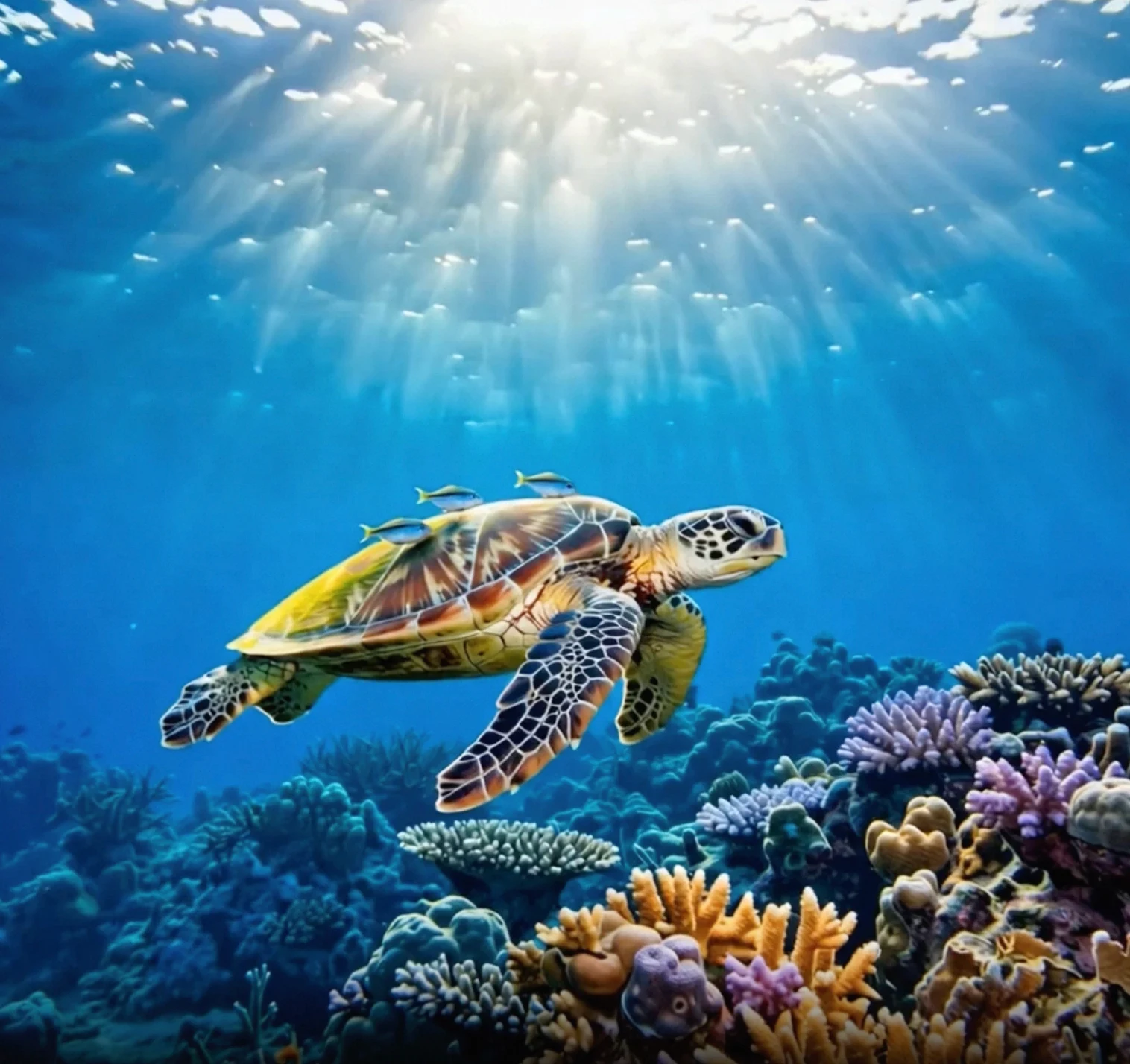 |
Before invoking the API, first obtain your API key and API host, then configure the API key as an environment variable (this method is deprecated and has been integrated into API key configuration). To invoke the API using the SDK, you can install the DashScope SDK.
Replace {WorkspaceId} with your actual Workspace ID.
Python SDK
ImportantEnsure that the DashScope Python SDK version is at least 1.25.8 before running the following code.
If the version is too low, it may trigger errors such as “url error, please check url!”. See Install SDK to update.
import os
from http import HTTPStatus
from dashscope import VideoSynthesis
import dashscope

# The following URL is for the Singapore region. Replace {WorkspaceId} with your actual workspace ID. URLs differ by region.
dashscope.base_http_api_url = 'https://{WorkspaceId}.ap-southeast-1.maas.aliyuncs.com/api/v1'
# API keys vary by region. Get an API key: https://www.alibabacloud.com/help/model-studio/get-api-key
api_key = os.getenv("DASHSCOPE_API_KEY", "YOUR_API_KEY")

print('please wait...')
rsp = VideoSynthesis.call(api_key=api_key,
                          model='wan2.6-i2v-flash',
                          prompt='The camera slowly moves up from below the turtle, which swims gracefully, its belly details clearly visible.',
                          img_url="https://help-static-aliyun-doc.aliyuncs.com/file-manage-files/zh-CN/20260121/zlpocv/wan-i2v-haigui.webp",
                          resolution="720P",
                          duration=10,
                          shot_type="multi",
                          prompt_extend=True,
                          watermark=True)
print(rsp)
if rsp.status_code == HTTPStatus.OK:
    print("video_url:", rsp.output.video_url)
else:
    print('Failed, status_code: %s, code: %s, message: %s' % (rsp.status_code, rsp.code, rsp.message))
Java SDK
ImportantMake sure that the DashScope Java SDK version is at least2.22.6 before running the following code.
If the version is too low, it may trigger errors such as “url error, please check url!”. See Install SDK to update.
import com.alibaba.dashscope.aigc.videosynthesis.VideoSynthesis;
import com.alibaba.dashscope.aigc.videosynthesis.VideoSynthesisParam;
import com.alibaba.dashscope.aigc.videosynthesis.VideoSynthesisResult;
import com.alibaba.dashscope.exception.ApiException;
import com.alibaba.dashscope.exception.InputRequiredException;
import com.alibaba.dashscope.exception.NoApiKeyException;
import com.alibaba.dashscope.utils.JsonUtils;
import com.alibaba.dashscope.utils.Constants;

public class Image2Video {

    static {
        // The following URL is for the Singapore region. Replace {WorkspaceId} with your actual workspace ID. URLs differ by region.
        Constants.baseHttpApiUrl = "https://{WorkspaceId}.ap-southeast-1.maas.aliyuncs.com/api/v1";
    }

    // If you have not configured the environment variable, replace the following line with your Model Studio API key: apiKey="sk-xxx"
    // API keys vary by region. Get an API key: https://www.alibabacloud.com/help/model-studio/get-api-key
    static String apiKey = System.getenv("DASHSCOPE_API_KEY");

    public static void image2video() throws ApiException, NoApiKeyException, InputRequiredException {
        VideoSynthesis vs = new VideoSynthesis();
        VideoSynthesisParam param =
                VideoSynthesisParam.builder()
                        .apiKey(apiKey)
                        .model("wan2.6-i2v-flash")
                        .prompt("The camera slowly moves up from below the turtle, which swims gracefully, its belly details clearly visible.")
                        .imgUrl("https://help-static-aliyun-doc.aliyuncs.com/file-manage-files/zh-CN/20260121/zlpocv/wan-i2v-haigui.webp")
                        .duration(10)
                        .resolution("720P")
                        .shotType("multi")
                        .promptExtend(true)
                        .watermark(true)
                        .build();
        System.out.println("please wait...");
        VideoSynthesisResult result = vs.call(param);
        System.out.println(JsonUtils.toJson(result));
    }

    public static void main(String[] args) {
        try {
            image2video();
        } catch (ApiException | NoApiKeyException | InputRequiredException e) {
            System.out.println(e.getMessage());
        }
        System.exit(0);
    }
}
curl
Step 1: Create a task to get the task IDcurl --location 'https://{WorkspaceId}.ap-southeast-1.maas.aliyuncs.com/api/v1/services/aigc/video-generation/video-synthesis' \
-H 'X-DashScope-Async: enable' \
-H "Authorization: Bearer $DASHSCOPE_API_KEY" \
-H 'Content-Type: application/json' \
-d '{
"model": "wan2.6-i2v-flash",
"input": {
"prompt": "The camera slowly moves up from below the turtle, which swims gracefully, its belly details clearly visible.",
"img_url": "https://help-static-aliyun-doc.aliyuncs.com/file-manage-files/zh-CN/20260121/zlpocv/wan-i2v-haigui.webp"
},
"parameters": {
"resolution": "720P",
"prompt_extend": true,
"watermark": true,
"duration": 10,
"shot_type":"multi"
}
}'
Replace {task_id} with the task_id value returned by the previous API call. The task_id is valid for queries for 24 hours, Replace {WorkspaceId} with your actual workspace ID.
curl -X GET https://{WorkspaceId}.ap-southeast-1.maas.aliyuncs.com/api/v1/tasks/{task_id} \
--header "Authorization: Bearer $DASHSCOPE_API_KEY"
video_urlis valid for 24 hours. Download the video promptly.
{
    "request_id": "c1209113-8437-424f-a386-xxxxxx",
    "output": {
        "task_id": "966cebcd-dedc-4962-af88-xxxxxx",
        "task_status": "SUCCEEDED",
        "video_url": "https://dashscope-result-sh.oss-accelerate.aliyuncs.com/xxx.mp4?Expires=xxx",
         ...
    },
    ...
}
Scope
- Supported models vary by region. Resources are isolated between regions. For supported models in each region, see the Model Studio console.
- When making a call, make sure your model, endpoint URL, and API key all belong to the same region. Cross-region calls fail.
NoteThe example code in this topic applies to the Singapore region.
Core Capabilities
Create Multi-shot Videos
Supported Models: Wan 2.6 series models.
Function Introduction: The model automatically switches between shots—such as from wide to close-up—making it ideal for music video production.
Parameters Setting:
shot_type: Must be set to"multi".prompt_extend: Must be set totrue(enables smart rewriting to optimize shot descriptions).
| Input Prompt | Input First Frame Image | Output Video (Wan 2.6, Multi-shot Video) |
An urban fantasy art scene. A dynamic graffiti art character. A boy made of spray paint comes to life from a concrete wall. He raps an English song at a very fast pace, striking a classic, energetic rapper pose. The scene is set at night under an urban railway bridge. The lighting comes from a single street lamp, creating a cinematic atmosphere, full of high energy and amazing detail. The audio part of the video consists entirely of rap, with no other dialogue or background noise. | 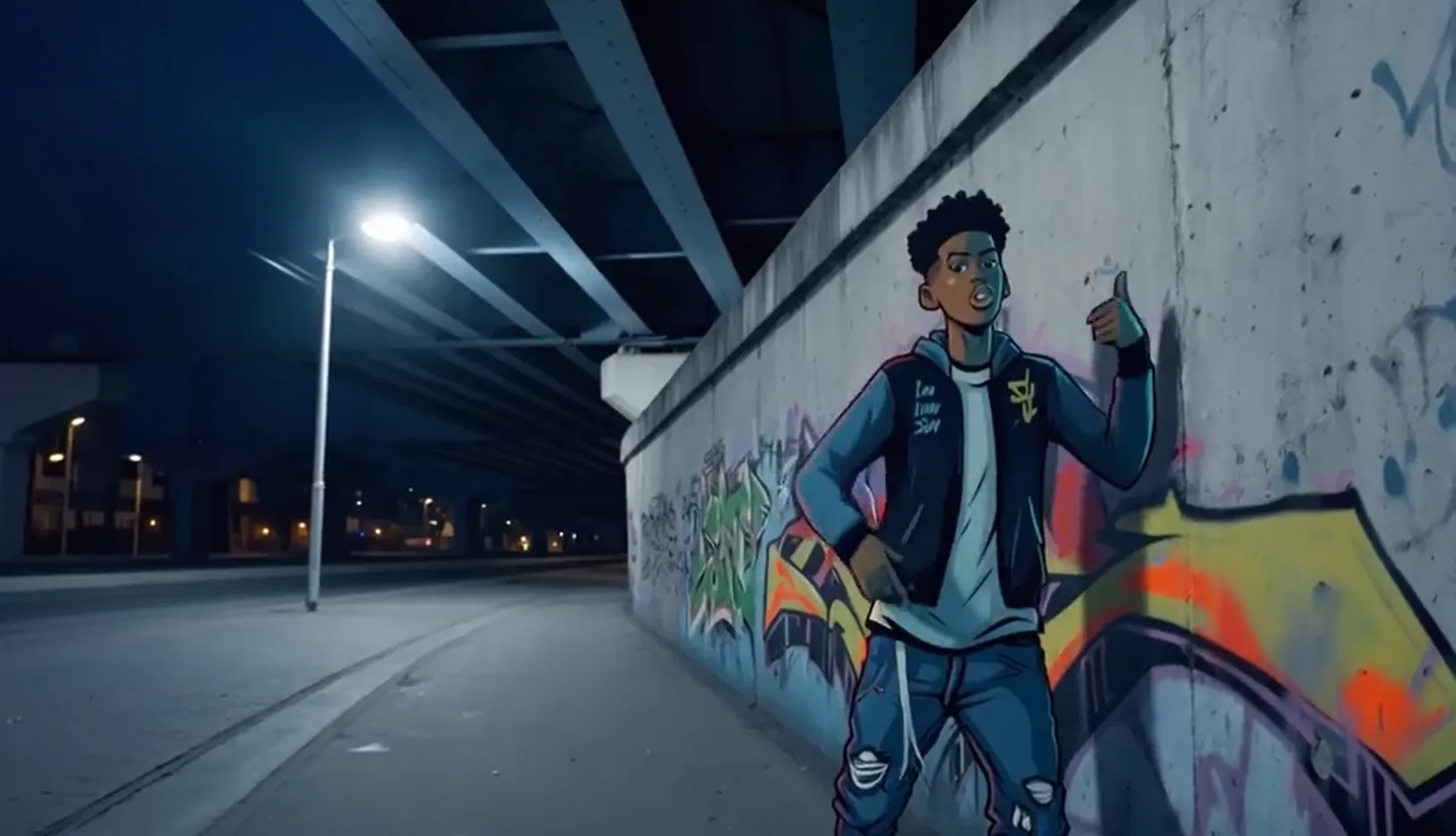 Input Audio: |
Replace {WorkspaceId} with your actual Workspace ID.
Python SDK
Ensure that the DashScope SDK for Python version is at least
1.25.8. For instructions on how to update, see Installing the SDK.
import os
from http import HTTPStatus
from dashscope import VideoSynthesis
import dashscope

# The following URL is for the Singapore region. Replace {WorkspaceId} with your actual workspace ID. URLs differ by region.
dashscope.base_http_api_url = 'https://{WorkspaceId}.ap-southeast-1.maas.aliyuncs.com/api/v1'

# If you have not configured the environment variable, replace the following line with your Model Studio API key: api_key="sk-xxx"
# API keys vary by region. Get an API key: https://www.alibabacloud.com/help/model-studio/get-api-key
api_key = os.getenv("DASHSCOPE_API_KEY")

def sample_async_call_i2v():
    # Asynchronous invocation returns a task ID
    rsp = VideoSynthesis.async_call(api_key=api_key,
                                    model='wan2.6-i2v-flash',
                                    prompt='An urban fantasy art scene. A dynamic graffiti art character. A boy made of spray paint comes to life from a concrete wall. He raps an English song at a very fast pace, striking a classic, energetic rapper pose. The scene is set at night under an urban railway bridge. The lighting comes from a single street lamp, creating a cinematic atmosphere, full of high energy and amazing detail. The audio part of the video consists entirely of rap, with no other dialogue or background noise.',
                                    img_url="https://help-static-aliyun-doc.aliyuncs.com/file-manage-files/zh-CN/20250925/wpimhv/rap.png",
                                    audio_url="https://help-static-aliyun-doc.aliyuncs.com/file-manage-files/zh-CN/20250925/ozwpvi/rap.mp3",
                                    resolution="720P",
                                    duration=10,
                                    shot_type="multi", # Multi-shot
                                    prompt_extend=True,
                                    watermark=True,
                                    negative_prompt="",
                                    seed=12345)
    print(rsp)
    if rsp.status_code == HTTPStatus.OK:
        print("task_id: %s" % rsp.output.task_id)
    else:
        print('Failed, status_code: %s, code: %s, message: %s' % (rsp.status_code, rsp.code, rsp.message))

    # Wait for the asynchronous task to complete
    rsp = VideoSynthesis.wait(task=rsp, api_key=api_key)
    print(rsp)
    if rsp.status_code == HTTPStatus.OK:
        print(rsp.output.video_url)
    else:
        print('Failed, status_code: %s, code: %s, message: %s' % (rsp.status_code, rsp.code, rsp.message))

if __name__ == '__main__':
    sample_async_call_i2v()
Java SDK
Ensure that the DashScope Java SDK version is at least
2.22.6. To update the SDK, see Install the SDK.
import com.alibaba.dashscope.aigc.videosynthesis.VideoSynthesis;
import com.alibaba.dashscope.aigc.videosynthesis.VideoSynthesisParam;
import com.alibaba.dashscope.aigc.videosynthesis.VideoSynthesisResult;
import com.alibaba.dashscope.exception.ApiException;
import com.alibaba.dashscope.exception.InputRequiredException;
import com.alibaba.dashscope.exception.NoApiKeyException;
import com.alibaba.dashscope.utils.JsonUtils;
import com.alibaba.dashscope.utils.Constants;

public class Image2Video {
    static {
        // The following URL is for the Singapore region. Replace {WorkspaceId} with your actual workspace ID. URLs differ by region.
        Constants.baseHttpApiUrl = "https://{WorkspaceId}.ap-southeast-1.maas.aliyuncs.com/api/v1";
    }

    // If you have not configured the environment variable, replace the following line with your Model Studio API key: apiKey="sk-xxx"
    // API keys vary by region. Get an API key: https://www.alibabacloud.com/help/model-studio/get-api-key
    static String apiKey = System.getenv("DASHSCOPE_API_KEY");

    // Set input image URL
    static String imgUrl = "https://help-static-aliyun-doc.aliyuncs.com/file-manage-files/zh-CN/20250925/wpimhv/rap.png";
    // Set audio URL
    static String audioUrl = "https://help-static-aliyun-doc.aliyuncs.com/file-manage-files/zh-CN/20250925/ozwpvi/rap.mp3";

    public static void image2video() throws ApiException, NoApiKeyException, InputRequiredException {
        VideoSynthesis vs = new VideoSynthesis();
        VideoSynthesisParam param =
                VideoSynthesisParam.builder()
                        .apiKey(apiKey)
                        .model("wan2.6-i2v-flash")
                        .prompt("An urban fantasy art scene. A dynamic graffiti art character. A boy made of spray paint comes to life from a concrete wall. He raps an English song at a very fast pace, striking a classic, energetic rapper pose. The scene is set at night under an urban railway bridge. The lighting comes from a single street lamp, creating a cinematic atmosphere, full of high energy and amazing detail. The audio part of the video consists entirely of rap, with no other dialogue or background noise.")
                        .imgUrl(imgUrl)
                        .audioUrl(audioUrl)
                        .shotType("multi")
                        .duration(10)
                        .resolution("720P")
                        .negativePrompt("")
                        .promptExtend(true)
                        .watermark(true)
                        .seed(12345)
                        .build();
        // Asynchronous invocation
        VideoSynthesisResult task = vs.asyncCall(param);
        System.out.println(JsonUtils.toJson(task));
        System.out.println("please wait...");

        // Get results
        VideoSynthesisResult result = vs.wait(task, apiKey);
        System.out.println(JsonUtils.toJson(result));
    }

    public static void main(String[] args) {
        try {
            image2video();
        } catch (ApiException | NoApiKeyException | InputRequiredException e) {
            System.out.println(e.getMessage());
        }
        System.exit(0);
    }
}
curl
Step 1: Create a task to get the task ID# The following URL is for the Singapore region. Replace {WorkspaceId} with your actual workspace ID. URLs differ by region.
curl --location 'https://{WorkspaceId}.ap-southeast-1.maas.aliyuncs.com/api/v1/services/aigc/video-generation/video-synthesis' \
-H 'X-DashScope-Async: enable' \
-H "Authorization: Bearer $DASHSCOPE_API_KEY" \
-H 'Content-Type: application/json' \
-d '{
"model": "wan2.6-i2v-flash",
"input": {
"prompt": "A scene of urban fantasy art. A dynamic graffiti art character. A boy made of spray paint comes to life from a concrete wall. He raps an English song at high speed while striking a classic, energetic rapper pose. The scene is set under an urban railway bridge at night. The lighting comes from a single street lamp, creating a cinematic atmosphere full of high energy and amazing detail. The audio of the video consists entirely of his rap, with no other dialogue or noise.",
"img_url": "https://help-static-aliyun-doc.aliyuncs.com/file-manage-files/zh-CN/20250925/wpimhv/rap.png",
"audio_url": "https://help-static-aliyun-doc.aliyuncs.com/file-manage-files/zh-CN/20250925/ozwpvi/rap.mp3"
},
"parameters": {
"resolution": "720P",
"prompt_extend": true,
"duration": 10,
"shot_type":"multi"
}
}'
Replace {task_id} with the task_id value returned by the previous API call. The task_id is valid for queries for 24 hours, Replace {WorkspaceId} with your actual workspace ID.
curl -X GET https://{WorkspaceId}.ap-southeast-1.maas.aliyuncs.com/api/v1/tasks/{task_id} \
--header "Authorization: Bearer $DASHSCOPE_API_KEY"
Achieve Audio-Visual Synchronization
Supported Models: wan2.5 and wan2.6 series models.
Function Introduction: Makes characters in photos speak or sing with lip movements synchronized to the audio. For more examples, see Video Sound Generation.
Parameters Setting:- Input Audio File: Provide an
audio_url. The model synchronizes lip movements based on the audio file. - Automatic Dubbing: Do not provide an
audio_url. By default, the output is a video with sound. The model automatically generates background sound effects, music, or vocals based on the visuals.
| Input Prompt | Input First Frame Image | Output Video (Video with Sound) |
A scene of urban fantasy art. A dynamic graffiti character. A teenager painted with spray paint comes to life from a concrete wall. He raps in English at a very fast pace, striking a classic, energetic rapper pose. The scene is set at night under an urban railway bridge. Light from a solitary streetlamp creates a cinematic atmosphere, full of high energy and stunning detail. The audio portion of the video consists entirely of rap, with no other dialogue or noise. | Input Audio: |
Replace {WorkspaceId} with your actual Workspace ID.
Python SDK
Ensure that the DashScope SDK for Python version is at least
1.25.8. For instructions on how to update, see Installing the SDK.
import os
from http import HTTPStatus
from dashscope import VideoSynthesis
import dashscope

# The following URL is for the Singapore region. Replace {WorkspaceId} with your actual workspace ID. URLs differ by region.
dashscope.base_http_api_url = 'https://{WorkspaceId}.ap-southeast-1.maas.aliyuncs.com/api/v1'

# If you have not configured the environment variable, replace the following line with: api_key="sk-xxx" using your Model Studio API key.
# API keys vary by region. Get your API key: https://www.alibabacloud.com/help/model-studio/get-api-key
api_key = os.getenv("DASHSCOPE_API_KEY")

def sample_async_call_i2v():
    # Asynchronous invocation, returns a task_id
    rsp = VideoSynthesis.async_call(api_key=api_key,
                                    model='wan2.6-i2v-flash',
                                    prompt='A scene of urban fantasy art. A dynamic graffiti character. A teenager painted with spray paint comes to life from a concrete wall. He raps in English at a very fast pace, striking a classic, energetic rapper pose. The scene is set at night under an urban railway bridge. Light from a solitary streetlamp creates a cinematic atmosphere, full of high energy and stunning detail. The audio portion of the video consists entirely of rap, with no other dialogue or noise.',
                                    img_url="https://help-static-aliyun-doc.aliyuncs.com/file-manage-files/zh-CN/20250925/wpimhv/rap.png",
                                    audio_url="https://help-static-aliyun-doc.aliyuncs.com/file-manage-files/zh-CN/20250925/ozwpvi/rap.mp3",
                                    resolution="720P",
                                    duration=10,
                                    prompt_extend=True,
                                    watermark=True,
                                    negative_prompt="",
                                    seed=12345)
    print(rsp)
    if rsp.status_code == HTTPStatus.OK:
        print("task_id: %s" % rsp.output.task_id)
    else:
        print('Failed, status_code: %s, code: %s, message: %s' % (rsp.status_code, rsp.code, rsp.message))

    # Wait for the asynchronous task to complete
    rsp = VideoSynthesis.wait(task=rsp, api_key=api_key)
    print(rsp)
    if rsp.status_code == HTTPStatus.OK:
        print(rsp.output.video_url)
    else:
        print('Failed, status_code: %s, code: %s, message: %s' % (rsp.status_code, rsp.code, rsp.message))

if __name__ == '__main__':
    sample_async_call_i2v()
Java SDK
Ensure that the DashScope Java SDK version is at least
2.22.6. To update the SDK, see Install the SDK.
import com.alibaba.dashscope.aigc.videosynthesis.VideoSynthesis;
import com.alibaba.dashscope.aigc.videosynthesis.VideoSynthesisParam;
import com.alibaba.dashscope.aigc.videosynthesis.VideoSynthesisResult;
import com.alibaba.dashscope.exception.ApiException;
import com.alibaba.dashscope.exception.InputRequiredException;
import com.alibaba.dashscope.exception.NoApiKeyException;
import com.alibaba.dashscope.utils.JsonUtils;
import com.alibaba.dashscope.utils.Constants;

public class Image2Video {
    static {
        // The following URL is for the Singapore region. Replace {WorkspaceId} with your actual workspace ID. URLs differ by region.
        Constants.baseHttpApiUrl = "https://{WorkspaceId}.ap-southeast-1.maas.aliyuncs.com/api/v1";
    }

    // If you have not configured the environment variable, replace the following line with: apiKey="sk-xxx" using your Model Studio API key.
    // API keys vary by region. Get your API key: https://www.alibabacloud.com/help/model-studio/get-api-key
    static String apiKey = System.getenv("DASHSCOPE_API_KEY");

    // Set input image URL
    static String imgUrl = "https://help-static-aliyun-doc.aliyuncs.com/file-manage-files/zh-CN/20250925/wpimhv/rap.png";
    // Set audio URL
    static String audioUrl = "https://help-static-aliyun-doc.aliyuncs.com/file-manage-files/zh-CN/20250925/ozwpvi/rap.mp3";

    public static void image2video() throws ApiException, NoApiKeyException, InputRequiredException {
        VideoSynthesis vs = new VideoSynthesis();
        VideoSynthesisParam param =
                VideoSynthesisParam.builder()
                        .apiKey(apiKey)
                        .model("wan2.6-i2v-flash")
                        .prompt("A scene of urban fantasy art. A dynamic graffiti character. A teenager painted with spray paint comes to life from a concrete wall. He raps in English at a very fast pace, striking a classic, energetic rapper pose. The scene is set at night under an urban railway bridge. Light from a solitary streetlamp creates a cinematic atmosphere, full of high energy and stunning detail. The audio portion of the video consists entirely of rap, with no other dialogue or noise.")
                        .imgUrl(imgUrl)
                        .audioUrl(audioUrl)
                        .duration(10)
                        .resolution("720P")
                        .negativePrompt("")
                        .promptExtend(true)
                        .watermark(true)
                        .seed(12345)
                        .build();
        // Asynchronous invocation
        VideoSynthesisResult task = vs.asyncCall(param);
        System.out.println(JsonUtils.toJson(task));
        System.out.println("please wait...");

        // Get result
        VideoSynthesisResult result = vs.wait(task, apiKey);
        System.out.println(JsonUtils.toJson(result));
    }

    public static void main(String[] args) {
        try {
            image2video();
        } catch (ApiException | NoApiKeyException | InputRequiredException e) {
            System.out.println(e.getMessage());
        }
        System.exit(0);
    }
}
curl
Step 1: Create a task to get the task ID# The following URL is for the Singapore region. Replace {WorkspaceId} with your actual workspace ID. URLs differ by region.
curl --location 'https://{WorkspaceId}.ap-southeast-1.maas.aliyuncs.com/api/v1/services/aigc/video-generation/video-synthesis' \
-H 'X-DashScope-Async: enable' \
-H "Authorization: Bearer $DASHSCOPE_API_KEY" \
-H 'Content-Type: application/json' \
-d '{
"model": "wan2.5-i2v-preview",
"input": {
"prompt": "A scene of urban fantasy art. A dynamic graffiti art character. A boy made of spray paint comes to life from a concrete wall. He raps an English song at high speed while striking a classic, energetic rapper pose. The scene is set under an urban railway bridge at night. The lighting comes from a single street lamp, creating a cinematic atmosphere full of high energy and amazing detail. The audio of the video consists entirely of his rap, with no other dialogue or noise.",
"img_url": "https://help-static-aliyun-doc.aliyuncs.com/file-manage-files/zh-CN/20250925/wpimhv/rap.png",
"audio_url": "https://help-static-aliyun-doc.aliyuncs.com/file-manage-files/zh-CN/20250925/ozwpvi/rap.mp3"
},
"parameters": {
"resolution": "480P",
"prompt_extend": true,
"duration": 10
}
}'
# The following URL is for the Singapore region. Replace {WorkspaceId} with your actual workspace ID. URLs differ by region.

curl --location 'https://{WorkspaceId}.ap-southeast-1.maas.aliyuncs.com/api/v1/services/aigc/video-generation/video-synthesis' \
    -H 'X-DashScope-Async: enable' \
    -H "Authorization: Bearer $DASHSCOPE_API_KEY" \
    -H 'Content-Type: application/json' \
    -d '{
    "model": "wan2.5-i2v-preview",
    "input": {
        "prompt": "A scene of urban fantasy art. A dynamic graffiti art character. A boy made of spray paint comes to life from a concrete wall. He raps an English song at high speed while striking a classic, energetic rapper pose. The scene is set under an urban railway bridge at night. The lighting comes from a single street lamp, creating a cinematic atmosphere full of high energy and amazing detail. The audio of the video consists entirely of his rap, with no other dialogue or noise.",
        "img_url": "https://help-static-aliyun-doc.aliyuncs.com/file-manage-files/zh-CN/20250925/wpimhv/rap.png"
    },
    "parameters": {
        "resolution": "480P",
        "prompt_extend": true,
        "duration": 10
    }
}'
Replace {task_id} with the task_id value returned by the previous API call. The task_id is valid for queries for 24 hours, Replace {WorkspaceId} with your actual workspace ID.
curl -X GET https://{WorkspaceId}.ap-southeast-1.maas.aliyuncs.com/api/v1/tasks/{task_id} \
--header "Authorization: Bearer $DASHSCOPE_API_KEY"
Step 1: Create a task to get the task ID
Automatic Dubbing
Input Audio File
Tab 2 Body
Step 2: Get results based on the task ID
Generate silent videos
Supported models: wan2.6-i2v-flash, wan2.2 series models, wan2.1 series models.
Function introduction: Use silent videos for visual-only scenarios that do not require audio, such as animated posters or short silent videos.
Parameters setting:
wan2.6-i2v-flash: Generates audio-enabled videos by default. To generate a silent video, explicitly setaudio=false. Even if you pass anaudio_url, the output remains silent whenaudio=false. You are billed for silent videos.wan2.2 and earlier models: Generate silent videos by default. No extra configuration is needed.
| Prompt | Input first-frame image | Output video (silent video) |
A cat runs on grass | 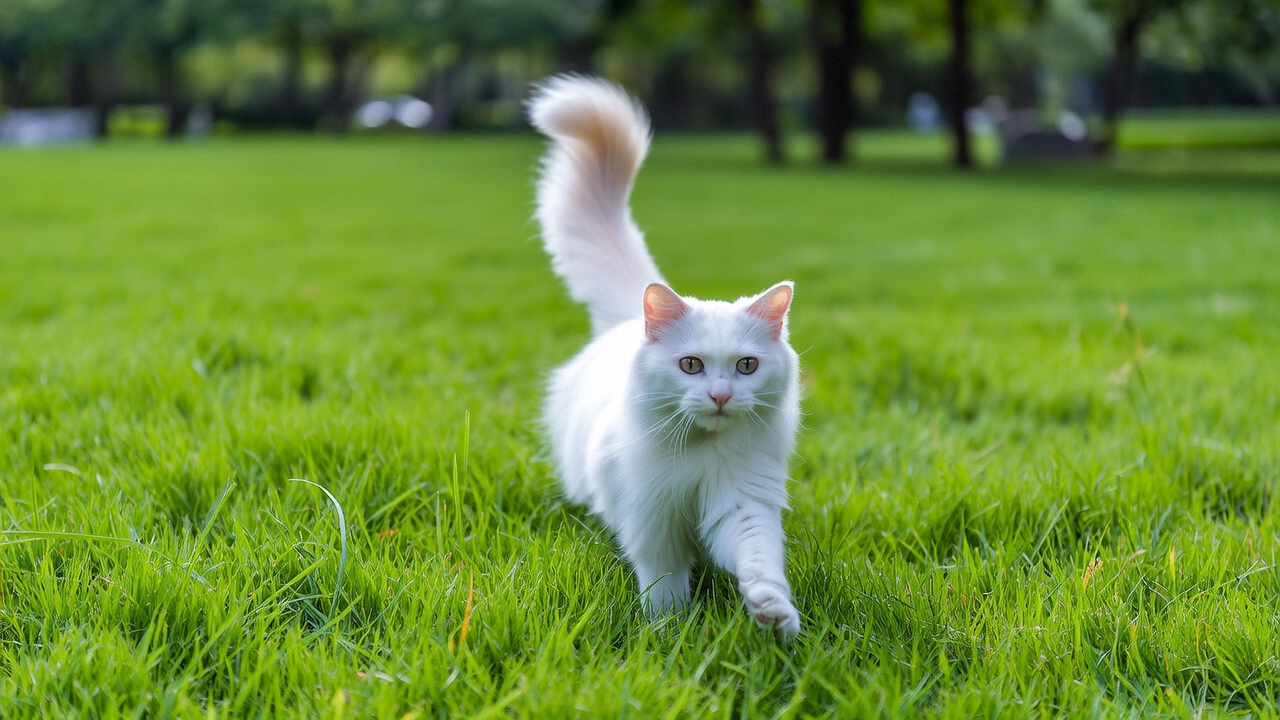 |
Replace {WorkspaceId} with your actual Workspace ID.
Python SDK
Ensure that the DashScope SDK for Python version is at least
1.25.8. For instructions on how to update, see Installing the SDK.
import os
from http import HTTPStatus
from dashscope import VideoSynthesis
import dashscope

# The following URL is for the Singapore region. Replace {WorkspaceId} with your actual workspace ID. URLs differ by region.
dashscope.base_http_api_url = 'https://{WorkspaceId}.ap-southeast-1.maas.aliyuncs.com/api/v1'

# If you have not set an environment variable, replace the next line with: api_key="sk-xxx"
# API keys differ by region. Get your API key: https://www.alibabacloud.com/help/model-studio/get-api-key
api_key = os.getenv("DASHSCOPE_API_KEY")

def sample_async_call_i2v():
    # Call asynchronously. Returns a task_id.
    rsp = VideoSynthesis.async_call(api_key=api_key,
                                    model='wan2.6-i2v-flash',
                                    prompt='A cat runs on grass',
                                    img_url="https://cdn.translate.alibaba.com/r/wanx-demo-1.png",
                                    audio=False,   # Set to False to generate a silent video.
                                    resolution="720P",
                                    duration=5,
                                    prompt_extend=True,
                                    watermark=True,
                                    negative_prompt="",
                                    seed=12345)
    print(rsp)
    if rsp.status_code == HTTPStatus.OK:
        print("task_id: %s" % rsp.output.task_id)
    else:
        print('Failed, status_code: %s, code: %s, message: %s' % (rsp.status_code, rsp.code, rsp.message))

    # Wait for the asynchronous task to complete.
    rsp = VideoSynthesis.wait(task=rsp, api_key=api_key)
    print(rsp)
    if rsp.status_code == HTTPStatus.OK:
        print(rsp.output.video_url)
    else:
        print('Failed, status_code: %s, code: %s, message: %s' % (rsp.status_code, rsp.code, rsp.message))

if __name__ == '__main__':
    sample_async_call_i2v()
Java SDK
Ensure that the DashScope Java SDK version is at least
2.22.6. To update the SDK, see Install the SDK.
import com.alibaba.dashscope.aigc.videosynthesis.VideoSynthesis;
import com.alibaba.dashscope.aigc.videosynthesis.VideoSynthesisParam;
import com.alibaba.dashscope.aigc.videosynthesis.VideoSynthesisResult;
import com.alibaba.dashscope.exception.ApiException;
import com.alibaba.dashscope.exception.InputRequiredException;
import com.alibaba.dashscope.exception.NoApiKeyException;
import com.alibaba.dashscope.utils.JsonUtils;
import com.alibaba.dashscope.utils.Constants;

public class Image2Video {
    static {
        // The following URL is for the Singapore region. Replace {WorkspaceId} with your actual workspace ID. URLs differ by region.
        Constants.baseHttpApiUrl = "https://{WorkspaceId}.ap-southeast-1.maas.aliyuncs.com/api/v1";
    }

    // If you have not set an environment variable, replace the next line with: apiKey="sk-xxx"
    // API keys differ by region. Get your API key: https://www.alibabacloud.com/help/model-studio/get-api-key
    static String apiKey = System.getenv("DASHSCOPE_API_KEY");

    public static void image2video() throws ApiException, NoApiKeyException, InputRequiredException {
        VideoSynthesis vs = new VideoSynthesis();
        VideoSynthesisParam param =
                VideoSynthesisParam.builder()
                        .apiKey(apiKey)
                        .model("wan2.6-i2v-flash")
                        .prompt("A cat runs on grass")
                        .imgUrl("https://cdn.translate.alibaba.com/r/wanx-demo-1.png")
                        .audio(false)   /*Set to false to generate a silent video.*/
                        .duration(10)
                        .resolution("720P")
                        .negativePrompt("")
                        .promptExtend(true)
                        .watermark(true)
                        .seed(12345)
                        .build();
        // Call asynchronously.
        VideoSynthesisResult task = vs.asyncCall(param);
        System.out.println(JsonUtils.toJson(task));
        System.out.println("please wait...");

        // Get the result.
        VideoSynthesisResult result = vs.wait(task, apiKey);
        System.out.println(JsonUtils.toJson(result));
    }

    public static void main(String[] args) {
        try {
            image2video();
        } catch (ApiException | NoApiKeyException | InputRequiredException e) {
            System.out.println(e.getMessage());
        }
        System.exit(0);
    }
}
curl
Step 1: Create a task to get a task IDcurl --location 'https://{WorkspaceId}.ap-southeast-1.maas.aliyuncs.com/api/v1/services/aigc/video-generation/video-synthesis' \
-H 'X-DashScope-Async: enable' \
-H "Authorization: Bearer $DASHSCOPE_API_KEY" \
-H 'Content-Type: application/json' \
-d '{
"model": "wan2.6-i2v-flash",
"input": {
"prompt": "A cat runs on grass",
"img_url": "https://cdn.translate.alibaba.com/r/wanx-demo-1.png"
},
"parameters": {
"audio": false,
"resolution": "720P",
"prompt_extend": true,
"watermark": true,
"duration": 5
}
}'
# The following URL is for the Singapore region. Replace {WorkspaceId} with your actual workspace ID. URLs differ by region.

curl --location 'https://{WorkspaceId}.ap-southeast-1.maas.aliyuncs.com/api/v1/services/aigc/video-generation/video-synthesis' \
    -H 'X-DashScope-Async: enable' \
    -H "Authorization: Bearer $DASHSCOPE_API_KEY" \
    -H 'Content-Type: application/json' \
    -d '{
    "model": "wan2.2-i2v-plus",
    "input": {
        "prompt": "A cat running on the grass",
        "img_url": "https://cdn.translate.alibaba.com/r/wanx-demo-1.png"
    },
    "parameters": {
        "resolution": "480P",
        "prompt_extend": true
    }
}'
Replace {task_id} with the task_id value returned by the previous API call. The task_id is valid for queries for 24 hours, Replace {WorkspaceId} with your actual workspace ID.
curl -X GET https://{WorkspaceId}.ap-southeast-1.maas.aliyuncs.com/api/v1/tasks/{task_id} \
--header "Authorization: Bearer $DASHSCOPE_API_KEY"
How to pass images and audio
Input Image
- Number of images: One.
- Input methods: Image URL, local file path, or Base64-encoded string.

Method 2: Local file path (SDK only)
The file path requirements differ slightly between Python and Java. Strictly follow the rules below to format the path.
Python SDK: Supports absolute and relative paths. The file path rules are as follows:
Operating system | Input file path | Example (absolute path) | Example (relative path) |
|---|---|---|---|
Linux / macOS | file://{absolute_or_relative_path_of_the_file} | file:///home/images/test.png | file://./images/test.png |
Windows | file://D:/images/test.png | file://./images/test.png |
Java SDK: Supports only absolute paths. The file path rules are as follows:
Operating system | Input file path | Example (absolute path) |
|---|---|---|
Linux / macOS | file://{absolute_path_of_the_file} | file:///home/images/test.png |
Windows | file:///{absolute_path_of_the_file} | file:///D:/images/test.png |
Method 3: Base64-encoded string (HTTP interface and SDK)
-
Example value:
data:image/png;base64,iVBORw0KGgoAAAANSUhEUgAABDg......(The example is truncated for demonstration purposes only). -
Format requirements: Follow the
data:{MIME_type};base64,{base64_data}format, where:-
{base64_data}: The Base64-encoded string of the image file.
-
{MIME_type}: The Multipurpose Internet Mail Extensions (MIME) type of the image. It must correspond to the file format.
Image format
MIME type
JPEG
image/jpeg
JPG
image/jpeg
PNG
image/png
BMP
image/bmp
WEBP
image/webp
-
Example code: Three input methods
import base64
import os
from http import HTTPStatus
from dashscope import VideoSynthesis
import mimetypes
import dashscope

# The following URL is for the Singapore region. Replace {WorkspaceId} with your actual workspace ID. URLs differ by region.
dashscope.base_http_api_url = 'https://{WorkspaceId}.ap-southeast-1.maas.aliyuncs.com/api/v1'

# If the environment variable is not set, replace the following line with your API key from Model Studio: api_key="sk-xxx"
# Get your API key: https://www.alibabacloud.com/help/model-studio/get-api-key
api_key = os.getenv("DASHSCOPE_API_KEY")

# --- Helper function for Base64 encoding ---
# Format: data:{MIME_type};base64,{base64_data}
def encode_file(file_path):
    mime_type, _ = mimetypes.guess_type(file_path)
    if not mime_type or not mime_type.startswith("image/"):
        raise ValueError("Unsupported or unrecognized image format")
    with open(file_path, "rb") as image_file:
        encoded_string = base64.b64encode(image_file.read()).decode('utf-8')
    return f"data:{mime_type};base64,{encoded_string}"

"""
Image input methods:
The following are three ways to provide an image. Choose one.

1. Public URL: Ideal for images that are already publicly accessible.
2. Local file: Suitable for local development and testing.
3. Base64 encoding: Best for private images or when data must be securely transmitted.
"""

# [Method 1] Use a publicly accessible image URL
# Example: Use a public image URL
img_url = "https://help-static-aliyun-doc.aliyuncs.com/file-manage-files/zh-CN/20250925/wpimhv/rap.png"

# [Method 2] Use a local file (supports absolute and relative paths)
# Format: file:// + file path
# Example (absolute path):
# img_url = "file://" + "/path/to/your/img.png"    # Linux/macOS
# img_url = "file://" + "C:/path/to/your/img.png"  # Windows
# Example (relative path):
# img_url = "file://" + "./img.png"                # Relative to the current script's directory

# [Method 3] Use a Base64-encoded image
# img_url = encode_file("./img.png")

# Set the audio URL
audio_url = "https://help-static-aliyun-doc.aliyuncs.com/file-manage-files/zh-CN/20250925/ozwpvi/rap.mp3"

def sample_call_i2v():
    # A synchronous call returns the result directly.
    print('please wait...')
    rsp = VideoSynthesis.call(api_key=api_key,
                              model='wan2.6-i2v-flash',
                              prompt='A scene of urban fantasy art. A dynamic graffiti art character. A boy made of spray paint comes to life from a concrete wall. He raps an English song at high speed while striking a classic, energetic rapper pose. The scene is set under an urban railway bridge at night. The lighting comes from a single street lamp, creating a cinematic atmosphere full of high energy and amazing detail. The audio of the video consists entirely of his rap, with no other dialogue or noise.',
                              img_url=img_url,
                              audio_url=audio_url,
                              resolution="720P",
                              duration=10,
                              prompt_extend=True,
                              watermark=False,
                              negative_prompt="",
                              seed=12345)
    print(rsp)
    if rsp.status_code == HTTPStatus.OK:
        print("video_url:", rsp.output.video_url)
    else:
        print('Failed, status_code: %s, code: %s, message: %s' %
              (rsp.status_code, rsp.code, rsp.message))

if __name__ == '__main__':
    sample_call_i2v()
// Copyright (c) Alibaba, Inc. and its affiliates.

import com.alibaba.dashscope.aigc.videosynthesis.VideoSynthesis;
import com.alibaba.dashscope.aigc.videosynthesis.VideoSynthesisParam;
import com.alibaba.dashscope.aigc.videosynthesis.VideoSynthesisResult;
import com.alibaba.dashscope.exception.ApiException;
import com.alibaba.dashscope.exception.InputRequiredException;
import com.alibaba.dashscope.exception.NoApiKeyException;
import com.alibaba.dashscope.utils.JsonUtils;
import com.alibaba.dashscope.utils.Constants;

import java.io.IOException;
import java.nio.file.Files;
import java.nio.file.Path;
import java.nio.file.Paths;
import java.util.Base64;
import java.util.HashMap;
import java.util.Map;

public class Image2Video {

    static {
        // Set the endpoint. This example uses the Singapore region. For other regions, see: https://www.alibabacloud.com/help/model-studio/image-to-video-api-reference
        Constants.baseHttpApiUrl = "https://{WorkspaceId}.ap-southeast-1.maas.aliyuncs.com/api/v1";
    }

    // If the environment variable is not set, replace the following line with your API key from Model Studio: apiKey="sk-xxx"
    // Get your API key: https://www.alibabacloud.com/help/model-studio/get-api-key
    static String apiKey = System.getenv("DASHSCOPE_API_KEY");

    /**
     * Image input methods: Choose one of the following three.
     *
     * 1. Public URL: Ideal for images that are already publicly accessible.
     * 2. Local file: Suitable for local development and testing.
     * 3. Base64 encoding: Best for private images or when data must be securely transmitted.
     */

    // [Method 1] Public URL
    static String imgUrl = "https://help-static-aliyun-doc.aliyuncs.com/file-manage-files/zh-CN/20250925/wpimhv/rap.png";

    // [Method 2] Local file path (file:// + absolute path)
    // static String imgUrl = "file://" + "/your/path/to/img.png";    // Linux/macOS
    // static String imgUrl = "file://" + "C:/your/path/to/img.png";  // Windows

    // [Method 3] Base64 encoding
    // static String imgUrl = Image2Video.encodeFile("/your/path/to/img.png");

    // Set the audio URL
    static String audioUrl = "https://help-static-aliyun-doc.aliyuncs.com/file-manage-files/zh-CN/20250925/ozwpvi/rap.mp3";

    public static void image2video() throws ApiException, NoApiKeyException, InputRequiredException {
        // Set the parameters
        Map<String, Object> parameters = new HashMap<>();
        parameters.put("prompt_extend", true);
        parameters.put("watermark", false);
        parameters.put("seed", 12345);

        VideoSynthesis vs = new VideoSynthesis();
        VideoSynthesisParam param =
                VideoSynthesisParam.builder()
                        .apiKey(apiKey)
                        .model("wan2.6-i2v-flash")
                        .prompt("A scene of urban fantasy art. A dynamic graffiti art character. A boy made of spray paint comes to life from a concrete wall. He raps an English song at high speed while striking a classic, energetic rapper pose. The scene is set under an urban railway bridge at night. The lighting comes from a single street lamp, creating a cinematic atmosphere full of high energy and amazing detail. The audio of the video consists entirely of his rap, with no other dialogue or noise.")
                        .imgUrl(imgUrl)
                        .audioUrl(audioUrl)
                        .duration(10)
                        .parameters(parameters)
                        .resolution("720P")
                        .negativePrompt("")
                        .build();
        System.out.println("please wait...");
        VideoSynthesisResult result = vs.call(param);
        System.out.println(JsonUtils.toJson(result));
    }

     /**
     * Encodes a file into a Base64 string.
     * @param filePath The file path.
     * @return A Base64 string in the format data:{MIME_type};base64,{base64_data}.
     */
    public static String encodeFile(String filePath) {
        Path path = Paths.get(filePath);
        if (!Files.exists(path)) {
            throw new IllegalArgumentException("File does not exist: " + filePath);
        }
        // Detect MIME type
        String mimeType = null;
        try {
            mimeType = Files.probeContentType(path);
        } catch (IOException e) {
            throw new IllegalArgumentException("Cannot detect file type: " + filePath);
        }
        if (mimeType == null || !mimeType.startsWith("image/")) {
            throw new IllegalArgumentException("Unsupported or unrecognized image format");
        }
        // Read file content and encode
        byte[] fileBytes = null;
        try{
            fileBytes = Files.readAllBytes(path);
        } catch (IOException e) {
            throw new IllegalArgumentException("Cannot read file content: " + filePath);
        }

        String encodedString = Base64.getEncoder().encodeToString(fileBytes);
        return "data:" + mimeType + ";base64," + encodedString;
    }

    public static void main(String[] args) {
        try {
            image2video();
        } catch (ApiException | NoApiKeyException | InputRequiredException e) {
            System.out.println(e.getMessage());
        }
        System.exit(0);
    }
}
Input Audio
-
Number of audio files: One.
-
Input methods:
- Public URL: Supports the HTTP or HTTPS protocol.
Output video
-
Number of videos: 1.
-
Output video specifications: Output specifications vary by model. For more information, see Scope.
-
Output video URL validity period: 24 hours.
-
Output video dimensions: Dimensions depend on the input image and the configured
resolution.- The model attempts to maintain the input image’s aspect ratio while scaling it to a total pixel count near the target value. To comply with encoding standards, the width and height must be multiples of 16. The model automatically fine-tunes the dimensions.
- For example: For an input image of 750 × 1000 pixels (aspect ratio 3:4 = 0.75) with resolution set to “720P” (target pixel count of about 920,000), the final output might be 816 × 1104 pixels (aspect ratio ≈ 0.739, total pixels ≈ 900,000). Both the width and height are multiples of 16.
Billing and throttling
-
For the model’s free quota and pricing, see Model pricing.
-
For model throttling, see Wan series.
-
Billing details:
- Inputs are not billed. Outputs are billed based on the duration in seconds of successfully generated videos.
- Failed model invocations or processing faults do not incur any fees and do not consume the free quota for new users.
- Image-to-video also supports savings plans.
API reference
Image-to-video (first frame) API reference
FAQ
Q: Why can’t I set the video aspect ratio directly (such as 16:9)?
A: The current API does not support setting the video aspect ratio directly. You can only configure the video resolution using the resolution parameter.
The resolution parameter controls the total number of pixels—not a fixed aspect ratio. The model preserves the original aspect ratio of the first input frame (approximately) and then fine-tunes it to meet video encoding requirements. Specifically, both the width and height must be multiples of 16.
Q: Why does the SDK code return “url error, please check url!”?
A: Make sure that:
- Your DashScope Python SDK version is at least
1.25.8. - Your DashScope Java SDK version is at least
2.22.6.
If your SDK version is too low, you may see the “url error, please check url!” error. For instructions, see Upgrading the SDK.