Learn the WebRTC workflow: prepare authentication, configure media directions, exchange SDP and model events, and release resources.
WebRTC carries audio and video on media tracks and model events and text over DataChannels. Web applications can use native browser APIs; other platforms can use standard WebRTC libraries. Model Studio does not provide a dedicated WebRTC SDK.
Prerequisites
-
Complete the preparations in Connection overview.
-
Check Realtime API overview to confirm WebRTC support for your target model. Supported categories include real-time multimodal interaction, voice conversations, speech translation, and the multimodal interaction suite. For speech synthesis or recognition, use AOQ or WebSocket as supported by the model.
-
Prepare an API key for the region and workspace on your application server (AppServer), which proxies the SDP exchange. For authentication fields, see Token authentication.
NoteUse a secure browser context and request microphone or camera permission as needed. Handle browser autoplay restrictions when receiving audio.
Workflow
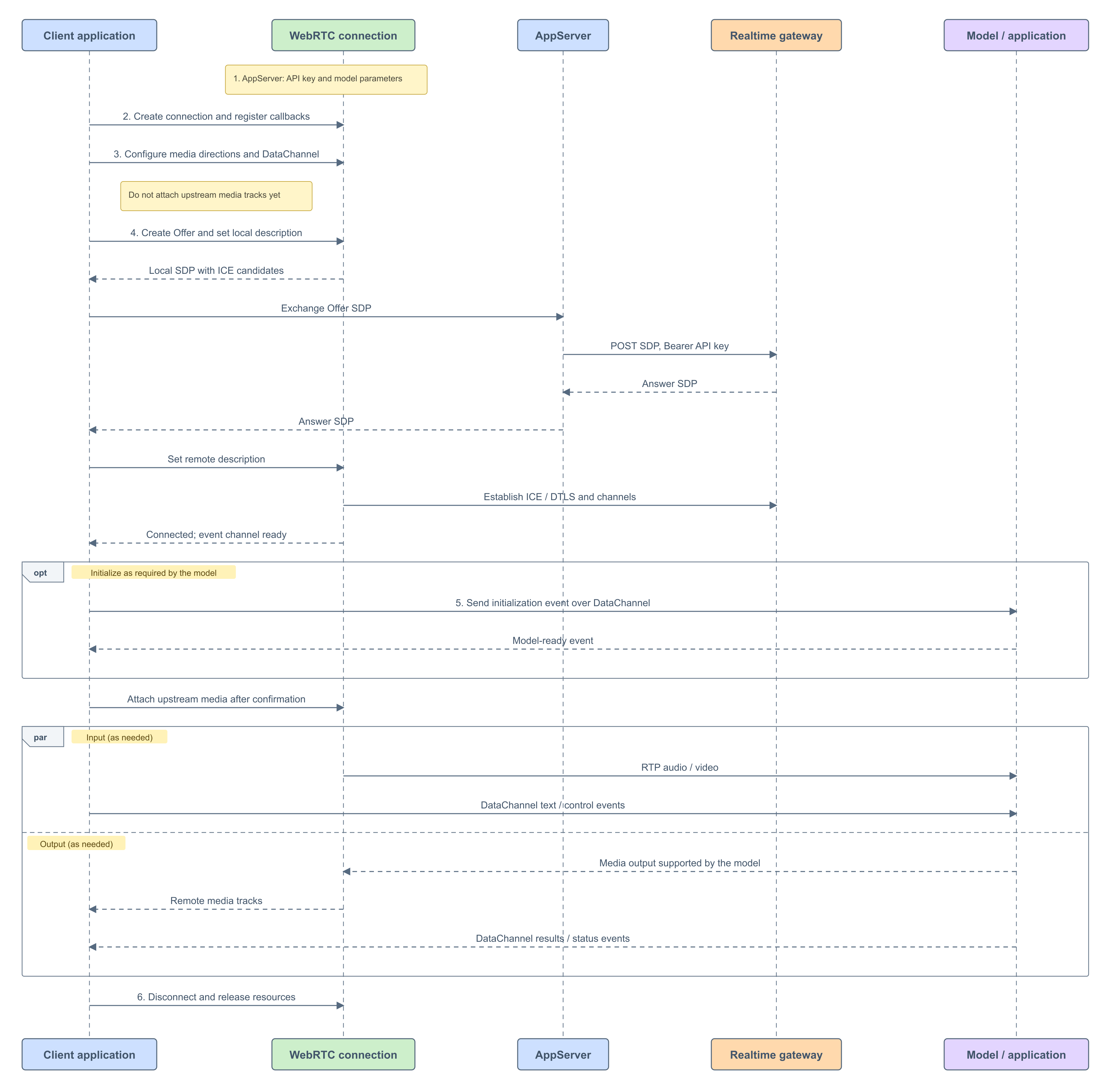
- Prepare the API key and target model parameters on AppServer.
- Create the client connection object and register callbacks.
- Configure media directions and DataChannels without attaching upstream media tracks.
- Exchange SDP through AppServer and wait for the connection and event channel to become ready.
- Configure the model according to its protocol. Attach the required upstream media tracks after confirmation.
- Stop capture, close the connection, and release resources when interaction is complete.
Note
-
WebRTC media tracks carry audio and video. Your application obtains local media tracks, attaches remote players, and exchanges DataChannel messages according to the target model's event definitions.
-
WebRTC authentication takes place during SDP exchange; no AOQ token is required. Proxy authentication and SDP through AppServer to keep the long-term API key out of frontend code.
-
A successful connection means that the transport is established, but media must wait until the target model is successfully initialized. For example, Realtime models must wait for
session.updated. The client can enable the required upstream media only after model initialization succeeds.
1. Prepare authentication and connection parameters
AppServer configures SDP exchange for the target model, region, and workspace. The following parameters apply to standard Realtime connections. For application-specific parameters, follow the corresponding best practice.
| Setting | Value |
|---|---|
| Method | POST |
| URL | https://{endpoint}/api/v1/webrtc/realtime?model={model_name} |
Content-Type | application/sdp |
Authorization | Bearer <API_KEY> |
| Request body | Offer SDP |
| Successful response | Answer SDP |
For regions, endpoints, and authentication, see Token authentication. Implement the AppServer interface in your application; it is not a Model Studio SDK API.
2. Initialize the connection object and register callbacks
Create an RTCPeerConnection in the browser, or initialize the corresponding library on another platform. Before connecting, register handlers for:
-
Connection state changes, including success, failure, and disconnection.
-
DataChannel creation, opening, messages, and closure.
-
Remote media tracks for receiving and playing audio or video.
const pc = new RTCPeerConnection({ iceServers: [ ] });

const channels = new Set();
const senders = new Map();
const remoteAudio = document.createElement("audio");
remoteAudio.controls = true; // Allow manual playback if autoplay is blocked.
remoteAudio.autoplay = true;
document.body.appendChild(remoteAudio);

let localStream = null;
let eventChannel = null;
let stopped = false;
let started = false;
let sessionCreated = false;
let updateSent = false;
let modelReady = false;
let mediaStarted = false;
const requestController = new AbortController();
Register message listeners before initializing the model so that server-initiated session events are not missed. Do not listen only to the client-created channel: the server sends events on a channel named txt, so handle the datachannel callback as well.
3. Configure media directions and DataChannels
Select media directions
Directions are relative to the client. WebRTC transceivers negotiate sending and receiving: sendrecv is bidirectional, sendonly sends only, and recvonly receives only. Available capabilities also depend on the server's SDP answer and model support.
| Direction | Configuration |
|---|---|
| Send audio | Negotiate audio transmission and prepare a microphone or external audio track; attach it after model readiness |
| Receive audio | Negotiate audio reception and attach playback in the remote track callback |
| Send video | Negotiate video transmission only if the model supports visual input; prepare a camera or external video track |
| Receive video | Negotiate reception and implement rendering only if the model or application explicitly supports video output |
Voice conversations typically require bidirectional audio; visual input additionally requires upstream video. The Offer SDP must include an m=audio media section. Do not remove it merely because the application does not need audio playback.
Choose directions for your model
| Model or application | Send audio | Receive audio | Send video | Receive video |
|---|---|---|---|---|
| Qwen-Omni-Realtime | For speech input | For spoken responses | For visual input | Not supported |
| Qwen-Audio-Realtime | For voice conversations | For spoken responses | Not supported | Not supported |
| Qwen-LiveTranslate-Realtime | For speech input | For spoken translations | Depends on the version and scenario | Not supported |
| multimodal-dialog | Based on application input | Based on application output | Based on application capabilities | Only if explicitly supported by the application |
This table describes the media directions needed by the application; it does not guarantee that every combination can be negotiated independently. Configuration depends on the target model and server negotiation capabilities.
Prepare media without sending it
Negotiate the required directions before creating the Offer. For models that require initialization confirmation, reserve sending capabilities without attaching captured tracks. After the model is ready, use replaceTrack on the corresponding sender to start transmission. Register media reception handlers in advance.
Configure audio sending, audio reception, video sending, and video reception independently. Opening the microphone, playing audio, and initializing the model are separate operations.
Media configuration example
This example uses bidirectional audio with optional upstream video. The four media switches express application requirements. Enable video reception only if the target application explicitly supports it. addTransceiver negotiates directions in advance; captured tracks remain local until they are attached to senders after model readiness.
const media = {
  sendAudio: true,
  receiveAudio: true,
  sendVideo: false,
  receiveVideo: false,
};

function mediaDirection(send, receive) {
  if (send && receive) return "sendrecv";
  if (send) return "sendonly";
  if (receive) return "recvonly";
  return "inactive";
}

async function configureMedia() {
  for (const kind of ["audio", "video"]) {
    const send = kind === "audio" ? media.sendAudio : media.sendVideo;
    const receive = kind === "audio" ? media.receiveAudio : media.receiveVideo;
    // Keep m=audio; the target service must support the selected directions.
    if (kind === "audio" || send || receive) {
      const transceiver = pc.addTransceiver(kind, {
        direction: mediaDirection(send, receive),
      });
      if (send) senders.set(kind, transceiver.sender);
    }
  }
  if (!media.sendAudio && !media.sendVideo) return;
  const stream = await navigator.mediaDevices.getUserMedia({
    audio: media.sendAudio,
    video: media.sendVideo ? {
      width: { ideal: 640 }, height: { ideal: 480 },
      frameRate: { ideal: 2, max: 2 },
    } : false,
  });
  // The user may end the session while the permission prompt is open.
  if (stopped) {
    stream.getTracks().forEach(track => track.stop());
    throw new Error("Session ended");
  }
  localStream = stream;
  // sender.track is still null; captured data is not sent to the model.
}
Set video resolution and frame rate according to the target model. If local preview and upstream frame rates need to differ, see the Canvas implementation in the best practice.
Create event channels
Create a DataChannel before the Offer so that the SDP includes data channel negotiation. For client-created and server-created channels, see the WebRTC best practices below.
DataChannels carry model initialization, text, and control events, and return model results, status, and errors. Media tracks carry audio and video.
// See Send and receive events over DataChannels for bindDataChannel.
pc.ondatachannel = ({ channel }) => bindDataChannel(channel);
const clientChannel = pc.createDataChannel("oai-events");
bindDataChannel(clientChannel);
4. Establish the connection
- Call
createOfferandsetLocalDescription. - Collect candidates using an ICE mode supported by the server. This example waits for ICE gathering to complete before sending the local SDP.
- Send the local SDP to AppServer, which calls the Model Studio SDP exchange endpoint with the API key.
- Check the HTTP status. On success, pass the returned Answer SDP to
setRemoteDescription. - Wait for the connection to succeed and confirm that the DataChannel used to send model events is open.
Successful SDP exchange or completion of setRemoteDescription only completes that negotiation step; it does not establish that the media connection is ready. Model events cannot be sent until the DataChannel is open.
Connection code and state callbacks
Listen for connectionstatechange to determine connection status and icegatheringstatechange to wait for complete local SDP. Model initialization also depends on the DataChannel being open and on model events; SDP exchange alone is insufficient.
pc.onconnectionstatechange = () => {
  console.log("WebRTC state:", pc.connectionState);
  if (pc.connectionState === "connected") {
    tryInitializeModel();
  } else if (["failed", "disconnected", "closed"].includes(pc.connectionState)) {
    // This example ends the session; implement recovery as needed.
    endSession();
  }
};

function waitForIceComplete() {
  return new Promise((resolve, reject) => {
    const timer = setTimeout(() => finish(new Error("ICE gathering timed out")), 15000);
    function finish(error) {
      clearTimeout(timer);
      pc.removeEventListener("icegatheringstatechange", check);
      requestController.signal.removeEventListener("abort", cancel);
      error ? reject(error) : resolve();
    }
    function check() {
      if (pc.iceGatheringState === "complete") finish();
    }
    function cancel() { finish(new Error("Session ended")); }
    pc.addEventListener("icegatheringstatechange", check);
    requestController.signal.addEventListener("abort", cancel, { once: true });
    if (stopped) cancel();
    else check();
  });
}

function normalizeAnswerSdp(sdp) {
  return String(sdp).trim().replace(/\r?\n/g, "\r\n") + "\r\n";
}

async function startSession() {
  if (started || stopped) return;
  started = true;
  try {
    await configureMedia();
    if (stopped) return;
    const offer = await pc.createOffer();
    await pc.setLocalDescription(offer);
    await waitForIceComplete();

    // Implement this same-origin application endpoint; it is not a Model Studio API.
    // AppServer forwards SDP with the API key and returns the raw Answer SDP.
    const response = await fetch("/api/realtime/sdp", {
      method: "POST",
      headers: { "Content-Type": "application/sdp" },
      body: pc.localDescription.sdp,
      signal: requestController.signal,
    });
    if (!response.ok) {
      throw new Error(`SDP exchange failed:${response.status} ${await response.text()}`);
    }
    const answerSdp = normalizeAnswerSdp(await response.text());
    if (stopped) return;
    await pc.setRemoteDescription({ type: "answer", sdp: answerSdp });
    // Continue through connectionstatechange, DataChannel, and model events.
  } catch (error) {
    if (!stopped) console.error("Connection failed:", error);
    endSession();
  }
}
AppServer must forward the Offer using the endpoint and headers in section 1. The example interface returns plain SDP text. Do not pass HTTP headers, logs, or a JSON wrapper to setRemoteDescription.
5. Exchange model events and media
Initialize the model
When the connection and event channel are available, initialize the target model according to its protocol. Store server initialization events and combine them with channel state to advance the flow; do not assume a fixed callback arrival order.
For example, models configured with session.update require an event that follows their protocol and confirmation before input is sent. Obtain voice, output modalities, VAD, and sample-rate parameters from the current model documentation. The multimodal interaction suite uses its own event protocol.
session.created means that the session was created, not necessarily that configuration has taken effect. For models that require session configuration confirmation, wait for session.updated. Other models or applications have their own readiness conditions.
The model navigation in WebSocket connection overview links to event definitions. Reuse only those definitions; WebRTC media transport and restrictions still follow this page.
Model event example: Omni
This example demonstrates Omni's session.created → session.update → session.updated flow. For other models, replace the initialization event and response handling according to their event definitions linked below. Attach upstream media tracks only after session.updated confirms configuration.
function tryInitializeModel() {
  if (stopped || updateSent || !sessionCreated ||
      pc.connectionState !== "connected" ||
      eventChannel?.readyState !== "open") return;
  sendModelEvent({
    event_id: `event_${crypto.randomUUID()}`,
    type: "session.update",
    session: {
      modalities: media.receiveAudio ? ["text", "audio"] : ["text"],
      input_audio_format: "pcm",
      output_audio_format: "pcm",
      turn_detection: { type: "server_vad", threshold: 0.5,
                        silence_duration_ms: 800 },
    },
  });
  updateSent = true;
}

async function handleModelEvent(event, channel) {
  if (stopped) return;
  if (event.type === "session.created") {
    sessionCreated = true;
    eventChannel = channel; // Send configuration on the channel that delivered the session event.
    tryInitializeModel();
  } else if (event.type === "session.updated" && updateSent) {
    modelReady = true;
    await startSendingMedia();
  } else if (event.type === "error") {
    console.error("Model error:", event.error);
    endSession();
  } else {
    // Handle text, transcripts, and response state; receive audio on media tracks.
    console.log("Model event:", event);
  }
}
Start media transmission and reception
After the model is ready, attach the audio and video tracks needed for upstream transmission. Handle model output in the remote track callback and continue parsing DataChannel events.
-
Audio travels over RTP media tracks; no
input_audio_buffer.appendevent is required. -
Images travel over video tracks. WebRTC does not support
input_image_buffer.append. -
DataChannels carry text, status, control, and error events.
async function startSendingMedia() {
  if (stopped || !modelReady || mediaStarted) return;
  mediaStarted = true;

  for (const track of localStream?.getTracks() ?? []) {

    if (stopped) return;
    const sender = senders.get(track.kind);
    if (sender) await sender.replaceTrack(track);
  }
}

// Register before startSession(); also handle tracks with no streams.
const remoteAudioStream = new MediaStream();
const remoteVideo = media.receiveVideo ? document.createElement("video") : null;
if (remoteVideo) {
  remoteVideo.autoplay = true;
  remoteVideo.playsInline = true;
  remoteVideo.controls = true;
  document.body.appendChild(remoteVideo);
}
pc.ontrack = ({ track }) => {
  if (stopped) return;
  if (track.kind === "audio" && media.receiveAudio) {
    remoteAudioStream.addTrack(track);
    remoteAudio.srcObject = remoteAudioStream;
    remoteAudio.play().catch(() => {
      console.info("Autoplay blocked. Use the audio controls to play.");
    });
  }
  if (track.kind === "video" && remoteVideo) {
    remoteVideo.srcObject = new MediaStream([track]);
    remoteVideo.play().catch(() => console.info("Use the video controls to play."));
  }
};
6. End interaction and release resources
When the connection is no longer needed, stop local capture tracks owned by your application, close DataChannels and the RTCPeerConnection, release players, and clear application state.
Clear model readiness after a failed or unexpected disconnection. Initialize the model again on a new connection instead of reusing the previous connection's session state.
function endSession() {
  if (stopped) return;
  stopped = true;
  modelReady = false;
  sessionCreated = false;
  updateSent = false;
  mediaStarted = false;
  requestController.abort(); // Cancel the pending SDP request and ICE wait.
  localStream?.getTracks().forEach(track => track.stop());
  localStream = null;
  channels.forEach(channel => channel.close());
  channels.clear();
  eventChannel = null;
  pc.close();
  senders.clear();
  remoteAudioStream.getTracks().forEach(track => track.stop());
  remoteAudio.pause();
  remoteAudio.srcObject = null;
  remoteAudio.remove();
  if (remoteVideo) {
    remoteVideo.srcObject?.getTracks().forEach(track => track.stop());
    remoteVideo.pause();
    remoteVideo.srcObject = null;
    remoteVideo.remove();
  }
}
Call endSession() when the user ends the call or leaves the page. If your application adds the Canvas or recording features from the best practice, also cancel animation loops and stop Canvas media tracks and the MediaRecorder.
Send and receive events over DataChannels
Check that the channel is open before calling send with a serialized event. Parse incoming messages in its message callback, including events on server-created channels.
Follow the target model's client event definitions for outgoing event names, fields, parameters, and timing. Follow its server event definitions for response parsing, state changes, results, and errors. Send initialization events as required by the model and subsequent text and control events as required by your application.
DataChannel example
Use the same binding function for client-created and server-created channels. It handles transport and JSON parsing; handleModelEvent in section 5 handles model semantics. Use sendModelEvent for model initialization, text, or control events only when permitted by the model's protocol.
function sendModelEvent(event, channel = eventChannel) {
  if (stopped || pc.connectionState !== "connected" ||
      channel?.readyState !== "open") {
    throw new Error("Data channel is not ready");
  }
  channel.send(JSON.stringify(event));
}

function bindDataChannel(channel) {
  channels.add(channel);
  channel.onopen = () => {
    if (stopped) return;
    console.log("DataChannel opened:", channel.label);
    tryInitializeModel();
  };
  channel.onmessage = ({ data }) => {
    if (stopped) return;
    let event;
    try { event = JSON.parse(data); }
    catch (error) {
      console.warn("Cannot parse model event:", error);
      return;
    }
    if (!event || typeof event !== "object") return;
    handleModelEvent(event, channel).catch(error => {
      if (!stopped) console.error("Model event handling failed:", error);
      endSession();
    });
  };
  channel.onerror = error => console.error("DataChannel error:", error);
  channel.onclose = () => {
    channels.delete(channel);
    if (channel === eventChannel) endSession();
  };
  if (channel.readyState === "open") channel.onopen();
}
Place all fragments in the same script. After all declarations and callbacks are registered, call startSession() from the start button handler and endSession() from the end button handler. These are example functions, not built-in WebRTC APIs.
Model event definitions
| Model or application | Client events (send) | Server events (receive) |
|---|---|---|
| Qwen-Omni-Realtime | Client events | Server events |
| Qwen-Audio-Realtime | Client events | Server events |
| Qwen-LiveTranslate-Realtime | Client events | Server events |
| multimodal-dialog | Input Message in the interaction protocol | Output Message in the interaction protocol |
The multimodal interaction suite defines both directions in one interaction protocol. Select event definitions for the actual model version; models do not share one fixed event schema.
Also follow these rules:
-
Identify event types and correlation identifiers according to the model. Realtime events typically use
type; the multimodal interaction suite usesheader.actionfor client events,header.eventfor server events, andtask_idfor correlation. -
Handle initialization confirmation, input submission, response cancellation, and task completion over DataChannels as required by the protocol. These operations are distinct from closing the transport connection.
-
Media uses media tracks. When referring to model event documentation, follow this WebRTC page for media transport and available interaction modes; do not copy WebSocket media-upload mechanisms.
Best practices
- Real-time Omni calls over WebRTC: application UI, recording, and Canvas frame-rate reduction. Initialize and attach media in the order described on this page.