Model Studio APIs limit request volume, token usage, and growth rate. Apply these strategies to maximize throughput and maintain availability.
Model Studio APIs limit requests, token usage, and growth rate over time — this is rate limiting. Large language models have long latency and are constrained on two dimensions (request count and token volume). Simple "retry on error" strategies fail here; you need purpose-built traffic control.
Three solution types, ordered from lowest to highest implementation cost:
Platform configuration solutions (minimal code changes): Server-side queuing, Increase quota limits, PTU, and Batch API.
Client-side traffic control strategies (client code changes): Four strategies with increasing engineering complexity, from basic retry to adaptive congestion control.
Architectural fallback solutions (system architecture changes): Model fallback and peak-load shifting using message queues (MQ).
If you are troubleshooting a 429 error now, go to Error diagnosis and strategy recommendations to identify the cause. For traffic burst errors, try server-side queuing first — it only requires one request header.
Platform rate limiting mechanism
The platform rate-limits each model independently at the root account level. After triggering, the service typically resumes within one minute. For rate limiting conditions and current usage per model, see Rate limiting and Model monitoring. Three types of rate limiting rules apply:
Minute-level quota limits (RPM / TPM): The maximum number of requests per minute (RPM) and the maximum token usage per minute (TPM).
Instantaneous frequency limits (RPS / TPS): Maximum requests per second (RPS) and maximum token usage per second (TPS). Dense API calls or token consumption within a single second can trigger rate limiting.
Growth rate limits (Traffic Burst): A sudden surge in request volume or token usage triggers rate limiting. The threshold adjusts dynamically. Ramp up requests gradually to avoid triggering this limit.
The following sections cover solutions at three levels: platform configuration, client-side traffic control, and architectural fallback.
Error diagnosis and strategy recommendations
The same error code can be triggered by different rate limiting dimensions. High concurrency can also saturate the server, causing timeouts. The adaptive congestion control strategy can help mitigate this.
Error code (DashScope / OpenAI) | Triggering dimension | Feature diagnosis | Recommended strategy |
Throttling.RateQuota / limit_requests | Request rate exceeded | Intermittent errors. Success rate decreases over time. | Token bucket: Control the request quota per unit of time. |
Request rate exceeded | Concentrated errors at startup or during concurrency spikes. | Concurrency semaphore or smoothing rate limiter: Increase the interval between requests. | |
Throttling.AllocationQuota / insufficient_quota | Token usage exceeded | Intermittent errors when processing long texts. | Dual token bucket: Limit both RPM and TPM quotas simultaneously. |
Token usage exceeded | Instantaneous token consumption is too high during concurrent processing of long texts. | ||
Throttling.BurstRate / limit_burst_rate | Traffic growth rate exceeded | Sudden large volume of requests after startup or recovery from an idle state. | We recommend trying server-side queuing first. Alternatively, use a token bucket with a low initial value, such as |
Platform configuration solutions
These solutions rely on platform capabilities and require minimal or no client-side code changes.
Server-side queuing (recommended)
For traffic burst rate limiting, Model Studio accepts a maximum wait time in the request header. The server queues and retries the request within that time until it starts processing or the queue times out. This significantly improves success rates during traffic bursts compared to an immediate 429 response.
This feature only applies to growth rate / traffic burst rate limiting (Throttling.BurstRate). It does not apply to absolute quota rate limiting (RPM/TPM).
Configuration
Add the X-DashScope-Wait-Timeout field to the request header:
Header field | Example | Description |
X-DashScope-Wait-Timeout | 30 | The maximum queuing wait time for burst requests, in seconds.
|
Timeout configuration
After enabling queuing, adjust the client timeout to account for the added wait time:
Non-streaming requests (stream: false): Timeout = original base timeout + Wait-Timeout value.
Streaming requests (stream: true): Timeout > Wait-Timeout value. Streaming requests start timing after the first chunk, so the initial response timeout just needs to exceed the queuing time.
Example: If the original base timeout is 120 seconds and Wait-Timeout is set to 30 seconds, the non-streaming request timeout should be set to 150 seconds.
Increase quota limits
If the default quota is insufficient, increase the temporary rate limit quota in the Model Studio console. Changes take effect immediately. Available in China (Beijing) and Singapore regions.
Scenarios: Default RPM/TPM quota insufficient due to business growth, or temporary throughput increase needed for short-term events. See Rate limits.
Simple to configure. Evaluate this option before trying client-side strategies.
Provisioned throughput unit (PTU)
The PTU service provides dedicated, reserved computing power. It avoids contention in the public resource pool and is the preferred solution for real-time, high-throughput requirements.
Use PTU when your business has deterministic throughput requirements (such as SLA commitments) or when you want stable, high throughput without client-side traffic control.
PTUs are reserved resources billed continuously, even when not fully utilized. Evaluate required specifications based on actual peak load to avoid waste.
Asynchronous batch processing (Batch API)
For tasks without strict real-time requirements (data cleaning, batch analytics), use the Batch API to submit them for batch processing. Tasks run during off-peak hours, return results asynchronously, and are not subject to online rate limits.
Suitable for offline tasks that tolerate hours-to-days return time: data annotation, log analysis, batch summarization. Batch API costs are typically lower than real-time API calls.
Return time is not guaranteed. Not suitable for services requiring immediate responses. Retrieve results via polling or callback after submission.
Client-side traffic control strategies
When platform solutions (such as server-side queuing and quota increases) are not enough, add traffic control on the client side. The core principle: distribute requests evenly within a time window to avoid bursts. After a system start or long idle period, ramp up concurrency gradually.
Four strategies in order of increasing complexity. Each includes the previous one and adds to it:
Basic retry provides only passive defense.
Request rate limiting adds active queuing.
Traffic shaping further introduces token-level control and smooth sending.
Adaptive congestion control dynamically adjusts the sending rate based on real-time feedback.
Choose the lowest-cost strategy that meets your needs.
Throughput performance comparison of each strategy
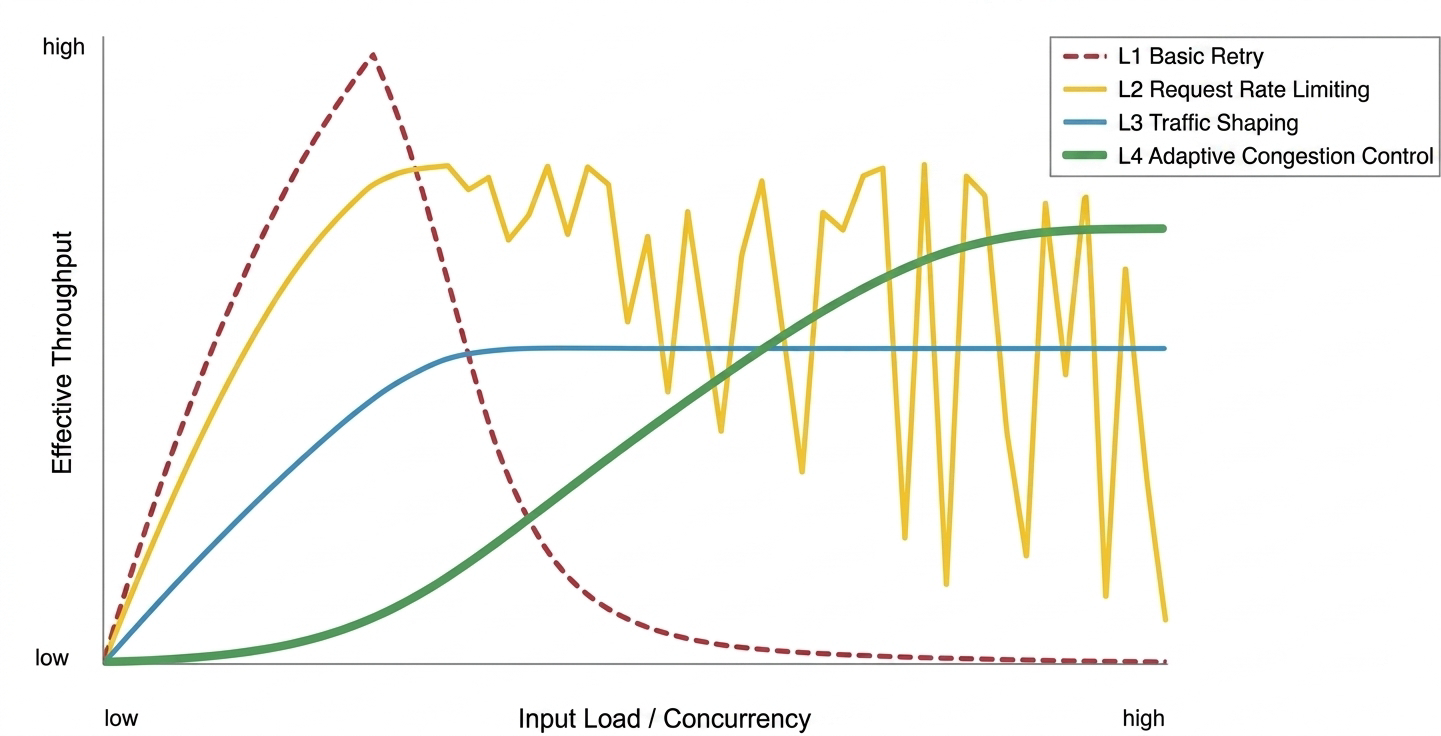
Throughput comparison under different loads:
Basic retry strategy: Effective under low load. Prone to congestive collapse under high concurrency, causing a sharp drop in throughput.
Request rate limiting strategy: Strong protection against collapse. However, under mixed workloads with long texts, throughput shows sawtooth-like fluctuations due to the lack of token control.
Traffic shaping strategy: High stability. Achieves smooth output by sacrificing some peak throughput.
Adaptive congestion control strategy: Can dynamically converge to a stable, high throughput point under high load, but has cold-start probing overhead.
Basic retry strategy
Suitable for personal testing, local scripts, and low-frequency background tasks. No rate limit on outgoing requests. Only triggers exponential backoff retry with random jitter on 429 or 5xx errors.
No proactive traffic control. Under multi-threaded concurrency, this easily triggers rate limiting and causes request backups.
The code uses exponential backoff, not fixed-interval retry. Fixed-interval retry causes all failed requests to re-send simultaneously, triggering rate limiting again. Exponential backoff with random jitter spreads retries out:
Wait time doubles progressively: For example,
1s, 2s, 4s.... This avoids repeated requests in a short period.Add random jitter: A random value (such as
2s +/- 0.5s) spreads retry traffic, preventing a secondary flood (thundering herd effect).
The system recovers gradually instead of getting stuck in a "fail — retry in unison — fail again" loop.
Request rate limiting strategy
Passive retries alone cannot handle real traffic. Frequent retries increase latency. This strategy introduces active traffic control: check and throttle requests before sending them, organizing unordered traffic into a queue that respects the RPM limit. Active smoothing adds a small, predictable queuing delay — far less than the cost of a "error — wait — retry" loop. A small known cost beats a large unknown one.
Suitable for chatbots and other lightweight, request-response services sensitive to time to first token.
Client-side active queuing uses two levels of control:
RPM token bucket: Limits total requests per minute. Bucket capacity equals the RPM quota; tokens refill at a constant rate. Supports borrowing: if tokens are insufficient, a request borrows from future quota, strictly FIFO.
Concurrency semaphore: Limits concurrent requests to prevent instantaneous high concurrency from triggering RPS limits.
Execute these two levels in strict order: acquire RPM token first, then acquire semaphore. Concurrency slots are scarce — only allocate them to requests that are ready to execute. Reversing the order causes head-of-line blocking under high load: requests hold slots but have no tokens, all slots fill up, nothing sends. Principle: do not hold a scarce resource while waiting.
The code below initializes the token bucket to full (initial_tokens=rpm_limit), suitable for online services that need to process requests immediately at startup. If a full bucket triggers rate limiting, lower the initial value (for example, initial_tokens=0 for an "empty bucket start") to ramp up more gradually.
This strategy does not track token usage. Long-text tasks can still exhaust the TPM quota.
Traffic shaping strategy
In batch scenarios requiring high, stable throughput (real-time RAG ingestion, bulk long-document analysis), request rate limiting has a TPM blind spot. Traffic shaping adds dual resource awareness (RPM & TPM) and a shaping mechanism that converts bursty traffic into a smooth flow.
Enhancements over request rate limiting:
Dual resource control (RPM & TPM): Maintains both RPM and TPM token buckets. All requests must pass quota checks for both dimensions before being sent.
Pre-deduction for input, post-settlement for output: Output length is unknown before the request. The TPM bucket pre-deducts input tokens when sending and settles actual output tokens after completion. Even if tokens go negative, subsequent requests wait for the count to become positive, naturally smoothing the flow.
Continuous warm-up: During a cold start, the token issuance rate increases linearly over time, eliminating the risk of initial bursts.
Smoothing rate limiter (Pacing): Smooths the sending rate by enforcing a minimum interval between requests (pacing), reducing the risk of triggering rate limits.
Alternative: If minor queuing delay at startup is acceptable, reuse the standard token bucket (set initial_tokens=0) for a safe start with lower complexity. The Python token bucket here is for demonstration. In production, use mature rate limiting libraries such as Guava's SmoothRateLimiter in Java.
In the code example, the smoothing wait is placed inside the concurrency lock. Multiple requests might compete for the semaphore simultaneously after their wait ends, re-bunching the traffic at the exit. Smoothing inside the lock slightly reduces concurrency efficiency but ensures precise send intervals.
The complete traffic shaping pipeline is: Estimate input tokens → Dual admission (RPM & TPM) → Concurrency lock → Traffic shaping → Send → Settle output tokens.
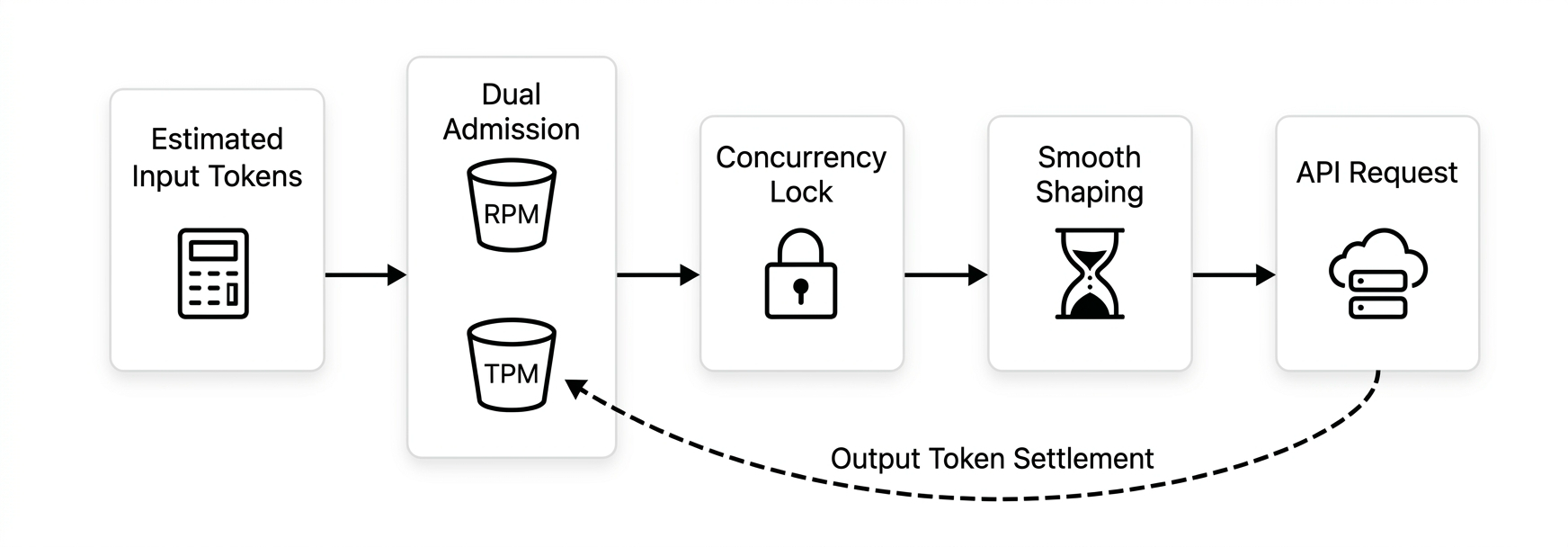
The conservative smoothing sacrifices some peak concurrency. Not suitable for services requiring extremely low latency.
Adaptive congestion control strategy
Suitable for large-scale, dynamic workloads: API gateways, complex proxies, multi-tenant systems.
Selection tip: This strategy is not a universal solution
This strategy handles highly uncertain and volatile environments. It is not a universal choice:
Performance paradox: If the load is predictable (such as batch processing), optimal static parameters outperform dynamic probing that needs "trial and convergence".
Probing overhead: Dynamic algorithms inevitably involve cold-start ramp-up and exploratory fluctuations — unnecessary overhead in known scenarios.
Maintenance cost: Closed-loop feedback increases system complexity and troubleshooting difficulty.
Unless your business has a very large scale, complex load, and significant volatility, choose one of the simpler first three strategies.
Request rate limiting and traffic shaping are static quota strategies — they work well under stable, predictable loads. But at the gateway level, downstream loads shift constantly (short requests mixed with deep inference), and platform thresholds fluctuate dynamically. Static strategies struggle to balance efficiency and stability.
Inspired by BBR, this strategy builds a closed-loop control system based on EBP (Elastic Bandwidth Probing). It uses RPM/TPM quotas as a guiding upper limit and dynamically calculates the optimal send rate from real-time feedback (latency changes, rate limit signals).
EBP: Stores the historical highest successful watermark. Calculates probing gain by simulating spring tension based on the distance from current concurrency to the watermark (farther = faster, closer = slower). Adds a small linear thrust to keep exploring even at high saturation.
TPT congestion awareness: LLM generation time scales with output length — high latency on long texts does not mean congestion. TPT (Time Per Token) filters out content-length noise. Congestion is only declared when TPT degrades significantly.
Anti-burst rate governor: Regardless of the EBP target, the governor caps concurrency growth acceleration to ensure smooth ramp-up and avoid step changes that trigger growth rate limits.
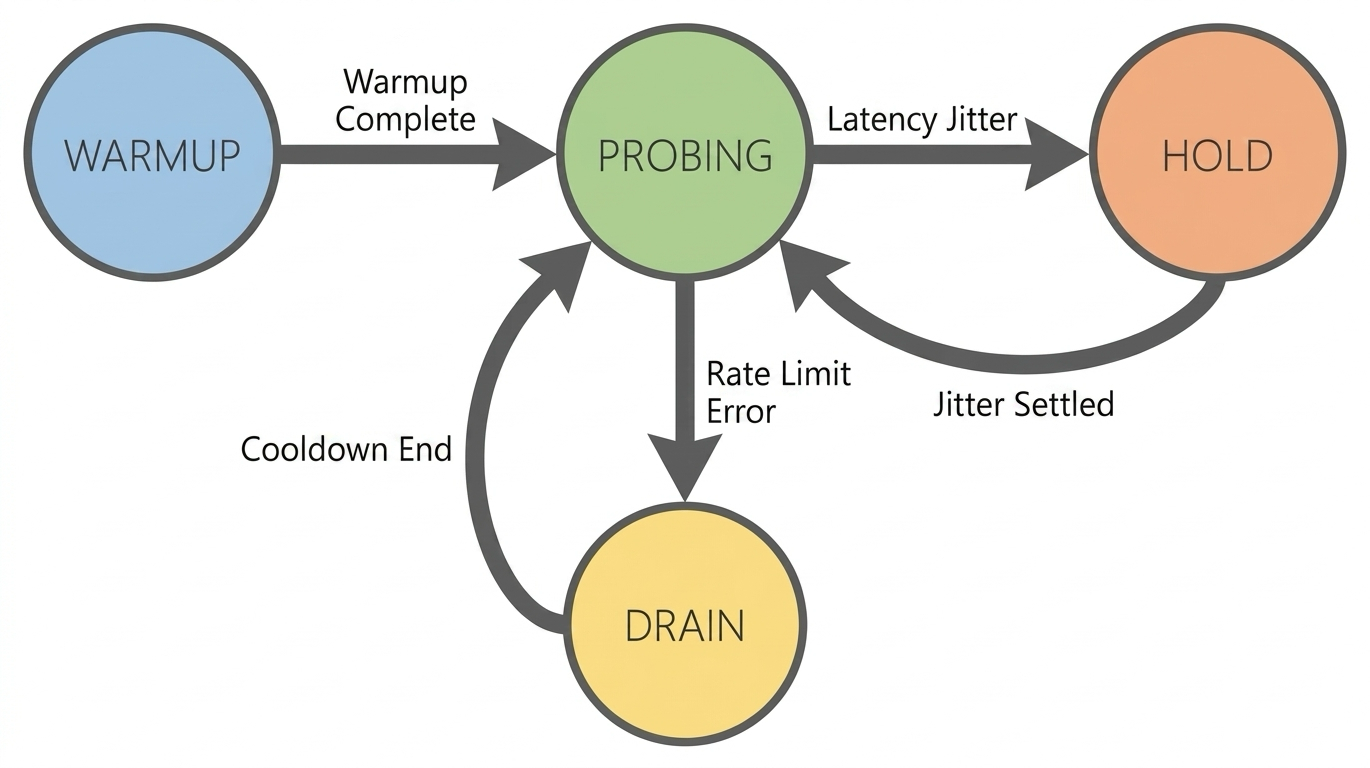
Key modifications from native BBR for large models:
Guided probing: Introduces known RPM/TPM quotas as a "guiding upper limit" to avoid frequent collisions caused by blind probing.
Signal source (RTT → TPT): Native BBR uses RTT. In LLM scenarios, content-length latency dwarfs network jitter. TPT eliminates that interference.
Response mechanism enhancement (ProbeRTT → Hold): In the face of latency fluctuations, it chooses to maintain the current concurrency level rather than proactively backing off and reducing throughput.
Hard rate limit response (Packet Loss → 429 Drain): Once a
429error is triggered, it enters an aggressive Drain state and performs a fast recovery after a cooldown period.
Limitations:
TPT noise: TPT is estimated as "total latency / total tokens". Total latency includes network round-trip, queuing, and time to first token — susceptible to jitter or long inputs, which can falsely trigger the Hold state.
Large request starvation: Uses a non-strict FIFO wakeup for scheduling performance. When quotas are scarce, short-token requests may preempt resources, causing long-token requests to wait too long.
Cold start: Requires a warm-up period to build a statistical model. In low-load or short-lived tasks, throughput may be lower than the first three strategies.
Architectural fallback solutions
When platform configuration and client-side traffic control still cannot meet availability or peak throughput requirements, add fallback mechanisms at the architecture level.
Model fallback
When the primary model cannot respond due to rate limiting or service issues, automatically fall back to an alternative model with a more generous quota.
Fallback path design principles
Choose models from different series: Rate limiting is per-model. Use a different model as fallback — for example, fall back from
qwen3.6-plustoqwen3.6-flash.Trigger fallback only on rate limit errors: Fall back on
429errors, not all exceptions. Switching models will not fix network timeouts or parameter errors.Validate the fallback model in advance: Ensure it supports required features (Function Calling, structured output, etc.) to avoid functional issues after fallback.
Model fallback can be combined with client-side traffic control strategies. For example, you can integrate fallback logic into the retry mechanism of the request rate limiting strategy. When retries are exhausted and rate limiting is still triggered, switch to the fallback model.
Peak-load shifting using message queues (MQ)
For backend services that do not require immediate responses, introduce a message middleware (RabbitMQ, Kafka) for peak-load shifting. Burst traffic goes into the MQ first; consumers pull and process at a steady rate matching the rate limit quota. This decouples frontend peaks from backend calls.
Suitable for businesses where users accept asynchronous results: ticket processing, content moderation, batch data annotation.
Key design points:
Consumer rate control: The consumer side should use the request rate limiting or traffic shaping strategy to consume messages at a steady rate based on the RPM/TPM quota, rather than pulling messages without limits.
Dead-letter handling: Move messages that fail after multiple retries to a dead-letter queue and trigger an alert. Prevent infinite retries from blocking consumption.
Back-pressure propagation: When the MQ backlog exceeds a threshold, propagate pressure upstream (for example, return a queuing status) to prevent unbounded queue growth.
Production environment considerations
The code examples use a Python asyncio single-threaded loop to demonstrate core algorithms. Before large-scale production use, consider the following.
Adapting to non-text models
The strategies above use text models as examples, but the core principles apply to multimodal services (image generation, speech synthesis). The units differ, but the essence is the same: limiting submission rate and processing capacity.
Models such as speech recognition are typically constrained by both the number of requests per unit of time (such as RPM) and usage (such as audio duration). The strategies are basically the same as for text models.
Models for images and videos are typically constrained by the task submission rate and the number of concurrent tasks. You can use the same approach as the request rate limiting strategy: limit the task submission rate and use a semaphore to control concurrency.
Regardless of how metrics change, the principle of client-side throttling stays the same. Replace the counter or probing metric with the one for your modality. For specific rules, see Rate limiting.
Atomicity in concurrent models
Example:
asynciouses single-threaded cooperative scheduling, so state modifications are inherently atomic within a single process.Production: In multi-threaded or multi-process environments, ensure concurrency safety of the token bucket and statistics window. Race conditions will break traffic control.
Distributed rate limiting
Example: All traffic control components are in-memory.
Production: In multi-instance deployments, each instance throttles independently. Total usage may exceed the limit. Use a centralized counter (such as Redis) to manage usage across all nodes.
Priority queues and starvation prevention
Example: No priority differentiation. The adaptive congestion control strategy uses non-strict FIFO wakeup for scheduling performance.
Production: For high/low priority requests, implement a weighted priority queue to guarantee bandwidth for high-priority traffic. Reserve a minimum quota for low-priority queues to prevent starvation.