Qwen-Coder is a language model designed for code tasks. You can use the API to generate code, complete code, and call tools to interact with external systems.
We recommend using the latest general-purpose models instead of Qwen-Coder models. For more information, see Text generation to select a model that is suitable for your scenario.
Getting started
Before you begin, obtain an API key and configure it as an environment variable. If you use a software development kit (SDK), you must install the OpenAI or DashScope SDK.
The following example shows how to call the qwen3-coder-next model to write a Python function that finds prime numbers.
OpenAI compatible-Chat Completions API
Python
Request example
import os
from openai import OpenAI

client = OpenAI(
    # API keys vary by region. To get an API key, visit: https://www.alibabacloud.com/help/en/model-studio/get-api-key
    # If the environment variable is not configured, replace the following line with your Alibaba Cloud Model Studio API key: api_key="sk-xxx",
    api_key=os.getenv("DASHSCOPE_API_KEY"),
    base_url="https://{WorkspaceId}.ap-southeast-1.maas.aliyuncs.com/compatible-mode/v1",
)
completion = client.chat.completions.create(
    model="qwen3-coder-next",
    messages=[
        {'role': 'system', 'content': 'You are a helpful assistant.'},
        {'role': 'user', 'content': 'Write a Python function named find_prime_numbers that takes an integer n as a parameter and returns a list of all prime numbers less than n. Do not output non-code content or Markdown code blocks.'}],
)
print(completion.choices[0].message.content)
Response
def find_prime_numbers(n):
    if n <= 2:
        return []

    primes = []
    for num in range(2, n):
        is_prime = True
        for i in range(2, int(num ** 0.5) + 1):
            if num % i == 0:
                is_prime = False
                break
        if is_prime:
            primes.append(num)

    return primes
Node.js
Request example
import OpenAI from "openai";

const client = new OpenAI(
    {
        // API keys vary by region. To get an API key, visit: https://www.alibabacloud.com/help/en/model-studio/get-api-key
        // If the environment variable is not configured, replace the following line with your Model Studio API key: apiKey: "sk-xxx",
        apiKey: process.env.DASHSCOPE_API_KEY,
        // The following URL is for the Singapore region. When making a call, replace {WorkspaceId} with your actual workspace ID. URLs vary by region.
        baseURL: "https://{WorkspaceId}.ap-southeast-1.maas.aliyuncs.com/compatible-mode/v1"
    }
);

async function main() {
    const completion = await client.chat.completions.create({
        model: "qwen3-coder-next",
        messages: [
            { role: "system", content: "You are a helpful assistant." },
            { role: "user", content: "Write a Python function named find_prime_numbers that takes an integer n as a parameter and returns a list of all prime numbers less than n. Do not output non-code content or Markdown code blocks." }
        ],
    });
    console.log(completion.choices[0].message.content);
}

main();
Response
def find_prime_numbers(n):
    if n <= 2:
        return []

    primes = []
    for num in range(2, n):
        is_prime = True
        for i in range(2, int(num ** 0.5) + 1):
            if num % i == 0:
                is_prime = False
                break
        if is_prime:
            primes.append(num)

    return primes
curl
Request example
URLs vary by region.
curl -X POST https://{WorkspaceId}.ap-southeast-1.maas.aliyuncs.com/compatible-mode/v1/chat/completions \
-H "Authorization: Bearer $DASHSCOPE_API_KEY" \
-H "Content-Type: application/json" \
-d '{
    "model": "qwen3-coder-next",
    "messages": [
        {
            "role": "system",
            "content": "You are a helpful assistant."
        },
        {
            "role": "user",
            "content": "Write a Python function named find_prime_numbers that takes an integer n as a parameter and returns a list of all prime numbers less than n. Do not output non-code content or Markdown code blocks."
        }
    ]
}'
Response
{
    "model": "qwen3-coder-next",
    "id": "chatcmpl-3123d5cb-01b8-9a90-98cc-5bffbb369xxx",
    "choices": [
        {
            "message": {
                "content": "def find_prime_numbers(n):\n    if n <= 2:\n        return []\n    \n    primes = []\n    for num in range(2, n):\n        is_prime = True\n        for i in range(2, int(num ** 0.5) + 1):\n            if num % i == 0:\n                is_prime = False\n                break\n        if is_prime:\n            primes.append(num)\n    \n    return primes",
                "role": "assistant"
            },
            "index": 0,
            "finish_reason": "stop"
        }
    ],
    "created": 1770108104,
    "object": "chat.completion",
    "usage": {
        "total_tokens": 155,
        "completion_tokens": 89,
        "prompt_tokens": 66
    }
}
DashScope
Python
Request example
import dashscope
import os

dashscope.base_http_api_url = 'https://{WorkspaceId}.ap-southeast-1.maas.aliyuncs.com/api/v1'

messages = [
    {
        "role": "system",
        "content": "You are a helpful assistant."
    },
    {
        "role": "user",
        "content": "Write a Python function named find_prime_numbers that takes an integer n as a parameter and returns a list of all prime numbers less than n. Do not output non-code content or Markdown code blocks."
    }
]

response = dashscope.Generation.call(
    # API keys vary by region. To get an API key, visit: https://www.alibabacloud.com/help/en/model-studio/get-api-key
    # If the environment variable is not configured, replace the following line with your Alibaba Cloud Model Studio API key: api_key = "sk-xxx",
    api_key=os.getenv("DASHSCOPE_API_KEY"),
    model="qwen3-coder-next",
    messages=messages,
    result_format="message"
)

if response.status_code == 200:
    print(response.output.choices[0].message.content)
else:
    print(f"HTTP return code: {response.status_code}")
    print(f"Error code: {response.code}")
    print(f"Error message: {response.message}")
Response
def find_prime_numbers(n):
    if n <= 2:
        return []

    primes = []
    for num in range(2, n):
        is_prime = True
        for i in range(2, int(num ** 0.5) + 1):
            if num % i == 0:
                is_prime = False
                break
        if is_prime:
            primes.append(num)

    return primes
Java
Request example
import java.util.Arrays;
import com.alibaba.dashscope.aigc.generation.Generation;
import com.alibaba.dashscope.aigc.generation.GenerationResult;
import com.alibaba.dashscope.aigc.generation.GenerationParam;
import com.alibaba.dashscope.common.Message;
import com.alibaba.dashscope.common.Role;
import com.alibaba.dashscope.exception.ApiException;
import com.alibaba.dashscope.exception.InputRequiredException;
import com.alibaba.dashscope.exception.NoApiKeyException;
import com.alibaba.dashscope.protocol.Protocol;


public class Main {
    public static GenerationResult callWithMessage()
            throws NoApiKeyException, ApiException, InputRequiredException {
        String apiKey = System.getenv("DASHSCOPE_API_KEY");
        Generation gen = new Generation(Protocol.HTTP.getValue(), "https://{WorkspaceId}.ap-southeast-1.maas.aliyuncs.com/api/v1");
        Message sysMsg = Message.builder()
                .role(Role.SYSTEM.getValue())
                .content("You are a helpful assistant.").build();
        Message userMsg = Message.builder()
                .role(Role.USER.getValue())
                .content("Write a Python function named find_prime_numbers that takes an integer n as a parameter and returns a list of all prime numbers less than n. Do not output non-code content or Markdown code blocks.").build();
        GenerationParam param = GenerationParam.builder()
                .apiKey(apiKey)
                .model("qwen3-coder-next")
                .messages(Arrays.asList(sysMsg, userMsg))
                .resultFormat(GenerationParam.ResultFormat.MESSAGE)
                .build();
        return gen.call(param);
    }
    public static void main(String[] args){
        try {
            GenerationResult result = callWithMessage();
            System.out.println(result.getOutput().getChoices().get(0).getMessage().getContent());
        } catch (ApiException | NoApiKeyException | InputRequiredException e) {
            System.err.println("Request exception: " + e.getMessage());
            e.printStackTrace();
        }
    }
}
Response
def find_prime_numbers(n):
    if n <= 2:
        return []

    primes = []
    for num in range(2, n):
        is_prime = True
        for i in range(2, int(num ** 0.5) + 1):
            if num % i == 0:
                is_prime = False
                break
        if is_prime:
            primes.append(num)

    return primes
curl
Request example
URLs vary by region.
curl -X POST "https://{WorkspaceId}.ap-southeast-1.maas.aliyuncs.com/api/v1/services/aigc/text-generation/generation" \
-H "Authorization: Bearer $DASHSCOPE_API_KEY" \
-H "Content-Type: application/json" \
-d '{
    "model": "qwen3-coder-next",
    "input":{
        "messages":[
            {
                "role": "system",
                "content": "You are a helpful assistant."
            },
            {
                "role": "user",
                "content": "Write a Python function named find_prime_numbers that takes an integer n as a parameter and returns a list of all prime numbers less than n. Do not output non-code content or Markdown code blocks."
            }
        ]
    },
    "parameters": {
        "result_format": "message"
    }
}'
Response
{
    "output": {
        "choices": [
            {
                "message": {
                    "content": "def find_prime_numbers(n):\n    if n <= 2:\n        return []\n    \n    primes = []\n    for num in range(2, n):\n        is_prime = True\n        for i in range(2, int(num ** 0.5) + 1):\n            if num % i == 0:\n                is_prime = False\n                break\n        if is_prime:\n            primes.append(num)\n    \n    return primes",
                    "role": "assistant"
                },
                "finish_reason": "stop"
            }
        ]
    },
    "usage": {
        "total_tokens": 155,
        "input_tokens": 66,
        "output_tokens": 89
    },
    "request_id": "dd78b1cf-8029-46bb-9bea-b794ded7bxxx"
}
Core capabilities
Call tools
Provide the model with a set of tools to interact with external environments, such as reading and writing files, calling APIs, or operating databases. The model decides whether and how to call these tools based on your instructions. For more information, see Function Calling.
The complete tool calling flow includes:
Define tools and initiate a request: Define a list of tools in the request and instruct the model to complete a task that requires these tools.
Execute the tools: Parse the
tool_callsreturned by the model and call your corresponding locally implemented tool functions to perform the task.Return the execution results: Package the tool execution results into a specific format and send them back to the model. The model uses these results to complete the final task.
The following example shows how to guide the model to generate code and use the write_file tool to save it to a local file.
OpenAI compatible-Chat Completions API
Python
import os
import json
from openai import OpenAI

client = OpenAI(
    # API keys vary by region. To get an API key, visit: https://www.alibabacloud.com/help/en/model-studio/get-api-key
    # If the environment variable is not configured, replace the following line with your Alibaba Cloud Model Studio API key: api_key="sk-xxx",
    api_key=os.getenv("DASHSCOPE_API_KEY"),
    base_url="https://{WorkspaceId}.ap-southeast-1.maas.aliyuncs.com/compatible-mode/v1",
)

tools = [
    {
        "type": "function",
        "function": {
            "name": "write_file",
            "description": "Writes content to a specified file. Creates the file if it does not exist.",
            "parameters": {
                "type": "object",
                "properties": {
                    "path": {
                        "type": "string",
                        "description": "The relative or absolute path of the object file."
                    },
                    "content": {
                        "type": "string",
                        "description": "The string content to write to the file."
                    }
                },
                "required": ["path", "content"]
            }
        }
    }
]

# Implement the tool function
def write_file(path: str, content: str) -> str:
    """Writes content to a file."""
    try:
        # Ensure the directory exists
        os.makedirs(os.path.dirname(path),
                    exist_ok=True) if os.path.dirname(path) else None
        with open(path, 'w', encoding='utf-8') as f:
            f.write(content)
        return f"Success: The file '{path}' has been written."
    except Exception as e:
        return f"Error: An exception occurred while writing the file - {str(e)}"


messages = [{"role": "user", "content": "Write a Python quicksort algorithm and name the file quick_sort.py."}]

completion = client.chat.completions.create(
    model="qwen3-coder-next",
    messages=messages,
    tools=tools
)

assistant_output = completion.choices[0].message
if assistant_output.content is None:
    assistant_output.content = ""
messages.append(assistant_output)

# If no tool call is needed, print the content directly
if assistant_output.tool_calls is None:
    print(f"No tool call needed. Direct response: {assistant_output.content}")
else:
    # Enter the tool calling loop
    while assistant_output.tool_calls is not None:
        for tool_call in assistant_output.tool_calls:
            tool_call_id = tool_call.id
            func_name = tool_call.function.name
            arguments = json.loads(tool_call.function.arguments)
            print(f"Calling tool [{func_name}] with arguments: {arguments}")
            # Execute the tool
            tool_result = write_file(**arguments)
            # Construct the tool return message
            tool_message = {
                "role": "tool",
                "tool_call_id": tool_call_id,
                "content": tool_result,
            }
            print(f"Tool returned: {tool_message['content']}")
            messages.append(tool_message)
        # Call the model again to get a summarized natural language response
        response = client.chat.completions.create(
            model="qwen3-coder-next",
            messages=messages,
            tools=tools
        )
        assistant_output = response.choices[0].message
        if assistant_output.content is None:
            assistant_output.content = ""
        messages.append(assistant_output)
    print(f"Final model response: {assistant_output.content}")
Response
Calling tool [write_file] with arguments: {'content': 'def quick_sort(arr):\\n    if len(arr) <= 1:\\n        return arr\\n    pivot = arr[len(arr) // 2]\\n    left = [x for x in arr if x < pivot]\\n    middle = [x for x in arr if x == pivot]\\n    right = [x for x in arr if x > pivot]\\n    return quick_sort(left) + middle + quick_sort(right)\\n\\nif __name__ == \\"__main__\\":\\n    example_list = [3, 6, 8, 10, 1, 2, 1]\\n    print(\\"Original list:\\", example_list)\\n    sorted_list = quick_sort(example_list)\\n    print(\\"Sorted list:\\", sorted_list)', 'path': 'quick_sort.py'}
Tool returned: Success: The file 'quick_sort.py' has been written.
Final model response: I have created a file named `quick_sort.py` for you, which contains the Python implementation of the quicksort algorithm. You can run this file to see the example output. Let me know if you need any further modifications or explanations!
Node.js
import OpenAI from "openai";
import fs from "fs/promises";
import path from "path";

const client = new OpenAI({
    // API keys vary by region. To get an API key, visit: https://www.alibabacloud.com/help/en/model-studio/get-api-key
    // If the environment variable is not configured, replace the following line with your Model Studio API key: apiKey: "sk-xxx",
    apiKey: process.env.DASHSCOPE_API_KEY,
    baseURL: "https://{WorkspaceId}.ap-southeast-1.maas.aliyuncs.com/compatible-mode/v1"
});

const tools = [
    {
        "type": "function",
        "function": {
            "name": "write_file",
            "description": "Writes content to a specified file. Creates the file if it does not exist.",
            "parameters": {
                "type": "object",
                "properties": {
                    "path": {
                        "type": "string",
                        "description": "The relative or absolute path of the object file."
                    },
                    "content": {
                        "type": "string",
                        "description": "The string content to write to the file."
                    }
                },
                "required": ["path", "content"]
            }
        }
    }
];

// Implement the tool function
async function write_file(filePath, content) {
    try {
        // For security reasons, the file writing feature is disabled by default. To use it, uncomment the following lines and ensure the path is secure.
        // const dir = path.dirname(filePath);
        // if (dir) {
        //     await fs.mkdir(dir, { recursive: true });
        // }
        // await fs.writeFile(filePath, content, "utf-8");
        return `Success: The file '${filePath}' has been written.`;
    } catch (error) {
        return `Error: An exception occurred while writing the file - ${error.message}`;
    }
}

const messages = [{"role": "user", "content": "Write a Python quicksort algorithm and name the file quick_sort.py."}];

async function main() {
    const completion = await client.chat.completions.create({
        model: "qwen3-coder-next",
        messages: messages,
        tools: tools
    });

    let assistant_output = completion.choices[0].message;
    // Ensure content is not null
    if (!assistant_output.content) assistant_output.content = "";
    messages.push(assistant_output);

    // If no tool call is needed, print the content directly
    if (!assistant_output.tool_calls) {
        console.log(`No tool call needed. Direct response: ${assistant_output.content}`);
    } else {
        // Enter the tool calling loop
        while (assistant_output.tool_calls) {
            for (const tool_call of assistant_output.tool_calls) {
                const tool_call_id = tool_call.id;
                const func_name = tool_call.function.name;
                const args = JSON.parse(tool_call.function.arguments);
                console.log(`Calling tool [${func_name}] with arguments:`, args);
                // Execute the tool
                const tool_result = await write_file(args.path, args.content);
                // Construct the tool return message
                const tool_message = {
                    "role": "tool",
                    "tool_call_id": tool_call_id,
                    "content": tool_result
                };
                console.log(`Tool returned: ${tool_message.content}`);
                messages.push(tool_message);
            }
            // Call the model again to get a summarized natural language response
            const response = await client.chat.completions.create({
                model: "qwen3-coder-next",
                messages: messages,
                tools: tools
            });
            assistant_output = response.choices[0].message;
            if (!assistant_output.content) assistant_output.content = "";
            messages.push(assistant_output);
        }
        console.log(`Final model response: ${assistant_output.content}`);
    }
}

main();
Response
Calling tool [write_file] with arguments: {
  content: 'def quick_sort(arr):\\n    if len(arr) <= 1:\\n        return arr\\n    pivot = arr[len(arr) // 2]\\n    left = [x for x in arr if x < pivot]\\n    middle = [x for x in arr if x == pivot]\\n    right = [x for x in arr if x > pivot]\\n    return quick_sort(left) + middle + quick_sort(right)\\n\\nif __name__ == \\"__main__\\":\\n    example_list = [3, 6, 8, 10, 1, 2, 1]\\n    print(\\"Original list:\\", example_list)\\n    sorted_list = quick_sort(example_list)\\n    print(\\"Sorted list:\\", sorted_list)',
  path: 'quick_sort.py'
}
Tool returned: Success: The file 'quick_sort.py' has been written.
Final model response: The `quick_sort.py` file has been successfully created with the Python implementation of the quicksort algorithm. You can run this file to see the sorting result for the example list. Let me know if you need any further modifications or explanations!
curl
This example shows the first step of the tool calling process: initiating a request and retrieving the model's intent to call a tool.
URLs vary by region.
curl -X POST https://{WorkspaceId}.ap-southeast-1.maas.aliyuncs.com/compatible-mode/v1/chat/completions \
-H "Authorization: Bearer $DASHSCOPE_API_KEY" \
-H "Content-Type: application/json" \
-d '{
    "model": "qwen3-coder-next",
    "messages": [
        {
            "role": "user",
            "content": "Write a Python quicksort algorithm and name the file quick_sort.py."
        }
    ],
    "tools": [
        {
            "type": "function",
            "function": {
                "name": "write_file",
                "description": "Writes content to a specified file. Creates the file if it does not exist.",
                "parameters": {
                    "type": "object",
                    "properties": {
                        "path": {
                            "type": "string",
                            "description": "The relative or absolute path of the object file."
                        },
                        "content": {
                            "type": "string",
                            "description": "The string content to write to the file."
                        }
                    },
                    "required": ["path", "content"]
                }
            }
        }
    ]
}'
Response
{
    "choices": [
        {
            "message": {
                "content": "",
                "role": "assistant",
                "tool_calls": [
                    {
                        "index": 0,
                        "id": "call_0ca7505bb6e44471a40511e5",
                        "type": "function",
                        "function": {
                            "name": "write_file",
                            "arguments": "{\"content\": \"def quick_sort(arr):\\\\n    if len(arr) <= 1:\\\\n        return arr\\\\n    pivot = arr[len(arr) // 2]\\\\n    left = [x for x in arr if x < pivot]\\\\n    middle = [x for x in arr if x == pivot]\\\\n    right = [x for x in arr if x > pivot]\\\\n    return quick_sort(left) + middle + quick_sort(right)\\\\n\\\\nif __name__ == \\\\\\\"__main__\\\\\\\":\\\\n    example_list = [3, 6, 8, 10, 1, 2, 1]\\\\n    print(\\\\\\\"Original list:\\\\\\\", example_list)\\\\n    sorted_list = quick_sort(example_list)\\\\n    print(\\\\\\\"Sorted list:\\\\\\\", sorted_list)\", \"path\": \"quick_sort.py\"}"
                        }
                    }
                ]
            },
            "finish_reason": "tool_calls",
            "index": 0,
            "logprobs": null
        }
    ],
    "object": "chat.completion",
    "usage": {
        "prompt_tokens": 494,
        "completion_tokens": 193,
        "total_tokens": 687,
        "prompt_tokens_details": {
            "cached_tokens": 0
        }
    },
    "created": 1761620025,
    "system_fingerprint": null,
    "model": "qwen3-coder-next",
    "id": "chatcmpl-20e96159-beea-451f-b3a4-d13b218112b5"
}
DashScope
Python
import os
import json
import dashscope

dashscope.base_http_api_url = 'https://{WorkspaceId}.ap-southeast-1.maas.aliyuncs.com/api/v1'

tools = [
    {
        "type": "function",
        "function": {
            "name": "write_file",
            "description": "Writes content to a specified file. Creates the file if it does not exist.",
            "parameters": {
                "type": "object",
                "properties": {
                    "path": {
                        "type": "string",
                        "description": "The relative or absolute path of the object file."
                    },
                    "content": {
                        "type": "string",
                        "description": "The string content to write to the file."
                    }
                },
                "required": ["path", "content"]
            }
        }
    }
]

# Implement the tool function
def write_file(path: str, content: str) -> str:
    """Writes content to a file."""
    try:
        # For security reasons, the file writing feature is disabled by default. To use it, uncomment the following lines and ensure the path is secure.
        # os.makedirs(os.path.dirname(path),exist_ok=True) if os.path.dirname(path) else None
        # with open(path, 'w', encoding='utf-8') as f:
        #     f.write(content)
        return f"Success: The file '{path}' has been written."
    except Exception as e:
        return f"Error: An exception occurred while writing the file - {str(e)}"


messages = [{"role": "user", "content": "Write a Python quicksort algorithm and name the file quick_sort.py."}]

response = dashscope.Generation.call(
    # If the environment variable is not configured, replace the following line with your Model Studio API key: api_key="sk-xxx",
    api_key=os.getenv('DASHSCOPE_API_KEY'),
    model='qwen3-coder-next',
    messages=messages,
    tools=tools,
    result_format='message'
)

if response.status_code == 200:
    assistant_output = response.output.choices[0].message
    messages.append(assistant_output)

    # If no tool call is needed, print the content directly
    if "tool_calls" not in assistant_output or not assistant_output["tool_calls"]:
        print(f"No tool call needed. Direct response: {assistant_output['content']}")
    else:
        # Enter the tool calling loop
        while "tool_calls" in assistant_output and assistant_output["tool_calls"]:
            for tool_call in assistant_output["tool_calls"]:
                func_name = tool_call["function"]["name"]
                arguments = json.loads(tool_call["function"]["arguments"])
                tool_call_id = tool_call.get("id")
                print(f"Calling tool [{func_name}] with arguments: {arguments}")
                # Execute the tool
                tool_result = write_file(**arguments)
                # Construct the tool return message
                tool_message = {
                    "role": "tool",
                    "content": tool_result,
                    "tool_call_id": tool_call_id
                }
                print(f"Tool returned: {tool_message['content']}")
                messages.append(tool_message)
            # Call the model again to get a summarized natural language response
            response = dashscope.Generation.call(
                api_key=os.getenv('DASHSCOPE_API_KEY'),
                model='qwen3-coder-next',
                messages=messages,
                tools=tools,
                result_format='message'
            )
            if response.status_code == 200:
                print(f"Final model response: {response.output.choices[0].message.content}")
                assistant_output = response.output.choices[0].message
                messages.append(assistant_output)
            else:
                print(f"Error during summary response generation: {response}")
                break
else:
    print(f"Execution error: {response}")
Response
Calling tool [write_file] with arguments: {'content': 'def quick_sort(arr):\\n    if len(arr) <= 1:\\n        return arr\\n    pivot = arr[len(arr) // 2]\\n    left = [x for x in arr if x < pivot]\\n    middle = [x for x in arr if x == pivot]\\n    right = [x for x in arr if x > pivot]\\n    return quick_sort(left) + middle + quick_sort(right)\\n\\nif __name__ == \\"__main__\\":\\n    example_list = [3, 6, 8, 10, 1, 2, 1]\\n    print(\\"Original list:\\", example_list)\\n    sorted_list = quick_sort(example_list)\\n    print(\\"Sorted list:\\", sorted_list)', 'path': 'quick_sort.py'}
Tool returned: Success: The file 'quick_sort.py' has been written.
Final model response: The `quick_sort.py` file has been successfully created with the Python implementation of the quicksort algorithm. You can run this file to see the sorting result for the example list. Let me know if you need any further modifications or explanations!
Java
import com.alibaba.dashscope.aigc.generation.Generation;
import com.alibaba.dashscope.aigc.generation.GenerationParam;
import com.alibaba.dashscope.aigc.generation.GenerationResult;
import com.alibaba.dashscope.common.Message;
import com.alibaba.dashscope.common.Role;
import com.alibaba.dashscope.protocol.Protocol;
import com.alibaba.dashscope.exception.NoApiKeyException;
import com.alibaba.dashscope.exception.InputRequiredException;
import com.alibaba.dashscope.tools.FunctionDefinition;
import com.alibaba.dashscope.tools.ToolCallBase;
import com.alibaba.dashscope.tools.ToolCallFunction;
import com.alibaba.dashscope.tools.ToolFunction;
import com.alibaba.dashscope.utils.JsonUtils;
import com.fasterxml.jackson.databind.JsonNode;
import com.fasterxml.jackson.databind.ObjectMapper;

import java.io.File;
import java.nio.charset.StandardCharsets;
import java.nio.file.Files;
import java.nio.file.Paths;
import java.util.ArrayList;
import java.util.Arrays;
import java.util.List;

public class Main {

    /**
     * Writes content to a file.
     * @param arguments A JSON string passed in by the model, which contains the parameters required for the tool.
     * @return The result string after the tool is executed.
     */
    public static String writeFile(String arguments) {
        try {
            ObjectMapper objectMapper = new ObjectMapper();
            JsonNode argsNode = objectMapper.readTree(arguments);
            String path = argsNode.get("path").asText();
            String content = argsNode.get("content").asText();

            // For security reasons, the file writing feature is disabled by default. To use it, uncomment the following lines and ensure the path is secure.
            // File file = new File(path);
            // File parentDir = file.getParentFile();
            // if (parentDir != null && !parentDir.exists()) {
            //     parentDir.mkdirs();
            // }
            // Files.write(Paths.get(path), content.getBytes(StandardCharsets.UTF_8));
            return "Success: File '" + path + "' has been written";
        } catch (Exception e) {
            return "Error: An exception occurred while writing the file - " + e.getMessage();
        }
    }

    public static void main(String[] args) {
        try {
            // Define the tool parameter schema.
            String writePropertyParams =
                    "{\"type\":\"object\",\"properties\":{\"path\":{\"type\":\"string\",\"description\":\"The relative or absolute path of the target file\"},\"content\":{\"type\":\"string\",\"description\":\"The string content to write to the file\"}},\"required\":[\"path\",\"content\"]}";

            FunctionDefinition writeFileFunction = FunctionDefinition.builder()
                    .name("write_file")
                    .description("Writes content to a specified file. Creates the file if it does not exist.")
                    .parameters(JsonUtils.parseString(writePropertyParams).getAsJsonObject())
                    .build();

            Generation gen = new Generation(Protocol.HTTP.getValue(), "https://{WorkspaceId}.ap-southeast-1.maas.aliyuncs.com/api/v1");

            String userInput = "Write a Python script for quick sort and name it quick_sort.py";
            List<Message> messages = new ArrayList<>();
            messages.add(Message.builder().role(Role.USER.getValue()).content(userInput).build());

            // First call to the model.
            GenerationParam param = GenerationParam.builder()
                    .model("qwen3-coder-next")
                    .apiKey(System.getenv("DASHSCOPE_API_KEY"))
                    .messages(messages)
                    .tools(Arrays.asList(ToolFunction.builder().function(writeFileFunction).build()))
                    .resultFormat(GenerationParam.ResultFormat.MESSAGE)
                    .build();

            GenerationResult result = gen.call(param);
            Message assistantOutput = result.getOutput().getChoices().get(0).getMessage();
            messages.add(assistantOutput);

            // If no tool call is required, directly output the content.
            if (assistantOutput.getToolCalls() == null || assistantOutput.getToolCalls().isEmpty()) {
                System.out.println("No tool call is required. Direct reply: " + assistantOutput.getContent());
            } else {
                // Enter the tool calling loop.
                while (assistantOutput.getToolCalls() != null && !assistantOutput.getToolCalls().isEmpty()) {
                    for (ToolCallBase toolCall : assistantOutput.getToolCalls()) {
                        ToolCallFunction functionCall = (ToolCallFunction) toolCall;
                        String funcName = functionCall.getFunction().getName();
                        String arguments = functionCall.getFunction().getArguments();
                        System.out.println("Calling tool [" + funcName + "], arguments: " + arguments);

                        // Execute the tool.
                        String toolResult = writeFile(arguments);

                        // Construct the tool return message.
                        Message toolMessage = Message.builder()
                                .role("tool")
                                .toolCallId(toolCall.getId())
                                .content(toolResult)
                                .build();
                        System.out.println("Tool returns: " + toolMessage.getContent());
                        messages.add(toolMessage);
                    }

                    // Call the model again to get a summarized natural language response.
                    param.setMessages(messages);
                    result = gen.call(param);
                    assistantOutput = result.getOutput().getChoices().get(0).getMessage();
                    messages.add(assistantOutput);
                }
                System.out.println("Final model reply: " + assistantOutput.getContent());
            }

        } catch (NoApiKeyException | InputRequiredException e) {
            System.err.println("Error: " + e.getMessage());
        } catch (Exception e) {
            e.printStackTrace();
        }
    }
}
Response
Calling tool [write_file] with arguments: {"content": "def quick_sort(arr):\\n    if len(arr) <= 1:\\n        return arr\\n    pivot = arr[len(arr) // 2]\\n    left = [x for x in arr if x < pivot]\\n    middle = [x for x in arr if x == pivot]\\n    right = [x for x in arr if x > pivot]\\n    return quick_sort(left) + middle + quick_sort(right)\\n\\nif __name__ == \\\"__main__\\\":\\n    example_array = [3, 6, 8, 10, 1, 2, 1]\\n    print(\\\"Original array:\\\", example_array)\\n    sorted_array = quick_sort(example_array)\\n    print(\\\"Sorted array:\\\", sorted_array)", "path": "quick_sort.py"}
Tool returned: Success: The file 'quick_sort.py' has been written.
Final model response: I have successfully created the Python code file `quick_sort.py` for you. This file contains a `quick_sort` function and an example of its usage. You can run it in your terminal or editor to test the quicksort functionality.
curl
This example shows the first step of the tool calling process: initiating a request and retrieving the model's intent to call a tool.
URLs vary by region.
curl --location "https://{WorkspaceId}.ap-southeast-1.maas.aliyuncs.com/api/v1/services/aigc/text-generation/generation" \
--header "Authorization: Bearer $DASHSCOPE_API_KEY" \
--header "Content-Type: application/json" \
--data '{
    "model": "qwen3-coder-next",
    "input": {
        "messages": [{
            "role": "user",
            "content": "Write a Python quicksort algorithm and name the file quick_sort.py."
        }]
    },
    "parameters": {
        "result_format": "message",
        "tools": [
        {
            "type": "function",
            "function": {
                "name": "write_file",
                "description": "Writes content to a specified file. Creates the file if it does not exist.",
                "parameters": {
                    "type": "object",
                    "properties": {
                        "path": {
                            "type": "string",
                            "description": "The relative or absolute path of the object file."
                        },
                        "content": {
                            "type": "string",
                            "description": "The string content to write to the file."
                        }
                    },
                    "required": ["path", "content"]
                }
            }
        }
    ]
    }
}'
Response
{
    "output": {
        "choices": [
            {
                "finish_reason": "tool_calls",
                "message": {
                    "role": "assistant",
                    "tool_calls": [
                        {
                            "function": {
                                "name": "write_file",
                                "arguments": "{\"content\": \"def quick_sort(arr):\\\\n    if len(arr) <= 1:\\\\n        return arr\\\\n    pivot = arr[len(arr) // 2]\\\\n    left = [x for x in arr if x < pivot]\\\\n    middle = [x for x in arr if x == pivot]\\\\n    right = [x for x in arr if x > pivot]\\\\n    return quick_sort(left) + middle + quick_sort(right)\\\\n\\\\nif __name__ == \\\\\\\"__main__\\\\\\\":\\\\n    example_list = [3, 6, 8, 10, 1, 2, 1]\\\\n    print(\\\\\\\"Original list:\\\\\\\", example_list)\\\\n    sorted_list = quick_sort(example_list)\\\\n    print(\\\\\\\"Sorted list:\\\\\\\", sorted_list), \"path\": \"quick_sort.py\"}"
                            },
                            "index": 0,
                            "id": "call_645b149bbd274e8bb3789aae",
                            "type": "function"
                        }
                    ],
                    "content": ""
                }
            }
        ]
    },
    "usage": {
        "total_tokens": 684,
        "output_tokens": 193,
        "input_tokens": 491,
        "prompt_tokens_details": {
            "cached_tokens": 0
        }
    },
    "request_id": "d2386acd-fce3-9d0f-8015-c5f3a8bf9f5c"
}
Code completion
Qwen-Coder supports two code completion methods. Select one based on your needs:
Partial mode: This method is suitable for all Qwen-Coder models and regions. It supports prefix completion and is simple to implement. We recommend this method.
Completions API: This method is only supported for the
qwen2.5-coderseries models in the China (Beijing) region. It supports both prefix completion and fill-in-the-middle completion.
Partial Mode
This feature allows the model to automatically complete the rest of your code based on a provided prefix.
To use this feature, add a message with role set to assistant and partial: true to the messages list. The content of the assistant message is the code prefix you provide. For more information, see Partial mode.
OpenAI compatible
Python
Request
import os
from openai import OpenAI


client = OpenAI(
    # If the environment variable is not configured, replace the following line with your Alibaba Cloud Model Studio API key: api_key="sk-xxx",
    api_key=os.getenv("DASHSCOPE_API_KEY"),
    base_url="https://{WorkspaceId}.ap-southeast-1.maas.aliyuncs.com/compatible-mode/v1",
)
completion = client.chat.completions.create(
    model="qwen3-coder-next",
    messages=[{
        "role": "user",
        "content": "Help me write a Python script to generate prime numbers up to 100. Do not output non-code content or Markdown code blocks."
    },
    {
        "role": "assistant",
        "content": "def generate_prime_number",
        "partial": True
    }]
    )
print(completion.choices[0].message.content)
Response
(n):
    primes = []
    for i in range(2, n+1):
        is_prime = True
        for j in range(2, int(i**0.5)+1):
            if i % j == 0:
                is_prime = False
                break
        if is_prime:
            primes.append(i)
    return primes

prime_numbers = generate_prime_number(100)
print(prime_numbers)
Node.js
Example request
import OpenAI from "openai";

const client = new OpenAI(
    {
        // If the environment variable is not configured, replace the following line with your Model Studio API key: apiKey: "sk-xxx",
        apiKey: process.env.DASHSCOPE_API_KEY,
        baseURL: "https://{WorkspaceId}.ap-southeast-1.maas.aliyuncs.com/compatible-mode/v1"
    }
);

async function main() {
    const completion = await client.chat.completions.create({
        model: "qwen3-coder-next",
        messages: [
            { role: "user", content: "Help me write a Python script to generate prime numbers up to 100. Do not output non-code content or Markdown code blocks." },
            { role: "assistant", content: "def generate_prime_number", partial: true}
        ],
    });
    console.log(completion.choices[0].message.content);
}

main();
Response
(n):
    primes = []
    for i in range(2, n+1):
        is_prime = True
        for j in range(2, int(i**0.5)+1):
            if i % j == 0:
                is_prime = False
                break
        if is_prime:
            primes.append(i)
    return primes

prime_numbers = generate_prime_number(100)
print(prime_numbers)
curl
Example request
URLs vary by region.
curl -X POST https://{WorkspaceId}.ap-southeast-1.maas.aliyuncs.com/compatible-mode/v1/chat/completions \
-H "Authorization: Bearer $DASHSCOPE_API_KEY" \
-H "Content-Type: application/json" \
-d '{
    "model": "qwen3-coder-next",
    "messages": [{
        "role": "user",
        "content": "Help me write a Python script to generate prime numbers up to 100. Do not output non-code content or Markdown code blocks."
    },
    {
        "role": "assistant",
        "content": "def generate_prime_number",
        "partial": true
    }]
}'
Response
{
    "choices": [
        {
            "message": {
                "content": "(n):\n    primes = []\n    for num in range(2, n + 1):\n        is_prime = True\n        for i in range(2, int(num ** 0.5) + 1):\n            if num % i == 0:\n                is_prime = False\n                break\n        if is_prime:\n            primes.append(num)\n    return primes\n\nprime_numbers = generate_prime_number(100)\nprint(prime_numbers)",
                "role": "assistant"
            },
            "finish_reason": "stop",
            "index": 0,
            "logprobs": null
        }
    ],
    "object": "chat.completion",
    "usage": {
        "prompt_tokens": 38,
        "completion_tokens": 93,
        "total_tokens": 131,
        "prompt_tokens_details": {
            "cached_tokens": 0
        }
    },
    "created": 1761634556,
    "system_fingerprint": null,
    "model": "qwen3-coder-next",
    "id": "chatcmpl-c108050a-bb6d-4423-9d36-f64aa6a32976"
}
DashScope
Python
Example request
from http import HTTPStatus
import dashscope
import os

dashscope.base_http_api_url = 'https://{WorkspaceId}.ap-southeast-1.maas.aliyuncs.com/api/v1'

messages = [{
    "role": "user",
    "content": "Help me write a Python script to generate prime numbers up to 100. Do not output non-code content or Markdown code blocks."
},
{
    "role": "assistant",
    "content": "def generate_prime_number",
    "partial": True
}]
response = dashscope.Generation.call(
    # If the environment variable is not configured, replace the following line with your Model Studio API key: api_key="sk-xxx",
    api_key=os.getenv('DASHSCOPE_API_KEY'),
    model='qwen3-coder-next',
    messages=messages,
    result_format='message',
)
if response.status_code == HTTPStatus.OK:
    print(response.output.choices[0].message.content)
else:
    print(f"HTTP return code: {response.status_code}")
    print(f"Error code: {response.code}")
    print(f"Error message: {response.message}")
Response
(n):
    primes = []
    for i in range(2, n+1):
        is_prime = True
        for j in range(2, int(i**0.5)+1):
            if i % j == 0:
                is_prime = False
                break
        if is_prime:
            primes.append(i)
    return primes

prime_numbers = generate_prime_number(100)
print(prime_numbers)
curl
Example Request
URLs vary by region.
curl -X POST "https://{WorkspaceId}.ap-southeast-1.maas.aliyuncs.com/api/v1/services/aigc/text-generation/generation" \
-H "Authorization: Bearer $DASHSCOPE_API_KEY" \
-H "Content-Type: application/json" \
-d '{
    "model": "qwen3-coder-next",
    "input":{
        "messages":[{
            "role": "user",
            "content": "Help me write a Python script to generate prime numbers up to 100. Do not output non-code content or Markdown code blocks."
        },
        {
            "role": "assistant",
            "content": "def generate_prime_number",
            "partial": true
        }]
    },
    "parameters": {
        "result_format": "message"
    }
}'
Response
{
    "output": {
        "choices": [
            {
                "message": {
                    "content": "(n):\n    prime_list = []\n    for i in range(2, n+1):\n        is_prime = True\n        for j in range(2, int(i**0.5)+1):\n            if i % j == 0:\n                is_prime = False\n                break\n        if is_prime:\n            prime_list.append(i)\n    return prime_list\n\nprime_numbers = generate_prime_number(100)\nprint(prime_numbers)",
                    "role": "assistant"
                },
                "finish_reason": "stop"
            }
        ]
    },
    "usage": {
        "total_tokens": 131,
        "output_tokens": 92,
        "input_tokens": 39,
        "prompt_tokens_details": {
            "cached_tokens": 0
        }
    },
    "request_id": "9917f629-e819-4519-af44-b0e677e94b2c"
}
Completions API
The Completions API is available only for models in the China (Beijing) region and requires an API key from the China (Beijing) region.
Supported models:
qwen-coder-turbo
The Completions API uses special fim (Fill-in-the-Middle) tags in the prompt to guide the model's completion.
Prefix-based completion
Prompt template:
<|fim_prefix|>{prefix_content}<|fim_suffix|><|fim_prefix|>and<|fim_suffix|>are special tokens that guide the model to complete the text. Do not modify them.Replace
{prefix_content}with your prefix information, such as the function name, input parameters, and usage instructions.
import os
from openai import OpenAI

client = OpenAI(
    base_url="https://{WorkspaceId}.cn-beijing.maas.aliyuncs.com/compatible-mode/v1",
    api_key=os.getenv("DASHSCOPE_API_KEY")
)

completion = client.completions.create(
  model="qwen-coder-turbo",
  prompt="<|fim_prefix|>def quick_sort(arr):<|fim_suffix|>",
)

print(completion.choices[0].text)import OpenAI from "openai";
const client = new OpenAI(
{
// If the environment variable is not configured, replace the following line with your Alibaba Cloud Model Studio API key: apiKey: "sk-xxx",
apiKey: process.env.DASHSCOPE_API_KEY,
baseURL: "https://{WorkspaceId}.cn-beijing.maas.aliyuncs.com/compatible-mode/v1"
}
);
async function main() {
const completion = await client.completions.create({
model: "qwen-coder-turbo",
prompt: "<|fim_prefix|>def quick_sort(arr):<|fim_suffix|>",
});
console.log(completion.choices[0].text)
}
main();curl -X POST https://{WorkspaceId}.cn-beijing.maas.aliyuncs.com/compatible-mode/v1/completions \
-H "Authorization: Bearer $DASHSCOPE_API_KEY" \
-H "Content-Type: application/json" \
-d '{
"model": "qwen-coder-turbo",
"prompt": "<|fim_prefix|>def quick_sort(arr):<|fim_suffix|>"
}'Prefix- and suffix-based completion
Prompt template:
<|fim_prefix|>{prefix_content}<|fim_suffix|>{suffix_content}<|fim_middle|><|fim_prefix|>,<|fim_suffix|>, and<|fim_middle|>are special tokens that guide the model to complete the text. Do not modify them.Replace
{prefix_content}with your prefix information, such as the function name, input parameters, and usage instructions.Replace
{suffix_content}with your suffix information, such as the function's return parameters.
import os
from openai import OpenAI

client = OpenAI(
    base_url="https://{WorkspaceId}.cn-beijing.maas.aliyuncs.com/compatible-mode/v1",
    api_key=os.getenv("DASHSCOPE_API_KEY")
)

prefix_content = """def reverse_words_with_special_chars(s):
'''
Reverse each word in a string while preserving the position of non-alphabetic characters and word order.
    Example:
    reverse_words_with_special_chars("Hello, world!") -> "olleH, dlrow!"
    Parameters:
        s (str): The input string, which may contain punctuation.
    Returns:
        str: The processed string with words reversed but non-alphabetic characters in their original positions.
'''
"""

suffix_content = "return result"

completion = client.completions.create(
  model="qwen-coder-turbo",
  prompt=f"<|fim_prefix|>{prefix_content}<|fim_suffix|>{suffix_content}<|fim_middle|>",
)

print(completion.choices[0].text)import OpenAI from 'openai';
const client = new OpenAI({
baseURL: "https://{WorkspaceId}.cn-beijing.maas.aliyuncs.com/compatible-mode/v1",
apiKey: process.env.DASHSCOPE_API_KEY
});
const prefixContent = `def reverse_words_with_special_chars(s):
'''
Reverse each word in a string while preserving the position of non-alphabetic characters and word order.
Example:
reverse_words_with_special_chars("Hello, world!") -> "olleH, dlrow!"
Parameters:
s (str): The input string, which may contain punctuation.
Returns:
str: The processed string with words reversed but non-alphabetic characters in their original positions.
'''
`;
const suffixContent = "return result";
async function main() {
const completion = await client.completions.create({
model: "qwen-coder-turbo",
prompt: `<|fim_prefix|>${prefixContent}<|fim_suffix|>${suffixContent}<|fim_middle|>`
});
console.log(completion.choices[0].text);
}
main();curl -X POST https://{WorkspaceId}.cn-beijing.maas.aliyuncs.com/compatible-mode/v1/completions \
-H "Authorization: Bearer $DASHSCOPE_API_KEY" \
-H "Content-Type: application/json" \
-d '{
"model": "qwen-coder-turbo",
"prompt": "<|fim_prefix|>def reverse_words_with_special_chars(s):\n\"\"\"\nReverse each word in a string while preserving the position of non-alphabetic characters and word order.\n Example:\n reverse_words_with_special_chars(\"Hello, world!\") -> \"olleH, dlrow!\"\n Parameters:\n s (str): The input string, which may contain punctuation.\n Returns:\n str: The processed string with words reversed but non-alphabetic characters in their original positions.\n\"\"\"\n<|fim_suffix|>return result<|fim_middle|>"
}'Going live
To optimize the efficiency and reduce the cost of using Qwen-Coder models, consider the following suggestions:
Enable streaming output: Set
stream=Trueto receive intermediate results in real time. This reduces the risk of timeouts and improves the user experience.Lower the temperature: Code generation tasks typically require deterministic and accurate results. Lowering the
temperatureparameter reduces the randomness of the generated output.Use a model that supports context cache: In scenarios with many repetitive prefixes, such as code completion and code review, using a model that supports context cache can effectively reduce overhead.
Control the number of tools: To ensure efficient and cost-effective model calls, pass no more than 20 tools in the
toolsparameter per call. Passing many tool descriptions consumes excessive input tokens, which increases costs, reduces response speed, and makes it more difficult for the model to select the correct tool. For more information, see Function Calling.
Billing and rate limiting
Basic billing: You are billed based on the number of input
tokensand outputtokensfor each request. The unit price varies depending on the model. For specific pricing, see the Model list.Special billing items:
Tiered billing: The
qwen3-coderseries models use a tiered billing method. When the number of input tokens in a single request reaches a specific tier, all input and output tokens for that request are billed at that tier's rate.Context cache: For models that support context cache, the caching mechanism can significantly reduce costs for requests with large amounts of repetitive input, such as in code reviews. Input text that hits the implicit cache is billed at 20% of the standard rate. Input text that hits the explicit cache is billed at 10% of the standard rate. For more information, see Context cache.
Tool calling (Function Calling): When you use the tool calling feature, the tool descriptions that you define in the
toolsparameter are included in the totaltokencount and incur charges.
Rate limiting: API calls are subject to dual limits on requests per minute (RPM) and tokens per minute (TPM). For more information, see Rate limiting.
Free quota (Singapore region only): After you enable Model Studio or your model request is approved, each Qwen-Coder model includes a free quota of 1 million tokens for new users that is valid for 90 days.
API reference
For more information about the input and output parameters of Qwen-Coder models, see Text generation.
FAQ
Why do development tools like Qwen Code and Claude Code consume many tokens?
When you use an external development tool to call a Qwen-Coder model, the tool may make multiple API calls, which consumes many tokens. For specific methods to monitor and reduce token consumption, see the Qwen Code and Claude Code documents. You can enable the stop-when-quota-exhausted feature to avoid incurring extra charges after your free quota is used up.
You can also purchase an AI coding plan. This plan offers a fixed monthly fee for a monthly request quota that can be used in AI tools. For more information, see the Coding Plan overview document.
How do I view model usage?
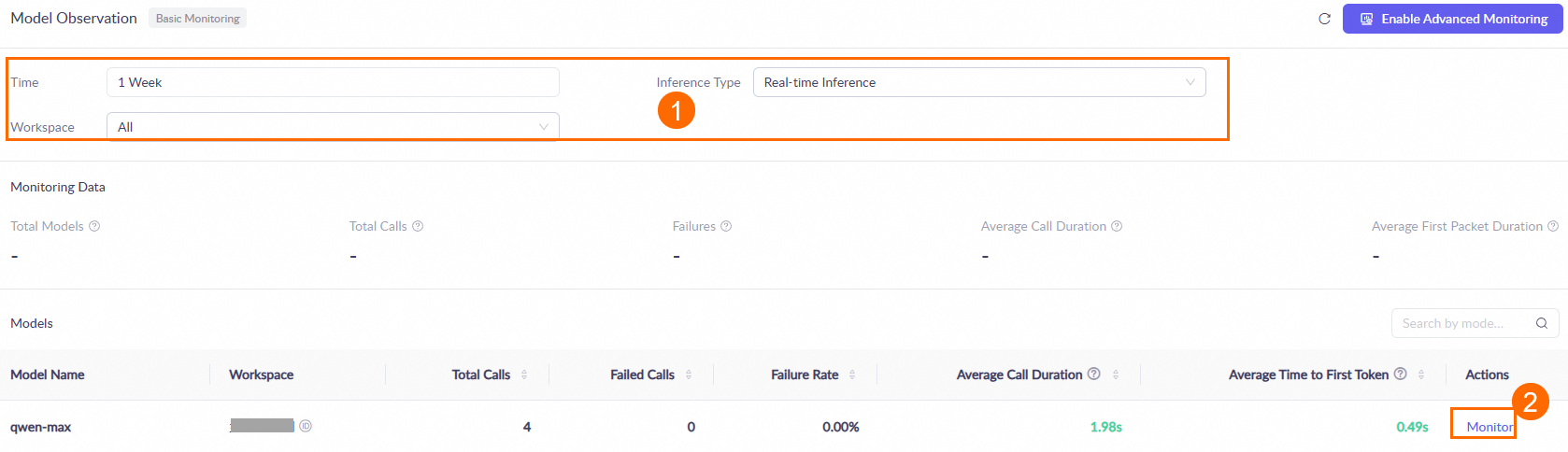
One hour after you call a model, go to the Monitoring (Singapore or Beijing) page. Set the query conditions, such as the time range and workspace. Then, in the Models area, find the target model and click Monitor in the Actions column to view the model's call statistics. For more information, see the Monitoring document.
Data is updated hourly. During peak periods, there may be an hour-level latency.
How can I make the model output only code without any explanatory text?
You can use the following methods:
Prompt constraints: Give clear instructions in the prompt, for example: "Return only the code. Do not include any explanations, comments, or Markdown tags."
Set a
stopsequence: Use phrases such asstop=["\n# Explanation:", "Note:"]to terminate generation before the model starts producing explanatory text. For more information, see the Qwen API reference.