This topic describes the parameters and interfaces of the Qwen-Audio-ASR-Filetrans non-real-time speech recognition Python SDK.
For input requirements such as supported audio formats, file size limits, and duration limits, see Audio specifications.
Prerequisites
-
You have activated the service and Obtain an API key. Please Configure API key as an environment variable instead of hardcoding it in your code to prevent security risks caused by code leakage.
Quick start
The following examples use DashScope Python SDK 2.0. The Core resource (client.audio.asr) provides methods to submit, wait for, and query tasks in either of the following ways:
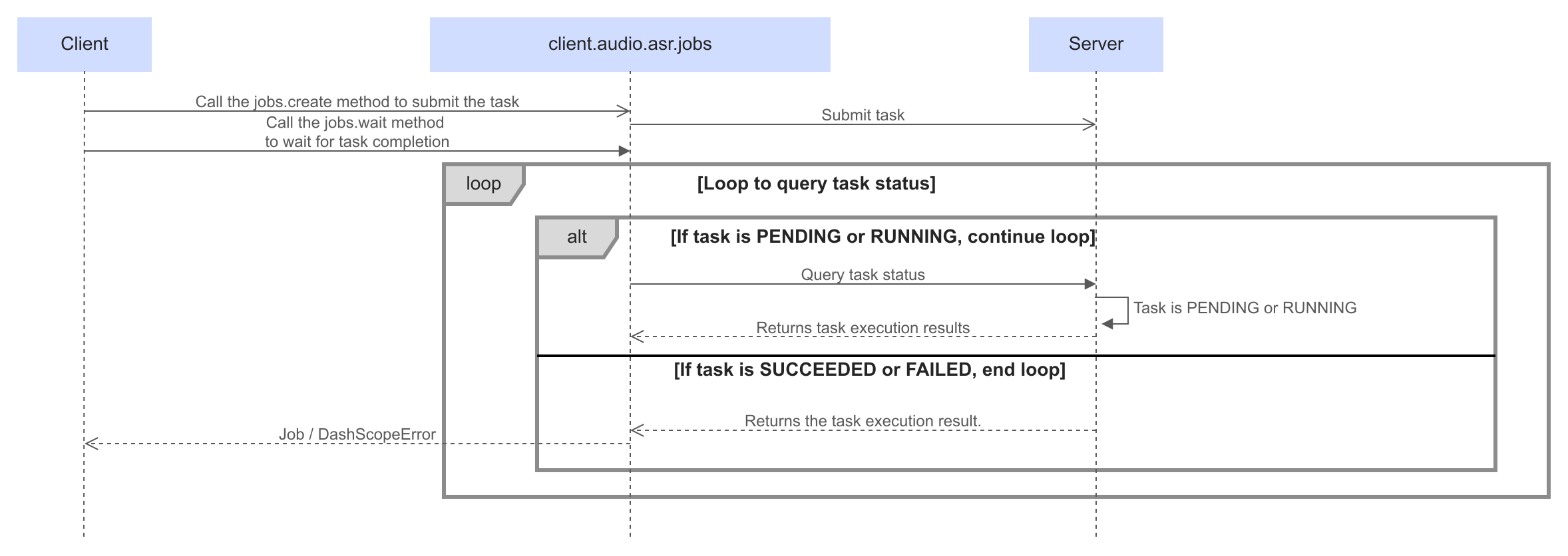
- Submit the task asynchronously and wait synchronously: after submitting the task, block the current thread until the task finishes and return the recognition result.
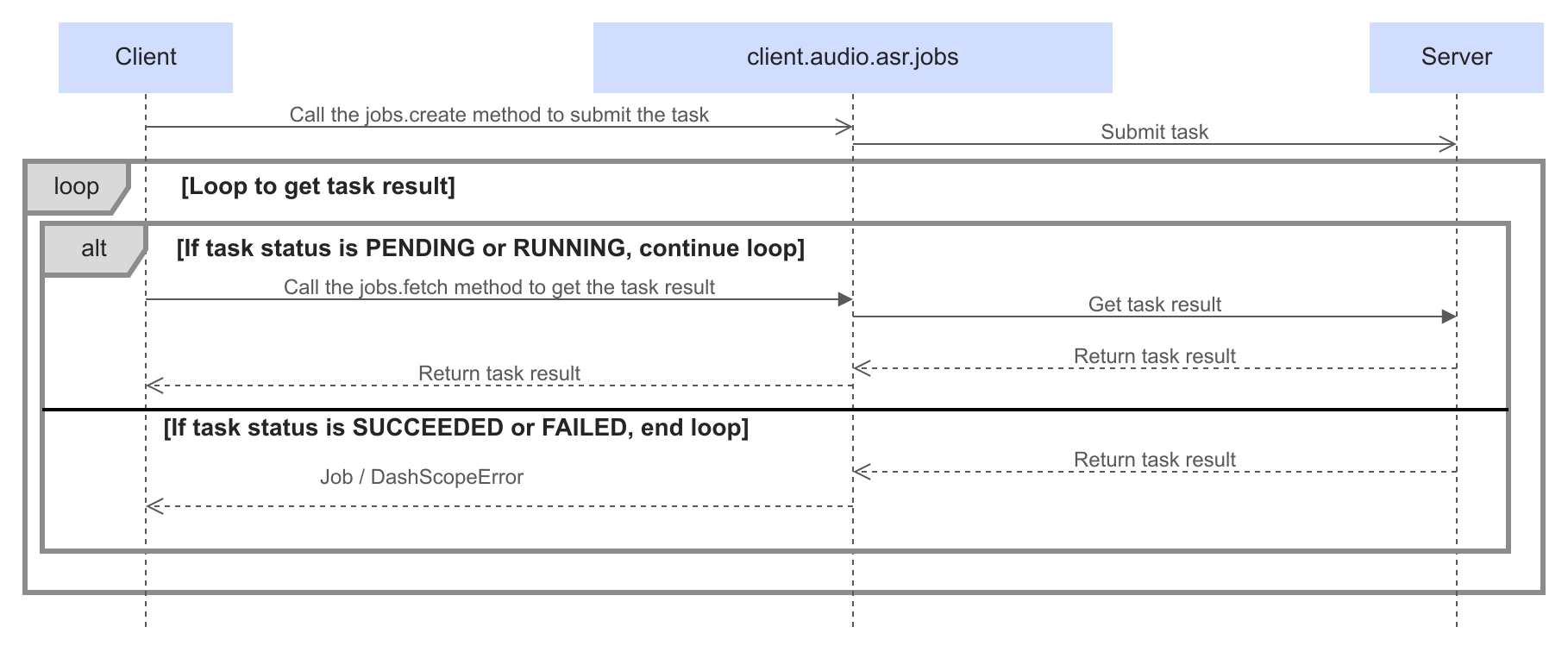
- Submit the task asynchronously and query the result asynchronously: after submitting the task, call the query interface to retrieve the result whenever you need it.
Submit asynchronously and wait synchronously
-
Call
client.audio.asr.jobs.createto submit a task with the request parameters.Note
- The file transcription service processes tasks submitted through the API on a best-effort basis. After you submit a task, it enters the queued (
PENDING) state. The queuing time depends on the queue length and the file duration, so it cannot be stated precisely, but it is usually within a few minutes. Once processing starts, speech recognition completes at hundreds of times real-time speed. - After each task finishes, the recognition result and the download URL are valid for 24 hours. After they expire, you can no longer query the task or download the result through the URL returned in a previous query.
- The file transcription service processes tasks submitted through the API on a best-effort basis. After you submit a task, it enters the queued (
-
Call
client.audio.asr.jobs.wait(job=job)to wait synchronously for completion.While the task is
PENDINGorRUNNING,jobs.waitcontinues to wait. It returns aJobwhen the task succeeds.The methods return a
Job. Read the result list fromjob.results; eachtranscription_urlpoints to a downloadable transcription result.
import json
import os

import dashscope

# Replace {WorkspaceId} with the actual workspace ID for the region.
client = dashscope.Client(
    api_key=os.environ["DASHSCOPE_API_KEY"],
    workspace="{WorkspaceId}",
    region="ap-southeast-1",
)

job = client.audio.asr.jobs.create(
    model="qwen-audio-3.1-asr-flash-filetrans",
    file_urls=["{YOUR_AUDIO_URL}"],
)

job = client.audio.asr.jobs.wait(job=job)

print(json.dumps(job.model_dump(), indent=4, ensure_ascii=False))
Submit asynchronously and query the result asynchronously
-
Call
client.audio.asr.jobs.createto submit a task with the request parameters.Note
- The file transcription service processes tasks submitted through the API on a best-effort basis. After you submit a task, it enters the queued (
PENDING) state. The queuing time depends on the queue length and the file duration, so it cannot be stated precisely, but it is usually within a few minutes. Once processing starts, speech recognition completes at hundreds of times real-time speed. - After each task finishes, the recognition result and the download URL are valid for 24 hours. After they expire, you can no longer query the task or download the result through the URL returned in a previous query.
- The file transcription service processes tasks submitted through the API on a best-effort basis. After you submit a task, it enters the queued (
-
Call
client.audio.asr.jobs.fetch(task_id)in a loop and read the results when the task succeeds.Read the task status from
job.status. This example queries the task once per second.The methods return a
Job. Read the result list fromjob.results; eachtranscription_urlpoints to a downloadable transcription result.
import json
import os
import time

import dashscope

# Replace {WorkspaceId} with the actual workspace ID for the region.
client = dashscope.Client(
    api_key=os.environ["DASHSCOPE_API_KEY"],
    workspace="{WorkspaceId}",
    region="ap-southeast-1",
)

job = client.audio.asr.jobs.create(
    model="qwen-audio-3.1-asr-flash-filetrans",
    file_urls=["{YOUR_AUDIO_URL}"],
)

while job.status in ("PENDING", "RUNNING"):
    time.sleep(1)
    job = client.audio.asr.jobs.fetch(task_id=job.task_id)

print(json.dumps(job.model_dump(), indent=4, ensure_ascii=False))
Service endpoints
The SDK defaults to the Beijing region. When creating dashscope.Client, set region to the target region and workspace to the workspace ID. The region setting applies only to this Client.
Singapore
https://{WorkspaceId}.ap-southeast-1.maas.aliyuncs.com/api/v1
Replace {WorkspaceId} with your actual Workspace ID.
China (Beijing)
https://{WorkspaceId}.cn-beijing.maas.aliyuncs.com/api/v1
Replace {WorkspaceId} with your actual Workspace ID.
API keys differ across regions. Use the API key for the corresponding region.
Request parameters
Set request parameters through client.audio.asr.transcribe or client.audio.asr.jobs.create.
| Parameter | Type | Required | Description |
|---|---|---|---|
|
| Yes | The model name. |
|
| Yes | A list of URLs of the audio or video files to transcribe. HTTP and HTTPS are supported. A single request supports only one URL. For input requirements such as supported audio formats, file size limits, and duration limits, see Audio specifications. If the recording is stored in Alibaba Cloud OSS, the RESTful API supports temporary URLs prefixed with Important
|
|
| No | Supported by |
|
| No | The ID of a precompiled hot word list. Generate this ID in advance by calling the create hot word list API. Pass the ID during recognition to use the hot words in the list. Suitable for scenarios where the vocabulary is known and relatively stable, and where you need to reuse the same word list across requests. For usage details, see Precompiled hotwords. |
|
| No | Instant hot words. Passed as key-value pairs, where the key is the hot word text ( Suitable for temporary, session-level hot word optimization. When instant and precompiled hotwords are configured together, the system merges both sets. If the merged set contains more than 2000 hotwords, the system randomly selects 2000 to use. For usage details, see Instant hotwords. Example: The following example reuses the |
|
| No | The index of the audio tracks to recognize in a multi-track audio file. The index starts at 0. For example, [0] recognizes the first track, and [0, 1] recognizes the first and second tracks at the same time. If you omit this parameter, only the first track is processed. ImportantEach specified track is billed independently. For example, requesting [0, 1] for a single file incurs two separate charges. Default value: [0]. |
|
| No | The sensitive words to process during speech recognition. You can set a different handling method for each sensitive word. For details, see Sensitive word filtering. |
|
| No | Whether to enable speaker diarization. Disabled by default. Applies only to mono audio. Multi-channel audio does not support speaker diarization. When enabled, the recognition result includes a NoteWhen speaker diarization is enabled, keep the audio duration within 2 hours. Otherwise, recognition may fail or time out. Default value: False. For an example of |
|
| No | ImportantTakes effect only when speaker diarization is enabled ( A reference value for the number of speakers. The valid range is an integer from 2 to 100 (inclusive). By default, the number of speakers is detected automatically. If you set this value, it only guides the algorithm to output the specified count when possible and does not guarantee that exact count. No default value. |
|
| No | The language codes to recognize. If you can't determine the language in advance, leave it unset and the model detects the language automatically. You can set up to 4 values. If you set more, only the first 4 take effect. Click to view the supported language codes
|
Response
Job
Job contains task information, raw output, and usage information.
{
    "task_id": "00000000-0000-0000-0000-000000000001",
    "status": "PENDING",
    "submitted_at": "2026-10-29 10:00:00.000",
    "scheduled_at": null,
    "finished_at": null,
    "output": {
        "task_id": "00000000-0000-0000-0000-000000000001",
        "task_status": "PENDING",
        "submit_time": "2026-10-29 10:00:00.000"
    },
    "usage": null
}
{
    "task_id": "00000000-0000-0000-0000-000000000001",
    "status": "RUNNING",
    "submitted_at": "2026-10-29 10:00:00.000",
    "scheduled_at": "2026-10-29 10:00:00.100",
    "finished_at": null,
    "output": {
        "task_id": "00000000-0000-0000-0000-000000000001",
        "task_status": "RUNNING",
        "submit_time": "2026-10-29 10:00:00.000",
        "scheduled_time": "2026-10-29 10:00:00.100"
    },
    "usage": null
}
{
    "task_id": "00000000-0000-0000-0000-000000000001",
    "status": "SUCCEEDED",
    "submitted_at": "2026-10-29 10:00:00.000",
    "scheduled_at": "2026-10-29 10:00:00.100",
    "finished_at": "2026-10-29 10:00:01.000",
    "output": {
        "task_id": "00000000-0000-0000-0000-000000000001",
        "task_status": "SUCCEEDED",
        "submit_time": "2026-10-29 10:00:00.000",
        "scheduled_time": "2026-10-29 10:00:00.100",
        "end_time": "2026-10-29 10:00:01.000",
        "results": [
            {
                "file_url": "{YOUR_AUDIO_URL}",
                "transcription_url": "{TRANSCRIPTION_URL}",
                "subtask_status": "SUCCEEDED"
            }
        ]
    },
    "usage": {
        "duration": 1,
        "total_tokens": 25,
        "output_tokens": 4,
        "input_tokens": 21
    }
}
{
    "task_id": "00000000-0000-0000-0000-000000000001",
    "status": "FAILED",
    "submitted_at": "2026-10-29 10:00:00.000",
    "scheduled_at": "2026-10-29 10:00:00.100",
    "finished_at": "2026-10-29 10:00:01.000",
    "output": {
        "task_id": "00000000-0000-0000-0000-000000000001",
        "task_status": "FAILED",
        "submit_time": "2026-10-29 10:00:00.000",
        "scheduled_time": "2026-10-29 10:00:00.100",
        "end_time": "2026-10-29 10:00:01.000",
        "code": "SERVER_ERROR",
        "file_url": "{YOUR_AUDIO_URL}",
        "subtask_status": "FAILED",
        "results": [
            {
                "file_url": "{YOUR_AUDIO_URL}",
                "subtask_status": "FAILED",
                "results": []
            }
        ]
    },
    "usage": null
}
Field | Description |
|---|---|
| The task ID. |
| The task status: |
| The submission time, corresponding to |
| The processing start time, corresponding to |
| The completion time, corresponding to |
| The raw task output dictionary. |
| The subtask result list, accessible through |
| Task usage information. |
Job.output
job.output is the raw task output dictionary returned by the service.
PENDING
{
    "task_id": "00000000-0000-0000-0000-000000000001",
    "task_status": "PENDING",
    "submit_time": "2026-10-29 10:00:00.000"
}
RUNNING
{
    "task_id": "00000000-0000-0000-0000-000000000001",
    "task_status": "RUNNING",
    "submit_time": "2026-10-29 10:00:00.000",
    "scheduled_time": "2026-10-29 10:00:00.100"
}
SUCCEEDED
{
    "task_id": "00000000-0000-0000-0000-000000000001",
    "task_status": "SUCCEEDED",
    "submit_time": "2026-10-29 10:00:00.000",
    "scheduled_time": "2026-10-29 10:00:00.100",
    "end_time": "2026-10-29 10:00:01.000",
    "results": [
        {
            "file_url": "{YOUR_AUDIO_URL}",
            "transcription_url": "{TRANSCRIPTION_URL}",
            "subtask_status": "SUCCEEDED"
        }
    ]
}
FAILED (raise_on_error=False)
{
    "task_id": "00000000-0000-0000-0000-000000000001",
    "task_status": "FAILED",
    "submit_time": "2026-10-29 10:00:00.000",
    "scheduled_time": "2026-10-29 10:00:00.100",
    "end_time": "2026-10-29 10:00:01.000",
    "code": "SERVER_ERROR",
    "file_url": "{YOUR_AUDIO_URL}",
    "subtask_status": "FAILED",
    "results": [
        {
            "file_url": "{YOUR_AUDIO_URL}",
            "subtask_status": "FAILED",
            "results": []
        }
    ]
}
| Parameter | Description |
|---|---|
| The error code. Combine it with the |
| The error message. Combine it with the |
| Task ID. |
| Task status. One of four states: When a task contains multiple subtasks, the overall task status is marked as |
| Subtask recognition results. |
| Subtask status. One of four states: |
| URL of the recognized audio. |
| URL of the audio recognition result. The recognition result is saved as a JSON file. You can download the file from the link associated with |
Recognition result description
The recognition result is saved as a JSON file.
{
    "file_url":"{YOUR_AUDIO_URL}",
    "properties":{
        "audio_format":"pcm_s16le",
        "channels":[
            0
        ],
        "original_sampling_rate":16000,
        "original_duration_in_milliseconds":3834
    },
    "transcripts":[
        {
            "channel_id":0,
            "content_duration_in_milliseconds":3720,
            "text":"Hello world, this is Alibaba Speech Lab.",
            "sentences":[
                {
                    "begin_time":100,
                    "end_time":3820,
                    "text":"Hello world, this is Alibaba Speech Lab.",
                    "sentence_id":1,
                    "speaker_id":0, //This field is displayed only when automatic speaker diarization is enabled
                    "words":[
                        {
                            "begin_time":100,
                            "end_time":596,
                            "text":"Hello ",
                            "punctuation":""
                        },
                        {
                            "begin_time":596,
                            "end_time":844,
                            "text":"world",
                            "punctuation":", "
                        }
                        // Other content is omitted here
                    ]
                }
            ]
        }
    ]
}
The following parameters are worth noting:
| Parameter | Type | Description |
|---|---|---|
|
| The audio format of the source file. |
| array[integer] | The track index of the audio in the source file. For single-track audio, [0] is returned; for dual-track audio, [0, 1] is returned; and so on. |
|
| The sampling rate (Hz) of the audio in the source file. |
|
| The original audio duration (ms) in the source file. |
|
| The track index of the transcription result, starting from 0. |
|
| The duration (ms) of content in the track that is identified as speech. NoteThe following billing description applies to The speech recognition model service transcribes only the content in a track that is identified as speech, and meters and bills based on that duration. Non-speech content is not metered or billed. Typically, the speech content duration is shorter than the original audio duration. Because whether speech content exists is determined by an AI model, the result may differ slightly from the actual situation. |
|
| The paragraph-level transcription result. |
|
| The sentence-level transcription result. |
|
| The word-level transcription result. |
|
| The start timestamp (ms). |
|
| The end timestamp (ms). |
|
| The transcription result. |
|
| The index of the current speaker, starting from 0, used to distinguish between different speakers. This field appears in the recognition result only when speaker diarization is enabled. |
|
| The punctuation predicted after the word, if any. |
Key interfaces
Core resource (client.audio.asr)
Create a client with dashscope.Client, then use its client.audio.asr resource. All methods below return a Job.
Method | Method signature | Description |
|---|---|---|
| | Submit a task and wait synchronously for completion. The default model is |
| | Submit a task and return a |
| | Pass a |
| | Query the task status and results once by task ID, without waiting for completion. |
Error codes
By default, a failed task raises DashScopeError. To receive a failed Job, set raise_on_error=False when creating the Client, and check job.status.
If you encounter an error, see Error codes to troubleshoot.
When a task contains multiple subtasks, the overall task status is marked as SUCCEEDED as long as at least one subtask succeeds. Check the subtask_status field to determine the result of each subtask.
Error response example:
{
    "task_id": "7bac899c-06ec-4a79-8875-xxxxxxxxxxxx",
    "task_status": "SUCCEEDED",
    "submit_time": "2024-12-16 16:30:59.170",
    "scheduled_time": "2024-12-16 16:30:59.204",
    "end_time": "2024-12-16 16:31:02.375",
    "results": [
        {
            "file_url": "{YOUR_AUDIO_URL}",
            "code": "InvalidFile.DownloadFailed",
            "message": "The audio file cannot be downloaded.",
            "subtask_status": "FAILED"
        }
    ],
    "task_metrics": {
        "TOTAL": 1,
        "SUCCEEDED": 0,
        "FAILED": 1
    }
}
FAQ
Features
Q: Is Base64-encoded audio supported?
Base64-encoded audio is not supported. Only audio at a publicly accessible URL can be recognized. Binary streams and local files cannot be recognized directly.
Q: How do I make an audio file available at a publicly accessible URL?
The typical steps are as follows. This is one approach; the exact process varies by storage product. We recommend that you upload the audio to Alibaba Cloud OSS:
1. Choose a storage and hosting method
For example:
-
Object storage service (recommended):
- Use a cloud provider's object storage service (such as Alibaba Cloud OSS) to upload the audio file to a bucket and set it to public access.
- Advantages: high availability, CDN acceleration support, and easy management.
-
Web server:
- Place the audio file on a web server that supports HTTP/HTTPS access (such as Nginx or Apache).
- Advantages: suitable for small projects or local testing.
-
Content delivery network (CDN):
- Host the audio file on a CDN and access it through the URL that the CDN provides.
- Advantages: accelerates file delivery and suits high-concurrency scenarios.
2. Upload the audio file
Upload the audio according to the storage or hosting method you chose. For example:
-
Object storage service:
- Log in to the cloud provider's console and create a bucket.
- Upload the audio file, and set its permission to public read or generate a temporary access link.
-
Web server:
- Place the audio file in a designated directory on the server (such as
/var/www/html/audio/). - Make sure the file is accessible over HTTP/HTTPS.
- Place the audio file in a designated directory on the server (such as
3. Generate a publicly accessible URL
For example:
-
Object storage service:
- After the file is uploaded, the system automatically generates a public access URL (typically in the format
https://<bucket-name>.<region>.aliyuncs.com/<file-name>). - For a friendlier domain name, bind a custom domain and enable HTTPS.
- After the file is uploaded, the system automatically generates a public access URL (typically in the format
-
Web server:
- The access URL is usually the server address plus the file path (such as
https://your-domain.com/audio/file.mp3).
- The access URL is usually the server address plus the file path (such as
-
CDN:
- After you configure CDN acceleration, use the URL that the CDN provides (such as
https://cdn.your-domain.com/audio/file.mp3).
- After you configure CDN acceleration, use the URL that the CDN provides (such as
4. Verify that the URL works
Make sure the generated URL is accessible over the public network. For example:
- Open the URL in a browser and check whether the audio file plays.
- Use a tool (such as
curlor Postman) to verify that the URL returns the correct HTTP response (status code 200).
When using the SDK, if audio files are stored in Alibaba Cloud OSS, temporary URLs with the oss:// prefix are not supported.
When using the RESTful API, if audio files are stored in Alibaba Cloud OSS, temporary URLs with the oss:// prefix are supported:
- The temporary URL is valid for 48 hours and cannot be used after it expires. Do not use it in a production environment.
- The API for obtaining an upload credential is limited to 100 QPS and does not support scaling out. Do not use it in production environments, high-concurrency scenarios, or stress testing scenarios.
- For production environments, use a stable storage service such as OSS to ensure long-term file availability and avoid rate limiting issues.
Q: How long does it take to get the recognition result?
After a task is submitted, it enters the queued (PENDING) state. The queuing time depends on the queue length and the audio duration, so it cannot be stated exactly, but it is usually within a few minutes. In general, the longer the audio, the longer it takes.
Troubleshooting
If you encounter a code error, troubleshoot the issue based on the information in Error codes.
Q: Polling never returns a result?
This may be caused by throttling. Wait a moment and try again.
Q: Why can't the speech be recognized (no recognition result)?
Check that the audio format and sample rate are correct and meet the parameter constraints.
Use the ffprobe tool to get the audio container, codec, sample rate, channels, and other details:
ffprobe -v error -show_entries format=format_name -show_entries stream=codec_name,sample_rate,channels -of default=noprint_wrappers=1 input.xxx