A user-defined table-valued function (UDTF) returns a table — one or more rows — from a single input row. This makes it fundamentally different from a scalar UDF, which returns one value per call. In SQL, a UDTF is invoked as a table source: use it with the AS clause in a SELECT statement.
MaxCompute supports writing UDTFs in Java. This topic covers the code structure, required methods, type mappings, SQL usage constraints, and an end-to-end example.
Code structure
Use Maven in IntelliJ IDEA or MaxCompute Studio to write UDTF code in Java. A Java UDTF consists of the following components:
| Component | Required | Description |
|---|---|---|
| Java package | No | Packages Java classes into a JAR file for reuse. |
| Base UDTF classes | Yes | com.aliyun.odps.udf.UDTF, com.aliyun.odps.udf.annotation.Resolve, and com.aliyun.odps.udf.UDFException. For additional classes or complex data types, see Overview. |
| Custom Java class | Yes | The organizational unit of UDTF code. Defines the variables and methods for your business logic. |
@Resolve annotation |
Yes | Declares the input and output types of the UDTF. The format is @Resolve(<signature>). |
| Implementation methods | Yes | setup, process, close, and forward. See Methods below. |
Methods
| Method | Description |
|---|---|
public void setup(ExecutionContext ctx) throws UDFException |
Initialization method. Called once per worker before the UDTF processes any input data. |
public void process(Object[] args) throws UDFException |
Called once per input SQL record. Input parameters are passed as Object[]. Call forward inside this method to emit output rows. |
public void close() throws UDFException |
Termination method. Called only once, after the last record has been processed. |
forward(Object... args) |
Emits one output row per call. Use the AS clause in SQL to name the output columns. |
Data loss may occur if you do not use the process or close method to call the forward function. If a background thread executes the forward call, process must not return until forward has finished.
You can use Java data types or Java writable types in a Java UDTF. For type mappings, see Data types.
The following example shows the complete code structure of a Java UDTF:
// Package Java classes into a JAR file named org.alidata.odps.udtf.examples.
package org.alidata.odps.udtf.examples;
// Base UDTF classes.
import com.aliyun.odps.udf.UDTF;
import com.aliyun.odps.udf.UDTFCollector;
import com.aliyun.odps.udf.annotation.Resolve;
import com.aliyun.odps.udf.UDFException;

// Splits a string by whitespace and emits one row per token, paired with the original bigint value.
@Resolve("string,bigint->string,bigint")
public class MyUDTF extends UDTF {
    @Override
    public void process(Object[] args) throws UDFException {
        String a = (String) args[0];
        Long b = (Long) args[1];
        for (String t : a.split("\\s+")) {
            forward(t, b);
        }
    }
}
@Resolve annotation
The @Resolve annotation declares the UDTF's type contract. MaxCompute checks type consistency at semantic parsing time. If the actual types do not match the declared signature, an error is returned.
Format:
@Resolve('<arg_type_list> -> <type_list>')| Parameter | Description |
|---|---|
arg_type_list |
Data types of input parameters, separated by commas. Supported types: BIGINT, STRING, DOUBLE, BOOLEAN, DATETIME, DECIMAL, FLOAT, BINARY, DATE, DECIMAL(precision, scale), CHAR, VARCHAR, ARRAY, MAP, STRUCT, and nested complex types. Use * to accept any number of parameters of any type. Leave blank ('') to accept no input parameters. |
type_list |
Data types of return values, separated by commas. Supported types: BIGINT, STRING, DOUBLE, BOOLEAN, DATETIME, DECIMAL, FLOAT, BINARY, DATE, DECIMAL(precision, scale), ARRAY, MAP, STRUCT, and nested complex types. |
Examples:
| Annotation | Input types | Return types |
|---|---|---|
@Resolve('bigint,boolean->string,datetime') |
BIGINT, BOOLEAN | STRING, DATETIME |
@Resolve('*->string,datetime') |
Any | STRING, DATETIME |
@Resolve('->double,bigint,string') |
None | DOUBLE, BIGINT, STRING |
@Resolve("array<string>,struct<a1:bigint,b1:string>,string->map<string,bigint>,struct<b1:bigint>") |
ARRAY, STRUCT, STRING | MAP, STRUCT |
For dynamic parameter syntax extensions, see Dynamic parameters of UDAFs and UDTFs.
Data types
MaxCompute data types, Java types, and Java writable types are mapped as follows. Write Java UDTFs based on these mappings to ensure type consistency.
| MaxCompute type | Java type | Java writable type |
|---|---|---|
| TINYINT | java.lang.Byte | ByteWritable |
| SMALLINT | java.lang.Short | ShortWritable |
| INT | java.lang.Integer | IntWritable |
| BIGINT | java.lang.Long | LongWritable |
| FLOAT | java.lang.Float | FloatWritable |
| DOUBLE | java.lang.Double | DoubleWritable |
| DECIMAL | java.math.BigDecimal | BigDecimalWritable |
| BOOLEAN | java.lang.Boolean | BooleanWritable |
| STRING | java.lang.String | Text |
| VARCHAR | com.aliyun.odps.data.Varchar | VarcharWritable |
| BINARY | com.aliyun.odps.data.Binary | BytesWritable |
| DATE | java.sql.Date | DateWritable |
| DATETIME | java.util.Date | DatetimeWritable |
| TIMESTAMP | java.sql.Timestamp | TimestampWritable |
| INTERVAL_YEAR_MONTH | N/A | IntervalYearMonthWritable |
| INTERVAL_DAY_TIME | N/A | IntervalDayTimeWritable |
| ARRAY | java.util.List | N/A |
| MAP | java.util.Map | N/A |
| STRUCT | com.aliyun.odps.data.Struct | N/A |
Java writable types are supported as input or return types only when your MaxCompute project uses the MaxCompute V2.0 data type edition. For more information, see Data type editions.
Three additional rules apply to data types in Java UDTFs:
-
Input and return value types are always objects. Use object types such as
String, not primitive types such asstring. -
Primitive Java types (such as
int,long,boolean) cannot represent SQL NULL. Do not use them. -
NULL values in MaxCompute SQL are represented by NULL in Java.
Limitations
The following SQL usage restrictions apply to UDTFs.
No other columns or expressions in the same SELECT
A UDTF must be the only item in the SELECT clause. The following statement is invalid:
-- Invalid: mixing a UDTF with another column.
SELECT value, user_udtf(key) AS mycol ...
No nesting
UDTFs cannot be used as input to other UDTFs:
-- Invalid: nesting UDTFs.
SELECT user_udtf1(user_udtf2(key)) AS mycol ...;
No GROUP BY, DISTRIBUTE BY, or SORT BY in the same SELECT
-- Invalid: combining a UDTF with GROUP BY.
SELECT user_udtf(key) AS mycol ... GROUP BY mycol;
No Internet access
UDFs cannot access the Internet by default. To enable Internet access, submit the network connection application form. After approval, the MaxCompute technical support team will help you establish the connection. For instructions, see Network connection process.
Usage notes
-
Do not package classes with the same name but different logic into the JAR files of different UDTFs. For example, if
udtf1.jarandudtf2.jarboth containcom.aliyun.UserFunction.classbut with different logic, calling both UDTFs in the same SQL statement causes MaxCompute to load only one version. This leads to incorrect behavior and may cause a compilation error.
Call a Java UDTF
After developing a Java UDTF following the Development process, call it in MaxCompute SQL using one of the following methods:
-
Within a project: The same as calling a built-in function.
-
Across projects: Reference a UDTF from project B in project A using the syntax
SELECT B:udf_in_other_project(arg0, arg1) AS res FROM table_t;. For more information, see Cross-project resource access based on packages.
Example
This example walks through building and calling a Java UDTF with MaxCompute Studio. The UDTF splits a string column by whitespace and emits one row per token.
Prerequisites
Before you begin, ensure that you have:
Write UDTF code
-
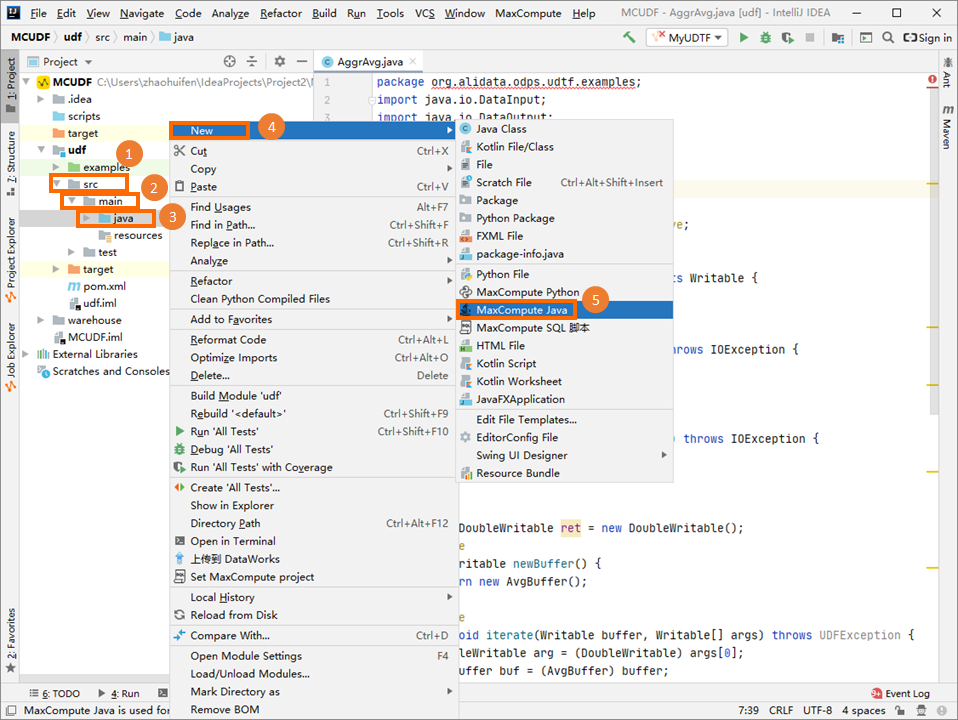
In the Project tab, navigate to src > main > java, right-click java, and choose New > MaxCompute Java.
-
In the Create new MaxCompute java class dialog box, click UDTF, enter a name in the Name field, and press Enter. This example uses
MyUDTFas the class name. If you have not created a package yet, specify the name inpackagename.classnameformat. MaxCompute Studio generates the package automatically.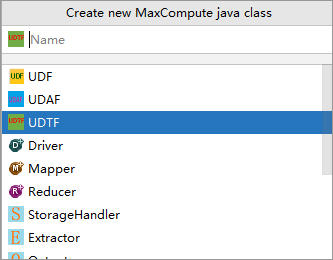
-
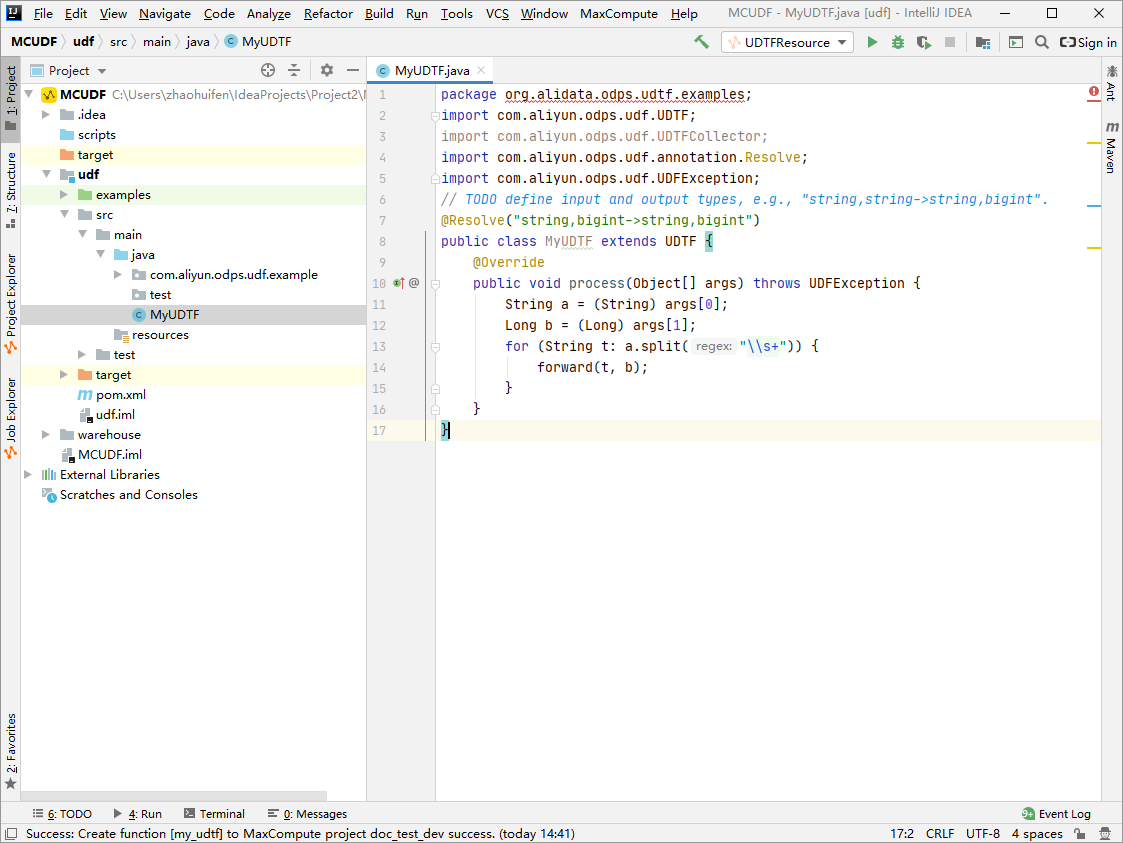
Write the following code in the editor:
package org.alidata.odps.udtf.examples;
import com.aliyun.odps.udf.UDTF;
import com.aliyun.odps.udf.UDTFCollector;
import com.aliyun.odps.udf.annotation.Resolve;
import com.aliyun.odps.udf.UDFException;

// Splits the first string argument by whitespace and emits one row per token,
// pairing each token with the original bigint value.
@Resolve("string,bigint->string,bigint")
public class MyUDTF extends UDTF {
    @Override
    public void process(Object[] args) throws UDFException {
        String a = (String) args[0];
        Long b = (Long) args[1];
        for (String t : a.split("\\s+")) {
            forward(t, b);
        }
    }
}
Debug locally
Run the UDTF on your local machine to verify that the code works before uploading it.
For debug instructions, see Perform a local run to debug the UDF.
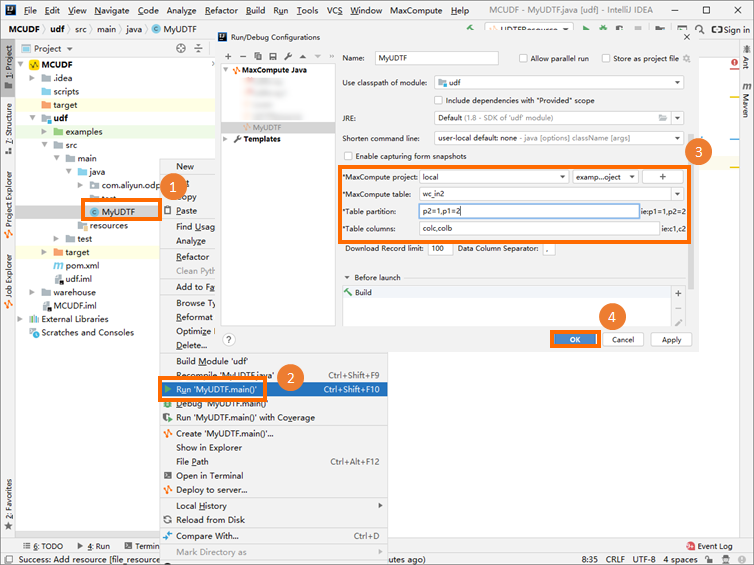
The parameter settings in the preceding figure are for reference only.
Register the UDTF
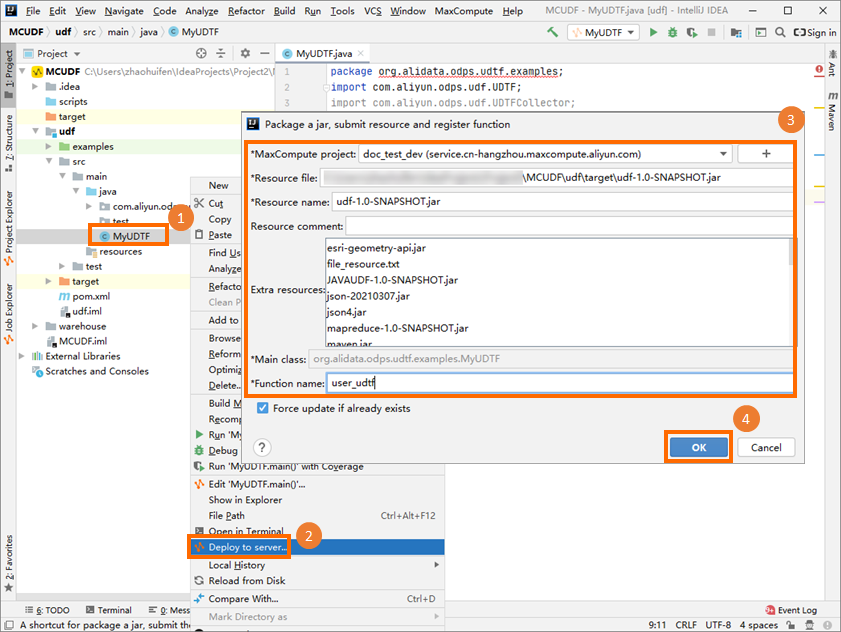
Package the UDTF into a JAR file, upload it to your MaxCompute project, and register it as a function. This example registers the function as user_udtf.
For packaging instructions, see Procedure.
Call the UDTF in SQL
In Project Explorer, right-click your MaxCompute project and select Open in Console to open the MaxCompute client.
The input table my_table has the following structure:
+------------+------------+
| col0       | col1       |
+------------+------------+
| A B        | 1          |
| C D        | 2          |
+------------+------------+
Run the following statement to call the UDTF:
SELECT user_udtf(col0, col1) AS (c0, c1) FROM my_table;Expected output:
+----+------------+
| c0 | c1         |
+----+------------+
| A  | 1          |
| B  | 1          |
| C  | 2          |
| D  | 2          |
+----+------------+