When MaxCompute's built-in functions are insufficient for your needs, use the workflow in this topic to create a user-defined function (UDF) in a development tool such as IntelliJ IDEA (Maven) or MaxCompute Studio. You can then call the UDF in MaxCompute to support a wide range of use cases. This topic describes how to write a UDF in Java.
Hard limits
Internet access — UDFs cannot access the Internet by default. To enable Internet access, submit a network connection application. After approval, the MaxCompute technical support team will contact you to establish the connection. For details, see Network Connection Request FormNetwork connection process.
VPC access — UDFs cannot access resources in a virtual private cloud (VPC) by default. To enable VPC access, establish a network connection between MaxCompute and the VPC. For details, see Use UDFs to access resources in VPCs.
Unsupported table types — UDFs, UDAFs, and UDTFs cannot read data from the following table types:
Tables on which schema evolution has been performed
Tables that contain complex data types
Tables that contain JSON data types
Transactional tables
Usage notes
Before you write a Java UDF, you must understand the UDF code structure and the mappings between Java UDF data types and MaxCompute data types. For more information about the mappings, see Appendix: Data types.
When you write a Java UDF, take note of the following:
Avoid including classes that have the same name but different logic in different UDF JAR files. For example, assume that UDF1 and UDF2 correspond to the resource JAR files udf1.jar and udf2.jar, and both JAR files contain a class named
com.aliyun.UserFunction.classbut with different logic. If you call UDF1 and UDF2 in the same SQL statement, MaxCompute randomly loads one of the classes. This can cause unexpected execution results or even a compilation failure.In a Java UDF, the data types of input parameters and return values must be object types (e.g., String, Long), not primitive types (e.g., int, long).
NULL values in SQL map to NULL in Java. Java primitive types cannot represent NULL values in SQL and are not allowed.
UDF development workflow
UDF development involves several steps: preparing the environment, writing UDF code, uploading the JAR file, registering the UDF, and debugging. The following sections demonstrate this workflow using MaxCompute Studio, DataWorks, and odpscmd.
Use MaxCompute Studio
The following example shows how to develop and call a Java UDF that converts characters to lowercase in MaxCompute Studio.
Prepare the environment.
Before you can develop and debug a UDF in MaxCompute Studio, you must install MaxCompute Studio and connect it to a MaxCompute project. For more information, see the following topics:
Write UDF code.
In the Project explorer, right-click the source code directory of the module () and select .
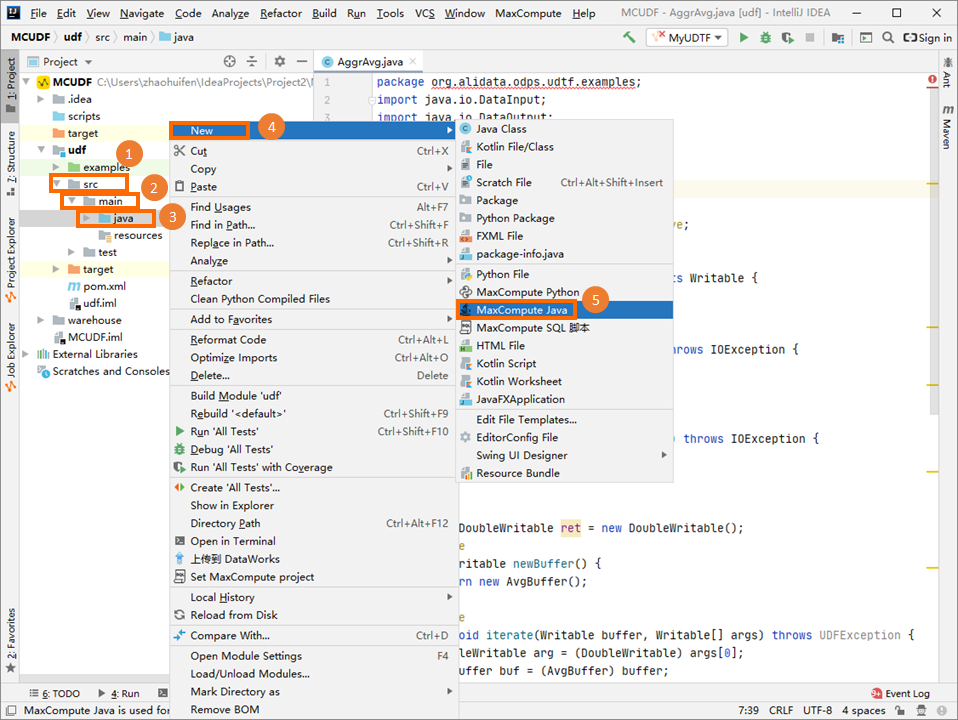
In the Create new MaxCompute java class dialog box, click UDF, enter a class name in the Name field, and then press Enter.
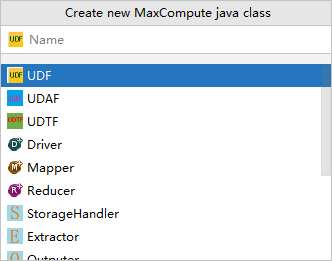
Name specifies the name of the MaxCompute Java Class to create. If you have not created a package, you can enter packagename.classname to automatically create one. In this example, the Java Class is named Lower.
Write the UDF code in the code editor.
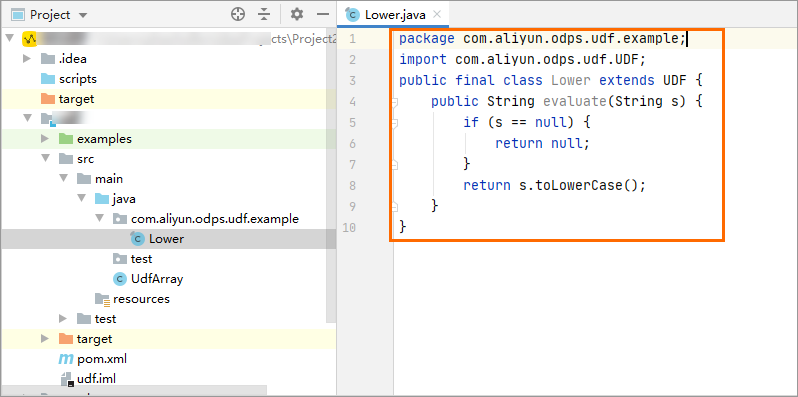 For example:
package com.aliyun.odps.udf.example; import com.aliyun.odps.udf.UDF; public final class Lower extends UDF { public String evaluate(String s) { if (s == null) { return null; } return s.toLowerCase(); } }NoteTo locally debug the Java UDF, see Develop and debug UDFs.
Upload and register the UDF.
Right-click the UDF Java file and select Deploy to server.... In the Package a jar, submit resource and register function dialog box, configure the parameters and click OK.
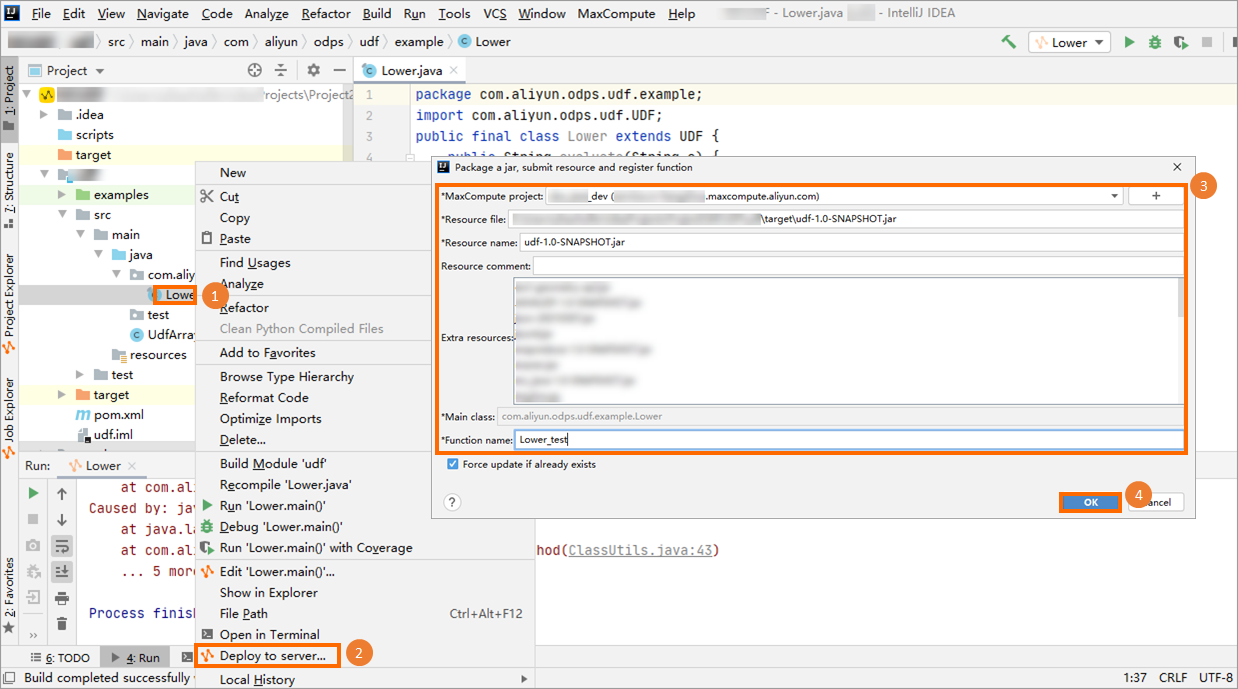
MaxCompute project: The name of the MaxCompute project to which the UDF belongs. Because the UDF is written in the connected MaxCompute project, you can retain the default value.
Resource file: The path of the resource file that the UDF depends on. You can retain the default value.
Resource name: The resource that the UDF depends on. You can retain the default value.
Function name: The name used to call the UDF in SQL statements. For example, Lower_test.
Debug the UDF.
In the left-side navigation pane, click Project Explore. Right-click the destination MaxCompute project and select Open Console. In the console, enter the SQL statement that calls the UDF and press Enter to run it.
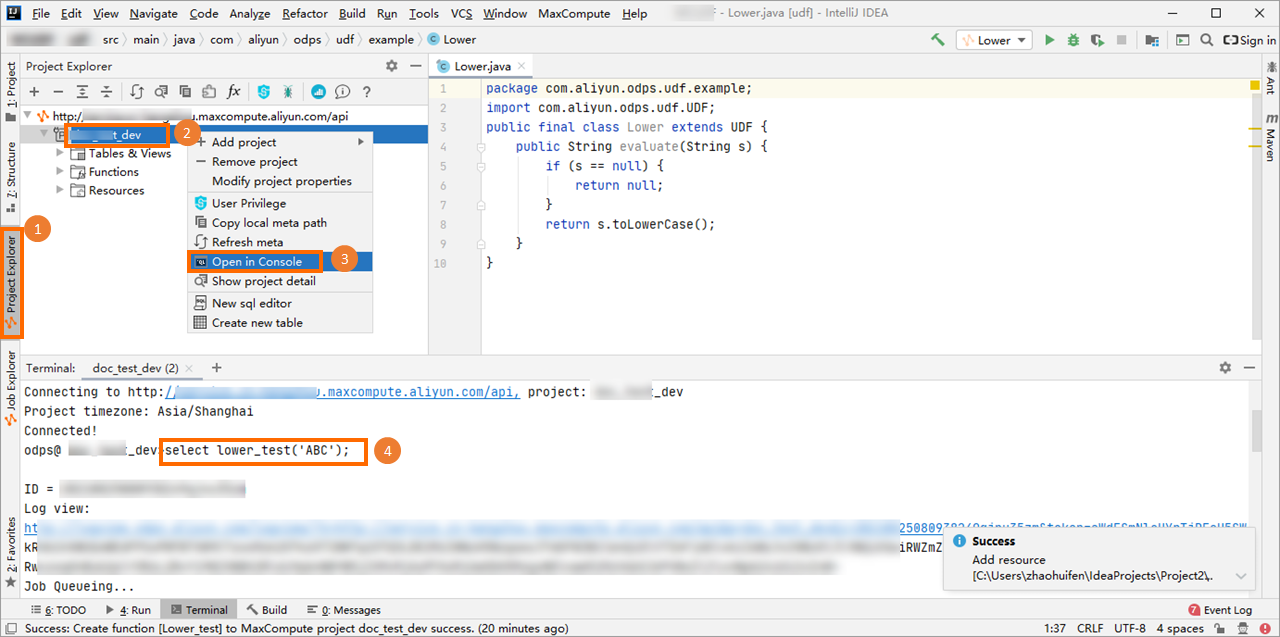 For example:
select lower_test('ABC');The following result is returned.
+-----+ | _c0 | +-----+ | abc | +-----+
Use DataWorks
Prepare the environment.
Before you can develop and debug a UDF in DataWorks, you must activate DataWorks and bind a MaxCompute project to it. For more information, see Use DataWorks.
Write UDF code.
You can write UDF code in any Java development tool and package it into a JAR file. For example:
package com.aliyun.odps.udf.example; import com.aliyun.odps.udf.UDF; public final class Lower extends UDF { public String evaluate(String s) { if (s == null) { return null; } return s.toLowerCase(); } }Upload and register the UDF.
You can upload the packaged code to DataWorks and register the UDF. For more information, see the following topics:
Debug the UDF.
After you register the UDF, create an ODPS SQL node and run a SQL command in the node to debug the UDF. For more information about how to create an ODPS SQL node, see Create an ODPS SQL node. The following is an example debugging command.
select lower_test('ABC');
Use odpscmd
Prepare the environment.
To develop and debug a UDF using odpscmd, you must install the client and configure its connection to a MaxCompute project. For more information, see Use the MaxCompute client (odpscmd).
Write UDF code.
You can write UDF code in any Java development tool and package it into a JAR file. For example:
package com.aliyun.odps.udf.example;
import com.aliyun.odps.udf.UDF;
public final class Lower extends UDF {
    public String evaluate(String s) {
        if (s == null) {
           return null;
        }
           return s.toLowerCase();
    }
}
Upload and register the UDF.
You can upload the packaged code by using odpscmd and register the UDF. For more information, see the following topics:
Debug the UDF.
After you register the UDF, you can write and run a SQL command to debug the UDF. The following is an example debugging command.
select lower_test('ABC');
Calling UDFs
After you develop a Java UDF as described in the preceding UDF development workflow, you can call it in MaxCompute SQL. The following methods are available:
Within a project — Call the UDF directly, like any built-in function.
Across projects — To use a UDF from project B in project A, reference it with the project prefix:
select B:udf_in_other_project(arg0, arg1) as res from table_t;For cross-project sharing setup, see Cross-project resource access based on packages.
UDF examples
Appendix: UDF code structure
A Java UDF is composed of the following parts:
Java package: Optional.
You can group your Java classes into a package to make them easier to find and reuse.
Inherit the UDF class: Required.
The required base class is
com.aliyun.odps.udf.UDF. If you need other UDF classes or complex data types, add the required classes from the MaxCompute SDK. For example, the class for the STRUCT data type iscom.aliyun.odps.data.Struct.@Resolveannotation: Optional.The format is
@Resolve(<signature>), wheresignaturedefines the data types of the input parameters and return value. When you use the STRUCT data type in a UDF, reflection cannot retrieve field names and field types fromcom.aliyun.odps.data.Struct. In this case, you must use the@Resolveannotation to retrieve them. If you use STRUCT in a UDF, add the@Resolveannotation to the UDF class. The annotation affects only the overloads whose parameters or return values contain com.aliyun.odps.data.Struct. Example:@Resolve("struct<a:string>,string->string"). For a detailed example, see UDF Example: Complex Data Types.Custom Java class: Required.
This is the unit that organizes your UDF code. It defines the variables and methods that implement your business logic.
evaluatemethod: Required.Your custom Java class must include a non-static public
evaluatemethod. The data types of its input parameters and return value define the UDF's SQL signature.You can implement multiple
evaluatemethods. When you call the UDF, MaxCompute selects the correctevaluatemethod based on the argument types.When you write a Java UDF, you can use Java types or Java Writable types. For detailed mappings between MaxCompute data types and Java data types, see Appendix: Data types.
UDF initialization and cleanup: Optional. You can implement initialization and cleanup using
void setup(ExecutionContext ctx)andvoid close(). Thevoid setup(ExecutionContext ctx)method is called once before theevaluatemethod and can be used to initialize resources or member objects required for the computation. Thevoid close()method is called once after allevaluatecalls are complete and is used for cleanup tasks, such as closing files.
The following examples show two types of UDFs.
Use Java types
// Organize the Java class in the org.alidata.odps.udf.examples package.
package org.alidata.odps.udf.examples;
// Inherit the UDF class.
import com.aliyun.odps.udf.UDF;
// Define a custom Java class.
public final class Lower extends UDF {
// The evaluate method defines the UDF's logic. It takes a String and returns a String.
    public String evaluate(String s) {
        if (s == null) {
        return null;
    }
        return s.toLowerCase();
  }
}
Use Java Writable types
// Organize the Java class in the com.aliyun.odps.udf.example package.
package com.aliyun.odps.udf.example;
// Add the required classes for the Java Writable type.
import com.aliyun.odps.io.Text;
// Inherit the UDF class.
import com.aliyun.odps.udf.UDF;
// Define a custom Java class.
public class MyConcat extends UDF {
  private Text ret = new Text();
// Define the evaluate method. `Text` specifies the data type of the input parameters, and the `return` value is also a Text object.
  public Text evaluate(Text a, Text b) {
      if (a == null || b == null) {
      return null;
    }
      ret.clear();
      ret.append(a.getBytes(), 0, a.getLength());
      ret.append(b.getBytes(), 0, b.getLength());
      return ret;
  }
}
MaxCompute also supports UDFs that are developed for its compatible Hive version. For more information, see Hive UDF compatibility.
Appendix: Data types
Data type mappings
To ensure that the data types used in a Java UDF are consistent with the data types supported by MaxCompute, use the following mappings.
The data types supported by MaxCompute vary based on the data type edition. Starting from MaxCompute 2.0, more data types are added, including complex data types such as ARRAY, MAP, and STRUCT. For more information about MaxCompute data type editions, see Data type editions.
MaxCompute type | Java type | Java Writable type |
TINYINT | java.lang.Byte | ByteWritable |
SMALLINT | java.lang.Short | ShortWritable |
INT | java.lang.Integer | IntWritable |
BIGINT | java.lang.Long | LongWritable |
FLOAT | java.lang.Float | FloatWritable |
DOUBLE | java.lang.Double | DoubleWritable |
DECIMAL | java.math.BigDecimal | BigDecimalWritable |
BOOLEAN | java.lang.Boolean | BooleanWritable |
STRING | java.lang.String | Text |
VARCHAR | com.aliyun.odps.data.Varchar | VarcharWritable |
BINARY | com.aliyun.odps.data.Binary | BytesWritable |
DATE | java.sql.Date | DateWritable |
DATETIME | java.util.Date | DatetimeWritable |
TIMESTAMP | java.sql.Timestamp | TimestampWritable |
INTERVAL_YEAR_MONTH | N/A | IntervalYearMonthWritable |
INTERVAL_DAY_TIME | N/A | IntervalDayTimeWritable |
ARRAY | java.util.List | N/A |
MAP | java.util.Map | N/A |
STRUCT | com.aliyun.odps.data.Struct | N/A |
The Java byte[] type is not in the list of supported Java types. If you use byte[] for an input parameter or the return value of an evaluate method, an ODPS-0130071 error is reported. To process binary data in a UDF, use the Java types corresponding to the MaxCompute BINARY type: com.aliyun.odps.data.Binary for the standard Java type, or com.aliyun.odps.io.BytesWritable for the Writable type. You can also convert binary data to a Base64-encoded string and use the String type for the return value.
Hive UDF compatibility
If your MaxCompute project uses the 2.0 data type edition, MaxCompute supports Hive-style UDFs. You can directly use Hive UDFs developed on a Hive version that is compatible with MaxCompute.
The compatible Hive version is 2.1.0, which corresponds to Hadoop 2.7.2. If your UDF was compiled against a different Hive or Hadoop version, recompile the UDF JAR file using Hive 2.1.0 or Hadoop 2.7.2.
For a detailed example of using a Hive UDF in MaxCompute, see UDF Example: Hive Compatibility.