A user-defined aggregate function (UDAF) reduces multiple input rows into a single output value — the same behavior as built-in functions like SUM or AVG, but with custom logic you define in Java.
How it works
MaxCompute processes UDAFs in a distributed pipeline across three phases:
| Phase | Method called | What happens |
|---|---|---|
| Map (iterate) | iterate() | Each worker reads its partition of input rows and calls iterate() once per row, accumulating results into a local buffer. |
| Combine/shuffle (merge) | merge() | Workers exchange partial buffers. merge() folds a partial buffer from one worker into the main buffer, collapsing results across map tasks. |
| Reduce (terminate) | terminate() | After all buffers are merged, terminate() extracts the final output value from the buffer. |
Because data moves between distributed workers, the aggregation buffer must be serializable. Implement the Writable interface to convert in-memory objects to byte sequences for network transmission and disk storage.
UDAF code structure
A Java UDAF consists of the following components:
| Component | Required | Description |
|---|---|---|
| Java package | No | Packages your classes into a JAR file |
| Base classes | Yes | com.aliyun.odps.udf.Aggregator and com.aliyun.odps.udf.annotation.Resolve |
com.aliyun.odps.udf.UDFException | No | Used in initialization and termination methods |
@Resolve annotation | Yes | Declares the input and output data types |
| Custom Java class | Yes | Extends Aggregator; defines your buffer and logic |
Required methods
Extend com.aliyun.odps.udf.Aggregator and implement the following methods:
import com.aliyun.odps.udf.ContextFunction;
import com.aliyun.odps.udf.ExecutionContext;
import com.aliyun.odps.udf.UDFException;

public abstract class Aggregator implements ContextFunction {
    // Called once before processing starts. Use for initialization.
    @Override
    public void setup(ExecutionContext ctx) throws UDFException {}

    // Called once after processing ends. Use for cleanup.
    @Override
    public void close() throws UDFException {}

    // Creates a new, empty aggregation buffer for each group.
    abstract public Writable newBuffer();

    // Map phase: called once per input row. Accumulate data into buffer.
    // args cannot be null, but individual values in args can be null (indicating SQL NULL input).
    abstract public void iterate(Writable buffer, Writable[] args) throws UDFException;

    // Combine/reduce phase: merges a partial buffer (partial) into the main buffer.
    abstract public void merge(Writable buffer, Writable partial) throws UDFException;

    // Reduce phase: extracts the final output value from the fully merged buffer.
    abstract public Writable terminate(Writable buffer) throws UDFException;
}
Mandatory vs. optional methods:
| Method | Required | When it runs |
|---|---|---|
newBuffer() | Always | Before processing each group |
iterate() | Always | Map phase — once per input row |
merge() | Always | Combine/shuffle phase — combines partial buffers from different workers |
terminate() | Always | Reduce phase — produces final output |
setup() | Only when you need initialization | Before the task starts |
close() | Only when you need cleanup | After the task ends |
iterate()andmerge()share the same buffer instance within a group. Design your buffer so it can accumulate data from both without conflict.
Aggregation buffer
The aggregation buffer holds intermediate results as data flows through the distributed pipeline. Implement the Writable interface to make it serializable:
import com.aliyun.odps.io.Writable;
import java.io.DataInput;
import java.io.DataOutput;
import java.io.IOException;

private static class MyBuffer implements Writable {
    // Serializes buffer fields to a byte stream for network transmission.
    @Override
    public void write(DataOutput out) throws IOException {
        // Write each field in a fixed order.
    }

    // Deserializes fields back from the byte stream.
    @Override
    public void readFields(DataInput in) throws IOException {
        // Read each field in the same order as write().
    }
}
Read and write fields in the same order. A mismatch between write() and readFields() causes silent data corruption that is difficult to debug.
@Resolve annotation
Declare input and return types using the @Resolve annotation. MaxCompute checks type consistency during semantic parsing — a mismatch returns an error before the job runs.
Format:
@Resolve('<arg_type_list> -> <return_type>')| Part | Description |
|---|---|
arg_type_list | Comma-separated input types. Set to * to accept any number of arguments, or leave blank to accept none. |
return_type | A single return type. UDAFs always return one column. |
Supported types include: BIGINT, STRING, DOUBLE, BOOLEAN, DATETIME, DECIMAL, FLOAT, BINARY, DATE, DECIMAL(precision,scale), CHAR, VARCHAR, ARRAY, MAP, STRUCT, and nested complex types.
Select data types based on the data type edition of your MaxCompute project. For details, see Data type editions.
Examples:
| Annotation | Input types | Return type |
|---|---|---|
@Resolve('bigint,double->string') | BIGINT or DOUBLE | STRING |
@Resolve('*->string') | Any | STRING |
@Resolve('->double') | None | DOUBLE |
@Resolve('array<bigint>->struct<x:string, y:int>') | ARRAY\<BIGINT\> | STRUCT\<x:STRING, y:INT\> |
Data types
Write UDAFs using Java object types or Java Writable types. The first letter of Java type names must be uppercase (for example, String, not string). Do not use primitive types — they cannot represent SQL NULL values, which MaxCompute maps to Java null.
Java Writable types as input or return types require MaxCompute V2.0 data type edition or later.
| MaxCompute type | Java type | Java Writable type |
|---|---|---|
| TINYINT | java.lang.Byte | ByteWritable |
| SMALLINT | java.lang.Short | ShortWritable |
| INT | java.lang.Integer | IntWritable |
| BIGINT | java.lang.Long | LongWritable |
| FLOAT | java.lang.Float | FloatWritable |
| DOUBLE | java.lang.Double | DoubleWritable |
| DECIMAL | java.math.BigDecimal | BigDecimalWritable |
| BOOLEAN | java.lang.Boolean | BooleanWritable |
| STRING | java.lang.String | Text |
| VARCHAR | com.aliyun.odps.data.Varchar | VarcharWritable |
| BINARY | com.aliyun.odps.data.Binary | BytesWritable |
| DATE | java.sql.Date | DateWritable |
| DATETIME | java.util.Date | DatetimeWritable |
| TIMESTAMP | java.sql.Timestamp | TimestampWritable |
| INTERVAL_YEAR_MONTH | N/A | IntervalYearMonthWritable |
| INTERVAL_DAY_TIME | N/A | IntervalDayTimeWritable |
| ARRAY | java.util.List | N/A |
| MAP | java.util.Map | N/A |
| STRUCT | com.aliyun.odps.data.Struct | N/A |
Write a UDAF
Example 1: average (AggrAvg)
This example develops AggrAvg, a UDAF that calculates the average of a DOUBLE column, using MaxCompute Studio.
The buffer stores two fields: a running sum and a row count. iterate() accumulates each input row during the map phase, merge() combines partial buffers from different workers during the combine phase, and terminate() divides the total sum by the total count during the reduce phase.
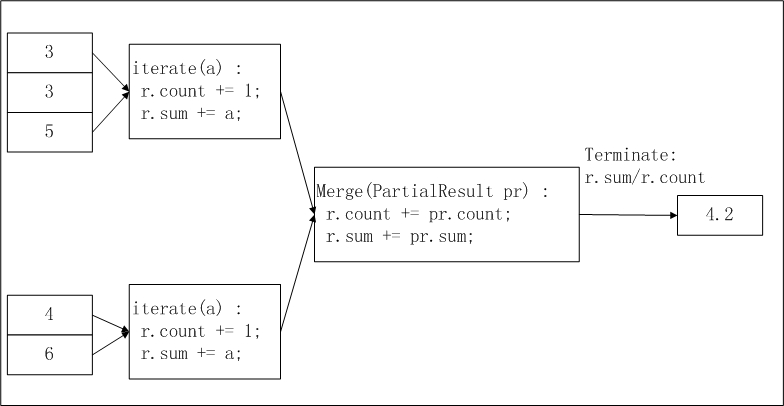
The input data is sliced and distributed to workers. You can configure the odps.stage.mapper.split.size parameter to adjust the size of each slice. Each worker counts the number of records and total in its slice (intermediate result), workers collect slice information, and the final output computes r.sum / r.count as the average.
Prerequisites
Before you begin, make sure you have:
Installed MaxCompute Studio. See Install MaxCompute Studio.
Connected MaxCompute Studio to a project. See Connect to a MaxCompute project.
Created a MaxCompute Java module. See Create a MaxCompute Java module.
Create the UDAF class
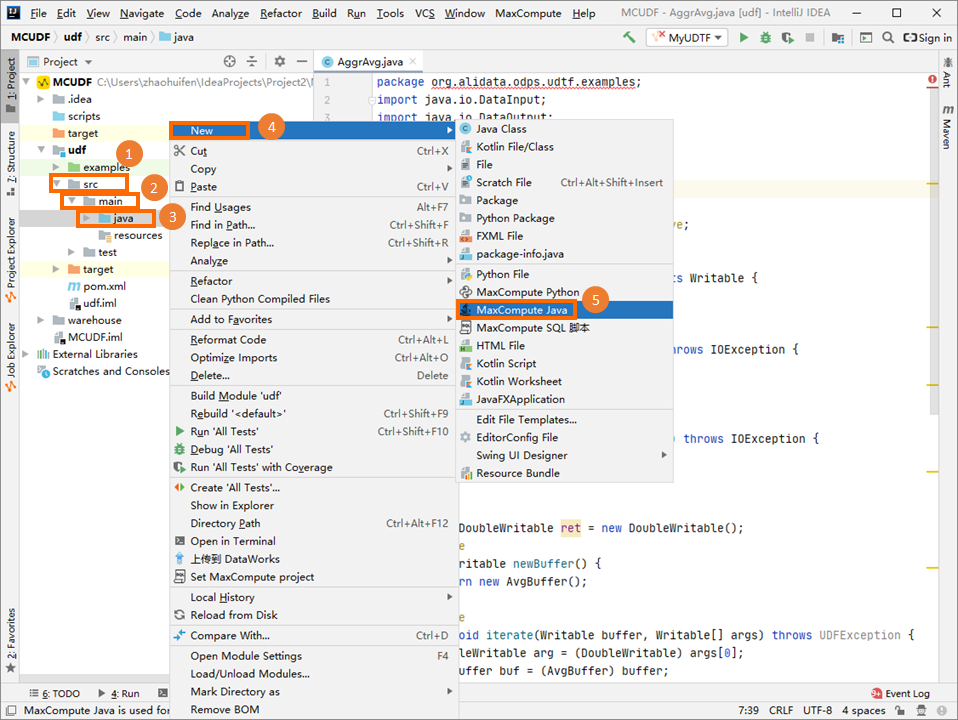
In the Project tab, navigate to src > main > java, right-click java, and choose New > MaxCompute Java.
In the Create new MaxCompute java class dialog box, click UDAF, enter a class name in the Name field, and press Enter. This example uses
AggrAvg. If you have not created a package, specify the Name field inpackagename.classnameformat. The system generates the package automatically.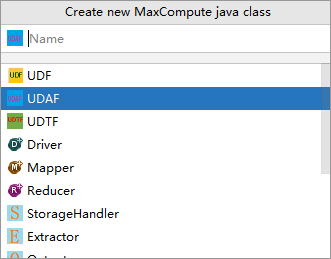
Write the UDAF code in the editor.
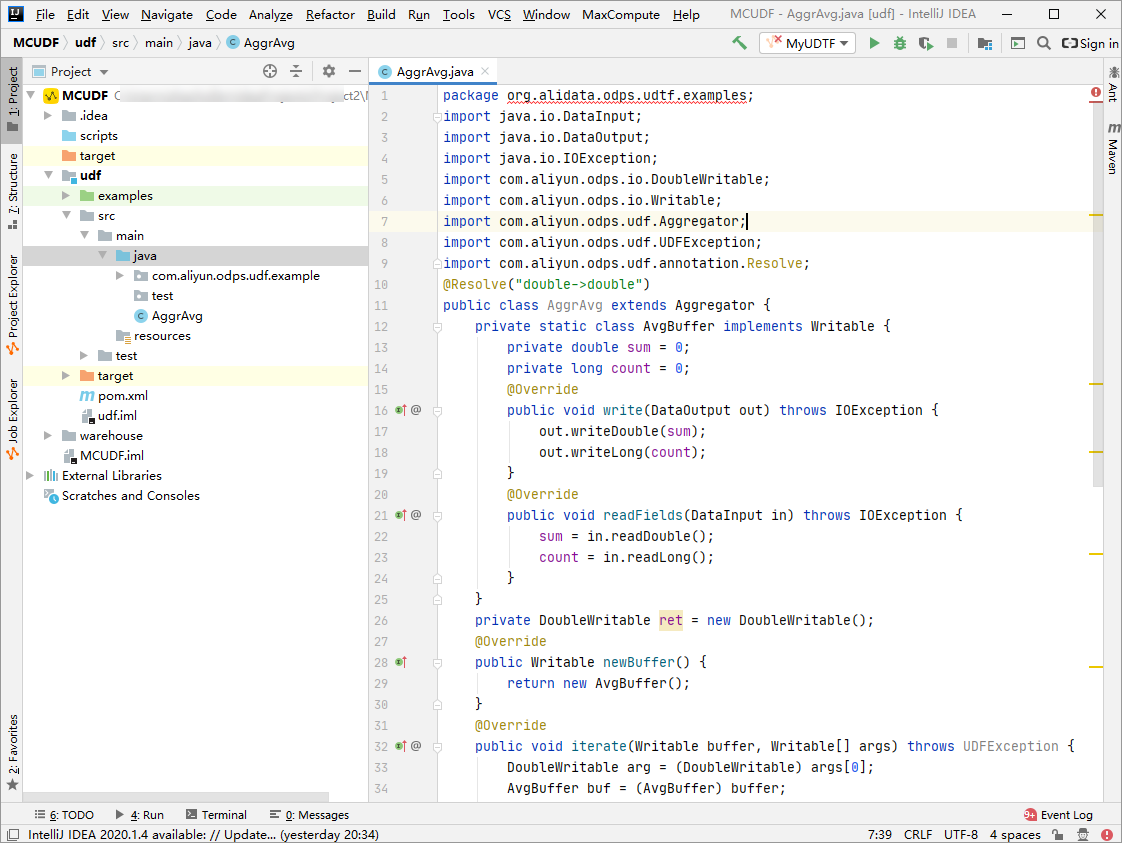
import java.io.DataInput;
import java.io.DataOutput;
import java.io.IOException;
import com.aliyun.odps.io.DoubleWritable;
import com.aliyun.odps.io.Writable;
import com.aliyun.odps.udf.Aggregator;
import com.aliyun.odps.udf.UDFException;
import com.aliyun.odps.udf.annotation.Resolve;

// Input: one DOUBLE column. Output: DOUBLE average.
@Resolve("double->double")
public class AggrAvg extends Aggregator {

  // Buffer roles: iterate() accumulates (IN -> BUF); terminate() extracts (BUF -> OUT).
  private static class AvgBuffer implements Writable {
    private double sum = 0;   // running total (BUF)
    private long count = 0;   // row count (BUF)

    @Override
    public void write(DataOutput out) throws IOException {
      out.writeDouble(sum);
      out.writeLong(count);
    }

    @Override
    public void readFields(DataInput in) throws IOException {
      sum = in.readDouble();
      count = in.readLong();
    }
  }

  private DoubleWritable ret = new DoubleWritable();

  @Override
  public Writable newBuffer() {
    return new AvgBuffer();
  }

  // Map phase: accumulate each non-null input row into the buffer.
  @Override
  public void iterate(Writable buffer, Writable[] args) throws UDFException {
    DoubleWritable arg = (DoubleWritable) args[0];
    AvgBuffer buf = (AvgBuffer) buffer;
    if (arg != null) {
      buf.count += 1;
      buf.sum += arg.get();
    }
  }

  // Combine phase: merge a partial buffer from another worker into this buffer.
  @Override
  public void merge(Writable buffer, Writable partial) throws UDFException {
    AvgBuffer buf = (AvgBuffer) buffer;
    AvgBuffer p = (AvgBuffer) partial;
    buf.sum += p.sum;
    buf.count += p.count;
  }

  // Reduce phase: compute the average from the fully merged buffer.
  @Override
  public Writable terminate(Writable buffer) throws UDFException {
    AvgBuffer buf = (AvgBuffer) buffer;
    if (buf.count == 0) {
      ret.set(0);
    } else {
      ret.set(buf.sum / buf.count);
    }
    return ret;
  }
}
Debug locally
Run the UDAF on your local machine to verify the logic before deploying. For debugging steps, see the "Perform a local run to debug the UDF" section in Develop a UDF.
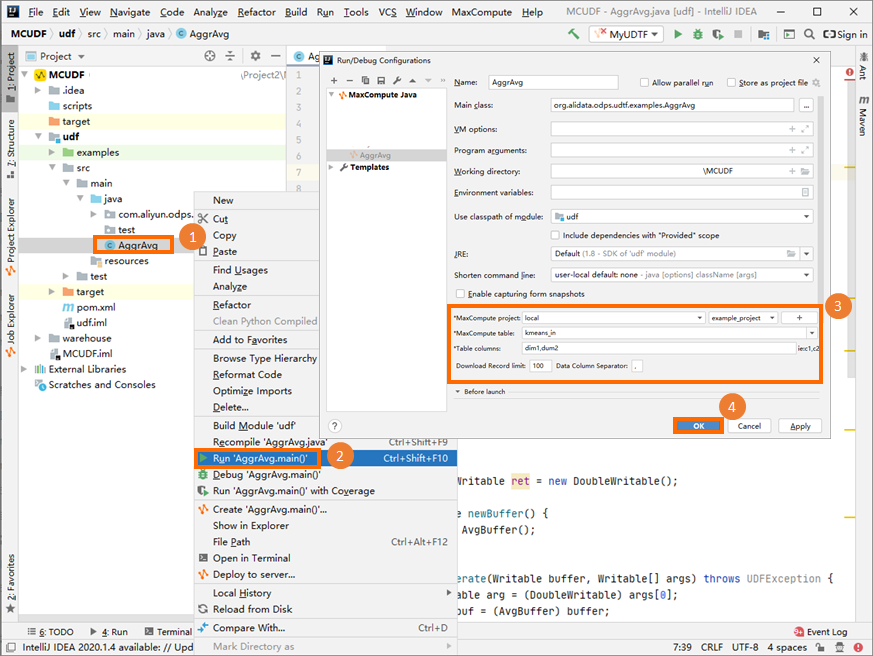
The parameter settings in the preceding figure are for reference only.
Package and register the UDAF
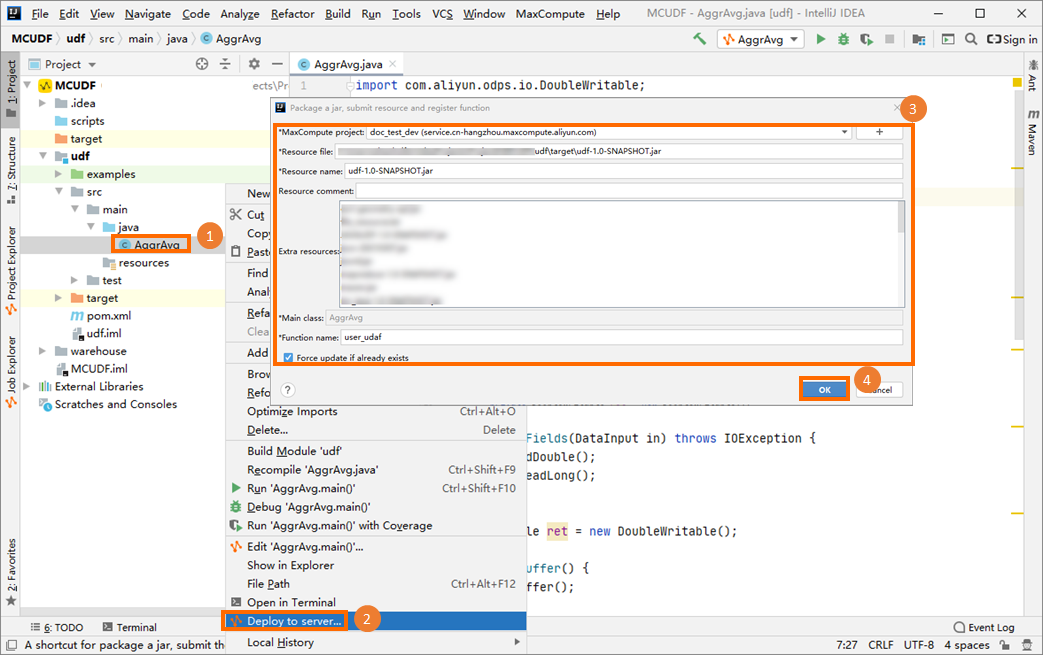
Package the UDAF code into a JAR file, upload it to your MaxCompute project, and create the UDAF. For packaging steps, see the "Procedure" section in Package a Java program, upload the package, and create a MaxCompute UDF.
This example registers the UDAF as user_udaf.
Call the UDAF
In the Project Explorer, right-click your MaxCompute project to open the MaxCompute client, then run a SQL statement to call the UDAF.
Given this input table (my_table):
+------------+------------+
| col0       | col1       |
+------------+------------+
| 1.2        | 2.0        |
| 1.6        | 2.1        |
+------------+------------+
Run the following statement:
SELECT user_udaf(col0) AS c0 FROM my_table;Result:
+----+
| c0 |
+----+
| 1.4|
+----+
Example 2: string concatenation (AggrConcat)
AggrAvg uses a simple numeric buffer. This example shows a more realistic pattern: collecting string values from multiple rows and concatenating them with a separator.
The buffer stores a StringBuilder and a separator string. Because StringBuilder is not directly serializable, the buffer serializes it as a plain String. This is the pattern to follow whenever your buffer holds a non-primitive type — serialize to a wire-safe form in write() and reconstruct the in-memory form in readFields().
import java.io.DataInput;
import java.io.DataOutput;
import java.io.IOException;
import com.aliyun.odps.io.Text;
import com.aliyun.odps.io.Writable;
import com.aliyun.odps.udf.Aggregator;
import com.aliyun.odps.udf.UDFException;
import com.aliyun.odps.udf.annotation.Resolve;

// Input: STRING column, STRING separator. Output: concatenated STRING.
@Resolve("string,string->string")
public class AggrConcat extends Aggregator {

  // Buffer: accumulated text and the separator to use between values.
  private static class ConcatBuffer implements Writable {
    private StringBuilder sb = new StringBuilder();
    private String separator = ",";

    @Override
    public void write(DataOutput out) throws IOException {
      // Serialize StringBuilder as a String so it survives network transfer.
      out.writeUTF(sb.toString());
      out.writeUTF(separator);
    }

    @Override
    public void readFields(DataInput in) throws IOException {
      sb = new StringBuilder(in.readUTF());
      separator = in.readUTF();
    }
  }

  private Text ret = new Text();

  @Override
  public Writable newBuffer() {
    return new ConcatBuffer();
  }

  // Map phase: append each non-null value to the buffer.
  @Override
  public void iterate(Writable buffer, Writable[] args) throws UDFException {
    Text value = (Text) args[0];
    Text sep   = (Text) args[1];
    ConcatBuffer buf = (ConcatBuffer) buffer;
    if (value != null) {
      if (sep != null) {
        buf.separator = sep.toString();
      }
      if (buf.sb.length() > 0) {
        buf.sb.append(buf.separator);
      }
      buf.sb.append(value.toString());
    }
  }

  // Combine phase: merge a partial buffer from another worker.
  @Override
  public void merge(Writable buffer, Writable partial) throws UDFException {
    ConcatBuffer buf = (ConcatBuffer) buffer;
    ConcatBuffer p   = (ConcatBuffer) partial;
    if (p.sb.length() > 0) {
      if (buf.sb.length() > 0) {
        buf.sb.append(buf.separator);
      }
      buf.sb.append(p.sb);
    }
  }

  // Reduce phase: return the concatenated result.
  @Override
  public Writable terminate(Writable buffer) throws UDFException {
    ConcatBuffer buf = (ConcatBuffer) buffer;
    ret.set(buf.sb.toString());
    return ret;
  }
}
Key design decisions:
| Decision | Explanation |
|---|---|
Serialize StringBuilder as String | StringBuilder is not serializable. Convert to String in write() and rebuild in readFields(). |
Carry separator in the buffer | The separator is passed as an argument to iterate() but must survive serialization to merge(). Store it in the buffer. |
Guard against empty partial in merge() | If a worker's partition had no matching rows, its buffer is empty. Check before appending to avoid a leading separator. |
String concatenation order is not guaranteed across workers because the map-phase partition assignment is determined by the execution engine, not by row order. If order matters, use an ORDER BY clause in your SQL statement and a single-reducer strategy, or sort the concatenated output afterward.Call a UDAF in SQL
After developing and registering a Java UDAF, call it in MaxCompute SQL. For the full development process, see the "Development process" section in Overview.
Two calling methods are available:
Within a project: Call the UDAF the same way as a built-in function.
Across projects: Call a UDAF from project B inside project A using the syntax below. For cross-project sharing details, see Cross-project resource access based on packages.
SELECT B:udf_in_other_project(arg0, arg1) AS res FROM table_t;
Limitations
Internet access
By default, MaxCompute does not allow UDAFs to access the Internet. To enable Internet access, submit a network connection application form based on your business requirements. After approval, the MaxCompute technical support team will help you establish the connection. For instructions on filling in the form, see Network connection process.
VPC access
By default, MaxCompute does not allow UDAFs to access resources in a virtual private cloud (VPC). To enable VPC access, establish a network connection between MaxCompute and the VPC. See Use UDFs to access resources in VPCs.
Table read restrictions
UDFs, UDAFs, and user-defined table-valued functions (UDTFs) cannot read data from the following table types:
Tables on which schema evolution has been performed
Tables containing complex data types
Tables containing JSON data types
Transactional tables
Usage notes
Do not package classes with the same name but different logic into JAR files for different UDAFs. If two UDAFs share a class name (for example,
com.aliyun.UserFunction.class) across separate JAR files and are called in the same SQL statement, MaxCompute loads the class from one file unpredictably — causing incorrect results or compilation failures.Java data types in UDAFs are object types. The first letter must be uppercase (for example,
String, notstring).NULL values in MaxCompute SQL map to
nullin Java. Do not use Java primitive types — they cannot representnull.
What's next
To add more complex UDFs such as table-valued functions, see Overview.
To learn about all supported data types and editions, see Data type editions.