A geo-fence is also known as an electronic alert system. It is often used in scenarios with large data volumes and high real-time requirements, such as urban planning and traffic scheduling. This topic describes how to schedule and manage vehicles in real time using the spatiotemporal functions of Lindorm GanosBase to calculate the relationship between a vehicle's real-time location and a geo-fence. This process lets you accurately monitor vehicles.
Background information
In vehicle management scenarios, a geo-fence is used to monitor a vehicle's travel area and determine whether it deviates from a preset route. This helps managers schedule and manage vehicles more effectively.
Managers typically predefine several areas, known as geo-fences. Because these areas are static, you can store them in Lindorm wide tables. Real-time vehicle data, such as coordinates, is continuously uploaded and stored in Kafka. The Lindorm stream engine then subscribes to the real-time data in Kafka to calculate the relationship between vehicle locations and the geo-fences.
Prerequisites
LindormTable is activated, and its database engine version is 2.6.5 or later. For more information about how to view or upgrade the version, see LindormTable version guide and Minor version update.
The Lindorm stream engine is activated. For more information, see Activate the stream engine.
The client IP address is added to the Lindorm whitelist. For more information, see Configure a whitelist.
A Java environment is installed. JDK 1.8 or later is required.
Usage notes
This tutorial deploys the Lindorm client on an ECS instance and uses a virtual private cloud (VPC) for data access.
Before you access a Lindorm instance over a VPC, make sure that the Lindorm instance and ECS instance meet the following conditions to ensure network connectivity.
The resources must be in the same region. For lower network latency, we recommend that you also place them in the same zone.
The ECS instance and the Lindorm instance are in the same VPC.
Step 1: Create a geo-fence table and a sink table
In LindormTable, create a geo-fence table to store geo-fence data and a sink table to store calculation results.
Create the geo-fence table and insert sample data.
Create a geo-fence table named
regions. The table has three fields: rID (area ID), rName (area name), and fence (geo-fence area).CREATE TABLE regions(rID INT, rName VARCHAR, fence GEOMETRY, PRIMARY KEY(rID));Insert the geo-fence data. The data includes three areas: SoHo, Chinatown, and Tribeca.
INSERT INTO regions(rID, rName, fence) VALUES
(1, 'SoHo', ST_GeomFromText('POLYGON((-74.00279525078275 40.72833625216264,-74.00547745979765 40.721929158663244,-74.00125029839018 40.71893680218994,-73.9957785919998 40.72521409075776,-73.9972377137039 40.72557184584898,-74.00279525078275 40.72833625216264))')),
(2, 'Chinatown', ST_GeomFromText('POLYGON((-73.99712367114876 40.71281582267133,-73.9901070123658 40.71336881907936,-73.99023575839851 40.71452359088633,-73.98976368961189 40.71554823078944,-73.99551434573982 40.717337246783735,-73.99480624255989 40.718491949759304,-73.99652285632942 40.719109951574,-73.99776740131233 40.7168005470334,-73.99903340396736 40.71727219249899,-74.00193018970344 40.71938642421256,-74.00409741458748 40.71688186545551,-74.00051398334358 40.71517415773184,-74.0004281526551 40.714377212470005,-73.99849696216438 40.713450141693166,-73.99748845157478 40.71405192594819,-73.99712367114876 40.71281582267133))')),
(3, 'Tribeca', ST_GeomFromText('POLYGON((-74.01091641815208 40.72583120006787,-74.01338405044578 40.71436586362705,-74.01370591552757 40.713617702123415,-74.00862044723533 40.711308107057235,-74.00194711120628 40.7194238654018,-74.01091641815208 40.72583120006787))'));
Create the sink table
fresult.CREATE TABLE fresult(uID VARCHAR, rName VARCHAR, rID INT, PRIMARY KEY (uID));
Step 2: Write stream data
Connect to the Lindorm stream engine and write test data using an open source client or script tool.
This section uses an open source script tool as an example.
Download and install the script tool. For more information, see Connect to the Lindorm stream engine using an open source script tool.
Create a topic named
log_topic../bin/kafka-topics.sh --bootstrap-server <Lindorm Stream endpoint> --topic log_topic --createThe following figure shows how to obtain the Lindorm Stream endpoint.

Write test data to the topic. Press
Ctrl+Cto stop writing../bin/kafka-console-producer.sh --bootstrap-server <Lindorm Stream endpoint> --topic log_topic {"uID": "A", "x":"-74.00035", "y": "40.72432"} {"uID": "B", "x":"-74.00239", "y": "40.71692"} {"uID": "C", "x":"-74.00201", "y": "40.72563"} {"uID": "D", "x":"-74.00158", "y": "40.72412"} {"uID": "E", "x":"-73.99836", "y": "40.71588"} {"uID": "F", "x":"-74.01015", "y": "40.71422"} {"uID": "G", "x":"-73.99183", "y": "40.71451"} {"uID": "H", "x":"-73.99595", "y": "40.71773"}Run the
./bin/kafka-console-consumer.sh --bootstrap-server <Lindorm Stream endpoint> --topic log_topic --from-beginningcommand to check whether the data was written successfully.
Step 3: Submit the computing task
Submit a computing task using Flink SQL. The task reads data from the topic and performs calculations with the geo-fence data.
Install the stream engine client.
On the ECS instance, run the following command to download the stream engine client package.
wget https://hbaseuepublic.oss-cn-beijing.aliyuncs.com/lindorm-sqlline-2.0.2.tar.gzRun the following command to decompress the package.
tar zxvf lindorm-sqlline-2.0.2.tar.gzGo to the
lindorm-sqlline-2.0.2/bindirectory and run the following command to connect to the Lindorm stream engine../lindorm-sqlline -url <Lindorm Stream SQL endpoint>
Submit the computing task.
The computing task involves the following steps:
Load the
ganosfunction module.In the Flink Job, create three tables: a data source table named
carData, a dimension table namedregions, and a sink table namedfresult. Set the connector parameters to associate these tables with the topic that you created, theregionsgeo-fence table, and thefresultsink table, respectively.Create a stream task. The task uses the
ST_Containsrelationship function to filter the data, calculate the geo-fence area for the real-time data, and write the results to thefresultsink table.
The following code provides an example:
CREATE FJOB fenceFilter (
  LOAD MODULE ganos;
  -- Enable parallelism
  SET 'parallelism.default'='12';
  -- Create stream table
  CREATE TABLE carData(`uID` STRING, `x` DOUBLE, `y` DOUBLE, `proctime` AS PROCTIME()
    ) WITH (
    'connector'='kafka',
    'topic'='log_topic',
    'scan.startup.mode'='earliest-offset',
    'properties.bootstrap.servers'='<Lindorm Stream endpoint>',
    'format'='json'
  );
  -- Create area table
  CREATE TABLE regions (
    `rID` INT,
    `rName` STRING,
    `fence` GEOMETRY,
    PRIMARY KEY (`rID`) NOT ENFORCED
    ) WITH (
    'connector'='lindorm',
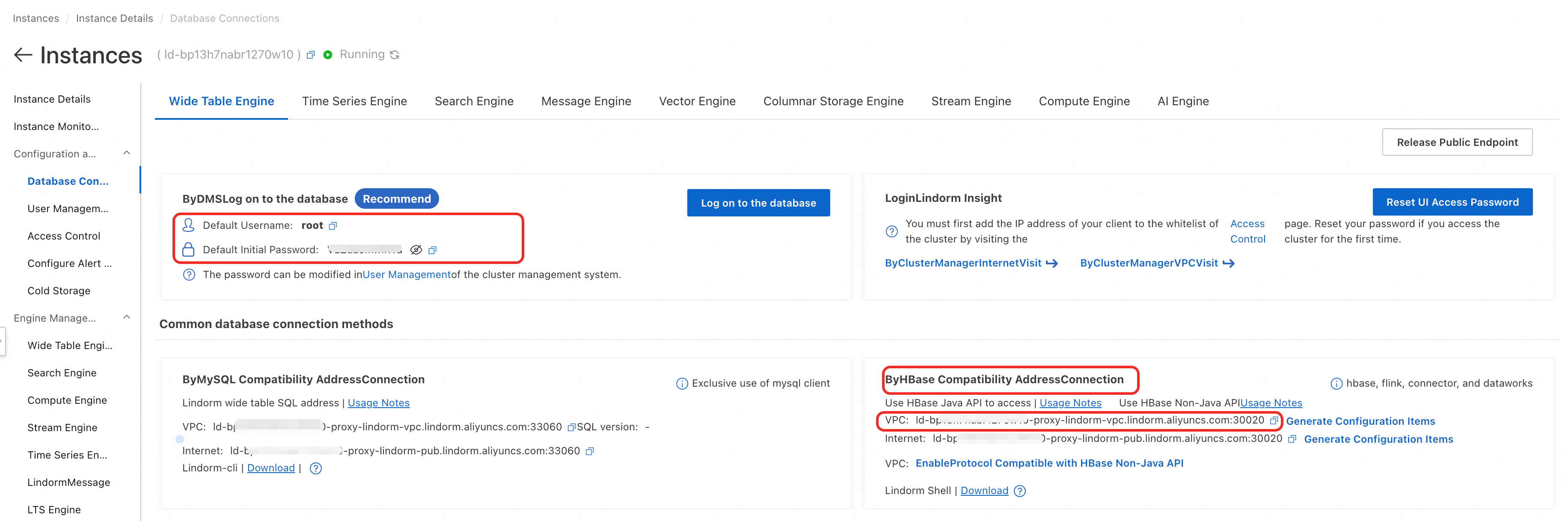
    'seedServer'='<HBase Java API endpoint for LindormTable>',
    'userName'='<LindormTable username>',
    'password'='<LindormTable password>',
    'tableName'='regions',
    'namespace'='default'
  );
  -- Create result table
  CREATE TABLE fresult (
    `uID` STRING,
    `rName` STRING,
    `rID` INT,
    PRIMARY KEY (`uID`) NOT ENFORCED
  ) WITH (
    'connector'='lindorm',
    'seedServer'='<HBase Java API endpoint for LindormTable>',
    'userName'='<LindormTable username>',
    'password'='<LindormTable password>',
    'tableName'='fresult',
    'namespace'='default'
  );
  -- Find the area that car located
  INSERT INTO fresult
    SELECT A.uID, B.rName, B.rID
    FROM carData AS A
    JOIN regions /*+ OPTIONS('geomHint'='fence:st_contains','geomIndex'='true','cacheTTLMs'='1800000') */
    FOR SYSTEM_TIME AS OF A.proctime AS B
    ON B.fence=ST_MakePoint(A.x,A.y);
);
The following figure shows how to obtain the HBase Java API endpoint for LindormTable, the LindormTable username, and the password.
Step 4: View the results
Run the following statement to view the calculation results.
SELECT * FROM fresult;The following result is returned:
+-----+-----------+-----+
| uID |   rName   | rID |
+-----+-----------+-----+
| A   | SoHo      | 1   |
| B   | Chinatown | 2   |
| C   | SoHo      | 1   |
| D   | SoHo      | 1   |
| E   | Chinatown | 2   |
| F   | Tribeca   | 3   |
| G   | Chinatown | 2   |
| H   | Chinatown | 2   |
+-----+-----------+-----+
The result shows the current area for each vehicle. For example, vehicle A is in area 1, which is SoHo.