IoT Platform uses OTA (Over-the-Air) technology to update firmware, software, or drivers on devices worldwide via wireless networks. This example walks through the OTA update process for an MQTT-connected device.
Background
OTA working principles, limits, and upgrade steps are covered in OTA updates. The update process and data formats are documented in Topics and data formats for OTA updates.
This example uses C Link SDK V4.x to connect a device to IoT Platform and perform an OTA update. C Link SDK V4.x for devices.
OTA update process
This example covers a full update with the default module and a single-file update package.
The following flowchart shows the process.
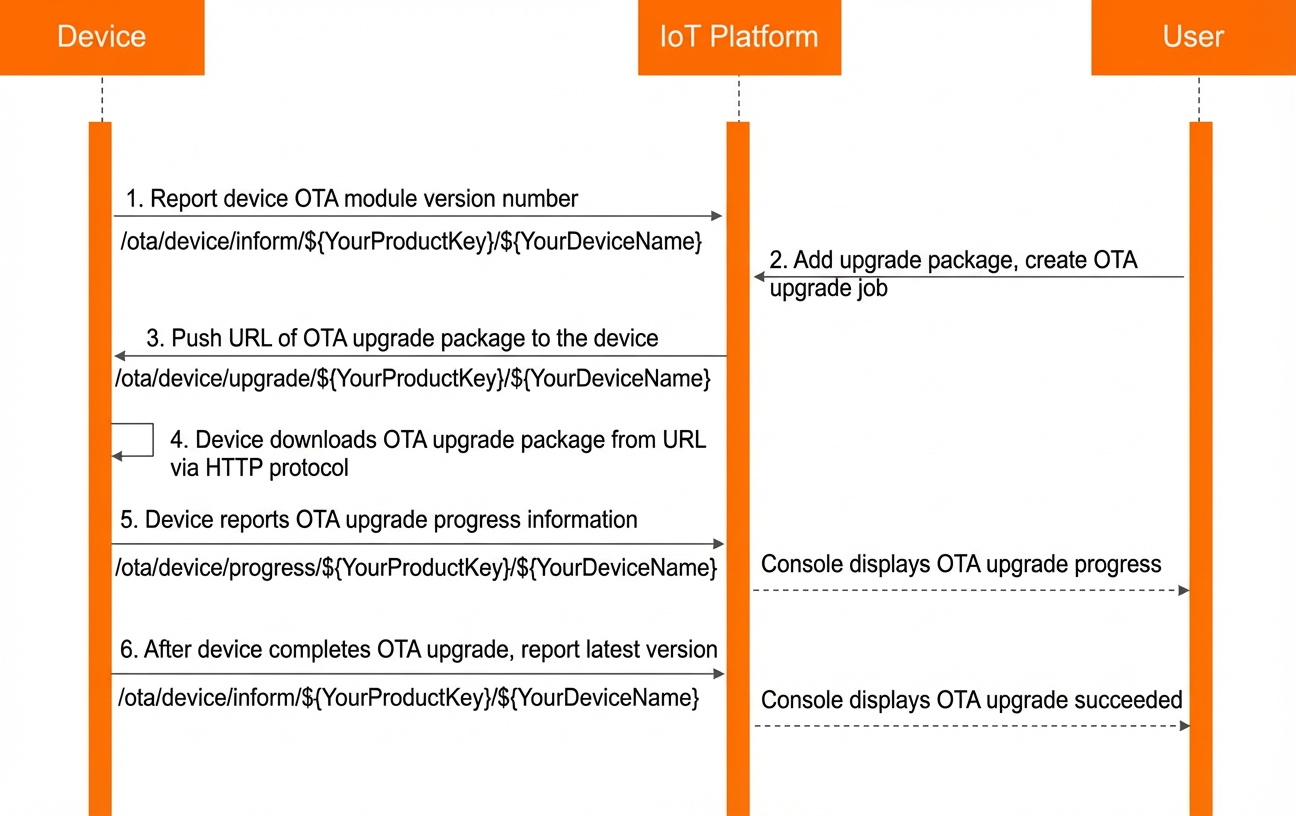
The following table describes the process.
|
Step |
Description |
References |
|
1 |
Report the current OTA version to the topic:
Example version report: |
|
|
2 |
In the IoT Platform console, upload a newer update package (2.0.0) for the product, then push an update task to the device running version 1.0.0. This upgrades the firmware from 1.0.0 to 2.0.0. |
|
|
3 |
The device subscribes to the topic to which IoT Platform pushes OTA update notifications: Sample upgrade message: |
|
|
4 |
After receiving the update package URL from the notification, the device calls SDK APIs to download the package and perform a local upgrade. This example downloads a single OTA update file. Related API references: |
|
|
5 |
Report the update progress to the topic: Example of a progress message: |
|
|
6 |
Report the OTA version after the update to the topic: Example version report: |
References
-
Troubleshoot failed updates in Issues with failed OTA updates.
-
You can query IoT Platform logs in the IoT Platform console. The logs contain communication records between IoT Platform, devices, and your application.
-
Device-facing error codes are documented in Error codes received by devices.
-
To forward device update events to your server over AMQP, set up a subscription as described in Configure an AMQP server-side subscription. The forwarded OTA topic data format is documented in Data format.