Hologres V3.0 and later supports the Query Queue feature for ordered request processing, load balancing, and resource management. It ensures system stability and improves response efficiency, especially in high-concurrency scenarios.
Introduction
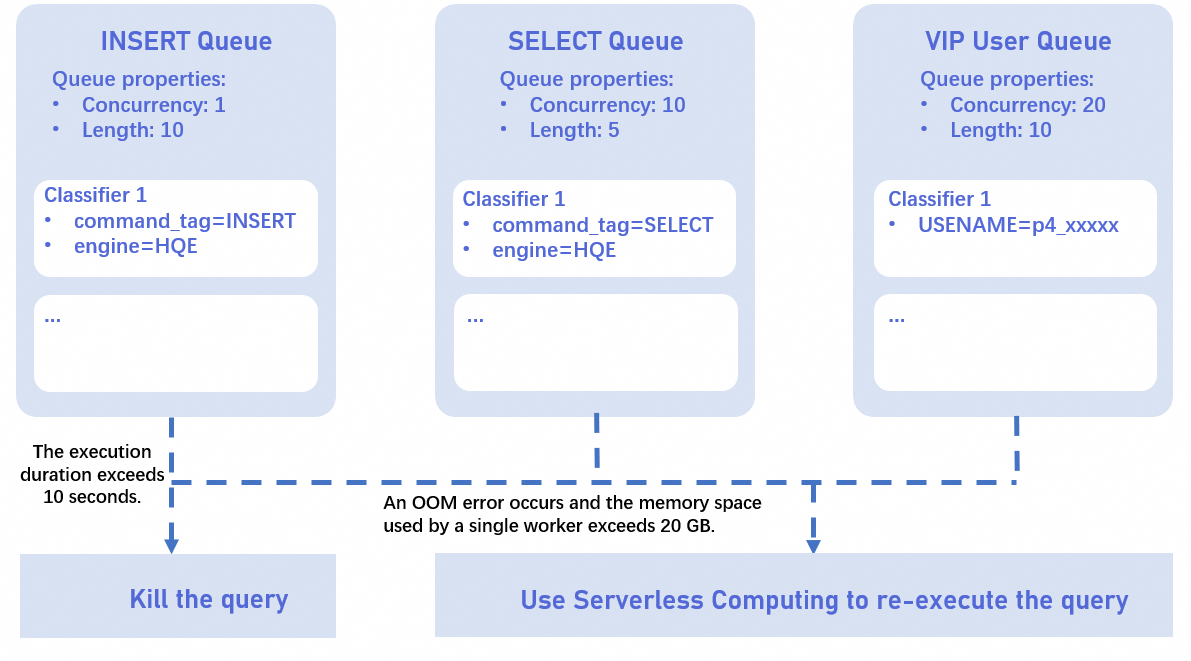
By default, Hologres instances process requests without concurrency control. The engine coordinator assigns resources as requests arrive. With the Query Queue feature, SQL requests are matched against configured classifier rules and routed to specific query queues. You can set maximum concurrency for each queue. When a queue reaches its limit, new requests wait, ensuring controlled resource allocation and preventing overload.
Important notes
For general-purpose instances, configurations such as query queues and optimizers apply at the instance level. For virtual warehouse instances, these configurations apply at the virtual warehouse level. If an instance has multiple databases, the query queue and optimizer settings apply to all databases.
The feature is available only for general-purpose and virtual warehouse instances of Hologres V3.0 or later.
NoteIf your instance is V2.2 or earlier, upgrade the instance or get online support for upgrade.
Starting from Hologres V3.0.10, you can route all SQL queries in a query queue to Serverless Computing resources. This query queue is not restricted by concurrency or queuing settings anymore.
Each general-purpose instance and each virtual warehouse in a virtual warehouse instance has a default query queue named
default_queue, which is not restricted by concurrency or maximum queue size.You cannot create classifiers for
default_queue. You can only configure its properties.default_queuemanages all requests that cannot be matched by other query queues.
Each general-purpose instance and each virtual warehouse supports up to 10 query queues, including
default_queue. Each query queue can have up to 10 classifiers.You cannot enable Query Queue for a read-only secondary instance independently. However, the query queue rules of the primary instance apply to the secondary instance.
Only queries with an engine_type of
HQE,PQE,SQE, orHiveQEare matched by query queues. Supported query types include SELECT, INSERT, UPDATE, DELETE, and INSERT from COPY and CTAS.Fixed Plan-accelerated queries do not enter the query queue. For more information, see Use Fixed Plan to accelerate SQL execution.
A classifier can belong to only one query queue, but a query queue can have multiple classifiers.
Procedure
Create a query queue
Syntax
General-purpose instance
CALL hg_create_query_queue (query_queue_name, max_concurrency, max_queue_size);Virtual warehouse instance
CALL hg_create_query_queue (warehouse_name, query_queue_name, max_concurrency, max_queue_size);
Parameter description
warehouse_name: Optional. The name of the virtual warehouse. If you do not specify this parameter, the query queue is created in the virtual warehouse of the current connection by default.NoteThis parameter is required only for virtual warehouse instances.
query_queue_name: Required. The name of the query queue. The name must be unique within the current instance or virtual warehouse.max_concurrency: Optional. The maximum concurrency. The default value is -1, which indicates that there is no concurrency limit. The value must be in the range of [-1, 2147483647).max_queue_size: Optional. The maximum queue size. This parameter specifies the maximum number of SQL statements that can be queued. The default value is -1, which indicates that the queue size is unlimited. The value must be in the range of [-1, 2147483647).
NoteWhen you create a query queue, you can configure the above properties. For information about setting other properties, see Set query queue properties.
Examples
General-purpose instance
-- Create a query queue named insert_queue and set the maximum concurrency to 10. The concurrency parameter does not require single quotation marks.
CALL hg_create_query_queue ('insert_queue', 10);
Virtual warehouse instance
-- In the init_warehouse virtual warehouse, create a query queue named insert_queue and set the maximum concurrency to 10.
CALL hg_create_query_queue ('init_warehouse', 'insert_queue', 10);
Create a classifier
Syntax
General-purpose instance
CALL hg_create_classifier (query_queue_name, classifier_name, priority);Virtual warehouse instance
CALL hg_create_classifier (warehouse_name, query_queue_name, classifier_name, priority);
Parameter description
warehouse_name: Optional. The name of the virtual warehouse. If you do not specify this parameter, the virtual warehouse of the current connection is used by default.NoteThis parameter applies only to virtual warehouse instances.
query_queue_name: Required. The name of the query queue for which you want to create a classifier.classifier_name: Required. The name of the classifier. The name must be unique within the current instance or virtual warehouse.priority: Optional. The matching priority of the classifier. A larger value indicates a higher priority. The default value is50. The value must be in the range of [1, 100]. If you do not specify this parameter when you create the classifier, you can configure it later. For more information, see Set classifier properties.NoteClassifiers with a higher priority are matched earlier.
If multiple classifiers have the same priority, they are matched based on the lexicographic order of their query queue and classifier names. The classifier with the name that comes first in lexicographic order is matched first. For example, queue_a(classifier_1) has a higher priority than queue_b(classifier_1).
Examples
General-purpose instance
-- In the insert_queue query queue, create a classifier named classifier_insert with a matching priority of 20. Note that the priority parameter does not require single quotation marks.
CALL hg_create_classifier ('insert_queue', 'classifier_insert', 20);
Virtual warehouse instance
-- In the insert_queue query queue of the init_warehouse virtual warehouse, create a classifier named classifier_insert with a matching priority of 20.
CALL hg_create_classifier ('init_warehouse', 'insert_queue', 'classifier_insert', 20);
Configure classifier conditions
By configuring classifier conditions, you can route specific SQL statements to particular query queues. If a query satisfies a classifier's condition, it will be placed in that classifier's query queue.
Syntax
General-purpose instance
CALL hg_set_classifier_rule_condition_value (query_queue_name, classifier_name, condition_name, condition_value);Virtual warehouse instance
CALL hg_set_classifier_rule_condition_value (warehouse_name, query_queue_name, classifier_name, condition_name, condition_value);
Parameter description
Name
Description
warehouse_nameOptional. The name of the virtual warehouse. If you do not configure this parameter, the virtual warehouse of the current connection is used by default.
NoteYou must configure this parameter only for virtual warehouse instance instances.
query_queue_nameRequired. The name of the query queue.
classifier_nameRequired. The name of the classifier for which you want to add a matching rule.
condition_nameandcondition_valueRequired. Supported conditions are:
user_name: The UID of the current account.command_tag: The request type. Valid values:INSERT,SELECT,UPDATE, andDELETE.To improve the execution efficiency of
COPYoperations, Hologres implementsCOPYoperations usingINSERT. Therefore, when the concurrency ofINSERToperations is limited, the write concurrency ofCOPYoperations is also affected.db_name: The database name.engine_type: The engine used by the request. Valid values:HQE,PQE,SQE, andHiveQE. We recommend that you use this property starting from Hologres V3.1.18.digest: The SQL fingerprint. For more information about SQL fingerprints, see SQL fingerprints.application_name: The application that initiated the query. This property is supported only in Hologres V3.0.9 and later.storage_mode: The storage mode. Valid values: hot and cold. We recommend that you use this property starting from Hologres V3.1.18 or V3.1.8.write_table: The destination table of the query. The format is<db_name>.<schema_name>.<table_name>. This property is supported only in Hologres V3.1 and later.read_table:The source table of the query. This property is supported only in Hologres V3.1 and later.
Classifiers support multiple conditions, and each condition can accept a set of values. Starting from Hologres V3.1.18, advanced classifier rules are supported. Take note of the following:
Relationship between conditions:
AND logic: When a classifier has multiple conditions (e.g.,
user_nameANDcommand_tag), a query must satisfy all of them to enter that classifier's queue.OR logic: To achieve an "OR" relationship (where a query matches if it meets any of several criteria), create multiple separate classifiers, each with a condition.
Match multiple values within a condition
Subset match (⊆): For conditions like
user_name,command_tag,db_name,digest,application_name. The query's values must be a subset of the acceptable values.Exact match (==): For
storage_mode. The query's values must exactly match the acceptable values.Intersection match (∩): For
engine_type,write_table,read_table. The query must share at least one value with the acceptable values.
NoteConfigure filter conditions one by one. If the condition value is case-sensitive, enclose it in double quotation marks ("").
If a condition accepts a value set, set it multiple times. For example, if a classifier needs to match requests where
command_tagis eitherSELECTorINSERT, execute two SQL statements to set the rules.
Examples
The following examples use a virtual warehouse instance. For a general-purpose instance, skip the first input parameter. Create a query queue named
test_queuefor the default virtual warehouseinit_warehouse:CALL hg_create_query_queue ('init_warehouse', 'test_queue');Example 1: Route a query to the
test_queuequery queue if the query is submitted by userp4_123orp4_456, or if its SQL fingerprint isxxxoryyy.-- Because an OR relationship is required between the user and SQL fingerprint properties, you must configure two classifiers. -- Create a classifier named classifier_user and attach it to the test_queue query queue. CALL hg_create_classifier ('init_warehouse', 'test_queue', 'classifier_user'); -- Set matching rules based on the user property. Queries from user "p4_123" or "p4_456" will hit this classifier. CALL hg_set_classifier_rule_condition_value ('init_warehouse','test_queue', 'classifier_user', 'user_name', 'p4_123'); CALL hg_set_classifier_rule_condition_value ('init_warehouse','test_queue', 'classifier_user', 'user_name', 'p4_456'); -- Create a classifier named classifier_digest and attach it to the test_queue query queue. CALL hg_create_classifier ('init_warehouse', 'test_queue', 'classifier_digest'); -- Set matching rules based on the SQL fingerprint property. Queries with SQL fingerprint "xxx" or "yyy" will hit this classifier. CALL hg_set_classifier_rule_condition_value ('init_warehouse','test_queue', 'classifier_user', 'digest', 'xxx'); CALL hg_set_classifier_rule_condition_value ('init_warehouse','test_queue', 'classifier_user', 'digest', 'yyy');Example 2: Route a query to the
test_queuequery queue if the query is initiated by thexx_biapplication and accesses both cold and hot storage.-- Because an AND relationship is required between the application and storage class properties, define both properties within the same classifier. -- Create a classifier named classifier_3 and attach it to the test_queue query queue. CALL hg_create_classifier ('init_warehouse', 'test_queue', 'classifier_3'); -- Set a condition based on the application property. CALL hg_set_classifier_rule_condition_value ('init_warehouse','test_queue', 'classifier_3', 'application_name', 'xx_bi'); -- Set a condition based on the storage class. Set both "hot" and "cold" rules. A query must access both cold and hot storage to match. CALL hg_set_classifier_rule_condition_value ('init_warehouse','test_queue', 'classifier_3', 'storage_mode', 'hot'); CALL hg_set_classifier_rule_condition_value ('init_warehouse','test_queue', 'classifier_3', 'storage_mode', 'cold');Example 3: Route all requests that access cold storage data to the
test_queuequery queue.-- Because the storage class value requires an exact match, requests that "access any cold storage data" must be split into the following two classifiers. The request only needs to match one of them. -- Create a classifier named classifier_cold_1 and attach it to the test_queue query queue. CALL hg_create_classifier ('init_warehouse', 'test_queue', 'classifier_cold_1'); -- Queries where storage_mode is only 'cold' enter this queue. CALL hg_set_classifier_rule_condition_value ('init_warehouse','test_queue', 'classifier_cold_1', 'storage_mode', 'cold'); -- Create a classifier named classifier_cold_2 and attach it to the test_queue query queue. CALL hg_create_classifier ('init_warehouse', 'test_queue', 'classifier_cold_2'); -- Queries where storage_mode includes both 'hot' and 'cold' enter this queue. CALL hg_set_classifier_rule_condition_value ('init_warehouse','test_queue', 'classifier_cold_2', 'storage_mode', 'hot'); CALL hg_set_classifier_rule_condition_value ('init_warehouse','test_queue', 'classifier_cold_2', 'storage_mode', 'cold');Example 4: Route all requests that read from table a and write to table b to the test_queue query queue.
-- Because an AND relationship is required between the read table and write table properties, define both properties within the same classifier.

-- Create a classifier named classifier_table and attach it to the test_queue query queue.
CALL hg_create_classifier ('init_warehouse', 'test_queue', 'classifier_table');
-- Set a matching rule based on the read table. A request matches this rule if it reads data from table a, regardless of whether it reads from other tables.
CALL hg_set_classifier_rule_condition_value ('init_warehouse','test_queue', 'classifier_3', 'read_table', 'db_name.schema_name.a');
-- Set a matching rule based on the write table. A request that writes to table b matches this rule.
CALL hg_set_classifier_rule_condition_value ('init_warehouse','test_queue', 'classifier_3', 'write_table', 'db_name.schema_name.b');
Advanced capabilities
Control big queries
To control the impact of large queries on an instance, use query queues to manage execution duration and out-of-memory (OOM) errors. For queries that exceed the specified execution duration or OOM threshold, stop the request or rerun it using Serverless Computing resources.
Hologres V3.0 supports rerunning only SELECT queries. V4.1 allow reruns of native
INSERT OVERWRITEcommands, provided the GUC parameterhg_enable_query_queue_rerun_insert_overwrite_via_serverlessis enabled. If you use FETCH to retrieve data when you rerun a query, the query is rerun based on the configured query queue's classifier conditions only when FETCH fails to retrieve any data. This process ensures the accuracy of the results.The actual execution of a query includes three parts: optimization_cost (generating the execution plan), start_query_cost (starting the query), and get_next_cost (executing the query). For more information, see Get and analyze slow query logs. Query Queue considers only the duration of the get_next_cost part. It does not consider the time spent waiting for resources or locks.
Control execution duration
You can configure the
big_query_execution_time_threshold_secparameter to set the execution duration in seconds (s). The default value is -1, which indicates no limit. The value must be in the range of [-1, 2147483647). The following examples show how you can control queries based on execution duration:Scenario 1: Terminate queries that exceed the execution duration
Queries that enter the
select_queuequeue are executed using local resources. If the execution duration exceeds 10 seconds, the query is automatically terminated.CALL hg_set_query_queue_property ('select_queue', 'big_query_execution_time_threshold_sec', '10');Scenario 2: Rerun queries that exceed the execution duration
Queries that enter the
select_queuequeue are executed using local resources. If the execution duration exceeds 10 seconds, the query is automatically terminated on the instance resources and rerun using Serverless Computing resources.CALL hg_set_query_queue_property ('select_queue', 'big_query_execution_time_threshold_sec', '10'); CALL hg_set_query_queue_property ('select_queue', 'enable_rerun_as_big_query_when_exceeded_execution_time_threshold', 'true'); CALL hg_set_query_queue_property ('select_queue', 'rerun_big_query_on_computing_resource', 'serverless');Noteenable_rerun_as_big_query_when_exceeded_execution_time_threshold: Specifies whether to rerun an SQL request using other resources after the request is terminated for exceeding the execution duration. The default value is false.rerun_big_query_on_computing_resource: Specifies the name of the Serverless Computing resource to use for rerunning the SQL request.
Rerun large queries that cause OOM errors
Queries that enter the
select_queuequeue are executed using local resources. If a query causes an OOM error and occupies more than 10 GB of memory on a single worker, the query is rerun using Serverless Computing resources. Thebig_query_mem_threshold_when_oom_gbparameter controls the memory threshold for OOM queries. The default value is -1, which indicates that there is no limit. The value must be in the range of [-1, 64). The following code provides an example:CALL hg_set_query_queue_property ('select_queue', 'big_query_mem_threshold_when_oom_gb', '10'); CALL hg_set_query_queue_property ('select_queue', 'enable_rerun_as_big_query_when_oom_exceeded_mem_threshold', 'true'); CALL hg_set_query_queue_property ('select_queue', 'rerun_big_query_on_computing_resource', 'serverless');
Manage query queues
Delete a query queue
Syntax
General-purpose instance
CALL hg_drop_query_queue (query_queue_name);Virtual warehouse instance
CALL hg_drop_query_queue (warehouse_name, query_queue_name);
Parameter description
warehouse_name: Optional. The name of the virtual warehouse. If you do not specify this parameter, the virtual warehouse of the current connection is used by default.NoteThis parameter applies only to virtual warehouse instance instances.
query_queue_name: Required. The name of the query queue.
Examples
General-purpose instance
-- Delete the insert_queue query queue.
CALL hg_drop_query_queue ('insert_queue');
Virtual warehouse instance
-- In the init_warehouse virtual warehouse, delete the insert_queue query queue.
CALL hg_drop_query_queue ('init_warehouse', 'insert_queue');
Delete query queue properties
Syntax
General-purpose instance
CALL hg_remove_query_queue_property (query_queue_name, property_key);Virtual warehouse instance
CALL hg_remove_query_queue_property (warehouse_name, query_queue_name, property_key);
Parameter description
warehouse_name: Optional. The name of the virtual warehouse. If you do not specify this parameter, the virtual warehouse of the current connection is used by default.NoteThis parameter applies only to virtual warehouse instances.
query_queue_name: Required. The name of the query queue.property_key: Required. The name of the property. The supported properties aremax_concurrency,max_queue_size, andqueue_timeout_ms. For more information about properties, see Set query queue properties.
Examples
General-purpose instance
-- Delete the maximum concurrency property of the insert_queue query queue.
CALL hg_remove_query_queue_property('insert_queue', 'max_concurrency');

-- Delete the maximum queue size property of the insert_queue query queue.
CALL hg_remove_query_queue_property('insert_queue', 'max_queue_size');

-- Delete the maximum queue time property of the insert_queue query queue.
CALL hg_remove_query_queue_property('insert_queue', 'queue_timeout_ms');
Virtual warehouse instance
-- In the init_warehouse virtual warehouse, delete the maximum concurrency property of the insert_queue query queue.
CALL hg_remove_query_queue_property('init_warehouse', 'insert_queue', 'max_concurrency');

-- In the init_warehouse virtual warehouse, delete the maximum queue size setting of the insert_queue query queue.
CALL hg_remove_query_queue_property('init_warehouse', 'insert_queue', 'max_queue_size');

-- In the init_warehouse virtual warehouse, delete the maximum queue time property of the insert_queue query queue.
CALL hg_remove_query_queue_property('init_warehouse', 'insert_queue', 'queue_timeout_ms');
View query queue metadata
The metadata of query queues is stored in the hologres.hg_query_queues system table. The main fields are described in the following table:
Field name | Field type | Description |
| INT | The virtual warehouse ID. Note For General-purpose instances, the value of the warehouse_id field is 0. |
| TEXT | The name of the virtual warehouse. Note For General-purpose instances, the warehouse_name is empty. |
| TEXT | The name of the query queue. |
| TEXT | The property name. |
| TEXT | The property value. |
Set query queue properties
Syntax
General-purpose instance
CALL hg_set_query_queue_property (query_queue_name, property_key, property_value);Virtual warehouse instance
CALL hg_set_query_queue_property (warehouse_name, query_queue_name, property_key, property_value);
Parameter description
warehouse_name: Optional. The name of the virtual warehouse whose query queue properties you want to configure. If you do not specify this parameter, the virtual warehouse of the current connection is used by default.NoteThis parameter is required only for virtual warehouse instances.
query_queue_name: Required. The name of the query queue whose properties you want to configure.property_keyandproperty_value: Required. The supported properties are described as follows:max_concurrency: The maximum concurrency. The default value is -1, which indicates that there is no concurrency limit. The value must be in the range of [-1, 2147483647).max_queue_size: The maximum queue size. This parameter specifies the maximum number of SQL statements that can be queued. The default value is -1, which indicates that the queue size is unlimited. The value must be in the range of [-1, 2147483647).queue_timeout_ms: The maximum queue duration in milliseconds (ms). If a query waits in the queue for a period longer than this value, the query is automatically stopped. The default value is -1, which indicates that there is no limit on the queue duration. The value must be in the range of [-1, 2147483647).
Examples
General-purpose instance
-- Set the maximum concurrency of the insert_queue query queue to 15.
CALL hg_set_query_queue_property('insert_queue', 'max_concurrency', '15');

-- Set the maximum queue size of the insert_queue query queue to 15.
CALL hg_set_query_queue_property('insert_queue', 'max_queue_size', '15');

-- Set the maximum queue time of the insert_queue query queue to 3000 ms.
CALL hg_set_query_queue_property('insert_queue', 'queue_timeout_ms', '3000');
Virtual warehouse instance
-- In the init_warehouse virtual warehouse, set the maximum concurrency of the insert_queue query queue to 15.
CALL hg_set_query_queue_property('init_warehouse', 'insert_queue', 'max_concurrency', '15');

-- In the init_warehouse virtual warehouse, set the maximum queue size of the insert_queue query queue to 15.
CALL hg_set_query_queue_property('init_warehouse', 'insert_queue', 'max_queue_size', '15');

-- In the init_warehouse virtual warehouse, set the maximum queue time of the insert_queue query queue to 3000 ms.
CALL hg_set_query_queue_property('init_warehouse', 'insert_queue', 'queue_timeout_ms', '3000');
Clear queued requests
Syntax
General-purpose instance
CALL hg_clear_query_queue (query_queue_name);Virtual warehouse instance
CALL hg_clear_query_queue (warehouse_name, query_queue_name);
Parameter description
warehouse_name: Optional. The name of the virtual warehouse. If you do not specify this parameter, the virtual warehouse of the current connection is used by default.NoteThis parameter is required only for virtual warehouse instances.
query_queue_name: Required. The name of the query queue.
Examples
General-purpose instance
-- Clear all queued requests in the select_queue query queue.
CALL hg_clear_query_queue ('select_queue');
Virtual warehouse instance
-- In the init_warehouse virtual warehouse, clear all queued requests in the select_queue query queue.
CALL hg_clear_query_queue ('init_warehouse', 'select_queue');
Classifier management
Drop a classifier
Syntax
General-purpose instance
CALL hg_drop_classifier (query_queue_name, classifier_name);Virtual warehouse instance
CALL hg_drop_classifier (warehouse_name, query_queue_name, classifier_name);
Parameter description
warehouse_name: Optional. The name of the virtual warehouse. If you do not specify this parameter, the virtual warehouse of the current connection is used by default.NoteThis parameter is required only for virtual warehouse instances.
query_queue_name: Required. The name of the query queue for which you want to create a classifier.classifier_name: Required. The name of the classifier.
Examples
General-purpose instance
-- In the insert_queue query queue, delete the classifier_insert classifier.
CALL hg_drop_classifier ('insert_queue', 'classifier_insert');
Virtual warehouse instance
-- In the insert_queue query queue of the init_warehouse virtual warehouse, delete the classifier_insert classifier.
CALL hg_drop_classifier ('init_warehouse', 'insert_queue', 'classifier_insert');
Remove classifier properties
Syntax
General-purpose instance
CALL hg_remove_classifier_property (query_queue_name, classifier_name, property_key);Virtual warehouse instance
CALL hg_remove_classifier_property (warehouse_name, query_queue_name, classifier_name, property_key);
Parameter description
warehouse_name: Optional. The name of the virtual warehouse. If you do not specify this parameter, the virtual warehouse of the current connection is used by default.NoteThis parameter is required only for virtual warehouse instances.
query_queue_name: Required. The name of the query queue.classifier_name: Required. The name of the classifier.property_key: Required. The supported property is priority. For more information about classifier properties, see Set classifier properties.
Examples
General-purpose instance
-- In the insert_queue query queue, delete the priority property of the classifier_insert classifier.
CALL hg_remove_classifier_property ('insert_queue', 'classifier_insert', 'priority');
Virtual warehouse instance
-- In the insert_queue query queue of the init_warehouse virtual warehouse, delete the priority property of the classifier_insert classifier.
CALL hg_remove_classifier_property ('init_warehouse', 'insert_queue', 'classifier_insert', 'priority');
Set classifier properties
Syntax
General-purpose instance
CALL hg_set_classifier_property (query_queue_name, classifier_name, property_key, property_value);Virtual warehouse instance
CALL hg_set_classifier_property (warehouse_name, query_queue_name, classifier_name, property_key, property_value);
Parameter description
warehouse_name: Optional. The name of the virtual warehouse. If you do not specify this parameter, the virtual warehouse of the current connection is used by default.NoteThis parameter is required only for virtual warehouse instances.
query_queue_name: Required. The name of the query queue.classifier_name: Required. The name of the classifier.property_keyandproperty_value: Required. The supported property is described as follows:priority: The matching priority of the classifier. A larger value indicates a higher priority. The default value is 50. The value must be in the range of [1, 100].NoteClassifiers with a higher priority are matched earlier.
If multiple classifiers have the same priority, they are matched based on the lexicographic order of their query queue and classifier names. The classifier with the name that comes first in lexicographic order is matched first. For example, queue_a(classifier_1) has a higher priority than queue_b(classifier_1).
Examples
General-purpose instance
-- In the insert_queue query queue, set the priority of the classifier_insert classifier to 30.
CALL hg_set_classifier_property ('insert_queue', 'classifier_insert', 'priority', '30');
Virtual warehouse instance
-- In the insert_queue query queue of the init_warehouse virtual warehouse, set the priority of the classifier_insert classifier to 30.
CALL hg_set_classifier_property ('init_warehouse', 'insert_queue', 'classifier_insert','priority', '30');
Remove classifier conditions
Remove a condition (condition_name) from a classifier
Syntax
General-purpose instance
CALL hg_remove_classifier_rule_condition_value (query_queue_name, classifier_name, condition_name, condition_value);Virtual warehouse instance
CALL hg_remove_classifier_rule_condition_value (warehouse_name, query_queue_name, classifier_name, condition_name, condition_value);
Parameter description
warehouse_name: Optional. The name of the virtual warehouse. If you do not specify this parameter, the virtual warehouse of the current connection is used by default.NoteThis parameter is required only for virtual warehouse instances.
query_queue_name: Required. The name of the query queue.classifier_name: Required. The name of the classifier.condition_nameandcondition_value: Required. The name and value of the condition to remove. The supported conditions areuser_name,command_tag,db_name,engine_type,digest, andstorage_mode. For more information, see Configure classifier conditions.
Examples
General-purpose instance
-- In the insert_queue query queue, delete the matching rule where command_tag is INSERT from the classifier_insert classifier.
CALL hg_remove_classifier_rule_condition_value ('insert_queue', 'classifier_insert', 'command_tag', 'INSERT');

-- In the insert_queue query queue, delete the matching rule where user_name is p4_12345 from the classifier_insert classifier.
CALL hg_remove_classifier_rule_condition_value ('insert_queue', 'classifier_insert', 'user_name', 'p4_12345');

-- In the insert_queue query queue, delete the matching rule where db_name is prd_db from the classifier_insert classifier.
CALL hg_remove_classifier_rule_condition_value ('insert_queue', 'classifier_insert', 'db_name', 'prd_db');

-- In the insert_queue query queue, delete the matching rule where engine_type is HQE from the classifier_insert classifier.
CALL hg_remove_classifier_rule_condition_value ('insert_queue', 'classifier_insert', 'engine_type', 'HQE');

-- In the insert_queue query queue, delete the matching rule where digest is md5edb3161000a003799a5d3f2656b70b4c from the classifier_insert classifier.
CALL hg_remove_classifier_rule_condition_value ('insert_queue', 'classifier_insert', 'digest', 'md5edb3161000a003799a5d3f2656b70b4c');

-- In the insert_queue query queue, delete the matching rule where storage_mode is hot from the classifier_insert classifier.
CALL hg_remove_classifier_rule_condition_value ('insert_queue', 'classifier_insert', 'storage_mode', 'hot');
Virtual warehouse instance
-- In the insert_queue query queue of the init_warehouse virtual warehouse, delete the matching rule where command_tag is INSERT from the classifier_insert classifier.
CALL hg_remove_classifier_rule_condition_value ('init_warehouse', 'insert_queue', 'classifier_insert', 'command_tag', 'INSERT');

-- In the insert_queue query queue of the init_warehouse virtual warehouse, delete the matching rule where user_name is p4_12345 from the classifier_insert classifier.
CALL hg_remove_classifier_rule_condition_value ('init_warehouse', 'insert_queue', 'classifier_insert', 'user_name', 'p4_12345');

-- In the insert_queue query queue of the init_warehouse virtual warehouse, delete the matching rule where db_name is prd_db from the classifier_insert classifier.
CALL hg_remove_classifier_rule_condition_value ('init_warehouse', 'insert_queue', 'classifier_insert', 'db_name', 'prd_db');

-- In the insert_queue query queue of the init_warehouse virtual warehouse, delete the matching rule where engine_type is HQE from the classifier_insert classifier.
CALL hg_remove_classifier_rule_condition_value ('init_warehouse', 'insert_queue', 'classifier_insert', 'engine_type', 'HQE');

-- In the insert_queue query queue of the init_warehouse virtual warehouse, delete the matching rule where digest is md5edb3161000a003799a5d3f2656b70b4c from the classifier_insert classifier.
CALL hg_remove_classifier_rule_condition_value ('init_warehouse', 'insert_queue', 'classifier_insert', 'digest', 'md5edb3161000a003799a5d3f2656b70b4c');

-- In the insert_queue query queue of the init_warehouse virtual warehouse, delete the matching rule where storage_mode is hot from the classifier_insert classifier.
CALL hg_remove_classifier_rule_condition_value ('init_warehouse', 'insert_queue', 'classifier_insert', 'storage_mode', 'hot');
Remove all conditions (condition_name) for a classifier
Syntax
General-purpose instance
CALL hg_remove_classifier_rule_condition (query_queue_name, classifier_name, condition_name);Virtual warehouse instance
CALL hg_remove_classifier_rule_condition (warehouse_name, query_queue_name, classifier_name, condition_name);
Parameter description
warehouse_name: Optional. The name of the virtual warehouse. If you do not specify this parameter, the virtual warehouse of the current connection is used by default.NoteThis parameter is required only for virtual warehouse instances.
query_queue_name: Required. The name of the query queue.classifier_name: Required. The name of the classifier.condition_name: Required. The name of the condition property that you want to delete. The supported condition properties areuser_name,command_tag,db_name,engine_type,digest, andstorage_mode. For more information about the condition properties for classifier matching rules, see Configure classifier conditions.
Examples
General-purpose instance
-- In the insert_queue query queue, delete all matching rules related to command_tag from the classifier_insert classifier.
CALL hg_remove_classifier_rule_condition ('insert_queue', 'classifier_insert', 'command_tag');

-- In the insert_queue query queue, delete all matching rules related to user_name from the classifier_insert classifier.
CALL hg_remove_classifier_rule_condition ('insert_queue', 'classifier_insert', 'user_name');

-- In the insert_queue query queue, delete all matching rules related to db_name from the classifier_insert classifier.
CALL hg_remove_classifier_rule_condition ('insert_queue', 'classifier_insert', 'db_name');

-- In the insert_queue query queue, delete all matching rules related to engine_type from the classifier_insert classifier.
CALL hg_remove_classifier_rule_condition ('insert_queue', 'classifier_insert', 'engine_type');

-- In the insert_queue query queue, delete all matching rules related to digest from the classifier_insert classifier.
CALL hg_remove_classifier_rule_condition ('insert_queue', 'classifier_insert', 'digest');

-- In the insert_queue query queue, delete all matching rules related to storage_mode from the classifier_insert classifier.
CALL hg_remove_classifier_rule_condition ('insert_queue', 'classifier_insert', 'storage_mode');
Virtual warehouse instance
-- In the insert_queue query queue of the init_warehouse virtual warehouse, delete all matching rules related to command_tag from the classifier_insert classifier.
CALL hg_remove_classifier_rule_condition ('init_warehouse', 'insert_queue', 'classifier_insert', 'command_tag');

-- In the insert_queue query queue of the init_warehouse virtual warehouse, delete all matching rules related to user_name from the classifier_insert classifier.
CALL hg_remove_classifier_rule_condition ('init_warehouse', 'insert_queue', 'classifier_insert', 'user_name');

-- In the insert_queue query queue of the init_warehouse virtual warehouse, delete all matching rules related to db_name from the classifier_insert classifier.
CALL hg_remove_classifier_rule_condition ('init_warehouse', 'insert_queue', 'classifier_insert', 'db_name');

-- In the insert_queue query queue of the init_warehouse virtual warehouse, delete all matching rules related to engine_type from the classifier_insert classifier.
CALL hg_remove_classifier_rule_condition ('init_warehouse', 'insert_queue', 'classifier_insert', 'engine_type');

-- In the insert_queue query queue of the init_warehouse virtual warehouse, delete all matching rules related to digest from the classifier_insert classifier.
CALL hg_remove_classifier_rule_condition ('init_warehouse', 'insert_queue', 'classifier_insert', 'digest');

-- In the insert_queue query queue of the init_warehouse virtual warehouse, delete all matching rules related to storage_mode from the classifier_insert classifier.
CALL hg_remove_classifier_rule_condition ('init_warehouse', 'insert_queue', 'classifier_insert', 'storage_mode');
View classifier metadata
The metadata of classifiers is stored in the hologres.hg_classifiers system table. The main fields are described in the following table:
Field | Field type | Description |
| INT | The virtual warehouse ID. Note For general-purpose instances, the value of the warehouse_id field is 0. |
| TEXT | The name of the virtual warehouse. Note For general-purpose instances, the warehouse_name is empty. |
| TEXT | The name of the query queue. |
| TEXT | The name of the classifier. |
| TEXT | The property name. |
| TEXT | The property value. |
Route queries in a queue to Serverless Computing resources
Starting from Hologres V3.0.10, you can specify that all queries in a specific query queue are executed by Serverless Computing resources. After this is configured, queries in the queue request Serverless resources for execution based on the request order and configured priority. They are no longer affected by the query queue's concurrency configuration or queuing mechanism. For more information, see Serverless Computing User Guide.
If Serverless Computing is not supported in the zone where your instance is located, the queries are still executed using local resources.
General-purpose instance
Syntax
-- Set all queries in the target queue to run on Serverless resources.
CALL hg_set_query_queue_property('<query_queue_name>', 'computing_resource', 'serverless');

-- (Optional) Set the priority for queries in the target queue when using Serverless resources. Supported values are 1-5. The default is 3.
CALL hg_set_query_queue_property('<query_queue_name>', 'query_priority_when_using_serverless_computing', '<priority>');
Parameter description
query_queue_name: Required. The name of the query queue.priority: The priority. The default value is 3. The value must be in the range of[1, 5].
Example
-- Set all queries in the target queue to run on Serverless resources.
CALL hg_set_query_queue_property('insert_queue', 'computing_resource', 'serverless');

-- Set the priority to 2 for queries in the target queue when using Serverless resources.
CALL hg_set_query_queue_property('insert_queue', 'query_priority_when_using_serverless_computing', '2');
Virtual warehouse instance
Syntax
-- Set all queries in the target queue to run on Serverless resources.
CALL hg_set_query_queue_property('<warehouse_name>', '<query_queue_name>', 'computing_resource', 'serverless');

-- (Optional) Set the priority for queries in the target queue when using Serverless resources. Supported values are 1-5. The default is 3.
CALL hg_set_query_queue_property('<warehouse_name>', '<query_queue_name>', 'query_priority_when_using_serverless_computing', '<priority>');
Parameter description
warehouse_name: Required. The name of the virtual warehouse.query_queue_name: Required. The name of the query queue.priority: Required. The priority. The default value is 3. The value must be in the range of[1, 5].
Example
-- Set all queries in the target queue to run on Serverless resources.
CALL hg_set_query_queue_property('init_warehouse', 'insert_queue', 'computing_resource', 'serverless');

-- Set the priority to 2 for queries in the target queue when using Serverless resources.
CALL hg_set_query_queue_property('init_warehouse', 'insert_queue', 'query_priority_when_using_serverless_computing', '2');
Common scenarios
View the query queue for a SQL query
Run EXPLAIN to view the query queue used by a specific SQL statement. The Query Queue field shows the query queue used. The following code provides an example.
-- Create a query queue with a concurrency of 10 and a maximum queue size of 20.
CALL hg_create_query_queue ('select_queue', 10, 20);
-- Create a classifier and set the command_tag property.
CALL hg_create_classifier ('select_queue', 'classifier_1');
CALL hg_set_classifier_rule_condition_value ('select_queue', 'classifier_1', 'command_tag', 'select');

-- Use Explain Analyze to view the classifier and query queue matched by the query.
EXPLAIN ANALYZE SELECT * FROM hg_stat_activity;
The following result is returned.
QUERY PLAN
Gather  (cost=0.00..14.96 rows=1000 width=408)
[4:1 id=100003 dop=1 time=16/16/16ms rows=142(142/142/142) mem=43/43/43KB open=0/0/0ms get_next=16/16/16ms]
  ->  Forward  (cost=0.00..12.19 rows=1000 width=408)
      [0:4 id=100002 dop=4 time=16/8/5ms rows=142(39/35/33) mem=6/6/6KB open=16/8/5ms get_next=0/0/0ms scan_rows=142(39/35/33)]
        ->  ExecuteExternalSQL on PQE  (cost=0.00..10.04 rows=0 width=408)
"              External SQL: SELECT "datid" AS c_d2adb610_0, "datname" AS c_d2adb760_1, "pid" AS c_d2adb8a0_2, "usesysid" AS c_d2adba10_3, "usename" AS c_d2adbb60_4, "application_name" AS c_d2adbd10_5, "client_addr" AS c_d2adbe80_6, "client_hostname" AS c_d2df1020_7, "client_port" AS c_d2df1190_8, "backend_start" AS c_d2df1300_9, "xact_start" AS c_d2df1470_10, "query_start" AS c_d2df15e0_11, "state_change" AS c_d2df1750_12, "wait_event_type" AS c_d2df18c0_13, "wait_event" AS c_d2df1a30_14, "state" AS c_d2df1b80_15, "backend_xid" AS c_d2df1cf0_16, "backend_xmin" AS c_d2df1e60_17, "query" AS c_d2df1fb0_18, "backend_type" AS c_d2df2120_19, "query_id" AS c_d2df2290_20, "transaction_id" AS c_d2df2400_21, "extend_info" AS c_d2df2570_22, "running_info" AS c_d2df26e0_23 FROM pg_catalog."hg_stat_activity""
Query id:[1001002491453065719]
Query Queue: init_warehouse.select_queue.classifier_1
View the query queues for active queries
Execute the following SQL statement to view information, such as the query queue name, current status, and queue time, for SQL statements in active queries.
SELECT
    running_info::json -> 'current_stage' ->> 'stage_name' AS stage_name,
    running_info::json -> 'current_stage' ->> 'queue_time_ms' AS queue_time_ms,
    running_info::json ->> 'query_queue' AS query_queue,
    *
FROM
    hg_stat_activity;
View the query queues for SQL statements in the Query Log
You can execute the following SQL statement to view the query queue, current status, and queue time for SQL statements in the Query Log. The query_detail field records the query queue used by the SQL statement. For more information about the hologres.hg_query_log system table, see The hg_query_log table.
SELECT * FROM hologres.hg_query_log WHERE query_detail like '%query_queue = <warehouse_name>.<queue_name>%';-- You must configure the warehouse_name parameter only for virtual warehouse-based instances.The extended_info field returned by the preceding SQL statement contains the following information:
serverless_computing_source: Indicates the source of the SQL statement that was executed using Serverless Computing resources. Valid values are as follows:user_submit: An SQL statement that was specified to run on Serverless resources, independent of the Query Queue feature.query_queue: All SQL statements in the specified query queue are executed by Serverless resources.query_queue_rerun: An SQL statement that was automatically rerun on Serverless resources by the large query control feature of the Query Queue.
query_id_of_triggered_rerun: This field exists only when serverless_computing_source is query_queue_rerun. This field indicates the original Query ID of the rerun SQL statement.
Create query queues for specific query types
Example 1: Create a query queue that accepts specific types of requests, such as INSERT.
After the query queue is created, all INSERT requests are matched by the
classifier_1classifier and routed to theinsert_queuequery queue.-- Create a query queue with a concurrency of 10 and a maximum queue size of 20. CALL hg_create_query_queue ('insert_queue', 10, 20); -- Create a classifier and attach the command_tag property. CALL hg_create_classifier ('insert_queue', 'classifier_1'); CALL hg_set_classifier_rule_condition_value ('insert_queue', 'classifier_1', 'command_tag', 'INSERT');Example 2: Create a query queue that accepts requests from specific users, like users
p4_123andp4_345.After creation, SQL requests submitted by users p4_123 and p4_345 are matched by classifier_2 and routed to the
user_queuequery queue.-- Create a query queue with a concurrency of 3 and an unlimited maximum queue size. CALL hg_create_query_queue ('user_queue', 3); CALL hg_set_query_queue_property('user_queue','max_queue_size', -1); -- Create a classifier and set a user_name matching rule. CALL hg_create_classifier ('user_queue', 'classifier_2'); CALL hg_set_classifier_rule_condition_value ('user_queue', 'classifier_2', 'user_name', 'p4_123'); CALL hg_set_classifier_rule_condition_value ('user_queue', 'classifier_2', 'user_name', 'p4_345');NoteIf you specify a custom user account, you must enclose its name in double quotation marks (""). For example,
CALL hg_set_classifier_rule_condition_value ('user_queue', 'classifier_2', 'user_name', '"BASIC$xxx"');.Create a query queue that accepts queries related to the
testandpostgresdatabases.After the query queue is created, SQL requests related to the
testandpostgresdatabases are matched byclassifier_3and assigned to thedb_queuequery queue.-- Create a query queue with a concurrency of 5. CALL hg_create_query_queue ('db_queue', 5); -- Set the maximum queue time to 600000 ms. If a query waits longer than this time, an error is reported. CALL hg_set_query_queue_property ('db_queue', 'queue_timeout_ms', '600000'); -- Create a classifier and attach the db_name property. CALL hg_create_classifier ('db_queue', 'classifier_3'); CALL hg_set_classifier_rule_condition_value ('db_queue', 'classifier_3', 'db_name', 'test'); CALL hg_set_classifier_rule_condition_value ('db_queue', 'classifier_3', 'db_name', 'postgres');Create a query queue that accepts requests related to the HQE engine.
After the query queue is created, SQL requests related to the HQE engine are matched by
classifier_4and routed to thehqe_queuequery queue.-- Create a query queue with a concurrency of 10. CALL hg_create_query_queue ('hqe_queue', 10); -- Create a classifier and attach the engine_type property. CALL hg_create_classifier ('hqe_queue', 'classifier_4'); CALL hg_set_classifier_rule_condition_value ('hqe_queue', 'classifier_4', 'engine_type', 'HQE');
Block all requests
Set the concurrency and queue size of insert_queue to 0 to block queries from entering a query queue.
CALL hg_set_query_queue_property ('insert_queue', 'max_concurrency', '0');
CALL hg_set_query_queue_property ('insert_queue', 'max_queue_size', '0');