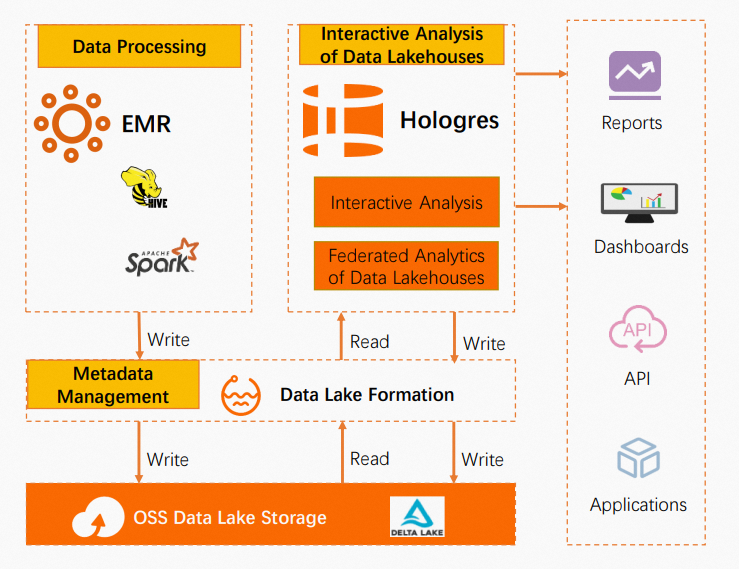
Hologres integrates natively with E-MapReduce (EMR), Data Lake Formation (DLF), and Object Storage Service (OSS) to deliver a complete data lakehouse—combining the open ecosystem of a data lake with the high-performance analytics of a real-time data warehouse.
Prerequisites
Before you begin, make sure you have:
-
A Hologres instance with the data lake acceleration feature available
-
An OSS bucket to store data
-
An EMR cluster with Spark, Hive, and Delta enabled, using DLF for metadata management
-
A DLF service configured to manage metadata for your OSS data
If you already have business data written to OSS via EMR, skip the data preparation steps. Use DLF's Metadata Discovery feature to automatically generate metadata, then proceed to Enable data lake acceleration.
How it works
EMR Spark transforms and processes data, storing it in OSS. DLF provides unified metadata management across this data. Hologres connects to DLF to query data lake files directly—supporting Hudi, Delta, CSV, Parquet, ORC, and SequenceFile formats—and delivers results to Business Intelligence (BI) reports, dashboards, and downstream applications.
Choose a query approach
Two approaches are available depending on your performance requirements:
| Approach | How it works | Query performance | Best for |
|---|---|---|---|
| Foreign table (direct query) | Hologres queries Delta Lake data in OSS via DLF metadata | Moderate (17.24 s for 100 GB TPC-H Q22) | Exploration, infrequent queries, data you don't want to copy |
| Internal table (imported data) | Data is copied into Hologres Standard storage (SSD/NVMe) | Up to 100x faster (106.67 ms for the same query) | Production analytics, dashboards, latency-sensitive workloads |
For Q2 specifically, importing into an internal table improves performance by more than 18x. See Performance comparison for details.
Prepare data
This section is for users setting up a new EMR environment with Delta Lake data. If you already have data in OSS, skip to Enable data lake acceleration.
Step 1: Set up an EMR cluster and OSS bucket
-
Create an EMR data lake cluster. Select Spark, Hive, and Delta as services, and select DLF for metadata management. For setup instructions, see Quickly create and use a DataLake cluster.
When creating the EMR cluster, set Region to China (Hangzhou), set Business Scenario to New Data Lake (DataLake), set Product Version to EMR-5.10.1, select Spark3 (3.3.1) and Deltalake (2.1.0) in optional services, and set Metadata to DLF Unified Metadata.
-
Activate OSS and create a bucket to store your data. For instructions, see Activate OSS.
Step 2: Generate TPC-H test data using EMR Spark
The TPC-H implementation in these steps is based on TPC-H benchmarking. Results are not comparable to published TPC-H benchmark results because the tests do not meet all TPC-H benchmark requirements.
-
Log on to the EMR cluster master node using Secure Shell (SSH) or passwordless logon for a core node. For details, see Log on to a cluster.
-
Generate 100 GB of TPC-H test data:
# Update all libraries yum update # Install git and gcc yum install git yum install gcc # Download the TPC-H data generation tool git clone https://github.com/gregrahn/tpch-kit.git # Build the tool cd tpch-kit/dbgen make # Generate data ./dbgen -vf -s 100 -
Enter the Hive interactive shell, create a database and tables, then load the generated data:
-- Enter the Hive interactive shell
hive

-- Create a database
CREATE DATABASE IF NOT EXISTS testdb_textfile location 'oss://oss-bucket-dlftest/testdb_textfile';

-- Switch to the new database
USE testdb_textfile;

-- Create tables
CREATE TABLE IF NOT EXISTS nation_textfile (
    n_nationkey integer ,
    n_name char(25) ,
    n_regionkey integer ,
    n_comment varchar(152)
) ROW FORMAT DELIMITED
FIELDS TERMINATED BY '|';

CREATE TABLE IF NOT EXISTS region_textfile (
    r_regionkey integer ,
    r_name char(25) ,
    r_comment varchar(152)
) ROW FORMAT DELIMITED
FIELDS TERMINATED BY '|';

CREATE TABLE IF NOT EXISTS part_textfile (
    p_partkey integer  ,
    p_name varchar(55)  ,
    p_mfgr char(25)  ,
    p_brand char(10)  ,
    p_type varchar(25)  ,
    p_size integer  ,
    p_container char(10) ,
    p_retailprice decimal(15,2) ,
    p_comment varchar(23)
) ROW FORMAT DELIMITED
FIELDS TERMINATED BY '|';

CREATE TABLE IF NOT EXISTS supplier_textfile (
    s_suppkey integer  ,
    s_name char(25)  ,
    s_address varchar(40) ,
    s_nationkey integer  ,
    s_phone char(15) ,
    s_acctbal decimal(15,2) ,
    s_comment varchar(101)
) ROW FORMAT DELIMITED
FIELDS TERMINATED BY '|';

CREATE TABLE IF NOT EXISTS partsupp_textfile (
    ps_partkey integer ,
    ps_suppkey integer ,
    ps_availqty integer ,
    ps_supplycost decimal(15,2) ,
    ps_comment varchar(199)
) ROW FORMAT DELIMITED
FIELDS TERMINATED BY '|';

CREATE TABLE IF NOT EXISTS customer_textfile (
    c_custkey integer  ,
    c_name varchar(25)  ,
    c_address varchar(40) ,
    c_nationkey integer  ,
    c_phone char(15)  ,
    c_acctbal decimal(15,2)  ,
    c_mktsegment char(10)  ,
    c_comment varchar(117)
) ROW FORMAT DELIMITED
FIELDS TERMINATED BY '|';

CREATE TABLE IF NOT EXISTS orders_textfile (
    o_orderkey integer ,
    o_custkey integer ,
    o_orderstatus char(1) ,
    o_totalprice decimal(15,2) ,
    o_orderdate date  ,
    o_orderpriority char(15)  ,
    o_clerk char(15)  ,
    o_shippriority integer  ,
    o_comment varchar(79)
) ROW FORMAT DELIMITED
FIELDS TERMINATED BY '|';

CREATE TABLE IF NOT EXISTS lineitem_textfile (
    l_orderkey integer  ,
    l_partkey integer  ,
    l_suppkey integer  ,
    l_linenumber integer  ,
    l_quantity decimal(15,2)  ,
    l_extendedprice decimal(15,2)  ,
    l_discount decimal(15,2)  ,
    l_tax decimal(15,2)  ,
    l_returnflag char(1)  ,
    l_linestatus char(1)  ,
    l_shipdate date  ,
    l_commitdate date  ,
    l_receiptdate date  ,
    l_shipinstruct char(25)  ,
    l_shipmode char(10)  ,
    l_comment varchar(44)
) ROW FORMAT DELIMITED
FIELDS TERMINATED BY '|';

-- Load data
LOAD DATA LOCAL INPATH '${YOUR_PATH}/nation.tbl*' OVERWRITE INTO TABLE nation_textfile;
LOAD DATA LOCAL INPATH '${YOUR_PATH}/region.tbl*' OVERWRITE INTO TABLE region_textfile;
LOAD DATA LOCAL INPATH '${YOUR_PATH}/supplier.tbl*' OVERWRITE INTO TABLE supplier_textfile;
LOAD DATA LOCAL INPATH '${YOUR_PATH}/customer.tbl*' OVERWRITE INTO TABLE customer_textfile;
LOAD DATA LOCAL INPATH '${YOUR_PATH}/part.tbl*' OVERWRITE INTO TABLE part_textfile;
LOAD DATA LOCAL INPATH '${YOUR_PATH}/partsupp.tbl*' OVERWRITE INTO TABLE partsupp_textfile;
LOAD DATA LOCAL INPATH '${YOUR_PATH}/orders.tbl*' OVERWRITE INTO TABLE orders_textfile;
LOAD DATA LOCAL INPATH '${YOUR_PATH}/lineitem.tbl*' OVERWRITE INTO TABLE lineitem_textfile;
Step 3: Create Delta format tables using Spark SQL
Enter the spark-sql interactive shell, then create a database and Delta tables from the text tables loaded in the previous step:
-- Enter the spark-sql interactive shell
spark-sql --conf 'spark.serializer=org.apache.spark.serializer.KryoSerializer' --conf 'spark.sql.delta.mergeSchema=true' --conf 'autoMerge.enable=true' --conf 'spark.sql.parquet.writeLegacyFormat=true'

-- Create a database
CREATE DATABASE IF NOT EXISTS test_spark_delta LOCATION 'oss://oss-bucket-dlftest/test_spark_delta';

-- Switch to the new database and create Delta tables
USE test_spark_delta;

CREATE TABLE nation_delta
USING delta
AS SELECT * FROM ${SOURCE}.nation_textfile;

CREATE TABLE region_delta
USING delta
AS SELECT * FROM ${SOURCE}.region_textfile;

CREATE TABLE supplier_delta
USING delta
AS SELECT * FROM ${SOURCE}.supplier_textfile;

CREATE TABLE customer_delta
USING delta
partitioned BY (c_mktsegment)
AS SELECT * FROM ${SOURCE}.customer_textfile;

CREATE TABLE part_delta
USING delta
partitioned BY (p_brand)
AS SELECT * FROM ${SOURCE}.part_textfile;

CREATE TABLE partsupp_delta
USING delta
AS SELECT * FROM ${SOURCE}.partsupp_textfile;

CREATE TABLE orders_delta
USING delta
partitioned BY (o_orderdate)
AS SELECT * FROM ${SOURCE}.orders_textfile;

CREATE TABLE lineitem_delta
USING delta
partitioned BY (l_shipdate)
AS SELECT * FROM ${SOURCE}.lineitem_textfile;
Enable data lake acceleration for Hologres
In the Hologres console, go to the Instances page, locate your instance, and click Data Lake Acceleration in the Actions column.
Query Delta Lake data
Option 1: Query via foreign tables (direct OSS access)
All queries in this option use the dlf_fdw extension to connect Hologres to DLF metadata without copying data into Hologres.
-
Create the
dlf_fdwextension and a foreign server pointing to your DLF and OSS endpoints:-- Create the dlf_fdw extension CREATE EXTENSION IF NOT EXISTS dlf_fdw; -- Create a foreign server CREATE SERVER IF NOT EXISTS dlf_server FOREIGN data wrapper dlf_fdw options ( dlf_region 'cn-beijing', dlf_endpoint 'dlf-share.cn-beijing.aliyuncs.com', oss_endpoint 'oss-cn-beijing-internal.aliyuncs.com' ); -
Import the foreign table definitions from your DLF schema:
IMPORT FOREIGN SCHEMA "test_spark_delta" LIMIT TO ( customer_delta, lineitem_delta, nation_delta, orders_delta, part_delta, partsupp_delta, region_delta, supplier_delta ) FROM SERVER dlf_server INTO oss_ext_tables options (if_table_exist 'update'); -
Query the foreign tables. The following example runs TPC-H Q22:
SELECT
        cntrycode,
        count(*) AS numcust,
        sum(c_acctbal) AS totacctbal
FROM
        (
                SELECT
                        substring(c_phone FROM 1 FOR 2) AS cntrycode,
                        c_acctbal
                FROM
                        customer_delta
                WHERE
                        substring(c_phone FROM 1 FOR 2) IN
                                ('24', '32', '17', '18', '12', '14', '22')
                        AND c_acctbal > (
                                SELECT
                                        avg(c_acctbal)
                                FROM
                                        customer_delta
                                WHERE
                                        c_acctbal > 0.00
                                        AND substring(c_phone FROM 1 FOR 2) IN
                                                ('24', '32', '17', '18', '12', '14', '22')
                        )
                        AND NOT EXISTS (
                                SELECT
                                        *
                                FROM
                                        orders_delta
                                WHERE
                                        o_custkey = c_custkey
                        )
        ) AS custsale
GROUP BY
        cntrycode
ORDER BY
        cntrycode;
Expected output:
+------------+-------------+---------------+
| cntrycode  | numcust     | totacctbal    |
+------------+-------------+---------------+
| 12         | 90805       | 681136537.68  |
| 14         | 91459       | 685826271.21  |
| 17         | 91313       | 685025263.11  |
| 18         | 91292       | 684588251.63  |
| 22         | 90399       | 677402363.79  |
| 24         | 90635       | 680033065.67  |
| 32         | 90668       | 680459221.16  |
+------------+-------------+---------------+
Option 2: Import data into Hologres for faster queries
Hologres Standard storage uses SSD (NVMe) disks. By importing Delta Lake data into internal tables, you can tune performance further with indexes, shard count, and distribution columns. For tuning details, see Optimize the performance of internal tables.
Complete Option 1 first—the foreign tables created in that step are the data source for the import.
-
Create an internal table and set its properties:
BEGIN;
CREATE TABLE region
(
    R_REGIONKEY INT  NOT NULL PRIMARY KEY,
    R_NAME      TEXT NOT NULL,
    R_COMMENT   TEXT
);
CALL set_table_property('region', 'distribution_key', 'R_REGIONKEY');
CALL set_table_property('region', 'bitmap_columns', 'R_REGIONKEY,R_NAME,R_COMMENT');
CALL set_table_property('region', 'dictionary_encoding_columns', 'R_NAME,R_COMMENT');
CALL set_table_property('region', 'time_to_live_in_seconds', '31536000');
COMMIT;
For
CREATE TABLEstatements for all eight TPC-H tables, see Hologres Query Experience Quick Start.. For more CREATE TABLE statements, see Hologres Query Experience Quick Start -
Import data from the OSS foreign table into the internal table:
INSERT INTO public.region SELECT * FROM region_delta; -
Query the internal table using the Q22 query. The query is the same as in Option 1, with
customer_deltaandorders_deltareplaced bycustomerandorders:SELECT cntrycode, count(*) AS numcust, sum(c_acctbal) AS totacctbal FROM ( SELECT substring(c_phone FROM 1 FOR 2) AS cntrycode, c_acctbal FROM customer WHERE substring(c_phone FROM 1 FOR 2) IN ('24', '32', '17', '18', '12', '14', '22') AND c_acctbal > ( SELECT avg(c_acctbal) FROM customer WHERE c_acctbal > 0.00 AND substring(c_phone FROM 1 FOR 2) IN ('24', '32', '17', '18', '12', '14', '22') ) AND NOT EXISTS ( SELECT * FROM orders WHERE o_custkey = c_custkey ) ) AS custsale GROUP BY cntrycode ORDER BY cntrycode;
Performance comparison
Tested on a 32-core dedicated Hologres instance with 100 GB of TPC-H data (Q22):
| Approach | Query duration | Execution plan |
|---|---|---|
| OSS foreign table | 17.24 s | |
| Hologres internal table | 106.67 ms | |
The internal table is approximately 100x faster for this query. For Q2, the speedup exceeds 18x.