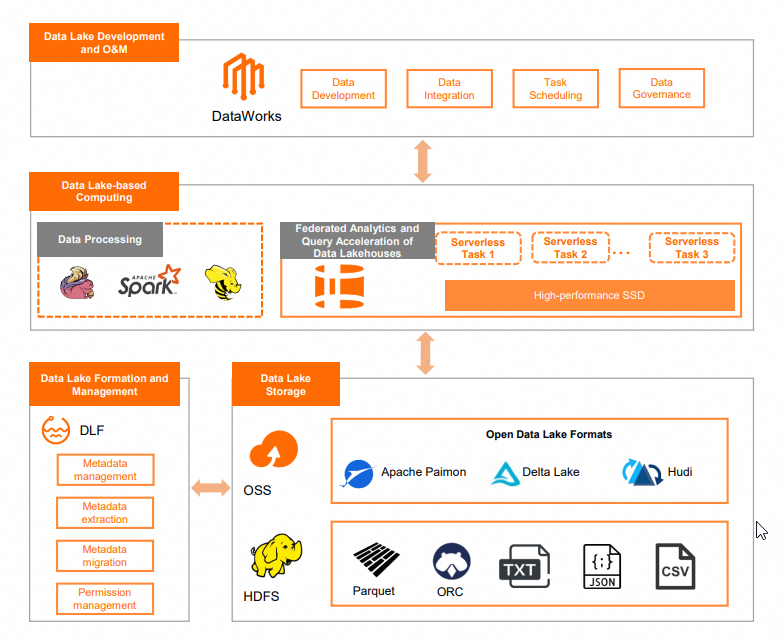
The Paimon-based Hologres serverless data lake solution accelerates queries on Paimon data stored in Object Storage Service (OSS) with on-demand resources and pay-as-you-go billing. No resource reservation is required. The flexible, scalable architecture helps you manage and use lake data more effectively for data-driven decision-making and business innovation.
Background information
Apache Paimon is a unified lake storage format for streaming and batch processing that supports high-throughput writes and low-latency queries. Compute engines on the Alibaba Cloud big data platform, including Flink, Hologres, MaxCompute, and EMR on Spark, integrate with Paimon. You can build a data lake storage service on OSS and connect to these engines for data lake analytics. For more information, see Apache Paimon.
Hologres shared clusters provide a serverless query acceleration service for foreign tables in MaxCompute and OSS data lakes. Built on the storage-compute separation architecture, shared clusters accelerate OSS lake data analysis with on-demand usage and billing based on the volume of data scanned. For more information, see Overview of shared clusters.
Architecture
Prerequisites
-
Purchase a Hologres shared cluster instance. For more information, see Create an instance.
-
Activate the Data Lake Formation (DLF) service. For more information, see Quick Start for DLF.
-
(Optional) To use a custom data catalog in DLF, create a data catalog first. You specify this catalog when creating a foreign server. For more information, see Create a data catalog.
-
Activate OSS for data lake storage.
-
Enable the OSS-HDFS service. For more information, see Enable the OSS-HDFS service.
Hologres dedicated instances also support reading Paimon and other lake format data. The procedure is the same as for shared cluster instances. This topic uses a shared cluster instance as an example.
Usage notes
-
Only Hologres V2.1.6 and later support querying Paimon data lakes.
-
Hologres shared clusters only support reading OSS data lake data. They do not support importing data from OSS. To import OSS data into Hologres internal tables, use a dedicated instance.
Procedure
-
Purchase an Elastic MapReduce (EMR) data lake instance.
Log on to the EMR on ECS console and create an EMR cluster. For more information, see Create a cluster. The following table describes key parameters:
Configuration item
Description
Business Scenario
Select Data Lake.
Optional Services
The required services are Spark, Hive, and Paimon. Select other services as needed.
Metadata
Select DLF Unified Metadata.
DLF Catalog
-
To use a custom DLF data catalog, select the created catalog, for example, paimon_catalog. For more information, see Create a data catalog.
-
You can also select the default catalog. If you use the default DLF catalog, you do not need to specify the
dlf_catalogparameter when creating a foreign server in the Hologres shared cluster.
Root Storage Directory of Cluster
Select the path of a bucket for which the OSS-HDFS service is enabled.
-
-
Build the data source.
This example uses 10 GB of TPC-H data. Use EMR Hive to build a textfile-format data source. For more information, see Build data using EMR Spark.
ImportantWhen you generate the data, replace the
./dbgen -vf -s 100command with./dbgen -vf -s 10. -
Use Spark to create a Paimon table.
-
Log on to Spark SQL.
spark-sql --conf spark.sql.catalog.paimon=org.apache.paimon.spark.SparkCatalog --conf spark.sql.catalog.paimon.metastore=dlf -
Create a database.
-- Create a database. CREATE DATABASE paimon_db location 'oss://${oss-hdfs-bucket}/tpch_10G/paimon_tpch_10g/';${oss-hdfs-bucket}: the name of the bucket for which the OSS-HDFS service is enabled. -
Create a Paimon table and import the textfile data that you prepared in the Build the data source step.
-- Switch to the database that you just created. use paimon_db; -- Create a table and import data. CREATE TABLE nation_paimon TBLPROPERTIES ( 'primary-key' = 'N_NATIONKEY' ) AS SELECT * from ${source}.nation_textfile; CREATE TABLE region_paimon TBLPROPERTIES ( 'primary-key' = 'R_REGIONKEY' ) AS SELECT * FROM ${source}.region_textfile; CREATE TABLE supplier_paimon TBLPROPERTIES ( 'primary-key' = 'S_SUPPKEY' ) AS SELECT * FROM ${source}.supplier_textfile; CREATE TABLE customer_paimon partitioned BY (c_mktsegment) TBLPROPERTIES ( 'primary-key' = 'C_CUSTKEY' ) AS SELECT * FROM ${source}.customer_textfile; CREATE TABLE part_paimon partitioned BY (p_brand) TBLPROPERTIES ( 'primary-key' = 'P_PARTKEY' ) AS SELECT * FROM ${source}.part_textfile; CREATE TABLE partsupp_paimon TBLPROPERTIES ( 'primary-key' = 'PS_PARTKEY,PS_SUPPKEY' ) AS SELECT * FROM ${source}.partsupp_textfile; CREATE TABLE orders_paimon partitioned BY (o_orderdate) TBLPROPERTIES ( 'primary-key' = 'O_ORDERKEY' ) AS SELECT * FROM ${source}.orders_textfile; CREATE TABLE lineitem_paimon partitioned BY (l_shipdate) TBLPROPERTIES ( 'primary-key' = 'L_ORDERKEY,L_LINENUMBER' ) AS SELECT * FROM ${source}.lineitem_textfile;${source}: the name of the database where the *_textfile table resides in Hive.
-
-
Create a foreign server in the Hologres shared cluster.
NoteWhen you create the EMR data lake instance:
-
If you selected a custom data catalog for the DLF Catalog parameter, you must set the
dlf_catalogoption to the name of that catalog. -
If you selected the default catalog for the DLF Catalog parameter, you can omit the
dlf_catalogoption from the statement.
-- Create a foreign server. CREATE SERVER IF NOT EXISTS dlf_server FOREIGN data wrapper dlf_fdw options ( dlf_catalog 'paimon_catalog', dlf_endpoint 'dlf-share.cn-shanghai.aliyuncs.com', oss_endpoint 'cn-shanghai.oss-dls.aliyuncs.com' ); -
-
Create a foreign table for the Paimon table in the Hologres shared cluster.
IMPORT FOREIGN SCHEMA paimon_db LIMIT TO ( lineitem_paimon ) FROM SERVER dlf_server INTO public options (if_table_exist 'update'); -
Query data.
The following SQL statement shows Query 1 (Q1) as an example:
SELECT l_returnflag, l_linestatus, SUM(l_quantity) AS sum_qty, SUM(l_extendedprice) AS sum_base_price, SUM(l_extendedprice * (1 - l_discount)) AS sum_disc_price, SUM(l_extendedprice * (1 - l_discount) * (1 + l_tax)) AS sum_charge, AVG(l_quantity) AS avg_qty, AVG(l_extendedprice) AS avg_price, AVG(l_discount) AS avg_disc, COUNT(*) AS count_order FROM lineitem_paimon WHERE l_shipdate <= date '1998-12-01' - interval '120' DAY GROUP BY l_returnflag, l_linestatus ORDER BY l_returnflag, l_linestatus;NoteFor the other 21 SQL statements, see The 22 TPC-H query statements.