Use COPY FROM STDIN to load data into Hologres and COPY TO STDOUT to export it. Hologres extends the standard PostgreSQL COPY syntax with two Hologres-specific parameters: STREAM_MODE (fixed copy mode) and ON_CONFLICT (primary key conflict policy).
All COPY statements must run on a PostgreSQL client. For connection details, see PostgreSQL client.
To monitor COPY operations, query hologres.hg_query_log. In Hologres V3.0 and later, each COPY operation generates two log records — one for the COPY command and one for the underlying INSERT statement — linked by transaction ID. See Query log for details.
Limitations
COPY FROMwrites only to child partitioned tables, not parent partitioned tables.COPY FROM STDINsupports tables with a DEFAULT constraint or SERIAL columns starting in Hologres V1.1.43. Earlier versions do not support these table types.
Syntax
/* Import data */
COPY table_name [ ( column_name [, ...] ) ]
    FROM STDIN
    [ [ WITH ] ( option [, ...] ) ]

/* Export data */
COPY { ( query ) }
    TO STDOUT
    [ [ WITH ] ( option [, ...] ) ]
Where option can be one of:
FORMAT format_name                        -- TEXT (default), CSV, or BINARY
DELIMITER 'delimiter_character'
NULL 'null_string'
HEADER [ boolean ]                        -- CSV only
QUOTE 'quote_character'                   -- CSV only
ESCAPE 'escape_character'                 -- CSV only
FORCE_QUOTE { ( column_name [, ...] ) | * }  -- CSV, COPY TO only
FORCE_NOT_NULL ( column_name [, ...] )    -- CSV, COPY FROM only
ENCODING 'encoding_name'
STREAM_MODE [ boolean ]                   -- Hologres-specific; COPY FROM only
ON_CONFLICT 'none|ignore|update'          -- Hologres-specific; COPY FROM only
Parameters
| Parameter | Description |
|---|---|
table_name | The Hologres table to import data into. |
query | A SELECT statement whose results are exported. |
STDIN | Reads input from the client's standard input. |
STDOUT | Writes output to the client's standard output. |
FORMAT | File format: TEXT (default), CSV, or BINARY. BINARY import is only supported in fixed copy mode (STREAM_MODE TRUE). |
DELIMITER | Column separator. Default: tab (\t) for TEXT, comma (,) for CSV. Example: DELIMITER AS ','. |
NULL | String representing a null value. Default: \N for TEXT, empty unquoted string for CSV. Not supported for BINARY. |
HEADER | Whether the file includes a header row. CSV only. |
QUOTE | Single-byte character used to quote field values. CSV only. Default: ". |
ESCAPE | Single-byte character preceding a QUOTE match. CSV only. Default: same as QUOTE. |
FORCE_QUOTE | Forces quoting for all non-NULL values in the specified columns. CSV, COPY TO only. |
FORCE_NOT_NULL | Treats null-representation strings as zero-length strings instead of NULL. CSV, COPY FROM only. |
ENCODING | File encoding. Default: the client's encoding. |
STREAM_MODE | Enables fixed copy mode for imports. Default: FALSE. When TRUE, uses a fixed execution plan with a row-level lock instead of a table-level lock. COPY FROM only. |
ON_CONFLICT | Conflict policy when a primary key collision occurs. Values are case-insensitive without quotes; with single quotes, use lowercase (e.g., 'none'). COPY FROM only. See ON_CONFLICT behavior by version. |
ON_CONFLICT values:
| Value | Behavior | When to use |
|---|---|---|
NONE | Reports an error on conflict. | Strict data integrity — every row must be new. |
IGNORE | Skips the conflicting row. | Idempotent loads where duplicates are expected and the existing record should be preserved. |
UPDATE | Overwrites the conflicting row. | Upsert patterns where the latest value should win. |
ON_CONFLICT behavior by version
Before V3.0.4:
ON_CONFLICTtakes effect only whenSTREAM_MODE TRUE.V3.0.4 and later:
ON_CONFLICTalso takes effect whenSTREAM_MODE FALSE, with the GUC parameterhg_experimental_copy_enable_on_conflictenabled. WhenSTREAM_MODE FALSE,UPDATErequires writing all columns.V3.1.1 and later: When
STREAM_MODE FALSE,UPDATEsupports partial-column imports (hg_experimental_copy_enable_on_conflictis enabled by default).
Atomicity
Standard COPY (STREAM_MODE FALSE) guarantees atomicity: the entire operation either succeeds or is rolled back.
Fixed copy mode (STREAM_MODE TRUE) uses a row-level lock instead of a table-level lock, so atomicity is not guaranteed. If a row contains invalid data, an error is reported for that row only — the remaining rows may be partially written or not written at all.
Query log
In Hologres V3.0 and later, each COPY operation generates two records in hologres.hg_query_log: one for the COPY command and one for the INSERT it executes internally. Link them using the transaction ID:
SELECT
    query_id,
    query,
    extended_info
FROM
    hologres.hg_query_log
WHERE
    extended_info ->> 'source_trx' = '<transaction_id>'  -- Get the transaction ID from the trans_id field in the COPY log record
ORDER BY
    query_start;
In versions earlier than V3.0, each COPY operation generates a single record.
Import data into Hologres
Import from a PostgreSQL client (stdin)
The PostgreSQL client can only read from stdin. The HoloWeb console does not support stdin imports.
Example 1: Import delimited text
-- Create the target table
CREATE TABLE copy_test (
    id    int,
    age   int,
    name  text
);

-- Import data from stdin
COPY copy_test FROM STDIN WITH DELIMITER AS ',' NULL AS '';
53444,24,wangming
55444,38,ligang
55444,38,luyong
\.

-- Verify
SELECT * FROM copy_test;
Example 2: Import a CSV file
-- Create the target table
CREATE TABLE partsupp (
    ps_partkey     integer NOT NULL,
    ps_suppkey     integer NOT NULL,
    ps_availqty    integer NOT NULL,
    ps_supplycost  float   NOT NULL,
    ps_comment     text    NOT NULL
);

-- Import CSV from stdin
COPY partsupp FROM STDIN WITH DELIMITER '|' CSV;
1|2|3325|771.64|final theodolites
1|25002|8076|993.49|ven ideas
\.

-- Verify
SELECT * FROM partsupp;
Example 3: Import a local file using psql
Redirect a local file to stdin with the psql shell redirect operator:
psql -U <username> -p <port> -h <endpoint> -d <databasename> \
-c "COPY <table> FROM STDIN WITH DELIMITER '|' CSV;" <<filename>;| Parameter | Description | Example |
|---|---|---|
username | Alibaba Cloud account: AccessKey ID. Custom account: username (e.g., BASIC$abc). Store the AccessKey ID in an environment variable to avoid exposing it in commands. | — |
port | Public port of the Hologres instance. | 80 |
endpoint | Public endpoint of the Hologres instance. | xxx-cn-hangzhou.hologres.aliyuncs.com |
databasename | Name of the Hologres database. | mydb |
table | Name of the target table. | — |
filename | Path to the local file. | D:\tmp\copy_test.csv |
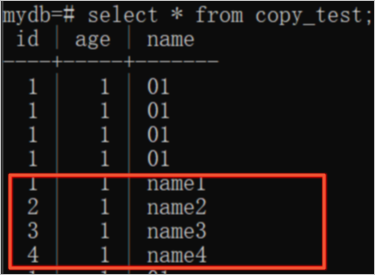
The following example imports the local file copy_test using this command:

The file contains:
01,01,name1
02,01,name2
03,01,name3
04,01,name4
After the import, query the results in psql:
Import from a JDBC client using CopyManager
Java Database Connectivity (JDBC) clients can use CopyManager — the PostgreSQL JDBC driver's API wrapper for COPY — to stream files into Hologres.
package com.aliyun.hologram.test.jdbc;

import java.io.FileInputStream;
import java.io.FileOutputStream;
import java.io.IOException;
import java.sql.*;
import java.util.Properties;

import org.postgresql.copy.CopyManager;
import org.postgresql.core.BaseConnection;

public class jdbcCopyFile {

    public static void main(String args[]) throws Exception {
        System.out.println(copyFromFile(getConnection(), "/Users/feng/Workspace/region.tbl", "region"));
    }

    public static Connection getConnection() throws Exception {
        Class.forName("org.postgresql.Driver");
        String url = "jdbc:postgresql://endpoint:port/dbname";
        Properties props = new Properties();
        // Store credentials in environment variables to avoid hardcoding them
        props.setProperty("user", "AAA");     // AccessKey ID
        props.setProperty("password", "BBB"); // AccessKey secret
        return DriverManager.getConnection(url, props);
    }

    /**
     * Streams a local file into Hologres via COPY FROM STDIN.
     *
     * @param connection  Active JDBC connection
     * @param filePath    Path to the local file
     * @param tableName   Target Hologres table
     * @return Number of rows imported
     */
    public static long copyFromFile(Connection connection, String filePath, String tableName)
            throws SQLException, IOException {
        long count = 0;
        FileInputStream fileInputStream = null;

        try {
            CopyManager copyManager = new CopyManager((BaseConnection) connection);
            fileInputStream = new FileInputStream(filePath);
            count = copyManager.copyIn("COPY " + tableName + " FROM STDIN delimiter '|' csv", fileInputStream);
        } finally {
            if (fileInputStream != null) {
                try {
                    fileInputStream.close();
                } catch (IOException e) {
                    e.printStackTrace();
                }
            }
        }
        return count;
    }
}
Fixed copy mode
Fixed copy mode (STREAM_MODE TRUE) uses pre-compiled fixed execution plans to accelerate repeated COPY imports. It is a Hologres-specific optimization available since V1.3.17 and applies to imports only. For a comparison with other batch write modes, see Comparison of batch write modes. For the underlying mechanism, see Accelerate SQL execution with fixed plan.
Writing to a subset of columns — partial update
When ON_CONFLICT UPDATE is set and the COPY writes to only some columns, columns not included in the COPY list are not modified:
CREATE TABLE t0 (id int NOT NULL, name text, age int, primary key(id));

COPY t0(id, name) FROM STDIN
WITH (
    STREAM_MODE TRUE,
    ON_CONFLICT UPDATE
);

-- Equivalent INSERT INTO statement:
INSERT INTO t0(id, name) VALUES(?, ?)
ON CONFLICT(id) DO UPDATE SET
    id = excluded.id, name = excluded.name;
Writing to a subset of columns — columns with defaults
When a column not included in the COPY list has a DEFAULT value, Hologres applies the default only for new rows. Existing rows that match on the primary key are not updated for that column:
CREATE TABLE t0 (id int NOT NULL, name text, age int DEFAULT 0, primary key(id));

COPY t0(id, name) FROM STDIN
WITH (
    STREAM_MODE TRUE,
    ON_CONFLICT UPDATE
);

-- Equivalent INSERT INTO statement:
-- For a new row (no matching id), age is set to its default value.
-- For an existing row (matching id), age is not updated.
INSERT INTO t0(id, name, age) VALUES(?, ?, DEFAULT)
ON CONFLICT(id) DO UPDATE SET
    id = excluded.id, name = excluded.name;
Export data from Hologres
Export to a local file
Both methods below are available on the PostgreSQL client only.
Using the `\copy` meta-command (psql)
-- Create and populate a table
CREATE TABLE copy_to_local (
    id    int,
    age   int,
    name  text
);

INSERT INTO copy_to_local VALUES
    (1, 1, 'a'),
    (1, 2, 'b'),
    (1, 3, 'c'),
    (1, 4, 'd');

-- Export to a local file
\COPY (SELECT * FROM copy_to_local) TO '/root/localfile.txt';
Using stdout redirection (psql)
psql -U <username> -p <port> -h <endpoint> -d <databasename> \
    -c "COPY (SELECT * FROM <tablename>) TO STDOUT WITH DELIMITER '|' CSV;" > <filename>
Export to Object Storage Service (OSS)
Use the hg_dump_to_oss program with COPY TO PROGRAM to export Hologres data to an OSS bucket. Each export is limited to 5 GB.
Prerequisites
Only superusers and users with the pg_execute_server_program role can run hg_dump_to_oss. Grant the role as follows:
-- Simple permission model (SPM)
CALL spm_grant('pg_execute_server_program', '<Alibaba Cloud account ID, email address, or RAM user account>');

-- Standard PostgreSQL authorization model
GRANT pg_execute_server_program TO <account>;
Syntax
COPY (query) TO PROGRAM 'hg_dump_to_oss
    --AccessKeyId <access_key_id>
    --AccessKeySecret <access_key_secret>
    --Endpoint <oss_classic_network_endpoint>
    --BucketName <bucket_name>
    --DirName <directory>
    [--FileName <file_name>]
    [--BatchSize <n>]'
(DELIMITER ',', HEADER true, FORMAT CSV);DirName cannot start with / or \.
Parameters
| Parameter | Description | Example | |
|---|---|---|---|
query | SELECT statement whose results are exported. | SELECT * FROM dual; | |
AccessKeyId | AccessKey ID. Store in an environment variable to avoid exposing credentials. | — | |
AccessKeySecret | AccessKey secret. Store in an environment variable. | — | |
Endpoint | Classic network endpoint of the OSS bucket. Use the classic network endpoint, not the public or VPC endpoint. Find it on the bucket details page or in Regions and OSS endpoints. | oss-cn-beijing-internal.aliyuncs.com | |
BucketName | Name of the OSS bucket. | dummy_bucket | |
DirName | OSS directory path. Cannot start with / or \. | testdemo/ | |
FileName | (Optional) Output file name. Cannot contain: `` ; # ' | ? ~ < ( ) " $ \ { } [ ] & * \n \r ``. | file_name |
BatchSize | Rows processed per batch. Default: 1000. | 5000 | |
DELIMITER | Field separator in the output file. Default: tab (\t). | , |
Examples
-- Export from a Hologres internal table to OSS
COPY (SELECT * FROM holo_test LIMIT 2)
TO PROGRAM 'hg_dump_to_oss
    --AccessKeyId <access_id>
    --AccessKeySecret <access_key>
    --Endpoint oss-cn-hangzhou-internal.aliyuncs.com
    --BucketName hologres-demo
    --DirName holotest/
    --FileName file_name
    --BatchSize 3000'
DELIMITER ',';

-- Export from a Hologres foreign table to OSS
COPY (SELECT * FROM foreign_holo_test LIMIT 20)
TO PROGRAM 'hg_dump_to_oss
    --AccessKeyId <access_id>
    --AccessKeySecret <access_key>
    --Endpoint oss-cn-hangzhou-internal.aliyuncs.com
    --BucketName hologres-demo
    --DirName holotest/
    --FileName file_name
    --BatchSize 3000'
(DELIMITER ',', HEADER true);

-- Export to an OSS bucket in a different region
-- (e.g., from a Hologres instance in China (Hangzhou) to an OSS bucket in China (Beijing))
COPY (SELECT * FROM holo_test_1 LIMIT 20)
TO PROGRAM 'hg_dump_to_oss
    --AccessKeyId <access_id>
    --AccessKeySecret <access_key>
    --Endpoint oss-cn-beijing-internal.aliyuncs.com
    --BucketName hologres-demo
    --DirName holotest/
    --FileName file_name
    --BatchSize 3000'
(DELIMITER ',', HEADER true, FORMAT CSV);
Troubleshooting
| Error | Cause | Solution |
|---|---|---|
ERROR: syntax error at or near ")" LINE 1: COPY (select 1,2,3 from ) TO PROGRAM 'hg_dump_to_oss2 --Acce... | The query parameter contains an invalid SQL statement. | Fix the query syntax. |
DETAIL: child process exited with exit code 255 | The OSS endpoint uses the wrong network type. | Use the classic network endpoint of the OSS bucket. |
DETAIL: command not found | The PROGRAM argument is not set to hg_dump_to_oss. | Correct the program name. |
DETAIL: child process exited with exit code 101 | Invalid AccessKeyId. | Use a valid AccessKey ID. |
DETAIL: child process exited with exit code 102 | Invalid AccessKeySecret. | Use the correct AccessKey secret. |
DETAIL: child process exited with exit code 103 | Invalid Endpoint. | Use the classic network endpoint for the OSS bucket. |
DETAIL: child process exited with exit code 104 | Invalid BucketName. | Verify the bucket name. |
DETAIL: child process exited with exit code 105 | A required parameter is missing. | Check that all required parameters are specified. |
ERROR: program "hg_dump_to_oss ..." failed DETAIL: child process exited with exit code 255 | The Hologres instance cannot reach the OSS network. | Switch to the classic network endpoint. For endpoint details, see OSS regions and endpoints. |
Export from a JDBC client using CopyManager
import org.postgresql.copy.CopyManager;
import org.postgresql.core.BaseConnection;

import java.io.FileOutputStream;
import java.io.IOException;
import java.sql.Connection;
import java.sql.DriverManager;
import java.sql.SQLException;
import java.util.Properties;

public class copy_to_local_file {

    public static void main(String args[]) throws Exception {
        System.out.println(copyToFile(getConnection(), "/Users/feng/Workspace/region.tbl", "select * from region"));
    }

    public static Connection getConnection() throws Exception {
        Class.forName("org.postgresql.Driver");
        String url = "jdbc:postgresql://endpoint:port/dbname";
        Properties props = new Properties();
        // Store credentials in environment variables to avoid hardcoding them
        props.setProperty("user", "AAA");     // AccessKey ID
        props.setProperty("password", "BBB"); // AccessKey secret
        return DriverManager.getConnection(url, props);
    }

    /**
     * Streams a Hologres query result into a local file via COPY TO STDOUT.
     *
     * @param connection  Active JDBC connection
     * @param filePath    Destination file path
     * @param SQL_Query   SELECT statement to export
     * @return Path of the written file
     */
    public static String copyToFile(Connection connection, String filePath, String SQL_Query)
            throws SQLException, IOException {

        FileOutputStream fileOutputStream = null;

        try {
            CopyManager copyManager = new CopyManager((BaseConnection) connection);
            fileOutputStream = new FileOutputStream(filePath);
            copyManager.copyOut("COPY (" + SQL_Query + ") TO STDOUT DELIMITER '|' csv", fileOutputStream);
        } finally {
            if (fileOutputStream != null) {
                try {
                    fileOutputStream.close();
                } catch (IOException e) {
                    e.printStackTrace();
                }
            }
        }
        return filePath;
    }
}
What's next
Data types overview — Supported data types for COPY operations
Accelerate SQL execution with fixed plan — How fixed plans work
Comparison of batch write modes — When to use COPY vs other write methods