Use dynamic parameter updates for your Flink jobs to apply new configurations faster. This feature reduces service interruptions from job restarts, simplifies dynamic scaling of TaskManagers, and helps you troubleshoot checkpoints.
Background
Updating Flink parameters traditionally requires a job restart. This process can cause service interruptions, data backfill delays, and resource usage spikes, extending downtime and affecting business continuity.
The dynamic parameter update feature sends a REST request to a running job. It allows the job to reuse existing JobManager and TaskManager containers and apply updates through an in-place restart or, in some cases, without a restart, reducing the cost of restarts. Combined with capabilities like resource pre-allocation and state lazy loading, this feature significantly speeds up job startup after an update, reducing downtime from minutes to seconds. For a typical Source -> Map -> Sink job, using dynamic parameter updates for dynamic scaling dramatically decreases service interruption time. The following figure compares the downtime.
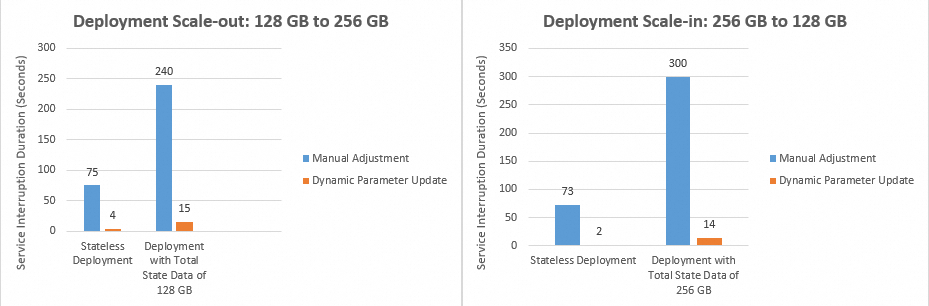
You can dynamically scale TaskManagers by updating the parallelism. For more information about how the number of TaskManagers is calculated, see Configure job resources.
Limitations
-
Only the following parameters support dynamic updates: parallelism, Checkpointing Interval, Checkpointing Timeout, and Min Interval Between Checkpoints. If you also modify parameters that do not support dynamic updates, those changes will take effect only after a job restart.
-
This feature is available only for jobs running on Ververica Runtime (VVR) 8.0.1 or later.
-
Dynamically updating parallelism is not supported in expert mode (fine-grained).
Usage notes
-
Dynamic parameter update is an experimental feature, and service interruptions may still occur during the update process. Compared to traditional parameter modification, dynamic updates can significantly reduce downtime. However, the exact duration of the interruption, typically between 5 seconds and 1 minute, depends on factors such as the job topology and state size.
-
You can apply dynamic parameter updates only to a running job.
-
When you dynamically update the parallelism, Realtime Compute for Apache Flink skips nodes where parallelism is explicitly set. This is because certain operators have specific parallelism requirements. For example, the parallelism of a global operator must be 1, and the parallelism of a Kafka source is often explicitly set to avoid exceeding the number of partitions. To ensure that an operator's parallelism can be updated dynamically, do not set it explicitly by using methods like
DataStream#setParallelismor source/sink configuration parameters. -
The Hot-update button appears only after you modify one of the supported parameters: parallelism, Checkpointing Interval, Checkpointing Timeout, or Min Interval Between Checkpoints. After you click the button, the changes take effect. If you also modify parameters that do not support dynamic updates, those changes will take effect only after a job restart.
Procedure
-
Go to the O&M > Deployments page.
-
Log in to the Realtime Compute for Apache Flink console.
-
In the Actions column for the target workspace, click Console.
-
In the left navigation pane, choose . Click the name of the target running job.
-
-
On the Configuration tab, in the Resources or Parameters section, click Edit.
-
Modify the values for the parameters that support dynamic updates, and then click Save.
-
In the upper-right corner of the page, click Hot-update.
ImportantOnly the following parameters support dynamic updates: parallelism, Checkpointing Interval, Checkpointing Timeout, and Min Interval Between Checkpoints. If you also modify parameters that do not support dynamic updates, those changes will take effect only after a job restart.
-
In the dialog box that appears, review the information and click OK.
After you click OK, an icon appears, indicating the update is in progress.
Related documentation
-
To update parameters that do not support dynamic updates, configure them on the Configuration tab and then restart the job. For more information, see Configure job deployment and Start a job.
-
The automatic performance tuning feature can help you optimize job parallelism and resource configuration. For more information, see Configure automatic tuning.
-
The intelligent job diagnostics service helps you monitor job health, analyze errors and anomalies, and provides actionable diagnostic suggestions. For more information, see Intelligent job diagnostics.