This topic answers common questions about data validity in Realtime Compute for Apache Flink.
Why do I get no output in the sink table?
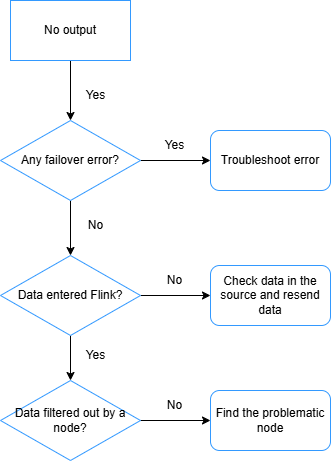
After a job starts, no data appears in the sink table. Work through the following checks in order.
-
Check for failovers. If the job has failed over, analyze the error message to identify the root cause and resolve it so the job runs as expected.
-
Verify that data is reaching Realtime Compute for Apache Flink. If no failover has occurred but data latency is very high, check the
numRecordsInOfSourcemetric on the monitoring and alerts page. If the metric shows zero for a source, the source table is not sending data to Flink — investigate the upstream data source. -
Check whether an operator is filtering out all records. Add
pipeline.operator-chaining: 'false'to the Other Configuration field (see How do I configure custom running parameters for a job?). This splits the operator chain so you can inspect each operator's Bytes Received and Bytes Sent metrics individually. An operator with input but zero output is the culprit — common offenders are JOIN, WINDOW, and WHERE. -
Check whether the downstream database is holding data in its write buffer. Reduce the batch size of the downstream connector to flush data sooner.
ImportantAvoid an excessively small batch size. A batch size of 1 means Flink sends a separate request for every record processed, which can overload the downstream database under high data volumes.
-
Check for deadlocks in ApsaraDB RDS for MySQL. See Deadlock when writing to MySQL through ApsaraDB RDS or TDDL connector.
To isolate the problem, print intermediate results to logs using a print sink table. See View print connector output.
Empty output caused by enabling MiniBatch with partial binlog consumption in CDC
-
Symptom
A CDC job starts consuming binlog from the middle using
latestor a specific offset, with MiniBatch enabled. The sink table then receives partial data or no output at all. -
Cause
MiniBatch merges and cancels out changelog messages for the same primary key within a batch. When the job starts from the middle of the binlog, it may receive an
UPDATE_AFTERwithout the matchingUPDATE_BEFORE(or vice versa). The opposing messages cancel each other inside the batch and produce no output, which leads to incorrect downstream data. -
Solutions
-
Consume the binlog from the beginning. Avoid partial-consumption modes such as
latestor a specified offset so that the full change sequence for every record is preserved. -
Disable MiniBatch so the job processes records one by one. This option trades some throughput for correctness.
-
How do I troubleshoot Flink source reading issues?
If Realtime Compute for Apache Flink cannot read from a source, check the following.
Network connectivity
By default, Realtime Compute for Apache Flink can only reach services in the same region and virtual private cloud (VPC). For cross-network access:
-
Cross-VPC: How do I access other services across VPCs?
-
Internet access: How do I access the Internet?
Upstream service whitelist
To read from services such as Kafka and Elasticsearch, add your Flink workspace to their whitelists:
-
Get the CIDR block of your Flink workspace's vSwitch. See How do I configure a whitelist?
-
Add that CIDR block to the upstream service's whitelist. See the "Prerequisites" section of the connector document, for example Kafka.
Field consistency between the Flink table and the physical table
Mismatches in field definitions are a common source of read failures. When writing the DDL for your Flink source table:
-
Field order: Match the exact field order of the physical table.
-
Field name casing: Use identical casing as in the physical table.
-
Field type: Use the mapped equivalent types. Check the "Data type mappings" section of the relevant connector document, for example Simple Log Service.
TaskManager log exceptions
Check whether the source table's TaskManager log contains exception messages:
-
In the left-side navigation pane, go to O&M > Deployment.
-
Click the deployment name.
-
Click the Status tab, then click the source vertex in the DAG.
-
In the right panel, click the SubTasks tab.
-
In the More column, click the
 icon and choose Open TaskManager Log Page.
 -
On the Logs tab, look for the earliest entry containing "Caused by" — this usually points to the root cause.
How do I troubleshoot no output in the downstream system?
Work through the following checks.
Network connectivity
By default, Realtime Compute for Apache Flink can only reach services in the same region and VPC. For cross-network access:
-
Cross-VPC: How do I access other services across VPCs?
-
Internet access: How do I access the Internet?
Downstream system whitelist
To write to services such as ApsaraDB RDS for MySQL, Kafka, Elasticsearch, AnalyticDB for MySQL 3.0, Apache HBase, Redis, and ClickHouse, add your Flink workspace to their whitelists:
-
Get the CIDR block of your Flink workspace's vSwitch. See How do I configure a whitelist?
-
Add that CIDR block to the downstream service's whitelist. See the "Prerequisites" section of the connector document, for example ApsaraDB RDS for MySQL.
Field consistency between the Flink table and the physical table
Use the same checks as described in How do I troubleshoot Flink source reading issues?: verify field order, field name casing, and field type mappings.
Data filtered out by operators
Examine each vertex's input and output counts in the job DAG. If a vertex such as WHERE shows input = 5 and output = 0, that operator is discarding all records.
Sink connector buffer thresholds too high
When input volume is low, high default buffer thresholds can prevent data from being flushed to the downstream system — the buffer never fills up enough to trigger a write. Reduce the relevant options as needed:
| Option | Description | Relevant downstream service |
|---|---|---|
batchSize
|
Size of data written at a time | DataHub, Tablestore, MongoDB, ApsaraDB RDS for MySQL, AnalyticDB for MySQL V3.0, ApsaraDB for ClickHouse, TSDB for InfluxDB |
batchCount
|
Maximum number of records written at a time | DataHub |
flushIntervalMs
|
Flush interval for the MaxCompute Tunnel Writer buffer | MaxCompute |
sink.buffer-flush.max-size
|
Size of data buffered in memory before writing to HBase, in bytes | ApsaraDB for Hbase |
sink.buffer-flush.max-rows
|
Number of records buffered in memory before writing to HBase | ApsaraDB for Hbase |
sink.buffer-flush.interval
|
Interval at which buffered data is periodically flushed to HBase | ApsaraDB for Hbase |
jdbcWriteBatchSize
|
Maximum rows processed by a Hologres streaming sink node at a time when using a JDBC driver | Hologres |
Out-of-order data in event-time windows
Watermarks control which records a window accepts. If the first record has a timestamp of 2100 and sets the watermark to 2100, any subsequent record with a timestamp below 2100 (such as 2021) is considered late and discarded. The window cannot close until a record with a timestamp greater than 2100 arrives.
To detect out-of-order records, use a print sink table or examine Log4j logs. See Create a print sink table and Configure log output. If late records are confirmed, filter them out or configure your watermark strategy to allow a grace period for late arrivals.
Source subtasks with no input
When a source subtask receives no data, its watermark stays at the epoch default (1970-01-01T00:00:00Z), which becomes the operator's overall watermark. This prevents event-time windows from ever closing.
Check the job DAG and confirm all source subtasks are receiving input. If any subtask is idle, reduce job parallelism to match the upstream table's shard count so every subtask is assigned data.
Empty Kafka partitions
An empty Kafka partition can stall watermark generation. See Why does an event time window produce no output from a Kafka source table?
How do I troubleshoot data losses?
Data volume reductions usually come from WHERE clauses, JOINs, or windowed operations. For unexplained losses, check the following.
Dimension table cache policy
An incorrect cache policy can cause lookup join failures that silently drop records. Configure an appropriate cache policy using the cache-related options in the connector document, for example the "Specific to dimension tables (such as Cache parameters)" section in ApsaraDB for Hbase.
Function usage
Incorrect use of functions such as to_timestamp_tz and date_format can cause data conversion failures that silently discard records. Verify function behavior using a print sink table or Log4j logs. See Print and Configure log output.
Out-of-order data
Late events are discarded when their timestamp falls outside the current window's accepted range. For example, an event with timestamp 11s entering a 15–20s window is discarded because its watermark is 11 — below the window's lower bound.
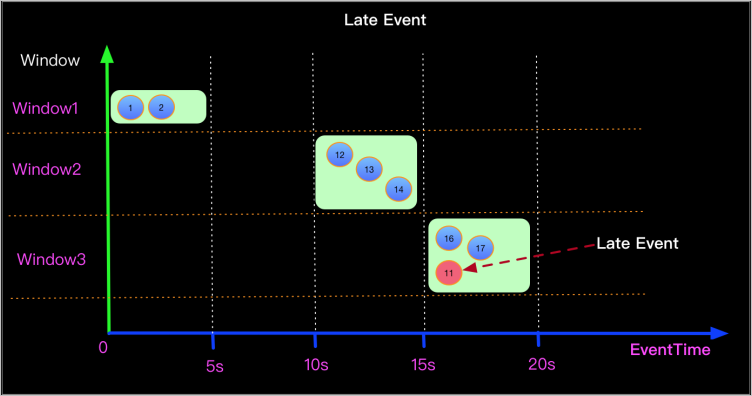
Losses from this cause typically concentrate in a single window. Use a print sink table or Log4j to confirm out-of-order data is present.
To minimize out-of-order losses, set a watermark generation strategy with a grace period (for example, Watermark = Event time - 5s). Align windows to exact day, hour, or minute boundaries — this makes window behavior predictable and reduces edge-case discards when combined with an appropriate grace period.
Why do I get inaccurate results when using ROW_NUMBER to deduplicate data ingested from Hologres in CDC mode?
SELECT
    hg_binlog_timestamp_us,
    order_id,
    order_name,
    order_pay,
    order_starttime
FROM(
    SELECT
        hg_binlog_lsn,
        hg_binlog_event_type,
        hg_binlog_timestamp_us,
        order_id,
        order_name,
        order_pay,
        order_starttime,
        ROW_NUMBER()
            OVER(
                PARTITION BY
                    order_id
                ORDER BY
                order_starttime desc
            ) as rn
    FROM test_cdc
)
where rn = 1
Assume that the test_cdc table contains the following sample data, in which the order with order_id 1001 has two change records:
hg_binlog_timestamp_us | order_id | order_name | order_pay | order_starttime
1785578400000000       | 1001     | phone      | 3999.00   | 2026-08-01 10:00:00
1785582000000000       | 1001     | phone      | 3599.00   | 2026-08-01 11:00:00
1785578460000000       | 1002     | earphone   | 299.00    | 2026-08-01 10:01:00
After you run the preceding SQL statement, records are expected to be partitioned by order_id and sorted by order_starttime in descending order, and only records with rn = 1 are retained. However, in this abnormal scenario, deduplication does not take effect, and the result still contains both change records of the order with order_id 1001:
hg_binlog_timestamp_us | order_id | order_name | order_pay | order_starttime
1785578400000000       | 1001     | phone      | 3999.00   | 2026-08-01 10:00:00
1785582000000000       | 1001     | phone      | 3599.00   | 2026-08-01 11:00:00
1785578460000000       | 1002     | earphone   | 299.00    | 2026-08-01 10:01:00
The downstream uses a retraction operator (for example, ROW_NUMBER OVER WINDOW for deduplication), but the Hologres source is not configured to emit data in upsert mode. Without upsert mode, the source emits insert-only events that the retraction operator cannot process correctly.
Add 'upsertSource' = 'true' to the WITH clause of the source table's DDL statement.
,'binlog' = 'true'
,'sdkMode' = 'jdbc'
,'cdcMode' = 'true'
,'binlogStartUpMode' = 'initial'
,'jdbcBinlogSlotName' = 'test_cdc_1_replication_slot'
,'binlogMaxRetryTimes' = '10',
'binlogRetryIntervalMs' = '500',
'binlogBatchReadSize' = '100'
,'upsertSource' = 'true'
)
How do I troubleshoot inaccurate results?
-
Enable operator profiling to inspect intermediate results without modifying job logic.
-
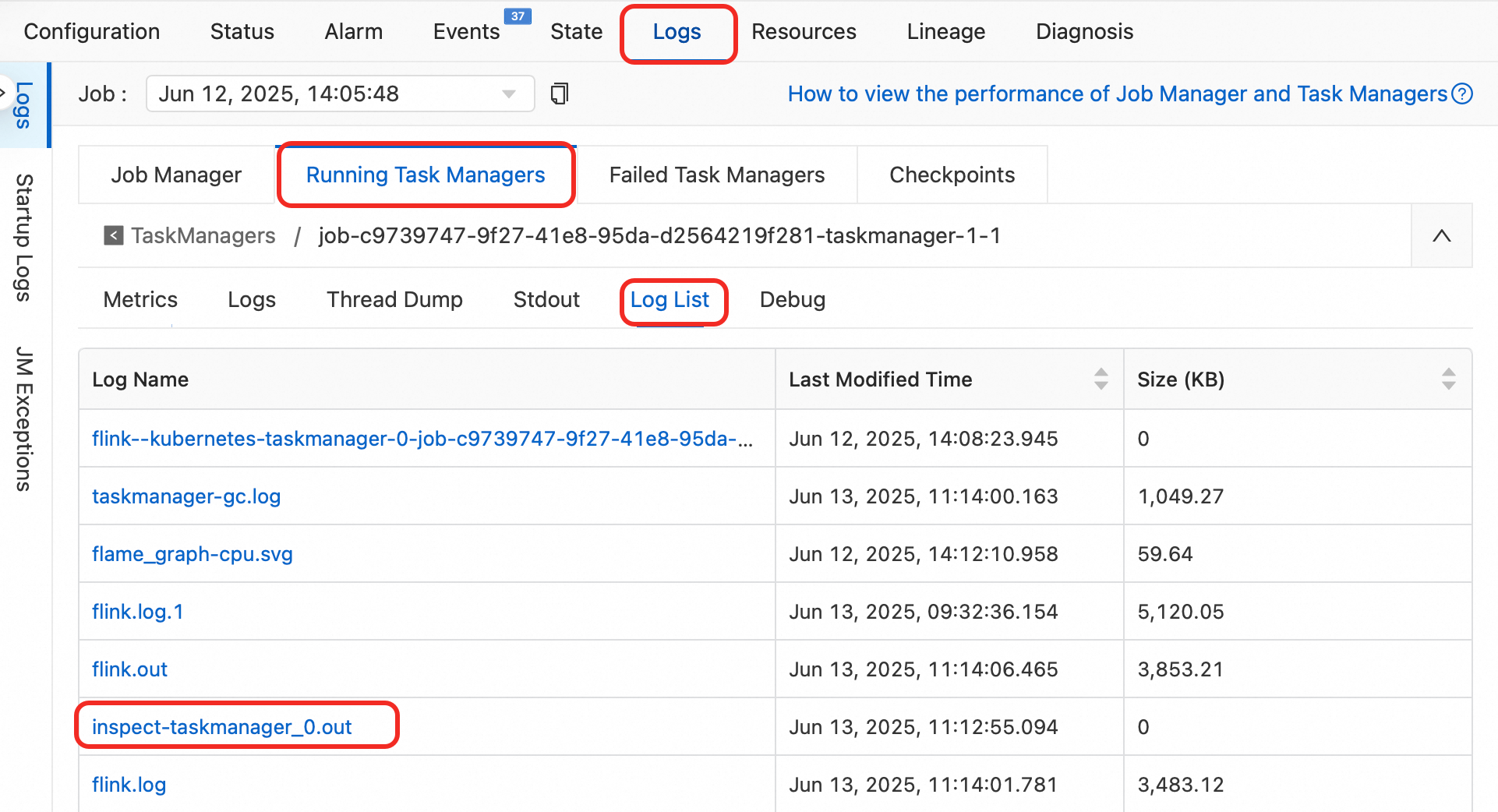
Analyze the runtime logs:
-
Click the deployment name, then click the Status tab.
-
In the DAG, copy the name of the operator producing wrong results.
-
In the log list, click
inspect-taskmanager_0.outunder Log Name and search for the operator name.
-
-
After identifying the root cause, revise the operator logic, restart the job, and verify data accuracy.
How do I fix the "doesn't support consuming update and delete changes which is produced by node TableSourceScan" error?
The error message looks like:
Table sink 'vvp.default.***' doesn't support consuming update and delete changes which is produced by node TableSourceScan(table=[[vvp, default, ***]], fields=[id,b, content])
    at org.apache.flink.table.sqlserver.execution.DelegateOperationExecutor.wrapExecutor(DelegateOperationExecutor.java:286)
    at org.apache.flink.table.sqlserver.execution.DelegateOperationExecutor.validate(DelegateOperationExecutor.java:211)
    at org.apache.flink.table.sqlserver.FlinkSqlServiceImpl.validate(FlinkSqlServiceImpl.java:741)
    at org.apache.flink.table.sqlserver.proto.FlinkSqlServiceGrpc$MethodHandlers.invoke(FlinkSqlServiceGrpc.java:2522)
    at io.grpc.stub.ServerCalls$UnaryServerCallHandler$UnaryServerCallListener.onHalfClose(ServerCalls.java:172)
    at io.grpc.internal.ServerCallImpl$ServerStreamListenerImpl.halfClosed(ServerCallImpl.java:331)
    at io.grpc.internal.ServerImpl$JumpToApplicationThreadServerStreamListener$1HalfClosed.runInContext(ServerImpl.java:820)
    at io.grpc.internal.ContextRunnable.run(ContextRunnable.java:37)
    at io.grpc.internal.SerializingExecutor.run(SerializingExecutor.java:123)
    at java.util.concurrent.ThreadPoolExecutor.runWorker(ThreadPoolExecutor.java:1147)
    at java.util.concurrent.ThreadPoolExecutor$Worker.run(ThreadPoolExecutor.java:622)
    at java.lang.Thread.run(Thread.java:834)
The sink table is in append-only mode and cannot consume update or delete events from the source. Replace it with a sink that supports upserts, such as Upsert Kafka.
How do I fix unexpected data overwrites or deletions when using the Lindorm connector?
By default, the Lindorm connector uses the upsert materialize operator (default: AUTO) to manage write ordering. This operator generates a DELETE followed by an INSERT for the same primary key. Two characteristics of Lindorm make this problematic:
-
Millisecond timestamp precision: Lindorm versions data using millisecond timestamps. Multiple records with the same primary key written within a single millisecond may arrive out of order, causing version conflicts.
-
No native DELETE support: Lindorm only supports UPSERT semantics — deletions are irreversible. The order-maintenance logic of
upsert materializeis therefore ineffective and can cause data anomalies from the DELETE + INSERT sequence.
When concurrent writes land within the same millisecond, the resulting DELETE and INSERT operations may produce incorrect data or silent data loss.
Solution: Explicitly disable the upsert materialize operator by adding the following to your job's runtime parameter configuration or SQL code:
SET 'table.exec.sink.upsert-materialize' = 'NONE';This setting applies to any job that writes to Lindorm through Flink.
After disabling this operator, only eventual consistency is guaranteed. Confirm that eventual consistency is acceptable for your use case before applying this change.